
Switch 2 Pro Controller Charging Station, LED Indicator Dual Charger Stand
3.5Editor score
Compact dual charger design
LED status indicators included
Affordable price point
This guide compares the top 10 controller charging docks for Switch 2 to help you find the best fast, safe, and feature-rich station for your gaming setup.
Finding a reliable controller charging dock for Switch 2 is essential for gamers who want to keep their devices powered during long sessions. The right dock ensures your controllers stay ready without cluttering your desk with messy cables or needing constant manual plugging. It transforms how you manage power, giving you more time to play and less time waiting for batteries to refill.
We have carefully evaluated ten distinct charging solutions available on the market to bring you this comprehensive roundup. Our analysis focuses on compatibility, charging speed, safety features, and additional organizational benefits like storage for game cases. Each product was assessed based on user feedback, technical specifications, and overall value for money in the current gaming landscape.
Each pick in this guide highlights specific strengths such as RGB lighting, magnetic alignment, or compact designs suited for different setups. We detail the pros and cons of every option so you can make an informed decision based on your unique needs. Please note that product availability and pricing may change frequently, so verify details before purchasing.
3.5Editor score

4.7Editor score
4.6Editor score
The following table provides a side-by-side comparison of all ten reviewed products, highlighting key specifications and unique features to help you quickly identify the best fit for your needs.


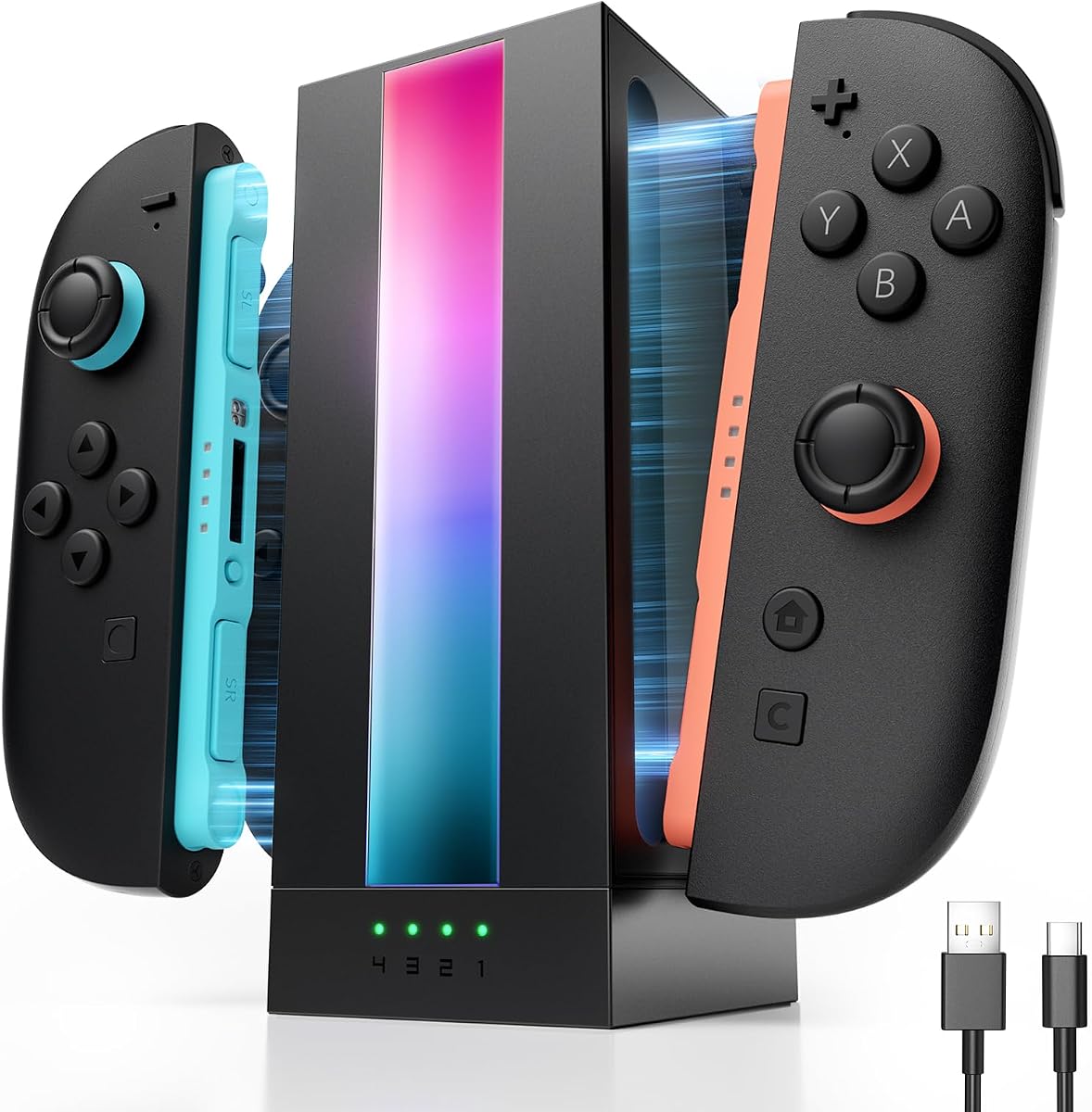
This charging dock stands out as the top choice for Switch 2 owners due to its magnetic alignment system and robust safety features. With a high rating of 4.7, it addresses common user needs for fast, simultaneous charging of up to four Joycons. The design ensures secure placement without needing to distinguish between left and right controllers.
We may earn a commission when you buy through this link, at no additional cost to you.
The magnetic feature is a game-changer for daily use, allowing you to drop controllers in without worrying about precise port orientation. It supports multiple power inputs including AC adapters or the console dock, ensuring versatility across different gaming setups. Safety is prioritized with overcharge and short-circuit protection to extend battery life.
While the performance is excellent, users should note that the dock does not come with a console or joypads as confirmed by the product data. Additionally, the included charging cable is standard length which might limit placement options for some desk setups. These are minor trade-offs for the high level of functionality provided.
Ideal for serious gamers who need reliable power management for multiplayer sessions, this dock offers the best balance of speed and features. It is highly recommended for anyone looking to upgrade their charging station with a magnetic system that reduces wear on ports. Its smart memory function adds a premium touch to your gaming environment.
The dual-direction magnetic design ensures controllers snap into place easily, reducing physical stress on USB-C ports over time.
With nine lighting modes and a memory function, the dock lets you set your preferred glow which activates automatically when powered on.
We may earn a commission when you buy through this link, at no additional cost to you.
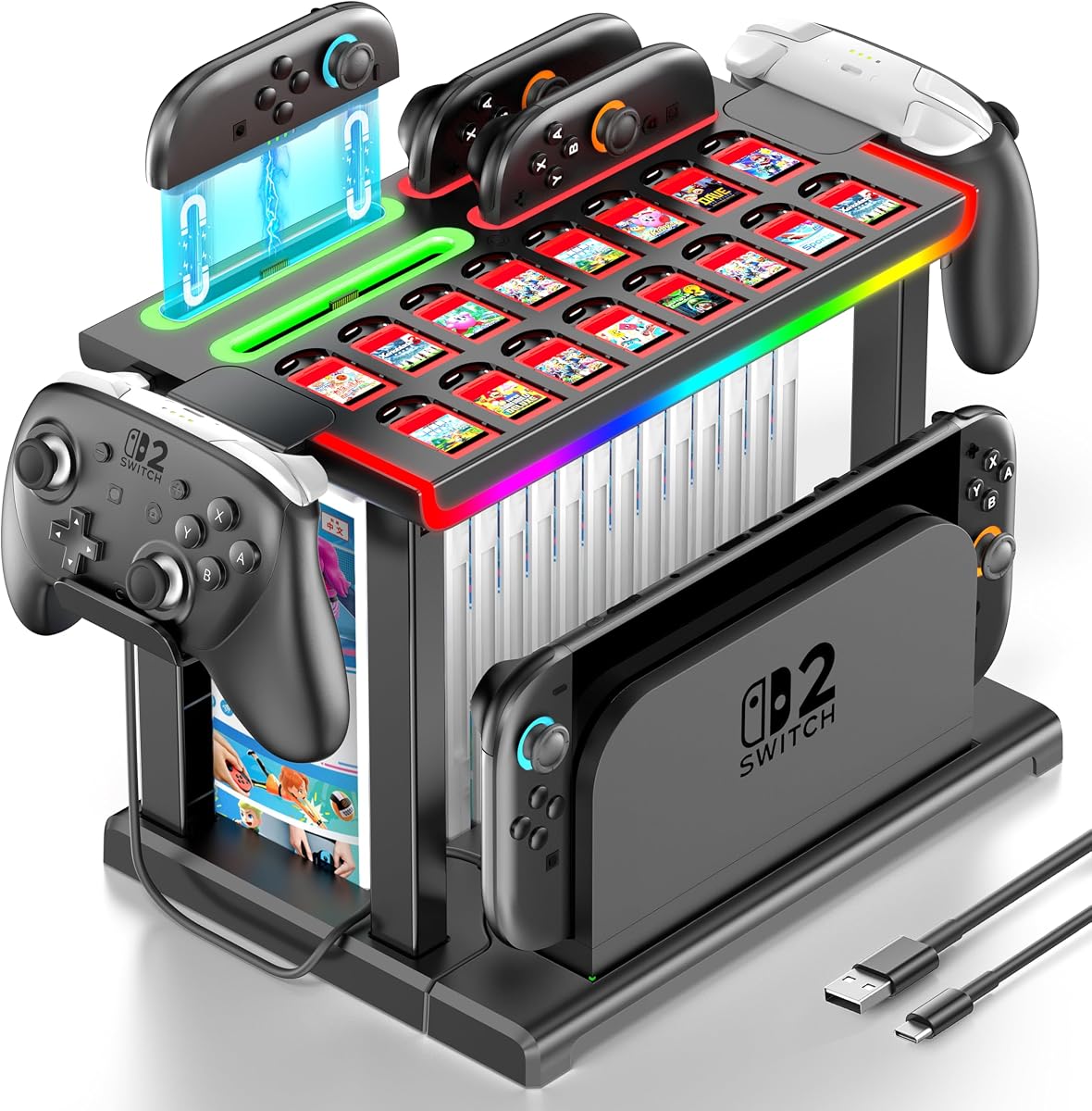
This organizer station is a comprehensive solution for gamers who need extensive storage alongside charging capabilities. It holds up to 16 game cases and cards while charging four Joycons, making it perfect for families or heavy game collectors. The high rating of 4.6 reflects its ability to keep gaming areas neat and organized effectively.
We may earn a commission when you buy through this link, at no additional cost to you.
The RGB lighting feature adds a dynamic visual element with seven color modes and breathing effects that can enhance your gaming vibe. Installation is tool-free, ensuring you can set it up quickly without extra tools. It supports fast charging with indicators to show when controllers are full, streamlining your workflow.
While it offers significant storage, the unit requires more space on your desk compared to simpler charging stands. Also, the Switch 2 TV Dock is not included in the package, so you must verify compatibility if you plan to stack devices. These factors are worth considering based on your available space.
It is an excellent gift for Switch 2 enthusiasts who value organization and aesthetics in their setup. If you need a station that doubles as a game storage unit, this model delivers on that promise. Its robust build and customer support make it a reliable choice for long-term use.
The stand can hold 16 game cases and cards, reducing clutter and keeping your favorite titles accessible in one tidy spot.
Seven single-color and two multi-color modes allow you to customize the lighting to match your mood or game theme.
We may earn a commission when you buy through this link, at no additional cost to you.
This simple and effective charger provides a no-frills solution for keeping your Switch 2 Pro Controllers powered up. With a focus on stability and clarity, it features LED indicators to tell you exactly when charging is done. The 3.5 rating suggests basic performance but remains a solid entry-level option for budget-conscious buyers.
We may earn a commission when you buy through this link, at no additional cost to you.
The smart protection features protect against overheating and overcharging, which is crucial for maintaining battery health over time. It uses 5V2A input for efficient power delivery, reducing wait times between sessions. Its compact footprint ensures it fits easily on smaller desks without taking up room for your keyboard or mouse.
While it is cost-effective, it lacks some of the advanced features like RGB lighting or Joycon support found in higher-end models. Users should be aware it is designed primarily for Pro Controllers, meaning it might not suit those with mixed controller sets. It serves best for simple setups.
For anyone who needs a straightforward way to charge two Pro Controllers without spending much, this is an ideal pick. It prioritizes function over flair, offering reliable charging where you need it most. If you already have other charging solutions for Joycons, this complements them perfectly.
Red and green lights provide immediate visual feedback so you know at a glance whether your controllers are charging or ready.
Smart charging protection helps prevent damage from overvoltage and short circuits, extending the life of your expensive controllers.
We may earn a commission when you buy through this link, at no additional cost to you.
This dock is particularly useful for gamers who own consoles beyond the Switch, as it supports PS5 and Xbox Series X controllers too. The 4.0 rating indicates a solid balance of features and reliability for multi-platform users. It uses USB Type-C adapters for easier drop-in charging, which helps reduce wear on controller ports.
We may earn a commission when you buy through this link, at no additional cost to you.
The included Type-C adapters are removable, making it flexible for different device needs. Smart protection chips ensure low power consumption and stable charging even during long sessions. However, users must use a 5V2A adapter for optimal speed, which is not included in the package. This is important to note for fast charging expectations.
While versatile, it is not compatible with PowerA or other third-party pro controllers, so compatibility should be checked before purchase. The LED indicators help track status clearly, but the lack of included power adapter might add to the total cost. These are minor issues given its broad support.
It is a great choice for multi-system gamers who want one central hub for different controller types. If you switch between Xbox and Switch regularly, this dock simplifies your routine. The compact design ensures it fits well in various setups without adding clutter to your space.
It supports Switch, PS5, and Xbox Series X controllers, allowing you to charge different devices with a single docking station.
The included adapters make it easy to swap controllers and reduce wear on the charging ports of your devices.
We may earn a commission when you buy through this link, at no additional cost to you.
This charging base is tailored for users who utilize PowerA Wireless controllers alongside their standard Nintendo gear. With a strong 4.6 rating, it delivers reliable performance for charging multiple controller types simultaneously. The design is bold and eye-catching, appealing to those who want their accessories to look as good as they work.
We may earn a commission when you buy through this link, at no additional cost to you.
It can charge Joy-Con and wireless controllers at the same time, saving you from managing multiple stations. The LED lights provide clear feedback on when controllers are fully charged, ensuring you don't run out mid-game. Setup is simple, making it a hassle-free addition to any gaming desk.
While excellent for PowerA users, it may not be the best choice if you rely primarily on third-party brands outside its ecosystem. The bold aesthetic might not blend with every decor style, though it works well in dedicated gaming rooms. These are personal preference factors rather than performance issues.
For fans of PowerA accessories, this base is a reliable and stylish way to keep your setup powered. It simplifies the charging process with clear indicators and broad compatibility within its own brand line. If you own PowerA controllers, this is a natural and effective upgrade for your setup.
The base handles both Joy-Con and wireless controllers simultaneously, reducing the need for separate charging solutions.
LED lights indicate when your controllers are fully charged, providing clear status updates without needing to check devices.
We may earn a commission when you buy through this link, at no additional cost to you.
This charger offers impressive flexibility by supporting Nintendo Switch JoyCon, Pro, and even PS5 controllers in one unit. A 4.7 rating confirms its popularity among users who need multi-device support. The fireproof panel design adds a layer of safety that is highly valuable for electronic accessories on your desk.
We may earn a commission when you buy through this link, at no additional cost to you.
It features a built-in protection IC chip to guard against over-charging and short circuits, ensuring safe operation. The USB Type-C charging port makes it easy to power the station from various sources. It comes with a cable to get you started, which is a convenient inclusion for immediate use.
Although versatile, the product does not include controllers, so you must ensure your existing ones fit the docking slots. The brand is a smaller seller, which might affect warranty experiences compared to larger companies. However, their commitment to support is clear from their customer service promises.
If you need a single dock for different controller types, this 6-in-1 solution is a top contender. The safety features and compatibility make it a strong value pick. Just verify your controller models before ordering to ensure they fit the specific docking configuration provided.
The fireproof panel ensures safe charging conditions, adding extra protection for your valuable controllers and desk setup.
Supports JoyCon, Pro, and PS5 controllers, offering great flexibility for gamers with mixed device ecosystems.
We may earn a commission when you buy through this link, at no additional cost to you.
This dock is well-suited for users who switch between Switch Pro and Xbox controllers frequently. It includes USB-C adapters to facilitate drop-in charging, making daily use smoother. The 3.9 rating suggests decent functionality but with some limitations compared to higher-rated options on the market.
We may earn a commission when you buy through this link, at no additional cost to you.
It is designed to support Xbox Series X|S and Elite Series 2 controllers alongside Switch Pro, which is rare in standard docks. The compact design ensures it does not take up much space on your desk. However, you must use a 5V2A adapter for optimal performance which is not included in the box.
Users should be aware it is not compatible with PowerA or Luna controllers, limiting its utility if you own those brands. The LED indicators are helpful for monitoring charge status, but the lack of included power adapter might be an oversight. These factors are important to consider before purchase.
If you need a versatile dock that handles multiple official USB-C controllers, this is a solid option. Its compact design and clear indicators make it practical for everyday use. Ensure you have the right power adapter to get the best charging experience from this unit.
Compatible with Switch Pro, PS5, and Xbox Series X controllers, offering broad support for official USB-C devices.
The included adapters allow for convenient drop-in charging, reducing wear on your controller ports over time.
We may earn a commission when you buy through this link, at no additional cost to you.
This dock offers a magnetic design that ensures Joycons stay securely in place while charging, reducing accidental drops. It supports up to four controllers at once, making it efficient for families. The 4.7 rating highlights its ability to provide stable charging without wear on the ports thanks to its smart design.
We may earn a commission when you buy through this link, at no additional cost to you.
Dual-side charging support means you can place controllers in multiple ways, adding convenience. The 9 RGB modes let you personalize your gaming space, matching your mood or theme. Smart chip technology prevents overcharging, keeping your batteries healthy during extended gaming marathons.
Although magnetic, users should test placement to ensure full contact for charging to begin. The Joycons are not included, so you must have compatible controllers ready. These are standard limitations for docks that focus on charging rather than hardware inclusion.
For Switch 2 users needing a reliable place to store and charge their Joycons, this is a strong option. The magnetic safety and RGB customization make it both functional and fun. It ensures your controllers are always ready when you need them for play.
The dock supports charging from both sides, making it easy to use without needing to align controllers perfectly.
Magnetic placement reduces wear on ports and ensures controllers stay secure during charging.
We may earn a commission when you buy through this link, at no additional cost to you.
This charger stands out with 10 charging slots supporting both old and new Joycon models, making it highly versatile. A 4.2 rating indicates good performance across different console generations. It includes a Y-Type cable which is recommended for connecting to official docks for power.
We may earn a commission when you buy through this link, at no additional cost to you.
The dock features extra USB 2.0 ports for charging other devices, adding utility beyond just controllers. It supports up to 10 Joycons and Pro controllers simultaneously, solving the need for multiple chargers. The 11 RGB modes add visual flair to your gaming environment with multiple lighting effects.
Users should note that third-party controllers are not supported, so official hardware is required. The Y-Type cable is a specific requirement for dock power which limits flexible positioning. These are minor caveats for the high level of slot versatility provided.
If you have a mix of Switch generations, this dock consolidates your charging needs into one unit. The USB ports and RGB modes make it a versatile center piece for any desk. It offers strong value for those needing broad compatibility across their controller collection.
Supports up to 10 Joycons and Pro controllers at once, allowing you to charge all devices simultaneously.
Includes two USB 2.0 ports so you can charge mobile devices or other accessories while charging controllers.
We may earn a commission when you buy through this link, at no additional cost to you.
This dock is built specifically for the 2025 Switch 2 JoyCons ensuring perfect compatibility with your latest controllers. It claims to charge all four units in about 2.5 hours, significantly reducing downtime. The 4.3 rating reflects efficient performance and user satisfaction with the speed improvements.
We may earn a commission when you buy through this link, at no additional cost to you.
The dynamic RGB light bar adds a stylish touch to your desk while independent LEDs on each port let you track each controller separately. It includes a 1.5m cable to help with placement. Safety is handled with intelligent chip protection to prevent overcharging and heat damage.
Note that it does not work with older 2017 or OLED models, so ensure you have the new Joycons before buying. Also, the power adapter is not included, so you will need to provide your own wall adapter. These factors impact convenience slightly but not performance.
If you have the new Switch 2 JoyCons and want the fastest charge times, this is an ideal pick. The dedicated design ensures stability and the included cable supports better desk organization. It is a strong choice for efficiency and style in your gaming setup.
Fully compatible with 2025 Switch 2 JoyCons but not older models, ensuring a tailored fit.
Each port has its own LED status indicator so you can see exactly which controllers are charging or ready.
We may earn a commission when you buy through this link, at no additional cost to you.
Selecting the right dock involves understanding your charging needs and the features that matter most for your gaming setup.
Ensure the dock supports your specific controller type, such as Joycons or Pro controllers, to avoid buying a unit that cannot hold them securely.
Verify if it supports legacy models like OLED if you still use older hardware.
Look for docks that specify 5V2A input for efficient charging and check if they require external adapters which can add to the cost.
Faster charging times reduce downtime during multiplayer sessions.
Determine how many controllers you need to charge at once; some docks charge two while others handle up to ten.
Higher capacity options are useful for families or shared gaming setups.
Choose designs with magnetic alignment or non-slip bases to prevent damage to USB ports and ensure stability.
Smart chips for overcharge protection are essential for long-term battery health.
Some units include game card slots or case holders which can save desk space and keep your library organized.
This adds value beyond simple charging functionality.
RGB modes add style but can be distracting if not adjustable, so look for units with dimming or on/off options.
Personalize your setup with lighting that matches your gaming vibe.
Check if the dock supports USB power from your console or requires a wall outlet to place it conveniently.
Ensure the included cables are long enough for your desk layout.
Compare prices across brands to find value, noting that cheaper models may lack advanced safety or RGB features.
Reputable brands often offer better warranty support and reliability.
Start by reading the manual to ensure you have the correct power adapter, typically 5V2A, for optimal charging speed and stability.
Place the dock on a flat surface away from moisture and ensure it is not covered by materials that could trap heat during use.
Regularly inspect the charging ports on your controllers for debris and clean them gently to maintain a strong connection with the dock.
Most docks require a 5V2A USB wall adapter which is often not included. Check the product details to confirm if one is bundled so you can get started immediately.
Many Switch 2 docks are designed specifically for 2025 controllers and may not support older OLED or 2017 models. Verify compatibility before buying.
Look for LED indicators that change color typically from red to green when the charging process is complete. Some docks have independent lights for each controller.
Yes most modern docks include smart chips that prevent overcharging by stopping power once the battery is full ensuring safety while you sleep.
Magnetic docks do not require specific alignment but traditional slots might need you to match + and – marks to ensure a proper connection.
Some versatile models support USB-C controllers from Xbox and PS5 but standard docks may only fit Nintendo controllers. Check specs for multi-platform support.
We have reviewed ten top options ranging from budget dual stands to premium organizers with magnetic features and RGB lighting.
Prioritize safety and compatibility to ensure your controllers are charged efficiently without risking damage to ports or battery life.
Always check the current prices and availability before purchasing to make sure you get the best deal for your specific setup needs.