
Lenovo Chromebook S330
4.2Editor score
Long battery life up to 10 hours
Lightweight design under 3.3 lbs
Fast Chrome OS updates and security
Finding a cheap laptop for everyday use requires balancing performance portability and battery life. Students and professionals need reliable devices that handle browsing streaming and work tasks without breaking the bank or sacrificing essential features.
We evaluated ten top models based on processor speed storage capacity display quality and real-world battery performance. Our analysis focuses on value for money ensuring each pick delivers smooth operation for daily workflows and entertainment needs.
Each pick highlights key strengths like screen size operating system and connectivity options to match your specific needs. Remember that prices change frequently so check current listings before making your final decision to secure the best deal available today.
4.2Editor score

4.3Editor score

4.5Editor score
As an Amazon Associate we earn from qualifying purchases.
Below is a detailed side-by-side comparison of all ten laptops to help you quickly identify the best fit for your daily computing needs based on specs and features.




The HP Chromebook 14 stands out as a top choice for students needing reliable performance without high costs. It carries a solid 4.3 rating and offers essential features like long battery life and 4K streaming ready graphics.
We may earn a commission when you buy through this link, at no additional cost to you.
Powered by the Intel Celeron N4120 processor this laptop handles daily tasks smoothly including web browsing and document editing. The anti-glare HD display ensures comfortable viewing indoors or outdoors while the lightweight chassis fits easily in backpacks.
While storage is limited to 64GB eMMC the Chrome OS cloud integration helps offset this constraint. Battery life reaches up to 14 hours so you can work through classes without constant charging and fast charge tech tops up quickly.
This device is ideal for budget-conscious users who prioritize mobility and battery endurance over heavy local storage. If you need a trustworthy tool for everyday schoolwork and media consumption this Chromebook delivers excellent value.
With up to 14 hours of battery life this Chromebook supports long days at school or work without needing a power outlet.
Chrome OS provides automatic updates and built-in protection making it easy to use without worrying about viruses or complex setup.
We may earn a commission when you buy through this link, at no additional cost to you.
The Amzboy 15.6 Laptop brings a large screen and Windows 11 to the budget category. With a 4.8 rating it appeals to users wanting a full OS experience with a crisp display at a low price.
We may earn a commission when you buy through this link, at no additional cost to you.
Its 15.6-inch FHD display offers 1920×1080 resolution providing better clarity than HD screens. The N4020 CPU handles daily work like Zoom classes and browsing smoothly while the fanless design ensures silent operation.
Storage can be expanded up to 1TB using the external TF card slot which is rare at this price point. The compact Type-C PD adapter simplifies charging allowing you to carry one cable for laptop and phone.
Ideal for home users or students who need Windows compatibility and a bigger screen without spending much. Just manage expectations on performance for heavy editing or gaming due to limited RAM.
The 15.6-inch FHD anti-glare screen delivers vibrant visuals perfect for watching movies or working on spreadsheets.
Without a fan the laptop runs completely quiet preventing dust buildup and noise during quiet study sessions.
We may earn a commission when you buy through this link, at no additional cost to you.
The HP Everyday Laptop 2026 offers a fresh look with an Intel N150 processor and Windows 11. It aims for modern productivity with AI tools and a sleek chassis suitable for professionals and students alike.
We may earn a commission when you buy through this link, at no additional cost to you.
With an SSD instead of eMMC boot times and app launches are notably faster. The Wi-Fi 6 and Bluetooth 5.4 connectivity ensure stable connections for video calls and file transfers across multiple devices.
The inclusion of Microsoft 365 adds value for document work though storage remains modest at 128GB. Weighing only 3.24 lbs it remains highly portable for daily commutes or travel.
Choose this if you prefer a contemporary aesthetic and faster storage. While the screen is HD the overall package targets efficient everyday computing with a focus on mobility and speed.
Preloaded Copilot AI helps summarize research and automate tasks making daily workflows more efficient.
SSD drives provide quicker data access than traditional storage ensuring smooth performance for basic tasks.
We may earn a commission when you buy through this link, at no additional cost to you.
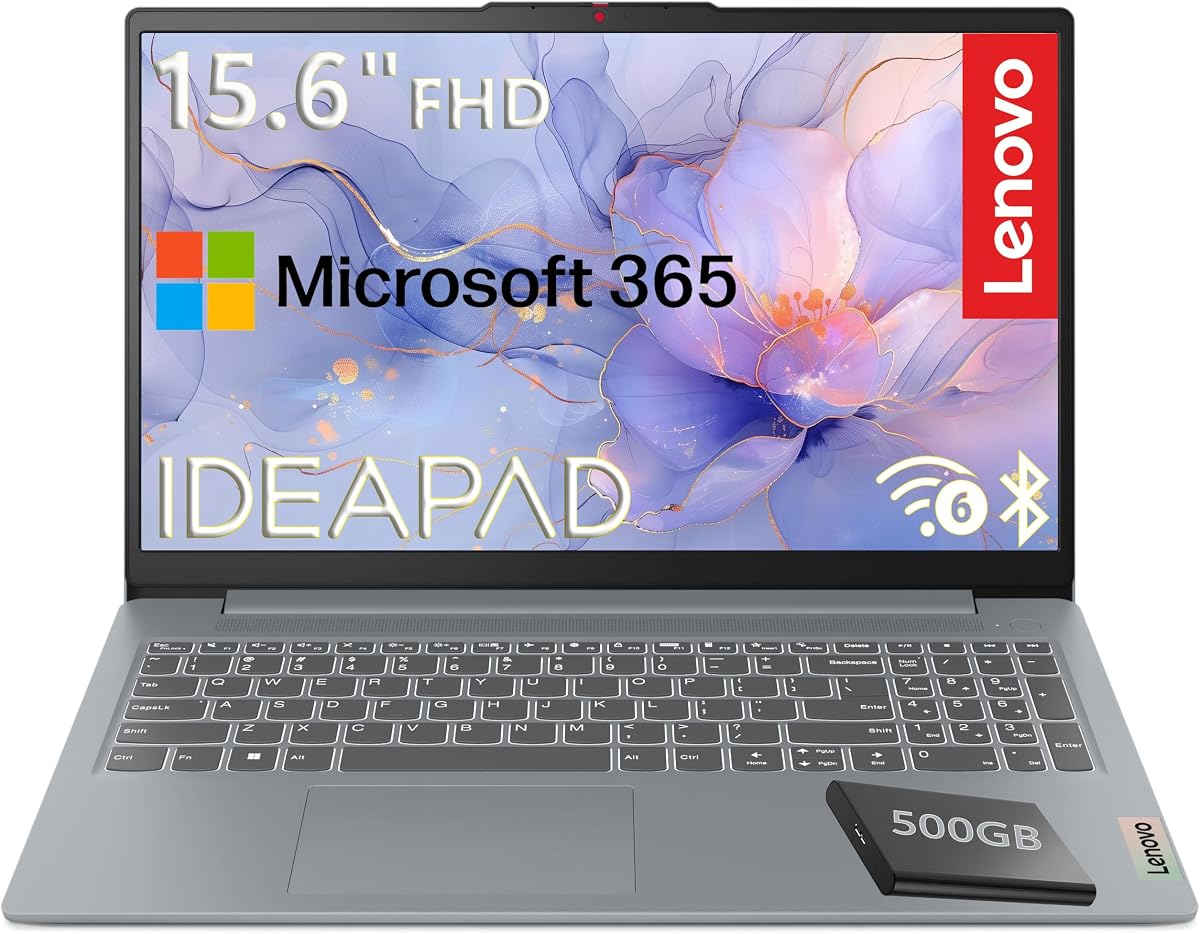
This Lenovo laptop prioritizes storage with an internal drive plus a 500GB external HDD option. It delivers robust value for families needing space for media and documents without paying premium prices.
We may earn a commission when you buy through this link, at no additional cost to you.
The 15.6-inch FHD TN display ensures clear visuals for streaming and work. Intel N100 4-Core CPU provides balanced performance for everyday tasks while Wi-Fi 6 keeps connectivity reliable.
Build quality is reinforced with MIL-STD certification ensuring durability against daily wear and tear. Security features like a privacy shutter and TPM 2.0 protect sensitive data effectively.
Best for users who need substantial storage and a large screen. While external storage adds bulk it provides significant flexibility for archiving files locally on a budget.
MIL-STD certification guarantees the laptop can withstand drops and harsh conditions making it rugged for travel.
The 1920×1080 resolution delivers sharper images for entertainment compared to standard HD options.
We may earn a commission when you buy through this link, at no additional cost to you.
This Chromebook upgrades the typical budget specs with 8GB RAM and 128GB UFS storage. It handles heavy browser tabs better than peers while maintaining the speed of Chrome OS.
We may earn a commission when you buy through this link, at no additional cost to you.
The Intel N100 processor ensures smooth performance for streaming and document work. UHD Graphics support 4K content playback making it great for multimedia consumption without lag.
Anti-glare technology reduces eye strain during long study sessions. The secure OS requires no setup and updates automatically so security stays current without user intervention.
Ideal for power users on Chrome OS who need extra RAM. The extra memory allows simultaneous apps to run smoothly without slowdowns during peak usage.
Having 8GB RAM enables smoother multitasking and faster switching between multiple applications.
Chrome OS is inherently secure with no antivirus needed simplifying maintenance for casual users.
We may earn a commission when you buy through this link, at no additional cost to you.
The Lenovo Chromebook S330 offers the lowest entry cost for a laptop with a physical keyboard. It is perfect for basic tasks and students who rely heavily on cloud storage for their files.
We may earn a commission when you buy through this link, at no additional cost to you.
MediaTek processor supports standard web browsing and video streaming. Battery life lasts up to 10 hours ensuring you can use it throughout a school day without recharging.
With 100GB cloud storage for two years you have plenty of space for documents and photos. The laptop is thin and light making it easy to carry in any bag.
Best for users who need a secondary device or simple web access. It sacrifices local storage for portability and price making it a dedicated internet machine.
Google Drive cloud storage keeps your files safe and accessible from any device with internet access.
Just sign in with a Google account and you are ready to work immediately without complex configuration.
We may earn a commission when you buy through this link, at no additional cost to you.
This HP Essential Laptop integrates AI tools directly into the workflow with a dedicated Copilot key. It stands out for modern productivity features at an affordable price point for 2026.
We may earn a commission when you buy through this link, at no additional cost to you.
The Intel N150 processor ensures responsiveness for daily work. The Copilot key provides instant access to AI assistance for research and summaries saving time on repetitive tasks.
Audio quality benefits from noise reduction making video calls clearer. The willow green finish adds a stylish touch while remaining professional for office environments.
Choose this if you want the latest AI features and Office 365 included. It balances modern tech with standard performance for efficient daily work.
A dedicated key lets you summon AI help instantly to assist with writing or research without extra clicks.
Noise reduction tech filters background sound ensuring your voice is clear during virtual meetings.
We may earn a commission when you buy through this link, at no additional cost to you.
The Lenovo Flagship Chromebook combines a touchscreen with a powerful 8-Core MediaTek processor. This makes it stand out for users who prefer touch input for navigation in apps.
We may earn a commission when you buy through this link, at no additional cost to you.
FHD resolution ensures text and images look sharp on the display. Wi-Fi 6 supports faster data rates which improves streaming quality and web browsing speed significantly.
The privacy shutter protects the webcam when not in use offering peace of mind for remote workers. Its weight under 3 lbs makes it extremely easy to carry daily.
Ideal for users who want a touchscreen experience and Android app compatibility. The extra cores help smooth out performance for more demanding tasks.
Touch input allows for intuitive navigation and easier zooming in documents and maps.
The 8-Core chip handles multitasking better than typical quad-core options in this price range.
We may earn a commission when you buy through this link, at no additional cost to you.
This HP Slim Laptop emphasizes portability with a natural silver chassis weighing only 3.24 lbs. It brings DDR5 RAM to a budget model improving memory efficiency for daily tasks.
We may earn a commission when you buy through this link, at no additional cost to you.
The SSD storage ensures quick boot times and smooth performance for apps. Wi-Fi 6 and Bluetooth 5.4 keep wireless connections stable for streaming and remote work.
Battery life reaches up to 11 hours supporting long sessions away from outlets. The dedicated Copilot key helps boost productivity with integrated AI tools.
Best for travelers who need a lightweight Windows machine. DDR5 support gives a slight edge in speed over older RAM types in this category.
DDR5 RAM provides faster data transfer speeds than DDR4 improving application performance.
Measuring 12.76 by 8.86 inches it fits easily in small bags for effortless transport.
We may earn a commission when you buy through this link, at no additional cost to you.
This laptop offers an impressive 12GB RAM at a low price point allowing for heavy multitasking. It stands out for budget users who need extra memory without buying expensive hardware.
We may earn a commission when you buy through this link, at no additional cost to you.
The Pentium Gold processor supports basic work and streaming well. An IPS FHD screen delivers better viewing angles than TN panels making it good for media consumption.
Ports include USB-C HDMI and multiple USB-A slots reducing the need for adapters. The physical privacy slider adds security without software requirements.
Ideal for home users needing high RAM for multiple apps. While not the fastest it provides substantial resources for daily use on a budget.
12GB of memory allows more browser tabs and apps to run simultaneously without slowdowns.
IPS technology offers wider viewing angles and more vibrant colors than standard panels.
We may earn a commission when you buy through this link, at no additional cost to you.
Selecting the right affordable laptop involves evaluating key factors like processor speed storage and battery life to match your daily needs.
The processor drives multitasking speed and application responsiveness. For everyday use look for Intel Celeron N series or MediaTek processors that handle web browsing and video calls efficiently.
Choose a quad-core option if you need smoother transitions between apps.
RAM determines how many programs can run simultaneously. 4GB is minimum for basic tasks while 8GB allows multiple tabs and apps without lag.
Higher RAM ensures better longevity as software demands increase over time.
Solid-state storage like SSD or UFS provides faster boot times than traditional drives. 128GB is sufficient if you use cloud storage for most files.
If you store media locally consider models with expandable slots or external drives.
Display resolution affects text clarity and image sharpness. Full HD displays offer better detail for work and streaming than standard HD.
Anti-glare coatings reduce eye strain during long viewing sessions outdoors.
Battery life ensures usability on the go. Aim for at least 8 hours of usage to cover a full work or school day without recharging.
Fast charging options reduce downtime when you need quick power boosts.
Windows 11 provides full compatibility with standard software while Chrome OS focuses on cloud apps. Choose based on whether you need desktop programs or just web tools.
Chrome OS offers simpler security updates and virus protection.
Ports determine peripheral support. Ensure the laptop has USB-C for modern charging and USB-A for legacy devices like mice and printers.
HDMI ports allow direct connection to external monitors for presentations.
Materials and chassis strength impact lifespan. Look for lightweight alloys or reinforced plastics that resist daily wear.
Military-grade certified models offer added protection against drops and shocks.
Protect your device by using a padded sleeve or case when transporting it. Avoid placing heavy items on top of the laptop in your bag to prevent screen damage.
Keep the cooling vents clear by using the laptop on flat hard surfaces. Regularly clean dust from vents with compressed air to maintain optimal performance.
Update your operating system regularly to patch security vulnerabilities and improve stability. Use cloud services to back up important files automatically.
Yes affordable laptops handle everyday tasks like web browsing email and document editing well. Models with at least 4GB RAM and SSD storage provide sufficient speed for students and home users.
Many budget laptops have limited upgrade options but some offer SD card or TF card slots. Always check the product specs for expandable storage capabilities before purchasing.
Chromebooks are excellent for web-based tasks but lack support for traditional desktop apps. If you need full Microsoft Office software Windows models are more suitable.
Most budget laptops offer 8 to 12 hours of battery life depending on usage. Models with power-efficient processors and smaller displays tend to last longer on a single charge.
Some models include a Microsoft 365 subscription while others do not. Check product details to see if Office is included or if you need to purchase it separately.
Durability varies but many budget options use lightweight materials that can handle light travel. Using a protective case helps prevent damage from bumps during commutes.
The HP Chromebook 14 and Amzboy 15.6 offer strong value for students and casual users respectively. Both balance performance and price effectively for daily tasks.
Prioritize battery life and RAM if you plan on using your laptop all day. SSD storage and Wi-Fi 6 support add significant convenience for modern workflows.
Prices fluctuate often so verify current deals before finalizing your purchase. Choosing the right model ensures reliable service without overspending on unnecessary features.