
Fosmon Fast Charging for Xbox Controller Charger Station Dock
4.5Editor score
SGS certified safety
5280mWh battery life
Smart charging protection
This guide compares the best controller charging station for Xbox options including battery life, charging speed, and design to help gamers choose the right
Keeping your controllers powered is essential for uninterrupted gaming sessions. A quality charging station keeps your devices ready and organized without the hassle of disposable batteries.
We evaluated ten top-rated docks based on capacity, speed, safety features, and design. Each pick balances performance with value to fit different gaming setups and preferences.
Every product review highlights real-world strengths and trade-offs. Note that stock and offers change frequently so verify current details before making your final purchase decision today.
4.5Editor score

4.6Editor score

4.4Editor score
The following table summarizes key specifications across all ten featured models to help you compare capacity, compatibility, and standout features at a glance.



This dock stands out with massive 6200mWh batteries delivering up to 25 hours per charge. Its unique X shaped LED indicators provide clear status updates without glare.
We may earn a commission when you buy through this link, at no additional cost to you.
The package includes battery covers for both One and Series models ensuring broad compatibility. Built in protection guards against overcharging or overheating for long term safety.
While it does not support third party controllers the included covers and high capacity make it ideal for standard Xbox hardware. The battery storage sits on the bottom of the dock.
Gamers seeking long sessions without swaps will appreciate this kit. It balances capacity, safety, and versatility better than most competitors in its price range.
The 6200mWh packs minimize interruptions during long matches by offering more than double the capacity of standard rechargeable options.
Unique X shaped LED indicators show charging status at a glance with soft lighting that avoids disturbing play or rest.
We may earn a commission when you buy through this link, at no additional cost to you.
Fosmon delivers reliable performance at an affordable price with SGS certified NiMH batteries offering up to 45 hours of gameplay. The smart charging board ensures safety and efficiency.
We may earn a commission when you buy through this link, at no additional cost to you.
Each slot features an LED indicator to track status while automatic stop prevents overcharging. A limited lifetime warranty adds peace of mind for long term ownership.
The dock does not support Elite 2 controllers but works with most standard Xbox hardware. Its straightforward design fits most setups without taking up excessive space.
Budget conscious gamers will find this dock offers excellent value. It combines safety certifications, long battery life, and warranty support at a competitive entry point.
SGS certification ensures the charging system meets strict safety requirements for consistent performance and protection against common electrical hazards.
An intelligent charging board detects full charge and stops automatically to extend battery health while preventing overheating during long dock periods.
We may earn a commission when you buy through this link, at no additional cost to you.
This stand delivers premium aesthetics and fast charging in under 3 hours. The magnetic contact system secures the controller reliably while allowing one handed dashboard navigation.
We may earn a commission when you buy through this link, at no additional cost to you.
Its color matched finish complements official Xbox controllers seamlessly. Built in overcharge protection safeguards hardware during extended docking sessions without requiring user intervention.
The dock does not include batteries so you must supply your own rechargeable packs. While pricier than others the design and quick charge speed justify the cost.
Users prioritizing style and quick turnaround will love this dock. It stands out as the most visually cohesive option for those invested in Xbox branding.
The stand shares durable materials and striking colors with official Xbox Series X S controllers for a seamless and integrated look.
A magnetic contact system ensures the controller stays firmly docked preventing interruptions to charging while allowing easy removal when needed.
We may earn a commission when you buy through this link, at no additional cost to you.
OlVO offers impressive durability with batteries rated for over 3000 recharge cycles. Each pack provides 20 hours of playtime and fully charges in just 2.5 hours.
We may earn a commission when you buy through this link, at no additional cost to you.
The kit includes covers for X and One models plus a USB C cable for fast connectivity. A perfect user rating suggests consistent reliability across different gaming habits.
It excludes 360 consoles and third party hardware limiting some use cases but fits standard Xbox needs well. The battery polarity must be observed during installation.
Gaming marathons benefit from the high cycle count and rapid recharge time. It is a robust choice for users who charge often and need long battery life.
The rechargeable packs support over 3000 cycles making them more durable and eco friendly compared to disposable AA batteries.
Charges 2 batteries in under 2.5 hours so you can return to gameplay quickly after a short break or overnight rest.
We may earn a commission when you buy through this link, at no additional cost to you.
This dock features official Xbox licensing and a magnetic secure charging system that aligns controllers automatically. Its seamless design complements the Xbox aesthetic with minimal clutter.
We may earn a commission when you buy through this link, at no additional cost to you.
LED indicators show amber while charging and white when fully charged. A storage compartment helps keep the area organized and light adjustment reduces glare during play.
The kit includes one 1100mAh battery pack but only covers for One and Series models. The limited capacity may require extra batteries for extended sessions.
Users seeking official branding and clean design will appreciate this dock. It balances function and form while offering reliable magnetic docking for standard Xbox controllers.
Being officially licensed ensures compatibility and design standards that align closely with Microsoft expectations for Xbox accessories.
Magnetic connections ensure the controller aligns automatically without fiddling making it easy to dock and undock quickly.
We may earn a commission when you buy through this link, at no additional cost to you.
This station features a unique robot helmet-inspired front that adds a superhero touch to your setup. The LED status lights include an on off button to avoid distractions.
We may earn a commission when you buy through this link, at no additional cost to you.
With 5520mWh batteries you get up to 25 hours of playtime. The USB C cable ensures fast charging while a bottom compartment keeps spare batteries organized.
The dock excludes Elite controllers but fits One and Series models perfectly. Its aesthetic appeal makes it a great gift for fans who value style alongside function.
Gamers who want a distinctive look will enjoy this dock. It combines practical battery life and safe fast charging with a visually engaging design.
The front robot helmet inspired aesthetic adds momentum to your game atmosphere making the dock a standout piece on your desk.
A button on top lets you turn LED indicators on or off without affecting the actual charging process for flexible usage.
We may earn a commission when you buy through this link, at no additional cost to you.
Nyko provides a practical dual port dock with an extra USB port for peripherals or other devices. The drop and charge design simplifies daily use for multiple players.
We may earn a commission when you buy through this link, at no additional cost to you.
Each 1100mAh battery offers up to 15 hours of playtime. Green LED lights on the hub clearly signal when charging is complete for easy monitoring.
The battery life is shorter than premium options but sufficient for casual sessions. It works with Series X S and One controllers but not Elite variants.
Multiplayer setups benefit from the extra USB port and dual charging slots. It is a straightforward choice for users needing basic functionality without complex features.
Both controllers charge simultaneously so you and a friend can get back to gaming without waiting in line for power.
An additional USB port allows you to charge headsets or other accessories while managing your controller power needs.
We may earn a commission when you buy through this link, at no additional cost to you.
This stand matches the Pulse Red controller exactly with high quality materials. The magnetic contact system ensures a perfect secure charge every time you dock.
We may earn a commission when you buy through this link, at no additional cost to you.
Ergonomic design allows one hand navigation while the controller is docked making it easy to check menus or switch games. It is officially licensed by Microsoft.
The kit includes one 1100mAh rechargeable battery which is standard for single slots. While pricier the precise color match elevates the look of your setup.
Owners of Pulse Red controllers will love the seamless integration. It combines style with practical one handed navigation for a polished gaming experience.
Manufactured with the same material and color as your Pulse Red controller to create a seamless look on your desk.
Ergonomic engineering lets you navigate the Xbox dashboard while the controller charges without removing it from the stand.
We may earn a commission when you buy through this link, at no additional cost to you.
PowerA offers a simple officially licensed stand that charges and displays your controller. It includes a 1100mAh battery and USB cable for immediate use.
We may earn a commission when you buy through this link, at no additional cost to you.
The single slot keeps your setup clean while eliminating the need for disposable replacements. A two year limited warranty covers defects for long term security.
You must supply battery covers separately which adds minor steps to setup. The design fits Xbox Series X S and One controllers without issue.
Casual gamers or single player setups will find this stand practical. It prioritizes reliability and official licensing over extra features like dual slots.
The simple single slot keeps your desk neat and ensures your controller is always ready for action without clutter.
A two year limited warranty ensures long term peace of mind for official Xbox accessories from trusted partners.
We may earn a commission when you buy through this link, at no additional cost to you.
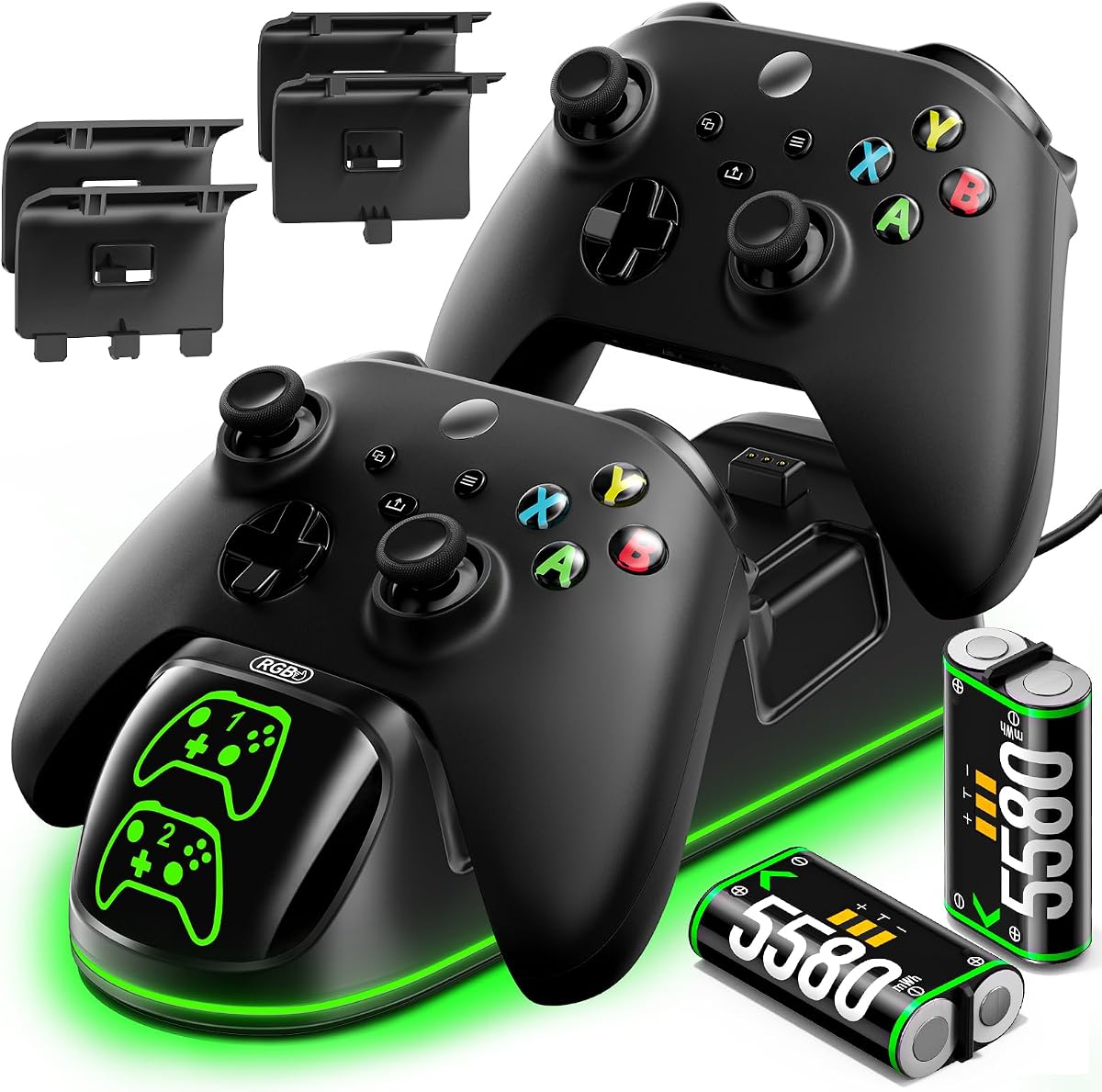
This dock delivers up to 30 hours of playtime per charge with massive 6200mWh batteries. It features 9 RGB lighting modes that enhance your gaming atmosphere significantly.
We may earn a commission when you buy through this link, at no additional cost to you.
Safe charging technology adjusts output to prevent overcharging while keeping your hardware secure. Includes battery covers for One and Series models for broad compatibility.
The RGB switch allows custom lighting but may not suit minimalist setups. It fits standard Xbox hardware but excludes Elite controllers from its compatibility list.
Users who love RGB lighting will find this dock ideal. It balances high capacity batteries with customizable visual flair for an immersive desktop setup.
Choose from 9 lighting options including color cycles to match your setup and enhance the gaming environment visually.
The charger automatically adjusts output to prevent overcharging ensuring consistent protection for your controller during long sessions.
We may earn a commission when you buy through this link, at no additional cost to you.
Choosing the right charging station involves evaluating capacity, safety, design, and compatibility to match your gaming habits and setup needs.
Higher capacity batteries reduce how often you must recharge your controller. Look for packs with 5000mWh or more if you want 20 plus hours of continuous playtime per charge.
Faster docks let you return to gameplay sooner but must include protection against overcharge or overheating. Ensure the product offers built in safety features to protect your controllers over time.
Verify that the dock supports your specific controller model including Elite or Series variants. Some docks only fit One or S models so always check before purchase.
Choose a design that matches your console or room decor. Options include color matched finishes RGB lighting or minimalist black to blend with your desk.
Officially licensed products ensure compatibility standards and build quality that align with Microsoft expectations. This reduces risk of hardware issues over time.
Check what accessories come in the box like battery covers cables or additional packs. Having covers for your exact model simplifies installation and saves time.
A solid warranty shows confidence in durability and gives recourse if issues arise. Look for at least a year of support to protect your investment.
Some docks include extra USB ports or USB C cables which add flexibility for other accessories. Ensure the dock supports the connection type you prefer.
Place the dock on a flat stable surface away from heat sources or direct sunlight to maintain internal electronics health.
Insert batteries with correct polarity before placing controllers on the dock. Ensure controllers align properly with contact points to avoid charging errors.
Clean contact points periodically with a dry cloth and avoid storing batteries in extreme temperatures for longest lifespan.
Many docks include batteries that fit standard controllers but you must check compatibility. Some models require covers for Series X S while others fit One or Elite separately.
Charging times vary by model but most docks finish in 2.5 to 4 hours. Faster options reduce downtime while standard ones take longer for safety.
Most official docks only work with first party Microsoft controllers. Always check the product page to confirm if third party models are supported before buying.
Not all docks support Elite controllers especially if they have thicker battery compartments. Verify product compatibility lists to ensure your Elite model fits.
Yes docks with built in stop charging will automatically cut power when batteries are full. Ensure your dock has these safety features before leaving it unplugged.
Most docks use USB C or USB A cables but some include proprietary cables. Check the included package details to confirm the correct connector type for your power source.
Most dual docks charge two controllers simultaneously while single docks charge one. Ensure the dock matches the number of controllers you use regularly.
No the charging docks use USB power and do not emit interference. Place them on a stable desk away from cables that may tangle with your console.
The Upgraded Controller Charger Station leads with high capacity and clear indicators while Fosmon offers budget value and Razer delivers premium design for serious enthusiasts.
Prioritize battery capacity and safety features if you play long sessions or want to minimize downtime. For style focused setups consider color matched docks that match your console.
Prices and availability change regularly so check current listings before purchasing. Ensure your final choice matches your controller model and setup needs.