
Corded Landline Phones for Seniors
4.2Editor score
Photo dialing for memory aid
110dB loud ringer
No battery or power needed
This guide compares the best captioned telephone models for hearing impaired users, featuring real-time captions, amplified sound, and large buttons for
Finding the right captioned telephone is essential for those who struggle with hearing loss but still want to stay connected. These devices combine audio clarity with visual text support to ensure no word is missed during a call.
We have evaluated ten top-rated models based on their captioning accuracy, sound amplification, ease of use, and reliability. Each product offers unique features tailored to different levels of impairment and user preferences.
Every pick highlights key specs, pros, and cons to help you decide quickly. Please note that product availability and pricing may change over time, so check current listings before purchasing.
4.2Editor score

4.3Editor score
4.5Editor score
This side-by-side comparison shows the key differences between each model so you can quickly identify which one fits your specific needs for clarity and ease of use.


The Hamilton CapTel 2400iSPNBT stands out as the top choice for users needing real-time captioning during calls. Its large touchscreen ensures that text is easy to read, making it ideal for those with significant hearing loss who still want full audio engagement.
We may earn a commission when you buy through this link, at no additional cost to you.
This model offers both auto captions and assisted captions with live operator support, giving flexibility based on call complexity. The amplified sound up to 40dB ensures that voices are clear even without full reliance on text, while customizable caption size and tone control adapt to individual comfort levels.
While the need for high-speed internet and FCC registration for US residents adds a setup step, the benefits of clarity and confidence during conversations outweigh this minor hurdle. Users appreciate the dual function of listening and reading simultaneously, which bridges the gap between total reliance on text and pure audio.
For anyone seeking a comprehensive solution that combines advanced captioning with traditional phone features, this is the recommended pick. It serves seniors, elderly users, and anyone with hearing impairment who values staying fully engaged in face-to-face style phone interactions.
The touchscreen displays captions instantly so users never miss a word during critical conversations with family or medical providers.
Customizable settings for text size and audio gain ensure the phone adapts to unique hearing needs without requiring extra accessories.
We may earn a commission when you buy through this link, at no additional cost to you.
This corded landline phone offers a budget-friendly alternative for seniors who need simplicity and reliability over advanced captioning. It focuses on ease of use with large buttons and photo dialing, which helps those with memory impairments make calls without frustration.
We may earn a commission when you buy through this link, at no additional cost to you.
The 110dB loud ringer and adjustable receiver volume address hearing loss by ensuring every ring and voice is heard clearly. The hands-free function allows users with arthritis or weak grip to talk without holding the handset, adding comfort and convenience to daily use.
While it lacks real-time captioning, its robust design ensures calls are never missed due to missed rings or dialing errors. The absence of batteries or AC power means it works during outages, providing peace of mind for families concerned about connectivity during emergencies.
For households on a tight budget or for those who prioritize basic connectivity over text support, this phone is an excellent starting point. It is particularly useful for memory care settings where visual cues like photos help initiate contact with loved ones effortlessly.
Photo buttons replace numbers so users can connect with family members by simply recognizing faces rather than memorizing digits.
A programmable SOS button is available for quick access to help, though it requires initial setup before it becomes active.
We may earn a commission when you buy through this link, at no additional cost to you.
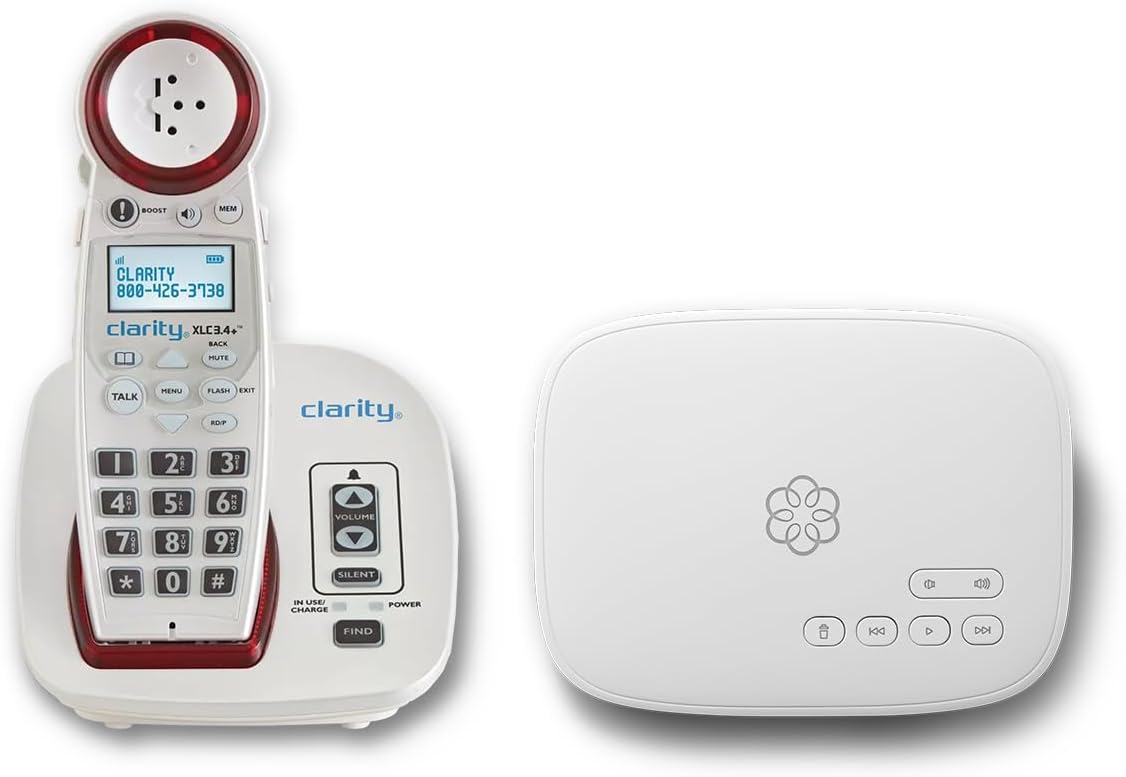
The Ooma Telo bundle with Clarity XLC3.4+ offers a premium all-in-one solution for those who want top-tier phone service alongside hardware. It combines amplified sound with comprehensive security features to ensure safe and clear communication for hearing impaired users.
We may earn a commission when you buy through this link, at no additional cost to you.
Key strengths include unlimited nationwide calling and advanced robocall blocking to reduce interruptions. The visual ringer ensures missed calls are noted even when audio is low, and address-based 911 alerts provide critical safety information to dispatchers in case of emergencies.
While a subscription plan is needed to maintain service, the peace of mind from professional support and safety features justifies the cost for many families. The personalized setup assistance makes installation smooth, removing technical barriers that often deter older users from adopting new tech.
If you are looking for a premium service package that prioritizes safety and clarity over standalone hardware, this bundle is the top choice. It is ideal for users who value reliability and want a single provider for both their phone and call security needs.
Address-based 911 ensures dispatchers know your exact location, and text alerts notify loved ones when emergency services are contacted.
24/7 concierge support means help is always available if issues arise, reducing frustration for users unfamiliar with VoIP technology.
We may earn a commission when you buy through this link, at no additional cost to you.
The VTech SN5147 provides a hybrid solution that allows users to move freely with a cordless handset while keeping a reliable corded base. This design suits seniors who need both mobility and backup connectivity during power outages without compromising on sound quality.
We may earn a commission when you buy through this link, at no additional cost to you.
With a 90dB extra-loud ringer and audio assist up to 50dB, this phone ensures that incoming calls are hard to miss. The photo speed dial and smart call blocker simplify navigation and protect against unwanted calls, making daily use straightforward and stress-free.
While it does not offer captioning, the visual indicators and expandable system mean multiple handsets can be added as needed. This flexibility is ideal for larger homes where different rooms need access to the phone system without rewiring or additional hardware.
For users who value mobility and reliability over text features, this phone is a strong contender. It balances modern features like caller ID with traditional functions that ensure calls are always answered clearly and promptly.
The corded base keeps the line open even during power outages while the cordless handset allows movement around the house.
Flashing visual alerts ensure calls are never missed in noisy environments or when audio is set to a lower volume.
We may earn a commission when you buy through this link, at no additional cost to you.
This unique telephone allows users to answer, dial, and hang up entirely using voice commands, removing the need for physical button presses. It is designed for those with significant mobility or vision difficulties who struggle with traditional handsets or keypads.
We may earn a commission when you buy through this link, at no additional cost to you.
The always-listening mode means the phone is ready to accept commands at any moment, providing a seamless experience. By eliminating buttons, the system reduces friction for users with arthritis or limited dexterity, allowing them to focus on the conversation rather than the device.
While the lack of visual feedback may be a challenge for some, the simplicity of voice commands makes it ideal for specialized needs. Users should ensure their voice is clear to avoid misinterpretation, but for the right person, this can be a transformative tool for independence.
If you or a loved one has trouble pressing buttons or holding a receiver, this phone offers a compelling alternative. It prioritizes ease of access over advanced features, ensuring that communication remains possible even with physical limitations.
Voice commands allow users to manage calls without holding the receiver, which is critical for those with hand impairments.
Basic commands like dial and answer make the system intuitive for anyone who prefers speaking over pressing buttons.
We may earn a commission when you buy through this link, at no additional cost to you.
This big button phone focuses on visual simplicity with replaceable picture buttons that store favorite contacts. It is designed for seniors with dementia or low vision who benefit from recognizing faces instead of numbers to initiate calls.
We may earn a commission when you buy through this link, at no additional cost to you.
The adjustable volume up to 40dB ensures that conversations are audible without requiring external amplifiers. Its wall-mountable design allows for flexible placement, meaning users can install it at eye level or within easy reach on a desk or counter.
Memory protection ensures stored contacts remain safe even if the line is unplugged, preventing the frustration of re-entering numbers. While it lacks modern smart features, its reliability and focus on basic communication make it a steady choice for daily household use.
For users who need a straightforward way to connect with family without complex menus, this phone is ideal. The combination of visual cues and amplified sound addresses common barriers that prevent seniors from using their telephone regularly.
Picture buttons allow users to dial by recognizing familiar faces, which is crucial for those with cognitive impairments.
The option to mount on a wall or use on a desktop ensures the phone can fit any home environment comfortably.
We may earn a commission when you buy through this link, at no additional cost to you.
The FLYINGVOICE FIP12WP is a VoIP phone tailored for seniors with dementia, offering customizable image keys for easy contact access. It uses internet telephony to provide high-quality sound without relying on traditional copper lines.
We may earn a commission when you buy through this link, at no additional cost to you.
With an enhanced volume up to 110dB, this phone ensures clarity even in noisy environments. The dedicated help key provides instant access to emergency contacts, and the visual red light alert notifies users of missed messages or incoming calls clearly.
While it requires an active VoIP service, the flexibility and modern features it offers make it suitable for tech-forward households. Users should confirm their internet setup before purchasing to ensure compatibility and avoid setup issues during initial installation.
If you need a modern solution that bridges the gap between smart technology and senior accessibility, this phone stands out. Its focus on visual memory aids and safety features makes it a powerful tool for daily communication.
Image keys allow users to insert family photos directly into the phone interface for instant dialing without memorization.
A dedicated help key ensures that users can reach pre-programmed contacts immediately during an emergency or health crisis.
We may earn a commission when you buy through this link, at no additional cost to you.
This phone is built specifically to deliver high-definition audio that enhances clarity for those with hearing loss. Its design focuses on performance, ensuring that every word spoken is transmitted with maximum fidelity and minimal distortion.
We may earn a commission when you buy through this link, at no additional cost to you.
Users often find that the sound quality makes a noticeable difference in reducing the strain of listening. The device is optimized for hearing impaired users, ensuring that both loud and quiet voices are heard clearly without the need for excessive volume.
While it may lack some of the visual features of other models, the pure focus on audio quality can be a deciding factor for those who prioritize sound above all else. It is a solid choice for households where conversation is the primary goal.
If clear audio is your main concern, this model offers a dedicated solution that excels in sound reproduction. It avoids unnecessary complexity, providing a straightforward and effective way to communicate clearly.
The high-definition audio ensures that conversations are crisp and easy to understand without background noise interference.
We may earn a commission when you buy through this link, at no additional cost to you.
This phone allows you to make, answer, and end calls using voice commands rather than buttons. It includes multiple voice-activated memories that let you reach contacts by name, which is helpful for users who struggle with keypad navigation.
We may earn a commission when you buy through this link, at no additional cost to you.
Visual ring indicators and talking caller ID ensure that incoming calls are noticed and identified clearly. The speakerphone function and adjustable volume up to 40dB provide additional flexibility for users with specific hearing needs.
While the voice setup may require initial patience to configure correctly, once set up, the hands-free operation can be very convenient. It offers a bridge between traditional phones and modern voice technology, catering to those who prefer speaking over typing.
For users who want to avoid physical buttons but still have traditional phone service, this model is a unique option. It emphasizes accessibility through voice interaction, making it a strong candidate for those with dexterity challenges.
Voice activated memories let users dial by name instead of number, simplifying the process significantly for those with vision issues.
Talking caller ID speaks the incoming caller name so users know who is calling before they answer.
We may earn a commission when you buy through this link, at no additional cost to you.
This phone offers nine photo memory keys that let users dial by pressing a family photo, bypassing the need to memorize numbers. It is designed to simplify communication for those with memory loss or cognitive impairments through visual cues.
We may earn a commission when you buy through this link, at no additional cost to you.
With ringtones reaching over 110dB and an adjustable earpiece volume, it ensures that users never miss a call. The hands-free feature makes it easier for those with limited mobility to converse without holding the receiver to their ear.
Since it runs on the standard phone line without batteries, it is reliable during power outages and requires no ongoing power source. This simplicity makes it an accessible choice for anyone who needs a dependable communication tool at home.
For households that prioritize simplicity and visual memory aids, this phone provides excellent value. It solves common problems like missed calls and dialing errors while maintaining a user-friendly interface that anyone can navigate.
The photo memory keys allow users to connect with loved ones instantly by selecting a face instead of a number.
Powered directly by the phone line, it functions regardless of electrical outages ensuring consistent availability.
We may earn a commission when you buy through this link, at no additional cost to you.
Choosing the right phone requires understanding your specific needs for sound, visual support, and connectivity. Below are key factors to consider before purchasing.
Captioning technology is the main reason for choosing this type of phone. Look for real-time captions on a large screen if you need text support during every call. Ensure the service provider is available in your region before buying.
Check that the caption display is easy to read and can be adjusted for your vision needs.
Different users have different hearing thresholds. Models with higher amplification levels such as 40dB or 110dB provide better clarity for those with significant loss. Adjustability is key so the volume can be personalized.
Select a phone that offers independent volume controls for incoming calls and the speakerphone.
Some phones rely on traditional landlines while others use internet or VoIP services. Confirm whether your home has the required infrastructure such as high-speed internet or a standard phone jack.
Ensure your chosen model matches your existing setup to avoid unexpected costs or installation issues.
Large buttons and clear navigation menus are essential for elderly users or those with cognitive challenges. Voice activated options can also help users who struggle with physical keypads.
Prioritize interfaces that require minimal steps to dial and answer calls.
Photo dialing and contact memories help users with memory loss to stay connected. Look for phones that allow you to store numbers in a way that is intuitive and visual.
Choose models that protect stored data even if the phone is unplugged.
Visual and audible alerts ensure that calls are never missed. Flashing lights and high-decibel ringers are useful for noisy environments or low hearing.
Verify that the alert system matches the user's sensory needs.
Prices vary widely depending on features. Basic landline phones are affordable while smart bundles or captioned models cost more. Consider long-term costs like subscriptions or internet fees.
Balance upfront costs with the functionality you need daily.
Emergency features such as one-touch help keys or 911 address transmission provide peace of mind. Some models offer text alerts to family when emergency calls are made.
Ensure safety features align with your personal health needs and living situation.
First connect the phone to the power source and phone line or internet as required by the model. Ensure all cords are secure to prevent interruptions during calls.
Next take time to program contacts and adjust volume settings to match your hearing profile. Use any visual aids or photo buttons to store important numbers for quick access.
Finally keep the device clean and free of dust by wiping it with a soft cloth. Check regularly that the ringer and lights are working so you never miss a call.
Not all captioned phones require internet as some use traditional telephone lines for basic features. However models that offer real-time captions and advanced services usually need high-speed internet access.
Photo dialing allows users to contact loved ones by pressing an image instead of a number. This is especially helpful for those with memory loss or vision issues who cannot easily recognize digits.
Many corded landline phones continue to function during outages as they draw power from the phone line. Cordless and VoIP models will typically lose functionality unless backed up by a battery.
Amplified ringers can reach up to 110dB or higher to ensure they are heard clearly. This is vital for users with hearing loss who might otherwise miss incoming calls.
Some services provide free captioning with a phone registration while others require subscriptions. Always verify the costs and requirements with the manufacturer or service provider before purchase.
Most modern models include hearing aid compatibility to prevent interference. Check the specs for T-coil or Bluetooth support to ensure a seamless connection with your devices.
We have reviewed ten models ranging from simple landlines to advanced captioned systems. Each offers unique strengths to help you stay connected with family and care providers effectively.
When choosing prioritize clarity, ease of use, and any specific health needs like memory support or mobility issues. The right phone should reduce frustration and encourage daily communication.
Always check current prices and availability before purchasing as features and costs may change. We hope this guide helps you find the perfect solution for your household.