
NGTeco Standalone Time Clock
4.3Editor score
Zero setup required
USB data export
Up to 500 users
This guide compares the top biometric fingerprint scanner time clock systems for businesses, focusing on accuracy, security, and ease of use for efficient
Finding the right time tracking solution is crucial for modern businesses aiming to streamline operations and reduce administrative overhead. A biometric fingerprint scanner time clock offers a robust method to verify employee identity, ensuring that only authorized personnel can clock in or out. This technology eliminates common issues like buddy punching and manual errors, providing a secure and efficient way to manage attendance records across various work environments.
We have carefully evaluated ten leading products in this category to help you make an informed decision. Our comparison considers factors such as recognition speed, storage capacity, connectivity options, and overall user experience. Each product was analyzed based on its ability to integrate with existing workflows, offer reliable data protection, and provide value through features like automated payroll calculations and detailed reporting tools for managers.
Each pick in this list highlights specific strengths that cater to different business sizes and operational needs. From standalone units requiring no internet to cloud-connected systems offering remote access, there is a solution for every scenario. Please note that prices and availability can change frequently, so we recommend checking the current listings before making your final purchase decision to ensure you get the best deal available today.
4.3Editor score

4.1Editor score

4.2Editor score
This side by side comparison outlines the key specifications and capabilities of each featured time clock system. It allows you to quickly identify which model aligns best with your specific operational requirements and budget constraints.




This device stands out as a comprehensive solution for businesses needing robust attendance tracking. With a rating of 4.1 stars, it is praised for its versatility in accepting multiple biometric inputs including face, palm, and fingerprint scans. The system automates clocking processes to reduce paperwork and prevent costly human errors in time records.
We may earn a commission when you buy through this link, at no additional cost to you.
The web-based connectivity allows managers to monitor workforce activity remotely without needing local software installations. Data punches are sent to the cloud via WiFi or LAN ensuring accessibility from any device. The included mobile app enhances efficiency by offering geo-fencing and GPS coordinates for location-based time tracking which is ideal for field workers or multiple site operations.
While the initial free trial offers a taste of the features, ongoing use requires a subscription plan which may be a consideration for some budgets. However, the trade-off includes automated alerts for early or late punches and real time online reporting that simplifies payroll processing significantly. The lifetime warranty and free replacements provide long-term security for your investment.
Businesses looking for a high security, scalable system should consider this top choice. It is particularly well-suited for small to mid-sized companies that value detailed job tracking and CSV exports for external payroll systems. The combination of hardware flexibility and cloud software makes it a strong contender for modern workforce management needs.
Using precision biometric authentication options like face and palm scanning helps eliminate time theft and ensures only authorized employees can clock in. This reduces the risk of buddy punching and costly mistakes in attendance records.
Automated alerts and real time online reporting free up valuable management time to focus on growing your business rather than manually calculating hours or correcting errors.
We may earn a commission when you buy through this link, at no additional cost to you.
This standalone unit is designed for businesses that want simplicity and reliability without network dependencies. It offers a true standalone operation allowing you to get started in minutes without configuring WiFi or complex software. Attendance data exports via an included USB drive to ready-to-use Excel reports for instant payroll integration making it fully independent for tracking.
We may earn a commission when you buy through this link, at no additional cost to you.
Built to scale with your business, the onboard memory supports up to 500 user profiles and 50,000 punch records. This capacity reliably handles shifts for growing teams without constant maintenance needs which is ideal for expanding small businesses. The internal backup system preserves every punch during unexpected power loss ensuring employee records stay secure and retrievable.
The lack of internet connectivity means remote monitoring is not possible but it also enhances data privacy by keeping everything local. This cost-effective tracking eliminates wasteful paper cards and printer ribbons while cutting supply costs. Its durable versatile design fits anywhere from warehouses to retail counters ensuring consistent performance in various environments.
If you prioritize cost efficiency and ease of setup over remote features this model is an excellent choice. It suits small teams that need a no-fuss solution for accurate attendance records without monthly fees or cloud subscriptions. The ability to export data directly via USB makes payroll processing straightforward for managers without technical IT support.
Get started in minutes with no WiFi or complex software required. This reduces setup time and technical barriers for immediate deployment in any workplace setting.
Onboard memory supports up to 500 user profiles and 50,000 punch records ensuring reliability as your team grows without needing immediate hardware upgrades.
We may earn a commission when you buy through this link, at no additional cost to you.
This premium time clock delivers advanced management tools through a cloud-connected ecosystem. It allows you to manage attendance effortlessly from anywhere with an intuitive mobile app and web portal. The dual-band WiFi ensures fast stable connectivity for uninterrupted performance which is crucial for daily office operations without connection lags.
We may earn a commission when you buy through this link, at no additional cost to you.
Flexible shift customization supports all types including fixed rotating part-time or department-specific schedules. You can configure weekly overtime and dual-level OT1 and OT2 rates to generate payroll-ready attendance data. AWS cloud storage protects your data with end-to-end encryption adhering to the latest data protection standards for secure private storage.
The built-in 2000mAh backup battery keeps the clock running even during power cuts ensuring you never lose attendance data due to unexpected outages. While advanced employee app features require a separate subscription the core management features are free providing cost-effective access to basic needs. U.S.-based support adds reliability for ongoing assistance and troubleshooting.
For businesses that need remote control and detailed analytics this system offers a comprehensive solution. It is best suited for organizations that prioritize data security and flexible workforce management across different locations. The balance of free core features and optional upgrades makes it scalable for growing teams with specific reporting requirements.
Manage your small business attendance effortlessly from anywhere with intuitive mobile app and web portal tools. Busy managers can monitor real-time clock-ins and generate reports on the go without being tied to the office.
Configure weekly overtime and dual-level rates to auto-compute hours and generate payroll-ready data. This simplifies payroll work and ensures accurate compensation for diverse team structures.
We may earn a commission when you buy through this link, at no additional cost to you.
The uAttend JR2000 makes employee time tracking effortless and accurate through a cloud-based system designed for efficiency. It automates payroll tasks by handling time and attendance data which simplifies tax filings and switching processes. Real-time data access allows you to view and manage attendance from any device providing control regardless of your location.
We may earn a commission when you buy through this link, at no additional cost to you.
Easy setup and a user-friendly interface make it accessible for any team including first-time users to tech-savvy managers. In-depth reporting capabilities give valuable insights into attendance trends productivity and labor costs helping you optimize operations. Data security is ensured with automatic cloud backups providing peace of mind and reliable access when needed.
While the system offers rich features the subscription service means ongoing costs beyond the initial purchase. Some users may find the rating lower compared to other options suggesting potential support or usability variations. However the comprehensive reporting tools and remote management options remain strong points for businesses needing detailed oversight.
This model suits small businesses looking for a complete all-in-one system with optional payroll integration. The balance of user-friendly setup and deep reporting makes it a viable option for those who prioritize cloud accessibility. Reviewing specific feature needs against the subscription model will help determine its fit for your workflow.
Automate payroll with time and attendance data handle tax filings and make switching easy. This reduces manual workload and ensures compliance with financial requirements.
View track and manage employee attendance in real-time from any device providing flexibility and control no matter where you are. This enables quick decision-making for workforce management.
We may earn a commission when you buy through this link, at no additional cost to you.
This device streamlines scheduling with auto-calculated work hours for shifts including overnight schedules. The advanced sensor authenticates wet or dry fingerprints in just 0.5 seconds delivering quick secure clock-ins 24/7. Real-time punch detection ensures accurate attendance records simplifying admin tasks without complex setup procedures for managers.
We may earn a commission when you buy through this link, at no additional cost to you.
Flexible payroll sync allows you to align tracked hours with any cycle such as monthly bi-weekly or weekly. You can export timesheets via email or USB for error-free fast payroll processing. Easy attendance editing via the mobile app ensures accurate hours and simplifies payroll adjustments when changes are needed quickly.
The requirement for the same local network to use app editing limits remote changes but ensures security within the office. US-based support and a 1-year warranty provide peace of mind for ongoing assistance. The built-in data protection safeguards records during power outages keeping data secure and recoverable to minimize disruptions.
High user satisfaction highlights its reliability for daily use in small businesses. It is ideal for environments where speed of authentication and straightforward payroll syncing are priorities. The app control adds a layer of convenience for making minor adjustments without needing physical access to the unit.
Effortlessly manage shifts with auto-calculated work hours. Real-time punch detection ensures accurate attendance records simplifying admin tasks without complex setup.
Advanced sensor authenticates wet dry fingerprints in 0.5 seconds delivering quick secure clock-ins 24/7. Consistent performance reduces wait times for all shifts.
We may earn a commission when you buy through this link, at no additional cost to you.
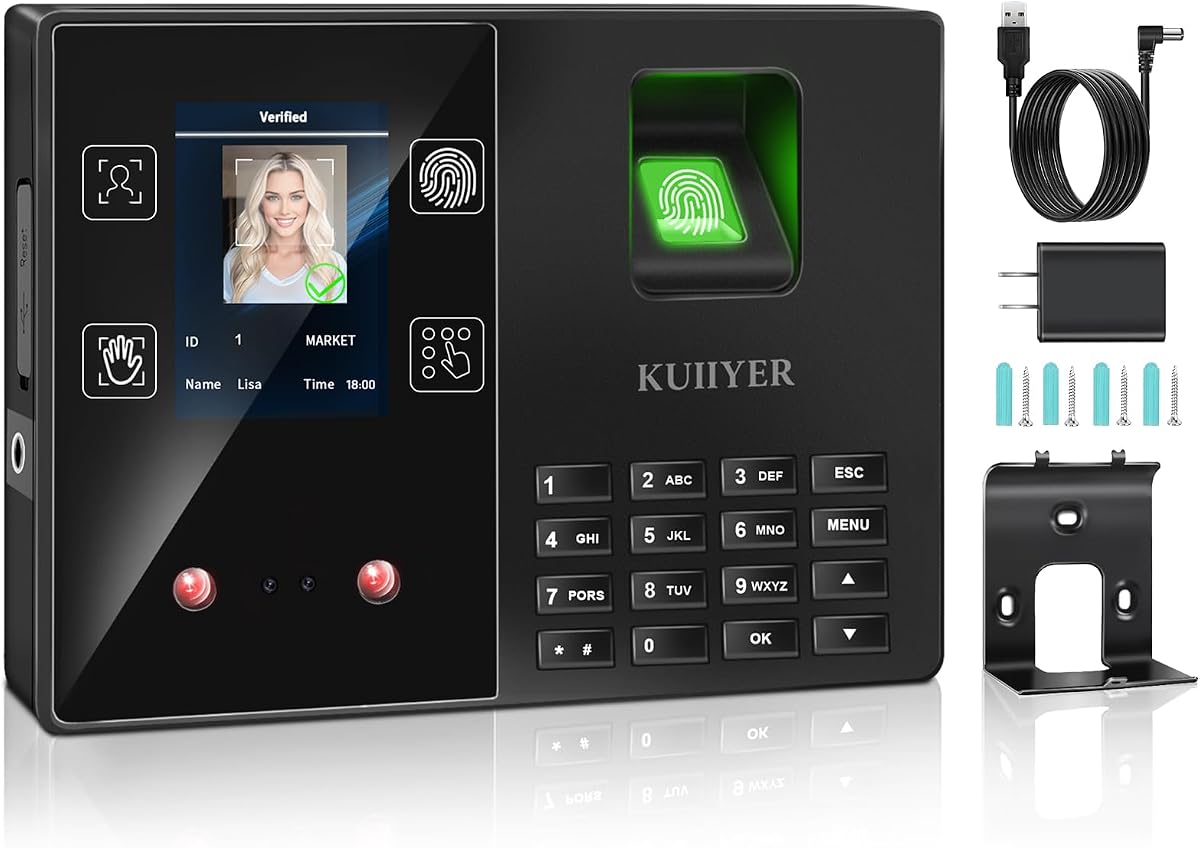
KUIIYER time clock adopts latest biometric technology with a high-performance processor for responsive accurate identification. It supports face palm and fingerprint scans within 0.5 to 0.6 seconds even in dim environments thanks to infrared cameras. The device offers a convenient time and attendance system without requiring network connections or monthly fees for ongoing use.
We may earn a commission when you buy through this link, at no additional cost to you.
With a capacity of up to 1000 users and 160000 records it meets needs of various small to medium businesses. The 2.8-inch TFT color LCD display allows users to easily set up and query records. Intelligent voice announcements in multiple languages confirm identity clearly which helps reduce confusion at clock-in stations.
Security is maintained through USB drive data management without the need for apps or internet which protects privacy during transmission. The offline nature means no complex software installations and it includes data security with power loss protection. A 90-day unconditional return and 24-month promise add confidence to your purchase decision.
This model is excellent for small to medium-sized businesses needing high capacity without recurring costs. It suits locations like hotels or schools where multiple languages and high user counts are common. The multi-mode input flexibility ensures that all employees can find a comfortable way to clock in regardless of preference.
Equipped with high performance processor and 300,000 pixels camera to provide responsive and accurate identification within seconds. Infrared capability works even in dim environments for consistent use.
Managers can view and download data reports via USB flash drive without needing app or network. This ensures security and privacy of data transmission while simplifying offline management.
We may earn a commission when you buy through this link, at no additional cost to you.
This USB device provides fast and accurate fingerprint recognition for secure user verification and efficient tracking. The plug and play interface allows easy connection with computers for quick setup and reliable operation without drivers. It supports multiple user enrollments with advanced biometric algorithms to ensure stable and consistent performance across all staff members.
We may earn a commission when you buy through this link, at no additional cost to you.
The compact and lightweight design makes it convenient for office desktop use and portable access control scenarios. It is compatible with most attendance and access control software for workplace security and employee management. This flexibility allows it to fit into existing systems that rely on PC-based data logging and processing.
Because it acts as a peripheral rather than a standalone unit it requires a computer to be on to function properly. This dependency might limit use in areas without always-on computers or where standalone reliability is preferred. The lack of specified pricing and ratings in the provided data suggests checking availability carefully before purchase.
For offices with existing computer infrastructure this device offers a simple and cost-effective addition to security protocols. It is best for environments where access control is combined with attendance tracking via desktop software. Ensuring compatibility with your specific software choice is a key step before implementing this unit.
Ensures secure user verification and efficient attendance tracking through advanced biometric algorithms. This provides reliable performance for multiple user enrollments consistently.
Allows easy connection with computers for quick setup and reliable operation. This reduces technical barriers for installation and use in standard office environments.
We may earn a commission when you buy through this link, at no additional cost to you.
Designed with privacy in mind this standalone device requires no WiFi or network setup keeping data local and secure. You can get started quickly with minimal learning and a step-by-step setup tutorial available on YouTube. Auto and accurate hours calculations total working hours automatically eliminating manual calculations and messy paper cards.
We may earn a commission when you buy through this link, at no additional cost to you.
The multi-language support includes English Spanish German French and Italian to cater to diverse teams. Easy to use functionality allows you to have the clock ready within 10 minutes. Worry-free shopping is ensured with a one-year warranty and lifetime customer support to assist whenever needed during use.
The inclusion of 5 RFID cards provides an alternative to fingerprint scanning for users with wet or damaged fingers. While this limits biometric options it adds versatility for varied employee needs. The absence of monthly fees makes it a cost-effective choice for businesses aiming to reduce recurring overhead expenses significantly.
Ideal for workplaces such as offices factories and schools this model suits small and mid-sized businesses up to 1000 employees. It prioritizes security and ease of use without network dependencies. The combination of physical cards and biometric scanning ensures reliable attendance tracking in environments with mixed access preferences.
Designed with privacy in mind the device is standalone requiring no WiFi or network setup. Your data stays local and secure via USB transfer preventing external access risks.
Working hours are totaled automatically without more manual calculations costly paper cards or messy ink ribbons. This saves time and reduces errors in payroll preparation.
We may earn a commission when you buy through this link, at no additional cost to you.
The TC1 Cloud-Connect time clock allows you to access real-time punch data from anywhere via web browser. It benefits from accurate hour calculations and automatic report generation which simplifies administrative oversight significantly. Customizable shifts suit all team structures including fixed rotating split-shift and open modes for part-time or 24/7 operations.
We may earn a commission when you buy through this link, at no additional cost to you.
Bank-grade data security is provided through AWS US servers with end-to-end encryption ensuring compliance with global data protection standards. The device supports up to 200 users and 30,000 logs connecting via 2.4GHz WiFi or LAN. Offline punch capture syncs automatically to the cloud once network is restored preventing any data loss during outages.
Free management features allow effortless handling of basic team affairs without subscription costs. However full access to employee app features requires a separate subscription for advanced GPS check-ins and reminders. Lifetime free access to core features like auto time calculation and basic reports ensures zero subscription costs for essential needs.
This model offers a balanced approach to cloud tracking with secure storage and flexible shift rules. It is suitable for businesses needing robust data protection and flexible workflows without mandatory fees for basic tools. The offline sync capability ensures continuity even in areas with intermittent internet connectivity.
Allows you to access real-time punch data from anywhere. Benefit from accurate hour calculations and automatic report generation through any web browser to simplify management.
Powered by AWS US servers with end-to-end encryption your attendance data is stored securely. This keeps sensitive workforce records protected against unauthorized access.
We may earn a commission when you buy through this link, at no additional cost to you.
This standalone time clock keeps your data private and fully under your control without needing WiFi or internet. Easily export records via USB for secure offline management ensuring no external dependencies for data retrieval. It works right out of the box with no software installation or ongoing fees making it a simple one-time purchase.
We may earn a commission when you buy through this link, at no additional cost to you.
Automatic and accurate hour tracking stops manual calculations by totalizing employee hours to reduce payroll errors. You can enjoy a 1-year warranty and lifetime customer support for buying with confidence. Quick setup is supported by step-by-step video guides allowing you to start tracking time in under 10 minutes.
Multi-language support includes English Spanish German French and Italian to cater to diverse teams easily. The unit is designed for growing teams ideal for offices restaurants retail shops and schools. It supports up to 1000 employees making it perfect for small to mid-sized businesses needing basic yet effective tracking.
This model is best for those prioritizing simplicity and cost control without hidden fees. It suits environments where basic clocking and offline data access are sufficient. The reliable support network adds value ensuring that any issues encountered during setup or use are resolved promptly.
Keep your data private and fully under your control. This standalone time clock works without WiFi or internet ensuring no network setup is required for secure offline management.
Skip subscriptions and hidden costs. This time clock is ready to use right out of the box with no ongoing fees just a simple one-time purchase.
We may earn a commission when you buy through this link, at no additional cost to you.
Selecting the right time clock involves understanding your business size security needs and budget. This guide outlines key factors to consider ensuring you find a system that supports efficient workforce management.
Look for scanners with low false rejection rates especially in varied lighting or weather conditions. Advanced optical or optical sensors can handle wet or dry fingers better than basic models ensuring consistent clock-ins.
Prioritize models with proven success rates for your specific environment to avoid frustration during daily use.
Decide if you need standalone units without internet or cloud-connected systems for remote access. Cloud options provide real-time data but rely on stable connections which may not suit all locations.
Choose a network type that aligns with your available infrastructure and remote management requirements.
Ensure the device stores data securely either locally on USB or encrypted in the cloud. Check compliance with local data protection regulations to avoid legal issues with employee records.
Verify encryption standards and access controls to protect sensitive attendance information from breaches.
Check the maximum number of users and punch records the device can store to match your workforce size. Growing businesses should consider models with expandable memory or cloud storage to avoid hardware upgrades soon.
Select a capacity that accommodates your current team plus anticipated growth over the next few years.
Review installation complexity and the user interface for administrators and employees. Systems with intuitive touch screens or clear voice prompts reduce training time and errors during clock-in.
Opt for solutions with clear instructions and responsive support to ensure smooth deployment and adoption.
Consider how well the system exports data to your existing payroll software through CSV or Excel files. Seamless integration reduces manual entry errors and saves time during payroll processing cycles.
Verify compatibility with your preferred payroll provider to ensure accurate and efficient payment calculations.
Evaluate upfront costs against ongoing subscription fees for cloud features or support. Some units may have low initial prices but require monthly payments for essential reports or remote access.
Calculate the total cost of ownership to avoid unexpected expenses over the device's lifespan.
Ensure the device is built to withstand your workplace conditions such as dust moisture or heavy use. Industrial-grade materials and robust casing protect against accidental drops or environmental wear.
Select a model designed for your specific environment to guarantee longevity and consistent performance.
Begin by following the initial setup guide to register employee profiles using their biometric data such as fingerprints. Ensure each scan is clear and consistent to prevent future recognition issues during daily use.
Regularly clean the scanner surface with a soft dry cloth to remove dust or oils that may interfere with accuracy. Avoid using harsh chemicals or abrasive materials that could damage the sensor or casing.
Periodically backup attendance data using USB or cloud options to prevent loss due to power outages or hardware failure. Keep your network connected if required to sync data and maintain real-time reports.
Not all models need a subscription. Some standalone units function completely offline without any fees while others offer optional cloud services for advanced reporting. Always check the product details to understand ongoing costs before buying.
Cloud-connected models allow remote access via apps or web portals whereas standalone units require physical USB exports. If remote monitoring is important look for devices explicitly listing cloud or app features in their specs.
Most modern devices include internal batteries or backup systems to save data during outages. Some units sync offline data once power is restored while others store locally on internal memory for later transfer.
Advanced sensors can handle wet or dry fingerprints but basic models may struggle in such conditions. Check product descriptions for wet/dry recognition capabilities if your workplace is prone to moisture or humidity.
Capacity varies by model with some supporting up to 1000 users and others holding fewer. Verify the specific user limit on the product page to ensure it fits your team size without upgrades.
Many devices are standalone and require no installation on your computers for basic use. Cloud models may offer optional software but often run through web browsers without needing local setups.
We have reviewed ten top options ranging from standalone units to advanced cloud systems that cater to diverse business needs. The NGTeco Cloud Time Clock and Biometric Time Clock + Online Reports offer robust features for remote management while the NGTeco Standalone provides cost-effective simplicity.
When selecting a model prioritize features that match your operational style such as remote access security requirements or ease of setup. Understanding your specific workflow will help you choose a system that reduces errors and improves workforce accountability efficiently.
Please remember to check current listings for the latest pricing and availability before purchasing. Prices and deals can change quickly so verifying details directly with the retailer ensures you get the best value for your business investment.