
ASUS ROG Raikiri II Pro PC Controller
4.0Editor score
8K Sampling Rate
Hot-Swappable Joysticks
Full Color Display
Finding the right controller for your ROG Ally or PC setup is essential for immersive gaming experiences. Modern gamers need precise inputs, comfortable grips, and reliable connectivity to enjoy long sessions without fatigue or lag.
We evaluated ten top controllers based on connectivity options, build quality, and customization features. Our analysis focuses on performance metrics like polling rates, joystick technology, and battery life to ensure you get reliable hardware.
Each selection highlights specific strengths such as OLED displays, TMR joysticks, or mobile compatibility. Prices and availability change frequently so check the links for current offers before making your final purchasing decision.
4.0Editor score

3.9Editor score

4.1Editor score
As an Amazon Associate we earn from qualifying purchases.
This side-by-side comparison helps you identify key differences between each model including connectivity types, unique features, and overall build quality.


This controller delivers versatile connectivity for PC and ROG Ally setups with a strong focus on precision and comfort. It holds a solid rating among users who value reliable wireless performance and customizable controls.
We may earn a commission when you buy through this link, at no additional cost to you.
The TMR joysticks provide superior accuracy compared to traditional Hall Effect sensors while consuming less power. You can switch between micro-switch and TMR triggers easily depending on your preferred game genre.
While it offers excellent features, the price reflects its premium build and advanced technology. Users note that RGB lighting and vibration can drain the battery faster than expected during extended sessions.
Ideal for serious gamers who need low latency and customizable inputs without compromising on comfort. The included case and charging stand add significant value to the overall package.
TMR technology ensures precise input with minimal drift over time making it ideal for competitive gaming scenarios where accuracy is paramount.
Three connection modes allow seamless transitions between devices ensuring you can switch between PC and handheld without reconfiguring settings constantly.
We may earn a commission when you buy through this link, at no additional cost to you.
Designed for competitive players this model offers an 8K sampling rate for near-instantaneous input response. It stands out with hot-swappable joystick modules and a full color display for real-time status updates.
We may earn a commission when you buy through this link, at no additional cost to you.
The display allows you to customize animations and check profiles on the fly without leaving the game. Additional bumpers and rear buttons provide extensive mapping options for complex command inputs.
The main drawback is the high cost which may be prohibitive for casual users. However the extended battery life ensures you can game for days without needing a recharge.
This is the ultimate choice for enthusiasts who demand the fastest response times and maximum customization options available in the market today.
With an 8K sampling rate the controller processes inputs faster than standard models reducing latency for competitive gaming environments.
Replace worn-out sticks quickly without tools ensuring consistent performance and longevity for your gaming hardware investment.
We may earn a commission when you buy through this link, at no additional cost to you.
This mobile controller excels at portability with a foldable design that fits easily into pockets. It provides console-grade control for Android games with a secure grip for your device.
We may earn a commission when you buy through this link, at no additional cost to you.
The wired connection ensures zero latency which is crucial for competitive mobile shooters. Pass-through charging allows you to play indefinitely without worrying about battery depletion.
While limited to Android and wired use the build quality and ergonomics are impressive for the price point. The aluminum paddles offer tactile feedback similar to higher-end desktop controllers.
Perfect for gamers who prioritize mobility and performance on mobile devices without breaking the bank. It supports over 350 titles including major shooters and sandbox games.
Folds down to pocket size making it ideal for travel while maintaining robust aluminum bridges for stability during intense gameplay.
Features mechanical switches and analog triggers that replicate the feel of console controllers for a more immersive mobile experience.
We may earn a commission when you buy through this link, at no additional cost to you.
This model introduces a built-in OLED screen that adds a unique visual element to your controller. It supports tri-mode connectivity and features an ESS DAC for enhanced audio quality during games.
We may earn a commission when you buy through this link, at no additional cost to you.
The OLED display lets you view status indicators and switch profiles instantly without needing a companion app. The 3.5mm jack provides high-quality audio which is rare in modern wireless controllers.
Users appreciate the ability to choose between step and linear triggers depending on their game preferences. However the display does consume additional battery power compared to simpler models.
Recommended for gamers who want a stylish controller with distinct audio features. The Armoury Crate software makes customization intuitive and accessible for most users.
The built-in ESS DAC ensures rich sound quality directly through the controller offering an immersive experience without external headsets.
Create unique animations and views on the OLED screen to personalize your gaming setup and monitor status easily.
We may earn a commission when you buy through this link, at no additional cost to you.
Similar to the OLED version this model focuses on providing a robust feature set for PC and Xbox users. It boasts an impressive battery life and a versatile range of connectivity options.
We may earn a commission when you buy through this link, at no additional cost to you.
The OLED display allows for quick access to profiles and status checks without interrupting gameplay. The ESS DAC ensures that audio is clear and immersive through the included jack.
Some users report needing firmware updates to resolve initial connectivity issues. Despite this the hardware build quality and feature set remain competitive in the mid-to-high range category.
Great for those who want a balance of advanced features without paying the premium price for the Pro II series. The battery life ensures long uninterrupted gaming sessions.
Up to 48 hours of battery life means you can play for days on a single charge making it ideal for travel.
Supports wired Bluetooth and RF connections ensuring you can adapt to different gaming environments easily.
We may earn a commission when you buy through this link, at no additional cost to you.
This renewed option provides access to premium features at a more affordable price. It includes the OLED display and ESS DAC while coming with a limited warranty.
We may earn a commission when you buy through this link, at no additional cost to you.
Each unit undergoes inspection and functionality testing to ensure it works like new. The battery life remains impressive allowing for extended use without frequent charging.
While there are no guarantees on cosmetic perfection the functional specs match the new model. This is a smart choice for budget-conscious buyers who still want high-end features.
Ideal for users who want to try the OLED features without paying full retail price. The included 90-day warranty offers some peace of mind for the purchase.
Get access to OLED screens and high-quality audio without the full price tag by choosing a certified renewed option.
Renewed items are tested to meet strict functionality standards ensuring consistent performance for daily gaming.
We may earn a commission when you buy through this link, at no additional cost to you.
This is a full handheld console designed to integrate seamlessly with Xbox services. While not an external controller it offers integrated gaming controls that are highly ergonomic and responsive.
We may earn a commission when you buy through this link, at no additional cost to you.
The device features a 120Hz touchscreen and powerful AMD processor for console-caliber performance. It includes Xbox Game Pass which gives access to hundreds of titles immediately.
While expensive it replaces the need for separate controllers when playing on the go. The built-in controls are designed to prevent fatigue during extended handheld gaming sessions.
Best for those seeking an all-in-one portable gaming solution rather than a separate accessory. The integration with Xbox ecosystem makes it a powerful choice.
Boot directly into Xbox Game Pass and access your library without needing separate streaming apps or software.
Get up to 50 percent charge in just 30 minutes minimizing downtime during travel or gaming breaks.
We may earn a commission when you buy through this link, at no additional cost to you.
This renewed version offers the benefits of TMR technology at a lower price point. It includes a travel case and supports configuration via web-based tools for ease of use.
We may earn a commission when you buy through this link, at no additional cost to you.
The anti-slip grip and travel case make it practical for commuting and travel. Battery life remains strong ensuring you can play for days without recharging.
Buying renewed saves money though cosmetic imperfections may exist. The core functionality matches the new model making it a smart choice for budget gamers.
Perfect for those who need a reliable wireless option without spending premium prices. The included case protects your controller during transit.
The included travel case protects the controller and accessories ensuring they are ready to use anywhere.
TMR sticks provide stable input without drift which is a common issue in cheaper wireless controllers.
We may earn a commission when you buy through this link, at no additional cost to you.
This controller offers broad compatibility across platforms including ROG Ally and Switch. It features Hall Effect sensors which eliminate stick drift entirely for long-term reliability.
We may earn a commission when you buy through this link, at no additional cost to you.
The adjustable trigger sensitivity allows you to tailor the feel to your specific needs. Collectible designs add a unique flair for users who value aesthetics alongside performance.
While it lacks advanced software customization it covers the essential needs for most players. The price is very competitive compared to other high-end options.
Great for gamers who switch between different devices regularly. The Hall Effect tech ensures it will last longer than standard potentiometer models.
Hall Effect sensors eliminate physical contact in sticks preventing wear and drift over time for consistent performance.
Limited edition collector designs make this a standout choice for gamers who want something unique in their setup.
We may earn a commission when you buy through this link, at no additional cost to you.
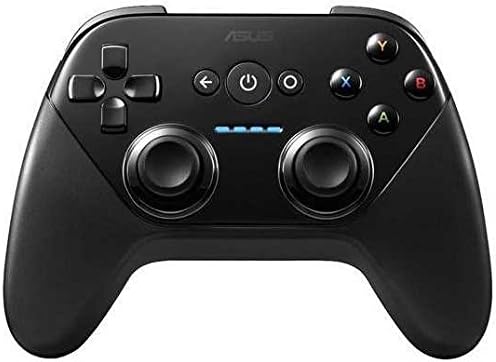
This is a basic wireless controller for Android and Windows users seeking simplicity. It pairs easily with devices and provides essential gaming functionality without complex features.
We may earn a commission when you buy through this link, at no additional cost to you.
It supports both Android TV and Windows allowing for a unified input experience across home and desktop setups. The ergonomic layout is comfortable for casual gaming sessions.
While it lacks advanced features like Hall Effect sticks it is reliable for casual play. The price point makes it accessible for budget-conscious buyers.
Best for those needing a simple wireless solution for TV or mobile gaming. It handles standard games well without needing extensive configuration.
Works seamlessly on both Android TV and Windows PCs allowing you to use one controller for multiple devices.
Wireless setup is straightforward ensuring you can start gaming quickly without technical hurdles.
We may earn a commission when you buy through this link, at no additional cost to you.
Selecting the right controller depends on your specific gaming needs and device compatibility. Below are key factors to consider before making your purchase.
Ensure the controller supports your device connection preferences whether it is Bluetooth 2.4GHz RF or USB-C. Wired options offer zero latency while wireless provides flexibility for mobile setups.
Check for tri-mode support to maximize versatility across PC and handheld systems.
Look for TMR or Hall Effect sensors to avoid stick drift which is common in older potentiometer models. These technologies ensure long-term accuracy and consistent input over time.
Prioritize models with anti-drift features if you play competitive games requiring precise aiming.
Consider how often you can recharge your controller during long gaming sessions. Models offering over 30 hours of playtime reduce interruptions for extended gameplay.
Decide if you prefer wired charging or a battery-backed wireless experience.
Features like remappable buttons and adjustable triggers allow you to tailor the controller to your playstyle. Look for software support for Armoury Crate for deep customization.
Ensure the controller supports button mapping for your specific game requirements.
Comfort is vital for long sessions so check for ergonomic grips and lightweight designs. Adjustable grips or modular components help reduce fatigue during extended play.
Test the weight distribution if possible to ensure it feels balanced in your hands.
Verify that the controller works with your specific device whether it is Xbox Ally PC or Android phone. Some controllers are limited to specific operating systems or hardware.
Ensure compatibility with your primary gaming platform before purchasing.
Materials like aluminum or high-grade plastics impact durability. Look for metal bridges or reinforced buttons that can withstand heavy usage over time.
Check user reviews regarding longevity to ensure the hardware lasts.
Determine a budget that aligns with the features you need. Premium models cost more but offer advanced tech while budget models provide essentials.
Consider renewed options for savings while ensuring warranty coverage is included.
Connect your controller via USB-C or pair via Bluetooth to start using it immediately. Ensure firmware updates are applied for optimal performance and bug fixes.
Clean the joysticks and buttons regularly with a soft cloth to maintain input accuracy. Avoid harsh chemicals that might damage the surface materials or sensors.
Store the controller in a protective case when not in use to prevent accidental drops. Keep the device charged and away from extreme temperatures for long-term health.
Many ROG controllers support PC and Android through USB-C or Bluetooth connectivity. Check the specific model details to ensure compatibility with non-ROG devices.
Most modern models use TMR or Hall Effect sensors to minimize drift. If drift occurs try updating firmware or recalibrating the sticks via Armoury Crate.
The Raikiri II Pro allows hot-swappable joystick modules for easy replacement. Standard models may require professional service or soldering for replacement.
Both prevent drift but TMR sensors generally consume less power. Hall Effect sensors use magnetic fields while TMR uses magnetic resistance for detection.
Most models offer between 30 to 50 hours of wireless play. The Pro models can reach up to 79 hours with conservative settings and no RGB lighting.
Some features require Armoury Crate for full customization but basic remapping is often possible through system settings. Web-based configuration tools are also available for some models.
The ROG Raikiri II and Raikiri II Pro stand out for their advanced features and versatility. They offer the best balance of connectivity customization and performance for serious gamers.
If you are on a budget the Tessen or renewed options provide reliable performance without high costs. Consider your platform needs to select the right model for your setup.
Always verify current pricing and availability before purchasing as these details change frequently. Check for updated firmware to ensure the best experience with your new controller.