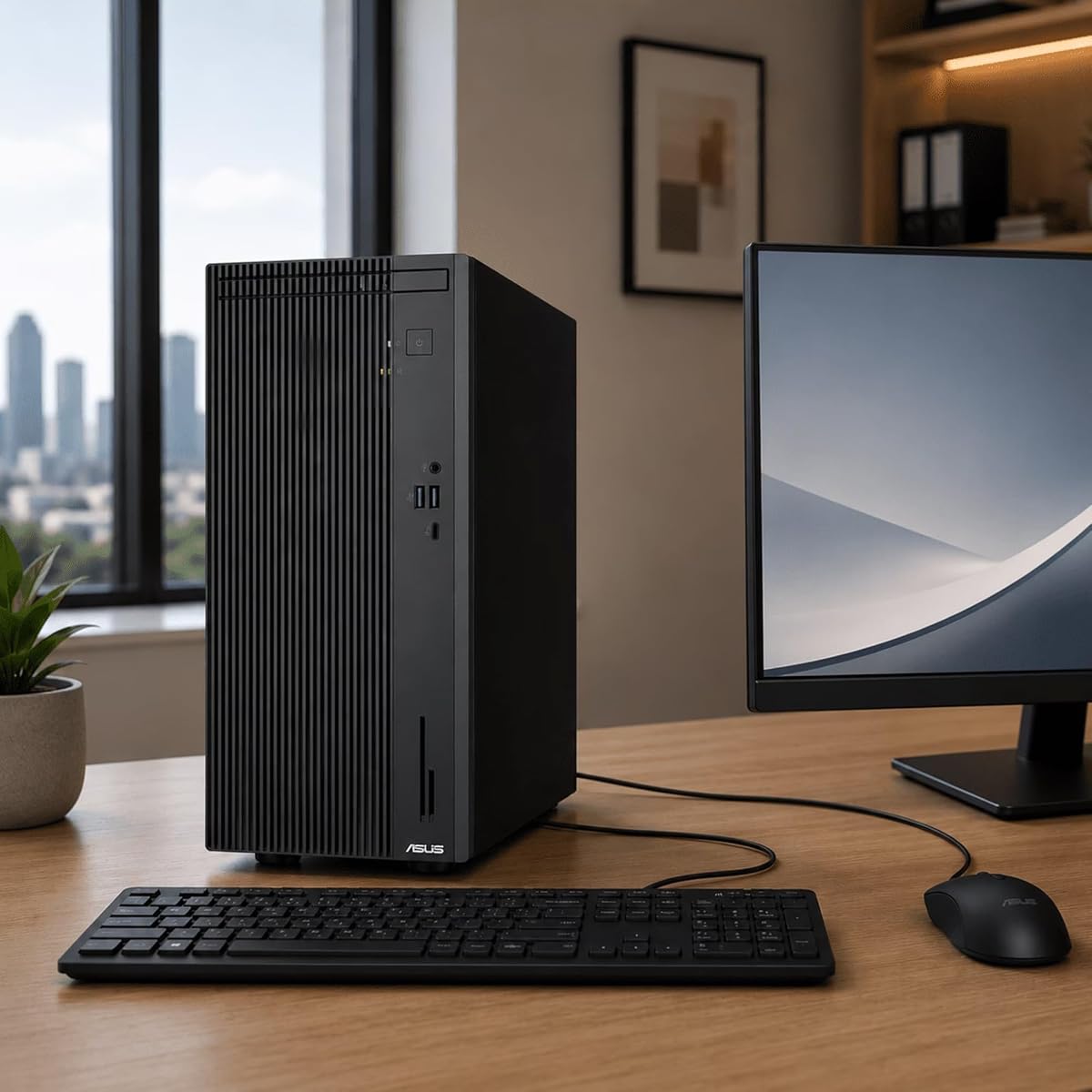
ASUS V500 Business Tower
5.0Editor score
Intel Core i7-13620H Processor
16GB DDR5 RAM
1TB Storage Configuration
This guide compares the top ASUS Desktop PC models for business and gaming, highlighting performance, connectivity, and value across ten distinct configurations
ASUS Desktop PCs offer reliable performance for diverse needs ranging from office productivity to high-end gaming. Selecting the right model depends on your specific workflow and budget constraints.
We evaluated ten distinct ASUS Desktop PC units based on processor power, memory capacity, storage speed, and overall connectivity options. This list covers models from entry-level business towers to premium gaming rigs.
Each pick highlights unique strengths like thermal design, expandability, or bundle accessories. Please note that pricing and availability change frequently, so verify current offers before purchasing.
5.0Editor score

4.7Editor score

4.2Editor score
The following table provides a side-by-side comparison of all ten ASUS Desktop PC models to help you quickly identify the best fit for your computing requirements.


The ASUS V500 Business Tower stands out as a highly capable workstation for office environments. It scores a perfect 5.0 rating for its balance of power and practicality. The inclusion of a wired keyboard and mouse bundle makes it ready to use immediately.
We may earn a commission when you buy through this link, at no additional cost to you.
Its 10-core Intel Core i7-13620H processor ensures smooth handling of multiple applications. With 16GB of DDR5 RAM, you can expect snappy responsiveness even when running heavy productivity software. The system boots quickly thanks to the integrated SSD.
While the 512GB external storage option is slower than internal NVMe, it provides extra space for archives. The integrated Intel UHD Graphics are sufficient for displays and 4K video playback but not for modern gaming.
This model is ideal for businesses or home offices needing reliable computing without gaming features. It is the recommended choice for users prioritizing stability and productivity features over raw graphics power.
The dual monitor support via HDMI and DisplayPort allows for efficient multitasking across spreadsheets and documents.
Seven USB ports ensure you can connect all necessary peripherals without needing extra hubs or adapters.
We may earn a commission when you buy through this link, at no additional cost to you.
The ASUS ROG G700 Gaming Desktop delivers exceptional performance for competitive and AAA gaming titles. It earns an Editor's Choice badge for its balanced spec sheet. The Intel Core Ultra 7 processor ensures streaming and gaming can happen simultaneously.
We may earn a commission when you buy through this link, at no additional cost to you.
The NVIDIA GeForce RTX 5060 graphics card supports ray tracing and AI-powered DLSS for immersive visuals. With 32GB of DDR5 RAM, the system handles demanding applications without slowdown. The 1TB NVMe SSD ensures fast boot times.
The chassis features signature Republic of Gamers styling that looks great on any desk. The included RGB keyboard and mouse add to the gaming experience. A 12-month CPS protection plan covers mechanical failures.
This desktop is best suited for gamers and content creators who need robust performance. It is highly recommended for those seeking a plug-and-play gaming solution with professional-grade software.
Air-cooled thermal design maintains stable performance under heavy loads preventing throttling during intense gaming sessions.
Built-in WiFi 6 technology ensures stable wireless connections for online gaming and fast downloads.
We may earn a commission when you buy through this link, at no additional cost to you.
The ASUS ROG GM700 Gaming Desktop represents the pinnacle of performance in this lineup. It offers top-tier specs for users who demand the best. The AMD Ryzen 7 9800X3D processor is engineered for heavy workloads and gaming.
We may earn a commission when you buy through this link, at no additional cost to you.
With the Radeon RX 9070 XT Prime OC GPU, you can enjoy immersive gaming and smooth creative workflows. The 32GB DDR5 RAM ensures seamless multitasking while you run multiple applications. The 2TB PCIe Gen 4.0 SSD offers lightning-fast load times.
The chassis supports triple-slot GPUs and allows for easy upgrades in the future. Windows 11 Home is optimized for gaming and productivity. It is a substantial investment for serious enthusiasts.
This system is perfect for streamers and power users needing raw horsepower. It is the top recommendation for anyone willing to invest in a high-end workstation or gaming rig.
Enhanced ray tracing and AV1 encoding deliver stunning visuals and incredible performance for modern creative applications.
The system effortlessly tackles intense workloads gaming streaming and content creation without breaking a sweat.
We may earn a commission when you buy through this link, at no additional cost to you.
The ASUS S501MER Desktop PC brings the latest 14th Gen Intel Core i7-14700 processor to your desk. It is designed for general productivity and light creative work. The 16GB DDR5 RAM ensures smooth operation during daily tasks.
We may earn a commission when you buy through this link, at no additional cost to you.
Its connectivity options are robust with dual-band Wi-Fi 6E for faster wireless speeds. The 1TB M.2 NVMe PCIe 4.0 SSD provides ample space for files and software. Front and rear I/O ports cover most needs.
The system includes a 1-month trial of Microsoft 365 for new customers. It is compact enough to fit on most desks without cluttering space. The 14th Gen CPU provides a good balance of efficiency.
This desktop suits home users and small offices needing modern features. It is recommended for those who want the latest generation technology without the cost of a gaming rig.
Seamless connectivity with Dual-Band Wi-Fi 6E ensures stable connections for online work and streaming.
Expansion slots include multiple M.2 connectors for storage allowing easy upgrades as needs grow.
We may earn a commission when you buy through this link, at no additional cost to you.
The ASUS V500 Home & Business Desktop Computer offers a compelling configuration with 32GB of RAM. This makes it suitable for heavier multitasking workloads. The processor provides fast and efficient performance for daily applications.
We may earn a commission when you buy through this link, at no additional cost to you.
Integrated Intel UHD Graphics handle crisp visuals for streaming and everyday computing. The 1TB PCIe SSD ensures quick bootups and responsive file access. It supports dual monitors for expanded workspace productivity.
The package includes essential peripherals making it easy to set up quickly. It balances power and cost for home office users. The 4K support ensures clear visuals on modern displays.
This unit is ideal for users needing more than standard memory capacity. It is the best pick for home businesses that require extra RAM for virtual machines or heavy browsing.
Run multiple applications simultaneously with high-speed 32GB DDR5 memory ensuring smooth performance without lag.
Integrated Intel UHD Graphics provide crisp visuals for everyday computing needs and efficient content creation.
We may earn a commission when you buy through this link, at no additional cost to you.
The ASUS ROG G700 2026 Desktop boasts a spacious 58L chassis designed for triple-slot GPUs. This makes it an excellent choice for future upgrades. The NVIDIA GeForce RTX 5070 provides seamless gaming and multitasking performance.
We may earn a commission when you buy through this link, at no additional cost to you.
Tool-less access allows users to swap components easily. The quad-fan system and 240mm liquid cooler maintain optimal temperatures. WiFi 6 ensures lag-free online gaming experiences. It is ready for upgrades out of the box.
The chassis showcases iconic ROG design with Aura Sync RGB lighting. It includes an RGB keyboard and mouse for a complete setup. The Intel Core Ultra 7 processor delivers powerful performance.
This PC is perfect for enthusiasts who plan to upgrade over time. It is the best choice for gamers prioritizing physical build quality and cooling efficiency.
Stay cool with a quad-fan system and 240mm liquid cooler ensuring long-term reliability under heavy loads.
Dolby Atmos audio and AI noise cancellation enhance sound and communication during immersive gaming.
We may earn a commission when you buy through this link, at no additional cost to you.
The ASUS V500 Home & Business Tower Desktop is a business-ready unit with Windows 11 Pro. It offers advanced security features essential for enterprise use. The included ADATA 64GB USB Flash Drive adds convenient portable storage.
We may earn a commission when you buy through this link, at no additional cost to you.
Powered by the Intel Core i7-13620H processor it handles multitasking with ease. The 1TB SSD ensures smooth system performance and quick startup. HDMI and DisplayPort outputs enable connection to multiple monitors.
The original seal has been opened for upgrades to RAM and SSD. A 1-year warranty covers these upgraded components. It supports professional workflows requiring reliable management tools.
This unit is suitable for small business environments needing extra security. It is recommended for those who prefer the Pro version of Windows for domain features.
Windows 11 Pro offers advanced security features and system management tools for modern business environments.
The bundle includes a 64GB USB Flash Drive offering convenient high-speed data transfer and extra storage.
We may earn a commission when you buy through this link, at no additional cost to you.
The ASUS ROG Strix G700 Desktop is a powerhouse with 128GB of DDR5 RAM. It targets professional users needing massive memory capacity. The Intel 15th gen Core Ultra 9 Processor turbo boosts to 6.00GHz for extreme speed.
We may earn a commission when you buy through this link, at no additional cost to you.
Storage is a key highlight with 11TB total capacity combining SSD and HDD. This accommodates large media libraries and datasets. The RTX 4060 Ti offers solid graphics performance for general use.
It includes Wi-Fi 6E triple band for stable wireless connectivity. The rear ports offer extensive connectivity options for peripherals. It is the highest capacity unit in this comparison.
This desktop is for professionals working with huge datasets or video editing. It is the ultimate choice for storage and memory needs over raw gaming performance.
Intel Core Ultra 9 285K ensures premium performance for extreme multitasking and heavy professional workloads.
11TB of storage includes 1TB SSD and 10TB HDD providing ample space for large files.
We may earn a commission when you buy through this link, at no additional cost to you.
The ASUS V500 Home & Business Desktop with 64GB RAM handles heavy multitasking. It is designed for professional productivity and virtual machines. The Intel Core i7 processor delivers fast performance for business applications.
We may earn a commission when you buy through this link, at no additional cost to you.
Its 1TB PCIe SSD offers ample space and quick data access. Integrated Intel UHD Graphics provide crisp visuals for content creation and streaming. Dual-monitor support via HDMI and DisplayPort boosts productivity.
The comprehensive connectivity options include USB 3.2 and USB-C. It runs Windows 11 Home for a streamlined interface. The system is built for stability and reliability.
This model is ideal for business users requiring significant memory capacity. It is the best choice for those needing to run multiple VMs or complex data tasks.
Run multiple applications simultaneously with high-speed 64GB DDR5 memory ensuring smooth performance without lag.
Integrated Intel UHD Graphics offer crisp visuals for everyday computing needs and efficient content creation.
We may earn a commission when you buy through this link, at no additional cost to you.
The ASUS Business Desktop PC is a reliable choice for office environments. It features Windows 11 Pro for enhanced security and productivity. The 16GB DDR5 memory ensures fast boot times and smooth multitasking.
We may earn a commission when you buy through this link, at no additional cost to you.
Its 1TB SSD provides ample storage for business files and applications. Integrated Intel UHD Graphics offer stable visual output for daily tasks. The compact tower design balances performance and space efficiency.
It includes wired keyboard and mouse for immediate use. Connectivity options include USB-C and Ethernet for flexible networking. It is designed to support business workloads effectively.
This desktop is suitable for standard office work and data management. It is the recommended choice for those seeking a secure and stable business environment.
Pre-installed Windows 11 Pro offers enhanced security and productivity for modern office environments.
Features USB-C and Ethernet for flexible connectivity for peripherals and external devices.
We may earn a commission when you buy through this link, at no additional cost to you.
Selecting the right ASUS Desktop PC involves balancing performance needs with budget and expandability requirements.
The processor is the brain of your desktop. Intel Core i7 and Ultra series processors offer high speeds for multitasking and gaming. For business tasks, a standard i7 is sufficient, but for gaming look for higher core counts.
Always check the generation and base clock speed. Newer generations provide better efficiency and support for the latest instruction sets.
RAM determines how many applications you can run at once. 16GB is standard for most users while 32GB or 64GB is best for heavy workflows. DDR5 RAM offers significantly faster speeds than DDR4.
SSDs provide faster boot times than traditional hard drives. Ensure your model includes at least a 1TB NVMe SSD for ample storage and speed.
For general office use integrated graphics are sufficient. However, gamers and creative professionals require dedicated GPUs like NVIDIA GeForce or AMD Radeon. These cards handle rendering and high-resolution displays better.
Check if the GPU supports your monitor's resolution and refresh rate. High-end models often support 4K gaming and 3D rendering workflows.
A good desktop should have enough USB ports for all your peripherals. Look for USB-C for modern connectivity and HDMI or DisplayPort for monitors. Wi-Fi 6 or 6E ensures fast wireless speeds if you do not use Ethernet.
Consider the placement of ports for your desk setup. Front ports are convenient for frequently used devices like drives or headphones.
Windows 11 Home is standard for most units and offers a modern interface. Windows 11 Pro includes advanced features like BitLocker encryption and remote desktop which are vital for business security.
Verify the OS license type before purchasing. Business users often benefit from the additional management tools provided in Pro versions.
A well-designed chassis ensures proper airflow to keep components cool. Larger cases often support better cooling and future upgrades. Look for dust filters and liquid cooling options in gaming models.
Consider the physical dimensions of the tower. Ensure it fits your desk space and allows access to ports without obstruction.
Future-proofing is important for longevity. Check if the motherboard has free RAM slots or M.2 slots for storage expansion. Tool-less designs make swapping components easier without requiring a screwdriver.
Review the warranty terms for any custom upgrades. Some systems may limit warranty coverage if components are modified by third parties.
Many models come bundled with a keyboard and mouse. This saves cost and ensures compatibility. Some gaming units include RGB accessories which add to the visual appeal of your setup.
Check if the bundle includes cables or mounts. Additional accessories like flash drives or extended warranties can add value to the purchase.
When setting up your ASUS Desktop PC connect the monitor to the HDMI or DisplayPort for optimal visuals. Ensure the power cable is plugged into a surge protector to protect sensitive electronics. Install the included drivers from the ASUS website to ensure all features work correctly.
Regularly update your BIOS and drivers to maintain system stability and security. Use the Windows Update feature alongside ASUS-specific software to keep your system running smoothly. Clean the dust filters in the chassis periodically to prevent overheating during heavy usage.
If you need more storage or RAM check the manual for upgrade guides. Most models allow easy access to internal components. Back up your important files to an external drive or cloud storage to avoid data loss in case of hardware failure.
Yes, ASUS ROG models are specifically designed for gaming with powerful GPUs and cooling. Business models like the V500 lack dedicated graphics so are better for office work. Always check the GPU specs before buying for gaming needs.
Most business and gaming models support multiple monitors via HDMI and DisplayPort. Check the specific product specs for the maximum number of displays supported. This feature is essential for productivity and multitasking.
Most ASUS Desktop PCs allow RAM upgrades up to a specific limit like 64GB. You should verify the motherboard slots in the technical specs. Upgrading allows for better multitasking performance in the future.
Windows 11 Pro includes advanced security features like BitLocker and remote desktop. Home is sufficient for personal use while Pro is better for business environments requiring encryption. The difference affects data safety and network management.
Gaming models usually have space for GPU upgrades if the power supply supports them. Business models often rely on integrated graphics so upgrades may not be feasible. Always check the power supply wattage before planning upgrades.
Yes, all models include a standard manufacturer warranty covering defects. Some premium models offer extended protection plans like the 12 Month CPS plan. Check the product details for warranty length and coverage terms.
The ASUS V500 Business series is ideal for office work due to its reliability and ports. It offers the right balance of performance and cost. The Windows 11 Pro versions are recommended for corporate security.
Models with high RAM like 32GB or 64GB are suitable for video editing. Look for dedicated GPUs to ensure smooth rendering. The ROG series generally handles video workloads better than business units.
This guide has covered ten top ASUS Desktop PC models ranging from business towers to high-end gaming rigs. Each pick offers unique strengths depending on whether you prioritize memory graphics or storage capacity.
For gaming enthusiasts the ROG G700 and GM700 provide the best performance. For business users the V500 series offers reliability and essential connectivity. Prioritize RAM and SSD speed for the smoothest daily experience.
Remember to check current prices and availability before purchasing as offers change frequently. This guide aims to help you find a desktop that meets your needs for years to come.