
Logitech G203 Wired Gaming Mouse
4.6Editor score
8000 DPI optical sensor
Six programmable buttons
Lighting customization
This guide compares the top 10 analog gaming mice for performance, comfort, and features to help you find the perfect peripheral for your gaming style.
Finding the right analog gaming mouse can transform your entire gaming experience by offering precise control and comfort during long sessions. These devices are designed to track movement accurately while providing customizable buttons for various gameplay needs.
We evaluated ten leading models based on sensor precision, ergonomic design, programmable features, and overall build quality. Our analysis focuses on how each mouse performs across different genres and user preferences to ensure you get the best value.
Each pick highlights specific strengths like weight customization, lighting effects, or specialized buttons for MMO and FPS games. Keep in mind that prices and availability may change over time, so check current listings before making your final decision.
4.6Editor score

4.6Editor score
4.5Editor score
This side by side comparison highlights the key specifications and unique features of each analog gaming mouse to help you identify which model fits your specific gaming requirements and budget constraints.



The Logitech G502 Hero stands out as a top choice for gamers seeking precision and customization. Its HERO sensor delivers unmatched tracking accuracy while the adjustable weight system allows you to tailor the mouse to your personal preference.
We may earn a commission when you buy through this link, at no additional cost to you.
With eleven programmable buttons and a dual mode hyper fast scroll wheel, this mouse offers incredible versatility for various gaming genres. The mechanical switch button tensioning ensures crisp clicks that enhance your overall gaming experience.
While the weight might feel heavy for some users, the ability to adjust it makes it suitable for different grip styles. The included weights let you find the perfect balance without compromising on stability during intense gameplay sessions.
This mouse is ideal for players who want a reliable and feature rich device that performs well across multiple game types. It represents a solid investment for anyone looking to upgrade their gaming peripherals with a proven performer.
The HERO sensor provides zero smoothing and acceleration ensuring your movements are captured with pinpoint precision every time.
Eleven programmable buttons let you map commands quickly giving you a competitive edge in fast paced gaming scenarios.
We may earn a commission when you buy through this link, at no additional cost to you.
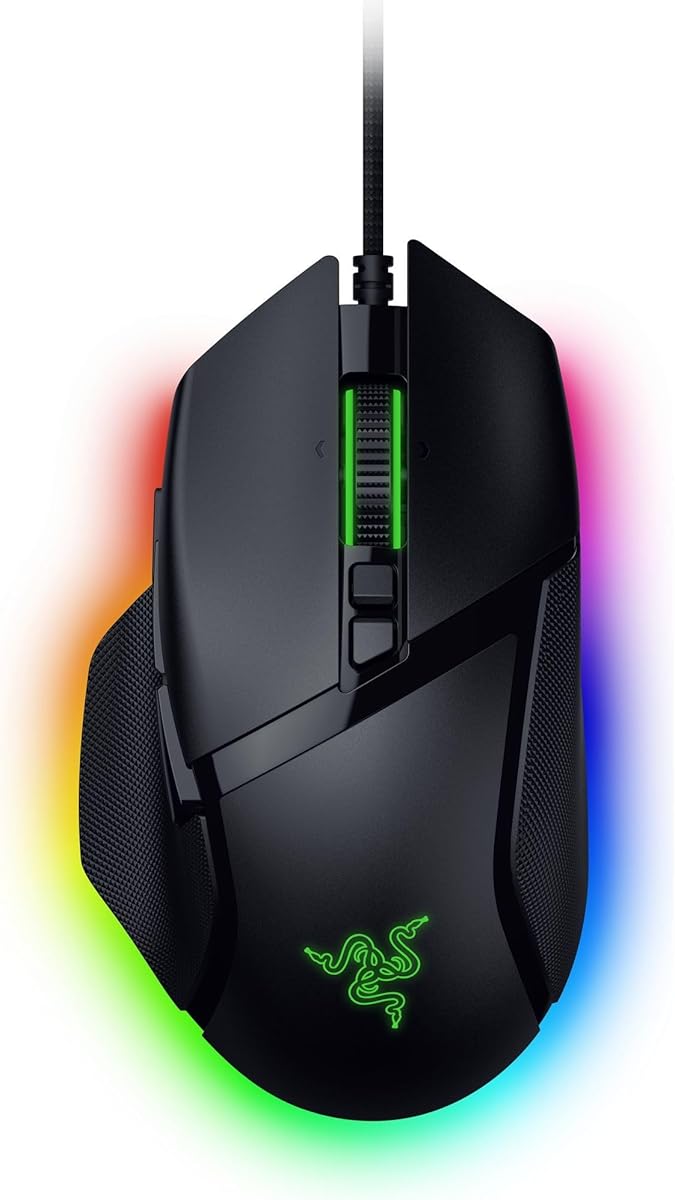
The Razer Basilisk V3 offers an impressive balance of features and affordability making it a top pick for budget conscious gamers. Its ergonomic design supports your hand comfortably during extended play sessions without causing fatigue.
We may earn a commission when you buy through this link, at no additional cost to you.
With ten plus one programmable buttons and optical switches providing rapid actuation, this mouse ensures reliable performance in critical moments. The HyperScroll tilt wheel adds versatility by letting you switch between free spin and tactile modes easily.
While the software is necessary for full customization, the intuitive interface makes setting up macros straightforward. The cable may have some stiffness but it does not hinder general movement during typical gaming activities.
This mouse is perfect for players who want high end features without breaking the bank. It delivers excellent value for money while maintaining the quality and responsiveness expected from a trusted gaming brand.
The signature form factor with thumb rest ensures effortless use and long lasting comfort for all hand sizes.
Eleven Chroma RGB zones allow you to personalize your setup with millions of colors and dynamic effects.
We may earn a commission when you buy through this link, at no additional cost to you.
The Razer Basilisk V3 35K represents the pinnacle of precision with its Focus Pro 35K optical sensor offering best in class tracking. This model is designed for serious gamers who demand every ounce of performance from their peripherals.
We may earn a commission when you buy through this link, at no additional cost to you.
Featuring optical switches gen 3 with a ninety million click lifecycle, durability and speed are unmatched. The Speedflex cable reduces drag allowing for smoother and quicker movements during intense gaming sessions.
The Smart Reel mode automatically switches between scroll modes based on speed which enhances usability across different tasks. While the price is higher, the advanced features justify the cost for enthusiasts seeking top tier performance.
This mouse is best suited for competitive players who need granular aim and control. It delivers a premium experience with reliability and innovation that sets a new standard for gaming mice.
The Focus Pro 35K sensor tracks on a wider variety of surfaces including glass with intelligent functions.
Optical switches gen 3 eliminate double clicking issues and offer blistering zero point two millisecond actuation speed.
We may earn a commission when you buy through this link, at no additional cost to you.
The Logitech G403 Hero combines lightweight design with powerful performance making it ideal for gamers who prefer fast movements. Its shape is easy to grip and control ensuring comfort during long gaming marathons.
We may earn a commission when you buy through this link, at no additional cost to you.
The Hero 16K sensor provides precise tracking with zero smoothing or acceleration for consistent results. On board memory allows you to save profiles and use them on any PC without needing additional software installation.
While it has fewer buttons than some competitors, the six programmable ones are well placed for essential actions. The lack of a thumb rest might not suit everyone but the rubber grips enhance stability during use.
This mouse is great for players who want a simple yet effective device without unnecessary bulk. It offers a balanced mix of features that cater to various gaming styles while maintaining a sleek profile.
The Hero 16K sensor ensures one to one tracking with up to four hundred IPS movement speed.
Full spectrum lighting responds to in game action and can sync across your other Logitech G accessories.
We may earn a commission when you buy through this link, at no additional cost to you.
The Logitech G203 is a fantastic entry level option that delivers gaming grade performance at a very accessible price. Its eight thousand DPI optical sensor offers improved precision over standard mice for smoother gameplay control.
We may earn a commission when you buy through this link, at no additional cost to you.
With six programmable buttons and LIGHTSYNC RGB lighting you can customize commands and style without hassle. The mechanical primary buttons are tensioned with durable metal springs ensuring reliable performance and crisp feedback.
While the sensor is not as advanced as higher end models it is more than sufficient for casual and competitive play. The lack of adjustable weights means you get a fixed balance but this suits many users perfectly.
This mouse is perfect for those stepping into gaming peripherals for the first time or needing a budget backup. It proves you do not need to spend a lot to get quality performance and features.
Zero filtering and smoothing on the optical sensor give you improved control and precision over standard mice.
Light sync lighting can react to screen color shifts or flash to the beat for a rich experience.
We may earn a commission when you buy through this link, at no additional cost to you.
The reborn Logitech G MX518 brings back a classic design while integrating modern technology like the HERO 25K sensor. It feels like the original mouse but performs to today's advanced standards for accuracy and speed.
We may earn a commission when you buy through this link, at no additional cost to you.
With on board memory you can save up to five profiles and take them anywhere without needing software. The eight programmable buttons give you plenty of options to build macros and power moves at your fingertips.
While the design might feel dated to some the performance is undeniable and robust. The scroll wheel is simple but effective providing necessary functionality without unnecessary complexity for everyday gaming tasks.
This mouse is ideal for fans of the classic shape who want reliable modern performance. It bridges the gap between nostalgia and innovation offering a familiar feel with powerful capabilities.
The HERO 25K sensor achieves up to one seven thousand frames per second for precise movement tracking.
Saved settings work on any PC without additional software or login required for seamless transitions.
We may earn a commission when you buy through this link, at no additional cost to you.
The Corsair Scimitar RGB Elite is built for MMO and MOBA players needing frequent actions and complex macros. Its seventeen programmable buttons provide ample access to skills and commands essential for these genres.
We may earn a commission when you buy through this link, at no additional cost to you.
A patented key slider control system allows you to reposition side buttons to fit your grip comfortably. The custom PixArt sensor offers highly accurate tracking adjustable in single DPI steps for precise sensitivity tuning.
While the bulk may feel large for FPS gamers the ergonomic design supports your palm regardless of hand size. The Omron switches rated for fifty million clicks ensure longevity during extended gaming sessions.
This mouse is perfect for dedicated MMO players who need extensive button access without leaving their hand. It combines functionality with comfort to meet the unique demands of complex game mechanics.
The key slider system lets you reposition twelve side buttons to comfortably fit your unique grip style.
Ultra durable construction with Omron switches stands up to the wear and tear of extended gaming.
We may earn a commission when you buy through this link, at no additional cost to you.
The Razer Basilisk V3 Customizable RGB model offers a favored form factor that supports your hand perfectly during gameplay. Its design is optimized for quick access to buttons making it easy to execute commands efficiently.
We may earn a commission when you buy through this link, at no additional cost to you.
With eleven programmable buttons and optical switches gen 2 you get responsive execution at zero point two millisecond speed. The Focus Plus 26K sensor tracks flawlessly with zero smoothing for crisp pixel precise accuracy.
While using Synapse is necessary for full customization the benefits of dynamic lighting and macros are worth it. The HyperScroll tilt wheel provides freedom for both fast scrolling and tactile feedback when needed.
This mouse is ideal for players prioritizing ergonomics and responsive performance in a single device. It delivers comfort and precision that cater to long sessions while maintaining a sleek aesthetic.
The iconic ergonomic design with thumb rest is favored by millions worldwide for effortless use.
Best in class sensor with intelligent functions flawlessly tracks movement with zero smoothing for accurate aim.
We may earn a commission when you buy through this link, at no additional cost to you.
The Corsair NIGHTSWORD RGB features a smart tunable weight system that detects the center of gravity in real time. This allows you to fine tune balance to perfectly fit your grip and personal play style preferences.
We may earn a commission when you buy through this link, at no additional cost to you.
With a custom PixArt sensor offering adjustable one DPI resolution steps you get total sensitivity customization. The contoured shape with high performance rubber grips ensures professional comfort inspired by pro sports equipment.
While the price is on the higher end the precision weight calibration options are unmatched in this category. It offers twelve weight configurations for those who want specific balance without compromising stability.
This mouse is best suited for gamers who prioritize weight and balance over other features. It provides a personalized feel that can significantly improve accuracy and comfort during competitive matches.
Exclusive software detects center of gravity allowing you to adjust weight between one hundred and nineteen and one forty one grams.
Built with a contoured shape that naturally fits your hand with high performance rubber grips.
We may earn a commission when you buy through this link, at no additional cost to you.
The Corsair M65 RGB Ultra is designed for FPS gaming with an iconic aluminum frame that ensures lasting durability. Its Marksmen sensor captures every movement with native twenty six thousand DPI and sixty five hundred IPS tracking.
We may earn a commission when you buy through this link, at no additional cost to you.
CORSAIR AXON technology registers movements up to eight times faster than conventional mice thanks to an eight thousand hertz polling rate. Optical switches deliver hyper fast responses that stand up to years of rigorous use.
While the shape may not suit everyone the sensor fusion control enables ultra low lift off distance for accurate tracking. This feature helps when repositioning your mouse quickly during intense combat scenarios.
This mouse is perfect for competitive FPS players needing speed and precision above all else. It offers a robust build and advanced tech that supports high level performance and reliability.
CORSAIR AXON technology enables up to eight thousand hertz polling rate for faster movement transmission.
Optical switches and sensor fusion control provide precise accurate tracking with ultra low lift off distances.
We may earn a commission when you buy through this link, at no additional cost to you.
Selecting the right analog gaming mouse depends on understanding your specific needs regarding sensor precision, weight, and programmable features.
A high quality sensor is crucial for accurate tracking without smoothing or acceleration. Look for optical sensors with high DPI ranges and consistent performance across surfaces.
Prioritize models with reputable brands and proven sensor technology to ensure your movements translate directly to screen actions.
Comfort during long sessions depends heavily on the mouse shape and texture. Choose a form factor that supports your grip style whether palm claw or fingertip.
Rubber grips and thumb rests can enhance comfort and reduce fatigue during extended gameplay periods significantly.
The number of programmable buttons affects your ability to execute macros and commands quickly. MMOs require more buttons while FPS games might need fewer but optimized ones.
Ensure the software allows easy customization so you can map actions without interrupting your game flow.
Weight influences control and speed especially in fast paced games. Some mice offer adjustable weights to let you tailor the feel to your preference.
Find a balance that provides stability without feeling too heavy or too light for your wrist comfort.
While this guide focuses on wired mice consider if a cable or wireless option suits your setup better. Wired mice eliminate latency concerns but cables can cause drag.
Look for flexible cables like Speedflex technology if you decide to stick with wired peripherals for reliability.
Gaming mice must withstand frequent clicks and movements over years of use. Check for ratings on switch lifecycles and overall material quality.
Durable construction ensures longevity and consistent performance without needing frequent replacements or repairs.
Software allows you to customize RGB lighting, button mapping, and profiles. Ensure the interface is intuitive and supports on board memory for portability.
Good software integration enhances the usability and makes the most of the hardware features available.
Set a budget but consider features that add long term value. Sometimes spending a bit more gets you better sensors or build quality that pays off over time.
Balance cost with necessary features to avoid overspending on capabilities you will not actually use during play.
Clean your mouse regularly using a soft cloth to remove dust and grime from the surface and sensor. Avoid using harsh chemicals that might damage the coating or electronics.
Store your mouse in a cool dry place when not in use to prevent moisture damage or overheating of internal components over time.
Update the firmware and software periodically to ensure optimal performance and access to new features or bug fixes.
Yes, analog gaming mice offer higher precision tracking with zero smoothing or acceleration compared to standard mice. This enhanced control helps players execute precise movements critical in competitive gaming environments.
Absolutely, these mice are versatile enough for productivity tasks like graphic design or office work. Many features like programmable buttons can be reassigned to speed up workflows beyond gaming.
Most analog gaming mice come with dedicated software for button customization and RGB control. While some basic functions work out of the box full potential requires installing the manufacturer's application.
DPI settings can usually be adjusted via dedicated buttons on the mouse or within the software suite. This allows you to switch sensitivity on the fly depending on the game scenario.
Many models in this guide feature ergonomic designs that accommodate larger hands comfortably. Check the dimensions and grip style recommendations to ensure a proper fit for your hand size.
Optical switches use light to register clicks while mechanical switches use physical contact. Optical switches tend to be faster and more durable with less risk of double clicking issues over time.
The ten analog gaming mice highlighted in this guide cover a wide range of preferences and needs from budget friendly to premium options.
Consider factors like sensor accuracy, weight, and button layout when deciding which model fits your specific gaming style best.
Always check current prices and availability before purchasing since these details may change frequently on online retailers.