
Home Security Systems for House
4.7Editor score
Instant app alerts on iOS
Supports smart life app
100 wireless sensor storage
This guide compares ten top alarm systems without monthly fees to help you choose secure wireless home security solutions with smart alerts and easy DIY setups.
Home security is essential for peace of mind but traditional monitoring services often come with costly monthly subscriptions. Many homeowners now prefer reliable alarm systems without monthly fees that offer strong protection while keeping ongoing expenses low.
We have evaluated ten leading wireless security kits based on connectivity, ease of installation, alert speed, and expandability. Each option provides robust features like app control and siren alerts without requiring a recurring contract or subscription payment.
Every pick highlights key strengths and potential trade-offs so you can match a system to your specific property needs. Prices and availability may change over time so check current listings before making your final purchase decision today.
4.7Editor score

4.5Editor score

4.3Editor score
The following table provides a quick side-by-side comparison of all ten security kits to help you evaluate key specifications and features at a glance.


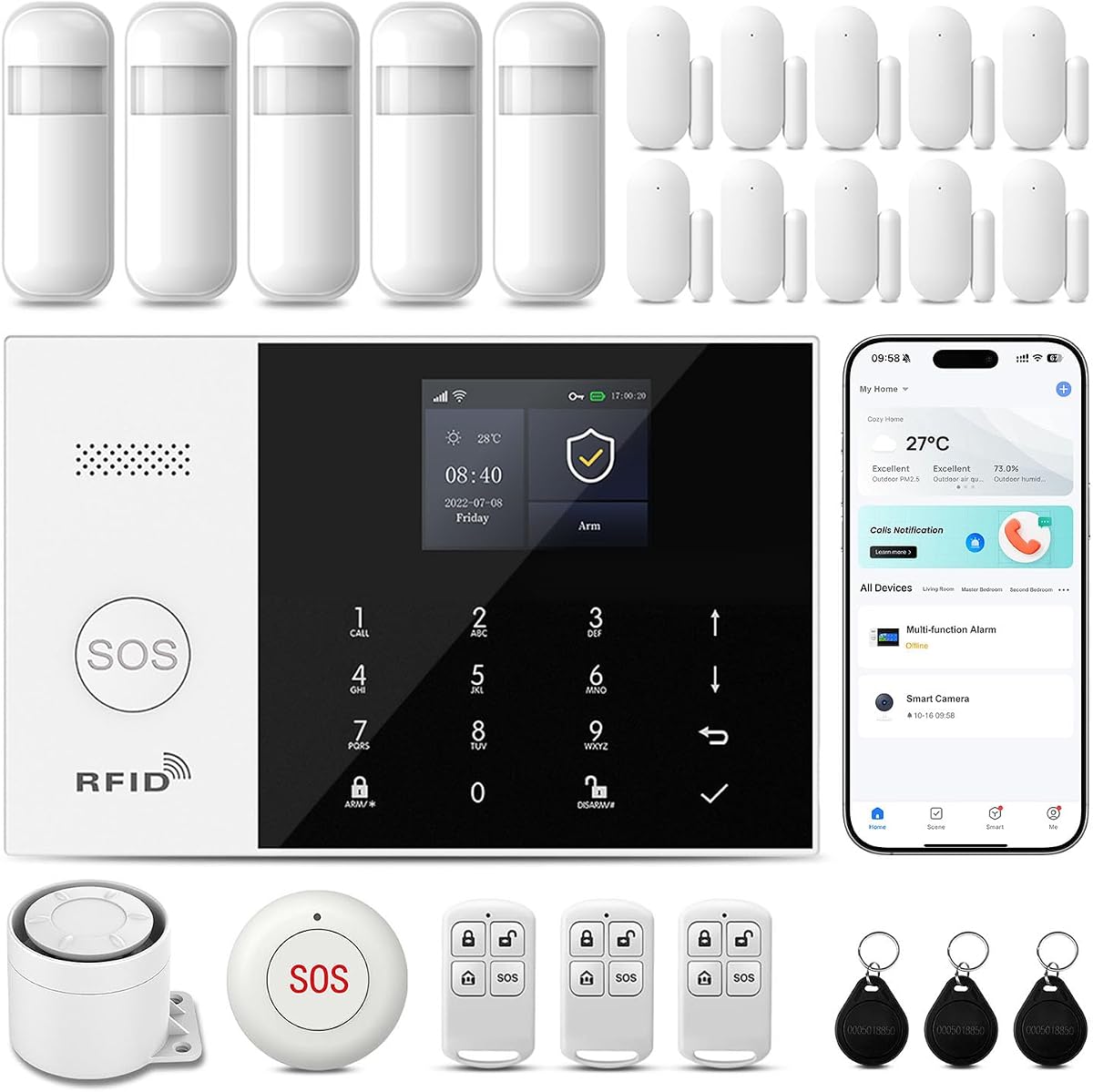
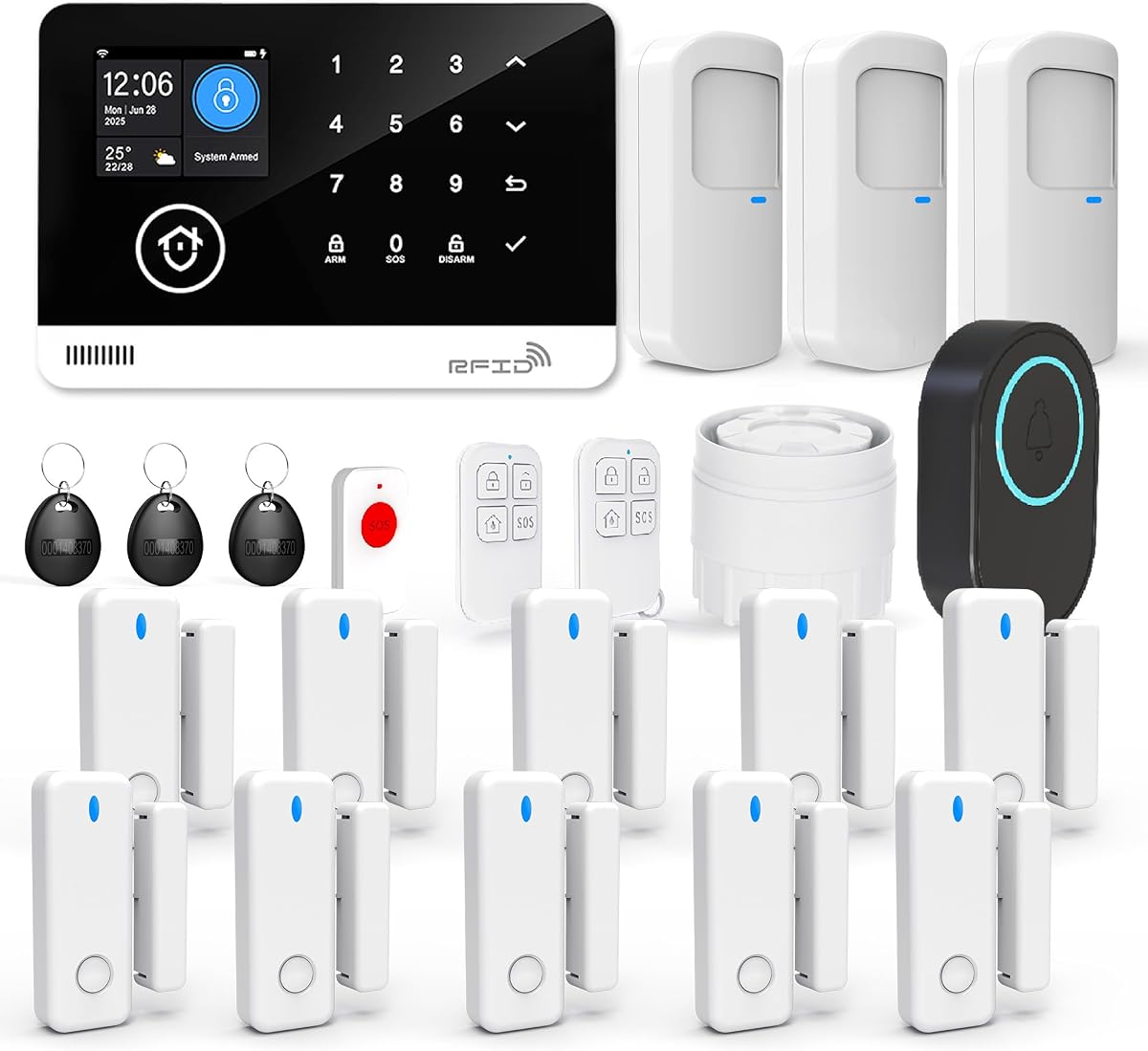
This top rated kit delivers robust protection without ongoing charges making it ideal for budget conscious homeowners seeking reliable alerts. It offers a strong combination of loud sirens and instant app notifications to keep you informed day and night.
We may earn a commission when you buy through this link, at no additional cost to you.
The system supports up to twenty sensors allowing you to cover multiple entry points as your needs grow. Its built-in backup battery ensures continued operation during power outages while the adhesive installation makes setup quick and clean.
While it does not support five GHz wifi networks the stability of two point four GHz connections is sufficient for most homes. The indoor siren is effective but outdoor coverage requires additional purchases which may be a consideration for larger properties.
Choose this model if you want a straightforward expandable system that prioritizes immediate alerts and low cost. It is perfect for apartments and small houses where easy installation and clear warnings are top priorities.
The hundred twenty decibel siren activates instantly when a sensor triggers to deter intruders and alert household members immediately.
Monitor your property and receive alerts via the free app without any hidden monthly charges or mandatory service contracts.
We may earn a commission when you buy through this link, at no additional cost to you.
This fifteen piece kit provides an excellent entry point for homeowners seeking affordable wireless security without hidden fees. It includes enough sensors to protect most standard entry points while offering smart home compatibility for added convenience.
We may earn a commission when you buy through this link, at no additional cost to you.
The system connects via two point four GHz wifi to send real-time alerts to your phone whenever motion or entry is detected. Voice control through Alexa allows you to arm or disarm the system hands free during daily routines.
Setup is designed to be straightforward with adhesive mounts but some users may prefer the stability of screw-in mounting. The network relies solely on two point four GHz which is widely compatible but may be slower than newer standards in busy networks.
Pick this kit if you need a complete package that balances cost with essential features like voice control and expandability. It suits families looking to secure their first smart home setup without committing to monthly monitoring costs.
Control your security modes hands free using compatible smart speakers to simplify arming and disarming during busy times.
Receive immediate notifications on your smartphone whenever a sensor is triggered to stay aware of activity at any time.
We may earn a commission when you buy through this link, at no additional cost to you.
This advanced system offers superior reliability by supporting both wifi and cellular connectivity to ensure alerts always reach you. Its large color screen and comprehensive sensor list make it a robust choice for larger homes seeking professional grade features.
We may earn a commission when you buy through this link, at no additional cost to you.
The inclusion of a SIM card slot allows the system to function even if your internet goes down which adds a critical layer of security. Tamper protection ensures that any attempt to remove the hub triggers an alarm and sends alerts immediately.
While the dual network capability is excellent users should be aware that cellular services may incur separate charges depending on your carrier. The interface is feature rich but may require more time to configure fully compared to simpler models.
Invest in this kit if you need maximum uptime and want a visually clear interface to manage your home security. It is best suited for tech savvy users who value redundancy and extensive control over their safety systems.
Use both wifi and cellular networks to maintain constant alert delivery even during power or internet outages.
Unauthorized removal of the main hub triggers a loud alarm and instant app alerts to prevent theft.
We may earn a commission when you buy through this link, at no additional cost to you.
This system stands out for its ability to store up to one hundred wireless accessories allowing extensive coverage for large properties. It supports multiple alert channels including push notifications and voice monitoring to keep you connected in various ways.
We may earn a commission when you buy through this link, at no additional cost to you.
The Smart Life and Tuya app compatibility ensures you can control settings and view status from anywhere using your mobile device. Groups can be configured to send messages to different numbers which helps organize alerts for different family members.
The reliance on app connectivity means control functions depend on network stability but this is standard for modern smart security. Some users may find the initial pairing process lengthy if adding many accessories at once.
Choose this model if you plan to build a large network of sensors and want flexible notification options. It is ideal for those who value high customization and remote voice monitoring capabilities.
Store and manage up to one hundred wireless devices to protect every corner of your property without limitations.
Assign different phone numbers to alarm groups to ensure the right people get notified when specific zones are triggered.
We may earn a commission when you buy through this link, at no additional cost to you.
This wireless kit excels at integrating with major smart home ecosystems allowing seamless control through Alexa or Google devices. It provides solid protection with a loud siren and a reliable backup battery to keep systems running during outages.
We may earn a commission when you buy through this link, at no additional cost to you.
The remote control includes a one touch SOS button that offers immediate assistance in emergencies which is helpful for seniors or children. Installation is straightforward with adhesive mounts and the system supports adding over one hundred accessories as needed.
The two point four GHz wifi limitation is common in budget kits but ensures wide compatibility with most home routers. The initial set of sensors may be small for larger homes so expect to buy additional units for full coverage.
Select this option if you already use smart speakers and want a system that responds to voice commands easily. It is perfect for households that prioritize smart home integration alongside basic security needs.
Arm or disarm the system using simple voice commands via compatible smart speakers for effortless daily security management.
Use the remote control SOS function to trigger an alarm instantly in case of personal safety emergencies at home.
We may earn a commission when you buy through this link, at no additional cost to you.
This system offers an impressive forty eight hour backup battery ensuring protection continues long after a power outage occurs. Its color screen provides clear visual feedback while the tamper proof design adds a layer of physical security to the hub.
We may earn a commission when you buy through this link, at no additional cost to you.
The silent alarm mode lets you trigger alerts without startling potential intruders which can be useful for discreet monitoring situations. Voice control via Alexa allows for easy command input and the system sends instant app notifications when sensors activate.
While the battery life is a strong point the reliance on two point four GHz networks may slow updates in high traffic areas. The setup process is efficient but requires a stable connection to pair all sensors correctly with the hub.
Buy this kit if long term power resilience is important to you and you want a clear visual status display. It suits users who value extended backup and silent monitoring features.
The built-in battery keeps the system active for up to forty eight hours during power failures to maintain constant security.
Activate silent alerts to receive notifications without sounding the siren allowing for discreet monitoring when needed.
We may earn a commission when you buy through this link, at no additional cost to you.
This system features a large four point three inch touchscreen that simplifies controls for all age groups including seniors and children. It supports both wifi and cellular connections to ensure alerts are sent even if the internet connection is lost.
We may earn a commission when you buy through this link, at no additional cost to you.
Control can be managed via RFID cards as well as the app providing physical access options that are convenient for family members. The silent alarm feature helps maintain discretion while still notifying you of unauthorized entry through your phone.
Users should note that cellular service may require a data plan which is separate from the device purchase price. The hub needs a steady power source to function fully but backup options exist for uninterrupted operation.
Opt for this system if you want an intuitive interface and multiple ways to control your security. It is excellent for households needing simple access controls and dual network reliability.
Use the large color touch screen to adjust settings and view status without needing a phone or remote device.
Tag and arm the system quickly using RFID cards which offer a secure physical method for daily control.
We may earn a commission when you buy through this link, at no additional cost to you.
This nine piece kit is designed for smaller homes and offers the unique benefit of auto dialing preset numbers when an alarm triggers. It switches between wifi and cellular networks automatically to maintain a steady connection during emergencies.
We may earn a commission when you buy through this link, at no additional cost to you.
You can manage the system via a physical keypad or mobile app which provides flexibility for different users in the household. Voice commands through Alexa make it easy to arm or disarm without touching any devices which adds to convenience.
The auto dial feature requires correct setup of phone numbers to ensure alerts reach the right recipients immediately. While the kit is small it allows for expansion if your security needs grow over time.
Choose this model if you want automated phone calls for alerts and a compact solution for a standard apartment. It is suitable for those who prefer keypad control alongside smart app features.
Set up phone numbers that receive automatic calls when sensors are triggered for immediate direct communication.
The system switches to 4G when wifi fails to ensure you always receive critical security notifications on time.
We may earn a commission when you buy through this link, at no additional cost to you.
This comprehensive system includes twenty four pieces and allows you to automate arming and disarming based on your daily schedule for convenience. Dual network support ensures that alerts are never lost and family members can share access to monitor the property.
We may earn a commission when you buy through this link, at no additional cost to you.
The ability to automate schedules means you do not have to remember to arm the system every night or disarm it every morning. Family access sharing lets multiple people manage the system which is useful for households with frequent visitors or tenants.
Setup involves configuring schedules and sharing access which may take a bit of time to get right. The higher sensor count makes it ideal for larger properties but may be too much for small apartments.
Select this kit if you want automation and shared access to manage security efficiently. It is perfect for busy families needing reliable dual connectivity and scheduled operations.
Set the system to arm and disarm automatically at specific times to ensure consistent protection without manual work.
Invite family members to access the system so everyone can monitor status and receive alerts simultaneously.
We may earn a commission when you buy through this link, at no additional cost to you.
This kit includes useful extra buttons like a doorbell push and an SOS button to provide more than just basic security alerts. It supports 2G cellular fallback when wifi is down ensuring you stay connected even in remote areas.
We may earn a commission when you buy through this link, at no additional cost to you.
The doorbell button can be used to alert household members or visitors without needing a wired installation. Combined with app control and smart home integration it offers a versatile setup for various home layouts.
The 2G network support may be limited in some regions compared to newer 4G standards but offers wide coverage in many places. The lower rating reflects a need for careful setup to maximize the system performance.
Choose this kit if you need additional physical buttons for alerts and SOS support. It works well for those who value included extras over advanced cellular speeds.
The included buttons let you trigger alarms or signal family members quickly in case of emergency or arrival.
Use 2G connectivity when wifi is unavailable to maintain a steady link for sending important security notifications.
We may earn a commission when you buy through this link, at no additional cost to you.
Choosing the right system depends on your property size and desired features so consider these key factors before buying.
Ensure the system supports both wifi and cellular if you need reliability during internet outages. Dual network setups provide redundancy so alerts are sent even when one connection fails.
Look for models that support local wireless networks to maintain control without relying on external cloud services.
Choose apps that offer real time push notifications and remote arming capabilities for convenience. A user friendly interface ensures you can manage settings easily from your smartphone.
Verify that the app is compatible with both iOS and Android devices to ensure full functionality across all phones.
Check how many accessories the hub can support to ensure it fits your current and future security needs. Large homes may need systems that accept over one hundred sensors for complete coverage.
Expandable systems allow you to add motion detectors or door sensors as your property changes without replacing the entire kit.
A built-in battery backup ensures the system works during power outages to maintain protection at all times. Longer backup times like forty eight hours offer more security than short duration batteries.
Prioritize units with rechargeable batteries that can be easily swapped or recharged to avoid downtime.
A loud siren of at least one hundred twenty decibels is effective at deterring intruders and alerting neighbors. Loud alerts help draw attention quickly to prevent unauthorized access.
Consider systems with adjustable volume settings to ensure the alarm is heard without causing disturbance.
If you use smart speakers check for compatibility with Alexa or Google Assistant to enable voice control. Integration allows for seamless management of security without needing extra steps.
Look for systems that support voice commands for arming and disarming to simplify daily routines.
Choose kits that use adhesive mounts for quick DIY setup without needing tools or drilling. Easy installation saves time and reduces the risk of damage during setup.
Ensure the instructions are clear and the components are wireless for a hassle free experience.
Look for built-in SOS buttons that allow instant alerts in personal emergencies for added safety. Emergency features help protect vulnerable household members like children or seniors.
Prioritize systems that include physical panic buttons for quick access during critical situations.
Begin by connecting the hub to your two point four GHz network and installing the companion app on your device. Follow the pairing instructions to link sensors and test each one to ensure they trigger alerts correctly.
Regularly check the battery levels and backup power to keep the system running during outages. Replace batteries as needed to maintain optimal performance and avoid false signals.
Review the app settings periodically to update your contact information and alarm schedules. Keep your firmware up to date to benefit from the latest security improvements and features.
No these systems operate without mandatory monthly fees and allow you to use all features permanently. Some models offer optional cloud storage but basic alerts and monitoring are free with no hidden costs.
Most kits use adhesive mounts to let you install sensors and hubs without drilling holes. Simply stick the devices in place and pair them via the mobile app following the on screen setup guide.
Yes many models support expanding up to twenty or even one hundred accessories depending on the kit. You can add door sensors or motion detectors as needed to increase coverage over time.
These systems typically include a backup battery that keeps them active during outages for several hours. The siren and sensors remain functional so you stay protected even without main power.
Most apps work on both iOS and Android platforms so you can monitor your home from any smartphone. Check the product details to ensure compatibility with your specific device before purchasing.
The sirens in these kits usually emit sounds around one hundred twenty decibels to deter intruders effectively. This volume is loud enough to alert household members and neighbors instantly when triggered.
Many models support voice control via Alexa or Google Assistant allowing you to arm or disarm hands free. Check the product specs to confirm compatibility with your existing smart speakers.
Adjust sensor sensitivity in the app or reposition sensors to avoid triggering due to pets or drafts. Most apps allow you to silence false alarms quickly and reset the system without issues.
The top picks reviewed offer a range of features from dual network reliability to extensive sensor support without charging ongoing fees. Each system provides strong protection and easy setup suitable for different home sizes and budgets.
Prioritize connectivity options and battery backup when selecting a model to ensure your home stays secure even during outages. Expandability and app quality should also guide your choice to match your long term security needs.
Always check current prices and availability before purchasing since offers may change over time. These systems are reliable solutions for securing your home affordably without the burden of monthly subscriptions.