
DIERYA T68SE
4.5Editor score
Tri-mode connectivity
Linear red switches
Anti-ghosting keys
This expert guide compares the top 60 Percent Percent Keyboard models for gaming and typing, highlighting features like switches, RGB, and portability for
Selecting the right compact input device is crucial for modern setups. A 60 Percent Percent Keyboard offers a minimalist design that saves desk space while maintaining essential functionality. These keyboards remove the numpad and navigation cluster to focus on core typing and gaming needs. Gamers often prefer this layout to free up mouse movement area for precise aiming during competitive matches.
To compile this list, we evaluated various models based on build quality, switch performance, and customization options. We looked at factors like hot-swappable PCBs, RGB lighting effects, and connectivity types. Each product was assessed for its value proposition and how well it serves different user preferences. Our goal is to provide a comprehensive overview to help you find the perfect match for your workflow.
Each pick below showcases unique strengths tailored to specific needs like budget, performance, or aesthetics. You will find detailed reviews highlighting pros, cons, and technical specifications for every model. Keep in mind that availability and pricing can fluctuate frequently in the market. We recommend checking current listings before making a final decision to ensure you get the best deal available today.
4.5Editor score

4.6Editor score

4.6Editor score
Below is a side-by-side comparison of the top ten models to help you quickly identify key differences in specs and features.





The HITIME x XVX H61 stands out as a top choice for enthusiasts who value aesthetics and build quality. It features a durable aluminum case with a glitter finish that catches the light beautifully. The anime-themed Kanagawa keycaps add a unique artistic touch to any gaming setup. This keyboard delivers a thocky typing experience thanks to its pre-lubed linear switches and sound-absorbing foam.
We may earn a commission when you buy through this link, at no additional cost to you.
One of its strongest features is the hot-swappable PCB which allows you to change switches without soldering. This flexibility makes it easy to customize the feel and sound over time. The Cherry profile PBT keycaps are double-shot for durability and clear shine-through RGB lighting. Users appreciate the noise-dampening pads that reduce vibration and improve overall sound quality during long sessions.
Despite its high quality, it lacks wireless connectivity which might be a downside for some users. The focus is entirely on a stable wired connection for optimal performance. The strap accessory adds to the portable nature but does not enable wireless modes. However, for desktop setups where sound and look matter most, these trade-offs are often acceptable.
This model is ideal for gamers and typists who want a premium feel without breaking the bank. The combination of style, sound, and customization options makes it a strong contender. We recommend it for those who prioritize build quality and visual appeal in their peripherals.
The Kanagawa theme brings classic art to your desk with vibrant PBT keycaps that shine through RGB lighting.
Sound-absorbing foam and switch pads minimize noise and vibration for a quieter workspace environment.
We may earn a commission when you buy through this link, at no additional cost to you.
The DIERYA T68SE is an excellent entry point for those seeking versatility without a high price tag. It offers tri-mode connectivity allowing you to switch between wired and wireless setups easily. The inclusion of both Bluetooth and 2.4GHz modes provides flexibility for multiple devices. Its linear red switches are smooth and quiet making it suitable for office and gaming environments.
We may earn a commission when you buy through this link, at no additional cost to you.
Anti-ghosting technology ensures that all keys can be pressed simultaneously without conflict. This is crucial for gaming where complex key combinations are common during intense moments. The keyboard supports up to three Bluetooth devices which enhances productivity across different tools. Bright blue LED backlights offer a variety of static and dynamic modes to customize your look.
While it lacks RGB lighting and premium materials, the performance and connectivity features are hard to beat at this price. The white design keeps it looking clean and modern on any desk. Users might miss the tactile feel of other switches but the smooth linear travel is great for speed.
We recommend this keyboard for budget-conscious buyers who need wireless connectivity and reliability. It balances cost and functionality effectively for everyday typing and gaming tasks. It is a solid pick for students or professionals looking to upgrade their setup affordably.
Switch effortlessly between Bluetooth 5.0 and 2.4GHz wireless to keep your setup clutter free and efficient.
Red switches provide rapid effortless keystrokes that reduce fatigue during long gaming or typing sessions.
We may earn a commission when you buy through this link, at no additional cost to you.
The Razer Huntsman Mini represents the pinnacle of gaming keyboard technology with its optical switch design. These switches use light to register key presses offering speed that mechanical contacts cannot match. The clicky feedback provides a satisfying sound that many gamers love for confirmation. Its aluminum frame ensures durability and a premium feel that withstands intense daily use.
We may earn a commission when you buy through this link, at no additional cost to you.
Chroma RGB lighting brings the keyboard to life with 16.8 million colors and sync with other devices. You can customize every key individually through Razer Synapse for unique effects and macros. The PBT keycaps are oil-resistant which helps prevent shine and grime buildup over time. This makes it a long-term investment for maintaining a clean look.
Being a renewed product means it comes with some warranty but might have minor cosmetic signs. The clicky nature may not suit quiet environments but adds to the gaming experience. For those seeking top-tier speed and customization, these factors are often worth the trade-off.
This keyboard is perfect for competitive players who need the fastest input possible. The build quality and software integration make it a standout choice in the premium category. It delivers the Razer brand promise of performance and style for serious gamers.
Optical switches register inputs at the speed of light for minimal latency and maximum gaming precision.
Razer Synapse allows full control over lighting and macros to tailor the keyboard to your style.
We may earn a commission when you buy through this link, at no additional cost to you.
Redragon continues to be a reliable brand for affordable gaming peripherals and the K617 is no exception. It features a compact layout that saves desk space while providing full functionality. The hot-swappable design allows you to experiment with different switch types easily. Stock linear switches are quiet which is great for shared spaces or office environments.
We may earn a commission when you buy through this link, at no additional cost to you.
RGB lighting is bright and customizable with up to 20 preset modes to choose from. You can adjust brightness and flow speed to match your vibe or time of day. The dedicated software lets you program macros and deeper lighting effects for advanced users. This adds a layer of personalization that enhances the overall experience.
The design uses a clean white and grey colorway that stands out from typical black peripherals. This aesthetic choice appeals to users who want a brighter setup. However, it relies on a wired connection which limits mobility but ensures zero latency during gameplay.
We recommend the K617 for anyone looking to dip their toes into custom mechanical keyboards. It offers great value and flexibility without a high cost. It is a solid option for gamers who want style and utility in a small package.
Swap switches without tools to find your perfect typing feel and sound profile quickly.
The white and grey colorway adds a fresh look to your desk while maintaining professional appeal.
We may earn a commission when you buy through this link, at no additional cost to you.
The R65 brings a gasket mount design to a compact price point which usually costs much more. This mounting style provides a softer typing experience and better sound isolation. The inclusion of a metal volume knob adds convenience for controlling audio without reaching for a mouse. It supports QMK and VIA for deep customization of keys and layers.
We may earn a commission when you buy through this link, at no additional cost to you.
Pre-lubed cream switches offer a smooth and creamy sound that many enthusiasts enjoy. The gasket structure with sound-absorbing foam reduces vibration for a premium feel. PBT keycaps are durable and resistant to fading ensuring the look lasts over time. This combination of features is rare at this price segment.
Users who are new to VIA might find the initial setup slightly complex. However, once configured it offers unmatched control over key behavior. The wired connection ensures stable input which is vital for gaming precision. It is a strong choice for hobbyists looking to expand their skills.
We suggest this model for those who value sound and programmability over wireless options. The metal knob and gasket mount make it feel like a high-end keyboard. It is a great step up for anyone wanting to build a custom feel on a budget.
Gasket mounting isolates the PCB for reduced vibration and a softer bounce on every keystroke.
QMK and VIA allow you to redefine every key and macro for ultimate customization.
We may earn a commission when you buy through this link, at no additional cost to you.
The TMKB 60% Mechanical is designed with portability in mind without sacrificing performance. It uses a streamlined ANSI layout that fits into bags easily. The detachable USB-C cable makes transport safer and more convenient for travelers. Red linear switches are responsive and smooth which is ideal for rapid gaming inputs.
We may earn a commission when you buy through this link, at no additional cost to you.
LED backlighting offers 15 dynamic modes to choose from for visibility in low light. The white finish enhances any workspace aesthetic and keeps things looking clean. Foldable feet provide ergonomic tilt options for extended comfort during long sessions. Anti-ghosting ensures that multiple key presses are registered accurately.
While it lacks the premium features of higher-end models it excels in simplicity and reliability. The plug-and-play nature means no software setup is required to use it. This makes it accessible for users who prefer straightforward functionality over customization.
We recommend this keyboard for students or professionals who travel often and need a reliable backup. Its compact size and durability make it a great companion for on-the-go work. It offers essential mechanical feel without unnecessary complexity.
Detachable cables and a compact shape make it easy to pack and transport anywhere.
Foldable feet allow you to adjust tilt for a natural wrist position during typing.
We may earn a commission when you buy through this link, at no additional cost to you.
This model focuses on providing a classic tactile typing experience with blue switches. The clicky feedback gives clear confirmation that a keypress has been registered. This can increase typing speed and accuracy for writers and coders. The deep key travel adds to the satisfying nature of each stroke.
We may earn a commission when you buy through this link, at no additional cost to you.
Rainbow LED backlighting provides 18 different effects to keep your setup interesting. Double injection ABS keycaps ensure the legends stay visible and clear over time. The detachable Type-C cable is long enough to route easily behind desks. An ergonomic stair-up design helps reduce hand fatigue during prolonged use.
The clicky sound might be too loud for quiet offices or shared rooms. However, for personal setups it adds to the enjoyment of the keyboard. It is a solid choice for those who prioritize tactile feedback over silence. A keycap puller is included to help with cleaning or swapping keys.
We suggest this keyboard for writers and coders who enjoy a strong tactile feel. The combination of typing experience and lighting makes it a fun tool for daily tasks. It is a budget friendly option for enthusiasts starting their mechanical journey.
Blue switches provide a clear click that improves typing confidence and rhythm.
Rainbow LED effects add color and vibrancy to your desk setup for a dynamic look.
We may earn a commission when you buy through this link, at no additional cost to you.
The linear variant of the Huntsman Mini focuses on smooth and rapid actuation. Optical technology ensures that key presses are detected instantly without physical contact. This reduces wear and tear over time and maintains consistent performance. The linear feel is preferred by competitive gamers who want fluid movement without bumps.
We may earn a commission when you buy through this link, at no additional cost to you.
Snap Tap allows for prioritizing inputs between assigned keys which can be crucial for movement in games. This feature is configurable via Razer Synapse 4 to suit specific titles. The aluminum top frame adds structural integrity and a premium touch to the build. Doubleshot PBT keycaps resist oil and wear ensuring longevity.
While it shares many features with the clicky version it offers a different feel for smooth typing. The reliance on software for certain features might be a drawback for minimalists. However, the raw speed and build quality are hard to ignore for gamers. It is a powerful tool for those seeking every advantage in performance.
We recommend this model for competitive players who demand fast and reliable inputs. The linear optical switches deliver the speed needed for high-level play. It is a robust choice for anyone who values performance and ecosystem integration.
Snap Tap prioritizes the latest input for improved responsive in-game movement.
Light based actuation provides 15 to 30 percent shorter actuation for faster speed.
We may earn a commission when you buy through this link, at no additional cost to you.
The RK61 is a well-rounded option for those looking for programmability and compact size. It supports QMK and VIA which gives you deep control over your layout. Hot swapping allows you to change switches without soldering or complex tools. The linear red switches are quiet and smooth making it suitable for various environments.
We may earn a commission when you buy through this link, at no additional cost to you.
RGB backlighting comes with 18 modes and 8 monochrome options out of the box. You can customize colors and effects through the software for a personalized look. The detachable Type-C cable ensures a stable connection for low latency gaming. It is a reliable workhorse for both work and play.
Users might find that it lacks wireless modes which could limit mobility. However, for a fixed desk setup it provides a stable and consistent experience. The white version adds a nice touch of style to any desk space. It is a popular choice among enthusiasts for its balance of features.
We recommend the RK61 for users who want to experiment with layouts and switches. Its support for advanced programming makes it a great learning tool for enthusiasts. It is a solid investment for long-term customization and reliability.
QMK and VIA allow complex key remapping and macro programming for any task.
Swap switches easily to adapt the keyboard feel to your changing preferences.
We may earn a commission when you buy through this link, at no additional cost to you.
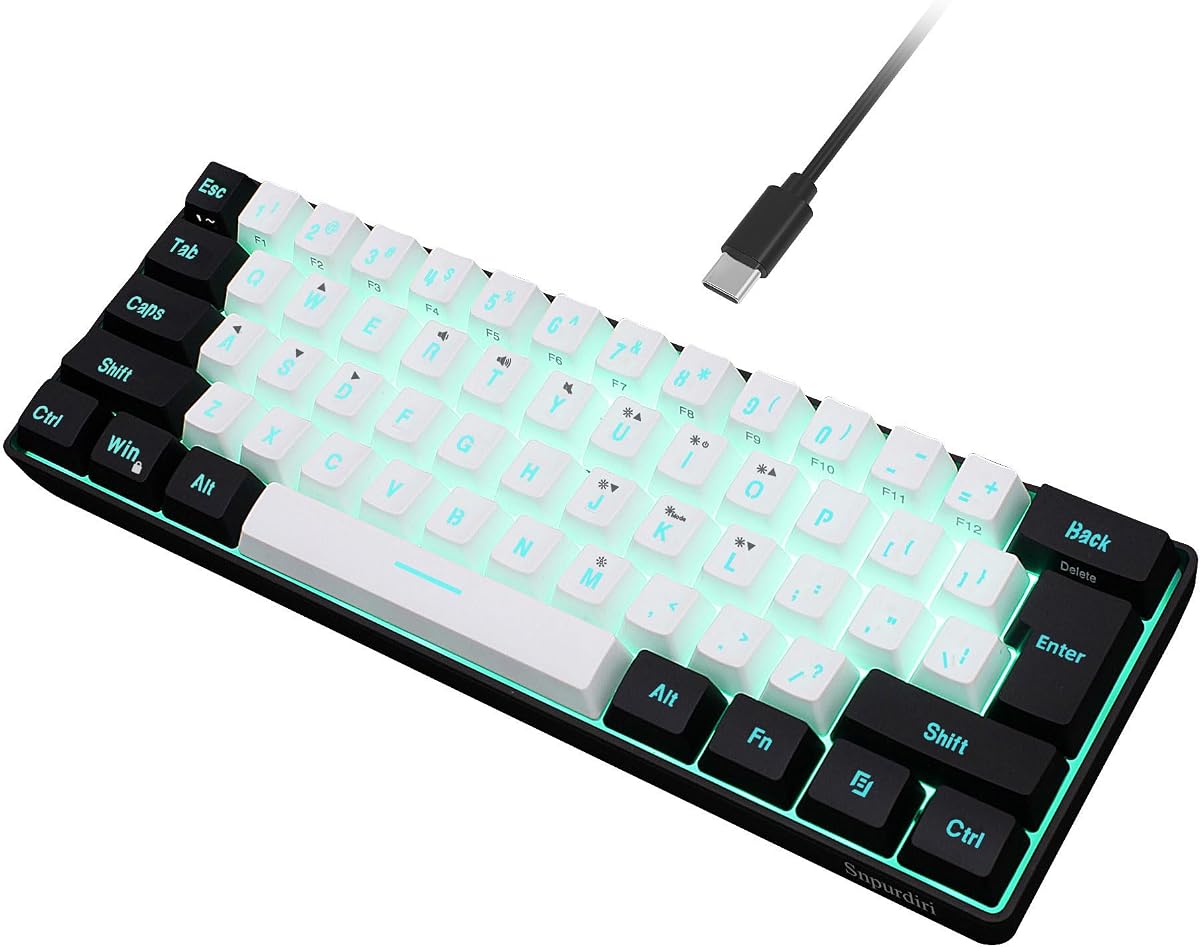
Snpurdiri offers a simple and elegant design with a black and white color scheme. It uses advanced imitation mechanical technology to provide a familiar feel without the cost. The double injection molding makes the characters transparent and clear for backlight visibility. This aesthetic appeal is great for users who want a unique look.
We may earn a commission when you buy through this link, at no additional cost to you.
RGB lighting includes 6 effects and color switching options to enrich typing time. Adjustable lighting speed and level help match your environment or mood. The ergonomic key height design reduces fatigue during long-term use. A detachable cable ensures stable transmission and easy storage when not in use.
While not a full mechanical keyboard it mimics the feel for a fraction of the price. The membrane feel may be softer than traditional mechanical switches but is quiet. It serves well as a travel or backup keyboard for those who need portability. The design focus keeps it stylish and mature.
We recommend this keyboard for users who prefer a simple and elegant setup. It is a great choice for those who do not need advanced mechanical features. The style and ease of use make it a friendly option for general tasks.
The black and white classic style offers a sophisticated look for any desk.
Double injection keycaps ensure clear legends and bright backlighting.
We may earn a commission when you buy through this link, at no additional cost to you.
Choosing the right 60 Percent Percent Keyboard requires understanding several key factors that impact performance and value.
Switches determine how your keyboard feels and sounds. Red switches are linear and smooth ideal for gaming and quiet environments. Blue switches provide tactile and clicky feedback great for typing enthusiasts. Brown switches offer a middle ground with tactile bumps but less noise. Consider your preference for sound and feedback before buying.
Wired connections offer zero latency and stable performance for gaming. Wireless options via Bluetooth or 2.4GHz provide flexibility for multiple devices and cleaner setups. If you need portability look for detachable USB-C cables and lightweight designs. For pure gaming, wired is often preferred to ensure consistent signal.
Aluminum cases feel premium and dissipate heat better than plastic. PBT keycaps resist wear and shine over time better than ABS materials. Hot-swappable boards let you replace switches without soldering to extend the lifespan. Check for sturdy feet and cable quality to ensure long-term reliability.
RGB lighting allows for customization of colors and effects across keys. Some models offer full per-key control while others have preset modes. If aesthetics matter look for brightness control and sync with other devices. For functional use, simple LED backlighting may suffice and save battery.
Dedicated software lets you program macros and remap keys for productivity. QMK and VIA support offer open-source customization for advanced users. Ensure the software is compatible with your operating system. Good customization options allow you to adapt the keyboard to your specific workflow.
The 60 percent layout removes function and arrow keys to save space. This frees up mouse area for gaming but requires key combos for missing keys. A compact size is ideal for travel and minimalist setups. Consider if you need extra keys or can adapt to the function layers.
Budget models offer basic mechanical feel at a low cost. Mid-range options add hot-swap and better keycaps for value. Premium boards cost more but include unique features like gasket mounts. Decide on your budget and prioritize features that matter most to you.
Established brands often provide better warranty and support. Reviews can highlight reliability issues with specific models. Look for brands with a history of quality control. A trusted brand ensures you receive a product that meets safety and performance standards.
Clean your keyboard regularly using compressed air to remove dust and debris from between the keys. Use a soft cloth to wipe down the case and keycaps to maintain appearance. Avoid spills by keeping drinks away from your workspace to protect internal components.
If your keyboard supports hot swapping, gently pull out switches with a tool to replace them without soldering. Check the manual for compatibility with different switch pin types before making changes. Proper handling ensures you do not damage the PCB during customization.
Use software to customize lighting and macros if your model supports it. Explore the manual to learn function key combinations for accessing arrow keys and media controls. Regularly update firmware to ensure compatibility with your system and improve stability over time.
Yes, a 60 percent keyboard is highly popular among gamers due to its compact layout. It frees up desk space for wider mouse movements which can improve aiming accuracy. The reduced distance between fingers allows for faster key reaches during intense gameplay.
Most 60 percent keyboards use function layers to access arrow keys. By holding the Fn key and pressing specific letter keys such as I J K L you can navigate without extra physical keys. This design saves space while keeping essential navigation available.
Modern wireless keyboards with 2.4GHz dongles are reliable for gaming with low latency. Bluetooth can have slight delay but is acceptable for general use. For competitive gaming, wired is still the safest choice to ensure zero input lag.
Hot-swappable switches allow you to change the keyboard's feel without soldering. You can try different switch types to find the perfect tactile or linear feel. This feature extends the life of your keyboard and supports experimentation at low cost.
PBT keycaps are more durable and resistant to shine than ABS plastic. They maintain their texture and appearance even after heavy use over time. Additionally they often have a thicker profile which contributes to a better sound and feel.
Most 60 percent keyboards are compatible with Mac with some layout adjustments. You may need to map keys differently due to layout differences on Mac keyboards. Check product compatibility before buying to ensure smooth functionality with your operating system.
We have reviewed ten top models ranging from budget options to premium high-performance units. Each keyboard offers unique strengths that cater to different needs like gaming and typing. The HITIME H61 stands out for build quality while the DIERYA offers great versatility.
When choosing your next keyboard prioritize features that align with your daily tasks. Consider factors like switch feel, connectivity, and build materials before making a decision. Understanding your own needs will help you find the perfect match for your setup.
Always check current pricing and availability before finalizing your purchase. Deals can change frequently so ensure you get the best value at the time of buying. We hope this guide has helped you find the ideal 60 percent keyboard for your workspace.