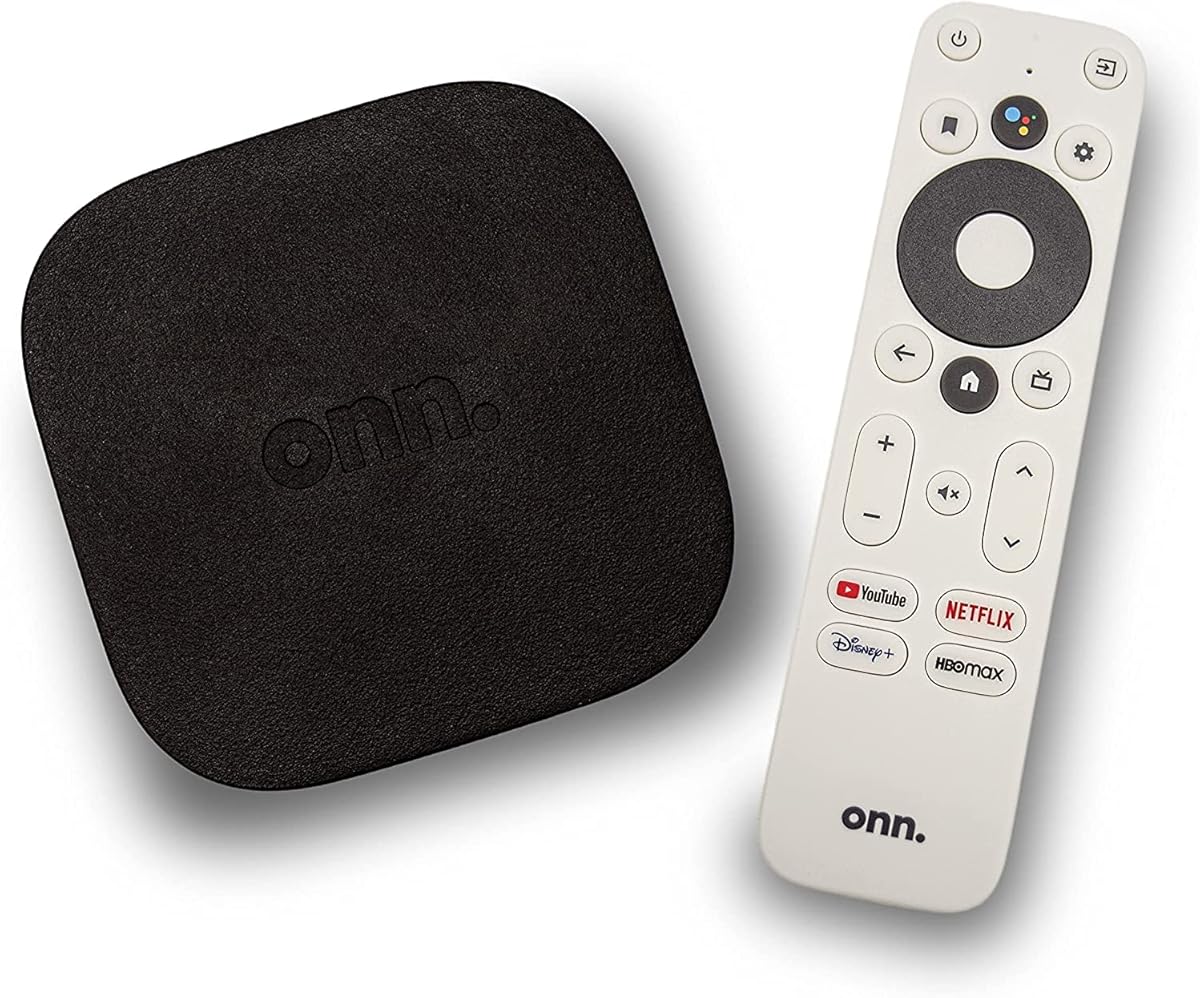
ONN Android TV 4K UHD Streaming Device
4.4Editor score
Google Assistant Voice Remote
Chromecast Built-in Support
Easy HDMI Setup
This guide compares the top 4K Android Box streaming devices for October 2026 to help you find the perfect smart entertainment solution for your home.
Finding the right streaming device can transform your viewing experience significantly. A quality 4K Android Box offers access to thousands of apps and crisp visual clarity.
We analyzed leading models based on performance, connectivity, and user interface. This list covers devices from budget-friendly options to high-end premium streaming boxes.
Each pick highlights unique strengths and potential limitations for different users. Please note that product availability and pricing may change over time.
4.4Editor score

4.1Editor score

4.3Editor score
Here is a side-by-side comparison of all ten streaming devices evaluated in this guide to help you choose quickly.



The ONN Android TV 4K UHD Streaming Device offers a reliable entry point into smart streaming. It holds a solid rating among users looking for affordable access to content.
We may earn a commission when you buy through this link, at no additional cost to you.
Its standout quality lies in the seamless integration of Google services. Users can cast content effortlessly from phones or use voice commands to find shows quickly.
While the remote lacks premium features like backlighting, it remains functional for basic navigation. The included HDMI cable simplifies setup further for new users.
This box suits casual viewers wanting essential features without complex menus. It is a practical choice for upgrading older TVs to smart capabilities.
Pressing the Google Assistant button lets you search for content hands-free.
Compatible with major TV brands ensuring broad usage across households.
We may earn a commission when you buy through this link, at no additional cost to you.
TiVo Stream 4K distinguishes itself with a unified interface that aggregates apps. It receives praise for eliminating the need to switch between screens constantly.
We may earn a commission when you buy through this link, at no additional cost to you.
Recommendations across apps help users discover new content effortlessly. The integration of Dolby Atmos adds depth to audio experiences for compatible setups.
However, the hardware is modest compared to newer high-end boxes. Some users report minor lag when navigating dense app libraries.
Ideal for viewers prioritizing content discovery over raw speed. It works well in environments where app switching is a major annoyance.
One search bar finds movies across all installed apps instantly.
Dolby Atmos creates a theater-quality sound without extra speakers.
We may earn a commission when you buy through this link, at no additional cost to you.
The Xiaomi 3rd Gen brings modern Wi-Fi 6 capabilities to streaming. It delivers sharp 4K visuals with support for advanced audio formats like DTS:X.
We may earn a commission when you buy through this link, at no additional cost to you.
Personalized recommendations via Google TV enhance the user experience. The high-speed connectivity reduces buffering during peak viewing times.
A requirement for a Wi-Fi 6 router might limit compatibility for some. The price reflects its premium feature set compared to standard boxes.
This device is best for tech-savvy households with updated networks. It offers a future-proof solution for high-bandwidth streaming needs.
Wi-Fi 6 ensures faster speeds and lower latency for 4K streaming.
Bluetooth remote works from any angle without line of sight.
We may earn a commission when you buy through this link, at no additional cost to you.
This model excels in performance within a tiny chassis. It supports smooth 60FPS playback which is critical for sports and action content.
We may earn a commission when you buy through this link, at no additional cost to you.
The inclusion of HDMI 2.1 ensures compatibility with newer TVs. Users benefit from quick navigation due to the robust processor.
Lacking an Ethernet port restricts wired connectivity options. The remote remains simple without extra customizable buttons.
Perfect for users with limited desk space behind the TV. It balances power and size effectively for a clean setup.
Its small size allows it to hide easily behind any television.
Supports 60FPS video for smoother motion in fast-paced scenes.
We may earn a commission when you buy through this link, at no additional cost to you.
This box stands out for offering 4GB of RAM which aids multitasking. It effectively turns older TVs into smart hubs with extensive app support.
We may earn a commission when you buy through this link, at no additional cost to you.
Dual-band WiFi helps avoid interference in crowded wireless environments. The H.265 decoding ensures efficient playback of high-quality streams.
The interface can feel less polished than branded alternatives. Users might need to configure settings more manually.
Suitable for users needing extra memory for multiple apps. It is a strong option for upgrading legacy televisions.
4GB RAM allows running background apps while streaming smoothly.
Simple HDMI connection brings smart features to old screens.
We may earn a commission when you buy through this link, at no additional cost to you.
The 4K Pro model introduces premium features like a backlit remote. It delivers fast streaming with a dedicated Ethernet port for stability.
We may earn a commission when you buy through this link, at no additional cost to you.
Find My Remote functionality prevents frustration when the remote is lost. The visual output is vivid with high-quality color reproduction.
It carries a higher price than basic units. Some users might find the advanced settings overwhelming.
Ideal for home theaters where reliability and convenience are key. It offers features often missing from standard streaming boxes.
Keys light up so you can navigate easily in dark rooms.
Wired connection option ensures consistent high-speed streaming.
We may earn a commission when you buy through this link, at no additional cost to you.
This device emphasizes audio and visual fidelity for cinematic views. It leverages a powerful 6nm platform for smooth operation.
We may earn a commission when you buy through this link, at no additional cost to you.
Users appreciate the rich color output and immersive sound features. The voice control simplifies navigation significantly for all ages.
Firmware updates sometimes take time to roll out fully. Pricing can vary depending on retailer promotions.
Recommended for those prioritizing media quality over cost. It provides a rich experience for movie enthusiasts.
Dolby Atmos creates a surround sound effect from any position.
Use voice to search for titles without typing on a remote.
We may earn a commission when you buy through this link, at no additional cost to you.
Certified status ensures security and compatibility with major apps. It runs Android 14 which offers improved privacy features.
We may earn a commission when you buy through this link, at no additional cost to you.
The Chromecast built-in feature allows quick sharing from phones. Storage can be expanded via USB for more media.
Internal storage is somewhat limited for many apps. Build materials feel light compared to premium devices.
Good for users needing certified software safety. It serves as a reliable everyday streaming box.
Google certification ensures safe app access and data protection.
Cast photos or videos instantly from your mobile device.
We may earn a commission when you buy through this link, at no additional cost to you.
This model offers access to a vast library of channels. It maintains a high rating for content variety and clarity.
We may earn a commission when you buy through this link, at no additional cost to you.
Voice search works well for finding photos or weather quickly. The stable CPU ensures consistent playback without glitches.
It runs an older Android version which may limit new apps. Long-term software support might be limited.
Best for users who need extensive channel access now. It is a solid choice for budget-conscious buyers.
Thousands of apps and channels available through Google Play.
4K HDR support ensures vibrant colors on modern screens.
We may earn a commission when you buy through this link, at no additional cost to you.
This device promises the latest Android 14.0 software experience. It includes unique peripherals like a wireless keyboard for typing.
We may earn a commission when you buy through this link, at no additional cost to you.
Bluetooth 5.4 provides strong connection capabilities for accessories. It supports high decoding rates for future 8K content.
The lower rating suggests potential bugs or compatibility issues. Users should be prepared for occasional technical quirks.
Ideal for tinkerers wanting to test new features. It offers advanced tech but lacks polish of established brands.
Android 14.0 brings enhanced security and modern app support.
Included keyboard allows light work directly from the TV.
We may earn a commission when you buy through this link, at no additional cost to you.
Selecting the right streaming device requires understanding specific hardware and software needs.
Ensure the box supports 4K UHD at 60FPS for smooth motion. Look for HDR standards like HDR10+ or Dolby Vision for better colors.
Prioritize 4K support to future-proof your setup against growing content resolution.
At least 2GB of RAM is necessary for smooth app switching. 32GB of internal storage allows installing many streaming apps comfortably.
Higher RAM and storage prevent lag when managing multiple applications simultaneously.
Wi-Fi 6 is preferred for high-bandwidth streaming without buffering. An Ethernet port provides stable wired internet for critical viewing.
Choose boxes with dual-band Wi-Fi or Ethernet for reliable network connections.
Android TV offers a standardized interface with Google Assistant integration. Certified devices ensure security and compatibility with major streaming apps.
Look for certified Android TV OS for a safer and more reliable experience.
Dolby Atmos and DTS:X support enhance sound quality significantly. Ensure the box supports your home theater system's audio formats.
Audio capabilities are crucial for a complete cinematic experience at home.
Voice assistants simplify finding content without typing. Backlit keys help navigate in low-light viewing conditions.
A good remote improves daily usability and navigation efficiency.
A Quad-Core CPU ensures quick app loading and system responsiveness. Faster processors reduce wait times when opening heavy apps.
Fast processing speeds keep the interface snappy and responsive to commands.
Established brands often provide better long-term software updates. Research user reviews to check for long-term reliability issues.
Trusted brands generally offer better support and consistent product quality.
Connect the device to an HDMI port on your TV and power it via the included adapter. Follow on-screen instructions to log into your Google account.
Keep the box in a well-ventilated area to prevent overheating. Dust the surface occasionally with a soft cloth to maintain cooling.
Install essential apps immediately and enable automatic updates for security. Use the voice remote to manage content efficiently without a keyboard.
No, they do not require a subscription to function. You only need a paid account for specific streaming services you want to use.
Any TV with an HDMI port can use these boxes. However, older TVs might not support 4K video output.
Models with higher RAM and fast processors like the 4K Pro are better. Bluetooth support allows connecting game controllers easily.
It helps reduce buffering but is not strictly necessary. Most 4K content streams fine on standard 5GHz WiFi networks.
While they are general purpose, certified models have better security. Avoid using sensitive financial apps on general streaming devices.
Navigate to Settings and check for System Updates. Certified devices usually update automatically to ensure security patches.
Our top picks cover a wide range of needs from budget to premium performance. The ONN model offers great value while Xiaomi boxes provide modern connectivity.
Prioritize features like RAM and connectivity based on your usage habits. A faster processor ensures your device remains responsive over time.
Always verify current availability and prices before making your purchase. Streaming technology evolves quickly so choose a device that grows with you.