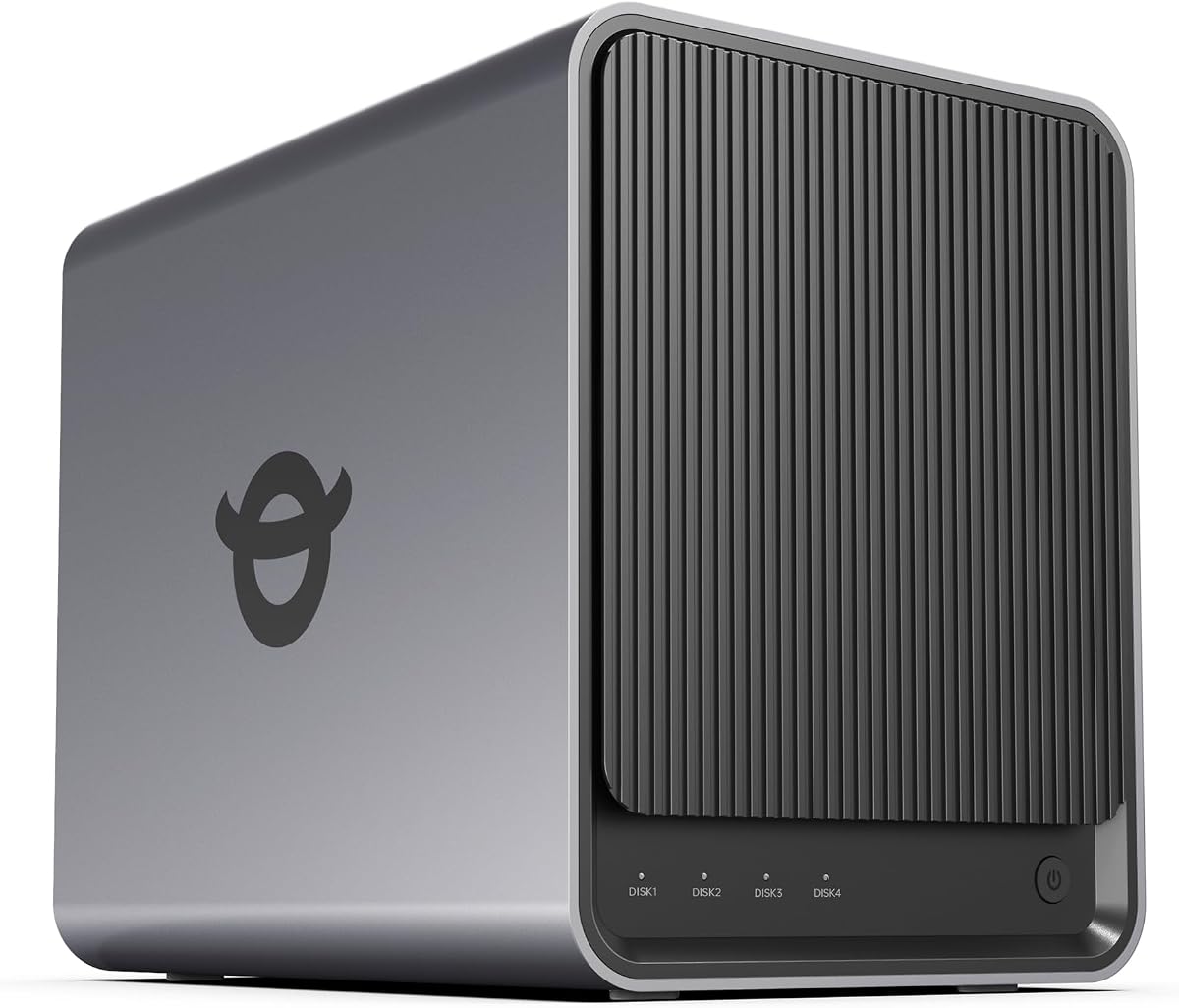
Yxk Zero1 Pro
4.4Editor score
Intel N100 processor
Beginner-friendly setup
Affordable price point
Compare the top 4 Bay NAS models for storage and performance to find the ideal private cloud solution for your home or office needs.
Choosing the right storage solution is critical for modern digital workflows. A 4 Bay NAS offers a balance of capacity and flexibility, allowing you to store vast amounts of data securely. It serves as a private cloud, giving you control over your files without relying on third-party subscriptions.
We evaluated ten leading models based on performance, features, and ease of use. Our analysis considers processor power, network capabilities, and software ecosystems. We looked at how each unit handles media streaming, backups, and multitasking to ensure they meet diverse user requirements effectively.
Each pick highlights specific strengths to help you make an informed decision. You will see detailed reviews, pros, cons, and key specifications. Note that prices and availability can change, so verify current details before purchasing your preferred device.
4.4Editor score

4.6Editor score

4.4Editor score
This table provides a quick side-by-side look at the key specifications of all ten models reviewed in this guide.


The UGREEN NAS DXP4800 Plus stands out as a top choice for families and small teams needing robust storage. It holds a high rating for its balance of power and usability, making it an ideal central hub for digital assets.
We may earn a commission when you buy through this link, at no additional cost to you.
Its powerful processor handles smooth collaboration and advanced features like Docker seamlessly. The 10GbE network port ensures super-fast transfers, backing up gigabytes in seconds. This device offers a secure private cloud with encryption and flexible permissions for protected access.
While it is a premium option, the cost is justified by the hardware capabilities and storage capacity. You get up to 144TB of space, allowing you to store millions of files without worrying about limits. It works across all major devices and operating systems.
This NAS is perfect for creators and teams who need speed and reliability. If you want a system that grows with your needs and keeps data secure, this model is a strong recommendation. It simplifies storage management effectively.
The powerful processor enables smooth performance for complex workflows and advanced application support.
Store vast amounts of data with a capacity supporting up to 144TB for extensive media and files.
We may earn a commission when you buy through this link, at no additional cost to you.
The UGREEN NAS DXP4800 Pro is engineered for demanding workflows and power users who need serious performance. It serves as a versatile private workstation, delivering smooth operations for virtual machines and Docker containers effortlessly.
We may earn a commission when you buy through this link, at no additional cost to you.
Powered by a pro-performance Intel processor, it offers a significant lead in multitasking capabilities. The dual high-speed network ports enable blazing-fast transfers reaching up to 1.25GB/s. It integrates intuitive software for media, photo management, and cloud sync.
Security is a key focus with enterprise-grade data protection and privacy certifications. Features like granular permissions and encrypted storage vaults protect sensitive files effectively. The local AI photo album manages libraries while ensuring privacy.
This NAS is ideal for IT professionals, developers, and video editors. If you require advanced workflows and reliable performance for growing teams, this is the perfect hub. It combines flexibility with robust security features for professional use.
The Intel Core i3 processor delivers significant performance leads for running heavy workloads and VMs.
Certified privacy and data protection features ensure your sensitive files remain safe and private.
We may earn a commission when you buy through this link, at no additional cost to you.
The Yxk Zero1 Pro is an excellent entry point for beginners needing home storage without custom OS setup. It holds a strong rating for its user-friendly app and guided steps, making it easy for families to start.
We may earn a commission when you buy through this link, at no additional cost to you.
Powered by an Intel N100 processor, it handles everyday tasks while giving room to explore advanced apps. You get up to 144TB raw storage and dual 2.5GbE ports for shared media access. The aluminum housing helps with cooling effectively.
It is a budget-friendly choice that still offers essential features like AI photo albums and Docker support. You can install third-party systems if you are experienced, but the default setup is simple. It provides good value for home users.
This NAS is perfect for families or small offices on a budget. If you want a straightforward way to store photos and files without complex configuration, this is a solid choice. It simplifies home storage efficiently.
The mobile app guides you through registration and setup, allowing quick access to storage.
Dual network ports and HDMI output help multiple users access media and view directly on TVs.
We may earn a commission when you buy through this link, at no additional cost to you.
The UGREEN NAS DXP4800 GT is built for creators and tech enthusiasts needing high performance. It handles backups and media processing smoothly with its AMD Ryzen processor and dual 10GbE networking for speed.
We may earn a commission when you buy through this link, at no additional cost to you.
Its UOS Pro ecosystem is simple to manage and supports Docker and virtual machines effectively. You can turn your NAS into a control center for surveillance with built-in features. The device also allows instant SD card and USB backups.
It supports local privacy with strong security encryption to protect your files. The storage capacity reaches up to 144TB with flexibility for SSD expansion. While drives are separate, the hardware offers great potential for workflows.
This NAS is ideal for teams needing speed and local data control. If you are a creator managing heavy files or security footage, this model meets those needs well. It ensures reliable and secure data storage.
Handles large media files and local editing with high-speed networking and fast transfers.
Built-in surveillance center allows you to manage cameras and footage locally without subscriptions.
We may earn a commission when you buy through this link, at no additional cost to you.
The TERRAMASTER F4-425 offers powerful performance for home media hubs at a great price. It handles 4K transcoding and multitasking easily with its Intel quad-core processor and 2.5GbE port for fast transfers.
We may earn a commission when you buy through this link, at no additional cost to you.
Its setup is user-friendly with tool-free HDD trays enabling installation in seconds. The device operates quietly, making it suitable for bedrooms or quiet offices. It supports mobile apps for control and synchronization anywhere.
It supports massive storage up to 120TB with flexible arrays for redundancy. CloudSync and TerraSync enable seamless cross-platform synchronization for your data. It is a solid choice for basic home storage needs.
This NAS is perfect for users needing reliable multimedia streaming. If you want a quiet, efficient server for photos and videos without complexity, this works well. It simplifies home storage management.
Supports 4K decoding and streaming apps for smooth video playback on multiple devices.
Supports up to 120TB total capacity to store extensive media libraries securely.
We may earn a commission when you buy through this link, at no additional cost to you.
The UGREEN NAS DH4300 Plus is designed as an entry-level option for home media storage. It simplifies moving from cloud subscriptions to your own private cloud with an easy setup and friendly user manual.
We may earn a commission when you buy through this link, at no additional cost to you.
It features smart photo backup with AI albums to organize memories. You can transfer files quickly with 2.5GbE ports and manage data remotely. The device ensures data ownership with strong encryption and local storage.
It is cost-effective compared to recurring cloud fees over the years. It handles multiple apps and transfers efficiently for basic home tasks. Magnetic covers help with alignment for closing the enclosure.
This NAS is ideal for families needing simple private storage. If you want a budget-friendly solution for backups and photos, it is a good pick. It keeps control of your data.
Automatically backs up photos and videos from phones with AI organization for easy search.
Retains full data ownership with advanced encryption and local backups for better privacy.
We may earn a commission when you buy through this link, at no additional cost to you.
The Synology DS425+ is a robust solution for team productivity and private cloud needs. It allows sharing large files and streaming media across offices with fast speeds for concurrent access.
We may earn a commission when you buy through this link, at no additional cost to you.
Its centralized repository ensures secure file storage with granular access controls. You get multi-layered data protection combining RAID and automated backups. It supports professional surveillance monitoring for business security.
This model offers reliable hardware backed by a dedicated warranty and support. It handles audit logs and document management effectively. The storage helps prevent data loss from various causes efficiently.
This NAS is perfect for small businesses needing secure file sharing. If you require reliable access and protection for client files, it works well. It streamlines data management.
Supports concurrent access from multiple users for seamless file sharing and media streaming.
Combines RAID redundancy and automated backups to prevent data loss from any cause.
We may earn a commission when you buy through this link, at no additional cost to you.
The Synology DS423 is a secure private cloud for family and business backup needs. It allows safe access and sharing of files from anywhere while keeping collaborators on the same page.
We may earn a commission when you buy through this link, at no additional cost to you.
It provides comprehensive protection with immutable snapshots to guard against malware. Surveillance features help protect homes or businesses with tools for monitoring. It replaces expensive cloud services with local secure file sharing.
Ransomware-resistant backups ensure your data remains safe with versioned files. The device is reliable and backed by expert customer support. It simplifies secure data management effectively.
This NAS is perfect for families needing privacy and backups. If you want to protect memories and files without cloud risks, it is a good choice. It ensures data security.
Safely access and share files and media from anywhere while keeping friends and partners updated.
Protect against malware with immutable snapshots and multi-destination backup strategies.
We may earn a commission when you buy through this link, at no additional cost to you.
The Synology DS925+ offers stable data transfers and fast sequential throughput for home and office use. It supports drives on the official compatibility list to ensure optimal performance.
We may earn a commission when you buy through this link, at no additional cost to you.
Its dual 2.5GbE ports provide fast network speeds and redundancy for critical data. Built-in solutions help manage files, protect data, and set up surveillance easily. Backed by a reliable warranty for peace of mind.
This device allows you to leverage file and photo management tools. It handles stable data transfers efficiently for daily tasks. The hardware is designed for reliability and consistent performance.
This NAS is perfect for users prioritizing transfer speeds. If you need fast access to files and strong reliability, it works well. It manages data securely.
Dual network ports ensure fast and reliable throughput for consistent file access.
Integrates file management, protection, and surveillance tools into one intuitive system.
We may earn a commission when you buy through this link, at no additional cost to you.
The Asustor Drivestor 4 Gen 2 is a budget home cloud solution with efficient processing. It features an upgraded quad-core CPU and 2.5GbE Ethernet for faster transfers compared to older models.
We may earn a commission when you buy through this link, at no additional cost to you.
It offers flexible RAID options to expand capacity and secure data redundancy. Enterprise-grade protection uses Btrfs snapshots to restore files quickly against ransomware. Supports smooth 4K playback for smart TVs and entertainment.
Personal cloud features allow secure remote access and device sync without relying on third parties. The USB 3.0 ports enable quick backups for external devices. It is cost-effective for basic needs.
This NAS is ideal for small offices needing basic cloud backup. If you want a cheap entry into private clouds with 4K streaming, it is a fit. It simplifies local storage.
Upgraded Quad-Core CPU provides smooth multitasking and lightning-fast processing.
Enterprise-grade protection with Btrfs snapshots allows instant data restoration from previous points.
We may earn a commission when you buy through this link, at no additional cost to you.
Choosing the right 4 Bay NAS involves evaluating performance needs and storage plans.
The processor determines how well your NAS handles multitasking and advanced apps. Look for modern quad-core CPUs to ensure smooth streaming and data processing without lag.
Choose a strong CPU for demanding workflows like virtual machines and Docker apps.
Network ports define how fast data moves across your local network. Dual 2.5GbE or 10GbE ports offer significant speed gains over standard Gigabit connections.
Prioritize faster ports if you work with large media files or multiple users.
RAM supports multitasking and system responsiveness. Having at least 4GB or 8GB ensures the system runs smoothly even under load.
Check if RAM is expandable to support future growth and heavier tasks.
4 Bay NAS units usually support up to 144TB of total storage. This is vital if you need to archive years of media or business data.
Verify maximum drive sizes supported to maximize your storage space effectively.
A user-friendly OS simplifies setup and file management. Look for intuitive interfaces and robust mobile apps for remote access.
Ensure the OS supports tools you need like photos, backups, and surveillance.
Features like RAID and snapshots protect data from loss or ransomware. Immutable backups ensure files cannot be changed by malware.
Prioritize NAS models with snapshot technology for critical data security.
Docker support allows running custom apps like Plex or Home Assistant. This turns your NAS into a versatile server for multiple purposes.
Check if the model supports Docker if you want to host custom services.
A solid warranty ensures hardware reliability over years. Look for vendors offering multi-year coverage and responsive technical support.
Choose brands with good reputations for long-term support and software updates.
Begin by installing compatible hard drives securely into the trays. Follow the guided setup steps on your mobile app to initialize the system.
Configure RAID arrays to balance storage space and data protection. This ensures that a single drive failure does not result in permanent data loss.
Regularly update the NAS operating system to patch security vulnerabilities. Monitor drive health via built-in tools to replace aging components before they fail.
Yes, most 4 Bay NAS units are sold as diskless appliances. You must purchase compatible hard drives or SSDs separately to store your files. Check the vendor's compatibility list to ensure the drives work correctly.
Yes, many models support Docker which allows you to run Plex. Some units have hardware transcoding built-in for smooth 4K streaming without needing a separate computer.
RAID arrays combine multiple drives for speed or redundancy. A single drive lacks redundancy, so failure means data loss. RAID 5 or 6 is common for balancing space and safety.
Most NAS devices require a wired Ethernet connection for stability. Wi-Fi is not common due to reliability issues. Check specs for 2.5GbE or 10GbE ports for best performance.
Use the vendor's quick setup tool to enable remote access securely. This usually involves creating a cloud ID and enabling HTTPS. Mobile apps allow you to browse files from anywhere.
Yes, a NAS involves a one-time purchase cost. Over several years, it is cheaper than monthly cloud subscriptions. It offers more control over your data and privacy.
Docker lets you run containerized apps like media servers or tools. It expands your NAS beyond simple storage into a versatile server. Not all entry-level models support this feature.
The top picks for 4 Bay NAS include strong contenders for various needs. The UGREEN DXP4800 Plus stands out as a versatile choice, while the Yxk Zero1 Pro offers budget value.
Prioritize processor performance and network speed for your specific workflow. If you need high speed, look for 10GbE options. For basic use, 2.5GbE is often sufficient.
Always check current prices and availability before buying. Storage needs grow, so choose a model that scales to meet future demands.