
SCRIB3D P1 3D Printing Pen with Display
4.4Editor score
Adjustable temperature and speed
Includes starter PLA filament
Auto sleep function for safety
This guide compares the top 3D printing pens for kids in October 2026, evaluating safety, ease of use, filament variety, and creative features to help you
3D printing pens offer a unique way for children to transform flat drawings into tangible objects. These tools melt plastic filament to create three-dimensional shapes, fostering creativity and spatial reasoning skills in a hands-on manner.
We evaluated ten leading models based on safety features, temperature control, filament compatibility, and included accessories. Our analysis focuses on how well each pen supports young users in learning STEM concepts while enjoying screen-free artistic play.
Each pick highlights key strengths and potential limitations to help you find the right fit for your child's age and skill level. Note that product availability and specific bundle contents may change over time, so verify details before purchasing.
4.4Editor score
4.4Editor score
4.5Editor score
This table provides a side-by-side overview of all ten selected pens, highlighting their core specifications and ideal use cases to help you quickly compare features and find the best match for your needs.


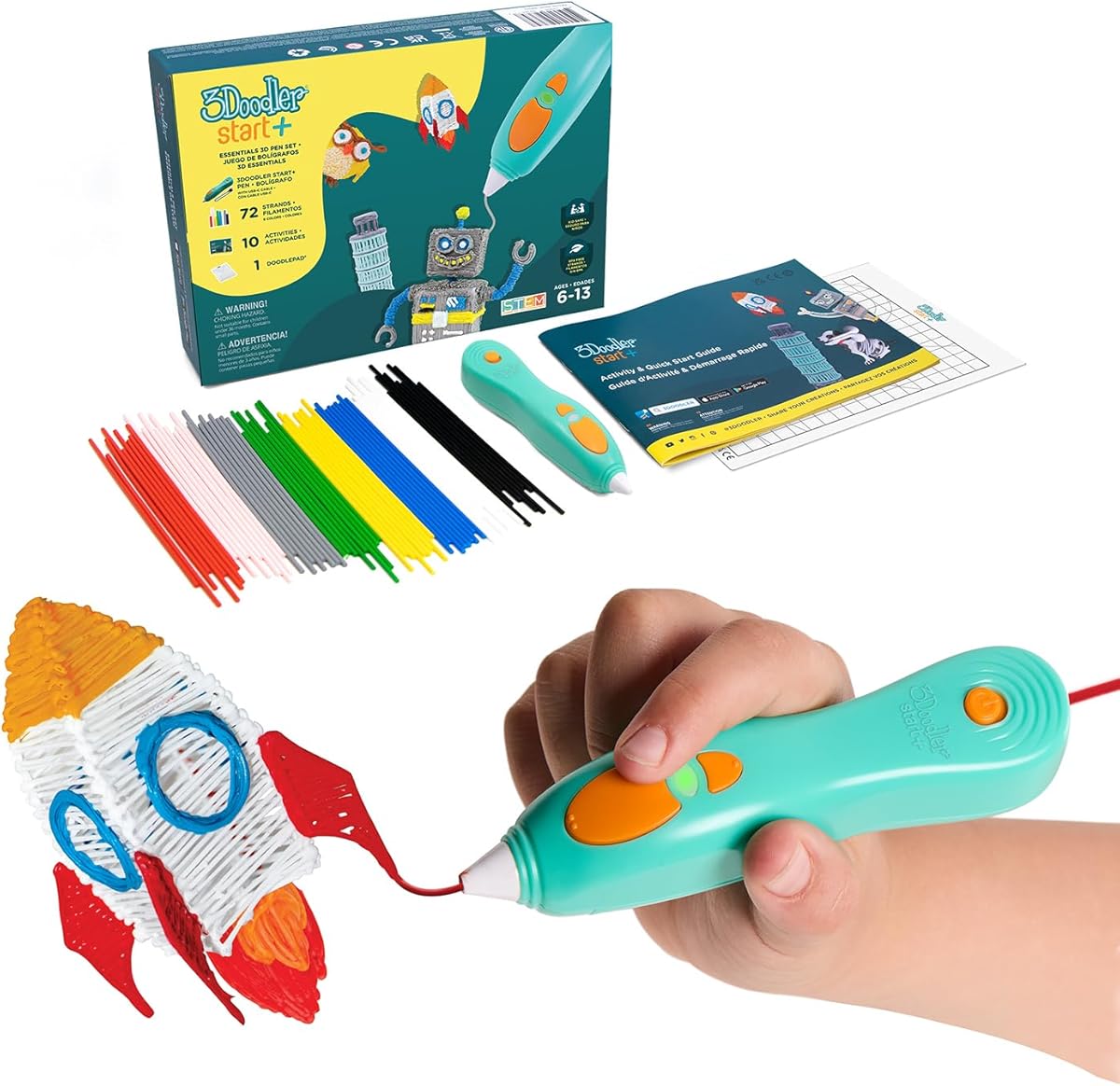
The 3Doodler Start+ Essentials set stands out as the top choice for families prioritizing safety and simplicity. With a rating of 4.4 stars, it offers a unique design that eliminates hot parts entirely, allowing kids to touch the nozzle safely. This makes it ideal for younger users who might be prone to accidents.
We may earn a commission when you buy through this link, at no additional cost to you.
Its upgraded experience includes 50% more filament and ten new stencils, providing ample material for creative projects right out of the box. The slimmer body and faster charging mean less downtime and more active drawing time. The included activity guide helps connect art to STEM concepts effectively.
While the proprietary filament system limits color choices compared to universal pens, the safety benefits outweigh this trade-off for many parents. The packaging is also eco-friendly, using 100% recyclable materials to minimize waste. This aligns with modern values around sustainability.
Parents seeking a worry-free intro to 3D art should consider this model first. It removes the fear of burns and simplifies the workflow so children can focus on imagination rather than mechanics. The warranty policy further supports confidence in the purchase.
The nozzle and plastic can be touched without burn risks, ensuring peace of mind for parents supervising creative play sessions.
This kit serves as a screen-free learning tool that helps children make real-world connections to various STEM concepts quickly.
We may earn a commission when you buy through this link, at no additional cost to you.
The SCRIB3D P1 offers exceptional value for families looking for a feature-rich pen without a premium price tag. It features a display that helps users monitor settings, which is rare at this price point. The 4.4-star rating reflects its reliability and ease of use for beginners.
We may earn a commission when you buy through this link, at no additional cost to you.
Its stepless speed slider allows optimal control whether you are doing slow intricate projects or faster infill work. The ability to switch between PLA and ABS filament expands creative possibilities significantly. A power adapter and starter colors ensure you can start creating immediately.
One limitation is the warm-up time of two to three minutes, which might test the patience of very young children. Additionally, while safer than many pens, the ceramic nozzle still gets hot and requires careful handling. However, these are standard trade-offs for this type of technology.
For budget-conscious buyers who still want advanced features like temperature adjustment and speed control, this is a strong contender. The 1-year guarantee and responsive customer service add to the confidence in purchasing this versatile tool.
Supports both PLA and ABS filaments, allowing for more durable creations and varied texture options.
Great for quality family time and making handmade gifts or decorations together during weekends.
We may earn a commission when you buy through this link, at no additional cost to you.
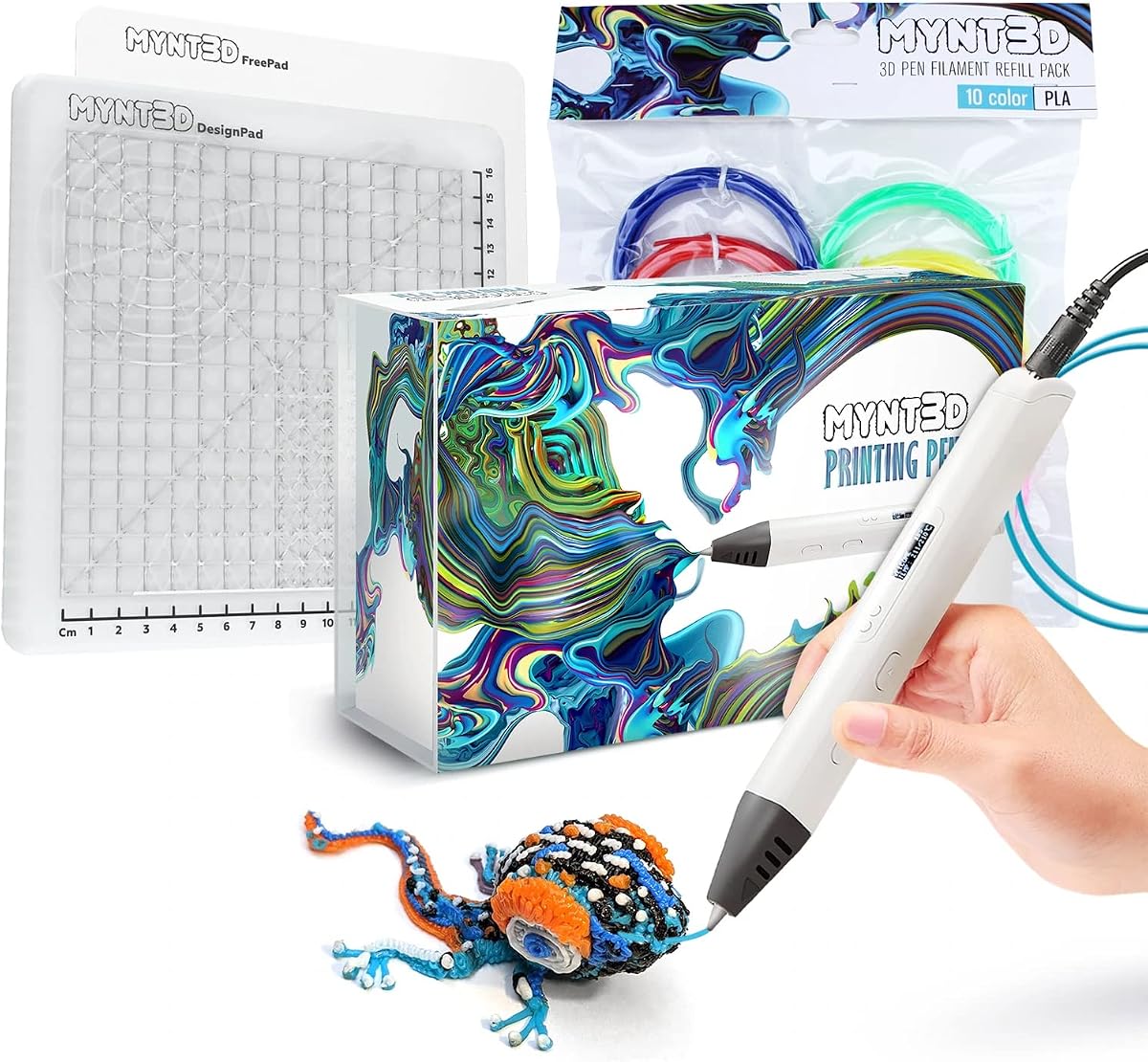
This bundle represents the pinnacle of what a premium 3D pen kit can offer. It includes a Pro pen with discrete temperature adjustability and a replaceable sealed nozzle design that ensures long-lasting operation. The inclusion of a DesignPad mat allows for precise geometric shaping.
We may earn a commission when you buy through this link, at no additional cost to you.
The filament selection is extensive, featuring ten different colors vacuum sealed to maintain quality. This variety encourages complex and colorful projects that might otherwise be limited by starter kits. The DesignPad and FreePad mats provide ideal adhesion for tracing and custom designs.
While the price is higher, the comprehensive nature of the kit justifies the investment for serious creators. Users benefit from unlimited customer service access which provides troubleshooting support and tips for mastering the tool. This level of support is rare in the industry.
If you want a setup that supports advanced techniques and offers durability, this is the ideal choice. The 1-year limited warranty further protects your investment. It is perfect for teens and adults who are ready to level up their 3D printing skills.
Vacuum sealed PLA ensures the plastic remains high quality and ready for use when you need it most.
DesignPad allows perfect geometric shapes while FreePad enables tracing of patterns with ideal adhesion.
We may earn a commission when you buy through this link, at no additional cost to you.
The MYNT3D Professional pen is designed for users who demand precision and control over their creative process. The large OLED display lets you monitor temperature to help achieve a wide variety of effects. This level of detail is unmatched in consumer 3D pens.
We may earn a commission when you buy through this link, at no additional cost to you.
Temperature is adjustable in 1 degree increments from 140 to 230 C, offering optimal fine-tuning for different materials. The adjustable feed allows you to regulate speed and flow for optimal control of material while drawing. This helps in creating consistent lines and structures.
However, this level of control comes with a learning curve that might be challenging for younger children. It lacks specific child-safety features like non-hot nozzles found in other models. Therefore it is better suited for older kids or adults with patience to master settings.
For hobbyists or educators teaching advanced concepts, this tool provides the necessary technical depth. The kit includes three colors of PLA filament and an adapter to get started immediately. Its ergonomic design ensures comfort during long sessions of detailed work.
Adjusting in single degree increments ensures you can find the perfect melt point for specific projects.
The OLED screen provides clear visibility of settings so you can make adjustments on the fly.
We may earn a commission when you buy through this link, at no additional cost to you.
The MYNT3D Super pen is built to last, featuring a new ultrasonic sealed nozzle that is nearly clog-proof. This durability makes it a reliable choice for frequent use and projects that require consistent output. The pen supports both PLA and ABS materials for versatility.
We may earn a commission when you buy through this link, at no additional cost to you.
A stepless speed slider lets you regulate flow for optimal control of material while you are drawing. This feature is essential for creating detailed structures without breaking delicate parts. The slim ergonomic design ensures it fits well in hand for extended periods.
While it lacks the visual feedback of an OLED display, the mechanical adjustments are intuitive and responsive. It is great for kids, artists, and engineers of all ages who need a sturdy tool. The included starter PLA and adapter provide a complete starting kit.
For those who value reliability and long-term performance over fancy screens, this model is highly recommended. The 1 year limited warranty offers protection against defects. It balances advanced features with a design that encourages practical daily use.
The ultrasonic sealed nozzle reduces interruptions caused by clogging during creative sessions.
Compatibility with both ABS and PLA allows for different strength and finish options in creations.
We may earn a commission when you buy through this link, at no additional cost to you.
Designed for accuracy and comfort, the SCRIB3D Advanced pen features a soft touch surface and ergonomic curvature. This design intention ensures the most comfortable 3D drawing experience on the market. It includes a large LCD screen to monitor heat and ensure correct settings.
We may earn a commission when you buy through this link, at no additional cost to you.
Eight different speed options allow you to regulate speed and flow for optimal control of line thickness. This precision helps in creating accurate and creative 3D models and structures. The kit includes five colors of PLA filament for variety in your early projects.
The advanced features mean there is a slight learning curve compared to simpler pens. However, once mastered, the control it offers is exceptional for making detailed items. It is designed for making accurate models and structures that require careful planning.
If comfort during long drawing sessions is a priority, this pen delivers on that front. The ready-to-use kit with manuals and stencils helps get you started without hassle. It bridges the gap between hobbyist tools and professional grade equipment.
Curvature intended to fit your hand reduces fatigue during extended creative drawing sessions.
Eight speed options provide granular control over flow to match the complexity of your design.
We may earn a commission when you buy through this link, at no additional cost to you.
This bundle combines the durable Super pen with a generous set of accessories for immediate creative freedom. It features stepless speed control for enhanced flow regulation and temperature adjustability for ABS or PLA materials. The kit includes ten color PLA filaments for diverse projects.
We may earn a commission when you buy through this link, at no additional cost to you.
The DesignPad mat provides a double sided silicone drawing surface with channels to design and create perfect geometric shapes. This helps maintain consistency in your 3D structures without needing manual measurement. The FreePad allows for custom pattern tracing with ideal adhesion.
Replacing the nozzle ensures long-lasting operation even if you run into issues with debris. The 1 year limited warranty supports your purchase with peace of mind. Customer service access is unlimited for tips, troubleshooting, and anything else you might need.
For users wanting a complete package without individual purchases, this is an efficient choice. It provides all the essentials from filament to mat in one box. It supports both casual fun and serious structural design work equally well.
Everything you need to create like a pro is included from the pen to the mats and filaments.
DesignPad channels help you create perfect geometric shapes every time without complex tools.
We may earn a commission when you buy through this link, at no additional cost to you.
The 3Doodler Flow brings reliability and multi-functional compatibility to the table for more experienced creators. It is compatible with 1.75 plastic filaments such as PLA, ABS, and wood which expands creative textures significantly. The integrated LCD provides real-time temperature monitoring to ensure smooth 3D printing.
We may earn a commission when you buy through this link, at no additional cost to you.
Designed to be user-friendly, it avoids complicated software or hardware setups. Just plug it in and wait for the pen to heat up to start creating with ease. Build and draw 3D structures with extruded heated plastic that hardens almost instantly for quick results.
While it carries a lower rating than other models, this may reflect the learning curve of multi-filament support. It is intended for teens, adults, and creators rather than young children. The lightweight design ensures you can take your Flow on-the-go for mobile creativity.
For those who want to experiment with wood or ABS materials, this pen offers that capability. The activity guide helps you learn the basics and get creative quickly. It is a practical tool for handmade gifts, decorations, and household repairs.
Compatibility with wood filament allows for unique textures not found in standard plastic pens.
Compact and light-weight design makes it easy to carry for creativity anywhere.
We may earn a commission when you buy through this link, at no additional cost to you.
This bundle upgrades the standard P1 pen with a two-sided silicone mat designed for tracing and practice. The smooth mat features built-in shapes and patterns to help guide designs and support more consistent 3D pen work. It is reusable and heat-resistant for repeated use.
We may earn a commission when you buy through this link, at no additional cost to you.
The bundle includes starter PLA filament, a stencil book, and a project guide so you can begin creating right out of the box. The mat is easy to wipe clean and built to handle the creative sessions without wear. It is made specifically for SCRIB3D P1 pens.
Adding a mat to your setup keeps your workspace clean and provides a consistent surface for your projects. This is especially helpful for beginners who are learning to control the pen flow on flat surfaces. The flexible nature of the mat ensures it adapts to any table.
If you want a ready-to-use kit that includes tools for practice, this bundle is highly practical. It offers great value by combining the pen with essential accessories. You can use it with P1, Advanced, or PRO pens for flexibility.
Silicone mat provides a smooth surface that helps beginners achieve more consistent lines.
Integrated shapes guide your hand to create geometric designs easily during practice.
We may earn a commission when you buy through this link, at no additional cost to you.
This bundle takes the safety of the Start+ model to the next level by providing over 1250 ft of additional plastic filament. It includes the 3Doodler Start pen, DoodlePad, 72 strands of filament, and ten new stencils for the best drawing experience. It is child-safe with no hot parts.
We may earn a commission when you buy through this link, at no additional cost to you.
Compatible with the free 3Doodler app, you can access stencils, templates, and step-by-step instructions on iOS and Android devices. This app support extends the creative possibilities beyond physical kits. It encourages screen-free play and learning of STEM skills effectively.
The sheer volume of filament means kids can enjoy hours of 3D doodling fun without running out quickly. This is ideal for classrooms or families planning multiple projects. The DoodlePad included is specifically designed for working with the pen.
If you want the longest-lasting fun for children who love this tool, this bundle is unmatched. It provides everything needed to start and continue creating immediately. It is a generous gift option for creative kids.
Over 1250 feet of filament ensures years of creative usage for multiple children.
Free app provides step-by-step instructions and templates to help kids learn new techniques.
We may earn a commission when you buy through this link, at no additional cost to you.
Choosing the right 3D pen requires considering safety, features, and ease of use. Here are key factors to evaluate before purchasing.
Safety is paramount when selecting a pen for children. Look for models with no hot parts or cool-touch nozzles to prevent burns. Some pens also include auto sleep functions that turn off the heat when not in use, reducing risks of accidental burns.
Always prioritize pens explicitly rated for children aged 6 and up.
Most pens use PLA filament which is safe and easy to use. Some advanced pens support ABS or wood filaments for different textures and durability. Ensure the pen accepts standard 1.75mm filaments if you want flexibility in materials.
Proprietary filaments limit choices and may cost more over time.
Adjustable temperature allows you to switch between materials and prevent clogs. Beginners benefit from simpler controls with fewer settings to manage. Advanced users might prefer precise adjustments for different creative needs.
Check if the pen has a display or physical buttons for easy settings changes.
Stepless speed sliders provide smooth control over how fast the plastic comes out. This helps in creating intricate details or fast fills depending on the project. Consistent flow is essential for a good user experience.
Look for pens that offer intuitive forward and reverse button controls.
Comfortable designs reduce hand fatigue during long creative sessions. A soft touch surface and curvature that fits the hand can make a difference. Lightweight pens are easier for small hands to hold and maneuver.
Consider the weight and balance of the pen when making a choice.
Bundles often come with stencils, mats, and starter filament. These extras add value and help beginners start creating immediately. A good kit includes all necessary cables and adapters for power.
Check what is included in the box to avoid buying additional items separately.
A reliable warranty ensures protection against manufacturing defects. Responsive customer service can help with setup or troubleshooting issues. Most reputable brands offer at least one year of coverage.
Research the company's reputation for supporting their products.
The setup process should be simple enough for children to handle with minimal help. Quick heat-up times and intuitive controls make the experience smoother. Clear manuals and activity guides assist in learning basics.
Prioritize models that emphasize screen-free learning and quick results.
Begin by plugging the pen into a power source and waiting for it to heat up. This usually takes two to three minutes. Once warm, insert a piece of filament into the back of the pen until it clicks into place.
Hold the pen upright and press the forward button to start extruding plastic. Use your free hand to guide the plastic as you draw shapes in the air or on paper. Move steadily to ensure smooth lines.
Clean the nozzle regularly with a soft brush to prevent clogs. Store the pen with the cap on to protect the tip. Follow the manufacturer's instructions for maintenance to keep your pen working well.
PLA is easier to use and smells less while ABS is stronger and can withstand heat. PLA is safer for kids and beginners whereas ABS requires higher temperatures and more ventilation. For children, PLA is usually the better choice.
Yes, many 3D pens are designed specifically for kids with safety features like cool nozzles and auto sleep modes. Always supervise children when they are using a pen and follow age recommendations. Choose models certified for child safety.
Heat the pen to the recommended temperature and gently pull the filament out. Use the reverse button to push plastic back. If blocked, clear the nozzle with a needle carefully. Follow the manual for specific cleaning steps.
No, most pens work with PLA and ABS 1.75mm filaments. Some support wood or metal blends. Always check the pen's specifications to ensure compatibility with the filament you plan to use to avoid damage.
Yes, 3D pens are great for fixing broken plastic items or household objects. They can fill cracks or reattach pieces quickly. Ensure the material you are repairing is compatible with the filament for a strong bond.
Depends on usage and size of projects. A 300 feet roll can last for several large projects or many small ones. Larger bundles offer more value for families. Check the filament amount when comparing options.
We have reviewed ten top models that balance safety, features, and ease of use for young creators. The 3Doodler Start+ remains the safest choice for beginners. The SCRIB3D P1 offers great value for families.
Consider what matters most to your child whether it is safety, creative freedom, or budget. Matching the pen to their age and skill level ensures a positive experience and long-term enjoyment.
Remember that products and bundles may change over time so verify current details before buying. These tools open up endless possibilities for learning and fun.