
8Bitdo Ultimate 2C Wireless
4.4Editor score
1000Hz Polling Rate
Hall Effect Sticks
Remappable Bumpers
Low Cost Option
This guide compares the top Android Joystick Controller options for 2026, focusing on precision, compatibility, battery life, and ergonomic design for mobile
Mobile gaming has evolved significantly, transforming smartphones into powerful consoles capable of running graphically demanding titles. For serious players, touch controls often fall short, especially in competitive shooters or rhythm games where precision is paramount. An Android Joystick Controller bridges this gap, offering physical buttons and analog sticks that mimic console experiences directly on your phone.
Selecting the right controller requires careful consideration of connectivity, build quality, and software support. We evaluated ten leading models based on their Hall Effect technology, battery longevity, and compatibility with popular cloud gaming services. Our analysis highlights which devices deliver the most reliable performance without introducing latency or drift issues during extended play sessions.
Each recommendation in this list showcases unique strengths tailored to different play styles and budget constraints. Whether you prefer a compact travel-friendly design or a full-sized controller with programmable back paddles, there is an option for you. Please note that product availability and pricing can fluctuate, so verify current details before making your final purchase decision.
4.4Editor score

4.4Editor score

4.4Editor score
The following table provides a side-by-side comparison of all ten controllers, highlighting their key specifications, unique features, and intended use cases to help you make an informed choice.
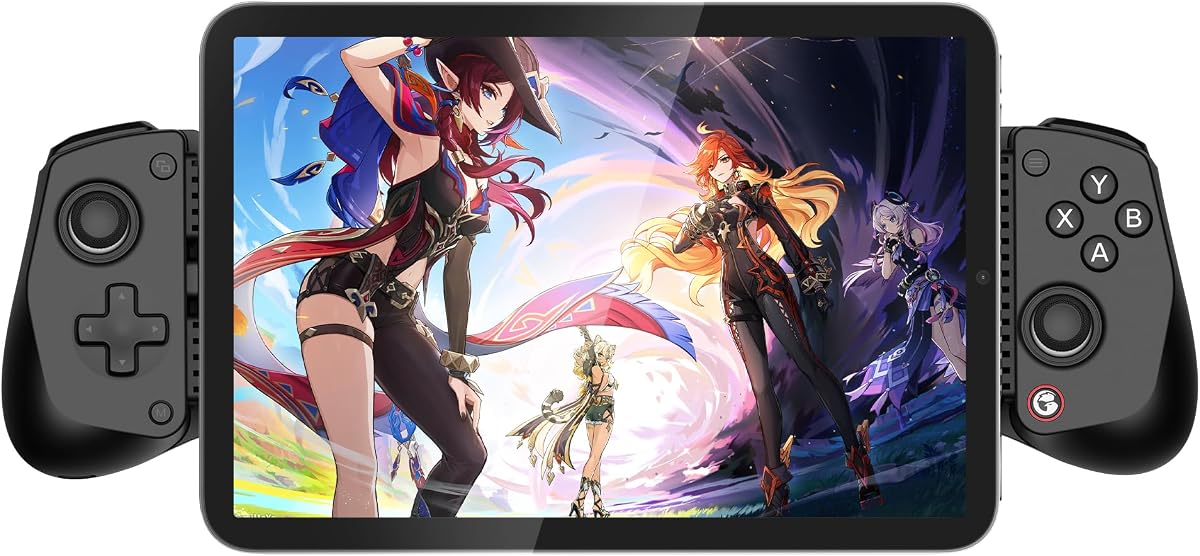


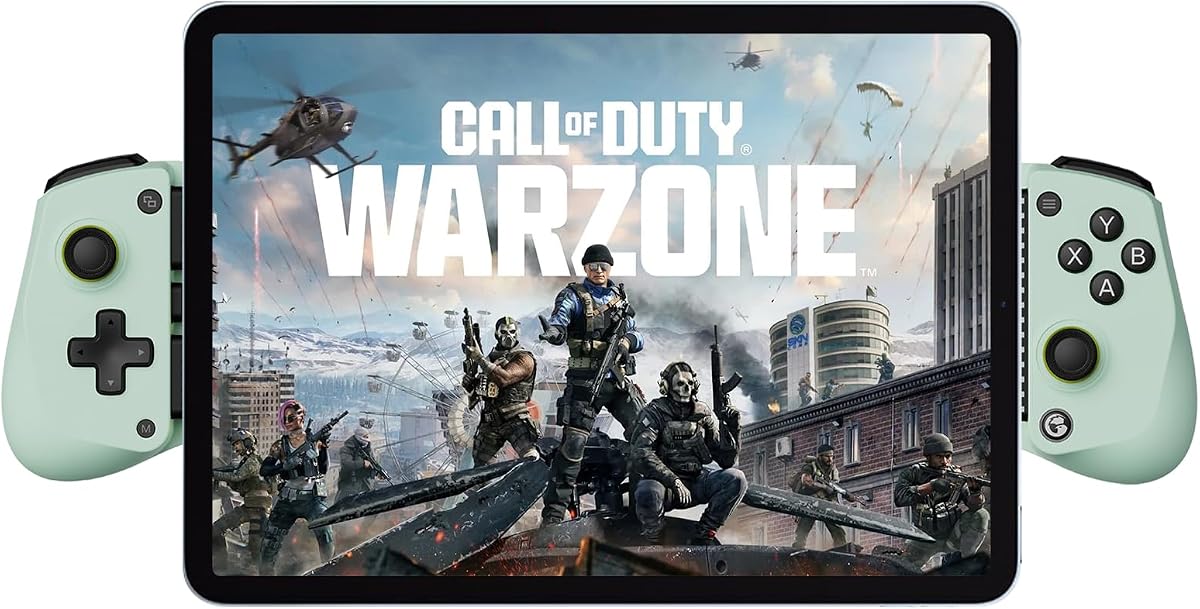

The Mocagen MC1 stands out as our top choice for Android users seeking a reliable and feature-rich mobile gaming controller. With a strong 4.4-star rating, it delivers professional-grade precision through its Hall Effect technology which eliminates the common issue of stick drift. Its ergonomic design and extended battery life make it ideal for both short commutes and lengthy weekend gaming marathons.
We may earn a commission when you buy through this link, at no additional cost to you.
At the core of this controller is its innovative electromagnetic induction technology ensuring zero drift during intense gameplay. The 5-million-cycle lifespan significantly outlasts standard carbon-film sticks, offering better long-term value. Additionally, the controller features a 600mAh battery providing up to six hours of playtime in brightness mode. This allows you to game all day without constantly worrying about charging.
While the RGB lighting adds a stylish aesthetic, it does consume more battery power when active. Users who prioritize battery longevity over visual flair may want to disable the light ring through the settings. The case-friendly design is a significant plus, allowing you to keep your protective case on while playing. This convenience saves time and prevents accidental scratches on your device.
We recommend this controller to mobile gamers who value durability and precision in a portable package. Whether you are playing shooters like Call of Duty or RPGs like Genshin Impact, the MC1 provides the accuracy needed to succeed. The combination of tactile feedback, customizable software, and robust hardware makes it the most balanced option on the market today.
The Hall Effect joysticks use magnets to detect position, removing physical contact that typically causes wear and drift. This ensures your inputs remain accurate and consistent over years of use.
Engineered to accommodate phone cases up to 12mm thick, this controller saves you the hassle of removing protection. It also features a camera recess to prevent lens scratches during clamping.
We may earn a commission when you buy through this link, at no additional cost to you.
For gamers seeking high performance without breaking the bank, the 8Bitdo Ultimate 2C is the clear winner. Despite its budget-friendly price tag, it does not compromise on critical features like Hall Effect joysticks and a high 1000Hz polling rate. This makes it an exceptional value for those who want competitive precision for mobile gaming on Android devices.
We may earn a commission when you buy through this link, at no additional cost to you.
The standout feature of this controller is its 1000Hz polling rate which ensures minimal input lag during fast-paced action. This is particularly beneficial for fighting games or competitive shooters where every millisecond counts. Furthermore, the controller includes wear-resistant metal joystick rings that prevent the wobble often seen in cheaper models. These small details significantly enhance the premium feel of the device.
A limitation to note is that this model is designed primarily for PC and Android use without a built-in phone clamp. You may need a separate holder if you intend to use it with phones for extended periods. Additionally, remapping is done via hardware combinations rather than software on mobile which might be less intuitive for some users compared to app-based customization.
We suggest this option for budget-conscious gamers who already have a stable setup like a phone stand or lap desk. It offers professional-grade hardware features at a fraction of the cost of premium controllers. If you prioritize performance and durability over integrated phone mounting, the 2C is an unbeatable choice.
The 1000Hz polling rate sends data to your device a thousand times per second. This reduces latency and provides smoother, more responsive gameplay than standard 125Hz controllers.
These rings protect the base of the sticks from wear caused by friction against the controller surface. They prevent the sticks from becoming loose over time ensuring consistent centering.
We may earn a commission when you buy through this link, at no additional cost to you.
The KICKDOT Mobile Gaming Controller represents the pinnacle of mobile gaming hardware for those who demand the absolute best. It utilizes advanced TMR (Tunneling Magnetoresistance) sensors which offer 10x higher precision than standard Hall Effect sensors. This technology ensures ultra-smooth aiming and zero stick drift, making it perfect for competitive shooters and precise platformers.
We may earn a commission when you buy through this link, at no additional cost to you.
One of its most impressive features is the massive 15-hour battery life supported by the low-power consumption of TMR technology. You can play for days without needing to recharge, which is ideal for travelers or heavy users. The controller also includes programmable macro back buttons allowing you to record complex button sequences for one-touch execution. This gives you a significant strategic advantage in strategy and fighting games.
Due to its full-size design and robust build quality, the KICKDOT is heavier and bulkier than pocket controllers. It may not fit comfortably in smaller pockets, so it is best suited for dedicated gaming sessions at home or on a tablet setup. The premium price reflects the high-end components and features, so it is an investment for serious enthusiasts.
This controller is recommended for competitive gamers and content creators who need reliable high-end performance and extended playtime. If you value customization options like macro recording and want the fastest response rates available on Android, the KICKDOT is worth the investment. It sets a new standard for what a mobile controller should be.
TMR sensors offer 4096-level sampling for ultra-smooth aiming with 3000-point resolution per axis. They consume significantly less power than Hall sensors extending battery life dramatically.
The macro function allows you to record complex button combinations and play them back with a single button press. This streamlines repetitive actions and improves efficiency during gameplay.
We may earn a commission when you buy through this link, at no additional cost to you.
The GameSir X5 Lite is a versatile option designed for users who prioritize stability and ease of use. Its Type-C connection ensures a secure link between the controller and your device, preventing disconnections during gameplay. The ability to stretch up to 213mm makes it compatible with larger tablets and modern large-screen phones providing a console-like experience on bigger displays.
We may earn a commission when you buy through this link, at no additional cost to you.
A key advantage of this model is the pass-through charging feature which allows you to play while your phone charges. This is particularly useful for cloud gaming sessions where battery drain can be rapid due to network streaming and screen usage. The lightweight design of 135.4g reduces hand fatigue during long sessions, and the membrane buttons operate quietly which is considerate for shared living spaces.
The main drawback is its slightly lower user rating compared to top-tier models which suggests mixed experiences with durability or feel. Additionally, software customization is limited compared to rivals with dedicated apps for detailed mapping. This makes it better suited for casual gamers who need a plug-and-play solution rather than competitive players needing deep customization.
We recommend this controller for budget buyers who want a reliable Type-C connection and tablet compatibility. It is a solid choice for those who stream games via cloud services and need uninterrupted power. If you do not require advanced features like TMR sensors, the X5 Lite offers good value and simplicity.
The Type-C connection provides a stable link that eliminates Bluetooth latency and pairing issues. This ensures your inputs are registered instantly with zero lag.
You can plug your phone into the controller and keep it connected to power. This means you never have to stop playing to recharge your device.
We may earn a commission when you buy through this link, at no additional cost to you.
The 8Bitdo Ultimate Mobile is designed for gamers who switch between different ecosystems like Xbox Cloud Gaming, Apple Arcade, and Android games. Its official Xbox license ensures seamless compatibility with Xbox Game Pass and other Microsoft services. This makes it a versatile tool for users who want a single controller that works across multiple platforms without configuration issues.
We may earn a commission when you buy through this link, at no additional cost to you.
This controller features upgraded Hall Effect joysticks and triggers that provide robust performance and long-lasting precision. The inclusion of two Pro back paddle buttons adds significant utility for shooters allowing you to fire or reload without lifting your thumbs. The wear-resistant metal joystick rings ensure that the sticks remain tight and responsive over time reducing the risk of wobble.
While it offers excellent features, it lacks pass-through charging which limits its utility for long cloud gaming sessions compared to wired options. The price is also mid-range, meaning it might not be the choice for those looking for the cheapest budget solution. However, the build quality and official licensing justify the cost for serious cross-platform players.
We suggest this controller for Xbox Game Pass subscribers or users who want a versatile solution for both iOS and Android. The official license and back buttons provide a professional experience that few other mobile controllers can match at this price point.
Being officially licensed by Xbox means the controller is optimized for Xbox Cloud Gaming. It works seamlessly with Game Pass and integrates natively with your Xbox ecosystem.
The two rear paddles offer extra inputs that can be mapped to any face button. This enhances gameplay in titles that require frequent actions like shooting or dodging.
We may earn a commission when you buy through this link, at no additional cost to you.
This alternative version of the Mocagen MC1 focuses on portability and consistent performance for travelers. It maintains the core Hall Effect technology that prevents drift, ensuring your aiming remains accurate regardless of how long you have used the controller. The design is optimized for carrying on trips with a compact form that fits easily in backpacks or carry-on bags.
We may earn a commission when you buy through this link, at no additional cost to you.
The controller supports the KeyLinker app for software customization allowing you to fine-tune button mappings and turbo speeds. This flexibility ensures that you can adapt the controller to various games from shooters to strategy titles. The turbo function allows continuous output for repetitive tasks like building in battle royales or rapid dialog selection in RPGs.
The main consideration is that this model shares many features with other MC1 variants which may limit differentiation for new buyers. Battery life is sufficient for most sessions but does not exceed the endurance of premium models with larger batteries. However, the reliable Bluetooth connection and low latency make it a dependable companion for on-the-go play.
We recommend this option for frequent travelers who need a durable and reliable controller that can handle different games. Its ability to pair quickly and work with phone cases makes it convenient for daily commutes and airport layovers.
The Bluetooth pairing process is optimized to ensure minimal delay between your button press and the in-game action. This provides a fluid gaming experience even wirelessly.
By downloading the KeyLinker app you can customize the controller to suit your specific needs. Adjust button layouts and turbo settings to match your play style.
We may earn a commission when you buy through this link, at no additional cost to you.
The GameSir G8 Plus is engineered to provide a console-level gaming experience on mobile devices. Its full-size layout mimics standard gamepads, offering a familiar grip and button spacing that feels comfortable after hours of play. This makes it an ideal choice for users who transition from console gaming and want that same tactile feedback on their Android phone.
We may earn a commission when you buy through this link, at no additional cost to you.
One of its unique features is the interchangeable magnetic components which let you personalize the controller's appearance and functionality. You can swap parts to change the look or feel without replacing the entire unit. The Hall Effect triggers are a significant upgrade, offering precise actuation points and preventing the wear issues common with traditional mechanical triggers.
A practical consideration is that it often requires separate power sources for the phone and the controller since pass-through charging is not always standard in this design. The battery capacity is 500mAh on each side, which provides decent playtime but may need recharging during long sessions. The price is higher than entry-level options, reflecting its premium build and features.
We recommend this controller for users who prioritize ergonomics and a traditional console layout on mobile. If you want a device that feels like a real Xbox or PlayStation controller and supports motion sensing, the G8 Plus is an excellent investment.
The controller is designed with console-sized sticks and buttons for exceptional control. This layout ensures comfort during long gaming sessions on mobile devices.
The triggers use magnetic sensors to ensure precise input and long-lasting durability. This prevents the stuck trigger issue found in cheaper models.
We may earn a commission when you buy through this link, at no additional cost to you.
The XPT Portable Mini is the ultimate solution for gamers who need a controller that fits in their pocket. It is incredibly compact, designed to be stored easily in a jacket pocket or bag. This makes it perfect for spontaneous gaming sessions while commuting or traveling where carrying a bulky controller is not practical.
We may earn a commission when you buy through this link, at no additional cost to you.
Despite its small size, it includes useful features like a turbo button and a 6-axis gyroscope for motion control. The gyro allows for precise aiming in games that support motion inputs, which is a rare feature for such a small device. It supports both wired and wireless modes giving you flexibility to choose based on latency or convenience.
The main drawback is that the smaller buttons and stick layout may be challenging for users with larger hands. Additionally, the customization options are limited compared to full-sized controllers, which might frustrate power users. The lower user rating suggests some variability in build quality, so checking reviews before purchase is advisable.
We recommend this controller for travelers and commuters who prioritize portability above all else. If you need a reliable controller that you can throw in a backpack and use anywhere without bulk, the XPT is a strong contender.
You can connect via Bluetooth 5.0 wireless or wired USB-C. This flexibility ensures you can switch between convenience and stable low-latency play easily.
The built-in turbo button allows adjustable speed for rapid fire actions. This reduces hand fatigue in games requiring repeated button presses.
We may earn a commission when you buy through this link, at no additional cost to you.
This controller is specifically optimized for cloud gaming services like Xbox Game Pass and Steam Link. It uses the Xbox Controller Input Protocol which ensures that Android and iOS devices recognize it as a native Xbox controller. This seamless compatibility means you can jump into games like Call of Duty or Roblox without needing complex pairing or mapping steps.
We may earn a commission when you buy through this link, at no additional cost to you.
The controller features a 600mAh battery providing over eight hours of continuous play which is sufficient for most cloud gaming sessions. The Hall joystick ensures precise control without drift, which is critical for accurate aiming in streamed titles. The adjustable turbo speeds allow you to fine-tune the firing rate based on the specific game you are playing.
A limitation to keep in mind is that it does not support PS Remote Play due to its specific protocol design. Users who primarily use PlayStation cloud services may find it incompatible with their needs. Additionally, initial pairing can be tricky, and a reset might be required if connection issues arise during use.
We recommend this controller for users who play primarily on Xbox Game Pass or Steam Link on mobile. If you want a controller that integrates natively with these services without extra software, this is a solid option to consider.
The controller uses the Xbox input protocol so your phone recognizes it as a standard Xbox Wireless Controller. This ensures immediate compatibility with thousands of games.
The turbo speed is adjustable to 5, 12, or 20 shots per second. This allows you to customize the rate to fit different game requirements.
We may earn a commission when you buy through this link, at no additional cost to you.
The GameSir X5 Lite (W) is designed for those who prefer a wired connection for maximum stability. Its Type-C interface allows for plug-and-play functionality which eliminates the need for Bluetooth pairing. This makes it an ideal choice for users who want to ensure zero latency and a consistent connection while playing demanding titles.
We may earn a commission when you buy through this link, at no additional cost to you.
This model supports a wide range of devices including iPhone 15/16 series and various Android phones. The ability to stretch up to 213mm ensures compatibility with most modern phones and tablets. The turbo function allows for efficient gaming by automating repetitive button presses which is useful for intense action games.
The main drawback is the wired connection which can limit mobility during play. If you move around frequently or play on a moving vehicle, the cable may become a hindrance. Additionally, the customization app is available only on Android which limits full setup options for iOS users.
We recommend this controller for users who prioritize connection stability and do not mind being tethered to a power source or phone. If you need a reliable plug-and-play experience for mobile gaming this is a solid choice.
The Type-C connection ensures your gameplay is uninterrupted by signal interference. This makes it perfect for competitive titles where every input counts.
The controller fits phones ranging from 105mm to 213mm in length. This flexibility ensures it works with most modern phones and tablets without modification.
We may earn a commission when you buy through this link, at no additional cost to you.
Choosing the right Android Joystick Controller involves evaluating several critical factors to ensure compatibility and performance.
You must decide between wired and wireless options. Wired controllers via Type-C offer zero latency and stable connections, which are vital for competitive gaming. Wireless Bluetooth controllers provide convenience and freedom of movement but may have slight latency. Consider your use case: if you play on a desk, wired is better; if you play on the go, wireless is preferable.
Ensure the connection method matches your device's ports and Bluetooth capabilities for the best experience.
Look for controllers using Hall Effect or TMR sensors to avoid stick drift. Hall Effect sensors use magnetic fields to detect position, eliminating physical wear that causes inaccuracy over time. TMR sensors offer even higher precision and lower power consumption. Avoid models with traditional carbon-film sticks as they degrade quickly.
Hall Effect or TMR technology ensures consistent and accurate control over the lifespan of the controller.
Battery capacity is crucial for wireless models, with 600mAh to 1000mAh being common. Controllers with lower capacity may need frequent recharging during long sessions. Advanced sensor tech like TMR helps extend battery life significantly. If you play for hours at a time, prioritize models with pass-through charging or high mAh ratings.
Check the manufacturer's estimated playtime and choose a battery size that supports your typical gaming duration.
Verify that the controller supports your specific device, such as iPhone 15/16 or specific Android versions. Some controllers are optimized for Xbox Cloud Gaming or Steam Link, so check service support before buying. Ensure the phone clamp can handle your device size including the case thickness. Cross-platform support adds value if you own multiple devices.
Always confirm compatibility with your specific phone model and gaming services to avoid issues.
A comfortable grip is essential for extended play. Full-size controllers offer console-like ergonomics while compact ones are portable but may have smaller buttons. Look for textured grips or rubberized surfaces to prevent slipping. Adjustable shoulder buttons and back paddles add utility for complex games.
Choose a shape and grip texture that feels natural in your hands to reduce fatigue.
Advanced users benefit from apps that allow remapping and macro recording. These features let you assign custom actions to buttons or create complex sequences. Not all controllers support this on mobile, so check if an app is available for your OS. Customization enhances your gameplay experience significantly.
Prioritize controllers with strong software support if you need to tailor controls to specific games.
Durable materials like metal joystick rings prevent wobble and increase longevity. Sturdy construction ensures the controller survives travel and daily use. Check user reviews for reports of plastic breaking or buttons failing. A higher price often reflects better build quality and materials.
Invest in models known for durability to ensure your controller lasts longer than standard plastic options.
Prices range from budget-friendly options to premium high-end models. Determine your budget and compare features like sensor type and battery life against the cost. A mid-range controller often offers the best balance of features and affordability for most users.
Focus on essential features like Hall Effect sensors rather than paying extra for unnecessary add-ons.
To set up your controller, first ensure Bluetooth is enabled on your device if using wireless. Press the pairing button on the controller and select it from your phone's list. For wired controllers, simply plug the Type-C cable into your phone and ensure the device is charging if pass-through is supported.
Clean the controller regularly using a soft, dry cloth to remove dust and sweat residue. Avoid using liquid cleaners directly on the buttons or joysticks to prevent damage. Store it in a protective case when not in use to prevent physical damage to the buttons or sticks.
Update the firmware or app settings periodically to ensure optimal performance. If you experience input lag, check for interference or update the Bluetooth drivers on your device. Avoid using the controller in humid or wet environments to prevent internal electrical damage.
Not every game on Android supports external controllers. Most popular titles like Call of Duty and Genshin Impact do, but some may require screen mapping. Always check if the game supports native controller input before purchasing to ensure compatibility.
Stick drift usually happens when the joystick sensors wear out. Modern controllers with Hall Effect or TMR sensors avoid this by using magnets instead of physical contact. If your controller drifts, check if it needs calibration or if it uses older sensor technology.
Many modern controllers are optimized for cloud gaming services like Xbox Game Pass and Steam Link. Look for ones with Xbox input protocol support to ensure seamless integration. Always verify that the specific cloud service you use is listed as supported.
High-quality controllers with Hall Effect sensors can last for years without degradation. Basic models might wear out faster due to physical contact wear. Regular maintenance like cleaning and careful handling can significantly extend the lifespan of your device.
Basic usage does not require an app as the controller works as a plug-and-play device. However, apps are useful for remapping buttons and adjusting settings like turbo speed. Check if your chosen controller has an available app for Android to unlock all features.
TMR sensors offer higher precision and consume less power than Hall Effect sensors. Both eliminate stick drift, but TMR is generally more advanced and found in premium models. If battery life and precision are critical, consider paying extra for a TMR model.
Yes, some controllers are officially licensed by Xbox and optimized for Xbox Cloud Gaming. These ensure native compatibility and better performance on the Xbox network. Look for models that explicitly state Xbox compatibility to get the best experience.
Wireless controllers do not allow pass-through charging, so you must charge your phone separately. If uninterrupted play while charging is important, look for a wired controller with pass-through charging. Wireless use requires a separate charging cable or power bank.
In conclusion, selecting the right Android Joystick Controller depends on your specific gaming needs and budget. The Mocagen MC1 offers the best overall balance, while the 8Bitdo Ultimate 2C provides excellent value for those on a budget.
Prioritize features like Hall Effect or TMR sensors to avoid drift and ensure longevity. Consider battery life and compatibility with your specific devices to avoid frustrating interruptions during play.
Remember that prices and availability can change, so check current offers before making your decision. With the right controller, you can transform your mobile gaming experience into a precise and comfortable console-like session.