
Rosewill VNW 550W
4.6Editor score
80 PLUS White Certified
Low Noise FDB Fan
Compact Small-Form Factor
We compare the top 550W power supplies for 2026 evaluating efficiency noise reliability and features to help you choose the right unit for your build.
Selecting the right power supply is critical for system stability and longevity. A 550W unit offers enough capacity for mid-range gaming and productivity rigs without excess cost or heat.
Our team analyzed technical specs, efficiency ratings, and user feedback to compile this list. We focused on units that balance performance with value for typical desktop configurations.
Each pick highlights specific strengths like quiet operation or modern compatibility. Remember that availability and pricing fluctuate so check current details before finalizing your purchase.
4.6Editor score

4.6Editor score

4.8Editor score
This side-by-side comparison highlights the key specifications and unique selling points of each unit to help you find the perfect match for your needs.



The LIAN LI RB550 stands out as a modern power supply designed for contemporary PC builds. With its ATX 3.1 platform readiness it offers future-proofing that many older units lack.
We may earn a commission when you buy through this link, at no additional cost to you.
Its integrated cable management system helps builders tuck excess wire length leading to better airflow and a cleaner look inside the case. The hydraulic bearing fan ensures quiet cooling even during demanding tasks.
While the efficiency is only Bronze certified the unit delivers stable output suitable for mid-range gaming PCs. The main drawback is the non-modular design which can complicate cable management in smaller cases.
We recommend this unit for builders who prioritize future compatibility and airflow over absolute maximum efficiency. It balances cost and features well for everyday use.
Built to ATX 3.1 specs ensures compatibility with next-gen GPUs and CPUs without requiring an upgrade soon.
Routing channels and straps on the housing reduce cable clutter improving aesthetics and thermal performance.
We may earn a commission when you buy through this link, at no additional cost to you.
The Rosewill VNW 550W offers a cost-effective solution for budget-conscious builders. Its compact size makes it ideal for small-form-factor cases where space is tight.
We may earn a commission when you buy through this link, at no additional cost to you.
Users benefit from the low-noise FDB silent fan that maintains cooling without creating excessive sound. The active PFC design helps improve power efficiency and stability.
The main trade-off is the non-modular cable setup which can be messy in tight enclosures. Efficiency is also lower than Gold certified units but acceptable for light loads.
This unit is perfect for office PCs or entry-level gaming systems where budget is a priority. It provides reliable power without breaking the bank.
The chassis is smaller than standard units enabling flexible integration into compact desktop cases.
Optimized thermal control and a silent fan keep noise levels minimal during daily use.
We may earn a commission when you buy through this link, at no additional cost to you.
The be quiet! Pure Power 12 represents premium quality with its Gold efficiency and ATX 3.1 standard. It is designed for users who value silence and reliability above all.
We may earn a commission when you buy through this link, at no additional cost to you.
German engineering ensures robust power delivery and quiet operation thanks to optimized cooling blades. The 12V rail supports modern GPUs with stable power under load.
The higher cost is justified for those seeking long-term value and minimal noise. However casual users might find standard units sufficient for their needs.
We recommend this for high-end builds or home offices where acoustic comfort is crucial. It delivers top-tier performance and peace of mind.
High-quality black sleeved cables and flat designs enhance airflow and installation simplicity.
Up to 92.9% efficiency lowers power consumption and operating costs over time.
We may earn a commission when you buy through this link, at no additional cost to you.
The NovaMist unit offers a straightforward power solution with Bronze efficiency and a solid five-year warranty. It suits users looking for reliable performance without extra frills.
We may earn a commission when you buy through this link, at no additional cost to you.
The low noise fan ensures the system remains quiet during normal workloads. Bronze certification helps reduce energy waste compared to older standards.
Limited advanced features like cable management or modular design may inconvenience custom builders. The title also makes it less distinct in search results.
Choose this if you need a dependable standard PSU for a basic PC. The warranty adds significant value for the price point.
A five-year limited warranty guarantees long-term reliable operation and peace of mind.
80 PLUS Bronze certification ensures better energy use than unbranded alternatives.
We may earn a commission when you buy through this link, at no additional cost to you.
The ASRock Challenger delivers 550W continuous power with a 5V Boost function that stabilizes voltage during transient spikes. It is a solid choice for mid-range gaming PCs.
We may earn a commission when you buy through this link, at no additional cost to you.
With full protection against common electrical issues and a robust power excursion rating it ensures system safety. The golf-blade fan helps optimize airflow and reduce noise.
The lower rating suggests mixed user experiences regarding noise or reliability. Non-modular cables might limit clean building in some cases.
This unit is suitable for budget gaming rigs needing stable power delivery. It offers good value for basic productivity and gaming tasks.
The 5V Boost function compensates for drops to maintain consistent performance during spikes.
Includes OCP SCP OVP UVP OTP and OPP protections for complete system security.
We may earn a commission when you buy through this link, at no additional cost to you.
The Thermaltake Smart 500W is an entry-level option providing enough power for basic systems. Its White certification ensures decent efficiency for the price.
We may earn a commission when you buy through this link, at no additional cost to you.
The ultra-quiet fan makes it suitable for living room or office setups. The industry-grade protections add a layer of safety for connected components.
It delivers less total power than true 550W units which might limit GPU upgrades. White certification is the lowest tier in the 80 PLUS scale.
Ideal for simple office PCs or home media centers where high power is not needed. It offers reliable performance at a low cost.
Equipped with a powerful 120mm fan for quiet cooling under typical loads.
High-quality components ensure steady performance under various system loading conditions.
We may earn a commission when you buy through this link, at no additional cost to you.
The MONTECH Century II features full modularity and Gold efficiency making it a strong contender for modern builds. Japanese capacitors ensure reliability and longevity.
We may earn a commission when you buy through this link, at no additional cost to you.
Zero RPM mode allows the fan to stay off during light loads reducing noise completely. The sleek silver design adds a touch of style to any setup.
The perfect rating suggests high user satisfaction with its performance and build quality. It is a premium choice for those who want flexibility.
Buy this for a clean efficient build that supports new hardware standards. The modular cables make installation and future upgrades much easier.
Attach only the cables you need to reduce clutter and improve airflow.
Fan stays silent during idle or low loads for a quiet workspace.
We may earn a commission when you buy through this link, at no additional cost to you.
The MSI MAG A550BN is a reliable unit from a well-known manufacturer. It provides standard Bronze efficiency suitable for typical mid-range builds.
We may earn a commission when you buy through this link, at no additional cost to you.
MSI products often come with good support and warranty service which adds value. The simple design keeps costs down while maintaining essential protections.
It lacks some advanced features found in higher-end units but performs well for its class. Buyers should check specific specs for compatibility.
Choose this if you prioritize brand trust and cost effectiveness. It fits most standard cases without issues.
MSI is known for quality components and solid customer support.
Fits standard mid-tower and full-tower cases easily.
We may earn a commission when you buy through this link, at no additional cost to you.
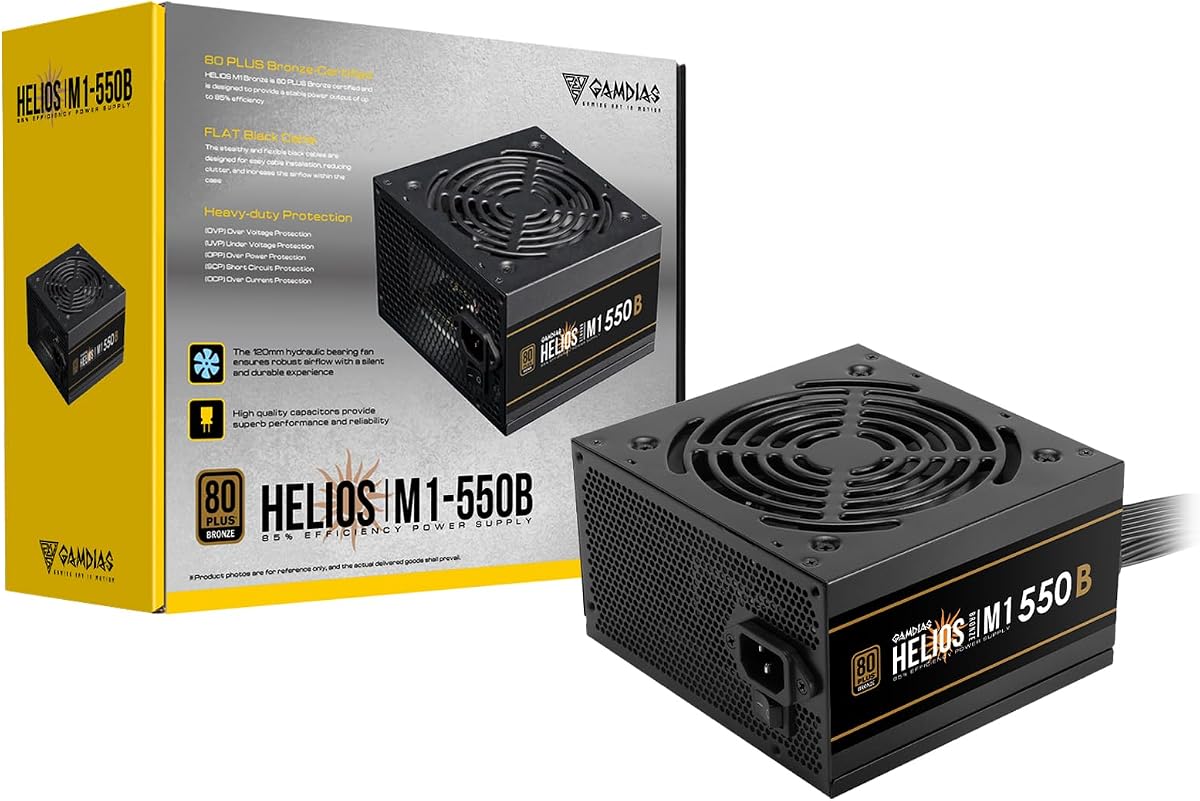
The GAMDIAS Helios M1 offers automatic fan speed optimization to balance noise and cooling. It supports high temperatures up to 50 degrees Celsius.
We may earn a commission when you buy through this link, at no additional cost to you.
Active PFC ensures better energy use and stability for daily tasks. The eco fan control helps maintain efficiency without manual tweaking.
While it performs well its average rating suggests some users may find it inconsistent. It is a good value for budget builds.
Ideal for users wanting a silent mode feature at a low cost. It handles gaming loads adequately for mid-range PCs.
Automatic speed adjustment balances power loading with noise levels effectively.
High-quality capacitors ensure performance in warmer environments.
We may earn a commission when you buy through this link, at no additional cost to you.
The Silverstone Extreme 550Rz brings Gold efficiency to the SFX form factor ideal for mini-ITX builds. It is fully modular and PCIe Gen 5 ready.
We may earn a commission when you buy through this link, at no additional cost to you.
Japanese capacitors and smart fan deactivation ensure quiet reliable operation even in cramped spaces. The flat cables improve airflow and installation.
SFX cases are less common and parts are expensive. This unit fits the niche of high-performance compact builds.
Perfect for mini towers needing top performance. Check case compatibility before purchase to ensure fit.
Small chassis size fits mini-ITX cases perfectly.
Japanese capacitors support 24/7 continuous output reliably.
We may earn a commission when you buy through this link, at no additional cost to you.
Selecting a power supply involves checking wattage efficiency certifications form factor protections and warranty.
Ensure the PSU provides enough headroom for your CPU and GPU under load. A 550W unit suits mid-range cards but high-end GPUs may need more.
Always add 20 percent extra capacity to prevent strain during gaming sessions.
Look for 80 PLUS ratings like Bronze or Gold to reduce electricity costs. Higher efficiency means less heat generation and better stability.
Gold units offer better savings over time but cost more upfront.
Verify your case supports the PSU size such as ATX or SFX. Incorrect sizes will not fit and may cause airflow issues.
Standard ATX units fit most towers while SFX suits compact builds.
Modular PSUs allow attaching only needed cables reducing clutter. Non-modular units have all cables attached which can complicate builds.
Choose modular for cleaner aesthetics especially in open cases.
Check the 12V rail amperage as most components draw power from it. Stable rails prevent crashes and ensure smooth GPU operation.
Single 12V rail designs offer better compatibility with modern hardware.
A longer warranty indicates manufacturer confidence in product durability. Aim for at least five years to protect your investment.
Reputable brands often offer better support if issues arise.
Look for protections like OVP UVP OCP SCP to prevent damage from surges. These safeguards keep your components safe from electrical faults.
Ensure the PSU lists these protections clearly before buying.
Fan size and bearings affect how loud the PSU runs under load. Larger fans generally run quieter at lower speeds.
Select units with silent or hydraulic bearing fans for quiet operation.
Install the PSU in a case that fits its form factor ensuring all mounting holes align properly. Connect the main 24-pin and CPU power cables first.
Keep the air vents free of dust by cleaning them monthly. Dust buildup can cause overheating and reduce the unit lifespan.
Avoid overloading the unit by checking total wattage before adding new components. Proper cable management helps airflow and keeps temperatures low.
Yes 550W is sufficient for mid-range GPUs like the RTX 4060 or RX 7600. Pair it with a balanced CPU to ensure stability.
It is an efficiency certification where higher ratings like Gold save more power. Bronze is entry-level and Gold is mid-high efficiency.
It is safer to replace old PSUs as they lack modern protections. Efficiency drops over time and reliability decreases with age.
Modular is better for airflow and cleanliness while non-modular is cheaper. Choose based on your budget and build preferences.
A stable PSU prevents crashes under load but does not directly boost FPS. It ensures consistent power delivery to all components.
Gold PSUs reduce electricity bills and heat output significantly. They are worth the investment for systems running 24/7.
Open the side panel to see the label on the unit or use software tools like HWMonitor. Note wattage and connectors before buying.
Our top picks offer a range of features from budget efficiency to premium compatibility. Choose based on your specific build requirements and noise preferences.
Prioritize safety protections and warranty length over minor efficiency gains for reliability. Future-proofing with ATX 3.1 helps avoid early upgrades.
Prices and availability change so verify current stock and deals before buying. A good PSU is the foundation of a stable and lasting system.