
UBIQUITI UniFi Aggregation Switch Pro
4.7Editor score
28 x 10G SFP+ ports
4 x 25G SFP28 ports
760Gbps switching capacity
Layer 3 routing features
Intuitive UniFi management app
This guide compares the top 25GbE switches with SFP28 ports for data centers, offering detailed specs to help you choose the right high-speed networking
Modern data centers require high-speed connectivity to handle growing bandwidth demands. 25GbE switches with SFP28 ports provide the perfect balance between cost and performance for enterprise networks.
We evaluated ten top models based on port configuration, switching capacity, management features, and reliability. Each product was selected for its ability to support 25GbE connectivity effectively.
Each pick highlights key strengths and ideal use cases. Prices change frequently so check current listings before purchasing. These switches help scale your network efficiently today.
4.7Editor score

4.8Editor score

4.6Editor score
Compare the top ten 25GbE switches side by side. This table summarizes key specs to help you choose the right model for your needs.




The Cisco Nexus N9K-C92160YC-X stands out as a top-tier choice for demanding data center environments. With 48 ports dedicated to 25GbE speeds via SFP28 connectivity, it offers unparalleled density for server aggregation.
We may earn a commission when you buy through this link, at no additional cost to you.
Its dual QSFP28 uplink ports enable high-speed backbone connections, ensuring minimal bottlenecks. The switch supports advanced features like VXLAN and ACI, making it ideal for virtualized workloads. The renewed condition ensures significant cost savings while maintaining functional integrity.
While the management can be complex for smaller setups, enterprises benefit from the granular control. The power consumption is higher but justified by the performance density. This is a reliable investment for scaling modern infrastructure.
Buyers seeking a robust platform for AI or virtualization workloads should prioritize this model. It delivers consistent performance and future-proofs your network. Check current listings for availability and warranty details before ordering.
48 SFP28 ports support high-performance server connections with minimal cabling complexity.
Built-in VXLAN and ACI support simplify network virtualization and automation workflows.
We may earn a commission when you buy through this link, at no additional cost to you.
The QNAP QSW-M7230-2X4F24T-US is purpose-built for high-bandwidth enterprise environments and NAS deployments. It combines 24 RJ45 ports with 25GbE SFP28, offering flexibility for mixed cabling needs.
We may earn a commission when you buy through this link, at no additional cost to you.
Advanced technologies like Priority Flow Control ensure lossless performance, crucial for storage area networks. The 100GbE uplinks allow seamless integration into modern data backbones. This makes it a solid choice for scaling storage clusters efficiently.
Its Layer 3 Lite features cover basic routing needs without overwhelming complexity. While it lacks deep advanced routing, its optimization for storage makes it unique. The web GUI simplifies setup significantly for IT administrators.
Organizations with heavy storage traffic should consider this switch. It balances cost and performance well. Verify compatibility with your existing NAS devices before purchase to ensure seamless operation.
PFC and ECN technologies minimize packet loss for critical storage operations.
Mix of copper and fiber ports supports smooth migration to higher speeds.
We may earn a commission when you buy through this link, at no additional cost to you.
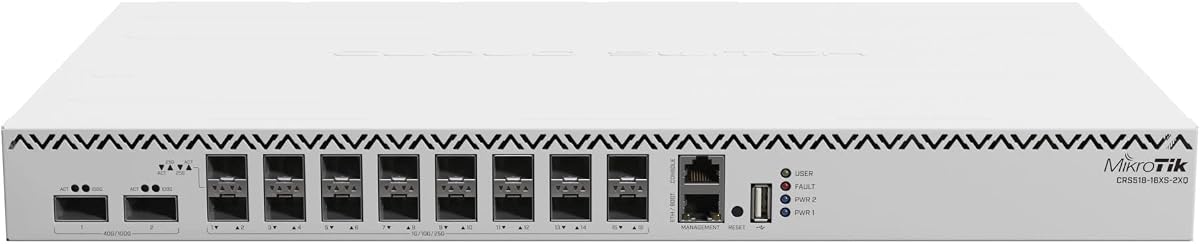
The MikroTik CRS518 is a powerful option for networks requiring deep customization and routing control. With 16 SFP28 ports, it delivers substantial 25GbE throughput at a competitive price point.
We may earn a commission when you buy through this link, at no additional cost to you.
Its Cloud Router Switch platform allows extensive configuration via RouterOS, ideal for advanced users. The 2 QSFP28 uplinks enable rapid backbone connectivity. This switch excels in scenarios where flexibility is more important than out-of-box simplicity.
While the learning curve is steep, the resulting network performance is exceptional. It handles complex routing protocols efficiently. Users should be prepared to invest time in configuration for best results.
Technical professionals and service providers will appreciate the raw power and control. It is a smart choice for those who want to tailor their network infrastructure closely. Review documentation carefully before deployment.
RouterOS provides granular control over routing tables and traffic policies.
High port density with 25GbE speeds at an affordable enterprise price.
We may earn a commission when you buy through this link, at no additional cost to you.
The MikroTik CRS520 represents a premium tier of networking performance designed for heavy data workloads. It offers 28 ports of 25GbE connectivity, alongside four 100GbE uplinks for maximum bandwidth.
We may earn a commission when you buy through this link, at no additional cost to you.
Powered by a quad-core ARM CPU and 4 GB of RAM, this switch handles complex routing tasks effortlessly. It is built for environments where processing power matches network speed needs. The architecture ensures low latency across all ports.
While expensive, it offers value through raw capability and scalability. The advanced features cater to IT teams capable of utilizing full potential. It minimizes bottlenecks in high-throughput scenarios effectively.
Select this switch for top-tier data center expansions or cloud infrastructure. It supports evolving bandwidth requirements with ease. Ensure you have skilled staff to manage its advanced configuration options.
Dedicated CPU and RAM handle complex data flows without lag.
Four 100GbE ports prepare your network for next-gen bandwidth demands.
We may earn a commission when you buy through this link, at no additional cost to you.
The UBIQUITI UniFi Aggregation Switch Pro delivers a balanced blend of speed and user-friendly management. It includes 28 SFP+ ports for 10G and four 25G SFP28 ports for uplinks or high-speed servers.
We may earn a commission when you buy through this link, at no additional cost to you.
With 760Gbps switching capacity, it handles heavy traffic loads smoothly. The Layer 3 features enable basic routing within your network. The UniFi app simplifies monitoring and configuration significantly for SMBs.
One constraint is that SFP28 ports work best in 25G mode exclusively. However, the value proposition remains strong for organizations using UniFi gear. It integrates well with other Ubiquiti devices seamlessly.
Ideal for businesses expanding into 25G backbone without overhauling existing networks. It provides a straightforward path to higher speeds. Check the specific port compatibility requirements before committing to this bundle.
UniFi app provides easy monitoring and configuration from any device.
760Gbps capacity ensures non-blocking performance under heavy loads.
We may earn a commission when you buy through this link, at no additional cost to you.
The Dell EMC PowerSwitch N3224P-ON offers a unique mix of PoE++ power and 25GbE networking. It features 24 PoE ports, ideal for powering devices while maintaining high-speed data connections.
We may earn a commission when you buy through this link, at no additional cost to you.
Four 25GbE SFP28 ports provide robust uplinks, backed by 100GbE QSFP28 for future expansion. Layer 3 support allows for efficient routing within your infrastructure. It is a versatile solution for complex office environments.
Power consumption is substantial, reflecting its capabilities. The modular design allows for tailored configurations. This switch is suitable for networks requiring both high-speed data and power delivery over Ethernet.
Organizations deploying cameras or access points alongside high-performance servers should consider this. It simplifies infrastructure by combining functions. Verify power requirements match your facility's capacity before installation.
PoE++ ports deliver power while SFP28 ports handle fast data traffic.
QSFP28 uplinks ensure your backbone keeps up with growing demands.
We may earn a commission when you buy through this link, at no additional cost to you.
While lacking dedicated SFP28 ports, the TRENDnet TEG-S50284 offers a cost-effective entry into multi-gigabit networking. It features 24 RJ45 ports supporting 2.5G speeds and four 10G SFP+ uplinks.
We may earn a commission when you buy through this link, at no additional cost to you.
This configuration suits small to medium businesses needing faster speeds without high-end enterprise costs. The switching capacity handles moderate loads efficiently. Its lifetime warranty provides long-term security for investments.
The web interface is straightforward, making it easy for non-experts to manage. It is compliant for government projects. While not a pure 25GbE switch, it bridges the gap effectively for many.
Buyers looking for a budget-friendly upgrade should find this model compelling. It simplifies transition to higher speeds easily. Ensure your cabling supports the intended speeds before deployment.
Multi-gigabit ports provide speed upgrades without major cabling changes.
Lifetime protection ensures your investment is covered over time.
We may earn a commission when you buy through this link, at no additional cost to you.
The TRENDnet TEG-3284WS is a web smart switch designed for easy configuration and remote management. It includes 24 multi-gigabit RJ45 ports and four 10G SFP+ uplinks for flexible connectivity.
We may earn a commission when you buy through this link, at no additional cost to you.
Hive cloud services allow remote monitoring, which is valuable for distributed offices. The web GUI simplifies VLAN setup. While it lacks SFP28, it supports robust traffic management features.
It is a solid option for those prioritizing management over raw speed. The compliance meets government standards. Setup is quick and intuitive for most IT staff.
Ideal for organizations needing simple cloud control. It balances usability and cost well. Verify cloud service fees before relying on remote features.
Hive enabled services allow easy management from anywhere.
Advanced VLANs help segment network traffic securely.
We may earn a commission when you buy through this link, at no additional cost to you.
The Cisco N9K-C93180YC-EX is engineered for large-scale data center deployments. It provides 48 ports of 25GbE SFP+ connectivity, backed by six 100GbE QSFP28 uplinks for massive bandwidth.
We may earn a commission when you buy through this link, at no additional cost to you.
Its cut-through architecture minimizes latency, ideal for HPC and big data. VXLAN support enables flexible virtualization. The hot-swappable supplies ensure high availability during operation.
Renewed units offer significant savings for enterprises with skilled staff. It is a heavy-duty solution for consistent reliability. Expect robust performance under peak loads.
Data center managers handling high-performance computing should consider this. It scales effortlessly with growth. Ensure your cooling systems match the power requirements.
Cut-through switching ensures fast data processing for critical apps.
Hot-swappable supplies allow maintenance without downtime.
We may earn a commission when you buy through this link, at no additional cost to you.
While not offering 25GbE, the D-Link DGS-1210-28 is a reliable entry-level switch for smaller setups. It provides 24 Gigabit ports and four SFP combos for fiber uplinks.
We may earn a commission when you buy through this link, at no additional cost to you.
Its fanless design ensures silent operation in quiet spaces. Layer 2+ features cover essential VLAN and QoS needs. It is ideal for basic office networking where high speed is not critical.
The lifetime warranty and NDAA compliance add value. It is a safe choice for budget-conscious buyers. The web interface simplifies administration for non-experts.
For those needing basic managed functionality, this is a solid option. It supports standard networks well. Consider this if 25G is not yet required for your tasks.
Fanless design keeps noise levels low in quiet environments.
VLANs and ACLs help protect your network access.
We may earn a commission when you buy through this link, at no additional cost to you.
Selecting the right switch involves balancing speed, port count, and management features. Here are key factors to consider.
Assess how many 25GbE ports you need versus other speeds. A switch with a mix of SFP28 and RJ45 offers flexibility for mixed devices. This avoids unnecessary costs on ports you won't use.
Prioritize switches with enough uplinks to handle aggregated traffic without bottlenecks.
Switching capacity determines total throughput. Ensure it exceeds your total port capacity to allow full-duplex operation. High capacity prevents performance degradation during peak usage times.
Look for non-blocking architectures to maintain consistent speeds under load.
Layer 3 features enable routing within your network, reducing external hardware needs. Managed switches offer VLANs and QoS for traffic control. Consider if your team can handle complex configurations.
Web GUIs provide ease of use for basic tasks, while CLI offers granular control for experts.
High-performance switches draw more power. Check wattage against your power budget and cooling capabilities. Efficient units reduce long-term operational costs and thermal issues.
PoE support may add value if you need to power devices directly.
NDAA and TAA compliance are essential for government or regulated projects. Ensure your chosen model meets these standards before procurement. Non-compliant models may be rejected by auditors.
Verify certifications on the product listing to avoid future issues.
Lifetime warranties protect your investment against defects. Reliable tech support ensures quick resolution of issues. Check provider reputation for response times.
Extended support packages may be necessary for mission-critical deployments.
Future-proofing requires uplinks that can handle growth. 100GbE QSFP28 ports allow migration to faster speeds without replacing the switch. Consider your roadmap when selecting ports.
Modular designs allow component upgrades as needs evolve.
Balancing performance with cost is key. Renewed or older models often offer similar functionality at lower prices. Weigh the savings against warranty coverage differences.
Avoid overspending on unnecessary features if your current needs are simpler.
Connect your server SFP28 modules to the switch using compatible optical cables. Ensure the fiber type matches the switch specifications. Proper alignment avoids connection errors and potential data loss.
Configure the web interface or CLI to set up VLANs and routing policies. Update firmware regularly to ensure security patches are applied. Proper setup maximizes performance and security.
Maintain cooling and cleanliness around the switch. Dust can clog vents and cause overheating. Regular monitoring of traffic logs helps detect anomalies early.
SFP+ typically supports up to 10Gbps, while SFP28 supports up to 25Gbps. Using SFP28 modules allows for higher throughput, ideal for modern data centers.
Yes, you need fiber optic cables for SFP28. For copper, ensure Cat6a or Cat7 cabling supports high speeds. Check compatibility before purchasing modules.
Most switches with SFP28 ports are backwards compatible with 10G modules. This allows mixed networks during migration phases without replacing all equipment.
Access the web GUI or CLI to configure settings. Use VLANs and QoS to optimize traffic. Most modern switches offer intuitive interfaces.
PoE++ delivers up to 90 watts of power over Ethernet cables. It supports demanding devices like cameras and APs while maintaining data transmission.
Not always. Layer 2 is sufficient for basic switching. Layer 3 adds routing features, beneficial for complex networks needing internal routing.
Yes, if from trusted vendors. They undergo testing to ensure functionality. Always check warranty terms before purchase.
Consider entry-level models or older generations that meet your needs. Used units from reputable sources can offer significant savings.
The Cisco Nexus N9K-C92160YC-X stands out for its robust port count and data center capabilities. It is the top choice for enterprise scalability. Its renewed status makes it accessible for many organizations.
Prioritize features that match your specific use cases. Storage needs may favor the QNAP model, while budget-focused buyers might prefer the Ubiquiti or Trendnet options. Evaluate your network's unique demands carefully.
Remember that prices fluctuate based on availability. Always verify current listings before making a final decision. Investing in the right switch ensures your network performs smoothly.