
Redragon BM4195 AI Wireless Optical Computer Office Mouse
3.9Editor score
AI voice typing and translation
5-level DPI adjustment
Type-C fast charging
This guide compares the top AI smart wireless mouse models for productivity, voice typing, translation, and multi-device connectivity to help you choose the
AI smart wireless mice are transforming how we interact with computers by integrating voice commands and translation tools directly into your workflow. These devices eliminate the need for constant typing and enable seamless cross-language communication for professionals and students alike.
We evaluated ten leading models based on voice recognition accuracy, battery life, connectivity options, and overall ergonomic design. Our analysis focuses on real-world performance in office environments, meeting settings, and creative workflows to ensure you get the most reliable tool.
Each pick highlights key strengths like transcription speed, multi-device switching, and local processing for privacy. Keep in mind that features and availability may vary by region and update, so check the latest details before making your final decision today.
3.9Editor score

4.1Editor score

5.0Editor score
The following table provides a side-by-side look at the key specifications and capabilities of each model to help you quickly identify the features that matter most for your specific work environment.




The Ai Mouse with Voice Typing and ChatGPT Assistant delivers a robust set of tools for professionals who need to transcribe and translate content without touching a keyboard. With a 4.1 rating, it stands out for its reliable voice recognition and local AI processing capabilities.
We may earn a commission when you buy through this link, at no additional cost to you.
Key strengths include its ability to handle over 200 languages with near-zero latency translation. The 600mAh battery ensures you can work through long days without interruption, while the silent click design keeps the workspace peaceful during meetings.
While the software download is required to unlock all AI functions, this setup ensures your data remains private. The ergonomic shape also reduces hand strain during extended use, making it comfortable for all-day tasks.
If you need a versatile tool for multilingual meetings, lecture transcription, or quick note-taking, this model is an excellent choice. It balances performance and privacy effectively for modern office environments.
Unlike cloud-based tools, this mouse processes voice data locally to protect your private work files and records from external access.
Break language barriers instantly with support for over 200 languages, ideal for international teams and global communication needs.
We may earn a commission when you buy through this link, at no additional cost to you.
The Redragon BM4195 offers an accessible entry into the world of AI-enhanced mice without demanding a large investment. It features essential voice typing and translation tools that simplify daily tasks for users on a budget.
We may earn a commission when you buy through this link, at no additional cost to you.
Its 2.4G and Bluetooth connectivity allows you to switch between devices easily, while the 500mAh battery keeps you powered through standard work sessions. The 5-level DPI adjustment provides enough precision for office work and light creative tasks.
Some users may find the software support basic compared to premium models, but the core voice functions work well for quick dictation and translation. The Type-C charging port ensures you can recharge quickly when needed.
For anyone looking to try AI mouse technology without a high price tag, this model provides a solid starting point. It is particularly useful for students or freelancers needing hands-free note-taking capabilities.
Get the benefits of voice typing and translation at a price point that makes it easy to upgrade your workflow without overspending.
Switch effortlessly between two Bluetooth devices and a 2.4G connection for versatile use across laptops and tablets.
We may earn a commission when you buy through this link, at no additional cost to you.
The Cheerdots2 AI Mouse stands out with its unique magnetic detachable design, transforming into a presentation tool instantly. With a perfect 5.0 rating, it excels in meeting scenarios where flexibility and professional appeal are paramount.
We may earn a commission when you buy through this link, at no additional cost to you.
It functions as an air mouse and touchpad when detached, allowing you to control slides without touching your laptop. The 20-day battery life means you can travel for weeks without recharging, making it ideal for frequent travelers.
The built-in laser pointer and voice recording features streamline your presentations, ensuring you stay engaged with your audience instead of fumbling with cables. While it costs more, the versatility justifies the price for professionals.
If you often lead meetings or give talks, this mouse offers a comprehensive solution for control and presentation. It combines the functions of multiple tools into one portable device that fits easily in a pocket.
Use the detachable mode to glide the cursor and flip slides hands-free, keeping eye contact with your audience throughout the presentation.
Enjoy up to 20 days of battery life on a single charge, so you never have to worry about power during long workdays or trips.
We may earn a commission when you buy through this link, at no additional cost to you.
This mouse focuses on accuracy and privacy, offering local processing for voice data to prevent cloud storage issues. Its 98% recognition rate ensures that dictation remains reliable even in varied environments.
We may earn a commission when you buy through this link, at no additional cost to you.
The 600mAh battery provides ample power for extended sessions, reducing the frequency of charging. Silent clicks make it suitable for libraries or quiet offices where noise could be a distraction.
Users should note that software setup is necessary to unlock advanced AI features like summarization and translation. Once configured, however, it delivers a smooth experience for both personal and professional tasks.
Ideal for those who prioritize data security and consistent performance, this model is a strong contender for daily transcription work. It handles complex multilingual tasks with ease.
Your voice data stays on your device rather than being sent to the cloud, ensuring higher security for confidential information.
Switch between languages effortlessly with support for over 200 languages, facilitating global communication and research.
We may earn a commission when you buy through this link, at no additional cost to you.
The LTC OM021 prioritizes comfort with an ergonomic design that reduces hand strain during long typing sessions. It delivers up to 300 words per minute, making it efficient for fast-paced note-taking.
We may earn a commission when you buy through this link, at no additional cost to you.
Silent click technology ensures that your workspace remains peaceful, which is valuable for shared offices. The rechargeable battery supports standard workdays without requiring constant recharging.
While translation features are included, they may not match the precision of specialized tools for complex content. However, for everyday dictation and basic translation, it offers reliable performance.
This mouse is a good option for users who need a comfortable and quiet device with voice capabilities. It strikes a balance between functionality and comfort for office environments.
The ergonomic shape is designed to fit the hand naturally, reducing fatigue during hours of daily computer use.
Silent clicks ensure that your typing does not disturb colleagues around you, making it perfect for shared workspaces.
We may earn a commission when you buy through this link, at no additional cost to you.
Logitech is known for reliability, and this model offers a solid experience with long battery life and versatile connectivity. While it lacks dedicated AI voice typing tools, it integrates well with Logi Options+ software.
We may earn a commission when you buy through this link, at no additional cost to you.
The Bluetooth and USB receiver options ensure you can connect to multiple devices without hassle. With up to 24 months of battery life using AA batteries, it reduces the need for frequent charging.
For users who prefer traditional functionality with strong brand support, this mouse is a safe choice. It works across macOS and Windows systems seamlessly.
If you need a dependable mouse for general use rather than advanced AI features, this model delivers consistent performance. Its build quality and battery efficiency are notable strengths.
Enjoy up to two years of battery life with a single AA set, reducing waste and maintenance frequency for office use.
Customize buttons and scroll with Logi Options+ for personalized productivity workflows across different operating systems.
We may earn a commission when you buy through this link, at no additional cost to you.
This model combines practical AI features with an RGB design that appeals to users who value aesthetics. It offers local AI processing and support for over 200 languages for versatile translation.
We may earn a commission when you buy through this link, at no additional cost to you.
The 500mAh battery supports daily workloads with quick recharge times via Type-C. Silent clicks and ergonomic design ensure comfort during extended use.
While it is newer, its specifications suggest it matches the capabilities of established models. The focus on privacy makes it attractive for sensitive work environments.
If you want a mouse that looks modern and supports multilingual tasks with strong privacy controls, this is a good option. It handles daily workflow needs efficiently.
RGB lighting adds a stylish touch to your desk setup while maintaining core performance for daily tasks.
All voice and text processing happens locally, ensuring your data remains private and secure from cloud access.
We may earn a commission when you buy through this link, at no additional cost to you.
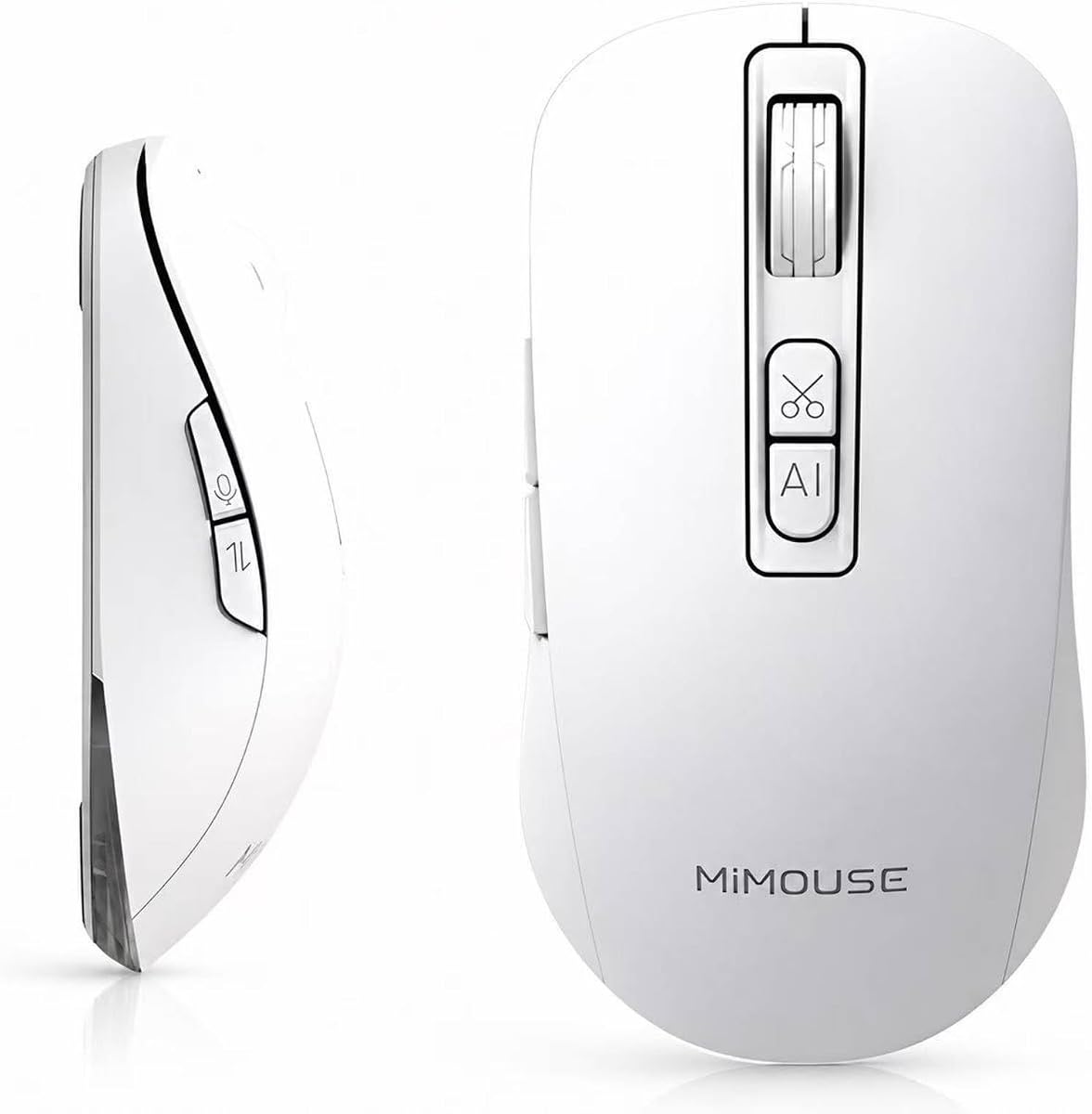
MiMouse offers a centralized AI platform that supports multiple models like Gemini and Claude, providing a unified interface for creation and summarization. It supports long battery life and gaming-level sensitivity.
We may earn a commission when you buy through this link, at no additional cost to you.
The 30-day battery life ensures you rarely need to charge, and the polling rate provides smooth tracking for precise tasks. Connectivity options allow you to switch between up to three devices seamlessly.
While the platform is specialized, it can streamline workflows for writers and professionals. The focus on local encryption enhances privacy for sensitive projects.
If you need a mouse that integrates deeply with various AI tools for content creation, this model is a strong contender. It bridges the gap between hardware and software effectively.
Access multiple AI models through a single platform to handle writing, summarizing, and creative tasks efficiently.
With a 500Hz polling rate, the mouse offers smooth and responsive tracking suitable for precise design work.
We may earn a commission when you buy through this link, at no additional cost to you.
This Bluetooth mouse is designed for remote work with integrated voice recording and summarization capabilities. It offers triple-mode connectivity to switch between devices easily.
We may earn a commission when you buy through this link, at no additional cost to you.
The ergonomic shape provides a secure grip, and the adjustable DPI levels allow for precise control across different screen sizes. Translation tools help break language barriers during research.
While it is newer, its features suggest it handles remote workflow needs well. The ability to summarize content on the fly adds significant value to daily tasks.
For remote workers who need to transcribe and summarize meetings or lectures, this model is a practical choice. It combines portability with essential productivity tools.
Designed to handle remote tasks with tools for transcription and summarization that fit any workflow.
Switch between three devices seamlessly with USB and Bluetooth options for a versatile desktop setup.
We may earn a commission when you buy through this link, at no additional cost to you.
This mouse focuses on the core functionality of voice-to-text conversion and summarization. It supports over 200 languages for translation and features silent clicks for quiet environments.
We may earn a commission when you buy through this link, at no additional cost to you.
The rechargeable design keeps the desk organized without cable clutter. Summarization tools help organize rough notes into structured content efficiently.
Due to its basic design, it may not suit users needing advanced features like local processing. It is best for casual dictation and simple translations.
If you need a simple tool for basic voice typing and translation, this model provides the essentials. It is suitable for light office tasks where complex features are not required.
Convert spoken words to text quickly for notes and emails without needing complex software setup.
Organize rough ideas into structured content with built-in summarization features that save time on editing.
We may earn a commission when you buy through this link, at no additional cost to you.
Choosing the right AI smart wireless mouse involves considering several factors that align with your work habits and privacy needs.
Accuracy is critical for effective transcription. Look for models that offer high accuracy rates like 98% to ensure your words are captured correctly without frequent corrections.
Prioritize mice with tested recognition capabilities to minimize editing time during meetings or lectures.
For global communication, the ability to translate and transcribe in multiple languages is essential. Ensure the mouse supports your required languages for seamless translation.
Check if the device supports over 200 languages to cover diverse communication needs across different regions.
Long battery life ensures uninterrupted work sessions without frequent charging interruptions. Look for capacities like 500mAh or 600mAh to sustain a full day of use.
Opt for models with Type-C fast charging to quickly restore power when needed without long downtime.
Versatility in connectivity allows you to switch between devices like laptops and tablets seamlessly. Ensure the mouse supports Bluetooth and 2.4G wireless modes.
Triple-mode connectivity offers the most flexibility for managing multiple devices in a single workspace efficiently.
Some users require that voice data remain private and off the cloud. Look for mice that advertise local AI processing to protect sensitive information.
Ensure the model stores data locally to prevent unauthorized access to your voice records and text files.
Comfort is key for devices used daily. Select mice with ergonomic shapes and silent clicks to reduce hand strain and noise.
Silent designs are especially important for shared office spaces where quiet operation is valued by colleagues.
Advanced mice offer tools beyond typing, such as summarization, code generation, and article polishing. Evaluate which AI functions match your specific workflow needs.
Prioritize models with features like AI Q&A and writing assistance if you need comprehensive support for content creation.
Ensure the mouse works seamlessly with your operating system. Most models support Windows and macOS, but checking specific requirements avoids setup issues.
Verify that the device is compatible with your current OS version to ensure all features work correctly out of the box.
To get started, pair the mouse with your device via Bluetooth or 2.4G receiver. Follow the specific pairing instructions such as holding the scroll wheel for six seconds to activate pairing mode.
Once connected, download the required software to unlock full AI features like voice typing and translation. Ensure your device has the necessary permissions enabled for audio input.
Maintain battery health by using Type-C charging and avoiding draining the battery completely. Keep the mouse clean with a soft cloth to prevent debris from affecting movement and silent clicks.
Some models support offline processing for privacy, but most require an internet connection for advanced AI translation. Check if the specific mouse supports local processing if offline use is important.
While some models have high polling rates, they are primarily designed for productivity rather than gaming. Most lack dedicated gaming features like customizable RGB profiles or high-performance sensors.
Top models claim up to 98% accuracy depending on audio clarity. Accuracy may vary based on noise levels and your speaking speed, so quiet environments work best.
Most support both Windows and macOS with varying levels of feature availability. Some models also work with Android or iOS tablets via Bluetooth connectivity.
Most models offer basic features without subscription, but some advanced tools may require in-app purchases. Always check product details before purchase to understand pricing structures.
Battery life ranges from several days to weeks depending on usage. Typical models with 500mAh batteries last around two to three days of continuous daily use.
Many models advertise silent clicks suitable for offices. However, check specific product details as click noise levels can vary between different designs.
The AI smart wireless mouse market offers diverse options ranging from budget-friendly entry models to premium presentation tools. The top picks provide strong voice recognition and privacy features for various needs.
Prioritize models with local processing if privacy is a concern and long battery life for portability. Ensure the device supports your required languages to maximize utility in global work environments.
Always verify current availability and compatibility with your specific devices before making a purchase. Technology evolves rapidly, so checking the latest updates ensures you get the best experience today.