
MAYFLASH F500 Arcade FightStick
4.0Editor score
Supports Magic Boots for PS5
Compatible with multiple consoles
Turbo functions included
This guide compares the top arcade sticks for PS5 including licensed options and versatile controllers for competitive fighting games and tournament play.
Finding the right arcade stick for PS5 can transform your fighting game experience from casual to competitive. A high-quality fight stick offers precision, durability, and a layout that mimics arcade cabinets for better control during intense matches.
We evaluated ten top-rated controllers based on build quality, compatibility, and user feedback. Our selection includes officially licensed options and versatile sticks that support multiple platforms for maximum flexibility.
Each pick highlights key features and performance traits to help you choose the best match for your style. Please note that product availability and pricing may change over time so always check current details.
4.0Editor score

4.6Editor score
4.5Editor score
This side-by-side comparison highlights the core specifications and unique features of each controller to help you quickly identify the right fit for your setup.


The HORI PlayStation 5 Fighting Stick Alpha stands out as a top-tier controller designed for serious fighting game enthusiasts. It holds an impressive rating and is officially licensed by Sony ensuring full compatibility with the latest console titles.
We may earn a commission when you buy through this link, at no additional cost to you.
This stick features HORI's proprietary Hayabusa buttons and joystick which deliver superior response times and durability. The casing opens easily allowing players to customize parts or perform maintenance without needing specialized tools.
While the price is higher than some alternatives the build quality justifies the investment for competitive players. The replaceable artwork panel lets you refresh the look without buying a new unit.
If you want a reliable tournament grade stick that respects the PS5 ecosystem this is the clear choice. It balances performance and aesthetics perfectly for home or arcade use.
Being officially licensed by Sony means this stick meets strict standards for compatibility and performance on PlayStation systems.
The open design allows for easy swapping of panels and internal components to suit your preferences.
We may earn a commission when you buy through this link, at no additional cost to you.
The Nacon Daija Arcade Fight Stick is designed in collaboration with pro gamers to meet high performance standards. It uses Sanwa components which are the industry standard for durability and feel in competitive scenes.
We may earn a commission when you buy through this link, at no additional cost to you.
A key feature is the full button mapping capability via PC software allowing you to create custom profiles for different games. The textured palm rest provides stability during long sessions reducing hand fatigue.
Users may need to install software to unlock the full mapping potential which adds a small setup step. The included tools make changing joystick heads easy for those who prefer different gate styles.
This stick is ideal for players who want precise control and the ability to tailor inputs to specific games. It offers great value with premium components included out of the box.
Developed with input from professionals this stick addresses real needs in tournament play environments.
A 3.5mm jack allows direct headset connection for better communication during online matches.
We may earn a commission when you buy through this link, at no additional cost to you.
The MAYFLASH Arcade Stick F700 offers versatile connectivity including Bluetooth and 2.4G wireless alongside a wired USB option. This flexibility makes it suitable for various consoles and handheld devices like the Steam Deck.
We may earn a commission when you buy through this link, at no additional cost to you.
It supports turbo functions and allows connection of wired headsets for chat on supported platforms. The included receiver has a hidden compartment to keep it safe when not in use.
While it lacks Xbox support the range of compatible systems is impressive for the price. Note that it focuses primarily on fighting games and not general gaming titles.
For players who value wireless freedom and cross platform compatibility this stick is an excellent choice. It provides reliable performance without breaking the bank.
Works with PS5 Switch and PC making it a great all in one solution for mixed setups.
Built in turbo functions help with rapid input sequences in certain game scenarios.
We may earn a commission when you buy through this link, at no additional cost to you.
The Qanba N3 Drone 2 brings authentic Qanba quality to a more accessible price point while maintaining official Sony licensing. It features a full control panel with a unique touch pad for extra functionality.
We may earn a commission when you buy through this link, at no additional cost to you.
The joystick and buttons are reliable for competitive play and the microphone input with mute button helps with communication. This model is great for those new to fight sticks who still want official support.
Unlike higher end models it has limited internal customization options which may be a trade off for enthusiasts. However for basic needs it delivers solid performance and reliability.
Choose this if you want a straightforward licensed experience without spending too much. It is a dependable entry point into arcade style controls.
As a licensed product it ensures seamless integration with PlayStation systems and games.
The included touch pad adds versatility for navigating menus or custom functions.
We may earn a commission when you buy through this link, at no additional cost to you.
The MAYFLASH Arcade Stick F700 Elite upgrades the standard model with genuine Sanwa components right out of the box. This delivers a pro level feel that is typically an aftermarket upgrade on other sticks.
We may earn a commission when you buy through this link, at no additional cost to you.
It supports wireless Bluetooth and 2.4G connections alongside wired USB for maximum flexibility. The included anti slip mat keeps the stick firmly in place during intense matches.
While it shares the same platform limits as the standard F700 the premium parts make it stand out. It offers near tournament quality at a consumer friendly price.
This is the best choice for players who want high end feel without the custom build effort. It balances features and quality effectively.
Using genuine Sanwa parts ensures consistent and responsive inputs that pros trust.
The anti slip mat prevents unwanted movement on desk or table surfaces.
We may earn a commission when you buy through this link, at no additional cost to you.
The MAYFLASH F500 Arcade FightStick bundle includes Magic Boots that allow direct connection to PS5 without a controller. This makes it one of the most accessible options for upgrading from standard controllers.
We may earn a commission when you buy through this link, at no additional cost to you.
It supports X input and D input on PC and works with many Xbox and PlayStation generations. The turbo functions help with repetitive inputs in various game types.
While the build is more basic than premium sticks it performs well for casual and semi competitive play. The inclusion of Magic Boots adds significant value to the package.
If you want to try an arcade stick without a large investment this bundle is perfect. It removes many barriers to entry for new users.
The Magic Boots simplify setup by removing the need to plug in a controller.
Support for Xbox and PlayStation systems makes it a versatile choice.
We may earn a commission when you buy through this link, at no additional cost to you.
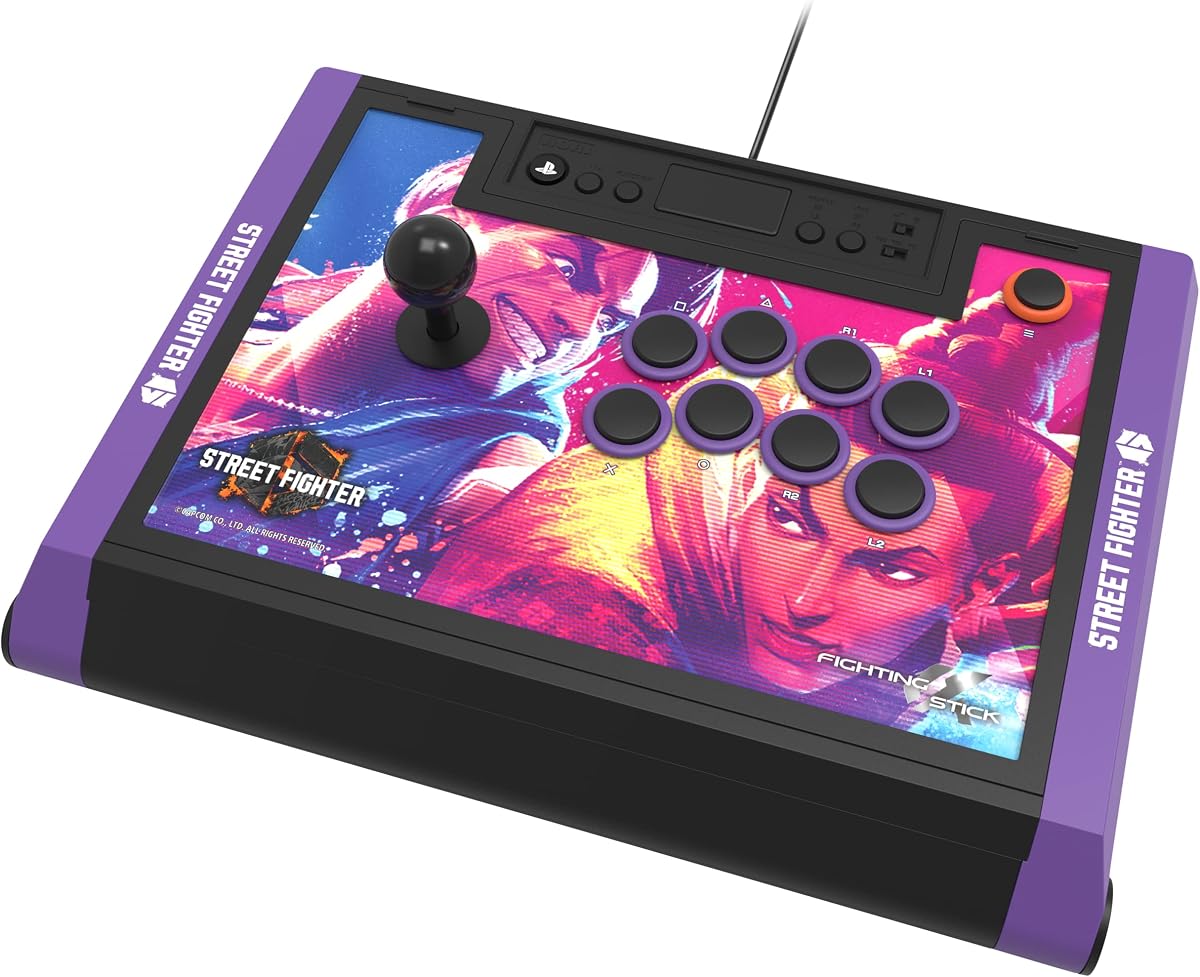
This special edition brings the Street Fighter 6 branding to the proven Alpha platform. It includes downloadable hi-res images of characters for the top panel allowing fans to customize the look.
We may earn a commission when you buy through this link, at no additional cost to you.
It retains all the premium features of the standard Alpha including Hayabusa components and easy maintenance access. The licensing by both Sony and Capcom ensures full game compatibility.
The limited edition price reflects the unique art and collector value which might be a consideration for budget conscious buyers. Performance remains consistent with other high end models.
For Street Fighter fans this is the ultimate way to show dedication while playing competitively. It combines form and function beautifully.
Included artwork lets you display your favorite fighters directly on your setup.
The Hayabusa parts ensure the stick feels responsive and durable over time.
We may earn a commission when you buy through this link, at no additional cost to you.
The Qanba Q7 Obsidian 2 offers advanced features like a dedicated switch to change between PS5 PS4 and PC modes. This simplifies setup for users who switch between systems frequently.
We may earn a commission when you buy through this link, at no additional cost to you.
It includes swappable Sanwa joystick tops for those who prefer different styles of movement. The touch pad and mic input add utility for modern gaming needs.
While it is pricier than entry models the feature set justifies it for experienced players. The licensed status ensures stability during critical matches.
If you need a reliable stick with versatile configuration options this is a strong candidate. It handles complex setups with ease.
Changing console modes is quick with a physical switch rather than software.
Swap joystick tops to find the gate style that suits your game.
We may earn a commission when you buy through this link, at no additional cost to you.
This edition of the Alpha is tailored for TEKKEN 8 with official artwork and alternate designs available for print. It maintains the high-end build quality that defines the Alpha line.
We may earn a commission when you buy through this link, at no additional cost to you.
Licensed by Bandai Namco and Sony it ensures full support for the latest TEKKEN updates. The Hayabusa components provide the quick responses needed for Tekken combos.
The theme specific design may not appeal to all but offers great pride for TEKKEN enthusiasts. The open design allows for easy updates to the look.
For TEKKEN fans this stick is a perfect match for the latest game release. It combines style with serious tournament readiness.
Official designs let you represent your favorite franchise on your stick.
Easy access to internals means you can maintain or modify it simply.
We may earn a commission when you buy through this link, at no additional cost to you.
The GuileKeys GK-18 leverless controller uses an all button layout instead of a joystick for four-direction movement. This design reduces input errors and offers unique control mechanics.
We may earn a commission when you buy through this link, at no additional cost to you.
It features RGB lights and an OLED screen that display input modes and button layouts. The switches are hot swappable allowing easy replacement without soldering.
You may need an additional converter for PS5 compatibility which is an extra step. The learning curve is steeper but offers competitive advantages for those who adapt.
If you want to try a modern innovative approach to fighting inputs this is a great start. It stands out for its customization and tech features.
Using buttons for movement can lower latency and increase precision for some players.
RGB lighting and OLED display keep your setup looking vibrant and informative.
We may earn a commission when you buy through this link, at no additional cost to you.
Selecting the right arcade stick involves considering compatibility build quality and personal preferences. This section breaks down key factors to guide your decision.
Ensure the stick supports PS5 specifically as some older models require adapters. Look for official licensing to avoid connectivity issues.
Check if it works with other systems you own like PC or Switch to maximize value.
High quality buttons like Sanwa or Hayabusa offer better responsiveness and longevity. This is crucial for competitive play where timing matters.
Consider whether you want standard buttons or custom ones that suit your feel.
The joystick gate and lever type affect movement precision. Choose between standard or leverless designs based on your game style.
Some sticks allow swapping joystick heads so you can experiment later.
Decide between wired and wireless options based on your setup needs. Wired sticks offer zero latency while wireless adds convenience.
Check if it supports audio inputs for chat if you play online often.
Sticks that open easily allow for maintenance and upgrades over time. Look for replaceable panels to change the look easily.
Hot swappable switches give you flexibility to change button feel without tools.
A sturdy base prevents sliding during intense use. Anti slip mats or rubber feet are essential for stability.
Materials should be durable enough to withstand frequent use at home or events.
Prices vary widely from entry bundles to premium tournament models. Determine how much you are willing to invest upfront.
Consider if additional accessories like converters or parts are included to save money.
Some sticks offer mapping software to create custom profiles for games. This adds flexibility for switching between different titles.
Check if the software works on your PC or Mac system for setup.
Connect the stick to your PS5 via USB or Bluetooth depending on the model. Ensure the settings recognize it before launching any game to avoid issues.
Clean the buttons and joystick regularly with a soft dry cloth to prevent debris buildup. This maintains responsiveness and extends the life of the parts.
Store the stick in a safe place to avoid damage when not in use. Cover it to keep dust away and prevent accidental pressure on the buttons.
Many top models are officially licensed by Sony which ensures full compatibility and stable performance. Licensed sticks are tested to meet specific standards for the console.
Some PS4 sticks work on PS5 but others may need adapters or updates. Always check the product details for PS5 specific support before buying.
Lever sticks use a joystick for movement while leverless use buttons. Leverless can reduce errors but require a learning curve to master.
Most modern arcade sticks support PC via USB or software mapping. They often work as standard controllers for competitive or casual gaming.
Clean under the button cap with isopropyl alcohol and check for dust. If the switch is faulty you may need to replace it using hot swap tools.
Wireless sticks offer convenience but wired ones have lower latency. For competitive play wired is preferred while wireless works well for casual sessions.
The HORI PlayStation 5 Fighting Stick Alpha leads the list for its balance of official support and premium features. It is ideal for players seeking a reliable tournament grade experience.
Budget options like the MAYFLASH F500 provide great entry points with bundles that simplify setup. These are perfect for testing out arcade play without a large commitment.
Always verify current availability and compatibility details before purchasing to ensure the best fit. Your choice should match your gaming style and setup needs.