
Inwa Computer Speakers
4.2Editor score
Affordable price point
Easy clip-on mounting system
Simple top-button controls
This guide compares the top clip on speakers for laptop users seeking portable, high-quality audio solutions for work, gaming, and entertainment needs.
Finding the right audio solution for your laptop can transform your daily workflow and entertainment experience. Clip on speakers offer a sleek, space-saving design that attaches directly to your monitor or screen.
We evaluated ten top-rated models based on sound quality, ease of installation, connectivity options, and overall value. Each product was analyzed for its ability to deliver clear audio without cluttering your workspace.
Every pick highlights unique strengths and potential limitations to help you make an informed decision. Please note that prices and availability may change frequently, so check the latest details before purchasing.
4.2Editor score

4.5Editor score

4.2Editor score
Here is a side-by-side comparison of all ten clip on speakers to help you quickly identify the right model for your specific laptop setup and audio preferences.


This clip on speaker delivers reliable audio for laptops with a clean USB connection. It earns a solid 4.2 rating for its ability to enhance sound without taking up desk space.
We may earn a commission when you buy through this link, at no additional cost to you.
The adaptive-channel-switching feature ensures left and right audio remain correct whether mounted on top or bottom. Dual drivers and a passive radiator create rich bass and clear mids.
While it lacks wireless connectivity, the wired setup guarantees stable performance. Some users may find the touch controls slightly sensitive during adjustment.
Ideal for office workers and students who need consistent sound. It balances performance and ease of use effectively for daily tasks.
The G-Sensor automatically adjusts audio channels based on orientation for accurate stereo imaging.
Works with Windows, macOS, and Linux systems, including modern USB-C laptops with the included adapter.
We may earn a commission when you buy through this link, at no additional cost to you.
OHAYO speakers combine premium features like Bluetooth connectivity and smart lighting. The 4.5 rating reflects user satisfaction with its versatile dual-mode operation.
We may earn a commission when you buy through this link, at no additional cost to you.
Switching between Bluetooth and USB is seamless. The built-in mic supports video calls with a 1.5-meter range. RGB effects sync with music for a dynamic look.
Cost is higher than basic models, but the added functionality justifies it. Some may prefer minimal aesthetics over colorful lights.
Perfect for gamers and professionals who want quality audio and modern styling. It offers the most complete feature set in the list.
Enjoy seamless switching between Bluetooth for mobile devices and USB for stable desktop audio.
Five RGB modes include audio syncing and system notification alerts for an immersive experience.
We may earn a commission when you buy through this link, at no additional cost to you.
Cirqon offers exceptional value with a straightforward design. Its 4.2 rating highlights reliability for users seeking basic sound improvement without complexity.
We may earn a commission when you buy through this link, at no additional cost to you.
The single knob controls power and volume intuitively. The clamp fits various screen thicknesses securely. USB and USB-C adapters ensure broad compatibility.
It lacks advanced audio controls but delivers clear sound for its price. Some may wish for more bass adjustment options.
Great for budget-conscious buyers who need reliable audio. It prioritizes simplicity and function over extra features.
One knob handles all volume and power adjustments for quick and intuitive operation.
Included USB-C adapter makes it work with modern laptops and tablets easily.
We may earn a commission when you buy through this link, at no additional cost to you.
This model stands out for its loud output and clean design. The 4.3 rating indicates strong performance for media consumption and video conferencing.
We may earn a commission when you buy through this link, at no additional cost to you.
Dual drivers and a passive radiator deliver deep bass. The clamp attaches gently without damaging monitors. It relies on computer system controls for volume.
Some users prefer physical volume buttons. However, this simplifies the design and reduces clutter on the desk.
Ideal for those who like minimal setups. It provides strong audio quality at a competitive price point.
Passive radiator technology enhances low-frequency response for a richer sound profile.
No extra buttons mean a cleaner look and reliance on OS volume controls for adjustments.
We may earn a commission when you buy through this link, at no additional cost to you.
Product details for this entry are currently unavailable in the dataset. Users should verify the model name and specs on the retailer page before buying.
We may earn a commission when you buy through this link, at no additional cost to you.
Checking recent reviews and compatibility info is essential. Product listings may change without notice.
Without concrete data, specific pros and cons cannot be listed. Always cross-reference with the official product description.
This placeholder helps users identify potential gaps. Ensure you review current info to make a safe purchase.
Always check the latest product listing for accurate specifications and compatibility details.
Recent user reviews can provide up-to-date feedback on performance and build quality.
We may earn a commission when you buy through this link, at no additional cost to you.
This product entry currently shows limited data. Buyers should visit the linked page for full specifications and availability status.
We may earn a commission when you buy through this link, at no additional cost to you.
Product information can vary over time. Ensuring compatibility with your laptop is crucial.
Without verified specs, specific audio performance details remain unclear. Always confirm details before purchase.
Use this link to check the current listing. Ensure it meets your audio and mounting needs.
Check the current product page to confirm stock and updated specifications.
Ensure the speaker works with your specific laptop model and ports.
We may earn a commission when you buy through this link, at no additional cost to you.
These speakers offer tactile control with a dedicated volume wheel and mute button. The 4.2 rating reflects solid performance and ease of use.
We may earn a commission when you buy through this link, at no additional cost to you.
The spring-loaded clip fits thicker monitors well. Dual drivers provide clear stereo sound. It supports both USB and Type-C connections.
It costs more than basic models but offers better control. Some users may prefer wireless connectivity.
Great for gamers needing quick adjustments. The physical controls add convenience over relying on software settings.
Physical wheel and mute button allow faster adjustments than system settings.
Compatible with Mac, Windows, iOS, and Android devices via USB or Type-C.
We may earn a commission when you buy through this link, at no additional cost to you.
Data for this product is not currently accessible. Please check the official listing for specs and pricing.
We may earn a commission when you buy through this link, at no additional cost to you.
Listing information may have been updated or removed. Verify compatibility and reviews before proceeding.
Without verified data, we cannot confirm performance or build quality. Always cross-reference with the retailer.
Use the link to confirm current details. Ensure it matches your audio and mounting requirements.
Visit the product page to confirm current specs and availability status.
Ensure the model matches your needs for sound quality and connectivity.
We may earn a commission when you buy through this link, at no additional cost to you.
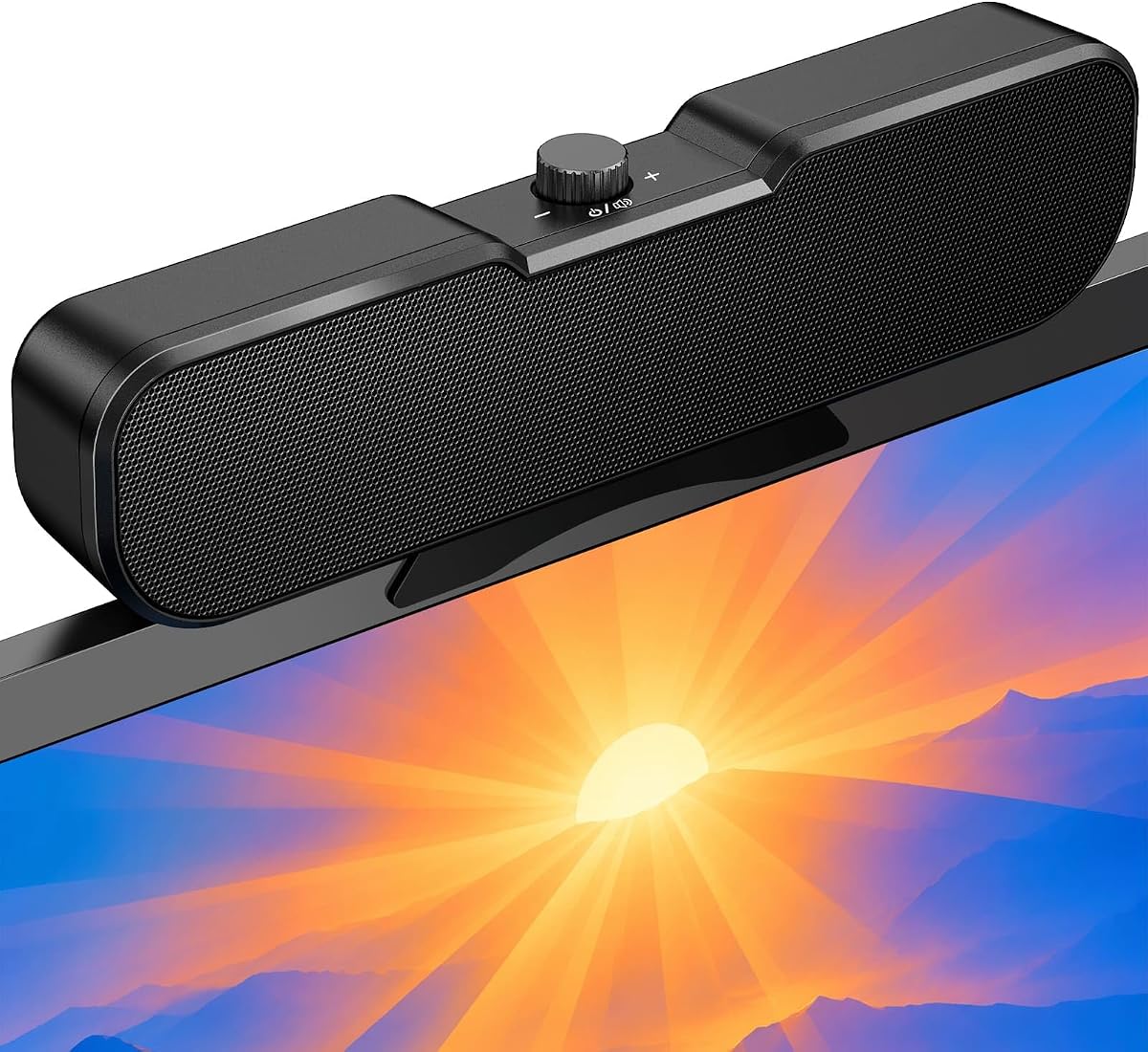
Inwa offers an affordable option with strong power output. The 4.2 rating highlights its value and loud stereo sound.
We may earn a commission when you buy through this link, at no additional cost to you.
10 watts ensure clear audio without distortion. Top buttons for volume and mute are intuitive. The spring clip works on most monitors.
Design is simple and functional. Some may wish for USB-C support.
Great for budget buyers seeking loud sound. It delivers solid performance for the price.
10 watts of power delivers loud and clear audio for various environments.
Three top buttons make volume and mute adjustments quick and intuitive.
We may earn a commission when you buy through this link, at no additional cost to you.
This model balances performance and simplicity. The 4.3 rating reflects satisfaction with its dual drivers and mounting flexibility.
We may earn a commission when you buy through this link, at no additional cost to you.
Dual 5W drivers ensure balanced sound. The clip adjusts angles for better projection. USB and USB-C adapter provide broad compatibility.
Controls are basic but functional. Some may desire more advanced customization.
Ideal for general users needing clear audio. It offers reliable performance for daily tasks.
The clip allows angle adjustments to direct sound optimally to your position.
USB and USB-C adapters ensure it works with a wide range of devices.
We may earn a commission when you buy through this link, at no additional cost to you.
Selecting the right clip on speakers requires understanding key features that impact sound quality and usability. This guide breaks down the most important factors to consider.
Sound quality is paramount for any speaker purchase. Look for models with dual drivers and passive radiators to ensure balanced mids and deep bass. Power output measured in watts indicates volume potential without distortion.
Prioritize speakers that offer clear audio across different frequencies for both work and entertainment.
Connectivity determines how easily the speaker integrates with your device. USB speakers provide stable power and audio without extra cables. Bluetooth adds flexibility for mobile devices or multi-device setups.
Choose wired for stability during calls and wireless for convenience when moving between devices.
The clip design must fit your monitor thickness securely. Spring-loaded clamps with silicone pads protect your screen while ensuring stability. Check the maximum thickness rating to avoid damage.
A secure mount prevents wobbling and ensures consistent audio direction toward you.
Ensure the speaker supports your operating system and port types. Modern laptops often use USB-C, so an adapter is essential for USB-A devices. Check for OS-specific requirements like drivers.
Plug and play models save time and reduce technical setup hurdles.
Physical controls like volume wheels or mute buttons improve usability. RGB lighting adds aesthetic value but consumes power. Microphones are vital for video conferencing clarity.
Select features based on your specific needs to avoid paying for unnecessary extras.
Durability matters for long-term use. Plastic construction should be sturdy enough to withstand daily adjustments. Weight affects monitor load, so lighter is often better for thin screens.
Check reviews for mentions of clamping strength and material durability.
Budget varies widely across models. Higher price often brings more features like Bluetooth or better sound. Balance your needs with the cost to find the best value.
Don't overpay for premium features you won't use regularly.
Customer support and warranty coverage provide peace of mind. Look for brands offering at least a one-year warranty. Accessible support helps resolve technical issues quickly.
Reliable support ensures you get the most out of your investment.
Attach the clip securely to the top or side of your monitor ensuring the silicone pads face the screen. Adjust the angle to direct sound toward your listening position.
Connect the USB cable to your laptop or powered hub. Select the speaker as the default audio device in your system settings if it does not auto-switch.
Keep the speakers dry and avoid placing heavy objects on the clip. Regularly dust the drivers and check the clamp tension to maintain optimal performance.
Most models support macOS provided you have a compatible USB or USB-C adapter. Check the product details for specific OS compatibility before purchasing to ensure seamless connection.
Yes, most models deliver clear audio suitable for video conferencing. Look for built-in microphones to enhance call quality without needing a headset.
No, most clip on speakers are plug and play devices. They should work automatically once connected to a USB port without installing additional software.
Some models fit slightly curved screens while others require flat edges. Verify the maximum thickness and curvature tolerance in the product specifications.
Cable lengths usually range from 5 to 6 feet. This provides enough reach for most desk setups without needing additional extension cables.
Many models have physical volume knobs or wheels. Others rely on your computer system volume controls. Check the specific product features for available controls.
Yes, if your tablet has a USB port or compatible adapter. USB-C tablets often connect directly while others may need an adapter.
Most clip on speakers draw power directly from the USB connection. This eliminates the need for separate power bricks or batteries.
We have explored ten clip on speakers ranging from budget-friendly options to premium models with advanced features. The top picks offer distinct advantages for different user needs.
Prioritize sound quality and mounting stability when making your choice. Consider connectivity and controls based on how you use your laptop daily.
Always verify current prices and availability as they can change frequently. Check the latest reviews before purchasing to ensure continued quality and support.