
Thames & Kosmos My Robotic Pet: Coding Chameleon STEM Building & Experiment Kit
4.1Editor score
Color sensing robotics
Unplugged coding lessons
3 unique play modes
This guide compares the top coding toys for kids to help you choose the best educational robotics and programming games for learning.
Coding toys offer a hands on way for children to learn programming logic without staring at a screen for hours. These interactive kits teach sequencing and problem solving through play. You can find options for toddlers and teens alike.
We evaluated each product based on educational value ease of use and engagement levels. Our team reviewed specifications user feedback and learning outcomes to create this curated list. Every item meets high standards for safety and durability.
Each pick highlights specific strengths like screen free design or advanced app integration. Prices may vary so check current listings before buying. These toys grow with your child from beginner to intermediate skill levels.
4.1Editor score
4.6Editor score

4.7Editor score
The following table provides a side by side view of key specifications for all ten selected products to help you compare features quickly.



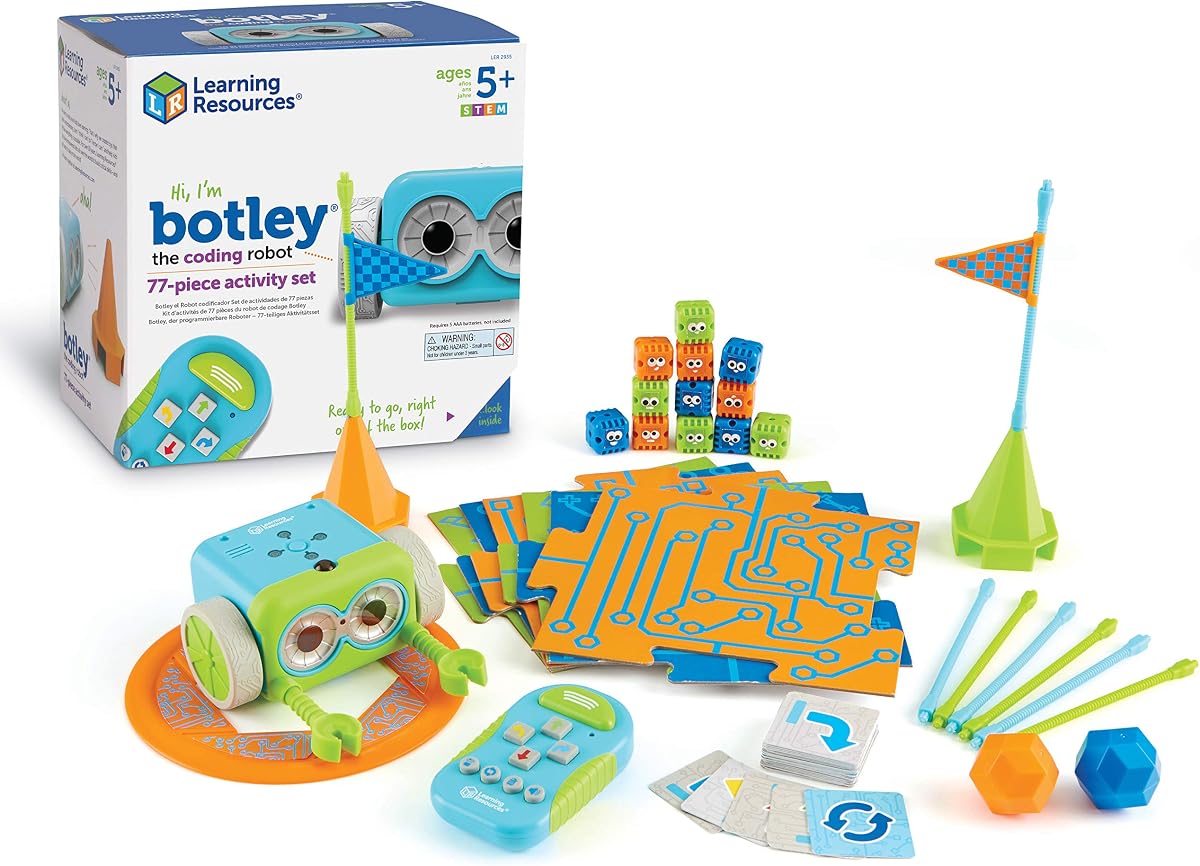
Botley stands out as the top choice for introducing young children to coding concepts without any screen time. With a rating of 4.6 stars parents appreciate the focus on logic and sequencing through physical play. This 77 piece set is perfect for home or classroom use.
We may earn a commission when you buy through this link, at no additional cost to you.
The robot features object detection allowing it to avoid obstacles automatically which adds a layer of sophistication to the play experience. Children can program looping commands and follow black lines on the floor using the included cards. The remote programmer makes it easy to send commands quickly.
While the robot is robust and well built users should note that batteries are not included which is a common oversight for this type of toy. The play area is generally limited to flat indoor surfaces which might restrict outdoor experimentation but keeps the focus on precision.
This set is ideal for educators and parents looking for a comprehensive STEM tool that grows with the child. The ability to build custom mazes and design stories ensures long term engagement. We recommend this as the primary choice for early coders.
Botley can detect objects in front of it and avoid them automatically which adds real world problem solving to the play experience.
The remote programmer allows kids to code without needing a tablet or phone making it safe for younger children.
We may earn a commission when you buy through this link, at no additional cost to you.
The Coding Chameleon offers an affordable entry point into robotics with its color sensing capabilities and screen free design. Rated 4.1 stars it combines building and coding in a single engaging package for kids aged 8 and up. It is an excellent choice for families on a budget.
We may earn a commission when you buy through this link, at no additional cost to you.
This robot changes colors and reacts to physical cards which teaches programming logic through tactile interaction. The articulated joints simulate realistic reptile movements adding a fun narrative element to the learning process. It also features three modes including wild and pet play.
Assembly can be challenging for younger children so adult supervision is recommended during the build process. The manual is detailed but the complexity might test patience for first time builders. However the educational value outweighs the initial time investment.
Buyers seeking a fun educational gift that does not rely on screens will find this kit highly rewarding. The color sensing feature encourages creative coding patterns. We suggest this for children who enjoy building and interactive play.
The robot uses physical colored action cards to program movements teaching logic without digital screens.
Articulated eyes torso and leg joints simulate realistic reptile movements that captivate children.
We may earn a commission when you buy through this link, at no additional cost to you.
TaleBot Pro is a premium option designed specifically for toddlers aged 3 to 5 offering a unique blend of coding and storytelling. With a rating of 4.7 stars it stands out for its voice feedback and interactive map system. It is a top pick for early childhood development.
We may earn a commission when you buy through this link, at no additional cost to you.
The robot allows kids to record their own voices and commands which fosters creativity and language skills. It supports multiple languages and works with Lego blocks to expand play possibilities. The touch based controls are simple enough for very young users to understand.
While the price is higher than average the educational depth and multi sensory feedback justify the investment. The age range is narrow so it may not grow with the child as long as other options. However it is perfect for preschoolers.
This toy is ideal for parents who want to introduce coding concepts gently through story and sound. The autism friendly design makes it accessible for children who need tactile engagement. We highly recommend it for toddlers.
An interactive map provides instant voice feedback to create an instructive and creative learning environment.
Kids can record voice commands and imaginative tales to bring stories to life through the robot.
We may earn a commission when you buy through this link, at no additional cost to you.
The mBot kit is designed for older children aged 8 to 12 who are ready to explore both Scratch and Arduino programming. Rated 4.6 stars it offers a robust metal build and open source flexibility. This is a strong option for tech focused kids.
We may earn a commission when you buy through this link, at no additional cost to you.
Children can learn electronics and robotics through building and programming the robot step by step. It supports line following and obstacle avoidance out of the box which demonstrates practical coding applications. The app ecosystem provides extensive resources for learning.
Setup requires attention to detail and batteries are not included which might delay initial play. The complexity can be daunting for beginners but it offers great depth for those willing to learn. It is a long term educational investment.
Families seeking a bridge between play and serious engineering should consider this kit. The compatibility with LEGO parts allows for endless customization. We recommend it for kids ready to graduate to advanced coding.
mBot supports both Scratch for beginners and Arduino for more advanced users allowing skill growth.
The durable metal material ensures the kit withstands classroom use and active play.
We may earn a commission when you buy through this link, at no additional cost to you.
The Sphero Mini packs powerful robotics into a tiny ball that connects via Bluetooth to a smartphone. Rated 4.6 stars it is ideal for teens and kids who enjoy app driven challenges. It supports coding blocks and JavaScript for advanced users.
We may earn a commission when you buy through this link, at no additional cost to you.
This robot features a gyroscope and accelerometer allowing for interactive control modes like tilt and joystick. Users can create custom games or play arcade style challenges that require programming skills. The LED lights add visual feedback to the coding process.
Battery life is limited to about an hour of active play which might require frequent recharging during long sessions. The reliance on a mobile device means it is not screen free which is a consideration for parents preferring physical controls.
For kids who already enjoy gaming and want to learn how code powers movement this toy is a great fit. It is portable and easy to use on the go. We recommend it for tech savvy children.
The Sphero Edu app allows users to draw paths or write JavaScript to control the robot.
The ball is the size of a ping pong ball making it easy to store and play with.
We may earn a commission when you buy through this link, at no additional cost to you.
This mouse set is designed for the youngest coders starting at age 4 with a simple button interface. Rated 4.5 stars it helps children practice sequencing and directional logic through hands on maze building. It is perfect for preschool or kindergarten centers.
We may earn a commission when you buy through this link, at no additional cost to you.
The mouse navigates a maze built by the child using physical coding cards to program the path. It includes grids and walls to create various challenge levels. The lack of screens makes it safe for toddlers and young learners to use independently.
While the functionality is basic it is intentionally so to avoid overwhelming young users. The battery life is decent but batteries are not included. It serves as a gentle introduction before moving to more complex robots.
Parents looking for a starter toy that teaches logic without screens will find this ideal. The components are durable enough for classroom use. We suggest this for early learners ready for first steps.
The mouse uses simple buttons and coding cards so no phone or tablet is required.
Included grids and walls let kids build their own 20 inch by 20 inch board.
We may earn a commission when you buy through this link, at no additional cost to you.
The Mech-5 is a mechanical coding robot that focuses on building and programming through physical interaction. Rated 4.5 stars it is designed for kids 10 and up to learn engineering principles. It uses a coding wheel system to trigger actions.
We may earn a commission when you buy through this link, at no additional cost to you.
This robot can throw lift kick and draw by snapping coding buttons onto a coding wheel. It provides a tactile way to understand cause and effect without screens. The detailed instructions encourage patience and careful assembly.
Building the robot takes multiple hours so it requires a significant time commitment from the child. The coding system is less flexible than app based solutions but more intuitive for mechanical thinkers. It is great for hobbyists.
Families looking to inspire interest in engineering should choose this kit. It offers a true STEM experience through building. We recommend it for children who enjoy working with their hands.
Buttons snap onto a coding wheel to trigger mechanical actions like kicking and drawing.
The kit is designed as a mission-based project to inspire young engineers to learn.
We may earn a commission when you buy through this link, at no additional cost to you.
The Evo Entry Kit introduces coding through physical lines and a robust app platform. Rated 4.6 stars it is perfect for grades K-12 and includes markers and a robot. It is a strong investment for educators and parents.
We may earn a commission when you buy through this link, at no additional cost to you.
Kids can draw lines for the robot to follow or use the Blockly app for advanced coding. The kit includes dual-tip markers and over 700 lessons which provide a long learning path. The robot is durable enough for classroom traffic.
The initial cost is high but the educational resources justify the price. Markers may need replacing over time which is an ongoing expense. However the flexibility of code modes offers great value.
Schools and parents seeking a comprehensive long-term coding tool will find this kit ideal. The variety of skill levels ensures it grows with the child. We recommend it for structured learning environments.
Five dual-tip markers allow for screen-free coding by drawing paths for the robot.
Access to over 700 free lessons covers STEAM and core subjects for deep learning.
We may earn a commission when you buy through this link, at no additional cost to you.
Botley 2.0 builds on the original with improved object sensing and secret code combinations. Rated 4.5 stars it challenges kids to refine strategies and tackle more complex routes. It is great for advancing skills after the first model.
We may earn a commission when you buy through this link, at no additional cost to you.
The robot uses a remote programmer to send commands and features lights and sounds for engagement. It can follow paths and detect objects to adjust its route. The 78 piece kit includes boards and obstacles for custom play.
While the features are richer the price is higher than the original. Some children may find the setup more complex than the first version. However the added depth keeps them engaged for longer periods.
Buyers looking to upgrade an existing Botley or seek more challenge will enjoy this model. The object sensing adds realism to the coding experience. We suggest it for intermediate coders.
The robot can detect objects in front of it and adjust its route automatically.
Lights sounds and playful music make this robot engaging for curious creators.
We may earn a commission when you buy through this link, at no additional cost to you.
The Dash robot is ready out of the box without assembly and offers voice command integration. Rated 4.6 stars it is used in over 40000 schools globally. It is an excellent option for older kids and classrooms.
We may earn a commission when you buy through this link, at no additional cost to you.
Dash can sing dance and navigate obstacles using apps for iOS and Android. It supports concepts like loops and variables which helps kids master coding fundamentals. The battery life is substantial allowing hours of play.
It requires a smartphone app to function which means screen time is involved. The price is at the higher end but the educational value is proven in schools. It is a reliable choice for serious learning.
Families wanting a plug and play robot that grows with the child will love Dash. It is fun and educational without requiring physical building skills. We recommend it for kids ready to code with apps.
Dash can respond to voice commands allowing for interactive fun and creativity.
Five different apps support coding from beginner to advanced levels for flexible learning.
We may earn a commission when you buy through this link, at no additional cost to you.
Selecting the right coding toy involves considering age compatibility learning goals and budget to ensure the best educational outcome.
Ensure the toy matches your child's developmental stage and reading ability to maintain engagement and prevent frustration during play.
Choose products rated for your child's age range to guarantee safety and appropriate learning challenges.
Decide if you prefer physical cards or buttons or an app driven interface depending on your family's screen time rules.
Opt for screen free options if limiting digital exposure is a priority for your household.
Determine whether you want to focus on basic sequencing or more advanced concepts like loops and variables.
Select toys that align with the specific coding concepts you wish your child to learn.
Look for sturdy materials and solid construction to ensure the toy survives daily play and handling by children.
Invest in kits made from high quality materials to maximize longevity and value.
Check if the toy requires batteries or charging since this impacts ongoing costs and convenience for users.
Consider rechargeable options or those with long battery life to reduce frequent maintenance.
Consider whether the toy supports add-on packs or new versions so the child can grow into more complex features.
Choose platforms that offer upgrade paths to extend the toy's life as skills develop.
Evaluate the price relative to the number of features and the educational depth provided by the product.
Set a budget that balances affordability with the quality of the learning experience offered.
Look for products with active online communities or resources that provide extra lessons and support for learners.
Select brands that offer tutorials and guides to help parents and kids get the most out of the toy.
Start by assembling the kit carefully following the instructions to ensure all parts function correctly from the beginning.
Program the toy using the provided cards or app to execute simple commands before moving on to complex tasks.
Store components in a dry place and replace batteries as needed to maintain optimal performance over time.
Yes most coding toys designed for young children meet strict safety standards and lack small parts. Always check age recommendations and supervise play with younger kids to ensure safe usage.
Not all coding toys require a smartphone as many offer screen free alternatives with physical cards or buttons. However some advanced models utilize apps for enhanced features and coding options.
Build times vary from fifteen minutes for simple toys to several hours for detailed kits. Be sure to review assembly instructions to set realistic expectations for project completion.
Several coding kits are compatible with standard LEGO bricks allowing for creative expansion. Check the product specifications to confirm compatibility before purchasing additional building sets.
Children can start as young as four years old with simple button based robots. More advanced kits are suitable for ages eight and up with better reading skills.
Many coding toys introduce concepts using block based interfaces that mimic real programming languages. This provides a foundation for learning advanced languages like Python or JavaScript later.
Yes many of these toys are designed for classroom use with lesson plans and teacher resources. They are excellent tools for integrating STEM learning into the school curriculum.
Keep electronic components dry and store them properly when not in use to prevent damage. Clean any sensors regularly and replace batteries to ensure continued functionality.
We have reviewed ten excellent options ranging from screen free mouses to advanced robotic kits.
Prioritize toys that match your child's interests to encourage long term engagement and learning.
Always verify current prices and availability before making your purchase to ensure the best value.