
ScreenBeam ECB7250K02 Network Adapter
4.4Editor score
Bonded MoCA 2.5
Up to 2.5Gbps Speed
Backwards Compatible
This guide compares the top ten coax to Ethernet adapters for home networking, evaluating speed, compatibility, reliability, and value for modern internet
Modern homes demand fast reliable internet connections for streaming gaming and remote work. A coax to Ethernet adapter transforms existing wiring into high speed networks without new cables. Choosing the right adapter ensures stable performance and eliminates dead zones effectively.
We analyzed ten top rated adapters based on speed compatibility and user feedback. Each product was evaluated for ease of setup network stability and feature set. This list helps you find the perfect match for your home internet infrastructure quickly.
Each pick highlights specific strengths and ideal use cases for different households. Prices and availability may change so verify details before purchasing your device. Our goal is to guide you toward a reliable wired connection solution today.
4.4Editor score
4.6Editor score

4.8Editor score
The following comparison table provides a side by side overview of all ten adapters. It highlights key specifications and features to help you decide which model fits your network needs best.


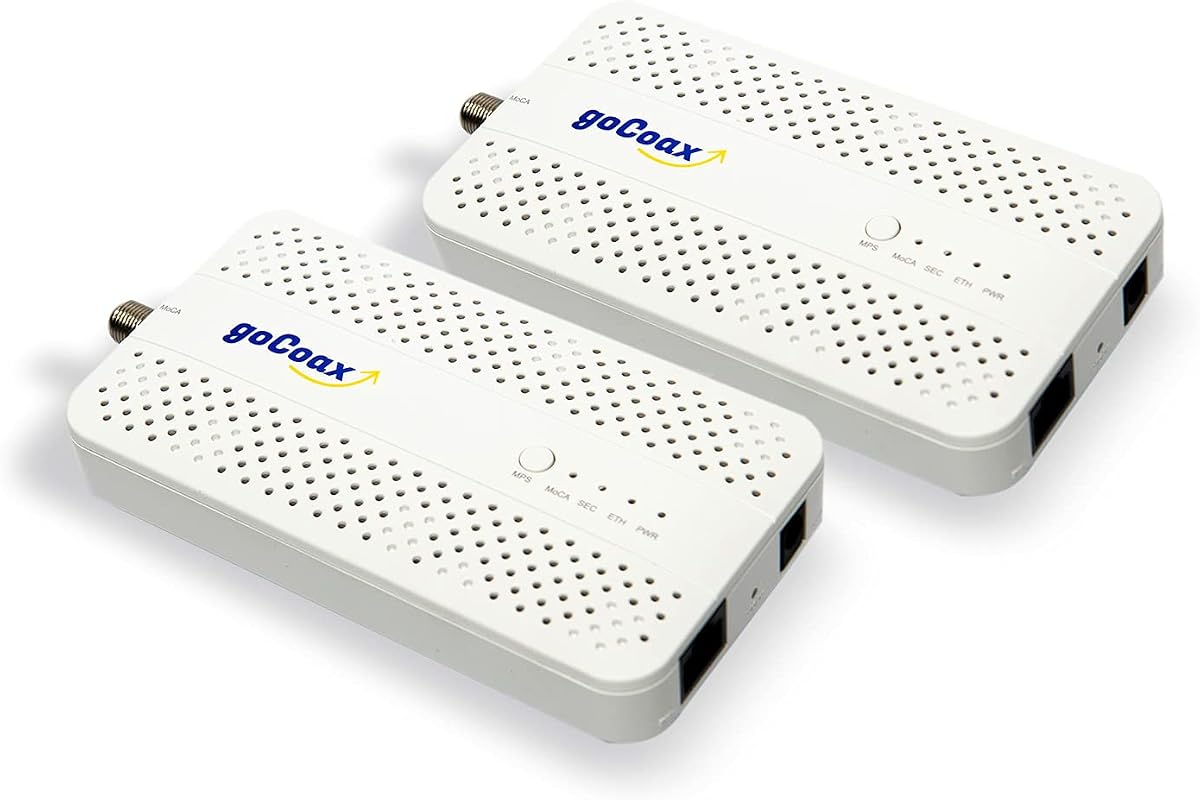
The goCoax MoCA 2.5 Adapter earns our top spot with its blazing fast 2.5Gbps speeds and rock solid reliability. This 2-pack kit delivers under 3ms latency making it perfect for competitive gaming and 4K streaming without buffering or lag.
We may earn a commission when you buy through this link, at no additional cost to you.
Built by MoCA specialists this adapter turns existing coax cables into a high speed wired backbone. It connects seamlessly with Comcast Spectrum Cox and Fios without needing configuration. The included cables and power adapters mean you are ready to set up right out of the box.
While it requires existing coax wiring and does not work with satellite TV the performance gains are significant. The low latency ensures smooth video conferencing and online gameplay even during peak hours. Most users find the setup intuitive and the connection stable.
If you want reliable high speed internet without running new cables this adapter is the best choice. It supports up to 16 nodes for whole home coverage and works with mesh systems as a wired backhaul. Upgrade your network today with this top rated solution.
Experience next-level speeds ideal for 4K streaming and large file transfers without any lag or buffering during use.
Achieve under 3ms latency for competitive gaming and smooth video calls that outperform Wi-Fi connections significantly.
We may earn a commission when you buy through this link, at no additional cost to you.
The ScreenBeam ECB7250K02 Kit offers premium performance with bonded MoCA 2.5 technology for faster speeds than standard Wi-Fi. It delivers up to 2.5Gbps over existing coax cables making it ideal for 4K streaming remote work and online gaming in large homes.
We may earn a commission when you buy through this link, at no additional cost to you.
This starter kit includes everything needed for setup including adapters power adapters ethernet and coax cables plus splitters. It supports up to 16 nodes on one network and is backwards compatible with older MoCA versions for maximum flexibility in your home network.
Some DOCSIS 3.1 modems may cause frequency overlap issues requiring ISP fixes. However for most users the reliability and speed surpass wireless options significantly. Check your router compatibility before purchase to ensure seamless integration with your internet setup.
Choose this kit if you need carrier-grade performance and whole home wired connectivity without new cabling. It connects remote Wi-Fi access points easily and provides stable high bandwidth for all devices. This is the ultimate upgrade for serious home networkers.
Bonded MoCA 2.5 delivers up to 2.5Gbps speeds surpassing Wi-Fi for high bandwidth tasks like 4K streaming.
Includes adapters cables splitters and power adapters for a complete turnkey setup right out of the box.
We may earn a commission when you buy through this link, at no additional cost to you.
The TRENDnet TMO-313C2K provides excellent value with 2.5Gbps speeds at a budget friendly price point. Its compact design fits easily in any room and supports up to 16 nodes for whole home wired coverage using existing coax cables.
We may earn a commission when you buy through this link, at no additional cost to you.
This adapter is NDAA and TAA compliant for government customers in the US and Canada. It enhances Wi-Fi networks by extending high speed connections without new wiring. The plug and play setup requires no configuration making it accessible for all users.
While it supports only one port per unit this is sufficient for most single device connections. The reliable performance ensures smooth streaming and gaming without the interference common with wireless networks. Check your ISP compatibility before buying.
For those seeking reliable high speed connectivity without breaking the bank this adapter is ideal. It offers the same MoCA 2.5 technology as pricier options in a smaller form factor. Upgrade your home network today with this cost effective solution.
Get 2.5Gbps speeds at a budget friendly price with reliable MoCA 2.5 technology for home networking needs.
NDAA and TAA compliant for government customers ensuring secure and approved networking solutions for all users.
We may earn a commission when you buy through this link, at no additional cost to you.
The Kiwee Broadband MoCA adapter stands out with exclusive dual 2.5GbE ports allowing you to connect multiple devices at full speed. This unique feature makes it perfect for homes with multiple devices needing wired connections in the same room.
We may earn a commission when you buy through this link, at no additional cost to you.
Harnessing the latest MoCA 2.5 standard it delivers ultra-fast interference-free wired networking over existing coax cables. The included coax and ethernet cables mean you can set up your network straight out of the box without extra purchases or hassle.
While the price is slightly higher than single port models the added versatility is worth it for demanding users. It supports seamless gaming streaming and work-from-home setups without any lag or buffering during peak usage hours.
If you need to connect a PC and gaming console or TV simultaneously this adapter is the best choice. It future proofs your network with next-gen speeds and reliable performance trusted by demanding users globally today.
Unique dual 2.5GbE ports allow connecting multiple devices at full speed without needing extra switches or hubs.
MoCA 2.5 standard ensures next-gen speeds and reliability for years of seamless gaming streaming and work use.
We may earn a commission when you buy through this link, at no additional cost to you.
The Hitron HTEM5 adapter extends your network via coax cables offering up to 2.5Gbps speeds for all bandwidth heavy devices. It works with Cable and most Fiber services making it versatile for various internet providers across the country.
We may earn a commission when you buy through this link, at no additional cost to you.
This 2-pack kit includes adapters coax cables ethernet cables and power adapters for quick setup. Free technical support is available if you experience connectivity issues which are often related to home wiring configuration rather than defects.
Ensure your home has interconnected coax wiring before purchase as it will not work with satellite TV systems. This limitation is standard for MoCA adapters but critical to verify for successful installation and reliable performance in your home.
Choose this adapter if you need a reliable extension for Cable or Fiber networks without new cabling. The complete kit and support ensure you get connected quickly and enjoy stable high speed internet throughout your home.
Works with Xfinity Spectrum Cox and most Fiber services for versatile connectivity across different internet providers.
Free technical support helps troubleshoot connectivity issues related to home wiring and ISP configurations easily.
We may earn a commission when you buy through this link, at no additional cost to you.
The LNOVISION LongReach is an industrial grade PoE over Coax converter ideal for upgrading analog systems to IP surveillance. It supports PoE standards 802.3af and 802.3at enabling data and power transmission over existing coax cables efficiently.
We may earn a commission when you buy through this link, at no additional cost to you.
Built with a heat sink for reliability this unit is designed for indoor use with a small footprint. It connects to POE switches or injectors and works with RG59 RG6 and RG11 cables for versatile installation in elevator shafts or old homes.
While limited to 100Mbps speed it is perfect for surveillance systems needing long distance transmission. The plug and play setup ensures hassle free transmission without technical expertise required for configuration or maintenance tasks.
Choose this converter for CCTV systems or industrial setups needing power and data over coax. It ensures super reliability and simple installation where traditional ethernet is impractical or too difficult to run to.
Transmits data and power over existing coax cables ideal for surveillance systems without needing separate power lines.
Built-in heat sink and industrial design ensure reliable and hassle free transmission in demanding environments.
We may earn a commission when you buy through this link, at no additional cost to you.
The G.hn Ethernet Kit transforms unused dark coax networks into a powerful ethernet connection offering up to 1.2Gbps speeds. It is ideal for Fiber or Satellite internet homes where coax lines are available but not actively used for TV.
We may earn a commission when you buy through this link, at no additional cost to you.
This kit ensures faster speeds lower latency and a stable connection for streaming and gaming without rewiring. The simple setup includes adapters allowing you to connect devices through existing coaxial cables with no professional help needed.
Warning: This adapter will not work with Cable TV or Cable Internet services so verify your coax status first. It supports Ethernet over coax allowing you to extend your network reach effectively where traditional wiring is difficult.
Choose this kit if you have dark coax and want reliable speeds without new cables. Nexuslink is a trusted brand delivering quality networking solutions for your home or office needs seamlessly.
Turns unused dark coax networks into powerful gigabit connections for seamless gaming and streaming without new wiring.
Provides secure reliable speeds ideal for Fiber or Satellite internet homes avoiding cable internet conflicts.
We may earn a commission when you buy through this link, at no additional cost to you.
The PowerBridge KB-M3-03 Kit offers true multi-gig speeds and PoE+ support for powering devices like Wi-Fi 6E/7 access points over coax. It achieves 2.5Gbps data speeds while delivering up to 30W power via Ethernet port for simplified installations.
We may earn a commission when you buy through this link, at no additional cost to you.
Integrated PoE+ eliminates the need for extra outlets powering cameras phones and access points through single Ethernet cables. This solution supports Wi-Fi 6E/7 devices ensuring seamless network expansion without running additional wires through walls or ceilings.
Low-latency data transfer ensures no buffering during high-performance sessions making it ideal for demanding applications. The kit is plug and play requiring no configuration so you can get started quickly and easily today.
Choose this adapter if you need to power modern access points or cameras remotely. It provides consistent interference-free signal outperforming standard adapters and simplifies your smart home setup effectively.
Integrated PoE+ allows powering devices like Wi-Fi 6E/7 access points and cameras via single Ethernet cable.
MoCA 2.5 support with 2.5G Ethernet port for ultra-fast stable connectivity ideal for high-demand applications.
We may earn a commission when you buy through this link, at no additional cost to you.
The TRENDnet TMO-312C is a single unit adapter featuring a Gigabit LAN port with throughput up to 1Gbps for smooth MoCA traffic. It is NDAA and TAA compliant ensuring secure and approved networking solutions for all users and businesses.
We may earn a commission when you buy through this link, at no additional cost to you.
This adapter supports up to 16 nodes on one network enhancing your existing coax wiring into a reliable wired connection. It is compact and lightweight fitting easily on desktops or entertainment centers without taking up much space.
Backed by 3 years of manufacturer protection and reliable tech support this adapter ensures long-term reliability. It reduces traffic bottlenecks and offers better performance than Wi-Fi for critical working from home needs and applications.
If you need a single add-on or replacement unit this adapter offers solid performance and support. It is ideal for extending networks without new wiring and ensures stable connections for gaming and streaming reliably.
Gigabit LAN port with up to 1Gbps throughput reduces bottlenecks and ensures smooth MoCA traffic flow.
Backed by 3 years of protection and reliable tech support for long-term peace of mind and reliability.
We may earn a commission when you buy through this link, at no additional cost to you.
The ScreenBeam ECB6200S02 is an add-on adapter for expanding existing MoCA 2.0 networks with bonded technology for reliable speeds. It achieves 1Gbps connections that surpass traditional Wi-Fi making it a cost-effective option for adding wired access points.
We may earn a commission when you buy through this link, at no additional cost to you.
This package includes one adapter power adapter ethernet cable coax cable and a guide for easy setup. It supports up to 16 nodes on one network ensuring robust connectivity for multiple devices throughout your home effectively.
Check compatibility with your router as built-in MoCA capability is required. While some modems may conflict this adapter delivers top performance for 4K and HD streaming in demanding environments with reliability.
Choose this add-on if you already have a MoCA network and need to expand it. It is the budget-friendly solution to get more wired connections without replacing your entire network setup today.
Add-on design expands existing MoCA networks easily with bonded technology for reliable 1Gbps wired connections.
Provides cost-effective 1Gbps speeds surpassing traditional Wi-Fi for 4K and HD streaming reliably.
We may earn a commission when you buy through this link, at no additional cost to you.
Choosing the right adapter requires understanding speed compatibility and your home network setup. This guide explains key factors to ensure you select a product that meets your needs.
MoCA standards define the speed and compatibility of your adapter. MoCA 2.5 offers up to 2.5Gbps speeds and is ideal for modern high bandwidth needs. Older MoCA 2.0 versions are limited to 1Gbps and may suffice for basic tasks.
Select MoCA 2.5 for future-proofing and better performance across your network.
The Ethernet port speed must match your network capabilities. Look for 2.5GbE ports for next-gen speed or Gigabit ports for standard 1Gbps connections. Ensure your router and devices support these speeds to avoid bottlenecks.
Match port speeds to your router to fully utilize high-speed internet connections.
Verify adapter compatibility with your internet provider. Most Cable and Fiber providers support MoCA but AT&T and satellite systems often block it. Check your modem and router specs to ensure seamless integration without conflicts.
Confirm provider compatibility before buying to avoid connectivity issues after installation.
Your home must have interconnected coax wiring for these adapters to work. Satellite TV systems usually disconnect coax lines which makes MoCA adapters unusable. Check your outlets and ensure they are linked to a main splitter for success.
Verify your coax wiring is interconnected before purchasing any adapter.
Some adapters offer Power over Ethernet (PoE) to power devices like cameras or access points. This feature eliminates the need for extra outlets and simplifies installation in remote locations. Consider this if you have such devices.
Look for PoE support if you need to power devices over the Ethernet cable.
Some kits include cables splitters and power adapters while others sell them separately. A complete kit saves money and hassle during setup. Check what is included to avoid extra costs when you start installing.
Choose kits that include essential accessories to simplify your installation process.
Reputable brands offer better reliability and customer support. Look for manufacturers with technical support and warranty options. This ensures help is available if you encounter network issues during or after setup.
Prioritize brands with strong support to ensure long-term reliability.
Most adapters have one port but some offer dual ports for multiple devices. If you need to connect more than one device per location consider a dual-port adapter. This avoids buying extra switches or additional hardware.
Opt for dual ports if you connect multiple devices in one room.
Start by checking your home coax wiring is interconnected and not used for satellite services. Plug one adapter into a coax outlet near your router and connect it via ethernet to the router. Ensure the adapter is powered on with the included adapter.
Plug the second adapter into a coax outlet where you need internet and connect your device to its Ethernet port. The devices should auto-configure in seconds creating a stable network link between the two rooms effortlessly.
To maintain performance avoid placing adapters near interference sources like large metal objects. Ensure cables are securely connected and check the indicator lights for optimal signal status regularly to ensure reliable network uptime.
No. MoCA adapters require interconnected coax wiring. Satellite systems typically disconnect coax lines making these adapters unusable with satellite TV setups in your home.
Most Cable providers like Comcast Xfinity Spectrum and Cox as well as Fiber services like Verizon Fios are compatible. AT&T internet and satellite systems are generally not compatible with MoCA adapters.
A PoE filter is recommended at the cable entry point to prevent signal leakage and improve security. It is not included with most kits but can be purchased separately for optimal performance.
Yes. These adapters work as wired backhaul for mesh systems like Eero and Orbi. This significantly improves stability and speed throughout your home compared to wireless mesh connections.
No. These adapters extend your existing network using coax wiring. You must have an active internet connection and router to use them effectively in your home network.
Most MoCA 2.5 adapters support up to 16 nodes on one network. This allows you to connect multiple devices in various rooms using coax outlets throughout your home.
Some DOCSIS 3.1 modems may conflict due to frequency overlap. Check with your ISP for a fix or try disabling MoCA on your gateway to resolve connectivity issues.
Most adapters have one Ethernet port. For multiple devices you will need a switch connected to that port. Some models like Kiwee offer dual ports for direct connection.
Our top picks highlight the best options for different needs. The goCoax adapter offers overall reliability while ScreenBeam delivers premium performance and TRENDnet provides excellent budget value for home networking.
Prioritize compatibility with your provider and home wiring before purchasing. Ensure your coax network is interconnected and avoid satellite systems to prevent installation issues and connectivity failures.
Prices and availability change often so check current offers before buying. Verify your setup and choose the adapter that best fits your internet speed and home layout today.