
Power Strips with Surge Protection
4.8Editor score
12 AC outlets plus 4 USB ports
Ultra slim flat plug design
1080 Joules surge protection
Discover the top desk mounted outlet towers for 2026. This guide compares features, charging speeds, and safety to help you organize your workspace efficiently.
Desk mounted outlet towers transform cluttered workspaces into organized hubs by consolidating multiple power sources into a single vertical unit. These devices are essential for modern offices and homes where digital devices outnumber available wall sockets.
We evaluated ten leading models based on port availability, charging speed, safety certifications, and design versatility. Each product was scrutinized for build quality, cord length, and user feedback to ensure reliable performance in daily scenarios.
Every selection highlights specific strengths like fast charging capabilities or space-saving footprints. Please note that pricing and availability fluctuate regularly, so verify current details before making your final purchasing decision.
4.8Editor score

4.5Editor score

4.8Editor score
The following table provides a side-by-side comparison of all ten products analyzed in this guide to help you quickly identify the model that best fits your specific power and space requirements.




The TenTrend Power Strip Tower stands out as a top contender for users needing high power density in a small footprint. With a total output of 230 watts, it supports a wide variety of devices simultaneously without compromising performance or speed.
We may earn a commission when you buy through this link, at no additional cost to you.
This model features two orange USB-C ports capable of delivering up to 65 watts, making it ideal for charging laptops directly from the tower. The additional ports ensure phones, tablets, and accessories stay powered throughout the day.
While highly capable, the tower relies on a flat plug that is very thin. Although this saves wall space, it means users must ensure their outlet configuration accommodates this specific orientation to avoid blocking adjacent sockets.
For anyone seeking a reliable central hub for office electronics, this tower offers a balanced mix of speed and convenience. Its safety features provide peace of mind during extended use, making it a recommended choice for professionals.
The 230W total capacity ensures that even power-hungry devices like laptops and monitors receive sufficient power without throttling speeds.
Separating high-power USB-C ports from standard USB-A ports allows users to optimize their charging strategy for different devices.
We may earn a commission when you buy through this link, at no additional cost to you.
For budget-conscious shoppers who need maximum connectivity, this power strip offers an impressive array of features without a high price tag. It provides twelve AC outlets, which is a rare find at this price level.
We may earn a commission when you buy through this link, at no additional cost to you.
The inclusion of smart USB ports adds versatility for charging smaller devices like smartphones and earbuds. The flat plug design ensures it fits easily into tight wall spaces, reducing clutter in the room.
While it may not offer the highest wattage per USB port compared to premium models, it excels in providing ample traditional power sockets. This makes it perfect for homes with many standard appliances.
We recommend this tower for students or home office users who need to plug in multiple devices on a tight budget. The surge protection ensures that your investment in electronics remains safe during power fluctuations.
With twelve AC outlets, this tower eliminates the need for multiple adapters, allowing direct connection for various household electronics.
The braided fabric cord adds a touch of style and significantly increases resistance to wear and tear over time.
We may earn a commission when you buy through this link, at no additional cost to you.
Anker brings its reputation for quality to this innovative desk-mounted power strip. The unique clamp design keeps the unit secure on your desk edge, freeing up valuable desktop space for work materials.
We may earn a commission when you buy through this link, at no additional cost to you.
The standout feature is the 70W USB-C port, which can charge most modern laptops at high speed without needing a separate brick. This reduces cable clutter and simplifies the setup for mobile professionals.
While the price point is higher than standard towers, the build quality and unique mounting mechanism justify the cost. It is designed for users who prioritize workspace aesthetics and premium functionality above all else.
This product is ideal for those with modern standing desks or minimalist setups. The clamp ensures stability, while the dual-zone layout helps organize cables and devices efficiently by their specific power needs.
By attaching to the desk edge, this unit leaves the surface clear for keyboards and documents, enhancing overall workspace ergonomics.
The 70W USB-C port supports fast charging protocols, ensuring your laptop stays powered up during intensive work sessions.
We may earn a commission when you buy through this link, at no additional cost to you.
This tower offers a unique solution to cable management with its built-in auto-rewind extension cord. Pulling the cord out only as much as needed prevents it from sprawling across your floor or desk.
We may earn a commission when you buy through this link, at no additional cost to you.
When not in use, the cord retracts into the base, keeping your environment tidy. This design is particularly useful in shared spaces like conference rooms or dormitories where cleanliness is a priority.
The upright cube design remains stable even when the cord is extended. Additionally, the mountable feet allow you to secure the unit to a wall or under a desk if you prefer overhead power access.
Ideal for users who value neatness and organization, this model stands out for its mechanical innovation. While it has fewer ports than some competitors, the cord management system makes it a practical choice for smaller setups.
The retractable cord system ensures that excess cable is never visible, maintaining a clean and professional look in any room.
Feet designed for mounting allow the tower to be attached to various surfaces, offering more installation flexibility than standard plugs.
We may earn a commission when you buy through this link, at no additional cost to you.
This SMALLRT model prioritizes port availability, offering a total of sixteen connection points in one vertical unit. With twelve AC outlets and four USB ports, it is ready to power almost any device simultaneously.
We may earn a commission when you buy through this link, at no additional cost to you.
The four separated switches allow you to control power to different sections of the tower independently. This feature is excellent for saving energy by turning off specific groups of devices when not in use.
The 6.5-foot cord provides excellent reach, allowing the tower to be placed centrally even if outlets are far away. The vertical design ensures that large adapters do not block adjacent outlets, a common issue with horizontal strips.
For college dorms or home offices with extensive device counts, this tower is a practical workhorse. The separate switches add a layer of convenience that helps manage power consumption effectively without unplugging cords constantly.
The four switches divide the outlets into zones, giving you granular control over which devices receive power at any given time.
The upright design prevents bulky power bricks from blocking other sockets, ensuring every outlet remains accessible.
We may earn a commission when you buy through this link, at no additional cost to you.
Safety is the primary focus of this SMALLRT tower, which is built with pure copper wires for better conductivity and heat resistance. The fire-resistant shell ensures durability even under high load conditions.
We may earn a commission when you buy through this link, at no additional cost to you.
The automatic power cut-off mechanism protects your devices from voltage spikes and overloads. This feature is crucial for expensive electronics like gaming consoles or work computers that require stable power input.
The anti-slip rubber base ensures the tower remains stable on smooth desk surfaces. Even when fully loaded with heavy plugs, the unit will not tip over, preventing potential damage to connected devices.
For users who prioritize safety and durability, this model is a top choice. The lifetime technology support adds extra value, giving buyers confidence that the manufacturer stands behind the product's reliability.
Using pure copper for the internal wiring reduces resistance and heat buildup, ensuring safer operation over long periods.
The rubberized feet grip the desk firmly, preventing the tower from sliding even when multiple heavy plugs are inserted.
We may earn a commission when you buy through this link, at no additional cost to you.
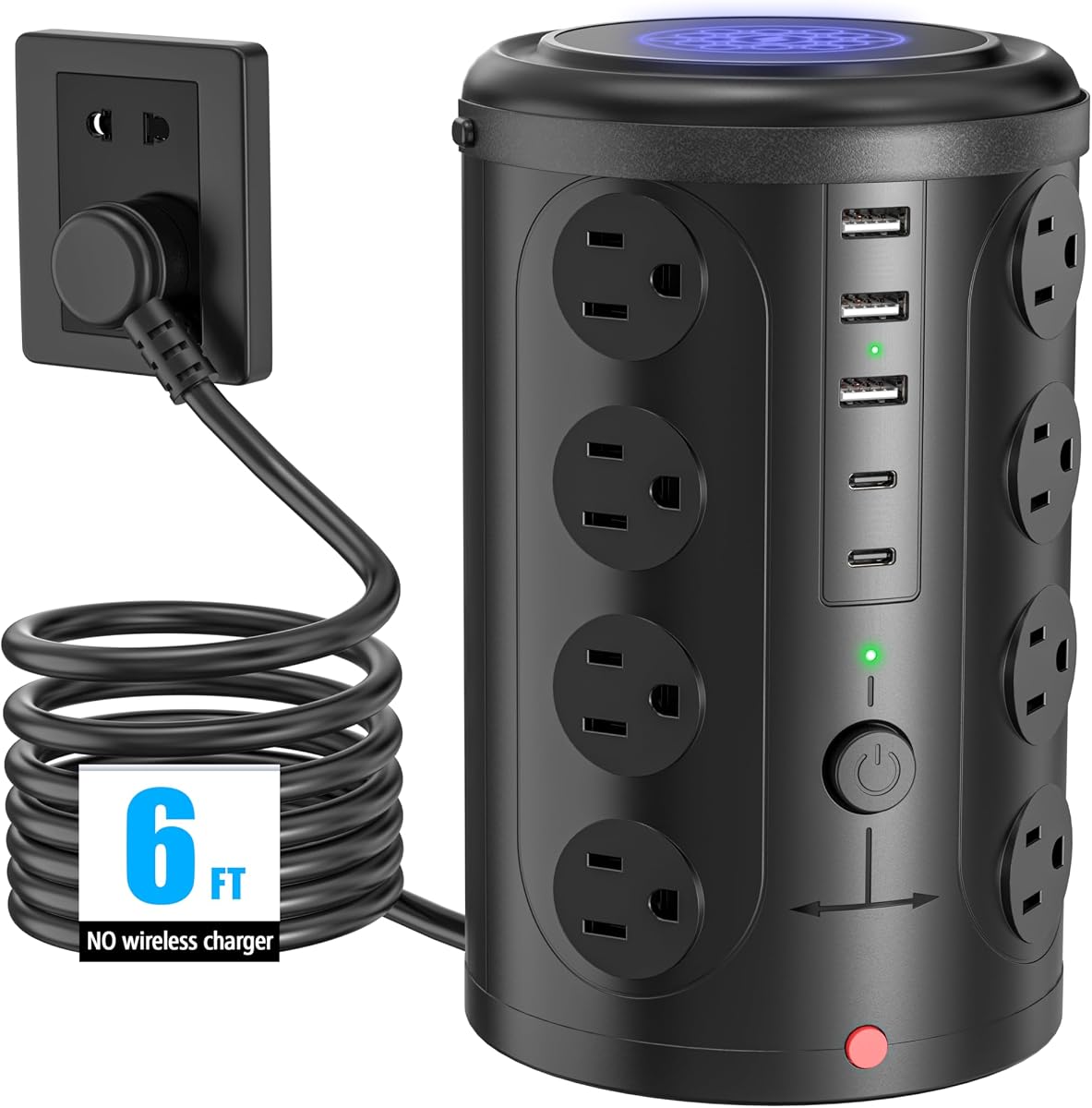
This tower solves the common issue of blocking adjacent outlets with its wide-spaced design. The 16 AC sockets are spaced generously to allow large adapters to fit without overlapping.
We may earn a commission when you buy through this link, at no additional cost to you.
The inclusion of five USB ports allows for convenient charging of mobile devices. The vertical layout ensures that all ports are accessible from the front, making it easy to plug and unplug devices frequently.
With a 6-foot cord, the tower is flexible enough to be placed on the floor or desk. The lightweight build makes it easy to move around, though it may feel less premium than heavier metal alternatives.
Ideal for general home use, this tower offers a practical solution for families with many electronic devices. The wide spacing is the key benefit, ensuring you can use all outlets without worrying about physical interference.
The wide spacing between outlets ensures that bulky travel adapters or power bricks do not block neighboring sockets.
Ports are designed to be accessed from the front, making it easy to manage cables even when the tower is against a wall.
We may earn a commission when you buy through this link, at no additional cost to you.
TESSAN focuses on a clean and unobtrusive design with this ultra-thin flat plug tower. The 0.31-inch plug sits flush against the wall, making it ideal for living rooms where outlets are behind furniture.
We may earn a commission when you buy through this link, at no additional cost to you.
The grey finish gives the tower a modern look that blends into most home decor styles. With twelve AC outlets and three USB ports, it balances functionality with a sleek aesthetic that does not overwhelm the room.
Surge protection is built-in to guard against voltage spikes. The rubber feet at the base provide stability on smooth floors or tables, ensuring the tower remains upright during regular use.
This model is perfect for living rooms or bedrooms where aesthetics matter. The thin plug design allows for placement behind sofas or beds without creating a tripping hazard or blocking other outlets.
The grey finish and thin profile ensure the power strip looks like a part of the room rather than an intrusive appliance.
The ultra-thin plug prevents the unit from protruding too far from the wall, maintaining a tidy appearance behind furniture.
We may earn a commission when you buy through this link, at no additional cost to you.
This model features a unique dual-layer design that allows access to outlets on both the front and back of the tower. This configuration effectively doubles the accessible ports for a given physical footprint.
We may earn a commission when you buy through this link, at no additional cost to you.
The clamp mechanism secures the tower firmly to the desk edge, keeping it out of the way while still accessible. The 20W USB-C port is sufficient for most phones and tablets, offering decent charging speed.
Constructed from fire-resistant ABS plastic, the unit prioritizes safety and durability. The installation requires no tools, making it quick to set up and adjust whenever you reorganize your workspace.
For users with limited desk surface area, this dual-layer clamp is an excellent solution. It effectively adds power access without consuming valuable desk space, allowing for a cleaner and more organized work environment.
Ports on both sides allow users to plug devices facing different directions, maximizing usability in tight spaces.
The secure clamp design ensures the strip stays in place, even when heavy adapters are plugged in during daily use.
We may earn a commission when you buy through this link, at no additional cost to you.
This tower offers robust protection with an 1800J surge rating, which is higher than many competitors in its class. This level of protection is ideal for safeguarding sensitive electronics against unexpected power spikes.
We may earn a commission when you buy through this link, at no additional cost to you.
The twelve AC outlets are spaced widely to accommodate large adapters without blocking. Four smart USB ports automatically adjust charging speed, ensuring your phones and tablets charge efficiently without manual intervention.
The ultra-thin flat plug ensures the unit does not stick out too far from the wall. The rubber feet on the bottom provide a stable base, keeping the tower steady on desks and floor surfaces.
For users concerned about electrical safety, this model is a solid investment. The combination of high surge rating and smart charging capabilities makes it a reliable choice for home office environments.
The 1800J rating provides substantial defense against voltage spikes, protecting your valuable electronics from potential damage.
Smart USB technology detects connected devices to optimize power delivery, reducing charging time significantly.
We may earn a commission when you buy through this link, at no additional cost to you.
Selecting the right power tower involves considering your specific device count and space constraints to ensure a seamless fit for your workflow.
Evaluate the total wattage the tower can handle to ensure it meets your simultaneous charging needs. High-power devices like laptops require dedicated high-wattage USB-C ports to function correctly.
Look for towers that specify total power limits to avoid overloading the unit which could trip breakers.
Count the number of AC outlets and USB ports required for your current setup. A tower with more than ten ports is ideal for multi-device users to avoid daisy-chaining.
Prioritize models with a mix of AC and USB ports to eliminate the need for individual wall adapters.
Decide whether you prefer a desk clamp or a standalone tower. Clamps save surface space but require a sturdy desk edge to hold the weight effectively.
Ensure the mounting mechanism is secure enough to prevent tipping when devices are plugged in.
Check the joule rating to confirm the level of protection against power surges. Higher joule ratings provide better defense for expensive electronics during storms or grid fluctuations.
A minimum of 1000 joules is recommended for home offices to ensure robust safety for computers.
Consider the length of the extension cord to ensure it reaches from your outlet to your desk easily. A flat cord is preferable for running along baseboards without creating tripping hazards.
Retractable cords are an excellent option for keeping cables organized when the unit is not in use.
Look for USB-C ports with Power Delivery support if you intend to charge laptops or large tablets. Standard USB-A ports usually provide lower wattage suitable only for phones.
Verify the wattage output on each port to ensure it matches your device specifications.
Measure your available space to ensure the tower fits without obstructing your view or workflow. Compact designs are essential for smaller desks or crowded workspaces.
Slim profiles are better for placement behind furniture where space is limited.
Start by plugging the tower into a wall outlet before connecting your devices to ensure the unit stabilizes power delivery. Avoid plugging heavy power bricks into the bottom ports if you use a desk clamp to maintain balance.
Regularly check the cord for any signs of wear or damage to prevent potential electrical hazards. Keep the unit away from liquids to maintain safety and extend its lifespan significantly.
Use the reset switches if available to power cycle connected devices without unplugging them. This feature helps manage energy usage and allows you to turn off entire groups of devices easily.
Yes, most modern towers have built-in safety features like surge protection and overload guards that make them safe for continuous use. However, it is recommended to turn them off when not in use to save energy.
You generally should not plug smart plugs into a power tower to avoid signal interference. Instead, use the tower's own switches or smart features if available for control.
Standard USB-A ports usually provide up to 12 watts while USB-C ports can range from 18 to 100 watts. Check the product specs to ensure the port supports your laptop charging needs.
Most towers sold are designed for standard US outlets. If you are traveling, check the input voltage rating to see if it supports 110V or 220V systems.
Use a dry microfiber cloth to wipe down the exterior. Do not use liquids directly on the ports to avoid short circuits or damage to the internal components.
Most reputable brands offer at least a one-year warranty. Check the product details for specific terms regarding defects and customer support hours.
Choosing the right tower depends on your specific balance of power needs and space limitations. The models reviewed offer a range of features from simple budget options to high-end premium solutions.
Prioritize surge protection and USB charging speeds if you use expensive electronics regularly. A reliable tower can significantly improve your workflow and reduce cable clutter effectively.
Always verify current prices and stock availability before purchasing since these details change frequently. We hope this guide helps you find the perfect power solution for your desk.