
Dell Latitude 3450
4.5Editor score
Intel Core i3 Processor
16GB DDR5 RAM
512GB SSD Storage
MIL-STD 810H Certified
Finding the right business laptop can be challenging with so many options available today. The Dell Latitude series stands out for its reliability, security features, and professional build quality that meets the demands of modern work environments.
We have analyzed ten distinct models from the current lineup to provide a comprehensive comparison. Each entry is evaluated based on processor power, memory capacity, display quality, and overall value for enterprise or individual professional use cases.
Every selection below highlights specific strengths and ideal use cases for different types of workers. Please note that availability and configurations may vary by region and retailer, so always verify specifications before making your final purchase decision.
4.5Editor score

4.6Editor score

5.0Editor score
As an Amazon Associate we earn from qualifying purchases.
The following table provides a side-by-side comparison of all ten selected Dell Latitude models. Review the key specifications for each device to understand how they differ in terms of screen size, processing power, memory, and storage options.




The Dell Latitude 5450 stands out as a top contender in the business laptop market. It combines robust processing power with a portable design that fits well in professional environments. The Intel Core Ultra 7 processor ensures smooth performance for demanding tasks.
We may earn a commission when you buy through this link, at no additional cost to you.
This model features a high-quality 14-inch display with anti-glare coating for comfortable viewing. The 32GB of DDR5 RAM allows for seamless multitasking across multiple applications. Connectivity is excellent with Thunderbolt 4 ports supporting external monitors.
While it offers premium features, the price reflects its high-end positioning. Some users might find the weight slightly heavier than entry-level ultrabooks. However, the durability and performance justify the investment for power users.
Ideal for professionals who need reliability and speed. Whether for enterprise work or creative tasks, this laptop delivers consistently. The Windows 11 Pro OS adds essential security features for business use.
The Intel Core Ultra 7 processor with AI capabilities accelerates workflows and improves efficiency for complex computing tasks.
The 14-inch FHD IPS panel provides accurate colors and sharp detail suitable for presentations and content review.
We may earn a commission when you buy through this link, at no additional cost to you.
The Dell Latitude 3450 offers excellent value for users seeking reliable business features without a high price tag. Its compact 14-inch design makes it easy to carry around for daily commutes or travel. The build quality remains sturdy despite the lower cost.
We may earn a commission when you buy through this link, at no additional cost to you.
Equipped with an Intel Core i3 processor and 16GB of DDR5 RAM, this laptop handles everyday tasks efficiently. The 512GB SSD provides fast boot times and ample storage for essential documents and media. Windows 11 Pro ensures enterprise-grade security.
Some limitations exist regarding raw processing power compared to higher-tier models. It may struggle with intensive video editing or heavy data analysis. However, for general office work and web browsing, it performs admirably.
This laptop is perfect for small business owners or students. The combination of durability, security, and affordability makes it a practical choice. Its fingerprint reader adds an extra layer of protection for sensitive data.
Tested against MIL-STD-810H standards, this device is built to withstand the rigors of daily transport and use.
A built-in fingerprint reader and IR camera ensure that only authorized users can access the system quickly.
We may earn a commission when you buy through this link, at no additional cost to you.
The Dell Latitude 5350 Touch represents the pinnacle of premium business mobility. Its touchscreen interface adds versatility for presentations and creative input. The compact 13.3-inch form factor is ideal for frequent travelers who need portability.
We may earn a commission when you buy through this link, at no additional cost to you.
Powered by the Intel Core Ultra 7-165U, this machine delivers top-tier performance. The 32GB of RAM supports heavy multitasking without slowdowns. The 1TB SSD ensures you have plenty of space for all your files and applications.
The premium nature comes with a higher price tag than standard models. The screen is smaller than some counterparts, which might limit productivity for some users. Yet the build quality and features justify the expense.
Best suited for executives and consultants who value elegance and performance. The AI-enhanced features help streamline workflows and improve efficiency. This laptop balances power and portability better than most competitors.
A responsive 13.3-inch touchscreen allows for intuitive navigation and makes presenting information to clients more engaging.
The latest Intel Core Ultra processor ensures that AI tasks and complex calculations are handled swiftly and efficiently.
We may earn a commission when you buy through this link, at no additional cost to you.
The Dell Pro 16 PC16250 focuses on maximizing workspace with its large 16-inch display. This model is designed for users who prioritize screen real estate over portability. The high-resolution panel offers sharp visuals for detailed work.
We may earn a commission when you buy through this link, at no additional cost to you.
Equipped with an Intel Core 5 processor and 16GB of DDR5 RAM, it balances performance well. The battery capacity is robust, allowing for extended use without plugging in. Connectivity options support up to three external monitors easily.
Portability is reduced due to the larger chassis and heavier build. The processor is mid-range, so it may not be ideal for heavy rendering tasks. However, for office productivity and multi-monitor setups, it excels.
This laptop is great for stationary workstations or home offices. The FHD IR camera provides clear video quality for meetings. Its durable build ensures it can handle the demands of a busy work environment.
The 16-inch WUXGA screen with narrow borders maximizes viewing area for better focus and productivity during long sessions.
A high-capacity 55Wh battery supports all-day usage on the go without needing constant access to a power outlet.
We may earn a commission when you buy through this link, at no additional cost to you.
The Dell Latitude 5520 offers a compelling option for budget-conscious buyers seeking high specifications. As a renewed unit, it provides significant savings while maintaining functional reliability. The specs are impressive for the price point.
We may earn a commission when you buy through this link, at no additional cost to you.
It features a 15.6-inch screen and supports Thunderbolt connectivity for versatile setups. The 32GB of RAM allows for smooth multitasking even with legacy applications. The 1TB NVMe SSD provides fast storage performance for large files.
Users should note it is an older generation model with standard HD resolution. The build quality may show minor signs of use depending on inspection. It remains a solid choice for general office productivity tasks.
Ideal for small businesses needing multiple units without breaking the bank. The included backlit keyboard aids in low-light environments. Connectivity options remain relevant for modern peripheral devices.
With 32GB of RAM this model handles multiple open applications smoothly without the need for constant swapping.
Thunderbolt ports and an SD card reader make it easy to transfer data and connect external displays efficiently.
We may earn a commission when you buy through this link, at no additional cost to you.
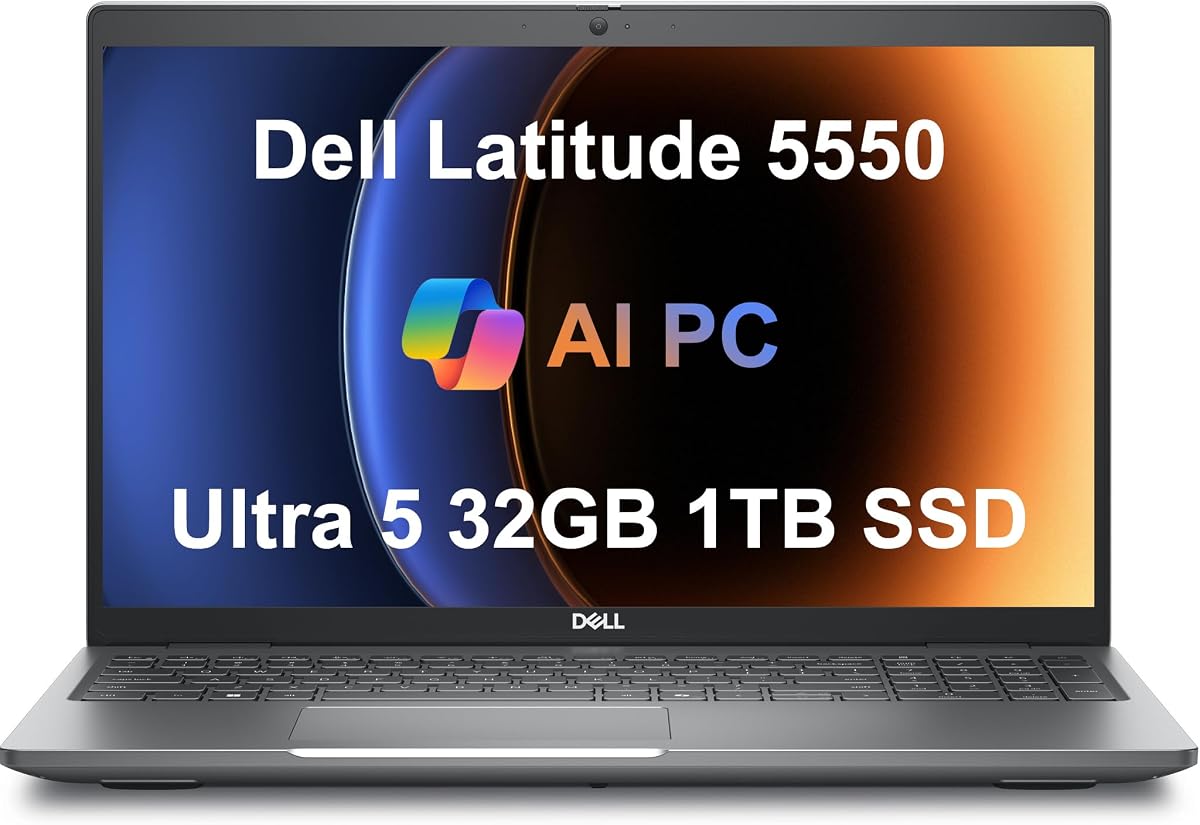
The Dell Latitude 5550 brings next-generation performance to a mainstream 15.6-inch package. It balances processing power with storage capabilities effectively. The design is sleek yet functional for daily professional use.
We may earn a commission when you buy through this link, at no additional cost to you.
Powered by the Intel Core Ultra 5 125U, it delivers efficient performance for complex tasks. The 32GB of DDR5 RAM supports heavy multitasking. Dual SSD configuration helps separate system and storage for better stability.
Privacy features include a physical shutter for the webcam. The display is standard FHD with anti-glare coating. While effective, it lacks some premium features found in higher-tier models.
Recommended for corporate environments needing reliable devices. The battery life ensures work continues throughout the day. Connectivity options include Thunderbolt 4 for external expansion.
A built-in privacy shutter for the webcam ensures your visual data remains private when not in use.
The Ultra 5 processor balances power and energy efficiency to extend battery life during unplugged use.
We may earn a commission when you buy through this link, at no additional cost to you.
The Dell Pro 16 Gen 3 offers a practical solution for professionals needing a reliable large screen. The 16-inch FHD+ display provides more vertical space for spreadsheets and documents. It remains a staple for business workflows.
We may earn a commission when you buy through this link, at no additional cost to you.
Equipped with an Intel Core i5 processor and 16GB of RAM, it handles daily tasks without issues. The 512GB SSD is standard but sufficient for most office workloads. Connectivity is robust with Ethernet and Wi-Fi 6E.
Performance is adequate for general productivity but not for heavy rendering. The lack of a high-end CPU limits peak throughput. However, stability and reliability are key strengths of this device.
Best for office desks where screen space is priority. The backlit keyboard aids work in dim conference rooms. Overall it provides consistent value for business deployments.
The 16-inch FHD+ display offers 1200p vertical resolution allowing more content to be viewed at once.
Standard RJ-45 Ethernet port ensures stable wired internet access for secure corporate network environments.
We may earn a commission when you buy through this link, at no additional cost to you.
The Dell Latitude 5350 excels as an ultra-portable option for frequent travelers. Weighing just 2.72 lbs it fits easily in bags for daily commutes. The compact design does not compromise essential business features.
We may earn a commission when you buy through this link, at no additional cost to you.
It uses the Intel Ultra 5 processor for efficient power management. The 16GB of DDR5 RAM ensures smooth operation. ExpressCharge technology allows quick top-ups when on the move. This helps maintain productivity during long days.
The screen brightness is moderate compared to larger models. The smaller size may require external monitors for heavy multitasking. However, the portability makes it a top choice for mobile professionals.
Ideal for consultants or sales teams on the road. The AI-driven noise suppression improves call quality in noisy environments. Its high rating reflects customer satisfaction with performance.
At just 2.72 lbs this laptop is easy to carry all day without fatigue or strain.
ExpressCharge technology allows you to regain a significant percentage of battery power in just a few hours.
We may earn a commission when you buy through this link, at no additional cost to you.
The Dell Latitude 5550 AI focuses on delivering next-generation computing with AI integration. The Intel Core Ultra 7 processor brings enhanced capabilities for creative and analytical tasks. It is a robust choice for demanding workflows.
We may earn a commission when you buy through this link, at no additional cost to you.
It features a 15.6-inch screen and standard 16GB of RAM. The 512GB SSD provides sufficient space for system files. Connectivity includes Wi-Fi 6E for faster wireless speeds in busy offices. This model is built for stability.
The RAM capacity is limited to 16GB which might constrain heavy users. The lack of a high-end tier in this specific listing reduces appeal for power users. Still the processing unit is strong.
Best for users needing AI features without premium costs. The Ethernet port supports reliable network connections. It is a solid middle-ground device for standard office needs.
Intel AI Boost accelerates specific workloads to improve efficiency in content creation and data analysis.
Wi-Fi 6E technology ensures lower latency and faster data transfer speeds in crowded wireless environments.
We may earn a commission when you buy through this link, at no additional cost to you.
The Dell Latitude 3550 offers premium performance at an entry-level price point. It provides a large 15.6-inch screen ideal for productivity. The Intel Ultra 7 processor ensures speed is not sacrificed for cost.
We may earn a commission when you buy through this link, at no additional cost to you.
With 16GB of RAM and 1TB of storage this model handles data-heavy tasks well. Security features like a fingerprint reader protect sensitive information. Wi-Fi 6E ensures modern connectivity standards are met.
Build materials are standard for this tier. The screen brightness is functional but not exceptional. However for general business use it delivers reliable performance day after day.
Ideal for students or small businesses needing robust specs. The keyboard supports comfortable typing for long sessions. Overall it balances cost and capability effectively.
A fingerprint reader adds a quick and secure way to authenticate access to the system.
The 1TB SSD provides ample space for storing large files, projects, and applications without needing external drives.
We may earn a commission when you buy through this link, at no additional cost to you.
Selecting the right Dell Latitude laptop involves balancing your specific work needs with available features. This guide breaks down the critical factors you should consider to make an informed decision.
The processor is the engine of your laptop. For heavy multitasking, look for Intel Core Ultra 7 or i7 options. Entry-level i3 or i5 chips are sufficient for basic office work and web browsing. Always consider future-proofing for software demands.
RAM determines how many applications can run simultaneously. 16GB is the current standard for smooth business usage. If you run virtual machines or large data sets, 32GB provides necessary headroom. DDR5 memory ensures faster data transfer rates.
SSD storage is essential for speed. 512GB is adequate for most users, but 1TB offers more comfort for media and documents. Dual SSD configurations are available on some models for separating system and data drives. Avoid older HDD storage options.
Screen size affects portability and comfort. 13 to 14 inches suit travelers, while 15 to 16 inches are better for stationary use. Look for anti-glare coatings and high resolution like FHD or WUXGA. Touchscreens add versatility for presentations.
Check for essential ports like HDMI, USB-A, and Thunderbolt 4. Thunderbolt supports fast data transfer and multiple external monitors. Ethernet ports are useful for stable network connections in offices. Ensure you have enough USB-C charging options.
Mobile workers need long battery endurance. Look for models with ExpressCharge technology for quick top-ups. Real-world usage typically ranges from 8 to 12 hours depending on load. A high-capacity battery ensures you work uninterrupted.
Business laptops should be rugged. MIL-STD certifications guarantee resistance to bumps and drops. Security features include fingerprint readers and IR webcams for facial recognition. Windows 11 Pro offers encryption tools for enterprise safety.
Windows 11 Pro is preferred for business environments due to Group Policy and BitLocker. Home versions may lack specific management features. AI-powered Copilot is included in modern builds to assist with productivity tasks and drafts.
Start by setting up Windows security features immediately. Enable BitLocker encryption to protect sensitive data in case of theft. Configure biometric login options like fingerprint or face ID for quick access without passwords.
Manage your battery by avoiding extreme temperatures. Use ExpressCharge to top up quickly rather than draining it completely. Keep the device on a hard surface to maintain airflow and prevent overheating during long sessions.
Keep the software updated to ensure security patches are applied regularly. Clean the screen with a microfiber cloth and avoid harsh chemicals. Store the laptop in a protective sleeve when traveling to prevent scratches and physical damage.
Yes, many models in the Latitude series feature powerful processors and high-resolution displays. The newer Intel Ultra series supports AI acceleration which benefits creative apps. However, specialized tasks may still require a workstation for maximum GPU power.
Some business models allow RAM upgrades through accessible slots. However, many newer ultrabooks have soldered memory to maintain thin profiles. Check the specific model documentation before purchase to confirm upgradeability options for your needs.
Latitude focuses on business durability and enterprise management features. XPS targets premium consumer use with sleeker designs. Latitude often includes more ports and security tools like fingerprint readers. XPS prioritizes build aesthetics and screen quality.
Most professional configurations include Windows 11 Pro by default. This version supports features like domain joining and BitLocker encryption. Some consumer listings may have Home versions so verify the OS details before buying to ensure compliance.
Standard warranties typically cover one year of hardware defects. Business customers can often purchase extended plans like ProSupport for added repair options. Third-party sellers may offer their own extended warranty terms on reconditioned units.
Yes, most models support multiple external displays via Thunderbolt or HDMI ports. Newer devices can drive up to three monitors at 4K resolution without a dock. This feature enhances productivity for those with limited physical desk space.
The Dell Latitude lineup offers a wide range of options for every professional need. Whether you prioritize portability or screen real estate there is a model to match your workflow. The top picks cover budget, mainstream, and premium segments effectively.
Focus on your primary tasks when selecting specs. Memory and storage are easier to manage than processing power later on. Ensure the device supports the software you use daily to avoid bottlenecks in your daily work.
Prices and availability change frequently based on retailer promotions. Always check the current listing for the most accurate specs and deals. Investing in the right hardware ensures you have a reliable partner for all your business goals.