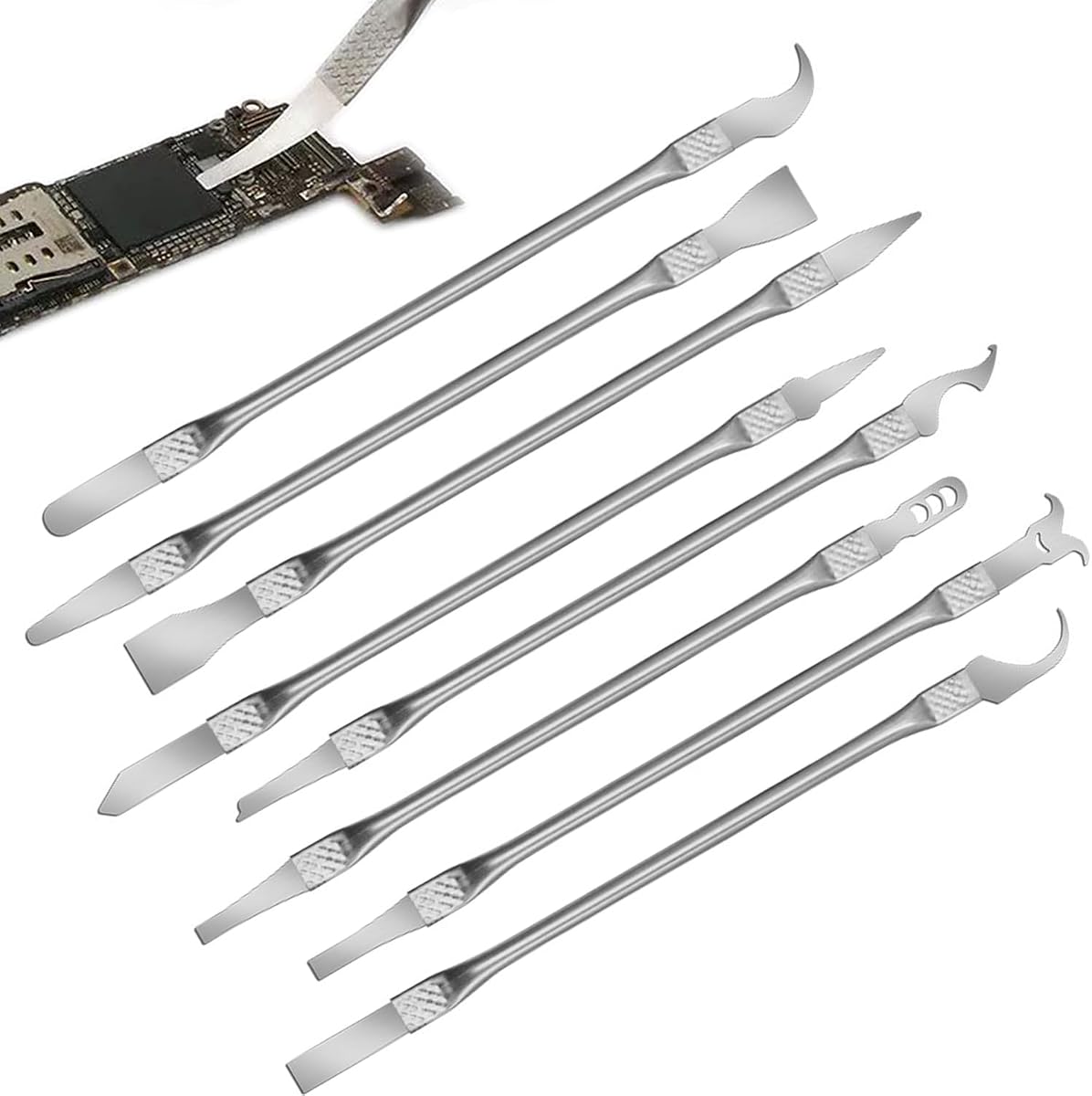
8 Piece Set Multi-Function CPU Removal Tool
4.0Editor score
Versatile for smartphones and computers
Ultra-thin tools for precision work
Affordable alloy construction materials
This guide compares the top delidding kits for CPUs and GPUs, detailing tools for safe heat spreader removal and thermal performance improvements.
Delidding kits are specialized toolsets designed to safely remove integrated heat spreaders from processors. These kits help enthusiasts achieve better thermal performance by allowing direct die cooling with superior thermal paste application.
We compared ten real products based on compatibility, build quality, and user feedback. Our analysis covers tools for desktop CPUs, gaming consoles, and general electronics repair to help you find the right solution.
Each pick highlights specific strengths and ideal use cases for different hardware. Note that product availability and pricing can change frequently, so verify current details before making your final purchase decision online.
4.0Editor score

4.5Editor score

4.1Editor score
The following table provides a side-by-side comparison of all ten products analyzed in this guide. Each entry lists key specifications and compatibility details to help you quickly identify the tool that matches your specific hardware requirements.


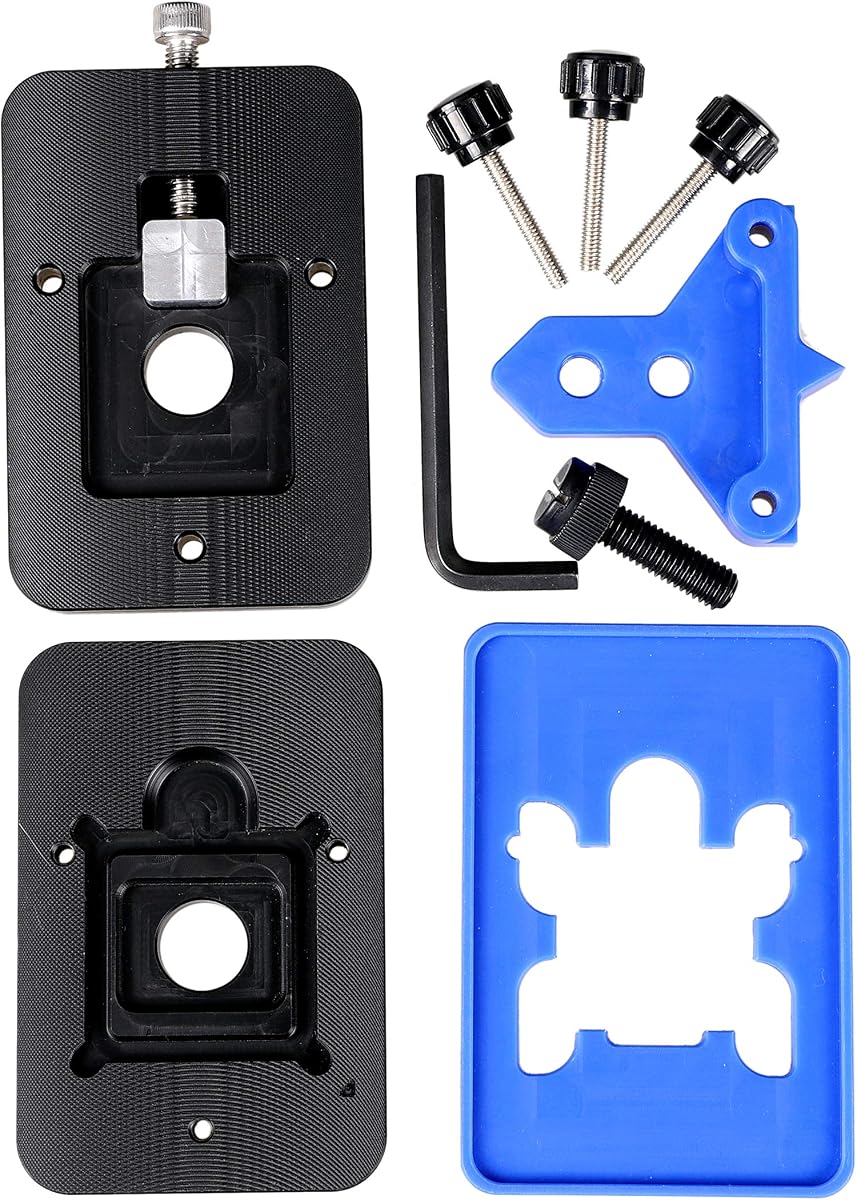


This tool stands out as the top choice for Intel users seeking precision and safety. With a 4.5 rating it offers professional grade performance backed by German engineering standards.
We may earn a commission when you buy through this link, at no additional cost to you.
The device removes the heatspreader efficiently enabling direct die cooling that can lower temperatures by 10 to 20 degrees. Its black and red anodized aluminum construction ensures durability during repeated use.
While it is more expensive than basic kits the added safety and efficiency justify the cost for serious builders. The learning curve is minimal compared to improvised methods.
It is ideal for enthusiasts upgrading Intel 12th or 13th generation CPUs who want maximum cooling potential. We recommend it for those willing to invest in quality hardware tools.
The tool facilitates better heat dissipation enhancing the overall cooling efficiency of your system significantly.
Made from black and red anodized aluminum it ensures durability and aesthetics for long term use.
We may earn a commission when you buy through this link, at no additional cost to you.
This premium tool is built for enthusiasts who demand the highest standards in hardware maintenance. It carries a 4.1 rating and is trusted by advanced users working with high-end desktop processors.
We may earn a commission when you buy through this link, at no additional cost to you.
Constructed from aluminum and stainless steel it provides the necessary rigidity for safe removal. The anodized black finish adds a professional touch that fits well in any build setup.
The main drawback is its high price and specific compatibility with Skylake-X and Kaby Lake-X processors. Users with older or different CPUs will need to look elsewhere.
It is perfect for owners of high-end Intel workstations who prioritize safety and durability. This tool ensures your processor survives the process intact while gaining thermal benefits.
The aluminum and stainless steel construction ensures durability and safety during delicate operations on high-end chips.
Anodised black color and precise engineering make it a reliable choice for professional and enthusiast users.
We may earn a commission when you buy through this link, at no additional cost to you.
This set offers an accessible entry point for those who want to try delidding without a large financial commitment. It holds a 4.0 rating and is praised for its versatility across different repair tasks.
We may earn a commission when you buy through this link, at no additional cost to you.
The tools are made from high-quality alloy that resists bending and corrosion. Its ultra-thin design allows for easy maneuvering between chips and boards without causing damage.
While it lacks the specialized features of high-end tools it performs adequately for general maintenance. The integrated blade design eliminates assembly needs making it time-saving.
It is best for hobbyists or students who need a general repair kit. If you need high precision for a single CPU this is a cost-effective starting option.
Perfect for safely removing BGA chips CPUs and other small components from smartphones and motherboards.
Ergonomic design ensures a comfortable grip reducing hand fatigue during extended repair sessions.
We may earn a commission when you buy through this link, at no additional cost to you.
This tool is designed to make the delidding process safer for Intel users. With a 4.6 rating it is highly trusted by users looking to maximize overclocking potential safely.
We may earn a commission when you buy through this link, at no additional cost to you.
It features a square aluminum block design that protects the CPU board during removal. It is compatible with Kaby lake and Coffee lake processors covering many common desktop CPUs.
The tool allows you to relid your CPU for maximum overclocking potential. Users must ensure the aluminum block is positioned correctly to avoid damage.
It is ideal for budget-conscious gamers with compatible Intel CPUs. The safety features make it a strong alternative to more expensive specialized tools.
Safest and easiest method to delid your Intel CPU with proper block placement to avoid board damage.
100% compatible with Kaby lake Coffee lake and fits LGA 1150 1151 1155 sockets.
We may earn a commission when you buy through this link, at no additional cost to you.
This kit is specialized for fixing overheating issues in PlayStation 3 consoles. With a 4.6 rating it addresses a common problem with high precision and safety features.
We may earn a commission when you buy through this link, at no additional cost to you.
Version 3 features a sharper and more flexible blade for improved durability. It includes replaceable blades ensuring long-term usability for multiple repairs.
The tool reduces risks compared to improvised methods which often damage the console. It is designed for both professionals and DIY enthusiasts working on gaming hardware.
It is essential for anyone repairing PS3s suffering from performance issues. This tool offers the precision needed to safely access the internal components.
Specifically designed for delidding your gaming console to address overheating and performance issues.
Precision-engineered with a thin durable blade for clean and accurate delidding every time.
We may earn a commission when you buy through this link, at no additional cost to you.
This tool is specifically designed to remove the integrated heat spreader from the PS3 RSX GPU. It helps users perform maintenance or replacement of aged thermal paste effectively.
We may earn a commission when you buy through this link, at no additional cost to you.
The design helps keep the working edge positioned away from the main board during delidding. This is crucial for preventing accidental damage to the motherboard while working on the GPU.
It is not compatible with Super Slim models which lack the IHS on the RSX. Users should verify their console model before purchasing to ensure compatibility.
It is a must-have for advanced PS3 repair technicians focused on GPU cooling. The specific design ensures safer access to thermal interface materials.
Designed to reduce board contact during delidding helping protect the main board from accidental damage.
Provides access to the thermal interface material between the RSX chip and IHS for better heat transfer.
We may earn a commission when you buy through this link, at no additional cost to you.
This kit is designed for precision chip removal and circuit board maintenance tasks. It holds a 3.6 rating but is noted for its ultra-thin blade design and steel construction.
We may earn a commission when you buy through this link, at no additional cost to you.
The blades are made from SK5 steel offering high heat tolerance and oxidation proof qualities. This ensures the tool remains sharp through extended repair sessions without bending easily.
Users must handle the tool with care as it is extremely sharp and precise. The ergonomic handle helps maintain control during intricate repairs on small components.
It is best for professionals working on motherboards or complex electronics. For general users it may require more skill than dedicated CPU tools.
SK5 steel construction with special quenching provides high heat tolerance and oxidation resistance.
Secure non-slip ergonomic handle ensures safe operation and reduces risk of slippage.
We may earn a commission when you buy through this link, at no additional cost to you.
This comprehensive set is engineered for removing adhesive and lifting chips from circuit boards. It is effective for intricate tasks on Apple devices like delidding and refurbishing CPUs.
We may earn a commission when you buy through this link, at no additional cost to you.
The kit includes a metal craft knife set with 12-in-1 utility. It is designed for professionals working on modern electronics needing precision and ease.
High-grade steel blades offer surgical precision for delicate components. The metal handle provides perfect balance and comfort during intricate work.
It is a must-have for serious repair technicians working on phones or motherboards. This kit elevates your repair station with professional grade tools.
This comprehensive set is engineered for removing adhesive lifting chips and cleaning solder pads.
Durable and ergonomic handle provides perfect balance and comfort during intricate work.
We may earn a commission when you buy through this link, at no additional cost to you.
This scraper is designed for cleaning residues after delidding rather than the removal itself. It holds a high 4.8 rating and is praised for being safe on CPU surfaces.
We may earn a commission when you buy through this link, at no additional cost to you.
The acrylic construction ensures durability without damaging dies or PCB. It features a narrow tip specifically for removing silicone adhesive and indium solder residue.
Users appreciate the ergonomic design that lets them maintain control and precision. It is perfect for anyone who removes lids and needs a reliable cleaning tool.
It is the perfect accessory to pair with a delidding tool for a complete process. For cleaning delicate components safely this tool is highly recommended.
Designed to reduce risk of scratching or damaging the CPU package when used carefully.
Narrow tip especially designed to remove silicone adhesive and indium solder residue from delidded processors.
We may earn a commission when you buy through this link, at no additional cost to you.
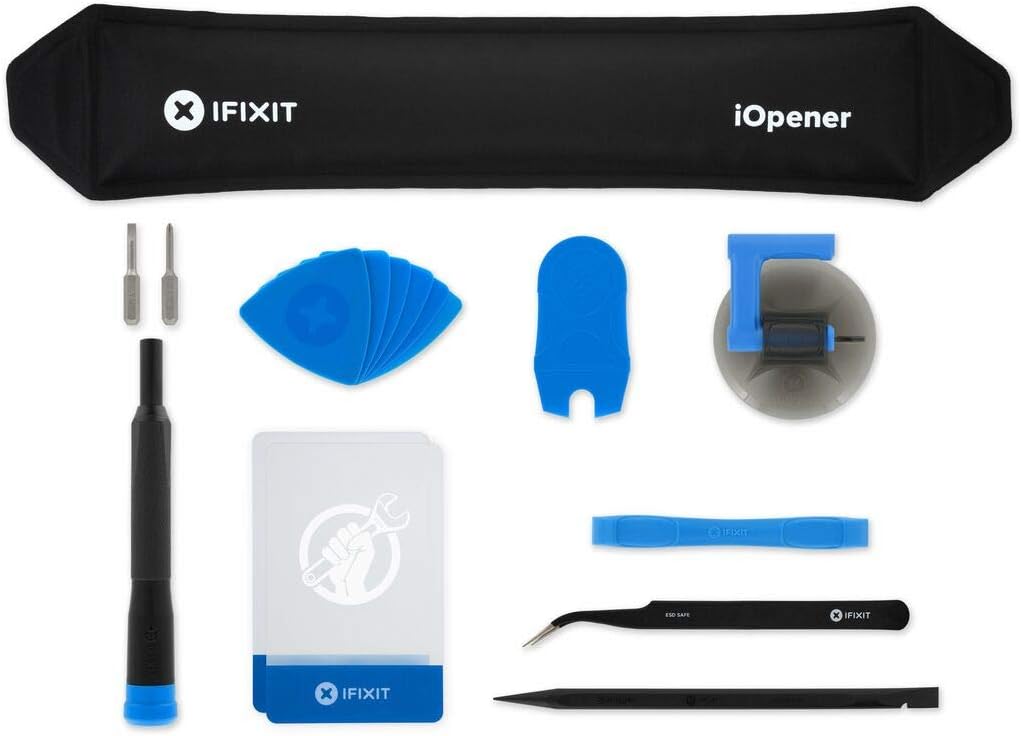
This tool is designed to apply heat to loosen adhesive during disassembly. It is universally used for phones laptops and tablets needing heat temperature application in repair.
We may earn a commission when you buy through this link, at no additional cost to you.
Made for iPad it works with many Android phones and PC laptops as well. The iOpener is easy-to-use non-toxic and food-safe for safe repair practices.
While it is not a delidding tool it helps in removing components by softening adhesives. It is a useful accessory for general electronics repair workflows.
It is ideal for those doing device teardowns before accessing internal chips. For safe and effective adhesive loosening this tool is highly trusted.
Universal compatibility for iPad Android phones PC laptops or other electronics needing heat temperature application.
Safe non-toxic and food-safe material ensures confidence during DIY repair processes.
We may earn a commission when you buy through this link, at no additional cost to you.
Choosing the right delidding kit depends on your specific hardware and technical experience. Here are key factors to consider before making a purchase.
Ensure the tool supports your CPU or GPU model. Some kits are limited to Intel sockets while others target consoles.
Check socket types and chip names to avoid buying incompatible hardware.
Look for tools made from steel aluminum or high-grade alloys. These materials provide durability and safety during delicate operations.
Avoid cheap plastic tools that may bend or break under pressure.
Tools with specific safety designs protect your motherboard from accidental damage. These often include spacers or guides.
Safety features are crucial to prevent costly hardware failures.
Determine if you need a removal tool or a cleaning accessory. Some tools are for the main process and others for post-work cleanup.
Match the tool purpose to your specific repair goals.
Ergonomic handles and straightforward designs reduce hand fatigue. Simple instructions help beginners avoid mistakes.
User-friendly designs save time and reduce stress during repairs.
Budget tools may lack precision while premium ones offer better safety. Choose based on your technical skill and frequency of use.
Balance cost with the value of the tool for your needs.
Select tools from established brands known for repair equipment. Reviews from other users highlight real-world performance.
A strong reputation often indicates reliability and support.
Check if the tool comes with a warranty for defects. This protects your investment if the tool fails.
Warranty coverage adds peace of mind for your purchase.
Begin by carefully removing the CPU cooler and cleaning the thermal paste off the package. Ensure the surface is dry and free of debris before starting the removal.
Place the tool on the heat spreader and apply even pressure to pry it off. Follow the specific tool instructions to avoid damaging the motherboard or die.
After removal use a scraper or alcohol wipe to clean residue from the die and spreader. Store your tools in a dry place to maintain their sharpness and integrity.
A delidding kit is a set of tools designed to remove the integrated heat spreader from a CPU. This allows users to apply better thermal paste directly to the processor die for improved cooling.
Yes delidding carries risks of damaging the CPU die or motherboard. It can also void your warranty so it should only be attempted by experienced users who accept these risks.
Yes using a specific tool is safer than improvised methods. Specialized tools reduce the risk of slips and provide the necessary leverage for a safe removal process.
Most kits are for desktop CPUs. Laptop CPUs are often soldered to the motherboard making delidding impossible or extremely difficult without destroying the device.
Yes direct die cooling often lowers temperatures by removing the IHS. This allows thermal paste to transfer heat more efficiently to the cooler.
Yes removing the IHS voids the manufacturer warranty. The processor is no longer in its original state so support claims will likely be rejected.
If you damage the CPU it may need to be replaced. Delidding should be done on spare CPUs or older parts before investing in high-end hardware.
It depends on your goals and risk tolerance. For enthusiasts seeking extreme overclocking it can be worth the risk and effort.
Choosing the right delidding kit depends on your hardware and experience. Our top picks include options for Intel users and PlayStation repairs offering safety and precision.
Prioritize tools with strong safety features and good material quality. These factors protect your expensive components while ensuring a successful thermal upgrade.
Remember that prices and availability change often. Always check current listings and verify compatibility before finalizing your purchase.