
Creality Falcon 10W Laser Engraver
4.2Editor score
72W effective power output
Large workspace for big projects
Anti-UV filter for eye protection
Choosing the right laser engraver can transform your creative projects into professional-quality results. With so many options on the market, it is essential to understand the key features that define performance and ease of use in modern devices.
We have carefully analyzed ten distinct models from Creality to bring you this comprehensive comparison. Each product was evaluated based on precision, speed, safety features, and software compatibility to ensure you get a reliable machine for your specific workflow.
Every pick in this list highlights unique strengths tailored to different user needs and budgets. Please note that product availability and specific configurations may change over time, so verify current details before making your final purchasing decision today.
4.2Editor score

4.1Editor score

4.2Editor score
As an Amazon Associate we earn from qualifying purchases.
The following table provides a side-by-side comparison of all ten top-rated Creality laser engraver models to help you quickly identify the specifications and features that matter most for your projects.



The Creality Falcon A1 10W Laser Engraver stands out as a top contender for users seeking a balance of speed, precision, and safety. With a strong rating from satisfied customers, this model delivers professional results right out of the box thanks to its advanced CoreXY system.
We may earn a commission when you buy through this link, at no additional cost to you.
Its 80W powerful output allows it to cut through 6mm wood in a single pass while maintaining an engraving accuracy of 0.05mm. The built-in HD camera automatically recognizes materials and applies optimal settings, removing the guesswork for beginners and saving time for pros.
While the machine is highly capable, users should note it is strictly prohibited from engraving highly reflective materials like mirror-finished metals. Additionally, compatibility is limited to specific 460x346mm honeycomb panels, which may require extra planning for custom setups.
This engraver is ideal for hobbyists and professionals alike who want a safe, quiet, and easy-to-use machine. Its Class 1 safety rating means you do not need goggles during operation, making it a great choice for home studios and classrooms.
The Falcon A1 uses an HD camera to automatically detect your material and apply the best engraving settings, ensuring consistent results without manual calibration.
With a fully enclosed design that blocks 99% of laser light, this machine includes emergency stops and lid sensors for safe operation without protective goggles.
We may earn a commission when you buy through this link, at no additional cost to you.
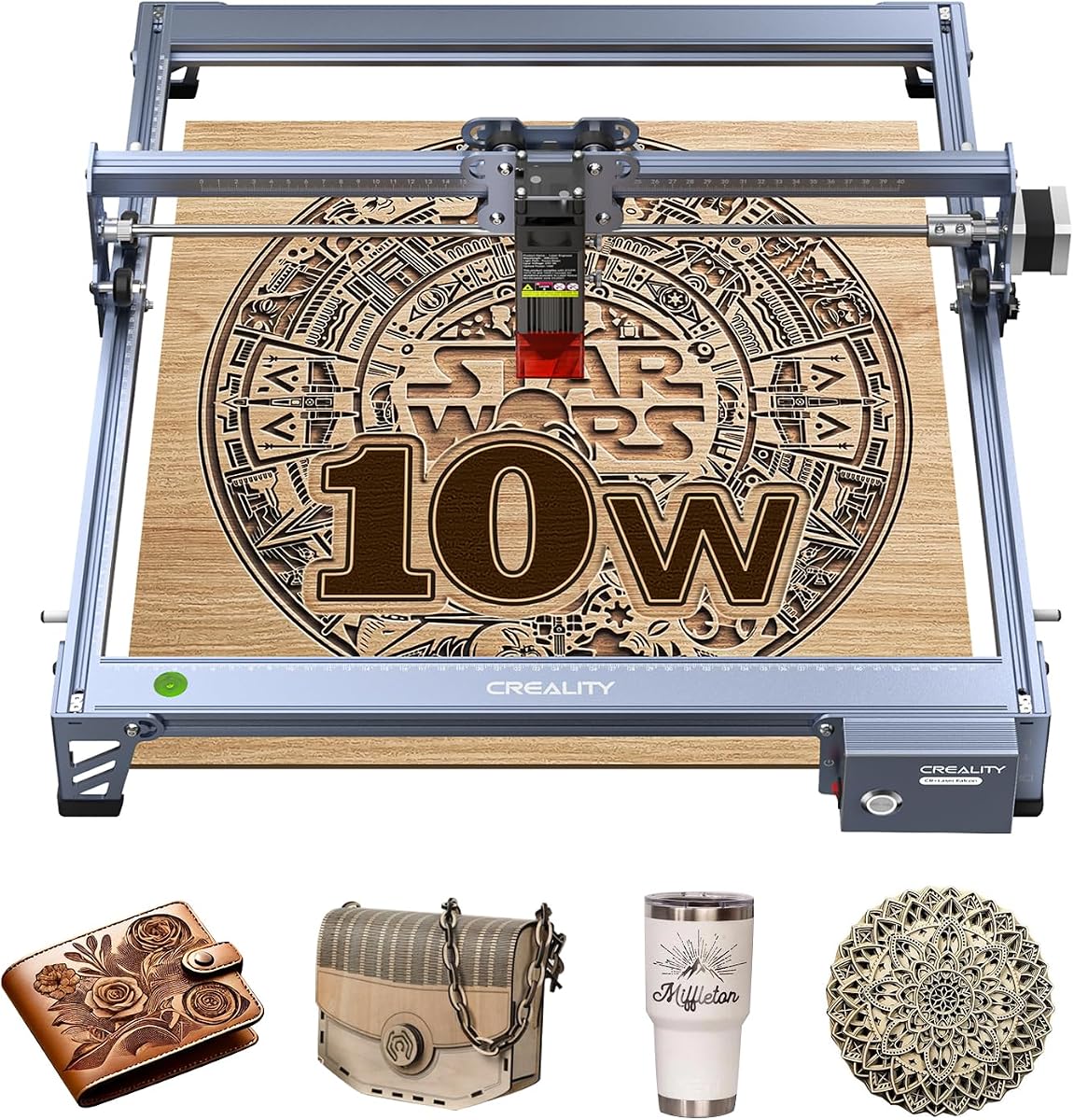
The Creality Falcon 10W Laser Engraver offers exceptional value for those looking to start laser engraving without breaking the bank. It delivers an effective power of 72W, which is impressive for its price point and allows for clean cuts through various materials.
We may earn a commission when you buy through this link, at no additional cost to you.
With a working area of 15.7×16.3 inches, this machine handles bigger projects in one go, making it versatile for wood, leather, acrylic, and metals. The 32-bit chip ensures high precision with a spot size of 0.06×0.06mm for detailed designs.
Users should be aware that while it comes with an anti-UV filter, a pair of goggles is included for double protection, so safety gear is necessary. Some assembly is required, though it is manageable for most users with basic tools.
This model is a strong choice for beginners and small businesses needing a reliable workhorse. Its compatibility with popular software like LightBurn and LaserGRBL gives you the flexibility to choose the design tools you prefer.
The 0.06mm spot laser module allows for precise control, enabling you to cut through 12mm wood boards in a single pass efficiently.
Support for both LightBurn and LaserGRBL ensures you can work across different operating systems and choose the interface that suits your workflow best.
We may earn a commission when you buy through this link, at no additional cost to you.
The Creality Falcon A1 Pro 20W is a premium laser engraver designed for users who demand speed, connectivity, and precision. With an impressive 180W output, it outpaces many competitors, reaching speeds up to 600mm/s for efficient batch production.
We may earn a commission when you buy through this link, at no additional cost to you.
Its smartphone-style touchscreen and app control allow you to monitor and manage projects from anywhere, adding a layer of convenience that modern creators appreciate. The high-definition camera and auto focus system ensure precise positioning with just 3 seconds of setup time.
While the standard blue laser is powerful, the optional 2W infrared module for fine metal engraving must be purchased separately, which adds to the total cost. However, the included safety shields and emergency stop features provide peace of mind for any workspace.
This model is perfect for seasoned designers and small businesses that need a robust, reliable machine with minimal setup. The Class 1 safety rating and enclosed design make it suitable for professional environments where safety and noise reduction are priorities.
The AI vision system and red-dot ranging laser deliver automatic focusing in just 3 seconds, ensuring measurement accuracy within 0.012 inches for every cut.
You can monitor real-time progress from the couch or kitchen via the app, making multitasking easy while your engraver runs safely in the background.
We may earn a commission when you buy through this link, at no additional cost to you.
The CREALITY FALCON A1 10W Laser Engraver combines speed and ease of use with its CoreXY motion system and smart camera positioning. This model is ready to use straight out of the box, allowing you to skip trials and focus on creative projects immediately.
We may earn a commission when you buy through this link, at no additional cost to you.
The Falcon Design Space Software offers graphic outline extraction and creative browsing, making it versatile for all design levels. The enclosed design with transparent cover filters out 99% of laser radiation while blocking noise and smoke for a comfortable workspace.
Users should note that this machine is not compatible with 500x500mm honeycomb panels and strictly prohibits engraving reflective materials. Acrylic surfaces must be coated for engraving, and cutting acrylic is not supported, which may limit some specific use cases.
This engraver is great for hobbyists who want a user-friendly experience with advanced software features. The Class 1 safety rating and auto-lock emergency stop provide reliable protection for home and small shop environments.
Unlock your creative potential by effortlessly capturing and converting design patterns into detailed engraving paths to transform artistic ideas into unique personalized engravings.
The pre-calibrated HD camera offers a full-frame view, allowing you to effortlessly lock onto your object and skip all the headache of manual tweaking.
We may earn a commission when you buy through this link, at no additional cost to you.
The Creality Laser Engraver Machine 10W is a powerful DIY option that balances performance with affordability. It features a 72W machine power output that can cut through 5mm basswood or 3mm black acrylic in one pass at speeds up to 10000mm/m.
We may earn a commission when you buy through this link, at no additional cost to you.
Constructed with an all-aluminum alloy structure and steel shaft wheel guide rails, this machine offers durability and stability for consistent engraving. The focusing plate included with the new laser head allows for quick and easy adjustments without any tools.
While it lacks an enclosure, the anti-UV filter on the laser module filters 97% of UV rays to protect your eyes. Assembly typically takes only 10 to 20 minutes, and the company provides 1-year free parts replacement and permanent technical customer service.
This model is ideal for makers who prefer a hands-on approach and want reliable hardware for various materials. Its compatibility with LightBurn and LaserGRBL along with Wi-Fi data transfer ensures you can work seamlessly across different platforms.
The rigid all-aluminum alloy structure and steel shaft wheel guide rail design provide the stability needed for precise engraving with accuracy controlled within 0.004 inches.
You can assemble this machine in 10 to 20 minutes and adjust focus instantly using the included focusing plate, so you start creating almost immediately.
We may earn a commission when you buy through this link, at no additional cost to you.
The Creality Falcon2 Pro S 22W is a professional-grade laser engraver designed for batch production and small studios. With 22W optical output, it can cut 15mm basswood or 10mm black acrylic in a single pass at speeds up to 600mm/s.
We may earn a commission when you buy through this link, at no additional cost to you.
Its integrated enclosure and fireproof fiber cover isolate smoke, dust, and noise effectively. Safety is enhanced with a built-in flame detector, laser detection, dual wire limit switches, and an emergency stop button, ensuring secure operation.
The Z-Axis auto focus and auto cut through path compensation help improve success rates without manual measurements. Shipped 80% pre-assembled, the machine can be installed and tested in 10 minutes or less with a built-in debris drawer for easy cleanup.
This engraver is suited for sole traders and makers who need high efficiency and wide material compatibility. While some users report a slightly lower rating, its robust safety features and professional cutting capabilities make it a strong contender.
The fully enclosed structure with a fireproof fiber cover and transparent design helps isolate smoke, dust, and noise during the creation process for a cleaner workspace.
Equipped with a flame detector, safety lock, and emergency stop button, this machine offers multiple layers of protection to keep your workshop safe from hazards.
We may earn a commission when you buy through this link, at no additional cost to you.
The Creality Falcon A1C 10W AI Laser Engraver brings intelligent design tools to the desktop. Its AI One-Tap Engraving instantly converts photos into engraving-ready artwork while smart layout optimization helps you get professional results faster than ever.
We may earn a commission when you buy through this link, at no additional cost to you.
A key feature is the interchangeable laser platform, which allows you to switch between 5W, 10W, and 1.2W laser modules easily. This flexibility ensures that you can tackle fine-detail artwork and higher-power applications with the same machine over time.
The working area is compact at 150x150x148mm, making it ideal for signs, coasters, and personalized gifts without taking up much space. Fully enclosed and Class 1 certified, it offers a safe experience for homes and classrooms without needing goggles.
This engraver is perfect for beginners who want powerful AI assistance and room to grow. With expandable accessories like rotary attachments and smoke purifiers, it supports your evolving creative needs without requiring a new device.
AI features like Background Removal and Auto Fill simplify design and layout, optimizing the best settings so you can create stunning engravings in just a few clicks.
Unlike bulky models, the A1C features a compact desktop design that is easy to place and move, making it ideal for makers on the go or those with limited space.
We may earn a commission when you buy through this link, at no additional cost to you.
The Creality Falcon A1 Pro 20W Laser Engraver offers a seamless user experience with its smart touchscreen and real-time previews. This model simplifies everyday tasks with no messy cables or complicated steps, allowing you to reopen recent projects with a single tap.
We may earn a commission when you buy through this link, at no additional cost to you.
With an upgrade to 180W output and CoreXY speed, it handles 10 mm basswood and 8 mm black acrylic with smooth edges and fewer passes. The autofocus feature works in about 3 seconds with a full-bed preview for precise placement every time.
While the IR module for fine work is not included, the standard laser provides exceptional clarity for photos and jewelry. The enclosed design with transparent cover blocks 99% of laser radiation and effectively reduces noise and smoke for a cleaner shop.
This engraver is designed for home or small shop owners who want a quiet, efficient machine. The Class 1 laser safety compliance and air assist function ensure clean cuts while keeping your workspace comfortable and safe.
Access history files and reopen recent projects with a single tap on the screen, saving time so you do not need to re-import or reconfigure designs repeatedly.
The air assist function and high output power help ensure clean cuts and smooth edges on materials like wood and acrylic with fewer passes and less effort.
We may earn a commission when you buy through this link, at no additional cost to you.
The Creality Falcon A1C 10W Mini Laser Engraver is a compact, portable design that delivers professional performance in a space-saving footprint. It features a quick-swap modular design that lets you change compatible laser modules in as little as 15 seconds.
We may earn a commission when you buy through this link, at no additional cost to you.
This model is lightweight and easy to move between your living room, classroom, garage, or retail counter. The built-in HD smart camera provides precise visual positioning and real-time preview, while auto focus eliminates manual calibration to get you started faster.
With a rigid frame and high-motion accuracy, it achieves speeds of up to 15,000 mm/min for crisp details and smooth lines. The design also includes intelligent flame detection and tilt protection to ensure safe operation without requiring protective goggles during normal use.
This engraver is ideal for makers who want versatility and portability. The free Falcon Design Space software offers AI image generation and material recognition, making every step from design to engraving simpler for both beginners and experienced users.
The innovative quick-swap modular design allows you to change compatible laser modules in as little as 15 seconds without complicated installation, giving your machine flexibility.
The built-in HD smart camera provides precise visual positioning and a real-time preview, making it easy to align designs before engraving for greater accuracy.
We may earn a commission when you buy through this link, at no additional cost to you.
The Creality Laser Engraver Falcon A1 10W is a precision machine that combines speed and accuracy with ease of use. It achieves instant acceleration from 0 to 600mm/s in just 0.03 seconds, ensuring quick turnaround times without sacrificing detail on intricate designs.
We may earn a commission when you buy through this link, at no additional cost to you.
With a fully enclosed design and high compatibility, this machine allows users to start engraving immediately after unboxing with zero assembly required. The smart HD full-frame camera enhances usability by providing a clear real-time view of the workspace.
The software is designed for accessibility with tools like Edit Nodes and a Free Line Drawing Pen that empower users to unleash creativity with minimal learning curves. Six safety protections including Class 1 compliance ensure care-free use at home without goggles.
This engraver is great for beginners and hobbyists who want a reliable machine that fits comfortably on desks or shelves. The aerospace-grade aluminum construction ensures durability while maintaining a space-saving footprint compared to similar models.
The CoreXY motion system enables speeds up to 600mm/s and precision levels of 0.01mm, ensuring quick turnaround times and sharp details on intricate designs.
Intuitive three-step operation and free design tools like Edit Nodes make engraving simple even for beginners who are just starting their creative journey.
We may earn a commission when you buy through this link, at no additional cost to you.
Selecting the right laser engraver requires understanding several key factors that affect performance, safety, and usability. This guide breaks down the essential considerations to help you make an informed decision based on your specific needs and budget.
Laser power determines how quickly and deeply your machine can cut or engrave materials. Higher wattage models like the 180W or 22W options are better for thicker materials and batch production, while 10W models suit lighter hobbies.
Safety should be a top priority when choosing an engraver. Fully enclosed Class 1 machines filter out harmful light and smoke, often eliminating the need for protective goggles and making them safer for home or classroom use.
Ensure the machine supports software you already use or find intuitive. Look for compatibility with popular tools like LightBurn and LaserGRBL as well as modern features like app control and auto camera positioning for easier setup.
The size of the working area defines the maximum project size you can complete in one go. Consider your available desk or workshop space versus the size of your projects to find the right balance between portability and functionality.
Some models come fully pre-assembled and ready to use out of the box, saving valuable time. Others may require basic assembly or calibration, so check the setup process if you want to start creating immediately.
Not all engravers handle every material equally. Verify which materials like wood, metal, acrylic, or leather are supported and be aware of any restrictions regarding reflective surfaces or specific panel types.
High-speed systems allow you to complete projects faster, while precision metrics ensure your designs come out sharp and detailed. Look for models with advanced motion systems like CoreXY for better stability and accuracy.
Consider if the machine supports interchangeable modules or accessories like rotary attachments. This flexibility allows your engraver to grow with your skills and tackle a wider range of projects without needing a new device.
Start by familiarizing yourself with the software and safety features of your specific model. Ensure the machine is on a stable surface with proper ventilation before connecting power and software to begin your first project.
Always use the camera auto-positioning and focus tools provided to align your designs correctly. This reduces setup time and prevents errors, ensuring that your engraving starts at the exact spot you intended.
Maintain your engraver by keeping the lens clean and checking the alignment of belts regularly. For enclosed models, empty the debris drawer and ensure ventilation systems are clear to prevent smoke buildup and maintain performance.
Class 1 laser engravers are designed to be safe during normal operation without protective goggles. The fully enclosed design blocks harmful light, but you should always follow the manufacturer safety guidelines and keep the safety locks functional.
Standard diode lasers struggle with bare metal, but some models support an optional infrared module specifically for metal engraving. Always check material compatibility charts and note that highly reflective metals are often prohibited.
Machine power refers to the electrical input consumed, while laser power is the optical output delivered to the material. For example, a 10W laser output may require 180W of machine power to operate the internal systems and cooling.
Clean the lens gently with a microfiber cloth and lens cleaning solution whenever you notice buildup. Avoid touching the surface with bare hands as oils can degrade performance over time and cause uneven engraving.
Software like LightBurn is widely regarded as user-friendly with a free trial for learning. The built-in Falcon Design Space on newer models also offers intuitive tools that help beginners get started without steep learning curves.
Air assist blows compressed air at the cutting point to clear smoke and debris. This results in cleaner cuts, reduces burn marks on the material, and helps protect the lens from buildup during operation.
We have explored ten exceptional Creality laser engraver models that cater to a wide range of needs from budget-friendly hobby kits to professional-grade workhorses. Each option offers unique strengths in speed, safety, and software integration.
When making your choice, prioritize features that match your typical projects and workspace constraints. Consider whether you need portability, advanced AI features, or raw cutting power before finalizing your decision.
Remember that product configurations and availability can change over time. Always verify current details and compatibility on the official retailer site before purchasing to ensure the model meets your requirements perfectly.