
Switch Cooling Fan with Bottom Cooling
4.0Editor score
Vertical Stand Design
Real Time Display
Includes Joystick Caps
This guide compares the top 10 cooling fan Nintendo Switch dock accessories to help you choose the best cooler for preventing overheating during long gaming
Keeping your console cool is essential for smooth gameplay and long hardware life. A dedicated cooling fan for the Nintendo Switch dock helps prevent overheating issues that can interrupt your favorite games.
We have evaluated ten different cooling solutions based on their performance, design, and user feedback. Our comparison covers models with multiple fans, LED displays, and various power options for different needs.
Each pick below highlights key features and potential drawbacks to help you decide. Note that prices and availability can change over time so check current listings before purchasing your new accessory.
4.0Editor score

4.6Editor score

4.4Editor score
The following table provides a side-by-side overview of all ten cooling fan options evaluated in this guide. Compare their key specifications to find the model that fits your gaming setup best.



This top rated cooling fan stands out for its digital LED display that shows both fan speed and exit air temperature. It receives high marks from users who want precise control over cooling performance without guessing if the dock is running hot.
We may earn a commission when you buy through this link, at no additional cost to you.
The adjustable fan speed ranges from a whisper quiet 510 RPM to a powerful 6000 RPM allowing you to balance noise and cooling as needed. The included fixed pad sits between the console and dock to prevent scratching while keeping the unit stable during intense play.
While the fan does produce sound above 2400 RPM most gamers find the trade-off acceptable for the protection it offers against overheating pauses. The Micro USB power connection is straightforward and requires no extra adapters beyond what many already have.
If you want a reliable accessory that monitors temperatures and lets you dial in cooling power this model is the clear choice. It is ideal for long gaming sessions where maintaining optimal operating conditions is critical for performance and longevity.
The LED display helps you see exactly how hot the air is leaving the dock so you can adjust fan speed before heat becomes an issue.
The included sponge pad prevents the fan from sliding and protects your console surface from scratches while securing the unit in place.
We may earn a commission when you buy through this link, at no additional cost to you.
This budget friendly cooler delivers many of the same features as pricier models including an LED display and wide speed adjustment range. Users appreciate the price point while still getting temperature monitoring and control buttons for daily use.
We may earn a commission when you buy through this link, at no additional cost to you.
The vertical stand design keeps your console elevated and stable while the fan pushes air directly into the dock vents. It supports both Switch and Steam Deck making it a versatile choice for multi console owners who want one solution for all their gear.
Some users note that the materials feel less premium than higher end options but the cooling performance remains effective for most play sessions. The included joystick caps and stabilizer pad add extra value that many competitors do not offer at this price.
For shoppers seeking an affordable way to prevent overheating without sacrificing basic features this model is an excellent starting point. It works well for casual gamers who want reliable protection without spending a premium on advanced digital readouts.
Unlike some docks that work only with one console this cooler is designed to fit both Switch and Steam Deck setups comfortably.
Three physical buttons let you power on and off or adjust speed without needing complex apps or complicated menus.
We may earn a commission when you buy through this link, at no additional cost to you.
This premium accessory is built specifically for the 2021 OLED dock and offers unique features like fourteen game card slots on top of the fan housing. The blue light integration adds a stylish touch that matches the OLED aesthetic while cooling efficiently.
We may earn a commission when you buy through this link, at no additional cost to you.
The high efficiency fan blows air inward to circulate heat quickly and the turbo mode ensures rapid cooling during demanding titles. Its compact size does not clutter your setup and the Type-C cable means you can use modern power sources without hunting for old adapters.
While it lacks a temperature readout the build quality and design make it a favorite for OLED owners who want functionality plus style. The hard ABS shell resists scratches and the overall weight feels substantial enough to stay put during play.
If you own the OLED model and value a clean organized setup with extra storage this is the top recommendation. It transforms your dock into a hub that holds cartridges while keeping your console cool and looking great on your TV stand.
Fourteen slots let you keep your most played cartridges ready to swap without needing a separate case or drawer nearby.
The blue light syncs with the fan so your setup looks cohesive and high tech when the cooling is active.
We may earn a commission when you buy through this link, at no additional cost to you.
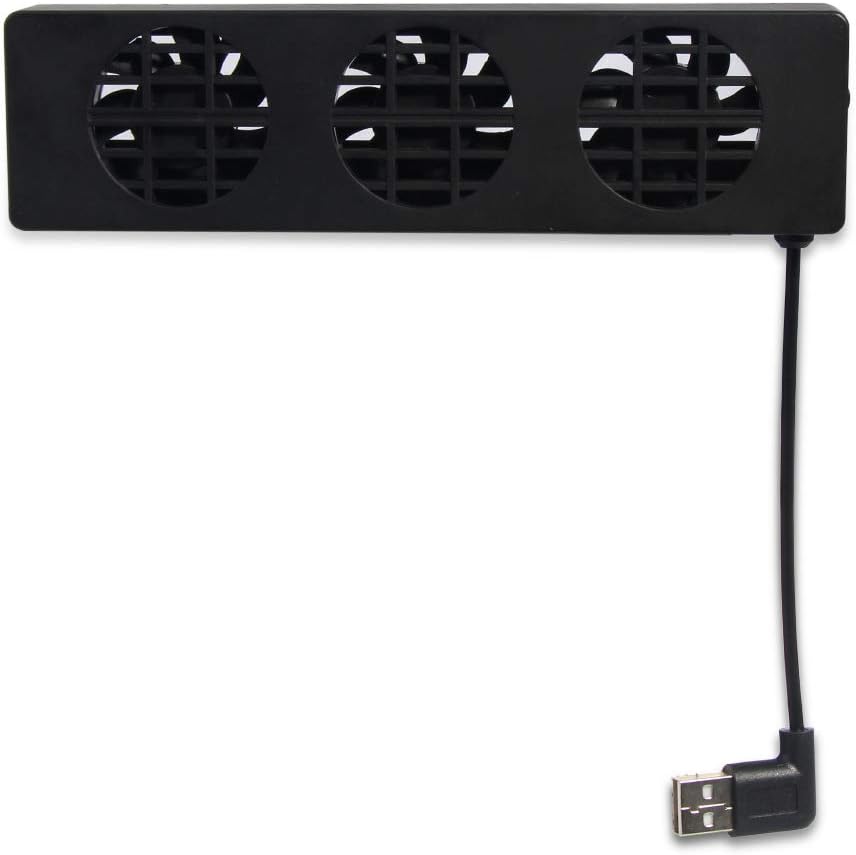
This model uses three high speed fans to move a large volume of air across the dock vents which is effective for keeping temperatures down. It is a straightforward solution for users who want raw cooling power without complicated displays or settings.
We may earn a commission when you buy through this link, at no additional cost to you.
The adjustable speed options let you switch between turbo for heavy gaming and normal for quieter play which provides some flexibility. Installation is easy since it simply inserts onto the back of the dock and draws power from the existing USB port.
While the design is a bit basic the three fan array ensures heat does not build up even during long sessions. It saves space on your stand and works seamlessly with the original dock model without requiring extra stands or adapters.
For players who prioritize airflow over digital readouts this cooler offers strong performance at a reasonable price. It is a solid choice for anyone frustrated by overheating issues and wants a no fuss way to keep the system running cool.
Three fans work together to push more air than single fan models which helps dissipate heat faster during intense gaming.
Using the dock USB port means you do not need extra wall plugs or cables to keep the fan running while you play.
We may earn a commission when you buy through this link, at no additional cost to you.
This cooling fan is crafted specifically for the Switch OLED model and matches the white base color perfectly for a clean look. It uses a high speed fan that circulates air efficiently and runs quietly so it does not distract from your gameplay.
We may earn a commission when you buy through this link, at no additional cost to you.
The blue LED lighting syncs with the fan so it turns on and off together which creates a unified visual effect. Power is supplied through the TYPE-C connection that matches the OLED dock so setup is simple and requires no special adapters.
While it lacks manual speed control the preset high speed mode is sufficient for most users who want constant cooling without thinking about settings. The compact design fits flush against the dock and does not protrude awkwardly on your TV stand.
If you own the OLED model and want a cooler that looks like an original part this is a great pick. It offers reliable cooling and a tidy appearance that blends into your setup while protecting your console from heat stress.
The white finish matches the OLED dock exactly which helps maintain a uniform look without mismatched colors distracting your eye.
The fan is designed to run quietly so it does not add noticeable noise over your game audio or voice chat.
We may earn a commission when you buy through this link, at no additional cost to you.
This white cooling fan is designed to blend with the OLED dock while delivering solid airflow through a 3000 r/min fan. It is a simple solution that focuses on quick cooling during gameplay without adding complexity to your setup.
We may earn a commission when you buy through this link, at no additional cost to you.
The blue LED light provides a subtle accent that turns on when the fan runs giving it a modern look without being too flashy. Installation is straightforward as it plugs into the USB port and starts working immediately without needing any software.
While it does not offer adjustable speeds the fixed speed is enough to handle most heat buildup in standard conditions. Its space saving design means it does not take up much room on your stand while still protecting the console effectively.
For users who want a clean and effective cooler without extra features this model is a good pick. It works well for keeping things cool and looks neat on your desk or entertainment center while you play for hours.
The fan accelerates airflow quickly to lower dock temperature which helps maintain performance during intense gaming sessions.
Its compact shape keeps your gaming area tidy by not adding bulk to your entertainment cabinet or TV stand.
We may earn a commission when you buy through this link, at no additional cost to you.
This cooling solution uses three fans inside a compact housing to move air efficiently across the dock. It is designed to be durable and easy to set up so you can start playing without delays.
We may earn a commission when you buy through this link, at no additional cost to you.
The side switch lets you choose between turbo and normal speeds which gives you flexibility depending on how hot the system gets. Its small size means it does not clutter your stand while still providing strong ventilation for long gaming sessions.
The build quality is described as durable which suggests it can handle daily use without failing quickly. Power comes from a standard USB port so no extra wiring is needed to keep it running while you play.
If you need a reliable cooler with speed options and a compact footprint this model fits the bill. It is a good choice for users who want effective cooling without taking up too much space on their desk or stand.
You can switch between turbo for heavy cooling and normal for quieter operation to suit your current game demands.
The small size ensures it fits neatly behind or beside your dock without making your setup look cluttered.
We may earn a commission when you buy through this link, at no additional cost to you.
This cooler uses three built-in fans to quickly reduce temperature and extend the lifespan of your console. It is designed to be easy to carry and store which makes it great for gamers who move between setups.
We may earn a commission when you buy through this link, at no additional cost to you.
The turbo and normal switch gives you two speed options so you can adjust cooling to the heat level you are experiencing. It runs entirely from the dock USB port so you do not need any additional power bricks or cables.
While it lacks advanced features the triple fan design ensures that air moves effectively to prevent overheating during long sessions. Its shape is optimized for easy insertion onto the back of the dock which simplifies installation.
For users who want a simple and portable solution with multiple fans this is a reliable choice. It works well for keeping the system cool and is easy to pack if you travel with your console often.
Three fans provide stronger ventilation than single fan models which helps keep temperatures down even during demanding games.
The fan runs from the dock USB port which means you do not need to find a wall outlet for extra power.
We may earn a commission when you buy through this link, at no additional cost to you.
This affordable cooler fits well with the original dock station and helps avoid overheating interruptions during long play. It includes an LED display for speed and temperature monitoring which is rare at this price point.
We may earn a commission when you buy through this link, at no additional cost to you.
You can adjust speed from 510 to 6000 RPM to balance noise and cooling which works well for different environments. The package includes a stabilizer pad that prevents slipping and protects your console from scratches during use.
The warranty coverage and customer service promise add confidence to the purchase which is valuable for budget shoppers. While the build is simple the features provided deliver reliable performance for casual and moderate gaming habits.
If you want an effective cooler with display features without spending much this is a strong contender. It is ideal for players who need basic cooling and temperature awareness without premium features that drive up the cost.
The LED screen shows RPM and temperature clearly which helps you manage cooling without paying extra for smart models.
Lifetime warranty and fast customer service support ensure you have help if any issues arise with the product.
We may earn a commission when you buy through this link, at no additional cost to you.
This black cooling fan is an accessory designed to fit the OLED dock and helps keep the console cooler during extended play. It is a straightforward option for users who want a dark color to match their setup.
We may earn a commission when you buy through this link, at no additional cost to you.
As a dock accessory it aims to improve airflow which can reduce overheating risks while you game. Its specific model fit ensures it aligns well with the OLED dock design without interfering with other connections.
While detailed features are not listed in the product data the purpose is clearly to provide cooling support for the console. It is a simple addition that targets heat dissipation directly at the dock vents for better performance.
For buyers who prefer a black aesthetic and need basic cooling for the OLED model this option may be suitable. It focuses on function and color matching which can be important for those who care about visual consistency.
The black design offers a different visual choice than white fans for those who prefer darker accessories on their TV stand.
It is made to align with the OLED dock which helps ensure stable placement and effective air delivery to vents.
We may earn a commission when you buy through this link, at no additional cost to you.
Selecting the right cooling fan requires attention to features like fan count power source and compatibility with your specific dock model.
More fans generally mean better airflow and faster heat dissipation which is helpful during long gaming sessions. Look for units with at least two or three fans if you play demanding games regularly.
Prioritize models with multiple fans to ensure the dock stays cool under load and prevents overheating pauses.
Most docks power from a USB port but some use Micro USB while newer models use Type-C. Check which cable is included and if you have matching adapters available.
Choose a power type that matches your existing cables to avoid needing extra adapters for your setup.
Adjustable speed lets you balance noise and cooling so you can keep things quiet when needed. Digital displays showing RPM or temperature give you more control over thermal management.
Opt for adjustable speed and displays if you want precision cooling without guessing when the dock is running hot.
Not all fans fit every dock variant so confirm compatibility with your exact Switch or OLED model. Some units are tailored for the 2021 OLED dock and will not fit the original design.
Verify your dock model before buying to ensure the fan mounts securely without blocking ports or cables.
Materials like ABS plastic can offer better durability and resistance to scratches during installation and use. A sturdy build means the unit will stay stable during gameplay without wobbling.
Look for solid materials that keep the fan in place and protect your console from damage during setup.
Higher fan speeds often produce more noise which can be distracting during quiet scenes. Check if the unit has a low noise mode for quieter play.
Consider noise levels if you game in shared spaces and want minimal distraction from fan sounds.
Some models include game card slots joystick caps or stabilizer pads that add convenience to your setup. These extras can reduce clutter and protect your console during use.
Check for useful extras like card slots or pads that add value beyond basic cooling functionality.
A lifetime or long warranty can give confidence in the product quality and manufacturer reliability. Look for companies that offer responsive customer service for quick help if issues arise.
Choose brands with strong warranty policies and support to ensure you are covered if the fan fails.
Install the fan by sliding it onto the back of the dock or attaching it as directed in the manual. Ensure it is firmly seated so it does not fall off during play.
Connect the power cable to the dock USB port or wall adapter if required and turn the unit on before starting a game session. Adjust the speed to suit your cooling needs and noise tolerance.
Clean the fan occasionally by wiping dust from the blades and vents to maintain performance and prevent overheating. Avoid using wet cloths directly on electronic parts and let it dry before reconnecting.
A cooling fan is helpful if you play long sessions or demanding games that cause the dock to get hot. It helps prevent overheating pauses and can extend the lifespan of your console.
No some are designed specifically for the OLED model while others fit the original dock. Always check the product compatibility details before purchasing to ensure a proper fit.
Most units are designed to sit on the back of the dock without blocking ports. However check the dimensions and installation guide to ensure cables remain accessible after mounting.
Noise levels vary by model and speed setting. Lower speeds are usually quiet while higher speeds produce more sound. Choose a unit with adjustable speeds to balance cooling and noise.
Most use the dock USB port to draw power directly. Some come with Micro USB or Type-C cables. Make sure your power setup matches the fan requirements.
No when used properly they are designed to protect against overheating. Ensure the fan is installed correctly and not blocking vents to avoid any heat issues.
The top three picks offer strong performance for different needs ranging from budget friendly options to premium OLED models. Each provides effective cooling to keep your system running smoothly during long play.
When choosing prioritize compatibility with your dock model and the features you need like speed control or storage. Noise levels and build quality should also guide your final selection.
Prices and stock can change so check current listings before purchasing to ensure you get the best deal. A cooling fan is a practical accessory that can protect your console and improve your gaming experience.