
Bloody V7 Ergonomic Claw Grip Gaming Mouse
4.4Editor score
Optical tracking technology for smooth precise movement
Multiple programmable buttons for customized controls
Adjustable DPI settings up to three thousand two hundred
This guide compares the top claw grip gaming mice for small hands, evaluating ergonomics, sensor performance, weight, and durability to help you find the
Finding the right gaming mouse can be challenging if you have smaller hands. A proper claw grip design ensures comfort and precision during intense sessions without causing strain or fatigue over time.
We evaluated ten top models based on sensor accuracy, build quality, weight distribution, and ergonomic shape. Each product was analyzed for its suitability for claw grip users seeking reliable performance and control.
Each pick highlights unique strengths tailored to specific needs. Note that prices and availability change frequently, so check the latest details before making your final decision for your gaming setup.
4.4Editor score

4.6Editor score

4.3Editor score
This side-by-side comparison highlights the core specifications of each top-rated mouse. Review the details to find the model that best fits your hand size and gaming style preferences.


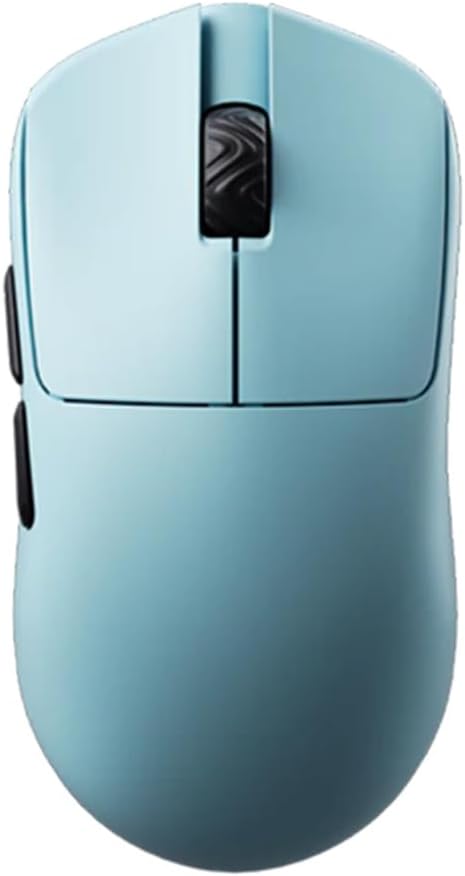

The Gwolves Skoll Mini offers exceptional value for budget-conscious gamers. With a 4.4 rating, it delivers solid performance for claw grip users seeking lightweight precision.
We may earn a commission when you buy through this link, at no additional cost to you.
Its ultralight 50g design and 3389 sensor ensure quick movements and accurate tracking. The detachable cable adds convenience for travel or cable management.
While the honeycomb shell can accumulate dust over time, it significantly reduces weight for faster reactions. The cable is standard but functional for most setups.
This mouse is ideal for entry-level gamers or those on a tight budget who still demand reliable performance. It is a strong starter option.
The 50g weight reduces strain during extended sessions allowing for faster flicks and less fatigue over time.
The 3389 sensor provides accurate tracking up to 16000 DPI ensuring smooth movement across various surfaces.
We may earn a commission when you buy through this link, at no additional cost to you.
The Lamzu Atlantis Mini stands out with a 4.6 rating. Its wireless tech and 51g weight make it a top contender for competitive claw grip gamers.
We may earn a commission when you buy through this link, at no additional cost to you.
Featuring the PAW3950 sensor and optical switches, it ensures zero delay and rapid response. The symmetrical design fits comfortably for both hands.
The premium cost may be a barrier for some buyers but the performance justifies the expense for serious players. The wireless connection remains stable.
Ideal for competitive players needing reliability and speed without cable drag. It balances ergonomics and performance exceptionally well.
Nordic 52840 MCU ensures stable low latency connection for lag-free gaming across long distances.
Optical switches offer three times longer lifespan than mechanical switches with faster actuation.
We may earn a commission when you buy through this link, at no additional cost to you.
The Bloody V7 is rated 4.4 for its balance of affordability and features. It offers unique programmability suited for complex macros.
We may earn a commission when you buy through this link, at no additional cost to you.
With eight programmable buttons and ergonomic shape, it supports claw users efficiently. The rubberized coating ensures a secure grip during intense matches.
Although the DPI caps at 3200 which is lower than modern standards, it remains sufficient for most screens. Software is simple to use.
Best for users prioritizing button count and ergonomics over raw sensor speed. A solid practical choice for daily use.
Eight programmable buttons allow mapping complex macros reducing the need for keyboard combinations during gameplay.
Rubberized coating prevents slippage ensuring fingers stay stable during quick directional movements.
We may earn a commission when you buy through this link, at no additional cost to you.
The Pulsar X3 LHD holds a 4.3 rating and is designed specifically for left-handed users. Its lightweight nature makes it stand out.
We may earn a commission when you buy through this link, at no additional cost to you.
At just 43 grams it is lighter than an egg ensuring minimal strain. The hybrid ergonomic design supports both palm and claw users comfortably.
The price reflects the specialized design and premium components. Left-handed gamers rarely find such high performance options available to them.
Best for left-handed claw users who prioritize speed and comfort. A unique addition to a specialized market.
43 grams allows for faster movement with less physical resistance during rapid aiming actions.
Designed to balance claw control with palm support for diverse grip preferences.
We may earn a commission when you buy through this link, at no additional cost to you.
The Pulsar X2H mini Rated 4.1 offers a renewed option for premium specs at lower cost. It remains a strong contender.
We may earn a commission when you buy through this link, at no additional cost to you.
With a PAW3395 sensor and 52g weight it delivers precision without strain. The narrow waist supports aggressive claw users well.
Buying renewed reduces cost but warranty may vary. The internal structure ensures consistent clicks and stability over time.
Ideal for budget-conscious buyers seeking high specs. It balances value and performance for daily gaming.
PAW3395 sensor ensures accurate tracking without spin-outs on various surfaces.
Up to 100 hours battery life ensures uninterrupted usage over multiple gaming sessions.
We may earn a commission when you buy through this link, at no additional cost to you.
The Corsair IRONCLAW holds a 3.9 rating and offers robust features. It is a strong choice for those preferring heavier mice.
We may earn a commission when you buy through this link, at no additional cost to you.
With ten programmable buttons and RGB customization it suits users needing extensive functionality. The ergonomic shape ensures comfort over time.
The lower rating might stem from weight or grip preference mismatches. It remains a capable option for specific user needs.
Best for users wanting extensive programmability and customization. A strong feature-rich model in the lineup.
Ten programmable buttons and RGB zones allow deep personalization to match gaming styles.
Asymmetric shape supports right hand comfort during extended play sessions.
We may earn a commission when you buy through this link, at no additional cost to you.
The V8 Gaming Mouse achieves a 4.5 rating. Its symmetry and extreme weight make it highly versatile for claw and fingertip users.
We may earn a commission when you buy through this link, at no additional cost to you.
With a PAW3950 sensor and 36g weight it offers unmatched speed. The web driver simplifies setup without software bloat.
Some users might find the symmetry less intuitive. The included 8K dongle supports high polling rates for precision.
Best for competitive players seeking lightweight agility. It balances features and performance well for daily gaming.
Web based driver eliminates need for heavy software installation for basic settings.
Kailh switches offer instant actuation ensuring rapid response during gameplay.
We may earn a commission when you buy through this link, at no additional cost to you.
The Pulsar X2H holds a 4.2 rating and focuses on wireless precision. The mini size suits smaller hands effectively.
We may earn a commission when you buy through this link, at no additional cost to you.
With a PAW3395 sensor and optical switches it ensures reliability. The elevated hump supports aggressive claw grips well.
The internal structure minimizes rattle ensuring consistent clicks. While premium, it offers lasting value for enthusiasts.
Ideal for those seeking reliable wireless performance. It delivers precision and comfort consistently.
PAW3395 with Motion Sync ensures pixel perfect tracking during fast movements.
Sturdier shell ensures consistent tactile feedback and reduces unwanted noise.
We may earn a commission when you buy through this link, at no additional cost to you.
The V6 Gaming Mouse achieves a 4.6 rating. Its no-hole shell makes it easy to clean and highly durable.
We may earn a commission when you buy through this link, at no additional cost to you.
At 40 grams it offers speed without compromise. The concave buttons ensure precise click placement for control.
Some users might miss RGB customization but performance remains top tier. The included 8K dongle supports competitive play.
Best for users prioritizing function over flash. A reliable choice for focused performance.
No holes prevent dust accumulation simplifying maintenance and extending lifespan.
Concave buttons fit finger pads ensuring precise consistent click registration.
We may earn a commission when you buy through this link, at no additional cost to you.
The BenQ Zowie S2-C holds a 4.3 rating. It focuses on driverless simplicity and competitive performance for smaller hands.
We may earn a commission when you buy through this link, at no additional cost to you.
With a 3360 sensor it ensures reliable tracking. The paracord cable reduces drag for smooth movements.
Lack of RGB or software appeals to purists who prefer hardware simplicity. It is a classic design.
Best for esports players who prefer minimal setups. It delivers reliable precision without software.
No software needed ensures setup is instant for any system configuration.
Paracord cable feels like wireless ensuring smooth glide without friction.
We may earn a commission when you buy through this link, at no additional cost to you.
Selecting the ideal mouse depends on several ergonomic and technical factors. Understanding these elements helps narrow down choices efficiently.
Measuring your hand length and width ensures a proper fit. Small hands benefit from compact mice with lower back humps that support claw positioning comfortably.
Choose a shape that keeps your fingers arched naturally without strain.
Lighter mice under 60 grams reduce wrist fatigue and allow faster reactions. Look for balanced weight distribution to avoid front or back heaviness.
A balanced design prevents accidental tipping during rapid movement.
Modern optical sensors like PAW3950 offer high DPI and low latency. Ensure the sensor supports adjustable settings to match your gaming preferences.
High-quality sensors prevent tracking issues on diverse surfaces.
Wireless offers freedom but wired provides zero latency. Evaluate battery life and dongle stability if choosing wireless for competitive play.
Prioritize low latency connections for reaction-based games.
Durable materials like reinforced plastics and quality switches extend lifespan. Dust-proof encoders and optical switches prevent premature wear.
Investing in robust construction saves money long-term.
Programmable buttons enhance customization for macros. Ensure buttons are placed where fingers rest naturally to prevent accidental presses.
Ergonomic placement reduces finger fatigue during long sessions.
For wired models, paracord cables reduce drag. Detachable cables add convenience for travel and storage.
Flexible cables improve movement fluidity during intense use.
Web drivers offer simplicity while full suites allow deep customization. Check for OS compatibility and stability updates.
Good software ensures all features function correctly across devices.
Start by adjusting DPI settings to match your sensitivity preferences. Use software or onboard buttons to find a comfortable baseline level.
Keep the mouse surface clean using a soft cloth. Dust accumulation can affect tracking accuracy and comfort.
Regularly update firmware via official tools to ensure optimal performance and stability.
A good claw grip mouse has a moderate back hump to support fingertips without touching the palm. It should be lightweight to reduce wrist strain during fast movements.
Modern wireless mice with low latency and strong sensors are competitive. Ensure the connection remains stable during rapid movements without lag.
Higher DPI allows precise cursor control with less movement. Claw users typically prefer 800 to 1600 DPI depending on resolution and sensitivity.
Honeycomb shells reduce weight significantly. Solid shells are more durable and easier to clean. Choose based on whether speed or protection is your priority.
Optical switches are faster and more durable than mechanical switches. They prevent double-clicking issues and offer consistent actuation for gaming.
Clean regularly with compressed air or a cloth. Update drivers and check firmware for performance improvements. Store in a dry area to protect electronics.
Hand fit determines comfort. Even premium brands fail if the shape does not match your hand size or grip style. Always check dimensions first.
Paracord cables are lighter and more flexible, reducing drag. They enhance the wired experience to feel closer to wireless performance.
Each model reviewed offers distinct advantages. The Bloody V7 excels in budget features while the Lamzu Atlantis Mini leads in premium wireless performance.
Prioritize ergonomics and sensor quality over brand name. A comfortable shape ensures long-term play without fatigue during intense sessions.
Check current availability and prices before buying. Conditions change frequently so verify details directly on the official store pages.