
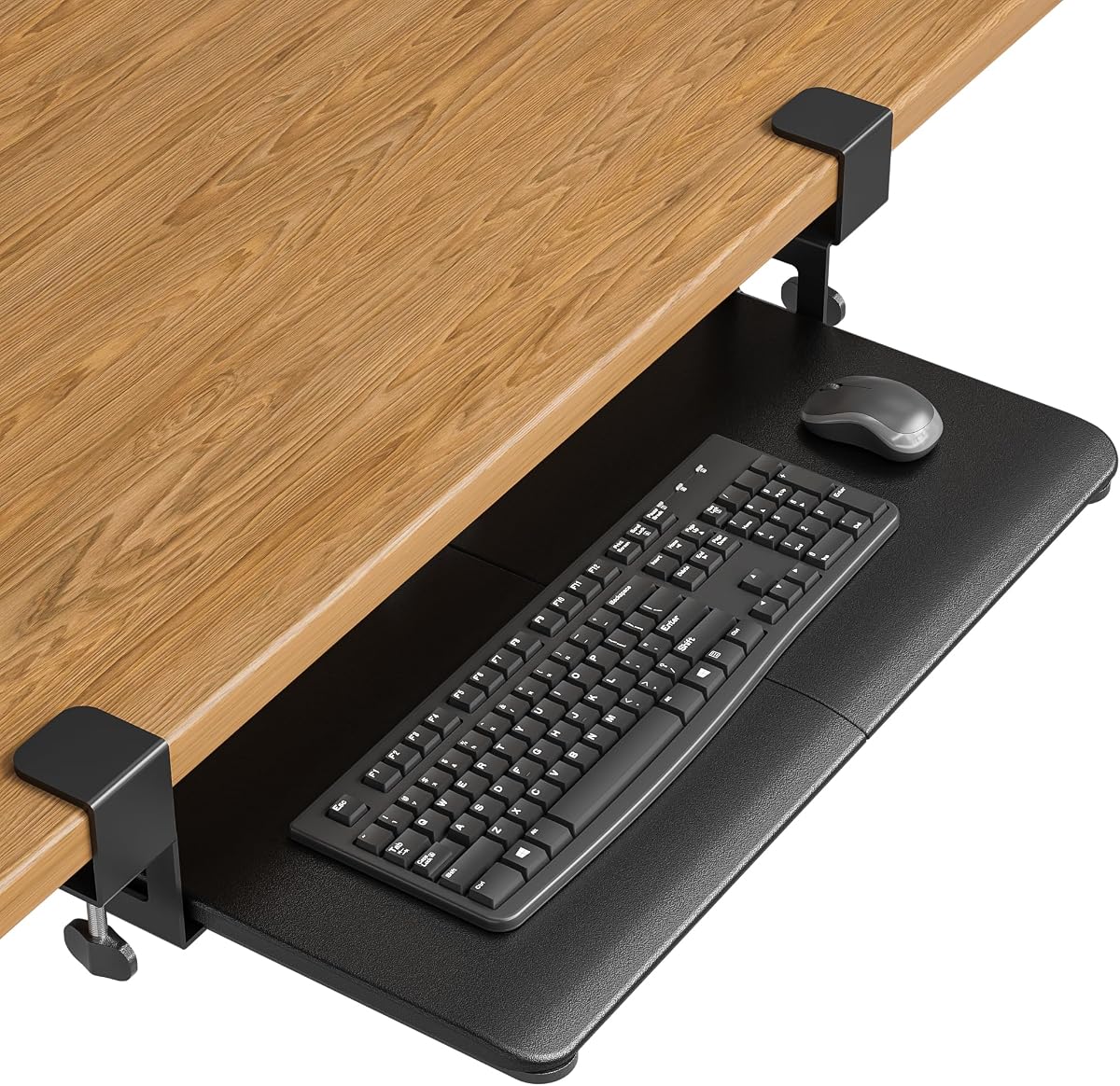
VIVO Premium Black Clamp-on 27 x 11 in Keyboard Tray, MOUNT-KB05HT
4.3Editor score
Tilt adjustment for comfort
Adjusting brackets and swivel clamps
Save desk space with premium tray
This guide compares the top ten clamp on keyboard tray models for ergonomics, space saving, and durability to help you choose the right under desk solution.
Finding the right workspace equipment can transform your daily productivity and physical comfort levels significantly. A clamp on keyboard tray offers a practical solution to free up valuable desk space while promoting better posture during long work sessions.
We have carefully evaluated ten leading models based on their build quality, ease of installation, and ergonomic features. Our comparison focuses on how well each tray integrates with existing desks and supports various typing styles effectively.
Each pick below highlights specific strengths and ideal use cases for different office setups. Please note that product availability and pricing can change over time so verify details before making your final purchasing decision today.
4.3Editor score

4.4Editor score
4.4Editor score
This side-by-side comparison highlights the key specifications and unique features of each model to help you identify the best fit for your specific workstation needs and constraints.


This VIVO model stands out as a top choice for users needing to reclaim valuable desk surface area. With a high rating from verified buyers, it delivers reliable performance and ergonomic benefits right out of the box.
We may earn a commission when you buy through this link, at no additional cost to you.
The tray comfortably holds keyboards and mice below the desktop, freeing up room for monitors and documents. Its C-clamp system ensures a secure fit without damaging your workstation, while the sliding mechanism allows smooth extension and retraction.
While the design is straightforward, it does require a flat desk edge without bevels for proper installation. The 1.25 inch thickness limit means thicker desks might need modifications or alternative mounting solutions before purchase.
Ideal for home office setups or shared workspaces, this tray offers a practical upgrade for anyone struggling with clutter. Its balance of affordability and functionality makes it a recommended starting point for ergonomic improvements.
Moving your input devices under the desk creates a cleaner and more organized professional environment for daily tasks.
The C-clamp design provides a stable base that prevents wobbling during intense typing sessions without drilling holes.
We may earn a commission when you buy through this link, at no additional cost to you.
For users who need flexibility in positioning, this adjustable tray offers extensive customization options. Its split design separates keyboard and mouse areas, which can enhance comfort during long work sessions significantly.
We may earn a commission when you buy through this link, at no additional cost to you.
The ability to adjust height and width means it can adapt to various body types and desk configurations. Included wrist rests provide additional support, reducing strain on hands and forearms during heavy typing workloads.
The wider dimensions might require careful measurement before installation to ensure fit under your specific desk. While the clamps accommodate thicker surfaces, the overall assembly involves more components than simpler single-piece trays.
This model is excellent for professionals who prioritize ergonomic health and have a larger desk to work with. The added adjustability justifies the extra effort required for setup and daily adjustments.
Multiple adjustment points allow you to tailor the tray height and depth to your exact sitting posture needs.
The included pads offer immediate relief for wrist strain without needing separate purchases or third-party accessories.
We may earn a commission when you buy through this link, at no additional cost to you.
This unique tray features a rotating clamp that allows you to pivot the surface a full 360 degrees. It is particularly useful for shared workspaces where quick access and storage flexibility are paramount.
We may earn a commission when you buy through this link, at no additional cost to you.
When not in use, the tray can be rotated under the desktop for discreet storage, which helps maintain a clean look. The single clamp design simplifies installation while still providing a secure hold for light use.
The width might be restrictive if you use large vertical mice or extended keyboards that need room to slide. Ensure you have enough clearance for the rotation path to avoid bumps or obstructions during movement.
Perfect for compact desks or temporary setups, this tray balances mobility with stability effectively. Its ability to hide away makes it a smart choice for those who value aesthetics alongside functionality.
Rotation allows you to position the tray at angles that suit different tasks or to tuck it away completely.
Hiding the tray under the desk keeps your surface clear for other activities or meetings without permanent removal.
We may earn a commission when you buy through this link, at no additional cost to you.
This option combines affordability with solid build quality, making it accessible for a wide range of users. The platform offers ample room for most standard input devices while supporting healthy wrist alignment during typing.
We may earn a commission when you buy through this link, at no additional cost to you.
Installation is straightforward thanks to the no-drill clamp system and protective pads that prevent scratches. The design ensures the keyboard stays in place while sliding smoothly, reducing the risk of accidental displacement during use.
Check your desk underside carefully as crossbars or curved edges can interfere with the clamps. This limitation means it works best with traditional flat boards, so measure thoroughly before committing to this model.
For budget conscious buyers seeking reliable performance, this tray delivers essential ergonomic benefits without unnecessary features. It remains a strong contender in the under desk category for home and office environments alike.
By relocating input devices below the desk, you gain significant space for documents or larger monitors.
Protective pads on the clamps ensure your desk surface remains pristine even after extended use periods.
We may earn a commission when you buy through this link, at no additional cost to you.
Premium features distinguish this model, particularly its tilt adjustment capabilities that allow for personalized ergonomic angles. Nine different settings let you find the perfect slope to reduce strain on wrists and arms effectively.
We may earn a commission when you buy through this link, at no additional cost to you.
The swivel clamps offer independent rotation, which is crucial for corner desk setups where standard trays might fail. Height adjustable side brackets provide clearance options so you can customize the fit under your specific desk.
While the versatility is impressive, the added mechanisms mean assembly is more involved than basic models. The higher cost reflects the enhanced control, but it might not be necessary for those with simple desk needs.
This tray is ideal for power users who need precise control over their typing environment. The combination of tilt and swivel features makes it a robust choice for demanding workloads.
Tilt options from negative to positive degrees help you align your wrists naturally for better long-term health.
Independent clamp rotation allows secure mounting even in complex L-shaped desk configurations without gaps.
We may earn a commission when you buy through this link, at no additional cost to you.
Designed specifically for L-shaped workstations, this tray solves the challenge of mounting on corner desks. The swiveling clamps adapt to different angles, ensuring a tight fit without damaging the desktop surface.
We may earn a commission when you buy through this link, at no additional cost to you.
Installation is simplified by the adjustable clamps that allow you to position the tray exactly where needed. The sliding mechanism provides smooth access to keyboards and mice while keeping the main desk area clear.
It does have a thickness limit of 1.25 inches, which might restrict use on heavier custom furniture. Verify your desk meets this requirement to avoid fitment issues after purchase and delivery.
If you have a corner setup, this model is one of the few that accommodates the geometry effectively. It ensures you get the benefits of an under desk tray even in complex furniture arrangements.
The clamp system adjusts to fit L-shaped desk angles securely, preventing wobble during typing.
Under-desk placement maximizes your usable desktop area for monitors or writing materials.
We may earn a commission when you buy through this link, at no additional cost to you.
This model adds utility with a built-in pencil drawer that stores pens, clips, and small items conveniently. It combines the benefits of a keyboard tray with organizational tools, reducing clutter on the desktop.
We may earn a commission when you buy through this link, at no additional cost to you.
The tray holds keyboards securely while the drawer extends slightly less than the main platform. This design ensures everything stays organized and accessible without needing separate storage boxes or organizers.
Check your desk length carefully because the combined extension of tray and drawer impacts total depth. You will need adequate space to slide everything out fully without hitting walls or obstacles.
For users who value organization, this tray offers a complete solution under your desk. It keeps tools within reach while maintaining a clean and ergonomic typing environment.
A dedicated drawer keeps small items organized and prevents them from scattering across your work surface.
Storing items below the desk helps maintain a tidy professional appearance in shared or home offices.
We may earn a commission when you buy through this link, at no additional cost to you.
This tray focuses on ergonomic efficiency with an upgraded slide mechanism that ensures smooth extension and retraction. The back baffle keeps your keyboard from sliding forward, providing a stable platform for typing tasks.
We may earn a commission when you buy through this link, at no additional cost to you.
Its clamps support thicker desks up to 2.76 inches, which is broader than many competitors. The non-slip pads protect your desk while adding stability during use to prevent movement.
The width might be tight if you use very large gaming mice or split keyboards. Measure your device dimensions to ensure they fit comfortably on the platform without overhanging.
Ideal for users prioritizing smooth operation and desk protection, this tray delivers on those specific needs. It is a reliable option for those who want a simple, efficient under desk setup.
The upgraded mechanism reduces friction so you can pull out the tray effortlessly when needed.
The baffle keeps the keyboard in place preventing accidental movement during intense typing sessions.
We may earn a commission when you buy through this link, at no additional cost to you.
This desk extender functions as a keyboard tray among other uses like holding printers or extra storage. Its foldable design lets you tuck it away when not in use, adding versatility to your workspace.
We may earn a commission when you buy through this link, at no additional cost to you.
The reinforced K-shaped brackets provide sturdy support that can hold up to 44 lbs of weight. This makes it suitable for heavier items beyond just keyboards, such as laptops or docking stations.
Since it is not exclusively a keyboard tray, the ergonomics might differ slightly from dedicated models. It is more of a flexible surface solution than a specialized ergonomic typing platform.
Ideal for users needing a flexible surface rather than a fixed keyboard mount, this extender adapts to changing needs. It maximizes space utility for those with varied tasks throughout the day.
Use it for keyboards, printers, or storage and fold it away when you need more top surface space.
The K-shaped brackets ensure stability even when holding heavier electronics or equipment securely.
We may earn a commission when you buy through this link, at no additional cost to you.
This model stands out with a lifetime warranty and dedicated US-based support for installation help. The large platform provides ample room for full-size keyboards, making it ideal for those who need extra space.
We may earn a commission when you buy through this link, at no additional cost to you.
Installation is quick and non-invasive with clamp-on design that fits desks up to 2.2 inches thick. The slide-out mechanism allows you to push it back when not in use, keeping your workspace organized and clear.
It does not work with glass desks so check your material before ordering to avoid return hassles. The price reflects the extended warranty but may be higher than other comparable options.
For buyers who value long-term support and peace of mind, this tray delivers confidence. It is a solid choice for home offices where durability and service reliability are key priorities.
The lifetime warranty covers potential issues so you can rely on this tray for years of use.
A wider platform ensures enough room for large keyboards and free mouse movement without constraints.
We may earn a commission when you buy through this link, at no additional cost to you.
Selecting the right tray involves assessing your desk type and ergonomic needs. This guide covers essential factors to consider.
Most trays specify a maximum thickness for clamps, ranging from 1.25 to 2.76 inches. Measure your desk edge accurately to ensure the clamps can secure it properly.
Choose a model with a thickness limit that matches your desk to avoid fitment issues after purchase.
Clamp-on systems vary from single clamps to dual C-clamps. Single clamps pivot for rotation while dual clamps provide stability for linear trays.
Select a mounting type that suits your desk shape and desired flexibility for tray movement.
Some trays work only on flat wooden desks and not glass or beveled edges. Check the product notes for material restrictions before buying.
Ensure your desk surface is flat and solid to prevent slipping or damage to the clamps.
Verify the tray length and width to ensure it fits under your desk without hitting obstacles. Look for weight capacity ratings to ensure it holds your keyboard and accessories.
Adequate space for your specific gear will prevent discomfort and extend the life of the tray.
Features like tilt adjustment and sliding rails improve comfort. Adjustable trays help achieve a neutral wrist position for long-term health.
Prioritize trays that allow you to find a comfortable typing angle based on your height and preferences.
Most models offer no-drill setups but some may need assembly tools. Check if all hardware and instructions are included in the package.
Easy installation saves time and reduces the risk of damaging your desk during setup.
Some trays include wrist rests, pencil drawers, or mouse pads. These extras can enhance convenience and organization.
Decide if you need integrated accessories or prefer to buy them separately based on your needs.
A warranty protects against defects and ensures you can get help if something goes wrong. Some brands offer longer terms or dedicated support lines.
Check the warranty details to understand what is covered and how to claim support if necessary.
Start by measuring your desk thickness and edge shape to confirm compatibility with the tray you chose. Ensure you have enough space under the desk for the tray to slide out fully.
Install the clamps according to the instructions, tightening them securely but not excessively to avoid damaging the wood. Check that all brackets are aligned before attaching the main tray surface.
Clean the tray regularly with a damp cloth to remove dust that might clog the sliding mechanisms. Lubricate the rails occasionally to maintain smooth movement over time.
Most standard clamp-on trays are not designed for glass desks due to the risk of slipping or cracking. Check product specifications carefully as some models explicitly forbid glass surfaces. Using a protective mat or alternate mounting method might be necessary if you must use it on glass.
Most models support around 11 to 44 pounds depending on the design. Standard keyboard trays usually hold 11 lbs while desk extenders may support more due to stronger brackets. Verify the rating to ensure it accommodates your keyboard and mouse comfortably.
No, the majority of clamp-on trays are designed to attach without drilling. They use sturdy C-clamps that secure to the edge of the desk. This makes them ideal for renters or shared offices where modifications are not allowed.
Use a soft cloth to wipe away dust from the rails and then apply a small amount of silicone lubricant. Avoid harsh chemicals that might damage plastic parts or leave sticky residues. Regular cleaning ensures smooth operation over time.
Many trays are not compatible with beveled or lipped edges because the clamps need a flat surface to grip. Check the product notes to confirm compatibility before purchasing. If your desk has edges, you may need to file them or choose another mounting type.
Yes, many clamp-on trays work on standing desks as long as the edge thickness is within limits. Ensure the desk has enough clearance under the desktop for the tray to slide without hitting legs or frame parts.
We explored ten distinct models ranging from simple space savers to adjustable ergonomic solutions. Each tray offers unique benefits depending on your desk type and personal comfort needs.
Prioritize features like tilt adjustment or storage if your workflow demands flexibility. Ensure the dimensions match your desk space to prevent installation issues later.
Always verify current availability and details before making your purchase since offerings can change over time.