
VIVO Black Adjustable Single Laptop Car Mount
3.9Editor score
Quick disconnect mechanism
Ventilated surface tray
Multiple mounting feet
Mobile professionals need reliable workstations inside their vehicles to stay productive between stops. A good car truck and van laptop mount secures your device safely while offering ergonomic adjustments for comfortable typing and viewing during long shifts.
We evaluated ten top-rated models based on stability, adjustability, cooling features, and ease of installation. Each product was assessed for build quality, compatibility with various vehicle types, and ability to support different laptop sizes without excessive vibration or drift.
This guide details the strengths and limitations of each mount to help you find the perfect fit for your specific truck van or car. Remember that product availability and pricing can change frequently, so verify current details before making your final purchase decision online.
3.9Editor score

4.0Editor score

5.0Editor score
As an Amazon Associate we earn from qualifying purchases.
This comparison table lists all ten reviewed models with their key specifications side by side. Use this overview to quickly identify which mount matches your vehicle type and laptop size requirements before reading the detailed reviews below.


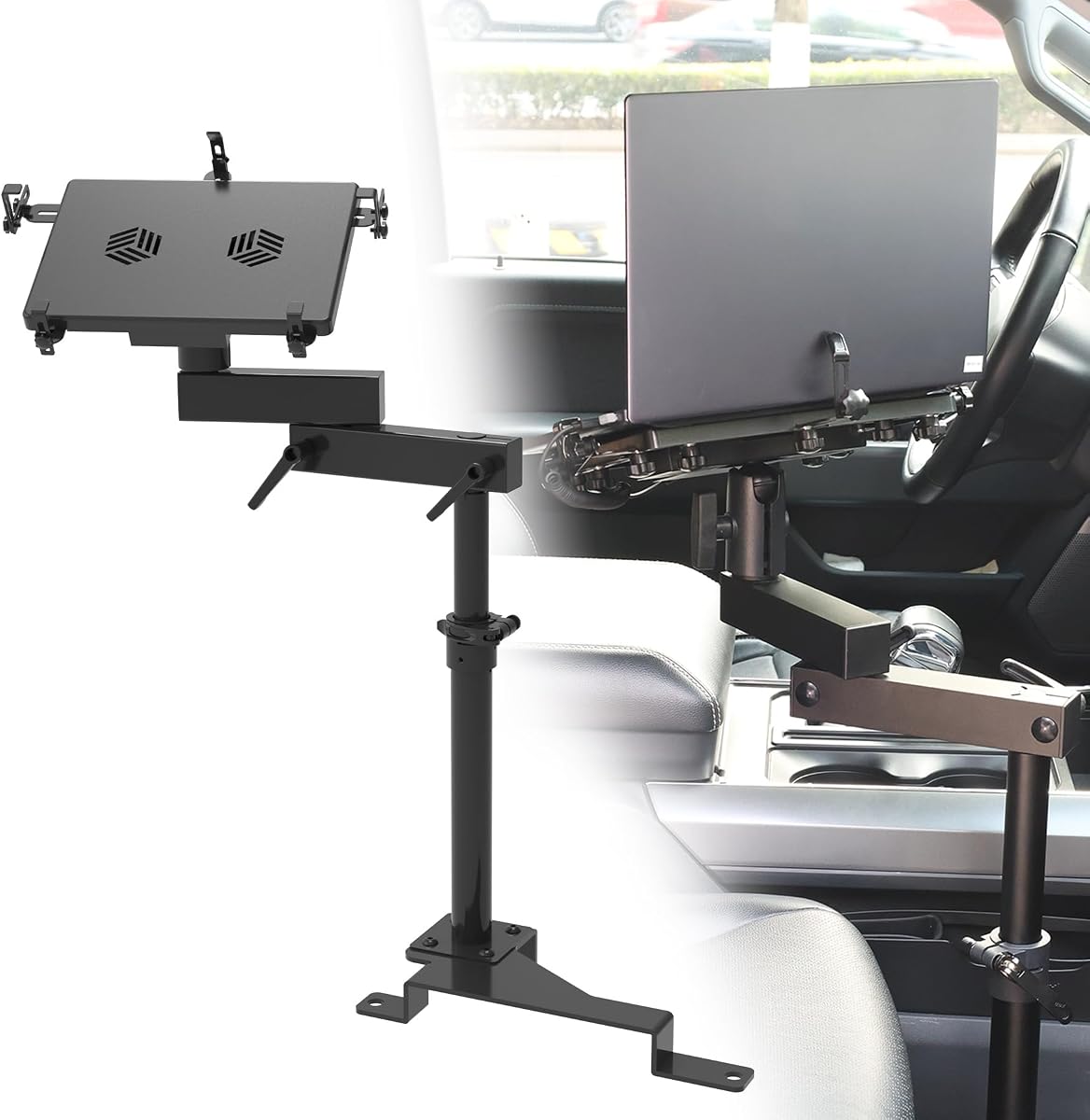


This mount stands out as our top recommendation due to its rugged build and comprehensive feature set. It received high marks for stability and cooling capabilities during extended use sessions inside parked vehicles.
We may earn a commission when you buy through this link, at no additional cost to you.
The triangular three-point base system significantly limits movement when parked, providing a reliable surface for typing. Two built-in fans actively manage heat buildup, ensuring your laptop stays cool during long reporting or diagnostic tasks.
While highly versatile, the installation requires checking specific passenger-seat bolt types beforehand. The design does not work with hook-style seat mounts, so verifying fitment is crucial before ordering to avoid returns.
Ideal for fleet operators and mobile service professionals who need a stable workspace in various truck types. The detachable upper workstation allows the base to remain installed, preserving mounting position without obstructing passenger access.
Dual USB fans increase airflow under the tray, preventing thermal throttling during heavy computing tasks while parked.
The workstation detaches at the center joint, allowing removal of the upper part when not in use for clearer passenger access.
We may earn a commission when you buy through this link, at no additional cost to you.
VIVO offers a cost-effective solution for those seeking basic functionality without breaking the bank. This model focuses on essential adjustability and compatibility with various vehicle floor bolts.
We may earn a commission when you buy through this link, at no additional cost to you.
The tray features flexible clips that secure laptops quickly and disconnect easily when the passenger seat is needed. Its ventilated surface helps maintain airflow, though it lacks active cooling fans found in pricier models.
While it includes multiple mounting feet for compatibility, users might find the base anchoring slightly less rigid than steel alternatives. The quick disconnect feature remains a strong selling point for shared vehicles.
Best suited for occasional users or budget-conscious buyers needing a simple stand for reporting. It works well with exposed floor seat bolts and provides sufficient range for most standard laptop sizes.
Thumb screws allow for rapid removal of the stand from the base, restoring full seat functionality in moments.
Three different mounting feet ensure compatibility across a wide range of trucks, vans, cars, and SUVs.
We may earn a commission when you buy through this link, at no additional cost to you.
This 2026 upgrade model introduces a unique base-free structure that maximizes interior space while maintaining stability. It achieved a perfect rating score from early adopters, signaling high satisfaction with its design.
We may earn a commission when you buy through this link, at no additional cost to you.
The absence of a bulky base allows for more flexible installation spots and leaves more room for passengers. Full motion adjustability ensures comfortable viewing angles for most notebook sizes up to 17 inches.
Premium materials provide good shock resistance for daily driving scenarios, ensuring the mount withstands regular use. The anti-scratch clips hold laptops steadily without causing surface abrasion during transport.
Perfect for professionals who prioritize interior space and modern aesthetics. It is ideal for shared vehicles where quick removal and minimal obstruction are top priorities during work sessions.
The base-free structure reduces interior obstruction significantly, making it easier for passengers to enter or exit.
Solid premium materials ensure structural integrity, preventing flex during heavy typing or vehicle movement.
We may earn a commission when you buy through this link, at no additional cost to you.
MELIPRON delivers a robust option designed to withstand heavy duty use in challenging environments. The heavy-duty aluminum and steel construction ensures stability even on rough roads during transit.
We may earn a commission when you buy through this link, at no additional cost to you.
Its dual USB cooling fans prevent overheating, keeping devices functional during long trips in hot vehicle environments. The quick-release telescopic pole allows easy removal when not in use to maintain passenger space.
While durable, the installation still relies on accessing passenger seat rail bolts without drilling. This makes it suitable for leased or personal vehicles where structural integrity must remain intact.
Ideal for fleet and field service professionals needing a reliable workstation. The two-year warranty and free replacement parts offer additional peace of mind regarding long-term use.
The design has been road-tested to ensure reliable performance even when driving over uneven terrain or rough roads.
Quick-release mechanisms allow the stand to be removed quickly, preserving up to 80% of the passenger area when needed.
We may earn a commission when you buy through this link, at no additional cost to you.
This model is specifically sized for everyday laptops, avoiding stability issues often seen with oversized devices. It features a lifetime manufacturer warranty, which is rare in this category and adds significant value.
We may earn a commission when you buy through this link, at no additional cost to you.
Velcro straps keep laptops securely in place within the rated weight limit, reducing wobble during vehicle movement. The open airflow design underneath helps reduce heat buildup during longer parked work sessions.
The arm's telescoping tubes and joint knobs allow height adjustment from 23 to 35 inches with full swivel. However, it may not be suitable for users who frequently use larger 17-inch desktop replacements.
Best for professionals who need a secure solution for standard business laptops. The quick-release lever ensures the seat can be used as a passenger area when the workday is done.
Unlike many competitors, this unit includes a lifetime manufacturer warranty and US-based product support for standard coverage.
Integrated hook-and-loop straps hold laptops securely within rated weights without requiring extra tools or hardware.
We may earn a commission when you buy through this link, at no additional cost to you.
Designed specifically for Ford F-Series trucks, this mount offers a tailored solution for owners of 2015 to 2026 models. It includes dual built-in cooling fans to prevent overheating during long trips.
We may earn a commission when you buy through this link, at no additional cost to you.
The patented design ensures unparalleled comfort and durability, addressing specific needs of truck drivers. Dual swing arms offer extended reach, allowing for comfortable use at various angles without strain.
While highly effective for Ford vehicles, it is not universally compatible with other brands. Users should check the vehicle compatibility image thoroughly before purchasing to ensure exact model alignment.
Ideal for Ford truck owners requiring a reliable workstation. The sturdy aluminum and steel build provides rock-solid stability, ensuring devices stay firm on bumpy roads during daily work.
Compatibility covers Ford F-150, F-250, F-350, F-450, and F-550 models from 2015 through 2026 specifically.
Dual swing arms provide additional range, allowing users to position the screen comfortably without leaning.
We may earn a commission when you buy through this link, at no additional cost to you.
Mobotron presents a heavy-duty solution that emphasizes durability and speed of installation. The sure-grip laptop deck easily secures devices ranging from 10 to 17 inches with confidence.
We may earn a commission when you buy through this link, at no additional cost to you.
The heavy-duty telescoping aluminum tube allows vertical adjustment while the quick lock-in release levers facilitate fast installation and uninstallation in seconds. This is crucial for professionals on tight schedules.
While functional, the design is utilitarian, focusing on performance over aesthetics. It requires flat passenger seat rails with visible and easily accessible bolts to ensure a secure fit.
Best for heavy-duty users who prioritize speed and stability over sleek looks. It provides full vertical and horizontal adjustability, offering flexible viewing angles for drivers and passengers alike.
Extendable rear and front brackets ensure the laptop remains secure regardless of the exact device size.
Quick lock-in release levers allow for rapid transition between work mode and passenger use.
We may earn a commission when you buy through this link, at no additional cost to you.
This mount is rated for laptops and tablets up to 17 inches, making it versatile for mixed-device users. It features both active and passive cooling systems to keep devices running cool.
We may earn a commission when you buy through this link, at no additional cost to you.
The toothed locking segments hold each position exactly where set, preventing drift during operation. When the workday ends, the arm collapses toward the seat, keeping the interior clean and functional.
While capable of holding heavy devices, the weight limit is around 6.6 lbs, which might exclude some larger towers. Users should weigh their device before ordering to ensure compliance with capacity limits.
Ideal for field technicians and contractors who use tablets or mixed devices. The lifetime warranty and US-based support provide strong assurance of quality and customer service availability.
A ventilated tray works with USB-powered fans to move heat away efficiently during long parked sessions.
The arm collapses toward the seat after work, ensuring the passenger seat remains usable instantly.
We may earn a commission when you buy through this link, at no additional cost to you.
This model emphasizes stability by anchoring at the base rather than relying solely on the arm. The base plate hooks onto the seat rail, adding a critical third contact point for enhanced rigidity.
We may earn a commission when you buy through this link, at no additional cost to you.
With a 90-degree tilt and swivel range, it offers precise positioning for comfortable typing. Extendable side grips hold devices securely without pinching the case, accommodating laptops and full-size tablets.
Installation involves multiple bolt configurations, which might be slightly more complex than single-bolt solutions. However, this added effort results in a significantly more stable workspace for heavy typing tasks.
Best for those who prioritize absolute stability in their workstation. It turns a parked vehicle into a robust workspace suitable for detailed fieldwork without worrying about device shifting.
Hooks onto seat rail at rear and bolts to bracket up front for a solid anchor point.
Extendable side grips ensure secure holds on various laptop sizes without damaging the chassis.
We may earn a commission when you buy through this link, at no additional cost to you.
This version comes with a complete accessory package, offering better value for those needing extra components. It includes a support brace and screen stabilizers to ensure maximum rigidity during use.
We may earn a commission when you buy through this link, at no additional cost to you.
The universal mounting base provides a no-drilling solution that works with accessible passenger seat rail bolts. A USB-powered cooling fan is preinstalled in the deck to keep devices cool during operation.
While expensive, the inclusion of screen stabilizers adds significant utility for larger devices. It ensures the screen stays locked in place, which is vital for heavy industrial or commercial environments.
Best for comprehensive setups needing extra support accessories. It saves money by bundling necessary parts into one package, making it ideal for fleet installations where consistency is key.
Includes support brace, screen stabilizers, and preinstalled cooling fan for a full workstation experience.
No drilling required as long as passenger seat rails are flat and bolts are visible.
We may earn a commission when you buy through this link, at no additional cost to you.
Selecting the right mount requires evaluating vehicle compatibility, build quality, and ergonomic features to ensure a stable workspace.
Always verify that your vehicle has exposed floor seat bolts or rail bolts before purchasing. Some mounts require specific bolt types or spacing that may not fit hook-style seats or certain sedan models.
Check the manufacturer's compatibility guide to ensure the mount fits your specific truck, van, or SUV model year.
Look for mounts with multi-point base systems or heavy-duty anchoring to prevent wobbling. Stability is critical when typing on uneven surfaces or during stops in traffic.
A rigid steel or aluminum base typically offers better stability than lighter plastic alternatives.
Confirm the tray supports your device's dimensions and weight. Most mounts handle 15 to 17-inch laptops, but weight limits vary, so check capacity to avoid straining the joints over time.
Ensure the clamps or straps can securely hold larger devices without sagging or slipping.
Prioritize models with full motion adjustments including tilt, swivel, and height changes. Proper ergonomics reduce neck and wrist strain during long reporting or data entry tasks.
A wide range of motion allows you to position the screen at eye level regardless of where the passenger seat is.
If you work for extended periods, look for mounts with ventilated trays or active cooling fans. Heat buildup can throttle laptop performance and damage components during summer driving.
Dual USB fans or open airflow designs help dissipate heat more effectively than solid trays.
For shared vehicles or mixed-use scenarios, a quick-release system is essential. It allows you to remove the workstation quickly to restore the passenger seat to its normal function.
Thumb screws or levers are common mechanisms that facilitate this rapid detachment without tools.
Heavy-duty aluminum and steel constructions are preferred for long-term durability. These materials resist wear from daily vibration and temperature fluctuations inside the vehicle.
Invest in units with reinforced joints and connectors that can withstand daily industrial use.
Review the warranty coverage offered by the manufacturer. Some brands provide lifetime warranties, while others offer limited two-year coverage with free replacement parts.
Strong customer support ensures you can get help with fitment questions or product concerns quickly.
Before installation, ensure your passenger seat rail is flat and the bolts are accessible. Use the included brackets to attach the base securely, verifying that all locking levers are tightened fully to prevent movement.
Adjust the telescoping pole and arm to the desired height and angle before placing your laptop. Secure the device using the flexible clips or straps, ensuring it sits flat on the tray without overhang.
Regularly inspect the mounting points and levers for signs of wear or looseness. Keep the cooling fans clean of dust to maintain airflow efficiency, especially during summer months when heat buildup is a risk.
Yes, most modern mounts use a no-drill installation method that attaches directly to existing passenger seat rail bolts. These systems use brackets and clamps to secure the base without requiring permanent modifications or holes in the vehicle body.
You should keep the stand's height clear of the airbag zone to ensure safety. Always verify clearance before installation and use the mount only while the vehicle is parked to avoid any obstruction during driving or emergency maneuvers.
No, these mounts are designed for use while the vehicle is parked. Balancing a laptop on the passenger seat while driving is unsafe and may distract you from the road, leading to potential accidents or traffic violations.
Use a mount with a ventilated tray or active cooling fans to promote airflow under the device. Avoid placing the laptop on solid surfaces like a dashboard or seat cushion where heat can get trapped during long work sessions.
Many mounts support both laptops and tablets, typically up to 17 inches in width. Check the weight capacity and tray dimensions to ensure your specific tablet model is compatible with the mounting mechanism.
Most mounts have a weight limit ranging from 9 to 11 pounds. Exceeding this limit can strain the joints and reduce stability, so always weigh your device including accessories before ordering.
Yes, many models feature quick-release levers or thumb screws that allow you to detach the workstation in seconds. This restores the passenger seat to its full functionality when the mount is not in use.
Usually, only basic hand tools like a screwdriver or wrench are needed to secure the base to the seat bolts. Some kits include all necessary mounting hardware and instructions for easy setup without specialized equipment.
Our top picks highlight the No-Drill Car Laptop Mount for its balanced features, the VIVO mount for budget-friendly versatility, and the 2026 Upgrade model for modern design innovation.
Prioritize stability and cooling features if you spend long hours working in your vehicle. A secure base and effective heat management will ensure your laptop performs well even during extended shifts.
Always check current pricing and availability before making your purchase as these details change frequently. Verify your vehicle compatibility to ensure a smooth installation process and reliable daily performance.