
Captel MDL 200 Corded Phone for The Hearing Impaired
3.5Editor score
Affordable basic option
Simple corded design
Clear caption support
This guide compares the top captioned telephones for hearing impaired users, evaluating real-time captions, sound amplification, and ease of use for clearer
Staying connected with loved ones is vital for everyone, especially those with hearing loss. Captioned telephones bridge the gap by displaying real-time text of conversations alongside audio. These devices transform phone calls into clearer, more confident interactions for seniors and the hard of hearing.
We have reviewed ten leading models to find the best captioned telephones for hearing impaired users. Our comparison covers amplification levels, screen size, ease of use, and special features like voicemail captions. Each product offers unique strengths to match different hearing needs and preferences.
Every pick below highlights key features, pros, cons, and real-world performance. You will see which models excel in clarity, volume, or specific accessibility options. Please note that prices and availability can change frequently, so check current listings before purchasing your ideal phone.
3.5Editor score

4.3Editor score

4.5Editor score
Here is a side-by-side look at all ten captioned and amplified phones. This table helps you quickly compare key specs like amplification power, hearing aid compatibility, and unique features to find the right fit for your needs.




The Hamilton CapTel 2400iSPNBT stands out as the top choice for hearing impaired users seeking clarity. With a 4.3 rating, it delivers real-time captions on a large touchscreen so you never miss a word. Its combination of audio and text makes conversations far more reliable and confidence-boosting.
We may earn a commission when you buy through this link, at no additional cost to you.
This phone features up to 40dB of amplified gain, ensuring sound is loud enough for moderate hearing loss. You can choose between auto captions or assisted captions with live operator support for accuracy. The built-in answering machine also displays voicemail captions directly on the screen for convenient review.
A key trade-off is the requirement for high-speed internet and service registration for US residents with hearing loss. However, the captioning service is available 24/7 at no cost, which offsets this complexity. Most users find the clear, confident conversations worth the minor setup steps.
If you want the most comprehensive captioned experience at home, this model is the best fit. It suits seniors and hard-of-hearing individuals who want full visual and auditory support. Choose this phone to turn everyday calls into clear, accessible interactions with loved ones.
Enjoy both automated and assisted captioning options tailored to your specific needs.
Check missed messages on the screen without needing to listen to audio only.
We may earn a commission when you buy through this link, at no additional cost to you.
The Captel MDL 200 offers an affordable entry into captioned telephony for those on a budget. While it lacks high-end features, it provides essential caption support in a reliable corded design. It is a practical solution for users who prioritize basic functionality over extra options.
We may earn a commission when you buy through this link, at no additional cost to you.
This phone focuses on delivering clear captions during calls without complex setup. Its simplicity means fewer buttons to learn, making it accessible for elderly users. Although it does not have a touchscreen, the dialpad and display are designed for easy readability.
The main limitation is the lack of advanced features like voicemail captions or adjustable amplification. However, for straightforward voice and text calls, it performs adequately. The lower price makes it a good option for secondary rooms or users needing minimal setup.
Consider this model if you need a simple, cost-effective captioned phone. It works well for those who mainly need basic call support. While not as robust as premium models, it keeps communication lines open without straining your budget.
Get essential captioned phone capabilities without paying for extra technology.
We may earn a commission when you buy through this link, at no additional cost to you.
The Clarity AltoPlus is a premium choice for those with severe hearing loss. With TIA certification and up to 53dB amplification, it ensures sound is loud and clear. The outgoing speech amplification feature makes your voice louder for callers, creating balanced conversations.
We may earn a commission when you buy through this link, at no additional cost to you.
Its ergonomic design includes tone and volume controls easy for arthritis users. The backlit screen and talking keypad add accessibility. While it does not offer real-time captions like CapTel, its focus is pure sound amplification and call clarity for difficult listening environments.
You pay more for these advanced features, but they justify the cost for significant hearing needs. The boost override and OSA features are unique benefits not found on many other phones. It may require more setup than basic corded phones, but performance is excellent.
Choose this phone if you need powerful sound and outgoing clarity. It is ideal for moderate to severe hearing loss where standard phones fail. Invest in this model to ensure every word is heard clearly by you and the caller.
Outgoing speech amplification helps callers hear you clearly too.
TIA certified for mild to severe hearing loss standards.
We may earn a commission when you buy through this link, at no additional cost to you.
The Geemarc Ampli550 is designed for maximum visibility and sound. With up to 55dB TrueSound and a 95dB ringer, it ensures you never miss a call. The talking keys and Caller ID help identify calls and dial numbers audibly, aiding low vision users.
We may earn a commission when you buy through this link, at no additional cost to you.
It features a bright strobe light for visual alerts in loud environments. The keypad has extra-large numbers and three emergency keys for quick access. These features make it ideal for seniors who struggle with small buttons or faint ringers.
While it is a corded phone with limited cordless options, its loud features are robust. Some users might find the size larger than standard phones. However, the clear audio and visual cues provide peace of mind for hard-of-hearing users.
This phone suits those needing strong audio and visual cues. It is great for families wanting clear alerts. For users who prioritize sound and light over advanced digital features, the Ampli550 delivers reliable performance.
Three color-coded emergency keys provide instant contact options.
We may earn a commission when you buy through this link, at no additional cost to you.
The Serene Innovations SI-CL-65 offers the freedom of a cordless handset with HD audio quality. It features talking Caller ID to announce incoming callers. This model is suited for users who want mobility while staying connected with amplified sound.
We may earn a commission when you buy through this link, at no additional cost to you.
Its large buttons and clear audio support hearing aid compatibility. The cordless nature means you can take calls from anywhere in the house. However, it relies on charging and may have fewer visual caption options than touchscreen models.
Users appreciate the simplicity and movement it provides. It is less robust than dedicated captioned phones but serves well for everyday calls. The HD audio improves clarity without requiring internet connection.
Choose this if you value mobility and sound quality. It is a practical choice for active seniors. While not as feature-rich as touchscreen models, it keeps communication easy and accessible.
Take calls from any room with the cordless handset.
We may earn a commission when you buy through this link, at no additional cost to you.
The VTech SN5147 combines corded reliability with cordless convenience. It includes a base handset and one cordless unit. With up to 50dB audio assist and a 90dB ringer, it ensures loud clear calls. The photo speed dial feature lets you contact loved ones with a touch of a picture.
We may earn a commission when you buy through this link, at no additional cost to you.
It includes a smart call blocker to stop robocalls. The visual ring indicator helps you spot calls in noisy environments. Users find the hybrid design useful during power outages while maintaining mobility.
Some users find the setup steps for photo dial complex. However, once configured, it streamlines calling. The 22-minute digital answering machine is functional but basic. It works well for seniors needing flexibility and spam protection.
This model suits those wanting both stability and mobility. It is a great choice for households. If you value photo dial and call blocking, the SN5147 is a strong contender.
Block up to 1,000 robocalls for cleaner calls.
We may earn a commission when you buy through this link, at no additional cost to you.
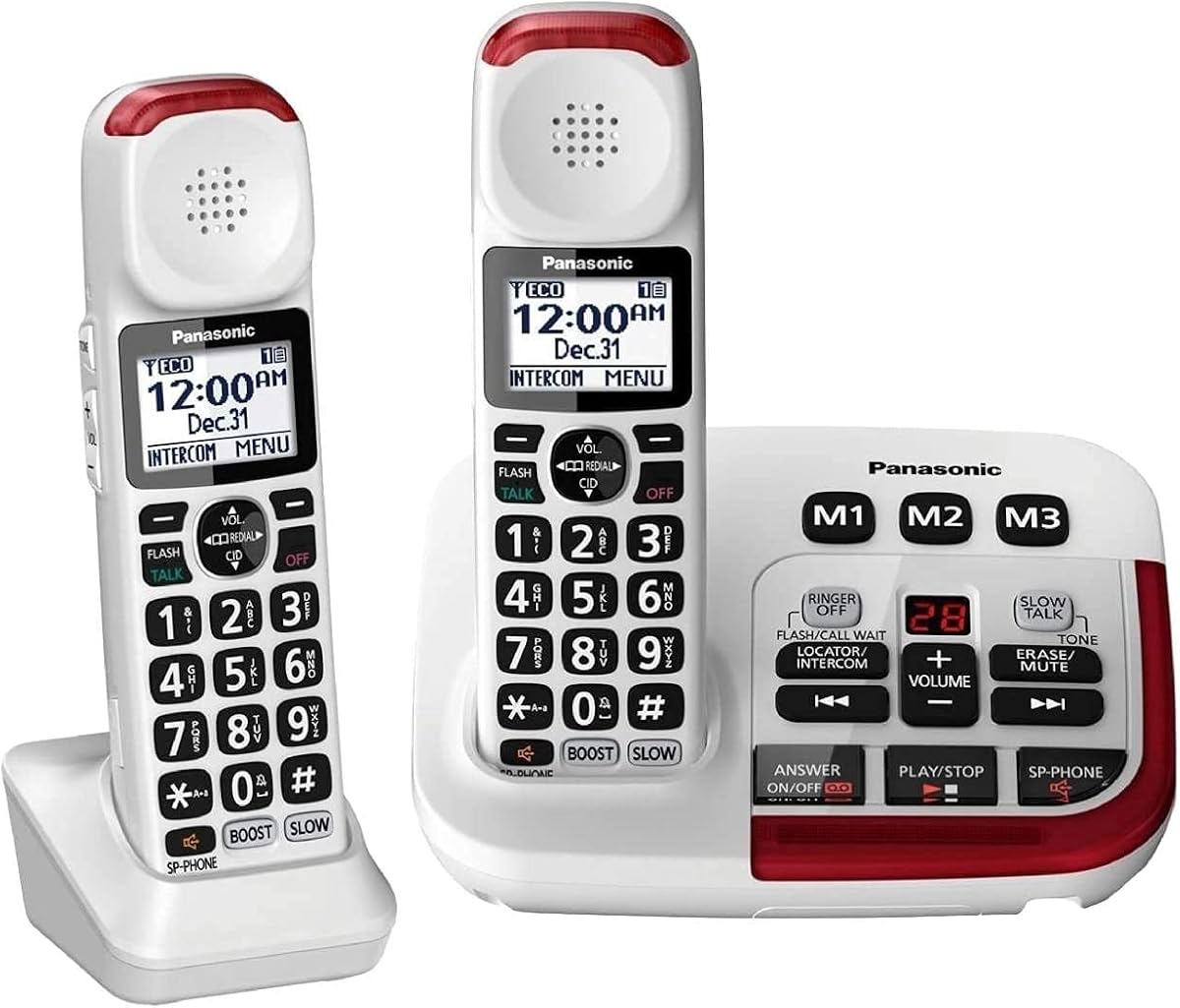
The Panasonic KX-TGM420W + 1 excels at reducing background noise for clear calls. It includes one handset with volume boost up to 40dB. The slow talk feature slows speech for easier listening. Red LED visual ringers ensure calls are seen even with volume lowered.
We may earn a commission when you buy through this link, at no additional cost to you.
This model expands to six handsets, ideal for larger homes. It includes talking Caller ID and a digital answering machine. Users appreciate the noise reduction for calls in noisy areas. The system is reliable and feature-rich.
The menu system can be complex to navigate for some seniors. Also, adding more handsets increases cost. However, the clarity features and expandability make it a versatile choice for families.
Choose this if you want noise control and expansion. It suits homes needing multiple phones. With its unique slow talk feature, it stands out for challenging listening environments.
Slow talk slows speech speed in real time for better understanding.
We may earn a commission when you buy through this link, at no additional cost to you.
The SWISSVOICE Big Button Phone simplifies dialing with photo memory buttons. It includes a corded base and an extra cordless handset. The 90dB ringer and large buttons make calls easy. Users can see photos of contacts, reducing dialing stress.
We may earn a commission when you buy through this link, at no additional cost to you.
It includes a built-in call block feature. The phone is hearing aid compatible and suited for unsteady hands. While the rating is lower, the visual features help users with low vision or memory issues.
The design is straightforward, avoiding complex menus. Some users report minor connection issues. However, the visual and size focus makes it accessible for specific needs.
This phone is great for those needing visual cues. It is ideal for elderly users needing simplicity. If photo dialing is a priority, this model provides practical benefits.
Press photos of family to call them instantly.
We may earn a commission when you buy through this link, at no additional cost to you.
The Panasonic KX-TGM420W + 2 offers two handsets right away. It shares features with the single unit like noise reduction and slow talk. This bundle is ideal for homes wanting multiple phones without buying extras later. It covers large spaces better.
We may earn a commission when you buy through this link, at no additional cost to you.
Users get the same clear audio and visual ringers as the single model. It expands to six handsets total. The two-handset setup is convenient for couples or family members needing separate units.
The price is higher but justified by having two units. Setup can be involved. However, the clarity and expansion options make it worth it for larger households.
Choose this if you need two phones immediately. It suits families wanting whole-home coverage. With its expandable design, it grows with your needs.
Start with two handsets for separate rooms.
We may earn a commission when you buy through this link, at no additional cost to you.
The Amplified 100dB Landline Phone is built for maximum alert volume. Its ringer reaches 100dB, louder than most models. With 80dB receiver gain, it delivers clear audio for mild to moderate loss. The photo speed dial helps quickly reach contacts.
We may earn a commission when you buy through this link, at no additional cost to you.
It includes a bright LED flash light for visual alerts. The design is straightforward and sturdy. Users appreciate the loudness and simplicity. It works well as a primary or backup phone.
It is not designed for profound hearing loss, so check needs. The setup is easy, avoiding complex menus. The visual alerts ensure no calls are missed in noisy rooms.
This phone suits those needing loud alerts. It is ideal for users with moderate loss. If volume and visual cues are priority, this model delivers.
100dB ringer equals a car wash for visibility.
We may earn a commission when you buy through this link, at no additional cost to you.
Choosing the right phone depends on your specific hearing loss and lifestyle. Consider these factors to find the best fit for your needs.
Look for phones with sufficient dB gain to match your hearing loss. Models range from 40dB to 100dB ringer power. Ensure the receiver gain matches your needs without causing discomfort.
Decide if you need real-time text captions or just louder audio. Captioned phones like CapTel show text alongside speech. Amplified phones focus purely on volume and sound clarity.
Check for TIA certification or hearing aid compatibility features. Phones with neckloop or audio jack support help you connect directly to your devices. This reduces background noise during calls.
Visual cues like flashing lights or strobe alarms help if you miss ringers. Some phones include red LED lights or strobe alerts. These are vital for noisy environments or low volume settings.
Large buttons, talking keys, and voice guides simplify dialing. Look for photo speed dial or large display screens. Avoid complex menus if simplicity is a priority for your daily routine.
Corded phones work during power outages, while cordless offer mobility. Hybrid models combine both. Decide if you need movement or reliability in a fixed spot.
Features like call blocking, answering machines, and outgoing speech amplification add value. Outgoing speech helps callers hear you. Call blocking prevents spam calls and stress.
Prices vary from budget models to premium systems. Captioned phones often require internet and registration. Basic amplified phones may be cheaper but lack text features. Factor in setup requirements.
Read the manual to set up volume controls and visual alerts properly. Test different amplification levels to find comfortable settings. Ensure the phone is placed in a location with clear sound.
Clean the handset and buttons gently with a soft cloth. Avoid using wet wipes or harsh chemicals. Keep the phone away from water or moisture to extend its lifespan.
Charge cordless handsets regularly to avoid sudden power loss. Replace batteries as needed. If you use a captioning service, keep your internet stable for uninterrupted access.
Yes, most real-time captioning services need high-speed internet. Ensure your home internet is active and stable for captions to display correctly. Some basic models may not need internet.
Amplification boosts sound volume for hearing aid users. Captioning displays text of conversations on a screen. You might choose one or both depending on your hearing needs.
Many models are hearing aid compatible. Look for TIA certification or audio jack support. Check the product specs to ensure they work with your specific hearing aid type.
Yes, registration is often required to activate captioning. Ensure you are a US resident with hearing loss. This step ensures services are used by eligible users.
Consider your hearing loss severity. Mild loss may need 40dB, while severe loss might need 80dB or more. Consult a specialist if unsure about the right level.
Many modern models include call blocking features. They can block robocalls and unwanted numbers. Check if the phone has built-in tools or needs extra add-ons.
Most manufacturers offer customer support. Check warranty terms for repairs. Some models include one-year service. Contact the seller if you face issues.
Some hybrid models offer cordless handsets. However, real-time captioning often requires a fixed base. Check the product specs for hybrid capabilities.
The Hamilton CapTel 2400iSPNBT leads as the best overall captioned phone with reliable text. The Clarity AltoPlus serves as the top premium option for severe hearing loss. The Captel MDL 200 offers a budget-friendly entry point.
Prioritize amplification levels and captioning needs based on your lifestyle. Visual alerts and ease of use are critical for daily independence. Ensure the phone matches your specific hearing requirements.
Prices and models change over time, so review current details before buying. Check availability and support options. Choose the phone that brings clarity and confidence to your calls.