
4K Vlogging Camera Pocket Digital
4.4Editor score
4K video recording
75MP photos
330-degree rotating lens
Built-in WiFi
Discover the top cameras for social media content in October 2026. This guide compares 10 models for vlogging, TikTok, YouTube, and Instagram to help you
Creating engaging content for social media requires the right tools, especially a reliable camera. Whether you are a beginner vlogger or a seasoned creator, choosing the correct device can elevate your production quality and help you connect with your audience effectively.
We have carefully selected and compared ten diverse cameras ranging from compact pocket options to advanced creator kits. Our analysis focuses on video resolution, stabilization, ease of use, and features specifically designed for platforms like YouTube, TikTok, and Instagram Reels.
Each pick in this guide highlights unique strengths suited to different needs and budgets. We include detailed reviews, comparison tables, and buying advice to help you make an informed decision. Please note that product availability and pricing may change over time.
4.4Editor score

4.5Editor score

4.3Editor score
The following table provides a side-by-side comparison of all ten cameras reviewed in this guide. It highlights key specifications to help you quickly identify which model fits your specific content creation needs and budget.




The DJI Osmo Pocket 3 Creator Combo stands out as the top choice for serious content creators who demand professional quality. It features a large 1-inch CMOS sensor that captures stunning footage in various lighting conditions.
We may earn a commission when you buy through this link, at no additional cost to you.
Its advanced 3-axis mechanical stabilization ensures that your videos remain smooth even during movement or action shots. The ActiveTrack 6.0 feature keeps you in focus effortlessly, making solo filming much easier.
While the cost is higher than basic models, the included accessories like the DJI Mic 2 transmitter provide exceptional value. The ability to shoot in 4K at 120fps allows for high-quality slow-motion content.
This camera is ideal for users ready to invest in premium gear that simplifies their workflow. If you prioritize image quality and ease of use, this is the best option available today.
The 1-inch sensor captures more light than smaller sensors, resulting in clearer and more vibrant footage.
Connecting directly to DJI Mic 2 ensures your audio is crystal clear, matching your high video quality.
We may earn a commission when you buy through this link, at no additional cost to you.
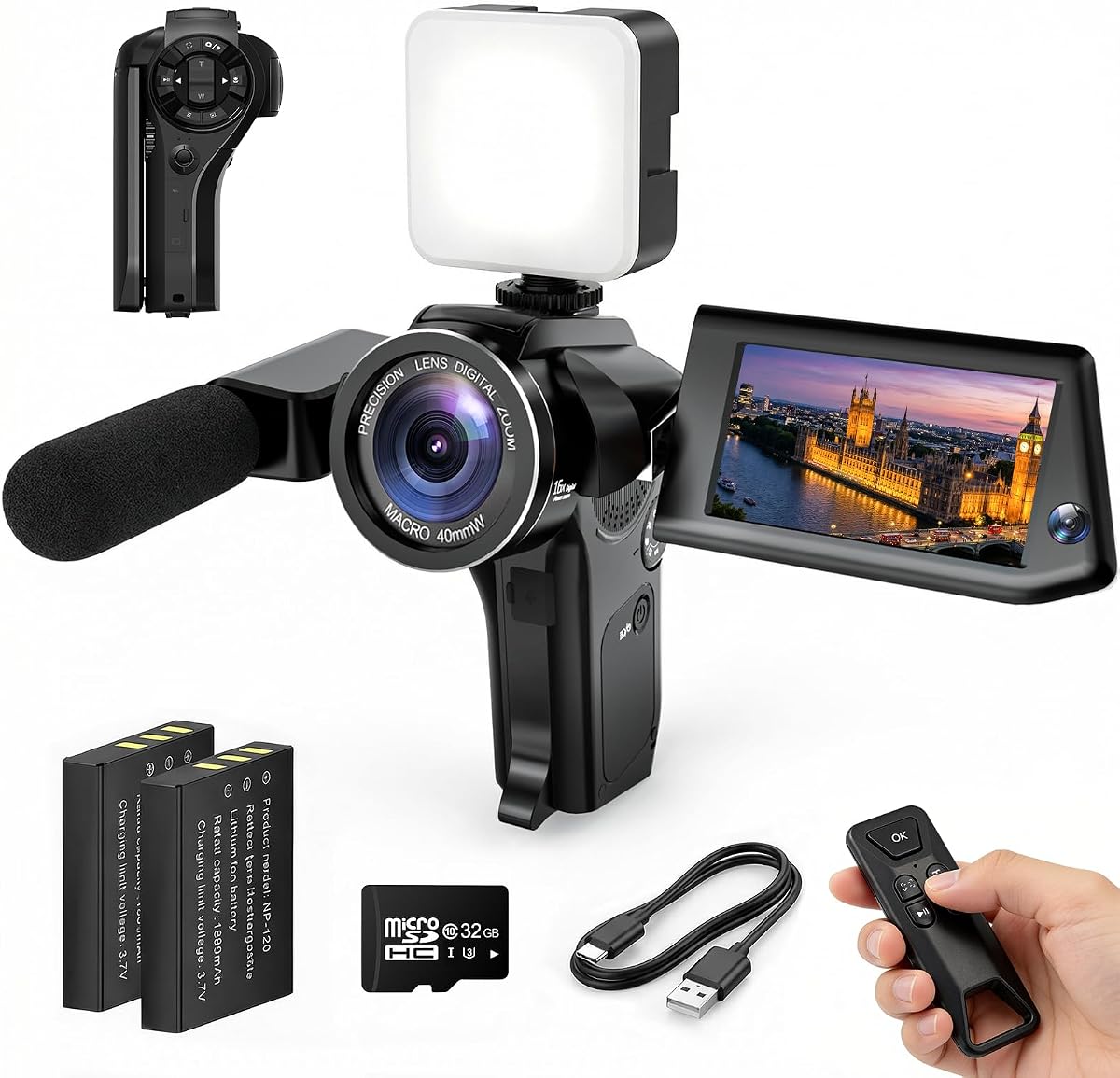
This 4K Vlogging Camera is an excellent starting point for beginners who want to create content without breaking the bank. It offers 4K video recording and captures 75MP photos which are shareable online.
We may earn a commission when you buy through this link, at no additional cost to you.
The unique 330-degree rotating lens allows you to frame yourself easily while vlogging, reducing the need for complex setups. Built-in WiFi lets you transfer files quickly to your phone for editing.
Although it lacks the advanced stabilization of premium models, it is stable enough for casual travel and daily vlogs. The kit includes a tripod and memory card so you can start filming immediately.
We recommend this camera for students or hobbyists looking for a reliable tool to learn the basics. It provides great value and functionality for those just starting their content creation journey.
Simple controls and ready-to-use accessories make this perfect for first-time creators.
Its compact design fits in a pocket making it ideal for travel and everyday use.
We may earn a commission when you buy through this link, at no additional cost to you.
The FlyFrost 8K Video Camera offers impressive resolution specs for those who want detailed footage. It records 8K video at 15fps and captures 88MP images ensuring high detail in your content.
We may earn a commission when you buy through this link, at no additional cost to you.
Features like IR night vision allow you to shoot in dimly lit environments without extra lights. The external microphone helps reduce wind noise for cleaner audio during outdoor recordings.
You can also use this camera as a webcam for video calls by connecting it to your computer. This versatility makes it a strong candidate for creators who also need streaming or online teaching tools.
Despite the lower frame rate in 8K, the visual clarity is notable for social media uploads. If you need a versatile camcorder with high resolution and webcam modes this is a great choice.
Built-in IR night vision allows for recording in low light conditions clearly.
The webcam function supports UVC cameras for direct connection to streaming software.
We may earn a commission when you buy through this link, at no additional cost to you.
This camera is designed for those who want to do both photography and videography for social media. It delivers 96MP photos and 8K video making it versatile for various content types.
We may earn a commission when you buy through this link, at no additional cost to you.
The 180-degree flip screen makes framing yourself easy for vlogs and selfies. WiFi transfer ensures you can get your content to social media apps quickly after shooting.
While the zoom is digital which can reduce quality at maximum range it is useful for distant shots. The anti-shake feature helps keep videos steady during handheld recording.
It is a solid option for travel creators who want to capture detailed photos and videos in one device. If you value still image resolution alongside video this model is worth considering.
Excellent balance between high resolution photo capture and video recording features.
WiFi capability allows seamless syncing to phones for immediate social media posting.
We may earn a commission when you buy through this link, at no additional cost to you.
For those who prioritize portability above all else this mini camcorder is a great choice. It fits easily in a pocket and is designed for spontaneous travel moments and daily recording.
We may earn a commission when you buy through this link, at no additional cost to you.
With a 7-hour battery life you can record for long periods without needing to recharge often. The 180-degree rotating lens allows for self-recording and POV shots without assistance.
While it does not offer high resolution like other models on this list it captures fun everyday moments effectively. It comes ready out of the box with a memory card so no setup is required.
We recommend this for casual users who want a secondary camera for quick captures. If you need a reliable tool for travel memories without bulk this camera fits the bill perfectly.
Lightweight design ensures it does not add bulk to your carry-on luggage.
One-button recording starts capturing immediately without complex menu navigation.
We may earn a commission when you buy through this link, at no additional cost to you.
This camera is nearly identical to the first model but offers great value with its included kit. It shoots 4K video and allows wireless transfer for quick sharing to social platforms.
We may earn a commission when you buy through this link, at no additional cost to you.
The rotating lens is perfect for solo vloggers who need to see themselves while filming. It is lightweight enough to carry in your pocket for travel and daily use.
It includes a tripod and carrying bag which adds to its utility as an all-in-one solution. The interface is intuitive making it accessible for beginners who are new to filming.
This is a strong recommendation for those who want everything they need to start vlogging right away. It balances performance and price effectively for social media creators.
Accessories like tripods and bags save you from buying extra gear separately.
Built-in WiFi ensures seamless file transfer to your smartphone for editing.
We may earn a commission when you buy through this link, at no additional cost to you.
This camera offers a unique Picture-in-Picture mode that captures both the scene and your reaction simultaneously. This feature makes family videos and travel vlogs much more engaging for viewers.
We may earn a commission when you buy through this link, at no additional cost to you.
You can record your child growing up or a family gathering while also seeing your own joy on the screen. It adds a personal touch that traditional cameras often miss.
The WiFi flip screen ensures you can frame your shots easily without guessing. It is designed to keep the focus on memories and emotions rather than complex technical settings.
We recommend this for parents and casual vloggers who want to tell a story with their content. If you value capturing reactions alongside the moment this camera is perfect.
Capture both the event and your reaction for more connected and personal videos.
Designed to make family gatherings and milestones feel more personal and inclusive.
We may earn a commission when you buy through this link, at no additional cost to you.
If you already have a good smartphone this kit elevates your mobile filming to a professional level. It includes a wireless microphone and lighting to improve your content quality.
We may earn a commission when you buy through this link, at no additional cost to you.
The flexible tripod allows you to wrap the camera around objects for creative angles. The RGB fill light helps ensure your face is well lit in darker environments.
This is an all-in-one solution that removes the need to buy separate accessories. You can get stable shots and clear audio which are crucial for social media retention.
We suggest this for creators who prefer using their phones but want better audio and stability. It provides the essential tools to make your smartphone content stand out.
Wireless microphone ensures clear voice capture without background noise.
RGB light allows you to adjust brightness and color temperature for better visuals.
We may earn a commission when you buy through this link, at no additional cost to you.
This kit features an auto face tracking tripod that keeps your face centered in the frame automatically. It works via gesture control so you do not need to download extra apps to use it.
We may earn a commission when you buy through this link, at no additional cost to you.
With dual wireless microphones your audio will be clear and synced with your video. This is ideal for solo creators who want to move around freely while recording.
The lights included help ensure your face is properly lit for social media algorithms. It is a comprehensive kit designed for TikTok and YouTube creators needing stability.
We recommend this for vloggers who need hands-free tracking and reliable audio. It simplifies the setup process so you can focus on creating engaging content.
Intelligent tracking follows your movements without manual adjustment.
Simple hand gestures turn tracking on and off for ease of use.
We may earn a commission when you buy through this link, at no additional cost to you.
For streamers and content creators who stay at a desk this webcam is a solid choice. It offers Full HD 1080p video and automatic light adjustment so you look clear.
We may earn a commission when you buy through this link, at no additional cost to you.
The built-in microphone ensures your voice is heard without extra equipment. It includes a privacy slide which is great for security when you are not on a call.
It is designed for easy plug and play so it works with most video calling platforms instantly. The compact design fits well with any computer setup without clutter.
We recommend this for creators who focus on streaming from a fixed location. If you need reliability and simplicity for desktop content this is a great option.
Designed for stationary streaming and meeting setups with reliable performance.
Built-in privacy cover protects your privacy when the camera is not in use.
We may earn a commission when you buy through this link, at no additional cost to you.
Choosing the right camera depends on your specific needs and budget. This guide breaks down the key factors to consider before making your purchase.
Video resolution is crucial for how clear your content looks on social media. Most modern cameras offer 4K which is ideal for high detail, though 1080p is often sufficient for mobile screens. Higher resolution files are larger so ensure your storage can handle them.
Prioritize a camera that offers at least 1080p or 4K to keep up with platform standards. Good resolution ensures your content looks sharp on all devices.
Stabilization helps reduce shakiness in your videos which is especially important for handheld recording. Mechanical stabilization like gimbals provides smoother footage than digital methods. If you plan to move while filming look for 3-axis mechanical stabilization.
Opt for a camera with strong stabilization to avoid blurry footage. Smooth video retains viewer attention better than shaky clips.
A camera that is easy to use allows you to focus on creativity rather than technical settings. Look for intuitive interfaces and features like flip screens for easy self-recording. Beginners benefit most from plug-and-play devices.
Choose a model with user-friendly controls and clear menus. This ensures you spend less time setting up and more time creating.
Audio quality is just as important as video quality for engaging content. Built-in microphones vary in quality so consider external options if you plan to do professional interviews. Wireless mics offer flexibility for moving shots.
Ensure your camera supports external audio or includes a good mic. Clear sound prevents viewers from leaving your video due to poor audio.
Connectivity features like WiFi and Bluetooth make it easier to transfer files to your phone for editing. Quick transfer allows you to post content immediately while it is fresh. Check compatibility with your editing apps.
Look for models with built-in WiFi or USB-C transfer. This speeds up your workflow for social media posting.
If you plan to travel or film on the go battery life and portability are essential. Compact cameras are easier to carry but may have shorter battery life. Consider carrying spare batteries for long sessions.
Choose a camera that balances size with battery performance. Long recording times ensure you do not miss key moments due to power loss.
Some cameras come with kits that include tripods, memory cards, and bags. These accessories can save you money and provide a complete solution. Check what is included to avoid additional purchases.
Opt for bundles that include essentials like memory cards and tripods. This adds value and convenience to your initial purchase.
Your budget will likely guide your choice among these cameras. While premium models offer better specs entry-level options can still produce great content. Determine what features are non-negotiable for your needs.
Assess the value each model offers against its price. A budget camera with the right features is better than an expensive one with unused capabilities.
Start by reading the user manual to familiarize yourself with the camera buttons and settings. Charge the battery fully and insert a memory card before your first recording session to ensure you are ready to capture moments.
Keep your lens clean by wiping it gently with a microfiber cloth to prevent smudges. Store your camera in a dry place or case to avoid damage from humidity or accidental drops when not in use.
Update your camera firmware regularly through the manufacturer app to maintain performance and security. This ensures you have access to the latest features and bug fixes for smooth operation.
For TikTok and Reels a compact camera with a rotating screen is ideal for easy self-recording. The DJI Osmo Pocket 3 or the 4K Vlogging Camera offers portability and good resolution for short-form content.
While 1080p is often sufficient 4K allows for better cropping and zooming without losing quality. If storage and bandwidth are not issues a 4K camera future-proofs your content for platforms that support high resolution.
Image stabilization is critical if you plan to move while filming. Shaky footage can distract viewers so a camera with 3-axis stabilization or a gimbal is recommended for smooth professional-looking videos.
Many cameras like the FlyFrost and Logitech models support webcam modes for live streaming. Check if the specific model supports UVC or connects to your streaming software via USB or capture card.
Essential accessories include a tripod for stability, an external microphone for clear audio, and a carrying case. Some kits include these items so look for a starter bundle to save time and money.
Most modern cameras have built-in WiFi to transfer files directly to your phone via an app. Alternatively you can use a USB card reader or connect the camera directly to your device for file transfer.
Choosing the right camera depends on your specific needs and budget. The DJI Osmo Pocket 3 stands out for quality while budget options like the 4K Vlogging Camera offer great value for beginners.
Prioritize features that matter most to your content such as stabilization and connectivity. A camera that fits your workflow will encourage you to create consistently.
Remember to check current prices and availability before purchasing as deals change frequently. We hope this guide helps you find the perfect tool to bring your creative vision to life.