
Ostrich Charger Compatible with Dell Laptop
4.5Editor score
65W and 45W round tip output
Compatible with all Dell 65W laptops
Safety certified with lifetime warranty
This guide compares the top battery backup solutions for Dell laptops including UPS units, power banks, and adapters to ensure uninterrupted power and mobility.
Keeping your Dell laptop powered during outages or while traveling requires reliable battery backup solutions. Whether you need a UPS for home use or a portable power bank for on-the-go work, choosing the right device ensures productivity never stops unexpectedly.
We analyzed ten top-rated products ranging from surge protectors to high-capacity power banks. Each option was evaluated on compatibility, charging speed, portability, and safety features to help you find the perfect match for your specific Dell model.
Every pick includes detailed specs, pros, and cons to guide your decision. Note that prices and availability change frequently so check current listings before purchasing to ensure you get the best value for your needs.
4.5Editor score

4.3Editor score

4.4Editor score
The following table provides a side-by-side comparison of all ten products to help you quickly identify the best match for your Dell laptop model and power requirements.




The CyberPower EC850LCD Ecologic UPS stands out as a top choice for keeping your Dell laptop and peripherals safe during power outages. With a strong 4.4-star rating, users praise its reliability and clear LCD interface that provides instant power condition updates.
We may earn a commission when you buy through this link, at no additional cost to you.
This unit offers 12 outlets with six providing battery backup and surge protection while another six are surge only. The ECO mode automatically shuts off power to peripherals when your laptop sleeps saving energy. It comes with a three-year warranty covering the battery and includes free PowerPanel software for advanced monitoring.
While the footprint is larger than standard surge protectors it ensures comprehensive protection for your entire workstation. The battery life may vary over years but the long warranty and equipment guarantee make it a secure investment for home offices.
If you need a robust battery backup that protects both your Dell laptop and connected devices this UPS is highly recommended for its safety features and user-friendly control panel.
The ECO mode detects when your computer is off or in sleep mode and cuts power to connected peripherals reducing energy consumption automatically.
Includes a three-year warranty on the battery and a 100000 dollar connected equipment guarantee providing peace of mind for expensive electronics.
We may earn a commission when you buy through this link, at no additional cost to you.
For those needing a reliable replacement charger at a budget-friendly price the Ostrich Charger is an excellent choice for Dell laptops. It holds a high 4.5-star rating for safety and performance across various Dell Inspiron XPS and Vostro models.
We may earn a commission when you buy through this link, at no additional cost to you.
This adapter supports 65W and 45W output with a 4.5mm round tip connector common in many Dell devices. It includes a converter cable for different jack sizes and meets strict safety standards from a leading US consumer testing lab ensuring protection against shorts and overheating.
While it is a third-party product its lifetime warranty and 30-day return policy show confidence in durability. Users appreciate the quick charging capability and the convenience of the included power cord.
If you need an affordable and safe charging solution for your Dell laptop this adapter offers great value without compromising on essential safety features.
Listed by a leading American consumer testing laboratory meeting high standards for electrical safety and design in the US and Canada.
Works with all 65W and 45W Dell laptops including Inspiron XPS and Vostro series with round power connectors.
We may earn a commission when you buy through this link, at no additional cost to you.
The UGREEN Power Bank is a premium portable battery solution designed for users who demand high power on the go. With a 25000mAh capacity and 145W output it can fully recharge laptops up to 1.3 times making it perfect for long travel days.
We may earn a commission when you buy through this link, at no additional cost to you.
It features PD3.1 and QC3.0 technology to deliver fast charging speeds and includes a digital display to show remaining battery life at a glance. The bi-directional fast recharge allows the power bank to be recharged in just two hours using a 65W PD adapter.
Its sleek design fits easily in bags while supporting a wide range of devices from Dell XPS to iPads and Android phones. The dual pack option offers excellent value for teams or households needing multiple high-capacity chargers.
For professionals needing a reliable high-capacity power bank for Dell laptops and other devices this UGREEN option provides top-tier performance and convenience.
Capable of fully recharging laptops up to 1.3 times and mobile devices up to 5.2 times on a single charge.
Recharge the battery pack in just 2 hours using a 65W PD charger allowing quick turnaround for daily use.
We may earn a commission when you buy through this link, at no additional cost to you.
The Omni 20C+ is a professional power bank that doubles as a USB hub making it ideal for complex setups. It holds a 4.2 rating for its ability to charge multiple devices simultaneously and support wireless charging for smartphones.
We may earn a commission when you buy through this link, at no additional cost to you.
With two high-powered USB-C ports it can power laptops like the Dell XPS while the USB-A ports connect other peripherals. The USB hub mode lets you transfer files or connect devices directly through the power bank adding versatility to travel work.
Its 71Wh capacity is enough for most short trips though you must supply your own wall charger for recharging. The pass-through charging allows you to charge the bank and devices at the same time saving outlet space.
For users needing a all-in-one power solution that combines charging with data connectivity this bank offers unique features beyond standard battery packs.
Transfer files and connect USB devices by connecting the right USB-C port to your laptop and devices through the USB-A ports.
Features wireless charging for compatible devices adding convenience for charging phones without cables.
We may earn a commission when you buy through this link, at no additional cost to you.
For users requiring a guaranteed compatible charger this Dell laptop charger offers OEM quality assurance. It supports USB Type-C charging and is designed for various Latitude XPS models ensuring reliable performance.
We may earn a commission when you buy through this link, at no additional cost to you.
The adapter provides 65W output which can scale down to 45W and 27W for different devices allowing versatile use across Dell laptops. It includes a power cord and matches specific factory model numbers for accurate replacement.
While third-party options may be cheaper this genuine adapter ensures optimal charging speeds and battery health for your laptop. The USB-C interface makes it suitable for modern Dell devices moving away from round plugs.
If you want original equipment manufacturer quality for your Dell laptop this charger is a safe and reliable choice for daily use.
Supports 65W 45W and 27W outputs making it compatible with a wide range of Dell Latitude and XPS models.
Uses the modern USB Type-C connector for faster and more versatile charging on recent Dell laptops.
We may earn a commission when you buy through this link, at no additional cost to you.
The Dell External USB Slim DVD RW Drive adds optical capabilities to laptops that lack internal drives. It is praised for its slim design and ease of use with plug-and-play functionality requiring no extra drivers.
We may earn a commission when you buy through this link, at no additional cost to you.
Powered directly by the USB port it does not require an additional power cord making it truly portable. The drive includes pre-loaded CyberLink Media Suite for playing and burning discs easily. It weighs only 200 grams and fits comfortably in bags.
While optical drives are less common today they remain useful for installing software or playing media. The lightweight build and one-year warranty make it a practical accessory for Dell ultrabooks.
If you need a reliable way to read or burn discs on your Dell laptop this drive offers simple and effective functionality.
Simply plug the drive into your notebook's USB port and you are ready to play or burn discs without additional software.
Includes CyberLink Media Suite for easy disc playback and burning or installing disc-based programs.
We may earn a commission when you buy through this link, at no additional cost to you.
This 65W AC charger is designed as a reliable replacement for Dell Inspiron laptops. With a 4.4 rating it delivers stable power with necessary safety certifications like CE and FCC for user protection.
We may earn a commission when you buy through this link, at no additional cost to you.
The charger outputs 19.5V 3.34A and fits Inspiron models with specific round plug sizes. It includes an 8.8ft cord providing flexibility in placement. It supports various Inspiron series including 3000 5000 and 7000 for broad usability.
Being new from a manufacturer ensures fresh components which helps with longevity. While not original it is a cost-effective way to keep your Inspiron powered without paying full retail prices.
For Inspiron users needing a spare charger this option balances affordability with reliable performance and safety.
Includes CE and FCC safety certificates ensuring the charger meets strict electrical safety standards.
Fits Dell Inspiron 11 13 15 and 17 series including 3000 5000 and 7000 models.
We may earn a commission when you buy through this link, at no additional cost to you.
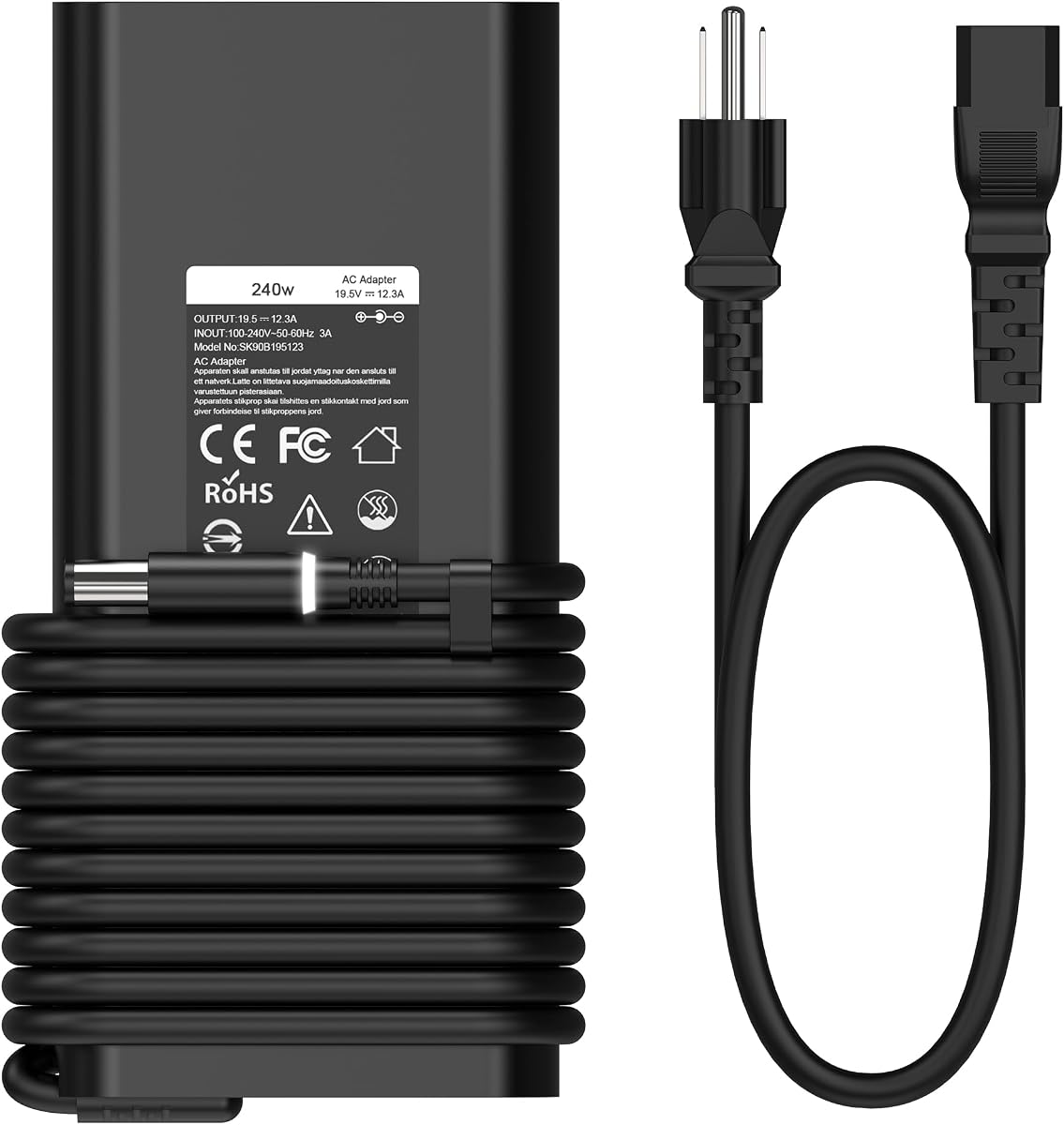
For high-performance Dell laptops this 240W charger provides the necessary power for demanding tasks. It supports Alienware Precision and G-series models ensuring full performance during gaming or rendering.
We may earn a commission when you buy through this link, at no additional cost to you.
The charger delivers 19.5V 12.3A output compatible with 180W devices as well making it versatile. It comes with a 12-month warranty from the seller for added security. The slim design helps with portability compared to bulkier original units.
While more expensive than lower-wattage chargers it ensures your laptop runs without throttling under load. The broad compatibility across Dell models makes it a practical backup for gaming rigs.
If you need a powerful charger for an Alienware or Precision laptop this option ensures reliable high-wattage performance.
Delivers 240W output compatible with 180W devices ensuring stable power for high-performance laptops.
Fits Alienware Precision and G-series laptops with multiple model numbers covered for flexible use.
We may earn a commission when you buy through this link, at no additional cost to you.
This 330W charger is designed for the most powerful Alienware laptops requiring maximum wattage. With a 4.7 rating it ensures stable power delivery to prevent thermal throttling during intensive gaming or editing.
We may earn a commission when you buy through this link, at no additional cost to you.
It supports M16 M18 X16 X17 models and is backward compatible with 180W and 240W devices. The extra headroom keeps the charger running cooler and prevents unexpected performance drops. It includes a 7.4mm tip for proper connection.
Though expensive this charger protects your investment by maintaining full performance on high-end Dell systems. Users report smooth gaming with no lag during long sessions.
For owners of top-tier Alienware laptops this charger provides the necessary power to unlock full system potential.
Extra power headroom reduces continuous load keeping the adapter cooler and preventing performance throttling.
Delivers stable full-rated power output to prevent frame drops and stuttering during intensive gaming.
We may earn a commission when you buy through this link, at no additional cost to you.
The KFD USB-C to DC Kit is a versatile solution for charging various laptops with a single PD source. It includes 15 different tips and supports up to 100W power delivery for fast charging.
We may earn a commission when you buy through this link, at no additional cost to you.
Built-in smart chips adjust current automatically to match device needs safely. It works with Dell HP Lenovo and many other brands but requires a 20V PD output source to function. The cable is 3.8ft long for added flexibility.
This kit is ideal for travelers or offices with mixed devices needing a single charging station. While not for data syncing it simplifies power needs effectively.
If you need a universal backup for multiple laptops this kit provides broad compatibility and smart charging features.
Includes 15 different DC plug tips to fit various laptop brands including Dell HP Lenovo and ASUS.
Built-in PD and E-mark chip adjusts current automatically to safely charge connected devices.
We may earn a commission when you buy through this link, at no additional cost to you.
Selecting the right battery backup involves understanding your power needs and laptop compatibility. Here are key factors to consider.
Capacity measured in watt-hours or milliamp-hours determines how long your battery can run your laptop. For long travel days choose 20000mAh or more. For desk backups consider UPS units with higher output.
Higher capacity offers more runtime but increases weight and size. Balance your mobility needs with required backup time.
Ensure the charger or adapter matches your Dell laptop's port. Many models use 4.5mm round tips while newer ones use USB-C. Mismatched connectors will not work or may damage ports.
Check your model number to confirm port type before purchasing. Adapters with multiple tips help flexibility.
The output wattage must meet your laptop's requirement. Gaming laptops need 180W or more while standard ultrabooks often use 65W. Using a lower wattage adapter may charge slower or fail to charge under load.
Select a backup that matches or exceeds your original charger's wattage to maintain performance.
Look for CE or FCC safety certifications indicating compliance with electrical standards. Reputable brands offer protection against short circuits and overheating to safeguard your device.
Avoid cheap uncertified chargers that risk damaging your laptop. Safety should always be a priority.
If you need a backup for travel choose a compact power bank. UPS units are bulky and meant for home desks. Consider weight when packing for on-the-go use.
Lighter options offer convenience but may have lower capacity. Find the right trade-off for your trips.
A longer warranty period reflects product quality. Many chargers offer one year or lifetime warranties. Check return policies for replacements in case of defects.
Good support ensures you can resolve issues quickly. Prioritize sellers with clear warranty terms.
Affordable options may save money initially but cost more over time if they fail. OEM chargers cost more but ensure compatibility. Third-party options offer balance with safety features.
Invest in a reliable unit to protect your expensive laptop. Price should reflect quality and longevity.
Modern PD chargers support fast charging protocols. If your laptop supports it choose a backup with PD capability for quicker power up. QC3.0 is common for other devices.
Fast charging reduces downtime significantly. Ensure the backup supports your laptop's charging standard.
Always fully charge your backup battery before first use to maximize initial capacity. Follow manufacturer instructions for initial setup.
Store your backup in a cool dry place away from direct sunlight. Extreme heat can reduce battery life over time.
Avoid overcharging by unplugging when full. Regularly check connectors for damage to ensure safe power delivery.
The best battery backup depends on your needs. For home use the CyberPower UPS offers robust protection. For travel the UGREEN Power Bank provides high capacity. Always match output wattage to your laptop.
Only if your laptop has a USB-C port and supports power delivery. Older models often require a round tip adapter. Check your model specs before choosing a USB-C option.
Capacity varies by mAh. A 20000mAh bank may recharge a 65W laptop once. A 25000mAh bank can do it 1.3 times. Check watt-hours for more accurate estimates.
Yes if it has safety certifications like CE or FCC. Brands like Ostrich and UGREEN meet standards. Avoid uncertified cheap options to prevent damage.
Yes UPS units can power laptops and monitors during outages. Ensure the UPS has enough outlets and wattage to support your setup. They also protect against power surges.
Many power banks have multiple ports allowing simultaneous charging. Check total output limits. Using multiple devices may reduce individual charging speed.
Warranties vary from one year to lifetime depending on the brand. Check the product listing for details. OEM chargers may have limited coverage compared to third-party offers.
Refer to your laptop's manual or model number. Most Dell laptops use 4.5mm or 7.4mm tips. If unsure measure the port diameter or check the original charger.
We reviewed ten top-rated products offering diverse options from UPS units to portable power banks. The CyberPower EC850LCD leads for home protection while UGREEN shines for travel power.
Prioritize safety certifications and wattage matching to ensure your laptop runs smoothly. Choose capacity based on whether you need desk backup or on-the-go energy.
Prices and availability change so verify current listings before buying. These picks offer reliable solutions to keep your Dell laptop powered anywhere.