
WAVLINK 4-Bay Hard Drive Enclosure
4.2Editor score
Up to 128TB capacity support
10Gbps USB-C data transfer speed
Integrated HDMI for 4K video output
Finding reliable storage for your data is crucial in today's digital world. A 4 Bay Hard Drive Enclosure with Cooling Fans offers a robust solution for expanding your storage capacity while keeping your drives safe from overheating. These devices support multiple drives and ensure optimal performance through active cooling systems.
We have carefully evaluated ten leading models available on the market. Our comparison focuses on key aspects like transfer speeds, build quality, compatibility, and cooling efficiency. This list covers a wide range of options suitable for both personal and professional use cases requiring significant data management.
Each pick in this guide highlights specific strengths and potential trade-offs. You will see detailed specifications and real-world usage insights to inform your decision. Please note that product availability and pricing can change frequently, so verify details before making a purchase.
4.2Editor score

4.3Editor score

4.2Editor score
As an Amazon Associate we earn from qualifying purchases.
This side-by-side comparison highlights the key specifications of all ten selected models. Look closely at transfer speeds, maximum capacity, and cooling mechanisms to find the best fit for your storage needs.


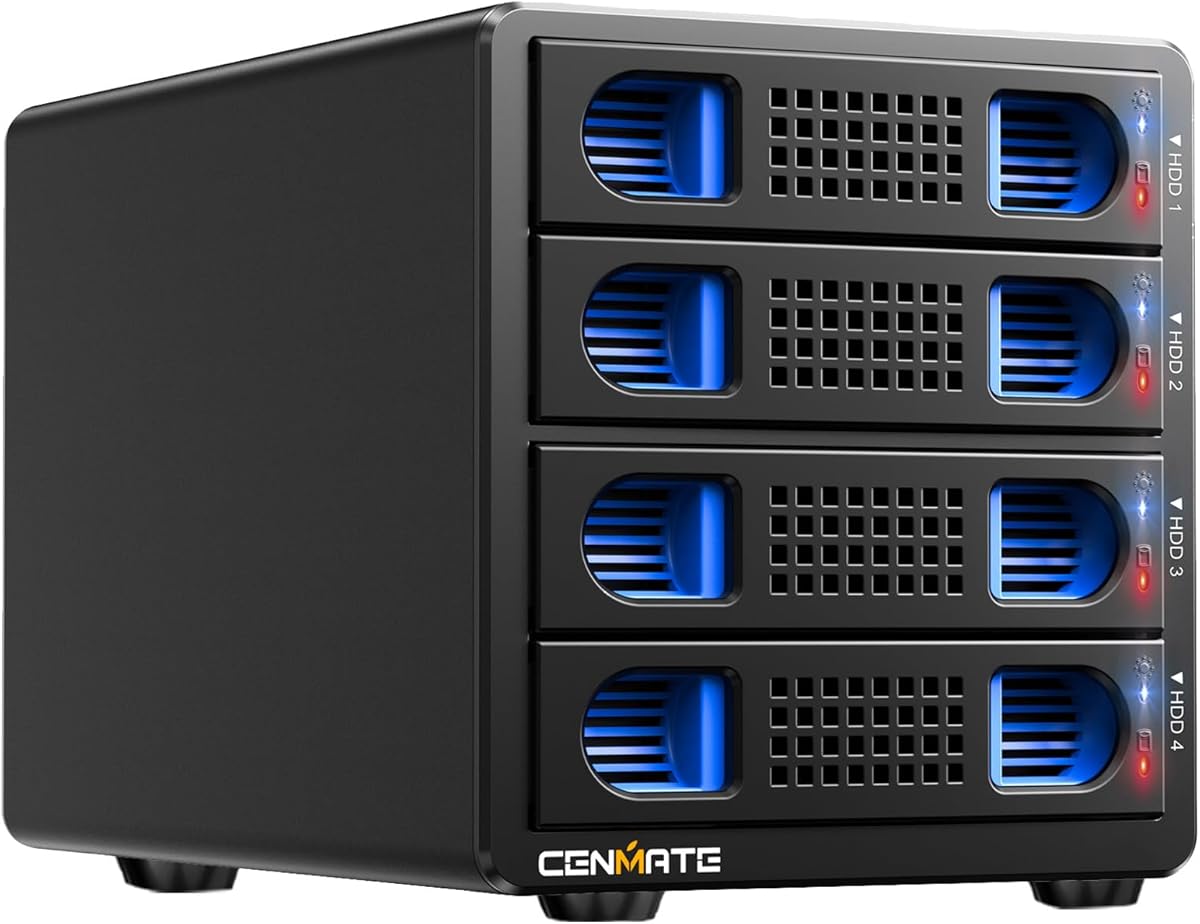
This enclosure ranks as a top choice for individuals needing reliable external storage. With a rating of 4.3 stars it offers solid performance for personal or enterprise use. Its aluminum build and cooling fan ensure your data remains secure and cool.
We may earn a commission when you buy through this link, at no additional cost to you.
The USB 3.0 interface delivers up to 5Gbps speeds allowing quick file transfers. You can move a 1G movie in seconds with this setup. The max capacity of 80TB provides ample room for large datasets without needing multiple units.
While the fan operates around 40 to 50 decibels it may bother noise sensitive users. However this trade-off ensures your drives stay within safe temperature ranges. The tool-free design makes swapping drives easy without extra hardware.
Ideal for desktop or laptop users seeking expanded storage this model balances cost and features. It supports Windows Mac and Linux systems seamlessly. For most users the benefits of stable power and cooling outweigh the minor noise concerns.
The built-in fan and aluminum alloy materials work together to prevent overheating during extended use.
Includes both USB A and C cables ensuring you can connect to a wide variety of modern computers.
We may earn a commission when you buy through this link, at no additional cost to you.
This model stands out for its 10Gbps data transfer capability which is twice as fast as standard USB 3.0. It supports up to 80TB total capacity making it great for heavy data users. The aluminum construction adds durability and heat resistance.
We may earn a commission when you buy through this link, at no additional cost to you.
Files transfer quickly thanks to the advanced chip and USB 3.2 interface. You can move 1G files in just 3 to 5 seconds efficiently. Hot swapping allows you to change drives without powering down the device saving valuable time.
The fan noise sits around 40 to 50 decibels which might be noticeable in quiet environments. Yet this ensures consistent cooling for your drives during high speed operations. Compatibility extends to Windows Mac and Linux easily.
Choose this if you need fast access to large volumes of data regularly. The USB Type-C interface supports Thunderbolt 3 and 4 for modern laptops. Its balance of speed and capacity makes it a strong contender for professionals.
USB 3.2 Gen 2 technology ensures you get the most out of your high performance hard drives.
Aluminum alloy materials provide structural integrity and help dissipate heat effectively during use.
We may earn a commission when you buy through this link, at no additional cost to you.
The MAIWO enclosure is designed for users who need extensive storage expansion through daisy chaining. It supports up to 96TB capacity which is impressive for a single unit. The dual cooling fans activate automatically when temperatures rise to protect your drives.
We may earn a commission when you buy through this link, at no additional cost to you.
Its unique HD-TV port allows direct connection to displays for 4K video output enhancing multimedia use. The 84W external power supply ensures stability for large capacity drives. Windows Mac and Linux users can connect without trouble.
One trade-off is the slightly lower rating which may indicate some consistency issues. The dual fans provide excellent cooling but might generate more noise than single fan models. Ensure your host supports USB 3.1 for best performance.
If you need to connect multiple storage units this is a versatile option. The independent power switch gives you control over each drive. Despite mixed reviews the features offer significant value for specific expansion needs.
Daisy chain capabilities allow you to connect multiple devices for a scalable storage network.
Dual fans activate at 48C to keep your hard drives safe from overheating during intense workloads.
We may earn a commission when you buy through this link, at no additional cost to you.
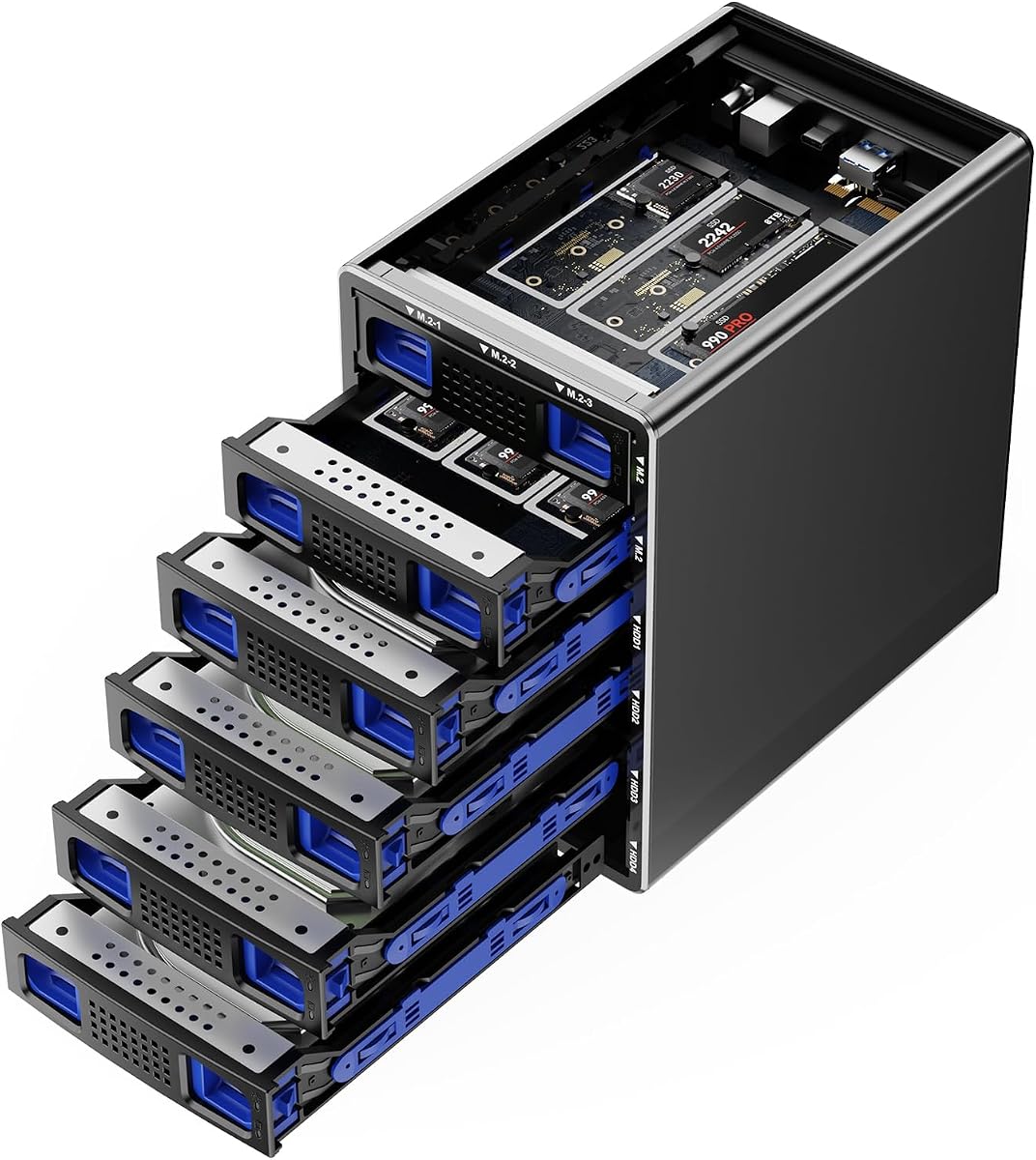
This innovative enclosure lets you use both SATA HDDs and M.2 NVMe SSDs simultaneously. It supports up to 136TB capacity combining massive storage with high-speed performance. The aluminum build and silent fans protect your data during operation.
We may earn a commission when you buy through this link, at no additional cost to you.
You can store large archives on HDDs while keeping active projects on NVMe SSDs. The USB 3.2 Gen 2 interface ensures fast data transfers for both drive types. Installation is simple with the tool-free tray design.
While powerful the hybrid nature might be complex for casual users to configure. Ensure your computer supports USB 3.2 Gen 2 to take full advantage of the speed. The fan does not sleep to maintain consistent cooling which may produce some noise.
This is perfect for professionals needing both speed and volume in one unit. It supports Windows Mac and Linux seamlessly for versatile use. If you want to maximize your storage without buying two separate enclosures this is ideal.
Holds 4 SATA drives and 6 NVMe drives for a versatile hybrid storage configuration.
Easy installation and removal of drives without requiring screws or extra tools for convenience.
We may earn a commission when you buy through this link, at no additional cost to you.
This WAVLINK model combines storage with multimedia features like a 4K HDMI port. It supports up to 88TB capacity and delivers 10Gbps speeds through USB-C. The aluminum shell offers superior heat dissipation for long term reliability.
We may earn a commission when you buy through this link, at no additional cost to you.
You can connect your computer to a TV or monitor directly using the HDMI interface. This makes it great for digital signage or media playback without extra adapters. Dual fans activate at 48C to keep your drives cool.
Note that the host USB-C port must support video output for HDMI to work. This adds a layer of complexity to setup. The independent power switches let you swap drives without shutting down the entire system.
If you need a docking station that also handles display output this is a top choice. The 8h response time for support adds peace of mind. It bridges the gap between storage and multimedia production needs effectively.
Built-in HDMI allows direct 4K video output for versatile media and presentation use.
Fans run automatically when temperature exceeds 48C to protect your valuable data from heat.
We may earn a commission when you buy through this link, at no additional cost to you.
This SABRENT station is a budget friendly choice for 2.5 inch drives. It supports up to 64TB capacity and uses USB 3.0 for decent transfer speeds. The magnetic cover design allows quick access to your drives without tools.
We may earn a commission when you buy through this link, at no additional cost to you.
The built-in whisper-quiet fan ensures your drives stay cool without noise disruption. It is engineered for 24/7 operation making it suitable for continuous data monitoring. Windows macOS and Linux work right out of the box.
While it lacks USB-C this model still offers reliable performance for many users. The 16TB per drive limit might be a constraint for very large storage needs. However its affordability makes it a solid entry point for basic needs.
Choose this if you prioritize cost and quiet operation over the latest interfaces. The optional on/off switch gives you control over fan noise. For casual backup tasks it provides excellent value without sacrificing essential cooling.
Whisper-quiet fan design ensures minimal disturbance while maintaining effective cooling performance.
Tool-free magnetic cover allows you to swap drives quickly without needing any screws or tools.
We may earn a commission when you buy through this link, at no additional cost to you.
This enclosure supports both USB 3.0 and eSATA connections for flexible integration. It handles up to 80TB capacity and uses a dual chip setup for stability. The aluminum build and 2 inch fan keep your drives protected from heat.
We may earn a commission when you buy through this link, at no additional cost to you.
The eSATA port can offer faster speeds on compatible systems. However note it does not support computer SATA-to-eSATA adapters. Hot swapping is not supported which means you must power down to swap drives safely.
For users with legacy systems having eSATA access is a unique benefit. The DC 12V adapter ensures stable power for high-speed transmission. Compatibility with Windows Mac and Linux allows broad usage scenarios without issues.
If your workstation has an eSATA port this model provides versatile connectivity options. Ensure you follow the manual for eSATA usage to avoid access issues. Overall it balances capacity and cooling well for standard storage needs.
Supports both USB 3.0 and eSATA for maximum connectivity flexibility across different systems.
Aluminum materials and cooling fans ensure your data remains safe from overheating risks.
We may earn a commission when you buy through this link, at no additional cost to you.
This WAVLINK model offers up to 128TB capacity ideal for massive data needs. It features a 4K HDMI port for direct display connectivity and 10Gbps transfer speeds. The temp-controlled fans maintain optimal drive health during use.
We may earn a commission when you buy through this link, at no additional cost to you.
You can store extensive libraries for media production or enterprise use easily. The USB-C interface supports Thunderbolt 3 and 4 for modern high speed laptops. Hot-swappable design lets you change drives without powering off the device.
As a premium option it comes with a higher price tag than budget models. Ensure your host supports video output via USB-C for the HDMI feature to work. The aluminum build ensures durability and efficient heat dissipation.
If you need a high capacity unit with display capabilities this is a top pick. The independent power switches add convenience for managing multiple drives. It is excellent for professionals needing both storage and screen output.
Supports up to 128TB capacity which is perfect for enterprise and heavy media projects.
Integrated HDMI allows you to connect directly to displays for 4K video output.
We may earn a commission when you buy through this link, at no additional cost to you.
This enclosure supports 8 RAID modes giving you options for data redundancy and performance. It handles up to 80TB capacity and uses both USB 3.0 and eSATA interfaces. The aluminum build and 2 inch fans protect your data from heat.
We may earn a commission when you buy through this link, at no additional cost to you.
You can choose RAID 0 for speed or RAID 1 for safety. Switching modes requires a specific process involving a reset button and power cycle. This adds complexity compared to simple DAS enclosures but offers significant benefits.
The rating of 3.8 suggests some users found setup tricky. Ensure your computer supports RAID functionality via eSATA for best results. Hot swapping is not supported so you must follow safety protocols during drive changes.
If you need data protection this RAID option is a solid choice. It works with Windows Mac and Linux with proper configuration. The balance of capacity and redundancy makes it valuable for small business or power users.
Multiple RAID modes let you choose between speed or data redundancy based on your priorities.
Dual USB and eSATA support ensures you can connect to various systems without adapters.
We may earn a commission when you buy through this link, at no additional cost to you.
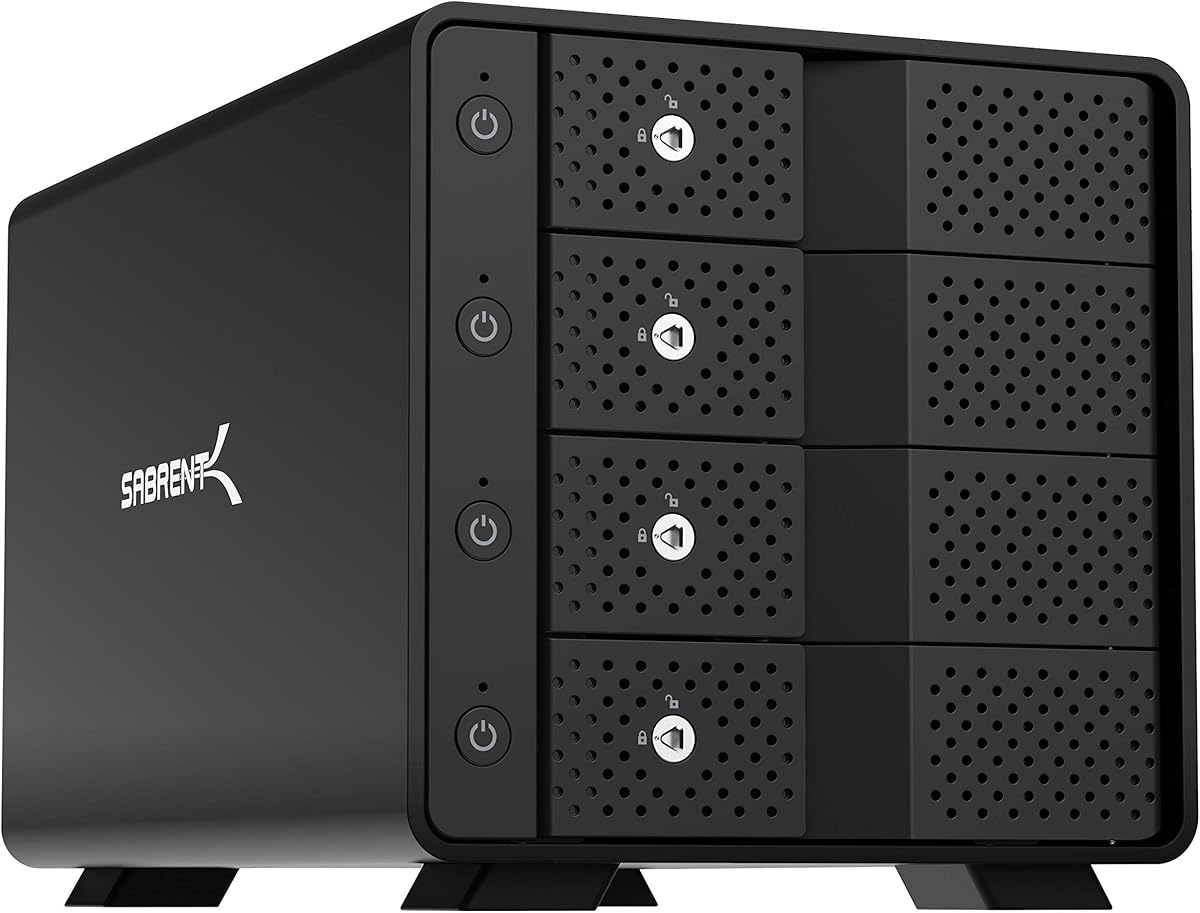
This SABRENT station uses a dedicated ASMedia controller for each bay ensuring stable links. It delivers 10Gbps speeds and supports up to 80TB capacity. The 92mm fan provides active cooling for reliable 24/7 operation.
We may earn a commission when you buy through this link, at no additional cost to you.
Each drive mounts individually without hardware RAID simplifying file management. The tray-less hot-swap feature allows easy drive changes without tools. It includes a locking key and Kensington slot for physical security.
While the price is higher the reliability of per-bay controllers justifies it for many. Ensure your host supports USB-C video output if you plan to use extra features. It works well with Windows macOS and Linux out of the box.
Choose this if you need maximum stability and speed for critical data. The one-year warranty can be extended with registration for extra peace of mind. It is a robust solution for professionals managing large storage needs.
Dedicated controller per bay ensures stable connections and independent drive access without interference.
Includes locking key and Kensington slot to protect your data drives from unauthorized access.
We may earn a commission when you buy through this link, at no additional cost to you.
Selecting the right enclosure depends on your specific data needs and budget. This guide breaks down the most important factors to consider before purchasing.
Ensure the enclosure supports your drive size such as 2.5 or 3.5 inches. Some models also support M.2 NVMe SSDs which adds versatility. Check the max capacity per drive to avoid bottlenecks in your storage planning.
Always verify drive size and capacity limits before buying to prevent compatibility issues.
Transfer speeds vary between USB 3.0 and USB 3.2 Gen 2 standards. Higher speeds like 10Gbps are essential for large file transfers in professional settings. USB-C ports are more future proof than USB-A only models.
Opt for USB-C and 10Gbps speeds if you need fast access to large media files.
Active cooling with fans is vital for 4 bay enclosures to prevent overheating. Look for models with temp-controlled fans that adjust based on drive temperature. Noise levels should be considered if you work in quiet environments.
Prioritize enclosures with temp-controlled fans to maintain drive health and performance.
DAS stands for Direct Attached Storage and does not support RAID configurations. RAID models offer data redundancy but require more complex setup. Decide if you need data protection or simple storage expansion.
Choose DAS for simplicity or RAID if you need built-in data redundancy features.
Aluminum alloy cases dissipate heat better than plastic alternatives. A solid build ensures durability during transport or daily use. Check for extra features like power switches for better control over drives.
Select aluminum enclosures for better heat dissipation and long-term durability.
Most enclosures work with Windows Mac and Linux but check specific requirements. Some models require USB-C to USB-C cables for full speed. Verify OS support to avoid driver issues on your computer.
Confirm system compatibility with your operating system before making your final decision.
External power adapters are necessary for 3.5 inch drives to ensure stable operation. Look for auto-switching adapters for worldwide voltage support. Insufficient power can lead to drive failures or data loss.
Ensure the enclosure includes a reliable external power adapter for stable drive operation.
Hot swapping allows you to change drives without powering down the system. This feature is useful for frequent access or backup workflows. Check if the model supports it to match your workflow needs.
Look for hot-swappable design if you need to swap drives frequently without downtime.
First install your hard drives into the trays carefully to avoid static damage. Use the tool-free design if available to secure them properly. Once installed plug the power adapter into a stable outlet.
Connect the enclosure to your computer via USB or USB-C cable. Ensure the cable supports data transfer speeds for best performance. Your system should recognize the drives immediately without extra drivers.
Regularly clean the fan vents to prevent dust buildup. Monitor drive temperatures through software tools to ensure cooling works. Avoid placing the unit in direct sunlight or enclosed spaces.
Most DAS models do not support RAID but some units offer 8 RAID modes. Check the product title for RAID support features to be sure. DAS units mount each drive individually for simpler management.
Many enclosures support both sizes but check the product description for specifics. Some require brackets for 2.5 inch drives to fit the bays. Ensure the total capacity meets your storage planning needs.
Drives generate heat during operation especially under heavy workloads. Active cooling fans help manage this but need clear vents. Dust buildup can reduce cooling efficiency over time.
USB-C generally supports faster speeds and is more future proof. It also allows for reversible plugging which adds convenience. Ensure your host port supports the speed you need.
Yes use a cable that supports data transfer not just charging. USB 3.2 Gen 2 cables are ideal for 10Gbps speeds. Check included cables or buy a certified one separately.
Regular backups are essential even with RAID support. Ensure stable power connections to avoid corruption during writes. Keep firmware updated if supported by the manufacturer.
We have highlighted ten models ranging from budget options to premium high capacity units. Each pick offers unique benefits like cooling or RAID support or multimedia features. Consider your specific needs before making a final choice.
Prioritize transfer speeds and cooling efficiency for long term reliability. Aluminum builds and active fans are key for protecting your valuable data. Ensure compatibility with your current computer setup before purchase.
Remember that prices change frequently so verify current offers before buying. Check warranties and support policies for added peace of mind. Your storage setup is a critical investment for your workflow.