
ASUS ProArt PA248QV 24 Inch WUXGA 16:10 Professional Monitor
4.6Editor score
100% sRGB color coverage
WUXGA resolution display
Ergonomic adjustable stand
Finding the right display for creative work requires careful consideration of color accuracy and resolution. Professionals need monitors that deliver true-to-life hues for editing tasks. ASUS Proart monitors are designed to meet these rigorous standards for visual content creation.
We evaluated ten leading models based on color gamut coverage, connectivity options, and ergonomic features. Each product was analyzed for its ability to support demanding workflows like video editing and graphic design. The list includes options ranging from compact screens to large professional displays.
Each pick highlights specific strengths such as factory calibration or Thunderbolt support. Readers will find detailed breakdowns of technical specifications and real-world usability. Please note that availability and pricing may fluctuate over time depending on market conditions.
4.6Editor score

4.2Editor score

As an Amazon Associate we earn from qualifying purchases.
The following comparison table lists every model evaluated in this guide. It highlights key specifications to help you identify the right fit for your workspace needs.




This 27-inch monitor delivers exceptional clarity for creative professionals with its 4K resolution and factory calibrated color accuracy. It holds a strong rating among users who value precision in their workflow.
We may earn a commission when you buy through this link, at no additional cost to you.
The wide color gamut coverage ensures vibrant and true-to-life images for graphic design and video editing. Connectivity is robust with USB-C support that includes power delivery to keep your laptop charged.
While it lacks the latest Thunderbolt interface, the DisplayPort daisy-chain feature still allows for efficient multi-monitor setups. The included Adobe Creative Cloud subscription adds significant value for new buyers.
Anyone looking for a reliable workhorse for daily creative tasks should consider this model. It balances performance and features effectively for a broad range of professional needs.
Factory calibration ensures Delta E less than two for reliable color reproduction across all tasks.
Extensive ports including USB-C and DisplayPort allow flexible connections to various devices.
We may earn a commission when you buy through this link, at no additional cost to you.
This model offers a fantastic entry point for professionals needing accurate colors without a high price tag. Users praise its vivid color reproduction and consistent performance over time.
We may earn a commission when you buy through this link, at no additional cost to you.
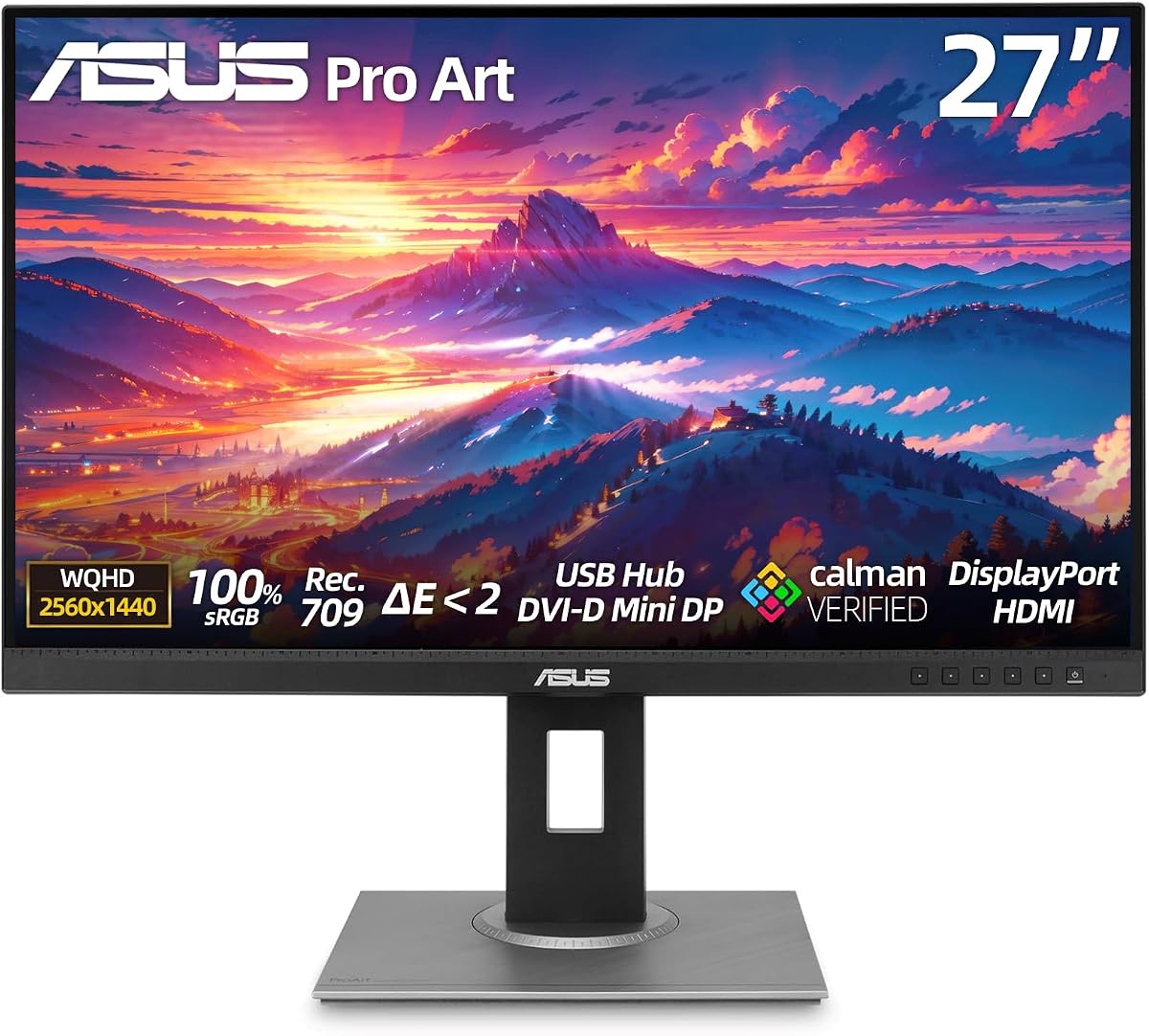
The WUXGA resolution provides ample screen real estate for multitasking while maintaining sharp text clarity. It covers the full sRGB color space making it suitable for web design and photo editing.
Although it lacks USB-C power delivery, the multiple ports like HDMI and DisplayPort ensure broad compatibility with existing hardware. The anti-glare coating helps reduce eye strain during long sessions.
Budget-conscious creators will find this monitor delivers premium features at an accessible price point. It is an ideal choice for those starting their professional setup journey.
Calman Verified technology ensures professional grade color accuracy even at this price level.
Adjustable stand allows tilt pivot and height changes to fit any desk setup.
We may earn a commission when you buy through this link, at no additional cost to you.
This flagship monitor pushes the boundaries of visual fidelity with its QD-OLED panel and exceptional brightness. It represents the pinnacle of what a professional display can offer for high-end production work.
We may earn a commission when you buy through this link, at no additional cost to you.
The 240 Hz refresh rate and fast response time make it unique for both creative and technical workflows requiring smooth motion. Color depth and contrast are unparalleled thanks to the OLED technology.
Specialized features like dual SDI ports cater to broadcast professionals who need uncompressed real-time playback. The included monitor hood helps maintain consistent viewing conditions in bright environments.
Those with demanding budgets and specific high-end requirements will appreciate this level of performance. It is a specialized tool for studios that demand the absolute best image quality.
True 10-bit color and OLED technology deliver infinite contrast and vivid hues.
SDI connectivity supports uncompressed video playback for broadcast and film production.
We may earn a commission when you buy through this link, at no additional cost to you.
Designed for streamlined workflows this monitor combines a sharp display with robust connectivity options. It receives high praise for its ability to simplify desk clutter while maintaining professional quality.
We may earn a commission when you buy through this link, at no additional cost to you.
The USB-C port supports power delivery allowing you to charge laptops while transferring data and video. This makes it ideal for mobile professionals who frequently dock at different workstations.
Color accuracy is reliable out of the box thanks to factory calibration settings. While it lacks HDR it excels in standard SDR content for design and documentation work.
Users seeking a tidy and efficient workstation will find this model highly practical. It balances essential features with ease of use for daily office and creative tasks.
USB-C Power Delivery reduces cable clutter by combining charging and data in one wire.
Daisy-chaining support allows multiple screens to be driven from a single source easily.
We may earn a commission when you buy through this link, at no additional cost to you.
This display has earned perfect user feedback due to its reliable performance and comfortable viewing experience. It focuses heavily on reducing physical strain for those working long hours at a screen.
We may earn a commission when you buy through this link, at no additional cost to you.
The eye care technology minimizes flicker and blue light exposure without compromising color quality. It is highly rated for maintaining clarity and comfort over extended periods of use.
While it uses standard ports rather than advanced USB-C power delivery it offers a practical USB hub for peripherals. The IPS panel ensures consistent colors from wide viewing angles.
Anyone prioritizing health and comfort during long workdays should consider this model. It provides a stable and pleasant visual environment for professional tasks.
Flicker-free and low blue light tech helps prevent headaches and tired eyes.
Factory calibration ensures precise colors for consistent creative work results.
We may earn a commission when you buy through this link, at no additional cost to you.
Ideal for expansive desks this 32-inch monitor offers significant screen space for complex projects. Users appreciate the balance of resolution and connectivity that supports multi-window workflows effectively.
We may earn a commission when you buy through this link, at no additional cost to you.
The high power delivery via USB-C ensures that powerful laptops remain charged even under heavy load. It covers the wide DCI-P3 color space making it suitable for cinematic content creation.
Compliance with trade agreements makes it a viable option for government or enterprise procurement. The stand offers full range of motion to adapt to various seating arrangements.
Professionals needing more room for their interfaces will find this size highly beneficial. It is a strong choice for studios requiring large canvas for design and editing.
TAA compliance ensures it meets requirements for government and public sector projects.
The larger 32-inch frame provides ample room for toolbars and timelines.
We may earn a commission when you buy through this link, at no additional cost to you.
This model shines with its mini-LED backlight and quantum dot tech for stunning image quality. It is well regarded for its ability to handle HDR content with high fidelity and depth.
We may earn a commission when you buy through this link, at no additional cost to you.
The included calibrator allows for precise customization of color profiles to match industry standards. Users can write back profiles directly to the monitor for consistent performance.
While the setup may be more involved than standard displays the results are worth the effort for critical viewing. The high peak brightness ensures visibility in bright room conditions.
Content creators focused on HDR video will find this monitor indispensable for their workflow. It brings broadcast level capabilities to a desktop environment effectively.
Mini-LED technology delivers high brightness for impactful HDR content viewing.
Included hardware allows for precise color matching without needing extra gear.
We may earn a commission when you buy through this link, at no additional cost to you.
This monitor stands out with its exceptional brightness levels and local dimming technology. It is designed for environments where high visibility and contrast are critical for accurate work.
We may earn a commission when you buy through this link, at no additional cost to you.
With support for variable refresh rates it can also handle demanding tasks that require smooth motion. The deep color support ensures gradients are rendered without visible banding artifacts.
Calibration features allow for precise control over output to match industry standards accurately. It is a robust choice for those needing a high performance visual interface.
Those working in bright rooms or needing precise highlight detail should consider this model. It offers a premium experience for specialized professional workflows.
High peak brightness ensures content remains visible in brightly lit workspaces.
Higher refresh rates support smoother motion for interactive and video tasks.
We may earn a commission when you buy through this link, at no additional cost to you.
This display bridges the gap between creative work and smooth motion with a high refresh rate. Users appreciate its ability to handle video editing while remaining responsive for other tasks.
We may earn a commission when you buy through this link, at no additional cost to you.
The USB-C port offers high power delivery which is beneficial for keeping modern laptops charged. Color coverage is wide enough for professional design tasks ensuring consistent results.
It includes HDR support which adds dynamic range for compatible content viewing. The adaptive sync features help reduce tearing during high speed content.
Creators who also value a fast response for general computing will enjoy this versatile model. It provides a flexible solution for diverse professional needs.
High refresh rate combined with color accuracy suits mixed workload environments.
Strong USB-C power delivery handles modern laptops efficiently without extra bricks.
We may earn a commission when you buy through this link, at no additional cost to you.
Offering a robust feature set this monitor supports professional workflows with dedicated calibration tools. It is a solid choice for those needing detailed control over their visual output.
We may earn a commission when you buy through this link, at no additional cost to you.
The inclusion of a calibrator simplifies the setup process for achieving high standards. It covers key color spaces making it suitable for high quality production and editing.
Connectivity is comprehensive allowing for easy integration with various computing environments. The stand provides stability and adjustability to match ergonomic needs.
Studios requiring reliable performance and calibration capabilities will find this unit valuable. It represents a strong investment for professional creative teams.
Included tools allow for precise adjustments to meet exact industry requirements.
Multiple port options ensure compatibility with diverse workstation setups.
We may earn a commission when you buy through this link, at no additional cost to you.
Selecting the right display depends on your specific workflow needs and budget. This guide outlines the key factors to consider before making a purchase.
Resolution impacts how much detail you can see in your work. Higher resolutions like 4K provide sharper text and finer image details compared to QHD options. Screen size should match your desk space and viewing distance to maintain comfort.
Choose a size and resolution that allows you to see details clearly without excessive scrolling or zooming.
Color accuracy is critical for professional work to ensure what you see matches the final output. Look for high percentages in color space coverage such as sRGB Adobe RGB and DCI-P3. Factory calibration helps achieve this standard out of the box.
Prioritize monitors with verified color accuracy to avoid color correction issues later in your workflow.
The available ports determine how easily you can connect your laptop and peripherals. USB-C with power delivery can simplify your setup by reducing cable clutter. Thunderbolt support offers faster data transfer and video speeds for modern systems.
Ensure the monitor has the necessary ports to support your specific laptop and peripheral setup.
Adjustability features help prevent physical strain during long work sessions. Look for stands that allow tilt swivel pivot and height changes. A flexible stand ensures you can find a comfortable viewing angle easily.
Invest in a monitor with a fully adjustable stand to support your posture and comfort.
Panel types like IPS OLED or Mini-LED affect contrast response time and viewing angles. IPS panels offer consistent color while OLED provides deep blacks and high contrast. Consider your primary use case to select the best panel type.
Select a panel technology that aligns with your specific needs for contrast and motion handling.
A good warranty protects your investment against defects and ensures long term reliability. Many professional models come with extended warranties or on-site support options. Check the terms to understand what is covered for your specific model.
Verify the warranty terms to ensure you have adequate protection for your equipment.
Prices vary widely based on features size and resolution capabilities. Determine which features are essential for your work versus what can be compromised. Balance cost against performance to find the best value for your needs.
Set a realistic budget that covers essential features without overspending on unnecessary extras.
Extra features like built-in KVM switches or USB hubs can enhance workflow efficiency. HDR support may be useful if you work with video content requiring dynamic range. Consider these additions based on how they impact your daily tasks.
Look for features that directly improve your workflow efficiency and daily productivity.
To get the best performance ensure your graphics card output settings match the native resolution and refresh rate of the monitor. Use the monitor software to configure color profiles if needed for specific creative applications.
Regularly clean the screen using a soft microfiber cloth to avoid scratches or residue. Avoid using harsh chemicals that might damage the anti-glare coating on the panel surface.
Take advantage of built-in eye care settings to reduce strain during long work hours. Periodically calibrate your display to maintain accurate color representation as the monitor ages over time.
ASUS ProArt monitors are specifically designed for creative professionals. They come factory calibrated with high color gamut coverage and hardware calibration support to ensure accurate color reproduction for design and video work.
Most models in this line are compatible with macOS systems. They often include USB-C or Thunderbolt ports that connect seamlessly with MacBooks and iMacs. Drivers are usually not needed as they work as plug and play displays.
Many models are factory pre-calibrated and ready to use out of the box. Some higher-end models include an external calibrator. You can also use third-party tools for further refinement if needed.
USB-C power delivery is highly beneficial for reducing desk clutter and supporting single cable connections. It allows you to charge your laptop while sending video and data through one port. Check the wattage to ensure it meets your laptop requirements.
These monitors are built with professional grade components for long-term reliability. With proper care they typically last for many years of daily use. The warranty terms often reflect this commitment to durability and support.
While optimized for creative work some models offer high refresh rates suitable for gaming. Check the specs for response time and refresh rate to ensure it meets your gaming needs. However they are best suited for professional creative tasks.
Most ProArt models include power saving modes and comply with energy efficiency standards. They are designed to be efficient without compromising performance. You can adjust brightness settings to further reduce power consumption.
Many models in this lineup support HDR formats like HDR400 or HDR True Black. This is useful for viewing high dynamic range video or photo content. Check specific model specs to confirm HDR capabilities.
This guide has explored a range of professional displays suited for different needs and budgets. From the versatile PA279CRV to the high-performance OLED options there is a model for every workspace.
Prioritize features like color accuracy and connectivity that align with your daily workflow requirements. A well chosen monitor can significantly improve productivity and the quality of your creative output.
Always check current availability and details before purchasing to ensure the model meets your latest needs. Professional tools evolve so staying informed helps you make the best long-term decision.