
AKASO EK7000
4.4Editor score
4K Ultra HD Video
Built-in EIS Stabilization
131ft Waterproof Case
Finding the right action camera for filming pickleball games requires balancing video quality stabilization and ease of use. Players need devices that can handle fast movement across the court while maintaining crisp detail in every shot.
We compared ten leading action cameras based on their resolution stabilization systems and durability. This guide evaluates how each model performs during dynamic sports recording to help you choose the best tool for your needs.
Each pick highlights specific strengths for capturing court action from different angles. Prices and availability change frequently so verify the latest details before purchasing to ensure you get the best value for your setup.
4.4Editor score

4.6Editor score

4.6Editor score
As an Amazon Associate we earn from qualifying purchases.
This side-by-side comparison outlines the key specifications and capabilities of each camera to help you quickly identify which model aligns best with your filming needs and budget constraints.


The XbotGo Falcon is a unique action camera designed specifically for sports recording without the need for a dedicated operator. With a solid rating it brings advanced AI tracking to the court ensuring you never miss a rally.
We may earn a commission when you buy through this link, at no additional cost to you.
Its standout feature is the AI-powered auto tracking system which uses an 8-core processor to keep players centered in the frame. The dual-lens setup allows one lens to record high-quality 4K video while the other handles the tracking logic seamlessly.
While it offers impressive automation, the price is higher than many competitors. Additionally users may need to adjust lighting conditions for optimal tracking performance during evening games or indoor courts with variable light.
This camera is ideal for coaches or serious players who want automated highlights and analysis tools. If you value convenience and post-game review features over pure portability, the Falcon delivers a comprehensive sports solution.
The Falcon uses 6 TOPS AI performance to recognize players and keep them centered automatically during gameplay.
Built-in Wi-Fi allows you to live stream matches instantly to family and fans without extra hardware.
We may earn a commission when you buy through this link, at no additional cost to you.
The AKASO EK7000 offers a budget-friendly entry into 4K action recording making it suitable for casual pickleball enthusiasts. It scores well for its price with stable video and essential features for court documentation.
We may earn a commission when you buy through this link, at no additional cost to you.
It records crisp 4K footage at 30fps and includes EIS to smooth out movements when you are walking around the sidelines. The waterproof case ensures durability even if the camera encounters rain or accidental drops.
Some trade-offs exist such as the non-waterproof remote which limits outdoor convenience during wet conditions. Also the EIS may crop the image slightly reducing the field of view compared to optical stabilization.
Choose this model if you want reliable 4K capture without spending a premium. It is perfect for recording practice sessions or sharing highlights on social media where high-end features are not critical.
Get professional resolution at a fraction of the cost compared to flagship action camera models.
The wireless wrist remote lets you start and stop recording without touching the camera directly.
We may earn a commission when you buy through this link, at no additional cost to you.
The DJI Osmo Action 5 Pro stands out as a top performer with its advanced imaging and stabilization technologies. It delivers professional-quality footage with excellent dynamic range that handles bright outdoor courts well.
We may earn a commission when you buy through this link, at no additional cost to you.
Key strengths include its 360 HorizonSteady feature which keeps the horizon level even if the camera tilts during setup. The voice control allows you to start recording without touching the device which is great for solo players.
While it is an investment the battery life and sensor quality justify the cost for serious content creators. The Essential Combo is slightly pared back but still includes the core camera and essential mounting gear.
For those seeking the best balance of quality and usability this camera is the top choice. It excels in both daylight and evening play thanks to its improved low-light sensor capabilities.
The 1/1.3 sensor with large pixels ensures clear footage even under indoor gym lighting or overcast skies.
Voice commands let you start or stop recording quickly so you can focus on your game immediately.
We may earn a commission when you buy through this link, at no additional cost to you.
The DJI Osmo Action 4 is celebrated for its color science and ease of use on the court. It offers 10-bit color depth which provides smoother gradients and more realistic skin tones in your videos.
We may earn a commission when you buy through this link, at no additional cost to you.
Its magnetic quick-release system makes it incredibly easy to switch between helmet and tripod mounts without tools. This flexibility is perfect for capturing different angles of a pickleball match quickly.
The pre-recording feature is a hidden gem that captures footage seconds before you press record ensuring you never miss a serve. While the Action 5 is newer the Action 4 remains a fantastic value with proven reliability.
Choose this model if color accuracy and mounting convenience are your top priorities. It is a robust tool for creators who want professional footage without the latest premium price tag.
Captures subtle shades and dynamic range for a professional look that is easier to color grade later.
Attach and detach the camera in seconds with the self-locking magnetic design for rapid angle changes.
We may earn a commission when you buy through this link, at no additional cost to you.
The DJI Osmo Action 6 Bundle offers a comprehensive package that includes everything you need to start filming immediately. It features 8K video capability which provides immense detail for cropping or zooming in post.
We may earn a commission when you buy through this link, at no additional cost to you.
With 50GB of built-in storage you can record without swapping cards which is useful during long tournaments. The variable aperture allows better light control helping you maintain consistent exposure across the court.
The extra batteries ensure you can record multiple matches without recharging. However the high resolution may consume storage quickly so having the included card is essential for extended sessions.
This bundle is ideal for creators who want a complete kit in one box. It reduces the hassle of buying accessories separately and delivers top-tier specs for professional-level output.
The bundle includes mounts and extra batteries so you are ready for any angle or duration of play.
Built-in memory provides a backup recording option if your memory card is full or damaged.
We may earn a commission when you buy through this link, at no additional cost to you.
The DJI Osmo Action 6 pushes the boundaries with 8K recording and a square sensor that supports flexible framing for social media. It is built for creators who need the highest possible resolution and detail.
We may earn a commission when you buy through this link, at no additional cost to you.
Its gesture control lets you start recording with a simple hand movement which is convenient when you are setting up on the sidelines. The dual mic support allows for high-quality audio recording without extra hardware.
While the files are large the clarity is unmatched for reviewing technique or analyzing slow-motion replays. The cloud upload feature ensures your footage is backed up and accessible from any device.
If you plan to edit high-quality content or need future-proof resolution this camera is an excellent investment. It combines cutting-edge sensor technology with practical features for everyday use.
The 1/1.1 square sensor allows you to reframe videos for vertical or horizontal platforms easily.
Start recording with a wave and automatically backup footage to the cloud for peace of mind.
We may earn a commission when you buy through this link, at no additional cost to you.
The GoPro HERO12 Black is a powerhouse known for its industry-leading HyperSmooth stabilization. This makes it perfect for pickleball where the camera might move or bounce during active recording.
We may earn a commission when you buy through this link, at no additional cost to you.
It captures 5.3K video at 60fps which provides smooth motion and enough detail for slow motion analysis. The HDR video ensures that details are visible in both bright sun and shadow areas of the court.
The camera is waterproof to 33ft without a case which adds durability for outdoor play in any weather. While it is an investment the performance and ecosystem make it a reliable choice for pros.
Choose the HERO12 if smooth video and brand ecosystem are priorities for you. It consistently delivers high-quality results that are easy to share or edit for various platforms.
Keeps footage smooth even when mounted on moving objects or handheld during play.
Balances exposure in high-contrast lighting so details are not lost in bright or dark areas.
We may earn a commission when you buy through this link, at no additional cost to you.
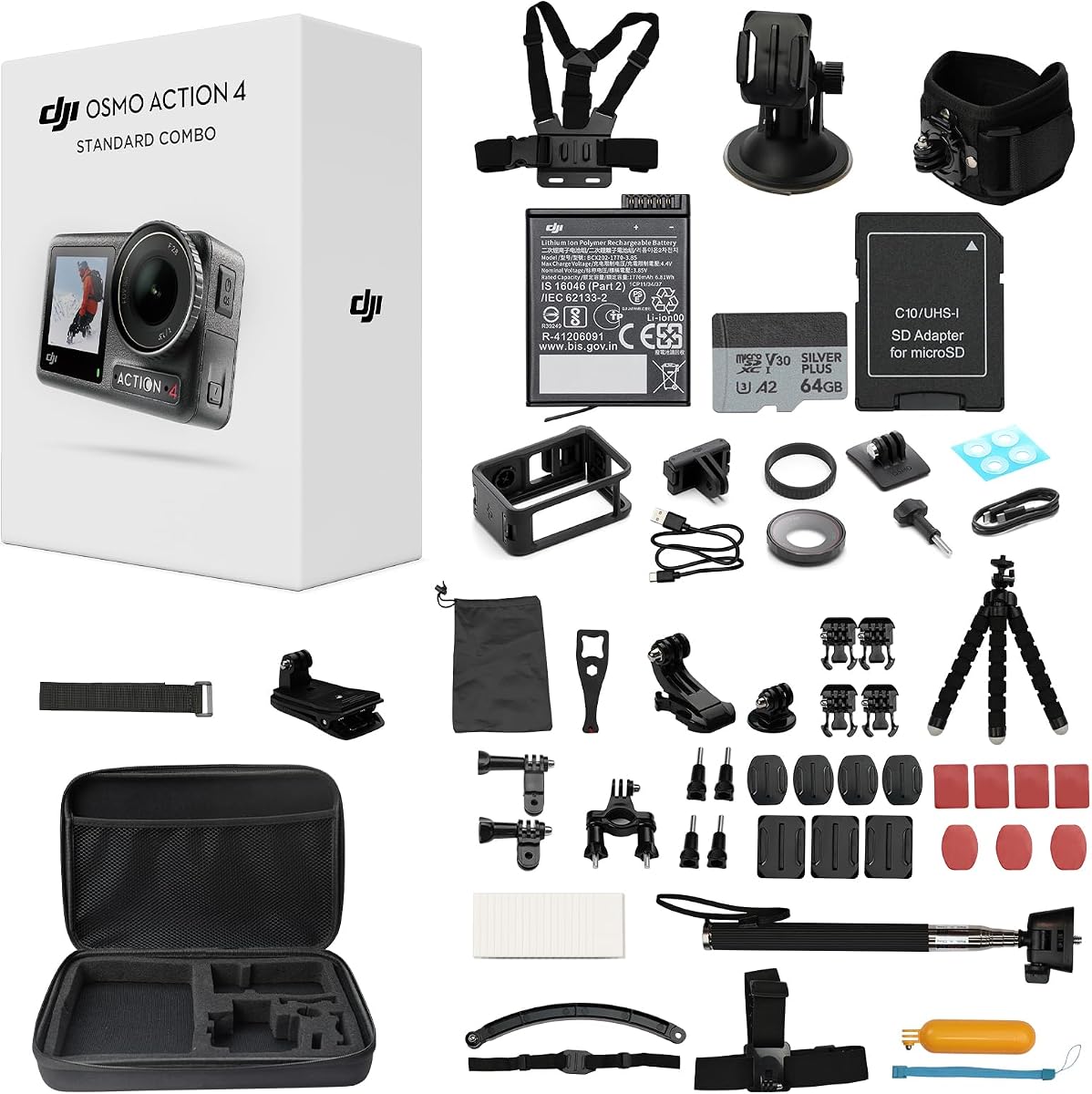
The DJI Osmo Action 4 Bundle provides a complete setup that includes the camera along with a memory card and accessory kit. It balances performance and value well for those who want everything in one box.
We may earn a commission when you buy through this link, at no additional cost to you.
Its color performance is outstanding thanks to the 10-bit depth and D-Log M profile. This allows for significant color grading potential if you want to edit your matches with a cinematic look.
The magnetic mounting system is one of the most convenient features available for quick transitions between angles. It is robust and reliable ensuring your camera stays secure during active play.
Opt for this bundle if you want a ready-to-use package without hunting for extra parts. It offers a professional experience at a price point that is often more accessible than buying items separately.
Get a memory card and multiple mounts included which saves time and money on setup.
Swap cameras between mounts quickly without tools to capture dynamic angles efficiently.
We may earn a commission when you buy through this link, at no additional cost to you.
The GoPro HERO12 (Alt) offers the same reliable performance as the standard model with a focus on durability and quality. It is a solid choice for those who want established technology with strong support.
We may earn a commission when you buy through this link, at no additional cost to you.
Its live streaming capability allows you to broadcast matches to spectators remotely which is great for remote players. The 27MP photos mean you can capture high-quality stills of game winning moments too.
Stabilization remains the core strength here ensuring your footage looks professional regardless of how you mount it. The waterproof design adds peace of mind when playing near water or in wet conditions.
Choose this if you prefer a proven brand with a large ecosystem of accessories. It is a reliable tool that delivers consistent results for both casual and serious content creators.
Share your match in real time with viewers around the world directly from the camera.
Switch easily between capturing video and high resolution photos for a complete media package.
We may earn a commission when you buy through this link, at no additional cost to you.
The Insta360 X5 offers unique creative freedom by capturing 360 video at 8K resolution. This allows you to reframe shots later so you do not need to aim perfectly during the match.
We may earn a commission when you buy through this link, at no additional cost to you.
Its FlowState stabilization keeps footage smooth even without a gimbal. The invisible selfie stick effect creates dynamic third-person views that look like a drone shot for your gameplay.
The replaceable lens design is a major benefit for protecting your investment from scratches or drops during rough play. The triple AI chip enhances low-light performance ensuring clarity in indoor courts.
Select this camera if you want the most creative control over your footage. It is perfect for players who want to experiment with angles and editing styles beyond traditional recording.
Creates unique third-person perspectives that make the footage feel like it was filmed by a drone.
Protects your camera investment by allowing you to swap scratched lenses quickly in the field.
We may earn a commission when you buy through this link, at no additional cost to you.
Choosing the right camera requires understanding which features matter most for court recording. This section breaks down the key factors to consider before buying.
Resolution determines the clarity of your footage. For pickleball 4K is standard for clear details of ball contact and body movement. Higher frame rates like 60fps allow for smooth slow motion which is useful for analyzing serves and smashes.
Look for at least 4K resolution to ensure you can zoom in during editing without losing detail.
Stabilization is critical for smooth footage if you mount the camera on a moving object or hold it. Electronic Image Stabilization (EIS) is common and reduces shake but may crop the image slightly.
Opt for models with advanced stabilization like HorizonSteady or HyperSmooth to keep the horizon level during active play.
Since games can be played outdoors in various weather conditions a waterproof rating is essential. A camera that is waterproof without a case gives you more flexibility for mounting options.
Ensure the camera is rated for outdoor use and has a durable body to withstand accidental drops or impacts.
Recording a full match or tournament session requires sufficient battery life. Cameras that offer 2 hours or more of continuous recording reduce the need for frequent recharging between games.
Check if the camera supports spare batteries or power banks for extended shooting sessions during tournaments.
Versatile mounting options allow you to capture different angles such as a low court view or a high sideline perspective. Magnetic mounts are often the fastest and easiest to use for changing positions quickly.
Verify that the camera includes necessary mounts or that third-party accessories are readily available for your needs.
Indoor courts often have variable lighting conditions that can affect video quality. Larger sensors generally perform better in low light reducing grain and maintaining color accuracy.
Prioritize models with larger sensors or specific low-light modes if you plan to film indoor matches regularly.
Clear audio adds context to your videos especially for commentary or capturing sound effects like ball hits. Some cameras allow external microphone connections which improve audio clarity significantly over built-in mics.
Check for external mic support if you plan to add narration or need high-quality sound recording.
Wi-Fi and Bluetooth connectivity allow you to transfer footage to your phone quickly. This is useful for social media sharing or immediate review of your performance after a game.
Ensure the companion app is user-friendly and supports the transfer speeds you need for your workflow.
Mount your camera securely on a tripod or wall mount near the sidelines to capture a wide view of the court. Ensure the lens is clean and the settings are adjusted for the lighting conditions before starting the match.
After recording always check your footage to ensure the settings were correct and the audio was captured clearly. Transfer files to a computer or cloud storage immediately to back them up against card failures.
Clean the lens and exterior regularly with a microfiber cloth to remove dirt or fingerprints. Store the camera in a dry protective case when not in use to extend its lifespan and maintain performance.
4K resolution is generally recommended for pickleball videos as it provides enough detail to see ball contact and player movement clearly. It also allows you to crop footage during editing without losing significant quality. Higher resolutions like 5.3K or 8K offer even more detail but may require more storage space.
Most modern action cameras have built-in electronic stabilization that eliminates the need for a gimbal in most scenarios. However if you plan to mount the camera on a moving vehicle or drone a gimbal might be helpful for extra smoothness. For static tripods a gimbal is usually unnecessary.
Yes most models listed are waterproof to a certain depth without a case. They can handle rain and splashes effectively. Always check the specific IP rating of your model to ensure it meets the conditions you expect to film in.
You can transfer files using Wi-Fi or Bluetooth connectivity to the manufacturer's mobile app. Download the app and pair it with your camera to select and copy video clips directly to your phone for sharing or editing.
A sturdy tripod mounted near the net post or at the corner of the court provides the best wide-angle view. Magnetic mounts are also popular for quickly switching between handheld and tripod positions during practice sessions.
Battery life varies by model but typically ranges from 90 minutes to 4 hours depending on resolution and settings. For longer sessions consider purchasing extra batteries or using a power bank to keep the camera running throughout the event.
You have reviewed ten top models that offer a range of features from budget friendly 4K recording to premium 8K stabilization. The DJI Osmo Action 5 Pro and XbotGo Falcon stand out for specific advanced needs.
Prioritize stabilization and resolution if you plan to analyze your gameplay closely. Budget options like the AKASO EK7000 still deliver great value for casual sharing and practice reviews.
Prices and availability change often so check current listings before making your final decision. Select the camera that best fits your budget and specific court recording goals for consistent results.