
ASUS Prime MR120 ARGB Fan Black Triple Pack
4.6Editor score
Extra-thick 28mm frame
Quiet operation at 21 dB
Dual-sided frame lighting
This comprehensive guide compares the top ten ASUS case fans to help you choose the right cooling solution for your PC build based on performance, noise, and
Choosing the right case fans is crucial for maintaining optimal temperatures and ensuring the longevity of your PC components. ASUS offers a diverse range of cooling solutions designed to balance airflow, static pressure, and aesthetic appeal with their signature Aura Sync lighting.
We have evaluated the latest ASUS case fans available in the market to provide you with a detailed comparison. Our analysis focuses on performance metrics, noise levels, build quality, and features like PWM control and addressable RGB lighting to help you make an informed decision.
Each product in this list highlights specific strengths tailored to different building needs, from silent office PCs to high-performance gaming rigs. Please note that pricing and availability can fluctuate, so we recommend checking the current listings before making a purchase to get the best deal.
4.6Editor score

4.4Editor score

4.2Editor score
The following table provides a side-by-side comparison of all ten ASUS case fans featured in this guide to help you quickly identify the specifications that matter most to your specific cooling requirements and build aesthetics.


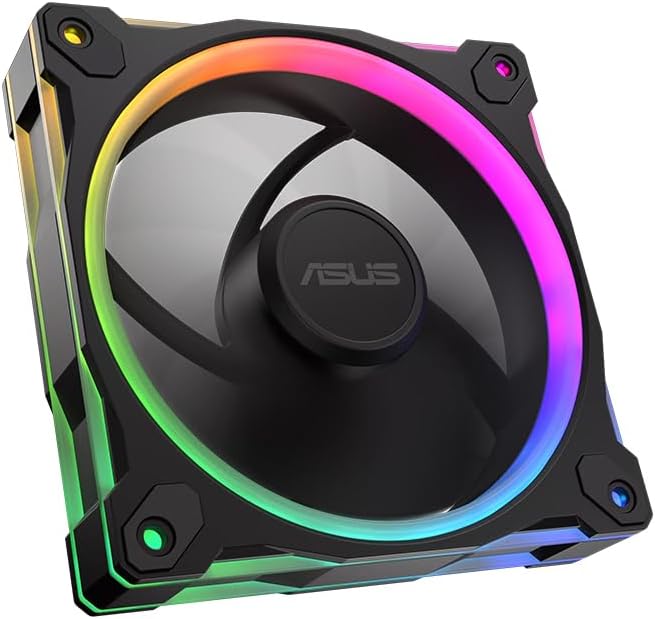


The ASUS Prime MR120 ARGB Fan Black Triple Pack stands out as a top contender for builders seeking a balance of performance and aesthetics without breaking the bank. With a rating of 4.6 stars, it offers reliable cooling powered by its extra-thick 28mm frame which maximizes airflow and static pressure effectively.
We may earn a commission when you buy through this link, at no additional cost to you.
One of the key strengths of this fan is its exceptional quietness, operating at only 21 dB(A) which is nearly silent even under load. The dual-sided frame lighting ensures that the RGB aesthetic is visible from both sides of the case creating a more immersive visual experience when synced with Aura Sync software.
While the fan is limited to a maximum speed of 1600 RPM it provides more than enough airflow for standard cases and mid-range cooling setups. The trade-off is that it might not be the absolute best choice for extreme overclocking or very restrictive radiators where higher static pressure is demanded.
This product is ideal for budget-conscious gamers or PC builders who want a complete fan solution in one box. The combination of silence, lighting quality, and durable construction makes it a highly recommended choice for general daily use and gaming rigs alike.
The 21 dB(A) noise level ensures that your system remains whisper-quiet allowing you to focus on your games or work without distraction from fan noise.
Dual-sided frame lighting means your RGB setup looks great whether viewing the front or back of your PC case enhancing the overall build appearance.
We may earn a commission when you buy through this link, at no additional cost to you.
The ASUS ProArt PF120 is designed for professionals and enthusiasts who prioritize raw cooling performance above all else. With a massive 3000 RPM capability it delivers outstanding airflow and static pressure making it perfect for challenging cooling scenarios like dense radiators or heavily obstructed cases.
We may earn a commission when you buy through this link, at no additional cost to you.
Build quality is exceptional here with CNC-milled brass bearing housing ensuring consistent operation and long-term reliability. The LCP blades offer high-speed operation with stable precise performance while the patented daisy-chain connectors make installation seamless and tidy without excessive cable clutter.
The main trade-off for such high performance is noise which can become noticeable when running at full speed. However the fan can be controlled via PWM to balance cooling needs with acceptable noise levels ensuring it does not disrupt your environment unnecessarily.
This fan is best suited for workstation PCs or high-end gaming systems where thermal headroom is critical. If you need a fan that can push air through thick radiators or restricted vents efficiently this model is a top-tier choice for demanding applications.
The 3000 RPM speed allows the fan to move significant volumes of air rapidly ensuring that hot spots are cleared efficiently even in restricted airflow paths.
The brass bearing housing provides superior durability compared to plastic alternatives ensuring the fan lasts for years of continuous operation without degradation.
We may earn a commission when you buy through this link, at no additional cost to you.
The ASUS TUF Gaming TR120 ARGB Reverse Blade brings TUF reliability and performance to budget builds. It boasts best in class static pressure at 2.75mm H2O which allows it to push air effectively through radiators or restricted grilles while maintaining impressive airflow of 76.3 CFM.
We may earn a commission when you buy through this link, at no additional cost to you.
A unique feature is the reverse blade design which allows for cleaner cable management when used as an intake fan eliminating the visible frame from the side. The flexible side pattern on the frame adds a personalized aesthetic touch that complements various build themes effectively.
While it lacks the extreme silence of some premium fans it performs reliably without excessive noise during typical usage. The 16 individually addressable RGB LEDs provide rich customization allowing you to match your system lighting perfectly with other components.
This fan is a great entry point for gamers looking for TUF durability without the premium price tag. It is particularly useful for those building a case that requires high static pressure fans on the front or bottom intakes to maintain efficient cooling.
The reverse blade configuration hides the fan frame when used as an intake keeping your build looking cleaner and more professional from the side panels.
With 2.75mm H2O pressure it handles dense radiators and mesh grilles with ease ensuring consistent cooling even when airflow is restricted by dust or filters.
We may earn a commission when you buy through this link, at no additional cost to you.
The ASUS TUF Gaming TR120 ARGB Triple Pack represents the pinnacle of TUF cooling performance with an impressive 3.3mm H2O static pressure. This ultra-wide RPM range allows optimal cooling for all types of workloads from idle browsing to heavy gaming sessions ensuring stable temperatures.
We may earn a commission when you buy through this link, at no additional cost to you.
The dual-layer LED matrix design with 16 individual addressable RGB LEDs provides a lighting effect that is brighter and more detailed than standard RGB fans. The 28mm extra-thick frame increases the surface area for cooling which translates to better thermal management across your system components.
While it carries a higher price tag the value is justified by the comprehensive cooling power and premium aesthetics it offers. The triple pack format ensures you have enough fans to cool your system effectively without needing to buy additional units later.
This is an excellent choice for high-end builds where thermal performance is a priority. If you are building a PC with a large water cooling loop or high heat output components this fan trio will keep everything running cool and quietly.
The 3.3mm H2O pressure rating ensures that air moves smoothly through dense radiators and filters maintaining efficient cooling even under maximum load conditions.
Dual-layer LED matrix technology delivers vibrant and uniform lighting that enhances the visual appeal of your build significantly compared to basic RGB fans.
We may earn a commission when you buy through this link, at no additional cost to you.
The ASUS TUF Gaming TF120 ARGB Case Fan White Edition is perfect for builders aiming for a clean and bright white themed system. It combines best air flow with a low noise level ensuring your PC stays cool without being disruptive to your environment.
We may earn a commission when you buy through this link, at no additional cost to you.
Its advanced dynamic plain bearing allows an operating time of up to 2500000 which significantly outperforms many standard fan bearings. Anti vibration pads reduce fan noise by dampening rattling and vibration ensuring a smooth and silent experience even at higher speeds.
The double layer LED array produces high color saturation and more lighting effects than traditional RGB fans allowing for a more striking visual display. This attention to detail in lighting and build quality makes it a standout choice for premium white builds.
Ideal for users who want a premium look without compromising on cooling performance this fan is highly recommended for cases that prioritize aesthetics. Its durability and reliability ensure it will serve your system well for years to come.
With up to 250000 hours of bearing life you can expect this fan to last significantly longer than typical alternatives reducing the need for replacements.
The double layer LED technology ensures your RGB colors are vibrant and rich making your system look visually appealing in any lighting condition.
We may earn a commission when you buy through this link, at no additional cost to you.
The ASUS TUF Gaming TR120 ARGB Standard Blade White provides a complete cooling solution for white themed builds with three high-performance fans in one pack. It maintains the same best in class static pressure at 3.3mm H2O which is ideal for pushing air through restricted spaces or radiators.
We may earn a commission when you buy through this link, at no additional cost to you.
Exclusive double layer LED matrix with 16 individually addressable RGB LEDs ensures that lighting is vibrant and customizable. The personalized aesthetic with a flexible side pattern on the frame adds a unique touch that enhances the visual appeal of your white setup.
Aura Sync compatibility allows you to coordinate colors and lighting effects with a variety of devices seamlessly. This unified lighting experience helps create a cohesive and professional look throughout your entire system setup without needing external controllers.
For those committed to a white build theme this fan pack delivers unmatched consistency in color and performance. It is an excellent investment for users who want top tier cooling paired with a stunning unified aesthetic across their system components.
With Aura Sync you can synchronize lighting across all your components easily creating a seamless and coordinated visual effect throughout your build.
The white finish is durable and stylish ensuring that your build looks clean and modern while providing the high performance cooling you need.
We may earn a commission when you buy through this link, at no additional cost to you.
The ASUS Prime MR120 ARGB Reverse Single Pack White Edition offers a sleek solution for those needing just one high-quality reverse fan. With a high rating of 4.8 it is known for its reliability and quiet operation up to 23 dB(A) ensuring minimal noise interference during use.
We may earn a commission when you buy through this link, at no additional cost to you.
The extra thick 28 mm fan frame ensures cooling performance while the double-sided frame lighting provides a vibrant lighting aesthetic visible from multiple angles. The 20 addressable RGB LEDs with circular design that illuminates the system are designed to create a striking visual impact.
PWM control with a fan speed of up to 1600 RPM ensures optimal cooling for a variety of workloads making it versatile for different usage scenarios. The reverse blade design specifically targets the need for clean looks on intake fans hiding the frame from view.
This fan is perfect for users who want a premium reverse fan to complete an intake setup. Its combination of high rating, low noise, and beautiful lighting makes it a reliable choice for both casual and enthusiast builders.
The high user rating reflects excellent build quality and performance ensuring you get a reliable fan that performs well over time.
The reverse blade design hides the motor hub and frame when used as an intake resulting in a much cleaner look from the side panels.
We may earn a commission when you buy through this link, at no additional cost to you.
The ASUS Prime MR120 ARGB Reverse Fan Black is a solid performer for black themed builds needing a reverse blade intake fan. It features quiet operation up to 23dB(A) which keeps noise levels low while the 20 addressable RGB LEDs in circular shape illuminate your system vividly.
We may earn a commission when you buy through this link, at no additional cost to you.
Double-sided frame lighting provides crisp uninterrupted writing ensuring that the lighting is visible from both sides of the case. The extra-thick 28mm fan frame for ideal cooling performance allows for better airflow and static pressure than standard thin frames.
PWM control up to 1600 RPM for optimal cooling for a variety of work loads ensures that the fan can scale speed according to system needs. While it is a single unit it serves as an excellent option for filling a specific spot in your build without buying a whole pack.
This fan is recommended for budget-conscious users who want reverse blade benefits without paying a premium price. It balances performance and aesthetics well making it a popular choice for standard PC configurations.
The 28mm frame design increases surface area which improves cooling performance ensuring your components stay at optimal temperatures.
The circular LED shape creates a unique lighting effect that adds character and style to your PC build without needing complex setups.
We may earn a commission when you buy through this link, at no additional cost to you.
The ASUS ProArt PF120 Single Pack is a masterpiece of engineering with a perfect 5.0 rating that speaks to its reliability and quality. It is designed to deliver high cooling efficiency and quiet operation making it ideal for users who demand the best performance for their workstation.
We may earn a commission when you buy through this link, at no additional cost to you.
The fan blades made of LCP composite provide exceptional resistance stable high-speed operation and natural vibration damping. Equipped with a CNC milled brass bearing housing to ensure manufacturing accuracy strict tolerances and long-term reliability this fan is built to last.
The 3-phase 6-pole fan motor delivers smooth robust performance with minimal noise and vibration. While it is a single unit and comes at a higher price point the precision engineering ensures that it outperforms many fans in its class in terms of stability and cooling efficiency.
This fan is highly recommended for professionals who need absolute certainty in their cooling performance. If you are building a system where downtime is not an option the ProArt PF120 is an investment that pays off in reliability and thermal control.
LCP blades are lightweight and durable allowing for stable high-speed operation without warping or breaking down over time.
CNC milled brass bearings ensure that tolerances are tight which reduces noise and increases the lifespan of the fan significantly.
We may earn a commission when you buy through this link, at no additional cost to you.
The CORSAIR RS120 ARGB 120mm PWM Fans offer a strong alternative for those looking for high performance fan packs. With streamlined fan connections you can daisy-chain multiple fans together and control them all through just one 4-pin PWM connector and one +5V ARGB connector reducing cable clutter.
We may earn a commission when you buy through this link, at no additional cost to you.
Precision PWM speeds allow you to set your fan speeds up to 2100 RPM while providing up to 72.8 CFM airflow to your system. This high static pressure at 2.8mm-H2O to push through obstructions ensures that the fans work well as radiator fans or intake fans.
Anti-vortex vanes direct airflow at your hottest components for concentrated cooling pushing air in the direction you need when mounted to a radiator or heatsink. This targeted airflow helps reduce hot spots and improves overall system cooling efficiency effectively.
This pack is recommended for users who want reliable performance and easy installation features. It serves as a robust alternative to ASUS fans especially if you prefer a different ecosystem or find a better deal on this package.
Daisy-chain connectors simplify your build by reducing the number of cables needed making cable management much easier and cleaner.
Anti-vortex vanes focus the air exactly where it is needed improving cooling efficiency for your most critical components like radiators.
We may earn a commission when you buy through this link, at no additional cost to you.
Selecting the right case fans involves understanding several key factors that affect both cooling performance and the overall look of your PC.
Airflow measured in CFM indicates how much air a fan can move while static pressure measured in mmH2O indicates its ability to push air through restrictions like radiators. High airflow is best for open cases and exhaust positions while high static pressure is ideal for intakes or water cooling setups.
Prioritize high static pressure if you are mounting fans over a radiator or dense filter.
Noise is measured in decibels (dB) and determines how quiet the fan is under load. A fan that is below 25dB is generally considered very quiet suitable for office or bedroom environments while higher noise levels may be acceptable in gaming rooms.
Look for fans rated at 25dB or lower for a quiet PC experience.
PWM or Pulse Width Modulation allows the fan speed to be adjusted by the motherboard based on system temperature. This ensures that the fan runs slowly and quietly when the system is idle and speeds up when cooling is needed.
Always choose fans with PWM support for optimal energy efficiency and noise control.
RGB lighting adds aesthetic appeal to your build and ASUS fans support Aura Sync to coordinate colors with other compatible components. Addressable LEDs provide more customization than standard RGB allowing individual light control.
Choose addressable RGB fans if you want detailed lighting effects and sync capabilities.
The bearing type determines the lifespan and reliability of the fan. Hydraulic sleeve bearings are common and cost-effective while fluid dynamic or rifle bearings offer longer life and less noise over time.
Opt for fluid dynamic or high-quality sleeve bearings for long-term reliability.
Reverse blade fans are designed to push air in the opposite direction of standard fans without the frame obstructing the view. This creates a cleaner look for intake fans on the front or bottom of cases.
Select reverse blade fans for cleaner aesthetics on front intake positions.
Most cases support 120mm fans but some may also accept 140mm fans for higher airflow. Thicker fans like the 28mm frame models provide better performance but require more space inside the case.
Verify your case dimensions before purchasing thicker or larger fans.
Most modern fans use a single 4-pin PWM connector for speed control and a separate 3-pin ARGB connector for lighting. Daisy-chain capabilities allow multiple fans to connect via one cable reducing clutter.
Check if your motherboard supports the required connectors for PWM and ARGB lighting.
Install the fans by screwing them securely into the case frame or using rubber mounts if available to reduce vibration. Ensure the fan orientation aligns with your desired airflow direction usually pushing air in at the front and out at the rear.
Connect the fan cables to the motherboard headers matching the PWM and ARGB pins correctly. Use the BIOS or your motherboard software to configure the fan curves so the speed adjusts based on temperature readings.
Maintain your fans by periodically cleaning dust from the blades and frame with compressed air. Check the screws occasionally to ensure they are tight and do not rattle which can cause unnecessary noise or vibration over time.
Most ASUS fans include a daisy-chain connector that allows you to link multiple fans together. Connect the first fan to the motherboard header and then use the extension cable to plug subsequent fans into the first one reducing the number of cables needed.
Standard RGB fans light up all LEDs in one color while Addressable RGB fans allow you to control each LED individually. Addressable RGB provides more dynamic lighting effects and is required for features like Aurora Sync animations.
While 28mm fans are slightly thicker than standard 25mm fans they fit in most modern cases. Always check your case manual for clearance limits especially if you plan to mount fans on both sides of a radiator.
No you do not need a separate fan controller as these fans connect directly to the motherboard headers. The motherboard handles speed control through PWM which simplifies installation and saves internal case space.
Yes these fans are designed to provide enough static pressure to push air through radiators effectively. Models with higher static pressure ratings are particularly well suited for water cooling loops.
Most ASUS fans operate below 25 dB which is considered very quiet for PC components. However noise levels increase with fan speed so using PWM control helps keep noise low during light usage.
To recap the ASUS Prime MR120 ARGB Triple Pack is the best budget option while the ASUS TUF Gaming TR120 ARGB Reverse Blade is ideal for budget focused builds. The ASUS ProArt PF120 stands out as the best premium choice for professional users needing maximum cooling performance.
When choosing your fans prioritize the specific needs of your build such as airflow requirements noise tolerance and aesthetic preferences. Understanding the difference between static pressure and airflow will help you select the right fans for intake and exhaust positions.
Remember that prices and availability can change so checking current listings is always a good idea before making a purchase. Whether you are building a silent workstation or a vibrant gaming rig ASUS has a case fan that will meet your performance and visual requirements.