
Sound Blaster Play! 3
4.5Editor score
Plug and Play Setup
24-bit 96kHz Support
No Drivers Needed
This guide compares the top audio converters for Mac to help you find the right DAC or interface for high-quality sound on your computer.
Finding the right audio converter for Mac can transform your listening experience significantly. These devices bridge the gap between digital files and analog speakers, ensuring crisp sound quality for music lovers and professionals alike.
We evaluated ten top-rated converters based on compatibility, sound quality, and ease of use. Each product was analyzed for its ability to handle high-resolution audio and integrate seamlessly with macOS systems for optimal performance.
Our selection includes budget-friendly options and premium models for audiophiles. Prices and availability fluctuate frequently, so please verify current details on the retailer site before making your final purchasing decision today.
4.5Editor score

4.6Editor score

4.5Editor score
The following table provides a side-by-side look at the key specifications and features of each audio converter listed in this guide to help you make an informed decision.
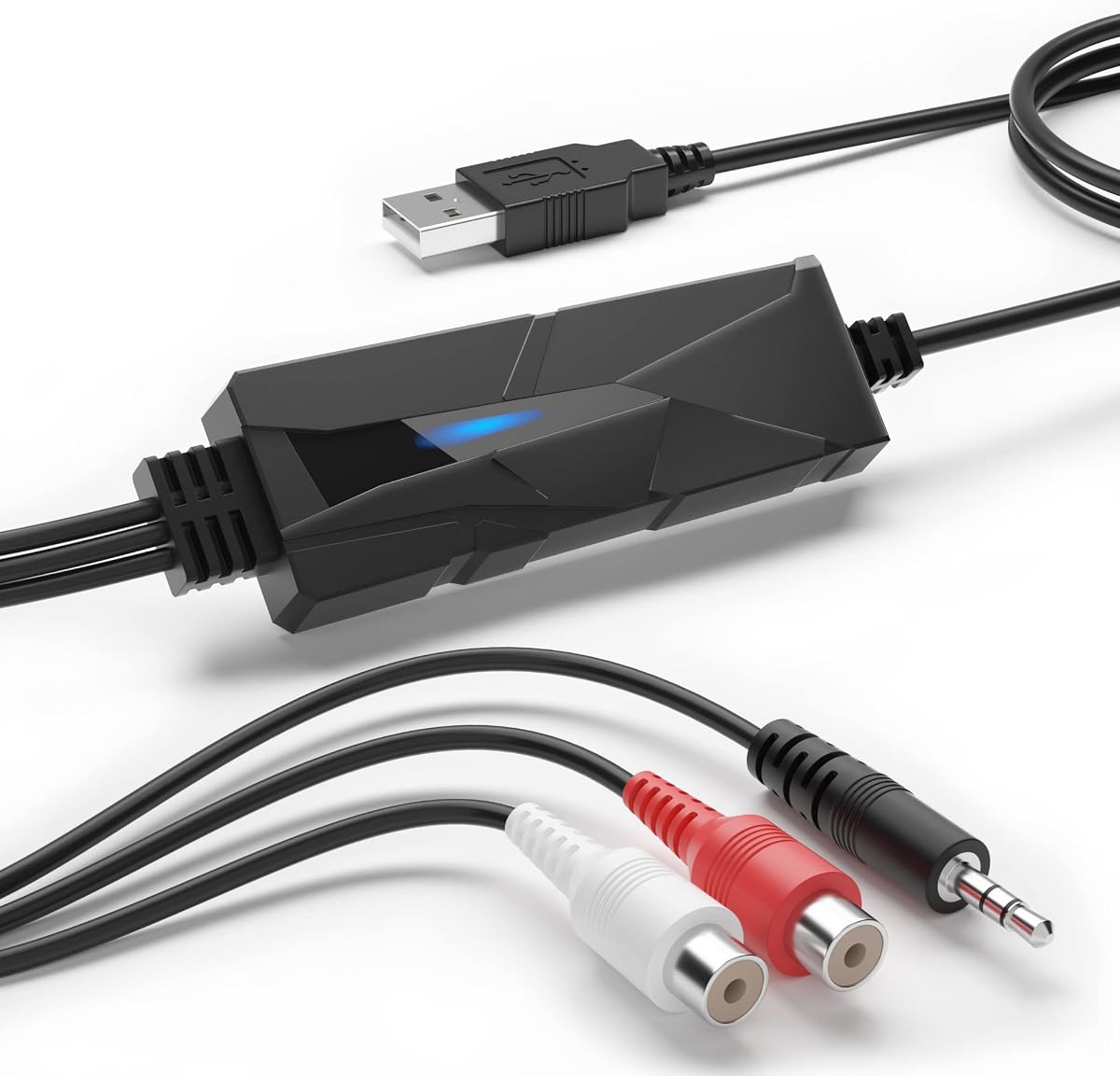


The Sound Blaster Play! 3 is a compact USB audio adapter designed to enhance audio output from your Mac. It holds a solid rating of 4.5 stars, reflecting its reliability and ease of use for casual listeners who want a quick upgrade.
We may earn a commission when you buy through this link, at no additional cost to you.
This device stands out for its plug-and-play functionality. It requires no drivers, meaning it works straight out of the box with your Mac. The included software provides powerful audio enhancements and optimized profiles for various earphone brands to improve clarity.
While it offers good connectivity for all analog headsets without needing Y-splitters, the audio quality is basic compared to higher-end DACs. The lack of advanced controls limits fine-tuning, but this trade-off is acceptable for such an affordable and simple device.
Anyone looking for a cost-effective way to improve Mac audio output should consider this adapter. It is ideal for general use and gaming where budget is a primary concern. We recommend it for users needing a hassle-free connection immediately.
This adapter works instantly with your Mac without requiring any driver installations or complex configuration steps.
Downloadable control panel software gives you access to audio enhancements and optimized profiles for different headset brands.
We may earn a commission when you buy through this link, at no additional cost to you.
The DriverGenius AudioXfer is a USB audio capture card designed to digitize analog audio sources like cassette tapes and LPs. With a rating of 4.2 stars, it serves as a practical tool for preserving old memories in digital formats like MP3 and WAV.
We may earn a commission when you buy through this link, at no additional cost to you.
This device features 3.5mm and RCA audio connector inputs to easily record live audio. It includes professional capture and editing software to help you create your own music. Users can save and listen to music on various players and home systems.
While it is effective for analog capture, Mac users must ensure they use the correct version of Audacity for 64-bit systems. The software requirements add a slight complexity to the setup process, but the hardware itself remains simple to operate.
This converter is perfect for those looking to preserve old media collections. It is not designed for high-fidelity music streaming but excels at analog transfer tasks. We recommend it for hobbyists seeking to archive vintage audio content easily.
This card allows you to easily record live audio from cassette tapes and LPs into digital formats.
Professional capture and editing software like Audacity is included to help you save your precious memories.
We may earn a commission when you buy through this link, at no additional cost to you.
The Fosi Audio K5 Pro is an upgraded version of the Q4 model that adds a microphone function and improved internals. Rated at 4.3 stars, it is born for gaming but works seamlessly with Mac computers to offer rich audio details and low distortion.
We may earn a commission when you buy through this link, at no additional cost to you.
This DAC converts USB Type C Optical and Coaxial signals to RCA and 3.5mm AUX outputs. The Texas Instruments NE5532 op-amp chip ensures a low-noise floor and clean sound. It supports various sampling rates for high-quality audio playback on your Mac.
While it offers exceptional sound quality and dynamic range, users must connect their audio source properly to the USB-A or C port. The volume button and power button are combined into one, which requires a long press to switch on, slightly different from standard controls.
This unit is excellent for gamers and home audio enthusiasts using a Mac. It provides a complete audio solution with amplification and multiple input types. We recommend it for users wanting an all-in-one external sound card upgrade.
This DAC converts USB Type C Optical and Coaxial signals with low distortion and great dynamic range.
Adopting the Texas Instruments NE5532 op-amp chip provides low noise floor and clean sound performance.
We may earn a commission when you buy through this link, at no additional cost to you.
The PROZOR 192KHz Digital to Analog Audio Converter is designed to convert digital optical signals to analog outputs. With a rating of 4.4 stars, it supports high-resolution audio up to 192kHz and features an upgraded chipset for cleaner output and lower distortion.
We may earn a commission when you buy through this link, at no additional cost to you.
This device accepts Coaxial or Toslink digital signals and converts them to analog L/R RCA and 3.5mm Jack audio simultaneously. It includes gold-plated connectors and a detachable box design to ensure long-term professional use and easy upgrades for your audio setup.
While the hardware is robust, users must set their TV audio output format to PCM and adjust volume via settings. The need for a certified 5V power adapter means you cannot rely solely on USB ports from other devices to avoid electrical noise or delay issues.
This DAC is suitable for Apple TV and home cinema systems using a Mac. It provides reliable conversion and electromagnetic shielding. We recommend it for users seeking affordable high-resolution support without compromising on build quality or signal clarity.
Supports Sampling Rate at 32KHz up to 192KHz for high-resolution audio playback.
Features aluminum alloy housing that delivers enhanced electromagnetic shielding and heat dissipation.
We may earn a commission when you buy through this link, at no additional cost to you.
The Douk Audio U2PRO is a digital interface that converts USB signals into clean optical and coaxial outputs. Rated at 4.1 stars, it is equipped with the XMOS XU316 chip to ensure virtually no latency and exceptional sound clarity for high-end music streaming.
We may earn a commission when you buy through this link, at no additional cost to you.
This device features a UAC mode switch that offers plug-and-play compatibility for gaming consoles and high-resolution audio support for Mac. It also supports an expandable oscillator design allowing audiophiles to upgrade clocks to further reduce jitter and achieve better sonic performance.
While it supports PCM up to 32bit/768kHz and DSD512, recent updates have resolved driver issues ensuring stable signals. The real-time PCM/DSD indicators make it easy to monitor sample rates and formats during playback for maximum transparency and control.
This adapter is ideal for audiophiles using Mac systems who demand lossless audio quality. It provides a stable interface for classic DACs and amplifiers. We recommend it for users seeking a powerful upgrade for their digital audio chain and jitter reduction.
Equipped with the latest XMOS XU316 chip supports PCM up to 32bit/768kHz and DSD512.
With ample internal space to accommodate compatible crystal oscillators to further reduce jitter.
We may earn a commission when you buy through this link, at no additional cost to you.
The SMSL SU-1 is a high-resolution DAC that supports MQA and MQA-CD decoding. Rated at 4.2 stars, it utilizes the AK4493S DAC chip to achieve distortion lower than 0.00013%, ensuring clean up and encapsulation of recording sound for audiophiles.
We may earn a commission when you buy through this link, at no additional cost to you.
This decoder can restore the original high-resolution signal heard in the studio when used with a CD player. It supports USB input and is compatible with Mac OS X 10.6+ making it a versatile tool for high-fidelity playback on Apple computers and devices.
While it offers exceptional low distortion performance, the USB input is the primary connection method and drivers are required for Windows users. Mac users benefit from Linux driverless support which simplifies setup and ensures reliable operation across different operating systems.
This unit is best for listeners who want to decode MQA files and enjoy studio-quality sound. It is compact and supports high-resolution formats like DSD512. We recommend it for music enthusiasts seeking a dedicated MQA decoder for their Mac setup.
Restores original high-resolution signal heard in the studio and confirms it using authentication signature.
Utilizes the latest AKM DAC chip AK4493S for achieving distortion lower than 0.00013%.
We may earn a commission when you buy through this link, at no additional cost to you.
The SMSL PO100 PRO is a portable digital interface featuring XMOS design and asynchronous transmission. Rated at 4.6 stars, it uses a Type-C USB interface for input and supports PCM32bit/768kHz and DSD native for high-resolution audio playback.
We may earn a commission when you buy through this link, at no additional cost to you.
This device supports MQA decoding without requiring additional software and offers I2S output of LVDS level. The two UAC mode and I2S mode change over switches allow flexible configuration to suit different playback needs and compatible devices like PS5.
While it is very compact for travel, users should adjust the volume of the computer to the maximum for best MQA output. The small design is ideal for light travel but ensures you adjust the correct USB UAC mode before use to avoid issues.
This converter is perfect for mobile audiophiles using Mac and portable devices. It combines high sampling rates with a tiny footprint. We recommend it for users needing a versatile and high-quality interface for streaming MQA music on the go.
Supports MQA playback and does not require additional software for decoding audio files.
Supports I2S output of LVDS level up to 32bit/768kHz via Type-C USB interface.
We may earn a commission when you buy through this link, at no additional cost to you.
The iFi Audio Go Link Max is a portable headphone amp and DAC dongle designed for high-resolution audio. With a rating of 4.5 stars, it features dual ESS Sabre DAC chips and Dynamic Range Enhancement technology to improve audio clarity on Mac and mobile devices.
We may earn a commission when you buy through this link, at no additional cost to you.
This device provides balanced 4.4mm output with up to 241mW power to drive high-impedance headphones. It supports PCM 384kHz and DSD256 formats ensuring your music sounds as close to the studio master as possible during playback sessions.
While it offers premium audio quality and gold-plated connectors, the flexible cable aids portability but costs more than standard adapters. Users may note image color differences due to lighting but the physical quality is verified for signal purity and reliability.
This unit is ideal for travelers wanting high-end sound quality on Mac and smartphones. It combines portability with balanced audio outputs. We recommend it for audiophiles seeking a compact dongle that delivers serious performance and rich sound.
Features Dynamic Range Enhancement technology and THD compensation for improved audio performance.
Provides balanced 4.4mm output offering up to 241mW power for better signal clarity.
We may earn a commission when you buy through this link, at no additional cost to you.
The Fosi Audio Q6 is a mini desktop DAC equipped with the AKM AK4493S DAC and XMOS XU316 audio processor. Rated at 4.6 stars, it supports maximum sampling rates of PCM 32bit/768kHz and DSD512 for crystal-clear audio and a truly immersive listening experience.
We may earn a commission when you buy through this link, at no additional cost to you.
This device connects seamlessly with home audio amplifiers powered speakers or subwoofers. It features Optical Coaxial and USB-C inputs as well as RCA and Sub-Out outputs making it versatile for various desktop setups and audio systems around the room.
While it delivers high-fidelity sound with low noise, it cannot drive headphones and passive speakers directly without an external amplifier. This design choice prioritizes signal purity and output quality for external devices rather than direct consumer headphone usage.
This converter is best for users seeking a clean digital-to-analog conversion for amplifiers. It is compact and durable with a sleek profile. We recommend it for anyone building a quality home stereo setup with a Mac as the source.
Supports maximum sampling rates of PCM 32bit/768kHz and DSD512 for immersive listening.
Features Optical Coaxial and USB-C inputs connecting easily to stereo amplifiers or powered speakers.
We may earn a commission when you buy through this link, at no additional cost to you.
The Shure MVX2U Gen 2 is a high-performance XLR-to-USB-C interface designed to streamline recording and streaming setups. With a rating of 4.5 stars, it offers clean consistent audio across devices using any connected XLR microphone for professional-quality content creation.
We may earn a commission when you buy through this link, at no additional cost to you.
This device features onboard Shure Digital Audio Processing including Auto Level Mode and Real-Time Denoiser for zero-latency audio. It provides up to +60 dB clean gain and 48V phantom power ensuring your microphone performs at its best during recording sessions.
While it is an excellent tool for podcasting and livestreaming, it requires XLR microphones and a higher investment compared to standard adapters. The MOTIV apps allow you to manage settings customize tone EQ compression and limiter for professional results on Mac.
This interface is ideal for creators using Mac who want professional recording quality. It offers plug-and-play convenience with powerful processing. We recommend it for serious podcasters and streamers needing consistent output and zero-latency performance.
Features onboard Shure Digital Audio Processing including Auto Level Mode and Real-Time Denoiser.
Manage settings on desktop or tablet using MOTIV apps to customize sound with tone EQ and compression.
We may earn a commission when you buy through this link, at no additional cost to you.
Selecting the right audio converter involves considering factors like compatibility, sound quality, and intended use cases to ensure seamless integration with your Mac.
Ensure the converter supports your macOS version and requires minimal driver installation. Most modern converters are plug-and-play on Mac systems, but some high-end models might need specific drivers for optimal performance. Check the manufacturer's specifications for supported operating systems before purchasing.
Look for devices explicitly labeled as Mac compatible to avoid connectivity issues.
High-resolution audio support such as 24-bit/96kHz or 32-bit/768kHz ensures better sound fidelity. DACs with high-quality chips like AKM or ESS Sabre provide clearer audio with less distortion. Consider the Signal-to-Noise Ratio (SNR) and Total Harmonic Distortion (THD) for accurate sound.
Prioritize converters with higher bit rates and sampling rates for professional or audiophile listening.
The versatility of a converter depends on its inputs and outputs. Some devices offer Optical Coaxial and USB inputs while others focus on analog to digital conversion. Ensure it matches your Mac's ports and your audio equipment needs like RCA or XLR connections.
Choose a unit with diverse port options to future-proof your audio setup for different devices.
Durable materials like aluminum alloy provide better heat dissipation and electromagnetic shielding than plastic. A compact and portable design is beneficial for users who travel or have limited desk space. Look for gold-plated connectors for better signal transmission and longevity.
Select a sturdy converter that fits your workspace and maintains stable performance over time.
Many audio converters are USB-powered but some may need an external power adapter. Ensure your Mac or hub can supply enough power to run the device effectively without audio dropouts or electrical noise. Verify the voltage and current ratings before setup.
Prefer USB-powered models for simplicity unless external power is required for high-performance output.
Some converters include software for audio enhancements or editing like Audacity for recording. Features like Auto Level Mode or built-in headphone amplifiers add value to the device. Check if the software is updated for the latest macOS versions to avoid compatibility problems.
Look for models with useful software features that match your specific audio workflow needs.
Prices vary from budget-friendly options to premium audiophile-grade units. Determine what features you truly need to avoid overspending on capabilities you will not use. Often mid-range converters offer the best balance of performance and cost for general users.
Set a budget based on your essential requirements to find the best value for your money.
Reputable brands often provide better customer support and warranty coverage. Check reviews to gauge the long-term reliability and performance of the converter. A brand with a history of quality products reduces the risk of defects or poor customer service.
Prioritize brands with strong reputations in the audio industry for reliable support and quality.
Connect the converter to your Mac using the appropriate USB or Optical cable. Ensure the device is recognized in your system audio settings and select it as the output or input source depending on your needs.
Install any required drivers or software from the manufacturer's website. Adjust volume settings on both the converter and Mac to avoid distortion or signal clipping during use.
Keep the device in a cool and dry environment to prevent overheating. Regularly check connections for dust and wear to ensure consistent audio quality and extend the lifespan of your converter.
Yes most USB-based audio converters are fully compatible with MacBooks. They support plug-and-play functionality meaning you do not need to install extra drivers to use them. Ensure your Mac has the necessary ports or adapters for the converter connection.
DAC stands for Digital-to-Analog Converter which converts digital audio signals into analog signals for speakers. It is essential for delivering high-quality sound from your Mac to external audio systems. A good DAC improves clarity and reduces audio distortion.
Some audio converters like interfaces are designed for recording audio from microphones. They feature inputs like XLR to capture high-quality sound directly into your Mac. Standard DACs may not support recording but focus only on playback output.
Many audio converters are powered directly via USB connection to your Mac. However high-performance models might require external power adapters for stable operation. Check the product specifications to confirm if an external power source is needed.
USB-C and Optical inputs are highly compatible with modern Mac models. Ensure the converter matches your Mac's available ports to avoid needing extra adapters. USB inputs often support higher data rates for better audio resolution.
Drivers are typically downloaded from the manufacturer's website or installed via included software. Ensure you download the version specific to your macOS version to avoid compatibility issues. Regular updates help maintain performance and fix bugs in the device software.
We have reviewed ten top-rated audio converters that offer a range of features from budget-friendly options to professional interfaces. Each model provides unique benefits such as MQA support or high-resolution playback to enhance your Mac audio experience.
Prioritize sound quality and compatibility when making your final choice. Consider your specific needs such as whether you require recording capabilities or just better playback output for speakers.
Prices and availability change frequently so please verify current details on the retailer site before making your final purchasing decision today. Happy listening.