
FYHXele 32 Inch Touchscreen Monitor
4.2Editor score
2K resolution clarity
100Hz fluid motion
Flexible USB-C connectivity
Touchscreen monitors are transforming how we interact with computers by offering intuitive control through direct touch. A good 32 inch model combines large display real estate with responsive touch technology for seamless navigation. These displays excel in creative workflows, collaborative settings, and modern home offices.
We evaluated ten leading 32 inch touchscreen monitors available on the market today. Our analysis focuses on resolution clarity, touch response, connectivity options, and ergonomic flexibility. Each product was reviewed for its suitability across different use cases like gaming, design, and general productivity tasks.
Each pick highlights specific strengths and trade-offs to help you find the right fit. Prices and availability change frequently so verify current details before purchasing. This comprehensive guide ensures you understand the features that matter most for your specific setup requirements.
4.2Editor score

5.0Editor score

4.1Editor score
As an Amazon Associate we earn from qualifying purchases.
The following table provides a side-by-side overview of key specifications for each model. This allows you to quickly identify differences in resolution, refresh rate, and port availability across the entire selection.



This monitor stands out as the top choice for users seeking high performance and versatility. It offers a stunning 4K resolution combined with a 144Hz refresh rate that delivers exceptional clarity and smooth visuals. The touch interface is precise and responsive making it ideal for creative work and interactive applications.
We may earn a commission when you buy through this link, at no additional cost to you.
The connectivity options are among the best available with HDMI 2.1, DisplayPort 1.4, and a full-featured Type-C port. This ensures you can connect modern devices easily while maintaining high video quality and data transfer speeds. The stand is fully adjustable allowing for height tilt and pivot adjustments to suit your ergonomic needs.
While the touch functionality is excellent on Windows there are some limitations with macOS devices where only two-point touch is supported. Additionally the monitor requires an external power adapter which adds a small step to the setup process but is standard for high-performance displays.
If you need a powerful touchscreen monitor for gaming design or general productivity this model delivers outstanding value. Its combination of resolution refresh rate and connectivity makes it a reliable choice for demanding users who want the best features available in a 32 inch package.
The 144Hz refresh rate ensures that motion and scrolling appear fluid reducing eye strain during long sessions of detailed design work or video editing tasks.
With HDMI 2.1 and Type-C you can connect high-end consoles and laptops with a single cable setup simplifying your desktop organization and reducing cable clutter significantly.
We may earn a commission when you buy through this link, at no additional cost to you.
The LG Smart Monitor Swing redefines what a monitor can do by integrating smart features directly into the display. It runs on webOS allowing you to access streaming apps and productivity tools without needing a connected computer. This makes it an excellent choice for flexible office setups or collaborative spaces.
We may earn a commission when you buy through this link, at no additional cost to you.
The rolling stand is a standout feature that provides unmatched mobility. You can easily move the monitor across a room and the base includes a hidden adapter compartment to keep cables organized. The touchscreen interface is intuitive and supports 360-degree adjustments for any viewing angle.
While the price is higher than standard monitors the added functionality justifies the cost for many users. The smart features might take some time to learn but once set up they offer significant convenience for managing tasks and entertainment on a single device.
If you prioritize flexibility and smart capabilities this monitor is a top recommendation. It bridges the gap between a traditional monitor and a standalone tablet making it perfect for environments where movement and independent operation are valuable.
The wheeled base allows you to reposition the display effortlessly ensuring it is always in the ideal spot for presentations or casual viewing without permanent installation.
Accessing entertainment and cloud apps directly through webOS eliminates the need for external streaming sticks simplifying your desk setup and reducing peripheral connections.
We may earn a commission when you buy through this link, at no additional cost to you.
The FYHXele monitor offers an excellent balance of features and affordability making it a strong contender for budget-conscious buyers. It provides a sharp 2K resolution and a 100Hz refresh rate which ensures crisp text and smooth movement for everyday tasks and light gaming.
We may earn a commission when you buy through this link, at no additional cost to you.
Color accuracy is impressive with full coverage of standard color spaces that appeal to designers and photographers. The IPS panel ensures consistent colors from wide angles which is crucial for collaborative work. Connectivity includes USB-C for convenient single-cable setups with laptops.
Some gaming consoles and specific Apple products do not support the touch function on this model so check your device compatibility before purchasing. Despite this limitation the display quality and touch responsiveness remain strong for most office and creative applications.
For those seeking a large touchscreen without breaking the bank this monitor is a reliable choice. It delivers high-quality visuals and smooth performance at a price point that makes advanced touch technology accessible to a wider audience.
The 2K resolution provides enough detail for text and design work ensuring visuals remain sharp and clear without the cost associated with 4K models.
With broad color space coverage the monitor renders hues faithfully allowing graphic designers to trust what they see on screen during production workflows.
We may earn a commission when you buy through this link, at no additional cost to you.
The Xyrio monitor brings unique aesthetic and functional touches to the desktop experience with its RGB lighting and built-in speakers. It features a 2K resolution and 100Hz refresh rate providing a solid visual experience for productivity and media consumption without needing external speakers.
We may earn a commission when you buy through this link, at no additional cost to you.
The ergonomic stand supports tilt swivel and rotation allowing you to customize your viewing angle easily. VESA mount compatibility means you can also mount it on an arm for a cleaner desk setup if you prefer a wall-mounted or arm-mounted configuration.
While specific user ratings are not yet available the technical specifications suggest a reliable product for various operating systems. The design caters to users who value both utility and style on their desk setup.
If you want a monitor that adds visual flair with RGB lighting and includes audio this model is a good option. It balances standard performance with unique features that enhance the user experience beyond a basic display.
The rear RGB ambient lighting adds a personalized touch to your workspace creating a premium and stylish atmosphere during work or gaming sessions.
Built-in speakers eliminate the need for external audio devices for casual media use keeping your desk clutter-free and simplifying connection requirements.
We may earn a commission when you buy through this link, at no additional cost to you.
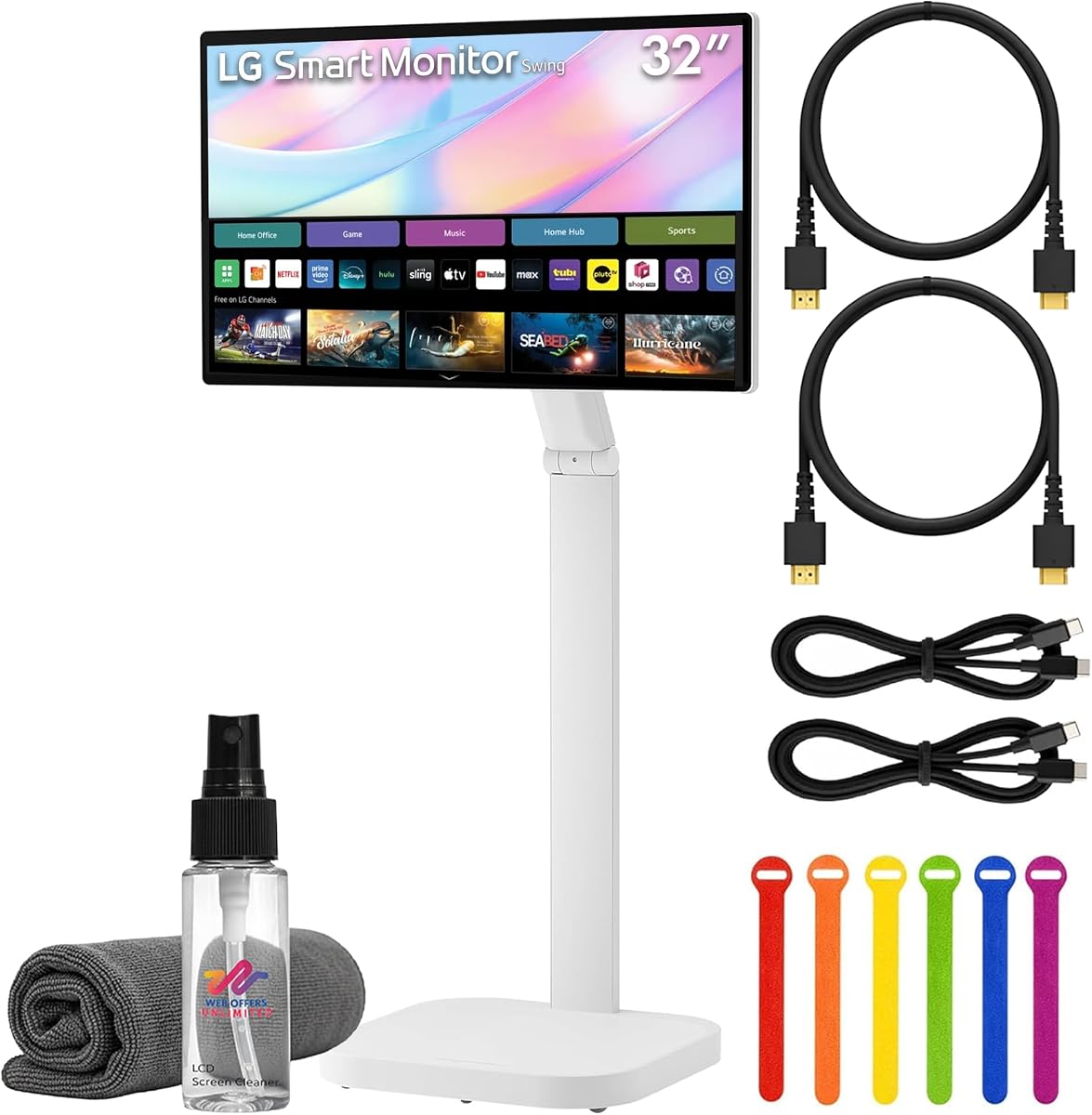
This bundle version of the LG Swing monitor includes essential accessories to ensure immediate use upon unboxing. It features the same high-quality 4K touchscreen and rolling stand as the standard model but adds cables and cleaning tools for convenience.
We may earn a commission when you buy through this link, at no additional cost to you.
The webOS platform remains a core feature allowing you to access smart applications without a PC. The bundled items help you set up the monitor quickly without needing to purchase additional cables or cleaning supplies separately.
While the total cost is higher than buying the monitor alone the added convenience can save time and effort. For users who prefer a plug-and-play experience this bundle is a thoughtful choice.
If you are setting up a new office space this package provides everything needed to get started immediately. It ensures you have all necessary connection options and maintenance tools included in one purchase.
Having necessary cables and cleaning tools included means you can deploy the monitor instantly without extra shopping or setup delays.
This bundle removes the friction of finding compatible accessories ensuring your smart monitor experience begins smoothly from day one.
We may earn a commission when you buy through this link, at no additional cost to you.
The Elo 3204L is designed for demanding commercial environments where reliability is paramount. It supports continuous 24/7 operation and meets strict impact resistance standards ensuring longevity in high-traffic areas. This makes it ideal for retail or industrial settings rather than casual home use.
We may earn a commission when you buy through this link, at no additional cost to you.
The unit includes VESA mounting and power passthrough options for easy integration into custom setups. IoT control features allow for remote management and monitoring which is essential for businesses maintaining multiple displays across locations.
While it is more expensive than standard consumer monitors its durability and reliability justify the cost for professional deployments. It is built to withstand daily wear and tear that would damage regular home or office monitors.
If you need a touch display for a store or public space this model offers the necessary robustness. It ensures consistent performance in environments where uptime and durability are critical for business operations.
The IK07 impact rating ensures the screen can withstand physical shocks making it ideal for public spaces where accidental contact is frequent.
Designed for 24/7 use this monitor can run without interruption ensuring your digital signage stays active whenever you need it.
We may earn a commission when you buy through this link, at no additional cost to you.
This LG model is a straightforward and reliable 32-inch monitor for basic visual tasks. It provides Full HD resolution with high brightness ensuring content remains clear even in well-lit rooms. The IPS panel offers consistent colors from wide angles suitable for general office work.
We may earn a commission when you buy through this link, at no additional cost to you.
While it lacks touch capabilities it serves well as a secondary display or for budget-conscious buyers who do not need interactive features. The build quality aligns with LG's reputation for dependable electronics at reasonable price points.
It is a solid choice if you prioritize screen real estate over advanced interactivity. The simple design and ease of use make it a practical option for standard computing needs.
If you need a large screen for spreadsheets or media without extra features this monitor is a safe pick. It delivers standard performance that meets the needs of everyday users efficiently.
With 350cd/m2 brightness the screen remains legible in various lighting conditions reducing strain during long working sessions.
This monitor delivers steady and dependable output for general tasks ensuring consistent performance without complex features.
We may earn a commission when you buy through this link, at no additional cost to you.
The Samsung QM32R-T is a trusted commercial touch display known for its durability and reliability. It offers Full HD resolution with a touch interface suitable for interactive presentations and simple control applications in business settings.
We may earn a commission when you buy through this link, at no additional cost to you.
Users report high satisfaction with its performance and robust construction. It is designed to handle regular usage in professional environments where dependability is a priority. The design is functional and straightforward focusing on utility.
While it does not offer 4K resolution it covers standard needs effectively for many business applications. The touch function works reliably for navigation and content management tasks.
If you need a workhorse display for commercial use this model is a strong option. It provides the necessary features to support operational tasks with a track record of performance.
Known for consistent operation this monitor supports daily business activities without failure ensuring smooth workflow.
The touch capability allows quick interaction with digital content aiding presentations and interactive kiosks efficiently.
We may earn a commission when you buy through this link, at no additional cost to you.
This Samsung model provides a standard 32-inch experience with a slight refresh rate boost over 60Hz. It delivers clear Full HD visuals and a sleek black finish that fits professional settings well. The LCD panel is reliable for general tasks and presentations.
We may earn a commission when you buy through this link, at no additional cost to you.
The design is utilitarian with an emphasis on straightforward performance. It is a safe choice for office environments or home offices that do not require advanced touch or high refresh rates.
While it may lack the cutting-edge features of premium models it fulfills its role as a dependable display. The refresh rate helps with basic fluidity without demanding extra resources.
If you need a practical screen for daily tasks this model is a sensible option. It balances performance with simplicity ensuring you can focus on work without distractions.
The 75Hz refresh rate offers a noticeable improvement over standard 60Hz for a fluid scrolling experience.
The black finish blends seamlessly into office environments maintaining a clean and professional aesthetic.
We may earn a commission when you buy through this link, at no additional cost to you.
This LG Smart monitor includes native AirPlay 2 support which makes it exceptionally friendly for Apple device users. It offers the same 4K resolution and rolling stand as the other Swing model ensuring high visual quality and flexibility. The USB-C port delivers enough power to charge many laptops simultaneously.
We may earn a commission when you buy through this link, at no additional cost to you.
The ability to mirror content from iPhones and Macs directly enhances collaboration and entertainment. You can manage your workspace and media without connecting cables for every session. This seamless integration is a major plus for Apple-centric setups.
Some users report a lower satisfaction score likely due to specific usability nuances with the webOS interface. However the core features of mobility and smart connectivity remain strong assets for the right user.
If you use Apple devices daily this monitor provides a streamlined experience. It reduces the friction of connecting and switching between devices keeping your workflow smooth and intuitive.
AirPlay 2 allows effortless streaming from iPhones and Macs making this monitor a natural extension of your Apple ecosystem.
With 65W delivery the USB-C port can power and charge laptops while transmitting video reducing cable clutter effectively.
We may earn a commission when you buy through this link, at no additional cost to you.
Selecting the right 32 inch touchscreen monitor requires considering several technical aspects to ensure it meets your specific workflow needs.
Resolution determines the sharpness of text and images on your display. A 4K resolution offers superior detail compared to Full HD which is beneficial for creative work and reading small text.
Higher resolution displays provide more screen real estate for multitasking. Choose 4K if you work with detailed graphics and opt for QHD if you want a balance between performance and cost.
Most modern touchscreen monitors use capacitive technology which supports multi-touch gestures like pinch and zoom. Resistive screens are less common now and usually do not support multi-touch.
Ensure the touch response is quick and accurate for your needs. Look for reviews confirming precise cursor movement to avoid frustration during navigation.
Refresh rate affects how smoothly motion appears on the screen. Standard monitors run at 60Hz but gaming or video editing benefits from 100Hz or 144Hz for fluid motion.
A higher refresh rate reduces motion blur and eye strain. Consider your usage; if you mostly browse or type 60Hz is fine but creative pros should look higher.
Verify the ports available on the monitor match your computer hardware. HDMI and DisplayPort are standard for video while USB-C is ideal for modern laptops needing single-cable charging.
USB-C with power delivery simplifies setup by reducing cable clutter. Check if the monitor supports signal transmission through USB-C as some models only support power or data.
An adjustable stand allows you to change height tilt and swivel to prevent neck strain. Some monitors include pivot functionality for portrait mode which helps with coding or reading long documents.
VESA mount compatibility gives you flexibility to use wall mounts or arms. This is essential if you need to free up desk space or position the monitor at unusual heights.
Some monitors run on a built-in smart operating system allowing them to function without a PC. This is useful for kiosks presentations or entertainment setups.
Evaluate the interface for ease of use and app availability. Smart features add convenience but can also add to the price and complexity of the system.
For design and photo editing color accuracy is critical. Look for monitors that specify high color gamut coverage like sRGB or DCI-P3 for faithful color reproduction.
Factory calibration ensures colors are accurate out of the box. If you edit media verify the specs for color depth and delta E values to ensure professional quality.
Check the build quality and warranty length before buying. Commercial grade monitors often offer longer warranties and stronger panels suitable for heavy daily use.
A longer warranty period provides peace of mind against defects. Prioritize brands with strong customer support to ensure any issues are resolved quickly.
Start by connecting the video cable first before touching the screen to ensure all drivers load correctly. Follow the manufacturer's guide to enable touch functionality through USB settings.
Clean the display with a microfiber cloth to avoid scratching the surface. Use a screen-safe cleaner sparingly and avoid spraying liquid directly onto the panel.
Avoid applying excessive force on the screen to prevent damage to the touch layer. Adjust your stand regularly to maintain comfortable viewing angles throughout the day.
Most 32 inch touchscreen monitors work with Macs for video output but touch functionality may be limited. Many models support basic two-point touch on macOS but full multi-touch is usually restricted to Windows systems. Check specific product details for confirmed compatibility.
Some models like the LG Smart Monitor can operate independently using built-in smart operating systems. These allow streaming and app usage directly on the screen without needing a connected computer. However standard monitors require a source device to display content.
HDMI and DisplayPort are essential for high-quality video transmission on these monitors. USB-C is highly desirable for single-cable connectivity that includes power delivery and touch data simultaneously. Ensure your computer has compatible ports for a seamless setup.
A 32 inch monitor requires significant desk depth and width to use comfortably. If your desk is small consider using a VESA wall mount or monitor arm to save surface space. Alternatively a 27 inch model might be a better fit.
Most monitors come with built-in calibration tools within the system settings menu. Access the display options and follow the on-screen prompts to map the touch coordinates to your visual output accurately.
Many capacitive monitors support active or passive styluses but check the product specs for compatibility. Some models include a stylus while others require a third-party purchase for precise input.
The 32 Inch 4K Touch Monitor leads the pack with its high refresh rate and versatile connectivity making it ideal for demanding users. For those seeking mobility the LG Smart Monitor Swing offers unique flexibility with its rolling stand.
Prioritize the features that align with your daily workflow such as color accuracy for designers or refresh rate for gamers. Ensure the touch functionality matches your operating system needs before committing to a purchase.
Prices and availability fluctuate frequently so double-check the current offers before buying. This guide helps you navigate the options to find a reliable and powerful display for your setup.