
Thermalright Assassin X120 Refined SE
4.7Editor score
AGHP heat pipe technology
Quiet TL-C12C PWM fan
Wide socket compatibility
This guide compares the top CPU Air Cooler Fan Heatsink models for performance, noise, and compatibility to help you choose the right cooling solution.
Finding the right CPU Air Cooler Fan Heatsink is essential for maintaining optimal system temperatures. A quality unit ensures your processor runs efficiently without thermal throttling during heavy tasks like gaming or rendering.
We evaluated ten top-rated models based on thermal performance, build quality, noise levels, and socket compatibility. Our analysis covers budget-friendly options alongside premium towers to suit every build scenario.
Each pick highlights specific strengths and trade-offs to help you decide quickly. Note that pricing fluctuates often so check current deals before purchasing to ensure you get the best value available.
4.7Editor score

4.8Editor score

4.8Editor score
The following table provides a side-by-side comparison of all ten models to help you quickly identify key specifications and features for your specific build needs.
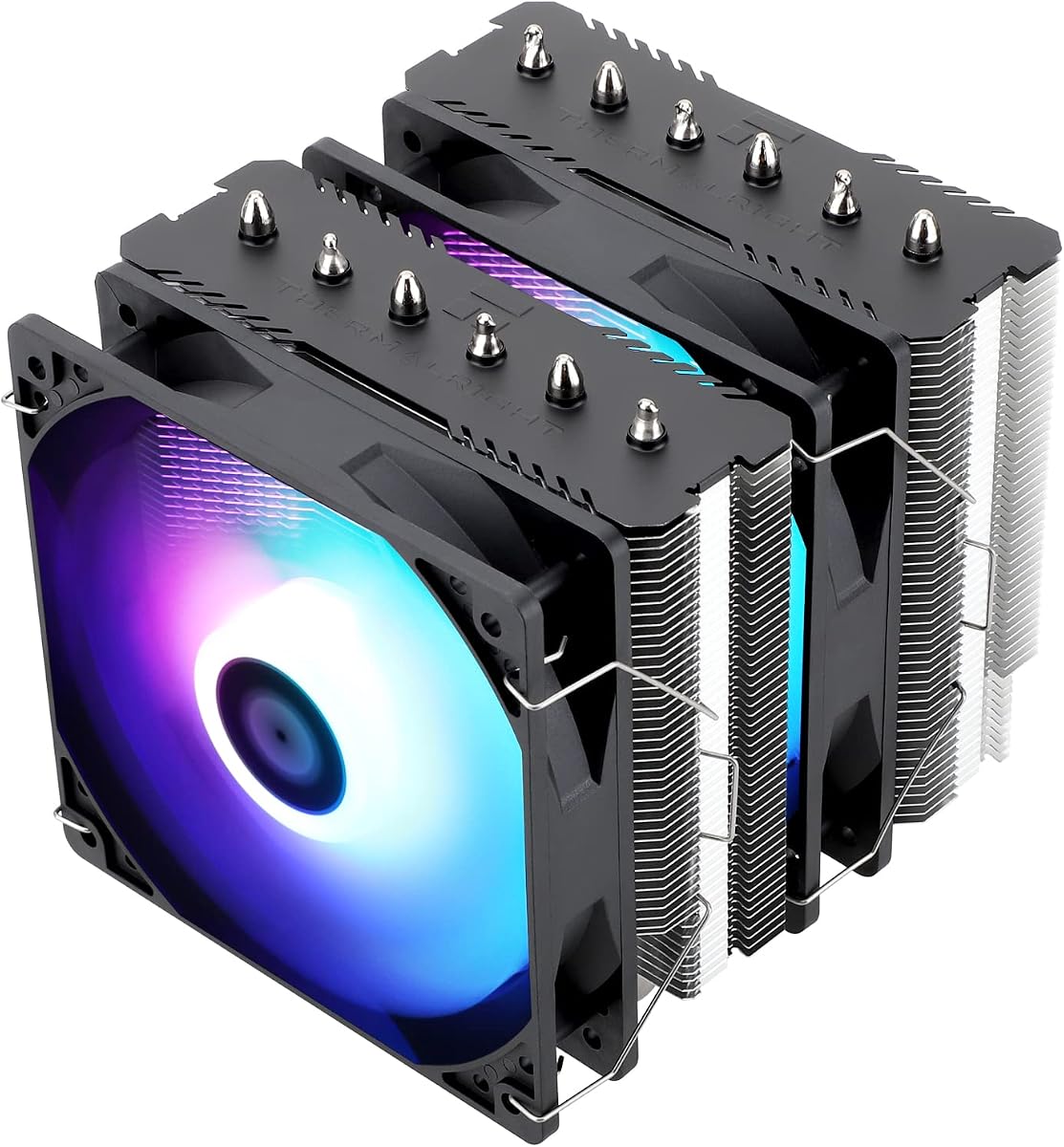


The Thermalright Assassin X120 Refined SE stands out as a top budget choice. With a 4.7 rating, it delivers reliable cooling for mainstream builds without breaking the bank.
We may earn a commission when you buy through this link, at no additional cost to you.
Its AGHP technology ensures heat dissipation works efficiently regardless of orientation. The TL-C12C PWM fan provides quiet airflow while the aluminum heatsink manages heat effectively.
While it lacks dual fans or RGB lighting, the trade-off is a compact footprint and lower cost. This makes it ideal for standard gaming rigs or office workstations.
Buyers seeking value should consider this model. It offers strong performance for the price and supports both Intel and AMD platforms including the latest AM5.
The AGHP technique solves inverse gravity effects so heat pipes function correctly in any orientation within your case.
The TL-C12C PWM fan delivers up to 66 CFM airflow while staying under 26 dB for a quiet environment.
We may earn a commission when you buy through this link, at no additional cost to you.
This model blends performance with style for users wanting visible cooling. The dual tower design handles high heat loads while ARGB fans enhance build aesthetics.
We may earn a commission when you buy through this link, at no additional cost to you.
Six sintered heat pipes and copper base ensure quick heat transfer. The dual fans allow flexible mounting and better airflow compared to single tower units.
Installation remains straightforward thanks to metal fasteners for both platforms. Just verify case clearance as 155mm height can be restrictive in smaller chassis.
Choose this for gaming rigs where looks and cooling matter. It balances modern design with effective thermal management for overclocked CPUs.
With a TDP range of 120 to 245 watts it handles demanding processors without thermal throttling.
Fans sync with 5V 3pin headers for seamless color effects across your system lighting.
We may earn a commission when you buy through this link, at no additional cost to you.
The Noctua NH-D15 chromax.Black remains a benchmark for air cooling. Its 4.8 rating reflects decades of refinement and top tier thermal performance.
We may earn a commission when you buy through this link, at no additional cost to you.
Two NF-A15 140mm fans provide massive airflow with minimal noise. The all black design fits modern cases while delivering water cooler level cooling.
Installation is easy with the SecuFirm2 system and offset option for better efficiency. NT-H1 paste is included for optimal heat transfer right away.
Ideal for enthusiasts wanting silence and power. Though pricey it justifies cost with reliability and six year warranty backing.
Low noise adaptors allow fans to run whisper quiet at idle without sacrificing load performance.
Over 300 awards validate its engineering and it comes with a comprehensive warranty.
We may earn a commission when you buy through this link, at no additional cost to you.
This cooler proves high performance doesn't need dual towers. It fits most ATX cases while maintaining superior cooling efficiency and quiet operation.
We may earn a commission when you buy through this link, at no additional cost to you.
Dual NF-A12x25 fans deliver strong airflow with precise control. The offset layout ensures RAM slots stay clear and motherboard features remain accessible.
Build quality matches Noctua standards with premium materials. It supports latest sockets so you can upgrade processors without changing the cooler.
Buyers with tight RAM clearance should choose this. It offers a perfect balance of size and power for high-end desktops.
The design avoids PCIe and RAM overhang making it versatile across different motherboards.
Seven heat pipes work with dual fans to handle high TDP processors effectively.
We may earn a commission when you buy through this link, at no additional cost to you.
This unit adds visual flair with an LCD top cover showing real-time metrics. It combines efficient cooling with a distinct look for custom PCs.
We may earn a commission when you buy through this link, at no additional cost to you.
The high speed fan delivers 70 CFM airflow for quick heat removal. Synced ARGB lighting complements system aesthetics while thermal management remains effective.
Software control allows customization of the display and lighting effects. However this adds slight complexity compared to traditional passive coolers.
Perfect for builders wanting monitor visibility. It merges utility and style so you stay informed while your PC runs quietly.
Monitor CPU and GPU temps instantly on the screen without opening monitoring apps.
Symmetrical all aluminum fins increase surface area for faster heat dissipation.
We may earn a commission when you buy through this link, at no additional cost to you.
The classic NH-D15 sets the standard for dual tower air cooling. Its brown and beige color scheme remains iconic among enthusiasts.
We may earn a commission when you buy through this link, at no additional cost to you.
Dual NF-A15 fans ensure whisper quiet performance under load. The SecuFirm2 system simplifies installation on current and legacy sockets.
Over 250 awards confirm its reliability and cooling capability. It delivers water cooler performance with air simplicity.
Choose this for proven performance and ease of use. It is the safe choice for stable and quiet computing.
As the NH-D14 successor it retains trusted engineering in an updated form.
Optimized blades and adapters minimize noise for a peaceful computing environment.
We may earn a commission when you buy through this link, at no additional cost to you.
This asymmetrical design solves clearance issues while keeping strong performance. The single fan avoids blocking RAM and PCIe slots.
We may earn a commission when you buy through this link, at no additional cost to you.
Build quality uses durable materials and precise mounting. It handles high TDP processors with low noise levels thanks to NF-A15 fan.
It fits most tower cases without overhang issues. The chromax.Black finish enhances visual appeal and builds.
Buyers needing compatibility should pick this. It balances size and cooling for modern high-end boards.
Sixty five millimeter clearance ensures RAM modules install freely without obstruction.
SecuFirm2 allows quick mounting on latest Intel and AMD platforms.
We may earn a commission when you buy through this link, at no additional cost to you.
Designed for small cases the NH-D9L delivers dual tower performance in 110mm height. Ideal for HTPCs and ITX builds.
We may earn a commission when you buy through this link, at no additional cost to you.
NF-A9 fan runs quietly with PWM control. Despite size it outperforms many larger single tower units.
Build quality remains premium with durable fins and mounting. It supports recent sockets for easy upgrades.
Choose this for compact silent builds. It ensures stable temperatures without compromising case size.
At 110mm height it fits most small form factor cases easily.
Low noise adaptor keeps the 92mm fan whisper quiet during operation.
We may earn a commission when you buy through this link, at no additional cost to you.
The NH-U12S offers slim tower efficiency for standard cases. It balances cooling performance with compatibility across most motherboards.
We may earn a commission when you buy through this link, at no additional cost to you.
NF-F12 fan provides focused airflow for targeted cooling. Mounting is simple and supports recent sockets.
It avoids RAM overhang making it versatile for builds. Quality remains high with Noctua standards.
Buyers wanting reliability should choose this. It delivers solid cooling for mainstream desktops.
Focused flow fan directs air precisely for efficient heat removal.
Does not block RAM or PCIe ensuring flexible component placement.
We may earn a commission when you buy through this link, at no additional cost to you.
This model offers near premium performance at a lower cost. Dual towers and six pipes ensure excellent thermal transfer.
We may earn a commission when you buy through this link, at no additional cost to you.
Nickel plated pipes and brushed finish enhance durability. Soldered base improves contact for better heat exchange.
Offset layout helps fit graphics cards better. Installation is straightforward with provided accessories.
Buyers seeking value should choose this. It delivers strong performance without the premium price.
Soldered heatsink base ensures stable heat transfer for consistent cooling.
Dual high airflow fans deliver strong results comparable to expensive models.
We may earn a commission when you buy through this link, at no additional cost to you.
Selecting the right CPU Air Cooler Fan Heatsink involves balancing size compatibility performance and budget. This guide outlines key factors to help you choose.
Check your case's maximum cooler height before purchasing. Most cases support up to 160mm but smaller builds may require 120mm or 110mm options.
Always measure your case and verify cooler specs to ensure the unit fits without blocking other components.
Ensure the cooler supports your motherboard socket. Look for AM4 AM5 or LGA 1700 compatibility in the product description.
Verify mounting hardware inclusion for your specific platform to avoid extra purchases or installation issues.
More heat pipes generally mean better thermal transfer for high power CPUs. Look for six or more pipes for demanding builds.
Choose at least four pipes for mid range systems to balance performance and cost effectively.
Larger fans move more air at lower speeds for better noise performance. 140mm fans are ideal for large cases and 120mm for compact ones.
PWM fans adjust speed dynamically to balance cooling and noise based on system load.
Aluminum fins and copper heat pipes offer efficient cooling. Check for nickel plating to prevent corrosion over time.
Select units with durable bases and robust mounting brackets for long term reliability.
Match the cooler's TDP to your CPU's heat output. High end processors require coolers rated above 200W TDP.
For mainstream CPUs 120W to 180W coolers are sufficient to maintain stable temperatures.
Look for dB ratings under 25dB for quiet operation. Low noise adaptors or S-FDB bearings help reduce operational noise.
Select models with PWM control to minimize noise during idle usage.
Consider RGB lighting or digital displays if build style matters to you. Sync capabilities can enhance the overall look of your setup.
Prioritize performance over aesthetics if you want the best cooling results.
Apply a pea-sized amount of thermal paste to the center of your CPU before mounting. Excess paste can reduce contact efficiency and affect cooling.
Clean dust from the heatsink fins periodically to maintain airflow. Use compressed air gently to avoid bending fins or damaging fans.
Monitor CPU temperatures regularly using system tools. If temps rise unusually check fan functionality and reapply paste if needed.
Measure the maximum height clearance inside your PC case from the motherboard to the top panel. Check the cooler specifications for its height and ensure it is less than your case clearance.
Most premium coolers include high-quality thermal paste. Check the product description to confirm what is included in the box.
High-end air coolers match all-in-one liquid cooling performance. They are easier to install and require less maintenance for most users.
Many modern coolers support both AM4 and AM5. Verify socket compatibility in the product details before purchasing.
Quality models run under 25 dB under load. Choose PWM fans and bearings like S-FDB for quieter operation.
Dust accumulates over time reducing cooling efficiency. Clean it every six months to maintain optimal performance.
Our top picks cover every need from budget to premium performance. The Thermalright models offer excellent value while Noctua delivers quiet reliability.
Prioritize case compatibility and socket support first. Then balance performance and noise to fit your specific build style.
Check current prices and promotions before purchasing. Prices change frequently so verify deals to get the best value.