
Dell Desktop Computer Package
3.8Editor score
Intel Core i5 Processor
500GB HDD Storage
19 Inch LCD Monitor
Finding the right desktop computer for kids can be challenging with so many options available in the market today. You need a machine that balances performance with durability while staying within a reasonable budget for your family needs and priorities.
We have carefully evaluated ten distinct desktop systems specifically suited for young users based on processing power memory storage and display quality. Our comparison includes both all-in-one units and traditional towers with monitors to cover various setup preferences.
Each pick below highlights key strengths and potential drawbacks so you can make an informed decision tailored to your child's specific needs. Keep in mind that prices and availability may fluctuate so always check current listings before purchasing online.
3.8Editor score

3.8Editor score

4.3Editor score
As an Amazon Associate we earn from qualifying purchases.
The following table provides a side-by-side comparison of all ten desktop systems evaluated in this guide allowing you to quickly assess specifications and features at a glance.


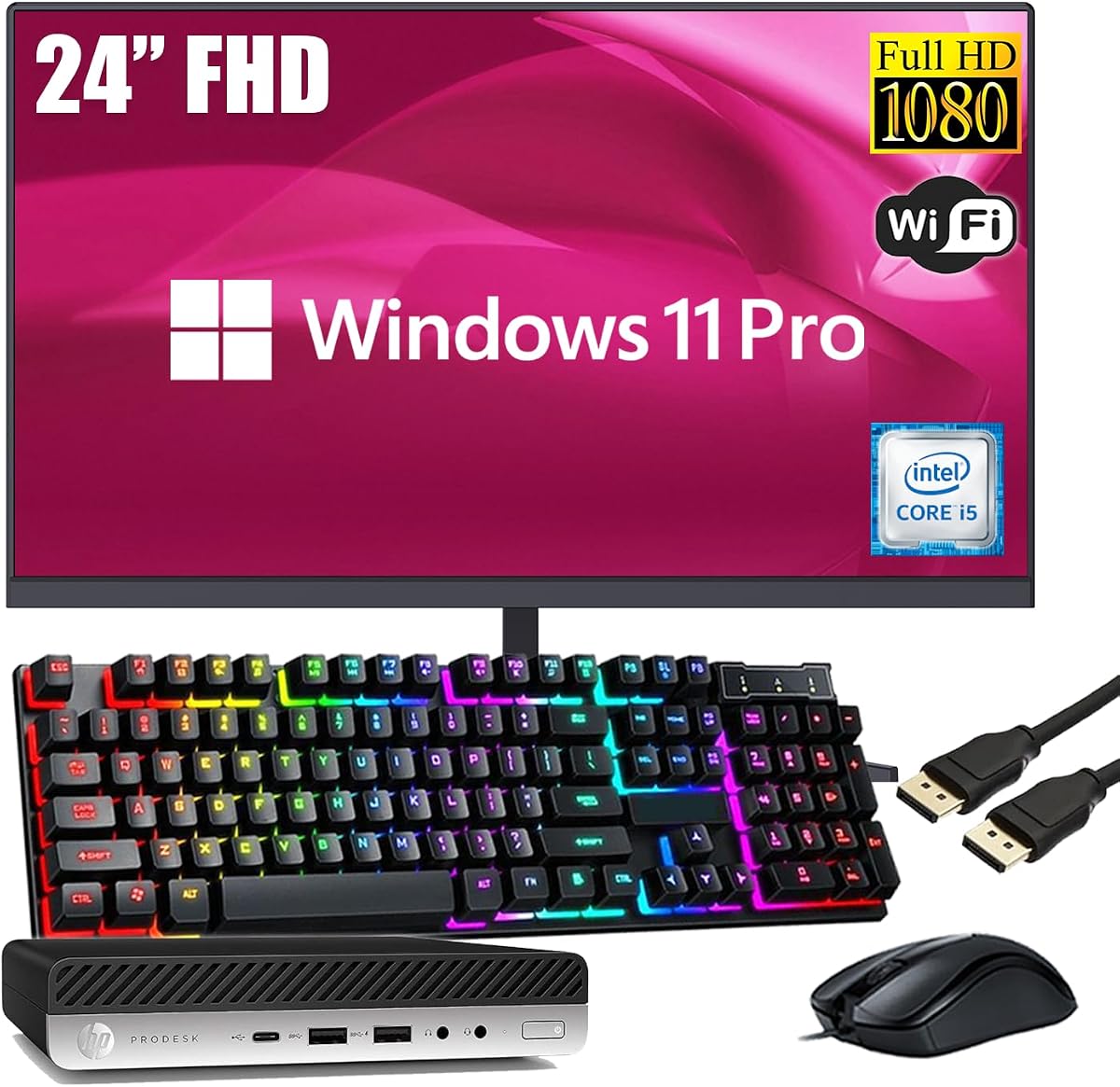


This HP desktop bundle offers a balanced mix of power and value making it a top contender for family use. With a rating of 3.8 stars it stands out for its generous memory and solid state drive which ensure smooth performance during homework or play.
We may earn a commission when you buy through this link, at no additional cost to you.
The Intel Core i5 8th Gen processor handles multiple browser tabs and apps without stuttering while the 16GB of RAM supports heavy multitasking needs. The included 24 inch monitor provides ample screen real estate for educational content and the RGB keyboard adds a playful touch kids will appreciate.
While the system is renewed and comes with a warranty some buyers may notice cosmetic signs of previous use. Additionally the monitor brand varies so visual quality might differ slightly between units but overall functionality remains reliable for daily school and entertainment tasks.
Parents looking for a ready-to-use system that supports both study and leisure will find this package highly practical. It strikes a great balance between specs and convenience ensuring your child has a dependable computer for years to come.
The 500GB SSD combined with 16GB RAM delivers quick load times and smooth multitasking essential for modern learning apps and games.
This bundle comes with everything you need including monitor keyboard mouse and speakers so you can start using it right out of the box.
We may earn a commission when you buy through this link, at no additional cost to you.
The Dell Optiplex 9020 is a reliable choice for families seeking an affordable desktop solution that still delivers consistent performance. With a 3.6 star rating it proves dependable for basic computing tasks though it lacks the speed of newer storage options.
We may earn a commission when you buy through this link, at no additional cost to you.
Its Intel Quad-Core i5 processor provides enough power for web browsing and document editing while the 20 inch monitor ensures comfortable viewing for young users. Windows 11 Pro is pre-installed offering enhanced security features that parents will value for protecting personal data and settings.
The main limitation lies in the use of DDR3 RAM and a traditional hard drive which may cause slight delays when switching between heavy applications. However for budget conscious shoppers this trade-off is often acceptable given the overall value and included accessories like the RGB keyboard and mouse.
This system works well for younger children who primarily need a device for schoolwork and light entertainment. It offers a no-fuss experience with essential components already bundled together for immediate use at home.
The included Windows 11 Pro operating system provides advanced security and management tools ideal for family use and educational environments.
You get a monitor keyboard mouse and RGB accessories included which reduces the need for separate purchases and simplifies setup.
We may earn a commission when you buy through this link, at no additional cost to you.
This Dell package stands out as the most budget-friendly option on our list while still offering essential features for everyday computing. With a 3.8 star rating it delivers reliable performance for basic tasks like homework and browsing without breaking the bank.
We may earn a commission when you buy through this link, at no additional cost to you.
The Intel Quad Core i5 processor at 3.2GHz ensures responsive handling of common applications and the 500GB drive provides plenty of space for storing school projects and media files. The included 19 inch monitor completes the setup making it ready to use immediately upon arrival.
While the screen size is smaller than modern standards and the RAM is limited to 8GB these constraints are manageable for light to moderate use. Parents who need a secondary computer or one for younger children will find this value proposition hard to beat.
Ideal for those on a tight budget this system offers a complete and functional experience. It covers all the basics you need for a child's first desktop computer with minimal extra cost.
Everything from monitor to mouse is included in this package so you can set up a workspace quickly and easily.
Despite the low price the core processor and storage remain capable of handling standard educational and entertainment workloads smoothly.
We may earn a commission when you buy through this link, at no additional cost to you.
The HP Elite Desktop brings solid specs to the table with 16GB of RAM and a spacious 1TB hard drive making it suitable for growing families. Its 3.5 star rating reflects mixed experiences but the core hardware remains capable of handling diverse tasks.
We may earn a commission when you buy through this link, at no additional cost to you.
The Intel Core i5 processor ensures stable performance while the 22 inch LED monitor offers a good viewing area for learning and gaming. Windows 11 is pre-installed to provide a modern interface and the RGB keyboard and speaker add a fun aesthetic touch.
Potential buyers should be aware that as a renewed unit the physical condition might vary and the lower rating suggests some units could have minor issues. However the ample storage and memory make it a strong candidate for those needing more space and multitasking capability.
This desktop is a great choice for households that need to store large media libraries and run several apps simultaneously. It bridges the gap between basic and high-performance options effectively.
The 1TB HDD allows you to store thousands of photos videos and documents without worrying about running out of space quickly.
With 16GB of RAM you can keep multiple browser tabs and programs open without experiencing significant slowdowns or lag.
We may earn a commission when you buy through this link, at no additional cost to you.
This Dell OptiPlex model is engineered for storage needs with a massive 2TB hard drive ensuring ample room for growing media collections. It holds a 3.6 star rating and pairs that storage with 16GB RAM for robust multitasking capabilities on a budget.
We may earn a commission when you buy through this link, at no additional cost to you.
The Intel Core i5 3rd Gen processor handles everyday tasks well though it is older than modern standards. The 22 inch LED monitor provides clear visuals for educational videos and gaming while Windows 11 Pro is ready to enhance security and management features.
While the hard drive speed may not match SSDs the sheer capacity compensates for families with large libraries. The RGB accessories add a touch of style making the setup appealing to younger users who enjoy personalized tech.
Choose this desktop if storage is your top priority and you need to archive years of school work and family media. It offers a practical balance of space and performance for home office environments.
With 2TB of space you can save thousands of high-resolution photos and movies without worrying about external drives immediately.
The included Windows 11 Pro OS provides professional-grade tools for managing updates and security settings on the home network.
We may earn a commission when you buy through this link, at no additional cost to you.
The HP ProDesk Mini offers a space-saving design without compromising on core performance thanks to its solid state drive. With a 4.2 star rating it is one of the better reviewed options for those needing a tidy setup for a desk or small room.
We may earn a commission when you buy through this link, at no additional cost to you.
The Intel i5-8500T processor paired with a 256GB SSD ensures quick boot times and responsive app launches. The 24 inch monitor provides a good view for learning tasks while USB-C connectivity adds modern flexibility for peripherals and charging.
Although the RAM is capped at 8GB the speed of the SSD helps mitigate minor lags for typical usage. Families with limited desk space will appreciate the small footprint of the mini tower combined with a large display.
This unit is ideal for younger students who need a reliable computer for web browsing and homework. It combines efficiency and compact design to fit seamlessly into any home study area.
The 256GB SSD delivers faster startup and application load times compared to traditional hard drives for a smoother experience.
The mini tower takes up minimal desk space while the 24 inch monitor ensures you still have enough visual area for work.
We may earn a commission when you buy through this link, at no additional cost to you.
This Lenovo All-in-One computer blends style and function with a clean design that reduces cable clutter on your desk. With a 4.2 star rating it delivers smooth performance for school and work thanks to its generous 16GB RAM and fast SSD.
We may earn a commission when you buy through this link, at no additional cost to you.
The 23.8 inch IPS display provides accurate colors and wide viewing angles ideal for media consumption and creative tasks. Wi-Fi 6 ensures fast and stable internet connectivity while Bluetooth 5.2 supports seamless pairing with wireless headsets and other accessories.
While the Intel N100 processor is efficient it may struggle with very demanding gaming or video editing tasks. However for everyday productivity and light entertainment it offers a solid and quiet experience without the need for separate tower components.
Parents seeking a modern and tidy setup will love this integrated solution. It is perfect for shared family spaces where aesthetics and simplicity are important alongside functional performance.
Wireless keyboard and mouse are included out of the box ensuring a clean and comfortable typing experience for all users.
Support for Wi-Fi 6 and Bluetooth 5.2 guarantees fast wireless performance and reliable connection to modern devices and networks.
We may earn a commission when you buy through this link, at no additional cost to you.
The Lenovo 23.8 AIO offers premium features like an Octa-Core processor and NVMe storage making it a top pick for speed and design. With a 4.3 star rating it stands out for its borderless display and powerful multitasking capabilities.
We may earn a commission when you buy through this link, at no additional cost to you.
This system handles intensive tasks effortlessly thanks to 16GB RAM and the fast 512GB drive which reduces load times significantly. The borderless design enhances the viewing experience by minimizing distractions while the integrated HD webcam supports video calls seamlessly.
Although it is more expensive than other options the build quality and performance justify the investment for families planning long-term use. It provides a polished look that fits well in modern home offices or study rooms.
Choose this premium All-in-One if you value aesthetics and performance equally. It is an excellent choice for students who need a reliable machine for both creative work and everyday tasks.
The eight core processor delivers smooth multitasking and quick responses even when running multiple demanding applications at once.
The borderless FHD screen maximizes the viewing area and provides a sleek look that enhances focus during study or play.
We may earn a commission when you buy through this link, at no additional cost to you.
This HP All-in-One features a stylish white finish and a unique docking hub that expands connectivity options significantly. With a high 4.5 star rating it appeals to users who want a clean look and versatile port access for peripherals.
We may earn a commission when you buy through this link, at no additional cost to you.
The 21.5 inch VA display offers sharp visuals with an anti-glare coating that reduces eye strain during long sessions. Windows 11 Home is pre-installed and the included keyboard and mouse make it ready to use instantly for homework or entertainment.
While the 8GB RAM and 384GB storage are moderate the docking hub allows for easy expansion if needed. The compact design saves desk space and the adjustable stand ensures comfortable viewing angles for users of different heights.
It is a great choice for younger children and students who need a reliable and attractive computer for daily use. The included dock adds value by simplifying connections to printers and external drives easily.
The 8-in-1 hub provides extra USB and card slots making it easy to connect various devices without cluttering the main unit.
The anti-glare VA panel reduces reflections and eye strain ensuring comfortable viewing for extended periods of study or play.
We may earn a commission when you buy through this link, at no additional cost to you.
The Lenovo IdeaCentre AIO offers a practical combination of storage and speed with a 512GB SSD ensuring fast app access and boot times. With a 4.3 star rating it is a dependable option for general computing needs in homes and offices.
We may earn a commission when you buy through this link, at no additional cost to you.
The 23.8 inch IPS display delivers vibrant colors and wide angles making it suitable for multimedia and educational content. Its slim design keeps the workspace organized and the included Calliope keyboard adds a unique touch to the overall setup.
While the 8GB RAM may limit heavy multitasking the SSD speed helps maintain smooth performance for everyday tasks. The Intel N100 processor is efficient enough for browsing and homework but not for high-end gaming or rendering work.
This system is perfect for families who want a straightforward and tidy computer setup. It balances affordability with enough storage to handle daily file needs without cluttering your desk space.
The 512GB SSD provides plenty of space and quick load times making it easy to start work and access files instantly.
The 23.8 inch IPS screen ensures clear and colorful images which enhances the experience for videos and educational apps.
We may earn a commission when you buy through this link, at no additional cost to you.
Selecting the right desktop computer requires balancing performance needs with budget constraints and physical space availability.
The processor is the brain of the computer and determines how fast it can handle tasks like loading web pages and running school apps. For kids older Intel Core i3 or i5 processors provide excellent speed and longevity ensuring the machine stays useful for years. Avoid very old or low-end CPUs that might slow down during video calls or heavy browsing.
Memory or RAM allows you to run multiple programs at once without lag so 16GB is ideal for multitasking and future-proofing. Storage comes in two main types with solid state drives being much faster than traditional hard drives for booting and loading apps. Aim for at least 256GB of SSD space to store school files and media comfortably.
Since kids spend hours looking at the screen choosing a monitor with good resolution and eye comfort features is critical. Look for Full HD panels with anti-glare coatings to reduce eye strain during long study sessions or gaming. Screen sizes between 21 and 24 inches usually offer the best balance of visibility and desk space.
Desktops come as towers or all-in-one units each with its own pros and cons regarding space and upgrades. All-in-ones save space and reduce cables while towers might allow for future upgrades if your needs grow. Ensure the unit is sturdy and stable to withstand accidental bumps in a busy household environment.
Modern computers need to connect to printers headsets and external drives so check for enough USB ports and modern standards. Wi-Fi 6 and Bluetooth 5.0 or newer ensure stable wireless connections for online learning and peripherals. A built-in webcam and microphone are also essential for video classes and family calls.
The operating system shapes how the computer feels and functions so Windows 11 is recommended for its security and parental features. Look for built-in tools that let you manage screen time and control access to apps safely. Some models offer Pro versions which add extra management tools for families needing more control.
Setting a budget helps narrow choices but consider long-term value over just the upfront price tag for kids computers. Renewed units often offer great specs at lower prices but check warranty terms to ensure protection against defects. Balance what you pay against the lifespan and performance you expect to get from the machine.
Kids can be rough on tech so a reliable build and strong warranty give peace of mind to parents buying desktops. Check the warranty length especially on renewed models since they might come with limited coverage from the retailer. A longer warranty helps cover potential hardware issues that could arise during the first years of use.
Dust the exterior and monitor screen weekly with a soft dry cloth to maintain performance and prevent overheating caused by blocked vents. Limit excessive gaming or heavy downloads on older models to extend the lifespan of the internal components and keep the system running smoothly.
Yes desktop computers are excellent for kids because they offer better performance and ergonomics than most laptops. They provide larger screens for comfortable viewing and dedicated keyboards which help with typing skills and reduce eye strain during study sessions.
For smooth performance and multitasking aim for at least 8GB of RAM though 16GB is recommended if budget allows. This ensures the computer can handle multiple browser tabs and apps without slowing down during homework or video calls.
Renewed desktops are a great choice for families looking to save money without sacrificing performance and reliability. Just ensure the seller offers a solid warranty and check the condition rating to avoid any unexpected issues with the hardware.
A screen size between 21 and 24 inches is ideal for kids as it provides enough space for learning tools without being overwhelming. This range also fits well on most desks and reduces the need to move the head too much while reading.
All-in-one PCs work very well for kids because they combine the computer and monitor into one unit saving space on your desk. They also reduce cable clutter and are often easier to move around if you need to rearrange the room.
You can protect your child by enabling parental controls built into the operating system and using a reliable antivirus solution. Setting limits on screen time and monitoring app usage helps ensure a safe and healthy digital environment for learning.
Always verify current prices and availability as deals may change frequently online. Use the links in this guide to explore the full specs and user reviews for a confident purchase decision today.