
WALI Computer Monitor Stand
4.7Editor score
Adjustable height settings
Ventilated metal shelf
Supports up to 44 lbs
This guide compares the top desktop monitor riser options for comfort and storage. We review features, materials, and ergonomics to help you choose the right
A desktop monitor riser elevates your screen to eye level, promoting better posture and reducing neck strain during long work sessions. It also frees up valuable desk space for keyboards and accessories. Choosing the right one depends on your setup needs, weight capacity, and desired aesthetics.
We evaluated ten highly rated models based on build quality, adjustability, storage options, and user feedback. Each product offers unique benefits, from simple metal shelves to multi-functional organizers with drawers. Our goal is to highlight the most reliable solutions for home and office desks.
Each pick below showcases key specifications and ideal use cases to help you decide. Note that availability and pricing may fluctuate over time. Always check the latest details before purchasing to ensure the best fit for your specific workspace requirements and budget.
4.7Editor score
4.7Editor score

4.6Editor score
The following table provides a side-by-side comparison of all ten selected models. Review key specifications like dimensions, weight limits, and unique features to find the perfect match for your desk setup.


The WALI Computer Monitor Stand is a top-rated budget option designed to elevate screens safely. With a 4.7 rating, users praise its sturdy metal construction and ability to support devices up to 44 pounds. It fits most flat screens and laptops while offering three height choices for better ergonomics.
We may earn a commission when you buy through this link, at no additional cost to you.
Its standout feature is the large vented platform which keeps devices cool during extended use. The shelf measures 14.6 by 9.3 inches providing ample space for monitors or printers. Rubber pads on the bottom protect your desk surface from scratches and prevent unwanted sliding during daily tasks.
While it requires basic assembly, the process is straightforward and tools are minimal. The height adjustment is mechanical using fixed positions rather than infinite tuning which might limit fine-tuning for some users. However for the stability and cost effectiveness make these minor trade-offs acceptable for most buyers.
This stand is ideal for home offices needing a reliable lift without spending much. It supports single or dual setups and creates under-shelf storage for keyboards. If you want a simple durable riser that improves posture and clears desk clutter this is a strong choice to consider first.
Three fixed heights let you raise your screen 3.9 4.7 or 5.5 inches. This flexibility helps align your eyes with the monitor top to reduce neck strain effectively.
Vented holes in the metal shelf promote airflow underneath devices. This prevents overheating and ensures laptops or consoles run cooler during heavy usage periods.
We may earn a commission when you buy through this link, at no additional cost to you.
The TEAMIX Monitor Stand offers a classic wood appearance suitable for modern home offices. Rated 4.6 stars it features a 20 inch wide shelf made of high quality MDF board. It supports up to 80 pounds making it robust for heavy monitors or multiple devices without wobbling.
We may earn a commission when you buy through this link, at no additional cost to you.
Its simplicity is a key strength allowing you to match various decor styles easily. The black finish blends well with most setups while providing a clean workspace surface. The open space underneath serves as a practical spot for keyboards notebooks or other desk accessories to keep things organized.
Assembly is quick and requires no special skills or tools beyond what is included. However the height is fixed at around four inches which might not suit taller users seeking more elevation. Also wood surfaces can show scratches over time if not handled with care compared to metal options.
Choose this stand if you prefer a natural look and need strong support. It works well for single monitors or laptops under 20 inches. The generous weight capacity and simple design make it a dependable pick for those prioritizing aesthetics and stability over adjustable features.
Made from high quality MDF wood this stand holds up to 80 lbs. This ensures your monitor stays secure without bending or sagging under heavy loads.
The 20 inch width allows fitting laptops under 20 inch and most screens under 50 inch. Use the extra area for storage to maximize your desk utility.
We may earn a commission when you buy through this link, at no additional cost to you.
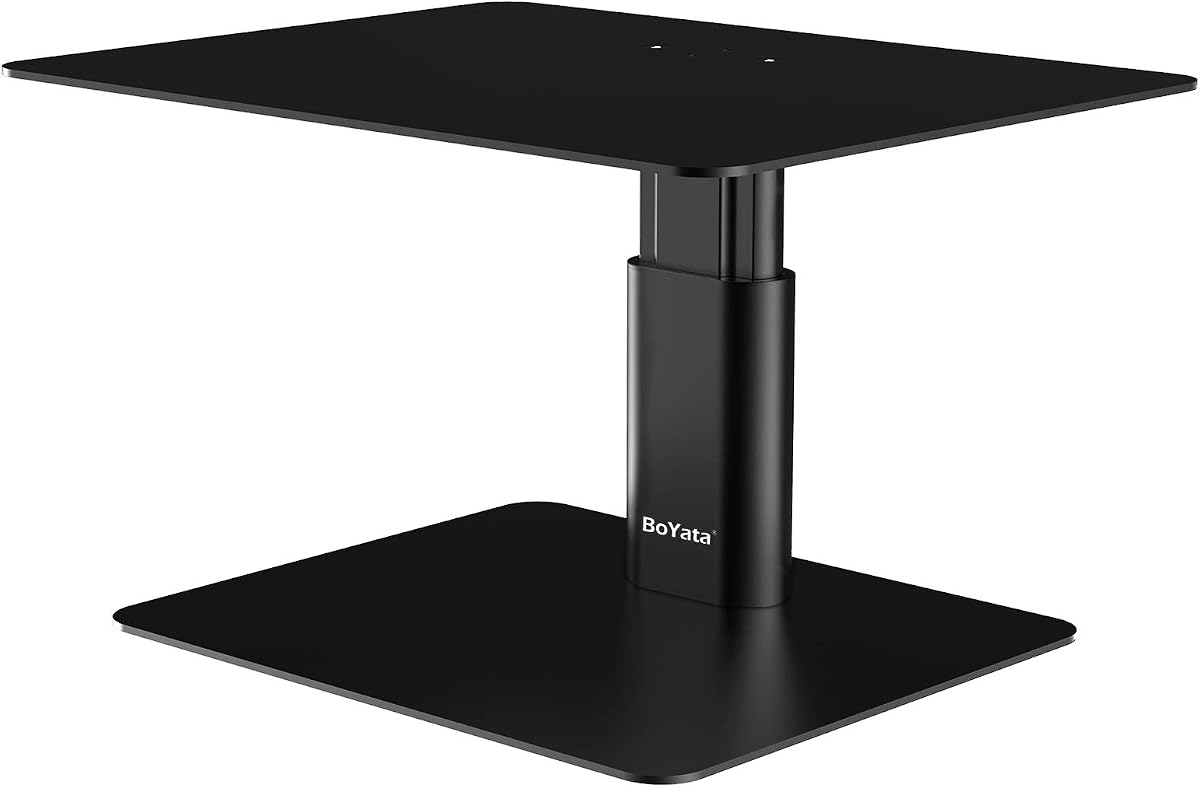
The BoYata Monitor Stand stands out with its unique twist knob height adjustment mechanism. Bo 4.7 rating it offers a durable metal build that supports up to 33 pounds. This model is perfect for users who need precise tuning to match their seating position and eye level accurately.
We may earn a commission when you buy through this link, at no additional cost to you.
Its high weight capacity and metal construction ensure longevity and resistance to bending. The skidproof pads at the bottom keep the stand firmly in place on any flat surface. Space between the metal plates is sufficient for storing notebooks or keyboards without causing obstruction to your workflow.
Assembly involves connecting two base plates with a support rod using included screws. While slightly more involved than clip-on options it results in a very rigid frame. The fixed height ranges might be less flexible than the knob version but provide reliable stability for heavier setups.
This is our editor choice for balancing build quality and ergonomic flexibility. It suits professionals needing a sturdy platform that reduces shoulder and neck pain. If you value a premium metal look and custom height settings this stand delivers excellent value for daily office use.
Unlike traditional stands this model uses a twist knob to adjust height. This lets you find the perfect viewing angle to improve comfort and reduce pain.
Strong metal plates and rods make this riser long lasting and easy to bend or dent. It provides a stable surface for your monitors or laptops securely.
We may earn a commission when you buy through this link, at no additional cost to you.
The Amazon Basics Height Adjustable Monitor Stand is a practical lightweight solution for smaller desks. With a 4.6 rating it uses durable ABS plastic to support devices up to 22 pounds. Its 3-level stackable design lets you customize height using detachable legs for varied comfort needs.
We may earn a commission when you buy through this link, at no additional cost to you.
The tapered top surface measures 11.6 by 11 inches which fits most laptops and small monitors well. While lighter than metal or wood options it remains sturdy enough for everyday office use. Anti-slip feet ensure the stand stays put on flat surfaces without sliding around during typing.
Assembling the legs is simple and requires no tools beyond basic hand twisting. However the plastic construction may feel less premium compared to metal stands. The weight limit means it is not suitable for heavy gaming monitors or dual setups but works well for single devices.
This stand is best for students or casual users needing a portable riser. It offers good value and flexibility for adjusting screen height. If you want a simple cost effective way to improve posture without heavy lifting this model is a solid entry-level choice.
Three detachable leg options provide heights of 2.87 4.2 and 4.8 inches. This stackable design allows you to choose the best lift for your specific desk setup.
Made from high quality ABS plastic this stand balances strength and portability. It is lighter than wood or metal making it easy to move between rooms.
We may earn a commission when you buy through this link, at no additional cost to you.
The YAOHUOO Dual Monitor Stand is designed for users needing space for two screens or a TV. Rated 4.6 it features a massive 38.6 inch length with steel legs supporting up to 100 pounds. This heavy-duty build ensures stability even when loaded with multiple devices without shaking or wobbling.
We may earn a commission when you buy through this link, at no additional cost to you.
Its wide surface allows fitting dual monitors or a large laptop and printer combo comfortably. The steel footing includes non-slip pads to protect your desk from scratches. Underneath you get plenty of room to store keyboards or accessories helping to keep your workspace tidy and efficient.
Assembly takes about 10 minutes with tools included in the package. The wooden top adds a stylish touch that blends well with home office decor. While it requires more desk space than single stands the benefits for multitaskers make it a worthwhile investment for productivity.
This premium choice is perfect for professionals running multiple displays simultaneously. It elevates screens to ergonomic levels reducing neck strain effectively. If you need a robust organizer that handles heavy loads and maximizes desk space this dual stand is an excellent upgrade to consider.
At 38.6 inches long this riser fits two monitors or laptops side by side. It allows you to work with multiple computers easily without cluttering your desk.
Steel legs and a max capacity of 100 pounds ensure it stays stable. Heavy-duty footing prevents collapsing or shaking during daily heavy use tasks.
We may earn a commission when you buy through this link, at no additional cost to you.
The Canyora 2 Pack offers two metal risers in one box for flexible workspace organization. With a 4.7 rating each stand supports up to 44 pounds and features 150 heat dissipation holes. This design actively prevents overheating for laptops and desktop computers during extended working hours.
We may earn a commission when you buy through this link, at no additional cost to you.
You can adjust each stand to three ergonomic heights using buttons on the legs. The platform measures 14.6 by 9.3 inches providing decent space for monitors or printers. Stacking two units doubles storage space making it versatile for various organizational needs around home or office desks.
Assembly takes under 30 seconds as you simply screw legs onto the platform without tools. The waterproof and anti-rust coating ensures longevity even in humid environments. While the height settings are fixed they offer enough range for most users to find a comfortable viewing position easily.
This bundle is ideal for those needing multiple stands for different areas. It is cost effective and provides reliable cooling for tech devices. If you want versatile metal shelves that can be used as plant stands or kitchen storage this pack offers excellent utility and value.
150 precisely placed holes allow air to flow freely under your device. This actively prevents overheating and extends the lifespan of your computer equipment.
Use these stands for desks floors or carpets. You can repurpose them as plant stands or kitchen storage holders when not supporting a monitor.
We may earn a commission when you buy through this link, at no additional cost to you.
The Klearlook Foldable Stand combines ergonomics with hidden storage features for a clutter-free desk. Rated 4.7 it offers three adjustable widths from 16.5 to 20.5 inches to match any workstation. A built-in drawer and tablet phone holder keep essentials organized within easy reach during work.
We may earn a commission when you buy through this link, at no additional cost to you.
Its foldable design allows easy storage when not in use by collapsing the legs flat. The metal plate inside ensures stability for ultrawide monitors without wobble. Rubberized non-slip legs provide a secure surface that protects your desk from scratches and keeps devices steady.
This model arrives ready to use right out of the box with no assembly steps. While the white finish looks clean it may require more cleaning to maintain. The width adjustment mechanism is smooth but adds a bit of bulk compared to simpler fixed stands.
Choose this stand if you need extra organization and flexibility. It suits home offices where space saving is key. If you want a solid platform that holds keyboards and phones while improving posture this multifunctional riser is a top contender for modern setups.
A hidden built-in drawer keeps office essentials like pens and notes organized. This feature helps reduce desktop clutter and keeps your workspace tidy.
Fold the legs to store the stand easily when not in use. The leg span adjusts to fit full-sized keyboards underneath when fully unfolded.
We may earn a commission when you buy through this link, at no additional cost to you.
The OPNICE Desk Organizer stands out with smart storage like a drawer and two pen holders. Rated 4.6 it uses premium metal construction to handle heavy daily use with stability. Elevate your monitor to eye level to reduce neck strain and boost posture comfort during long workdays.
We may earn a commission when you buy through this link, at no additional cost to you.
This unit requires no installation so you can start using it immediately. It fits in home offices or dorms to free up space for keyboards or mice. The sleek black design transforms clutter into calm adding a professional touch to any workspace environment effectively.
While the drawer is handy it may not hold large items. The metal frame ensures rock-solid stability but does not offer height adjustments. If you need a simple way to keep supplies visible and accessible without assembly this organizer delivers efficiency and focus.
Pick this stand if you value immediate utility and organization. It works well for standard monitors and laptops. If you want to clear desk clutter and optimize your workspace without tools this dual monitor riser is a practical choice to transform your desk.
A drawer and two hanging pen holders organize your desk accessories neatly. Keep essentials visible and instantly accessible for better focus and efficiency.
No installation is required for this desk organizer. Enjoy instant workspace optimization and a clutter-free desktop with free 24-hour support.
We may earn a commission when you buy through this link, at no additional cost to you.
The WESTREE Dual Monitor Stand blends rustic brown wood with sturdy steel legs for a unique look. Rated 4.6 it supports two monitors or TVs easily thanks to its original patented design. Thick steel legs ensure strong bearing load and stability without sliding during daily use tasks.
We may earn a commission when you buy through this link, at no additional cost to you.
Pre-drilled holes and included tools make assembly very quick for everyone. The open space underneath organizes office supplies keeping the table clean. You can also use it as a printer stand or makeup shelf making it versatile beyond just computer setups.
Ergonomic design helps raise screens to comfortable sight levels reducing eye strain. The anti-slip pads protect your desk surface from scratches when you place devices. While assembly is required it is simple and follows clear step-by-step instructions in the package.
This stand is perfect for users wanting both style and function. It suits home offices needing a multi-purpose storage solution. If you prefer a wood finish with metal strength this dual monitor riser provides a solid foundation for your workspace needs.
Features a rustic brown wood finish with sturdy steel legs. This design adds a unique look to your desk while ensuring solid performance.
Board and frame come with pre-drilled holes and all tools included. Follow instructions to install in just 2 minutes easily.
We may earn a commission when you buy through this link, at no additional cost to you.
The gianotter Dual Monitor Stand simplifies setup by requiring no assembly. Rated 4.5 it uses high-strength metal materials to ensure exceptional support performance. Includes magnetic pen holders and a drawer to organize accessories and keep your workspace clear and tidy for easier access.
We may earn a commission when you buy through this link, at no additional cost to you.
By raising the monitor height it maximizes desktop space for storing mice or keyboards. The ergonomic design reduces neck and eye strain improving posture and focus. This model transforms cluttered desktop areas quickly allowing you to enhance workspace aesthetics immediately.
It is a USPTO patented product crafted with a perfect design ratio. While assembly is skipped the drawer is compact so heavy items may not fit. The metal build ensures durability and stability for dual or single monitor arrangements effectively.
Choose this stand if you want an immediate upgrade without tools. It suits home or office desks needing storage. If you want to revitalize your desktop with a clean look and simple organization this dual stand is an ideal choice.
Skip assembly hassle by unboxing and using instantly. Just place it on your desktop to transform cluttered areas efficiently.
Features two magnetic pen holders and a drawer for desk accessories. Keep your workspace tidy and items easy to reach.
We may earn a commission when you buy through this link, at no additional cost to you.
Choosing a desktop monitor riser involves considering several factors to ensure it meets your ergonomic and storage needs. This guide breaks down key aspects to help you make an informed decision.
Always check the maximum weight limit to ensure your monitor or laptop will not exceed it. Some stands support up to 100 pounds while others cap at 22 pounds. Exceeding the limit can cause the stand to bend or become unstable.
Choose a stand with a capacity higher than your device weight for safety and longevity.
Look for models with adjustable height options like twist knobs or stackable legs. This allows you to customize the screen elevation to match your eye level comfortably. Fixed stands may not offer enough flexibility for different users.
Adjustable risers help reduce neck strain by letting you find the perfect viewing angle.
Measure your desk space and monitor size to ensure the riser fits properly. Wide stands like dual monitors need extra width while small ones save space. Check depth to allow space for keyboards underneath.
Ensure the shelf dimensions accommodate your devices without overhanging or cluttering your desk.
Metal stands offer durability and stability while wood adds style. Plastic is lightweight but may feel less solid. Consider the material that best matches your desk environment and usage intensity.
High-quality materials ensure the stand remains sturdy and lasts longer over time.
Some risers include drawers pen holders or phone stands for better organization. These features help keep your desk clutter free and tools accessible. Decide if you need extra storage or just a simple platform.
Integrated storage accessories can significantly improve your daily workspace efficiency.
Vented designs allow airflow to prevent your devices from overheating. This is crucial for laptops or consoles used for long periods. Solid platforms might trap heat and cause performance issues.
Look for perforated surfaces to keep your electronics running cool and efficient.
Rubber or non-slip pads protect your desk and prevent the stand from moving. A wobbling stand can damage your screen or cause accidents. Check reviews for stability feedback before buying.
Secure feet ensure your equipment stays safely in place during daily use.
Some models require tools and time while others are ready out of the box. Consider your preference for setup convenience when choosing. Quick assembly options save time and effort for busy users.
No assembly stands offer immediate use while others might take minutes to build.
Place the riser on a flat stable surface to ensure it does not wobble. Check that the rubber pads are clean and firmly attached for maximum grip on your desk.
Position your monitor or laptop on the top shelf so the screen center aligns with your eyes. Adjust the height settings if available to match your seated posture comfortably.
Clean the stand regularly with a damp cloth to remove dust and prevent scratches. Avoid harsh chemicals that might damage the finish or coating of the material.
Yes elevating your screen brings it to eye level which reduces strain on your neck and back. Proper positioning encourages you to sit upright and aligns your spine better. This adjustment is a key ergonomic improvement for any workspace.
Some models like the YAOHUOO and WESTREE stands are designed specifically for two screens. Others support single monitors but can fit small dual setups depending on the total width. Always check dimensions before buying.
Weight limits vary from 22 pounds to over 100 pounds depending on the model. Metal and steel stands usually handle heavier loads while plastic ones are lighter. Check product specs to match your device weight safely.
Yes many users place printers laptops or consoles on these shelves. They also serve as storage for keyboards and books underneath. The versatile design makes them suitable for various desk electronics and accessories.
Some models need a screwdriver while others are tool-free. Many include all necessary hardware in the package. Quick setup options are available for those who prefer instant use without extra effort.
Use a soft damp cloth to wipe away dust and debris gently. Avoid abrasive cleaners that could scratch the surface or finish. Regular maintenance keeps the stand looking new and functioning well over time.
We highlighted ten top options ranging from budget-friendly metal stands to premium dual setups. Each pick offers unique benefits like ventilation drawers or adjustable heights to suit different needs.
Prioritize ergonomics and weight capacity to ensure long-term comfort and safety. Consider the material and assembly time based on your personal preferences and desk space constraints.
Remember that availability and pricing may change so always verify details before buying. Use our guide to find the perfect riser that enhances your workspace efficiency and comfort today.