
Zalman CUBIX M-ATX
4.5Editor score
Compact 17.1 liter volume
Durable 0.8T steel build
Supports standard ATX power units
This guide compares the top ten cube shaped PC case options for gamers and creators. Explore features airflow support and design to find your perfect build.
Choosing the right cube shaped PC case can transform your desktop setup into a visual masterpiece. These compact enclosures offer unique aesthetics while maintaining robust cooling and component compatibility for modern hardware.
We evaluated ten leading models based on airflow efficiency, build quality, and compatibility with various motherboard sizes. Our analysis focuses on real-world performance and design versatility for diverse user needs.
Each pick highlights specific strengths from budget-friendly options to premium designs. Note that pricing fluctuates frequently so always verify current listings before making your final purchase decision today.
4.5Editor score
4.7Editor score

4.7Editor score
The following table provides a side-by-side comparison of all ten selected cube shaped PC case models. Review key specifications like motherboard support, cooling capacity, and unique design features to narrow down your choices effectively.



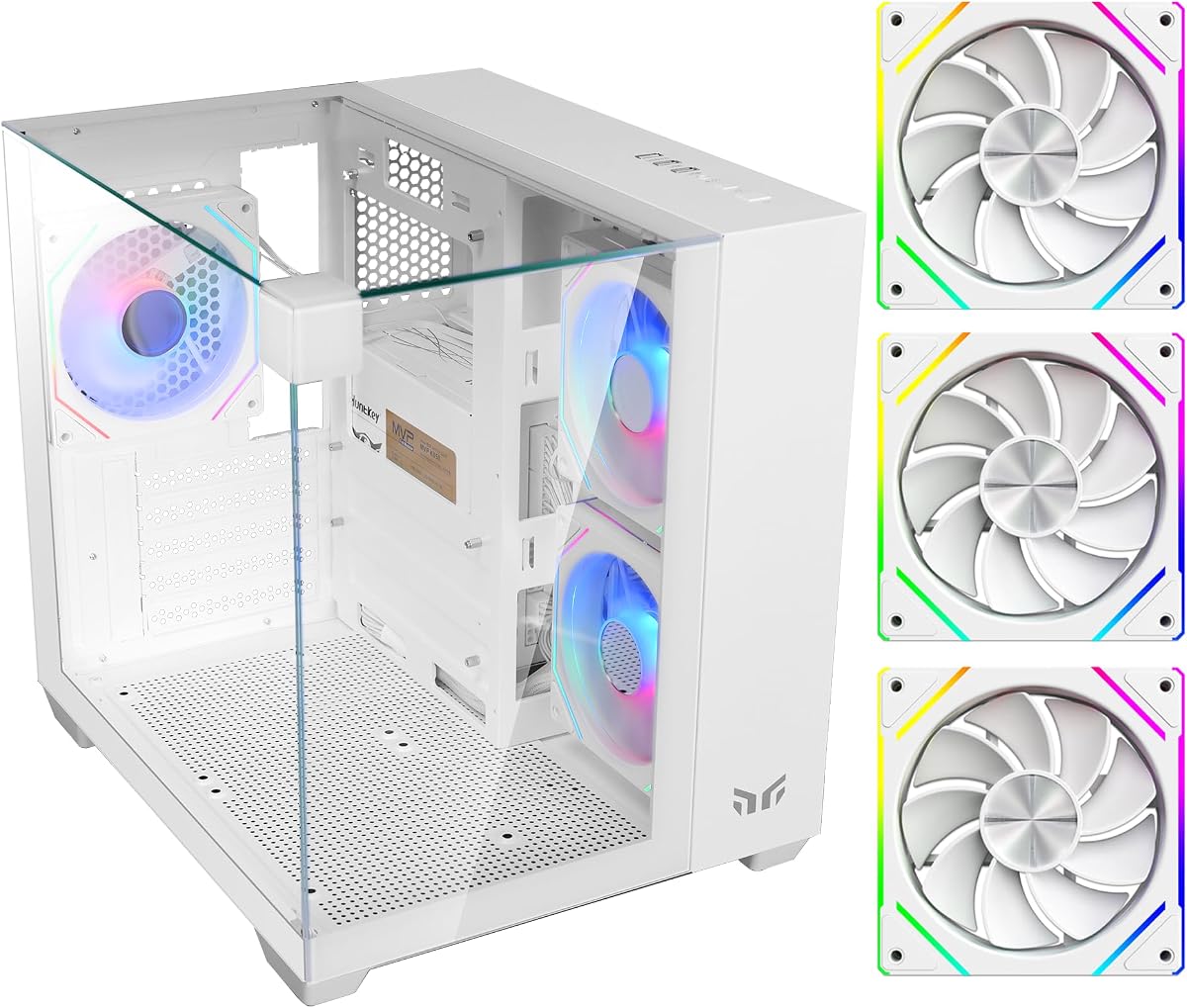
This Cube Gaming PC Case stands out with its 270-degree panoramic glass design that showcases your build from multiple angles. It receives a high 4.7 rating from users who appreciate the seamless visual experience it provides on any desktop.
We may earn a commission when you buy through this link, at no additional cost to you.
The case includes three pre-installed ARGB fans and supports up to five additional 120mm fans for robust cooling. Its optimized interior layout ensures efficient airflow while keeping cables hidden behind the PSU shroud for a professional look.
Trade-offs include the restriction to Micro-ATX motherboards and the absence of a USB Type-C port on the front panel. These limitations are acceptable given the affordable price point and the striking aesthetic appeal it offers.
Ideal for gamers wanting a compact and visually striking setup, this case balances performance and style. We recommend it for those prioritizing design and RGB customization without compromising on essential cooling capabilities.
The triple tempered glass setup creates a stunning display for custom loops and RGB lighting setups.
Despite its small size, it accommodates powerful components while maintaining a tidy desktop footprint.
We may earn a commission when you buy through this link, at no additional cost to you.
The Cooler Master QUBE 540 offers incredible flexibility with its design that works in both horizontal and vertical orientations. Users rate it 4.4 stars, highlighting the unique ability to customize the case layout to fit specific desk setups.
We may earn a commission when you buy through this link, at no additional cost to you.
It supports full-size graphics cards up to 415mm and accommodates large E-ATX motherboards. The mesh front panel ensures superior cooling, while the USB Type-C port provides modern connectivity options for peripherals.
While it lacks pre-installed RGB fans, the focus on airflow and compatibility makes it a strong contender. The reversible I/O panel adds convenience, though the overall size is larger than typical mini cubes.
Best for users needing maximum component flexibility, this case supports high-end builds effectively. Choose it if you require support for oversized GPUs and motherboards within a cube-inspired form factor.
Customize your desktop with horizontal or vertical placement thanks to the flexible design and handles.
Front USB Type-C ensures fast data transfer speeds for modern storage devices.
We may earn a commission when you buy through this link, at no additional cost to you.
The Apevia Prism-WH impresses with five pre-installed ARGB PWM fans right out of the box. It holds a 4.2 rating and offers a dual chamber design that separates power supply components from the motherboard for better airflow.
We may earn a commission when you buy through this link, at no additional cost to you.
With support for graphics cards up to 340mm and CPU coolers up to 155mm, it handles mainstream gaming loads well. The magnetic dust filter on top simplifies cleaning, and the screw-in PCI-E covers allow hassle-free GPU installation.
Limitations include the requirement for an ARGB motherboard for full sync and the need to use the top switch for lighting modes. These are minor issues considering the extensive lighting options provided at this price.
Recommended for enthusiasts who want an RGB-rich experience without buying separate fans, this case delivers value. Opt for it if you prioritize color customization and decent cooling for standard gaming builds.
Five fans provide broad lighting coverage with multiple modes controllable via the top button.
Separating heat sources helps maintain lower temperatures during extended gaming sessions.
We may earn a commission when you buy through this link, at no additional cost to you.
The Zalman CUBIX-G is a space-saving option designed for budget gaming builds. Rated 4.4 stars, it features a clean white finish and supports Micro-ATX motherboards within a compact mini tower enclosure.
We may earn a commission when you buy through this link, at no additional cost to you.
It includes three fixed RGB fans that provide optimized airflow out of the box. The case supports GPUs up to 280mm and offers modern connectivity with a USB Type-C port on the front I/O panel.
While the RGB is fixed and build materials are basic, it delivers essential features for entry-level setups. The inclusion of Type-C at this price range is a significant advantage over competitors.
Ideal for first-time builders needing an affordable cube design, this case meets basic needs. Pick it if you want a tidy desktop look without spending heavily on premium features.
The panda white finish offers a modern look for a very competitive entry price.
USB Type-C connectivity ensures compatibility with new peripherals despite the budget build.
We may earn a commission when you buy through this link, at no additional cost to you.
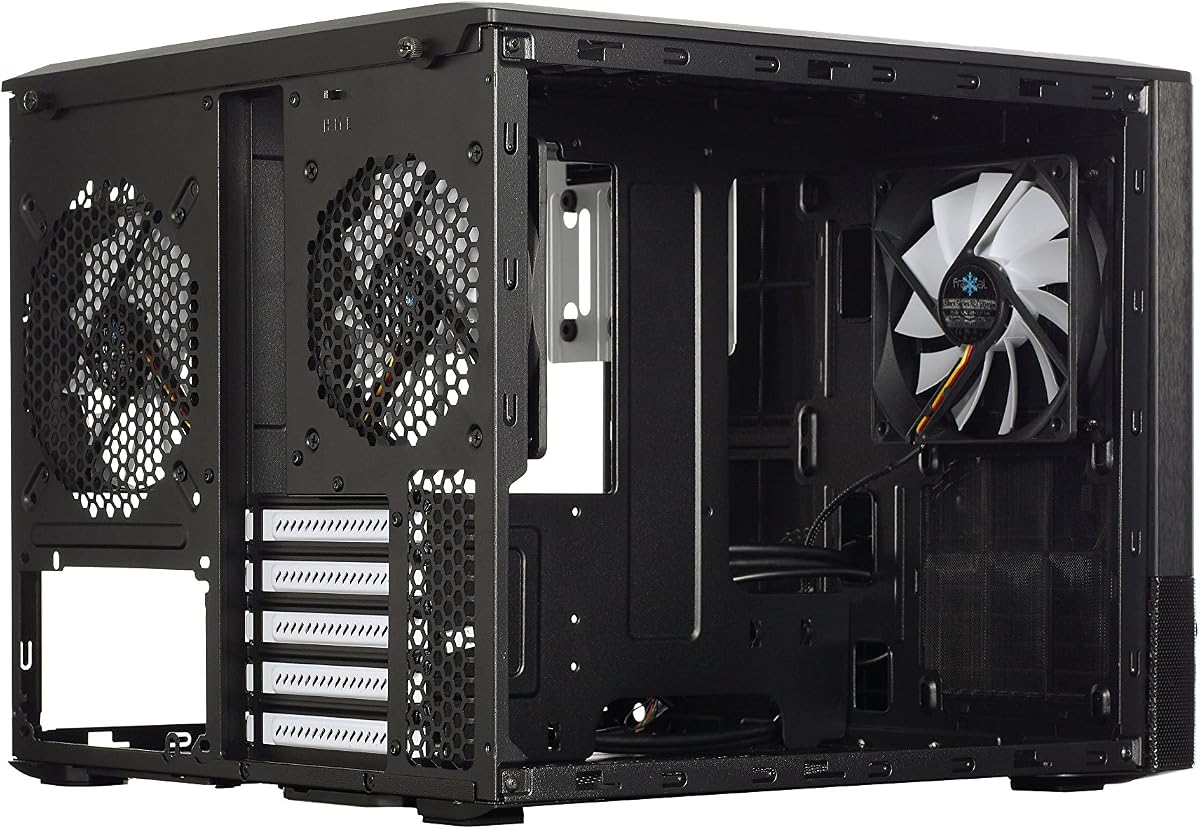
The Fractal Design Node 804 sets the standard for cube cases with its dual chamber layout and exceptional build quality. Users rate it 4.7 stars, praising the modular interior that supports extensive storage and cooling configurations.
We may earn a commission when you buy through this link, at no additional cost to you.
It accommodates up to ten hard drives and supports up to four radiators for advanced water cooling setups. The design ensures dust-free operation with filters on all intakes and provides ample space for large components.
The case is heavier and pricier than competitors, but the thermal performance justifies the investment. It lacks a side window in some variants, but the focus remains on functionality and internal airflow.
Best for workstation builds needing high storage and cooling, this case offers unmatched versatility. Invest in it if you require robust hardware support and premium manufacturing standards.
The drive mounting system allows for massive storage capacity without sacrificing airflow.
Dual chambers isolate heat and ensure optimal temperatures under sustained load.
We may earn a commission when you buy through this link, at no additional cost to you.
The Apevia Prism-Elite-BK is designed for users who demand maximum airflow with seven pre-installed ARGB PWM fans. It holds a 4.0 rating and features a dual chamber layout that improves airflow efficiency for high-end components.
We may earn a commission when you buy through this link, at no additional cost to you.
With support for graphics cards up to 400mm and extensive water cooling options up to 360mm, it handles powerful hardware effectively. The magnetic dust filters make maintenance easy, and the screw-in covers simplify GPU installation.
The high fan count may increase noise levels, and RGB sync requires compatible motherboards. However, the cooling potential is significant for enthusiasts looking to push hardware limits in a cube design.
Ideal for performance-focused builds needing aggressive cooling, this case delivers on thermal capacity. Select it if you plan to use high-performance CPUs or GPUs in a compact mid tower.
Seven fans provide unparalleled airflow for intense gaming or rendering workloads.
Top and side supports accommodate large radiators for custom loop integration.
We may earn a commission when you buy through this link, at no additional cost to you.
The Zalman CUBIX M-ATX is one of the smallest cube cases available with a 17.1-liter total volume. It receives a 4.5 rating for its durable 0.8T steel construction and minimalist design suitable for tight spaces.
We may earn a commission when you buy through this link, at no additional cost to you.
It supports standard ATX power supplies and GPUs up to 260mm, which covers most budget GPUs. The perforated front panel aids airflow despite the small size, and USB 3.0 ports ensure fast data transfer.
It includes only one 80mm fan, so users may need to add more for high-end builds. The limited GPU length restricts top-tier graphics cards but fits standard models perfectly.
Best for budget users needing minimal space usage, this case offers robust construction. Choose it for simple home office or entry-level gaming setups where size is a priority.
The compact footprint frees up desk space while still supporting key hardware.
Thick steel panels ensure stability and protection despite the small external dimensions.
We may earn a commission when you buy through this link, at no additional cost to you.
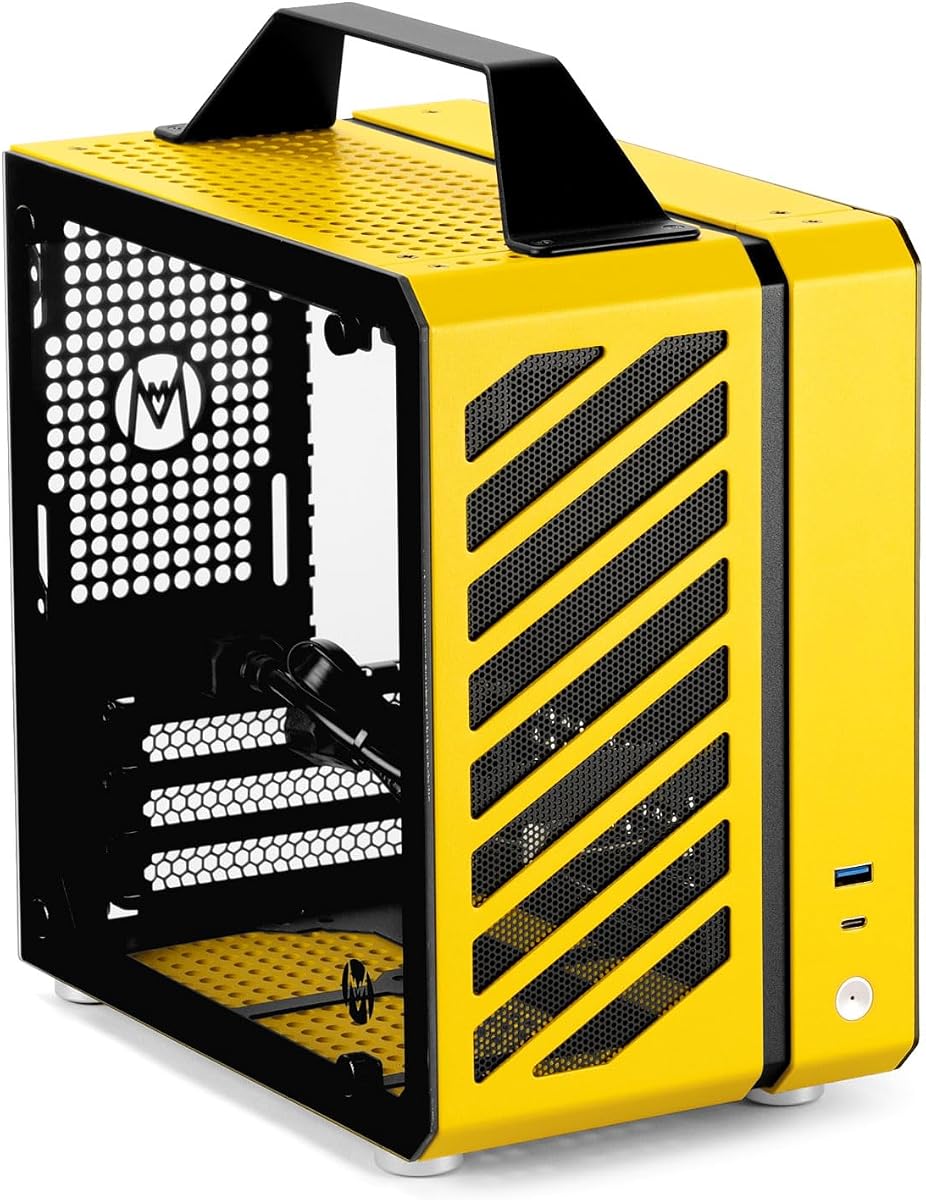
The Mechanic Master C24 features a 9.9L ultra-small form factor ideal for portable builds. Users rate it 4.4 stars, praising the aluminum handle that makes transport easy for LAN parties or travel.
We may earn a commission when you buy through this link, at no additional cost to you.
It supports ITX boards and SFX PSUs, allowing for compact high-performance gaming systems. The hybrid frame is robust and tool-free installation simplifies assembly. Advanced cooling support ensures temperatures remain stable.
Using an SFX power supply can be expensive, and the small internal space limits upgrades. These constraints are acceptable for users prioritizing mobility over expandability.
Ideal for travelers needing a powerful portable rig, this case is highly functional. Select it if you want a cube design that fits easily in a backpack or small bag.
Integrated handles and small size make moving your PC effortless.
Detachable panels allow easy access even in a confined chassis.
We may earn a commission when you buy through this link, at no additional cost to you.
The Fractal Node 804 variant without power supply offers high storage potential for media servers. Rated 4.7 stars, it supports up to eight 3.5-inch drives and uses durable aluminum steel materials for longevity.
We may earn a commission when you buy through this link, at no additional cost to you.
It accommodates Mini-ITX and MicroATX motherboards and provides excellent airflow through its dual chamber layout. The modular design allows customization for various hardware setups without obstruction.
It does not include a power supply, which adds to the total build cost. However, the build quality and storage capacity make it worth the investment for serious users.
Best for storage servers needing reliable airflow, this case offers unmatched utility. Choose it if you plan to run a media hub or archive system with high data capacity.
Eight drive bays support large data archives without sacrificing internal space.
Aluminum and steel materials ensure the case withstands years of operation.
We may earn a commission when you buy through this link, at no additional cost to you.
The Cooler Master Qube 540 Moonstone variant offers a unique finish for white builds. It shares the same features as the black version but holds a 3.8 rating due to fewer user reviews.
We may earn a commission when you buy through this link, at no additional cost to you.
It supports standard ATX motherboards and includes flexible orientation options for custom desk layouts. The tempered glass panels enhance visibility while maintaining the high airflow design of the series.
Some users report higher pricing for the color variant compared to standard options. The lack of extensive reviews makes it harder to verify long-term performance compared to other models.
Ideal for those seeking a specific aesthetic, this model offers design consistency. Select it if matching a white theme is your primary goal for a custom build.
The Moonstone finish aligns perfectly with white component builds and setups.
Retains the flexible orientation design for versatile placement options.
We may earn a commission when you buy through this link, at no additional cost to you.
Selecting the right cube shaped PC case requires evaluating size, airflow, and compatibility to ensure your build performs optimally.
Cube cases vary in size; some support only Mini-ITX or Micro-ATX while others fit full ATX boards. Verify your motherboard dimensions before purchasing to avoid fitting issues.
Always check manufacturer specifications for supported form factors to ensure your core components fit securely.
Airflow is critical in compact designs. Look for mesh panels and pre-installed fans to maintain temperatures during gaming.
Adequate fan support prevents thermal throttling and ensures system stability under load.
Check graphics card and CPU cooler limits. Some cases restrict GPU length or cooler height due to internal geometry.
Matching hardware dimensions to case limits ensures all parts fit without modification.
Steel, aluminum, and plastic impact durability. Thicker metal resists dents and improves vibration damping.
Prioritize durable materials for long-term reliability and better protection for internal hardware.
Cube cases offer unique drive mounting systems. Ensure enough space for your required number of hard drives or SSDs.
Plan your storage needs early to choose a case with sufficient bays.
Interior layouts should support clean routing. Look for cable holes and shrouds to hide wires behind components.
Good cable management improves airflow and enhances the visual appeal of transparent cases.
Glass panels versus mesh determine visibility. Choose based on whether you prioritize component visibility or maximum airflow.
Design choice impacts both looks and thermal performance significantly.
Modern ports like USB Type-C are useful for peripherals. Check front I/O options before buying.
Having fast ports ensures convenient access to external devices.
Always place the case on a stable, flat surface to prevent wobbling. Ensure there is enough clearance around airflow panels for ventilation.
Regularly clean dust filters using compressed air or a soft brush. Dust buildup can restrict airflow and increase internal temperatures over time.
Avoid stacking heavy items on top of the case to prevent structural damage. Ensure all screws are tight after assembly to keep the panels secure.
Cube cases vary by design. Models with full mesh fronts allow excellent airflow while glass-heavy designs rely on fans. Choose based on your specific hardware cooling needs.
Many do, but limits apply. Check clearance specs carefully. Some compact models may restrict long GPUs, so verify compatibility with your specific graphics card model.
Most support Mini-ITX and Micro-ATX. Some larger variants fit standard ATX boards. Always confirm the dimensions against your motherboard requirements before buying.
They can be tighter than standard towers but offer unique cable routing. Planning your route beforehand makes assembly easier. Tool-free designs simplify the process significantly.
Yes, many models support radiators up to 240mm or 360mm. Verify radiator mounting points on the top or rear panel before purchasing pumps or blocks.
They offer unique aesthetics and compact footprints. Cube cases fit smaller desks and look visually striking with glass panels. They are ideal for space-conscious setups.
Most cube cases do not include power supplies. You must buy a compatible PSU separately that matches your case's power requirements and form factor.
Use built-in cable channels and the PSU shroud to route wires. Plan paths carefully to avoid blocking airflow. Good routing keeps the interior clean.
Our top picks cover a range of styles and capabilities from the visually striking Cube Gaming PC Case to the versatile Cooler Master QUBE 540.
Prioritize your specific needs such as motherboard size or cooling requirements when making a selection to ensure long-term satisfaction with your build.
Prices fluctuate often so always check current listings for the best deals before finalizing your purchase decision today.