
HUANUO Printer Stand with Cable Management
4.5Editor score
Compact under desk design
Locking caster wheels included
Storage drawer with dividers
This guide compares the top computer printer drawers for storage and mobility, helping you choose the best mobile filing cabinet or stand for your office needs.
Finding the right storage solution for your office equipment can transform your workspace efficiency. Computer printer drawers offer a practical way to keep printers accessible while organizing documents and supplies nearby for daily use.
We evaluated ten top-rated models based on stability, storage capacity, mobility, and ease of assembly. Each option was compared for its ability to support heavy devices and fit seamlessly into home or professional office environments.
Every pick highlights unique strengths like locking wheels, charging ports, or extra shelving. Prices and availability change frequently, so verify current listings before purchasing to ensure you get the best value for your budget.
4.5Editor score

4.8Editor score

4.2Editor score
The following table provides a side-by-side overview of each model's key specifications to help you quickly identify the right fit for your office layout and storage requirements.


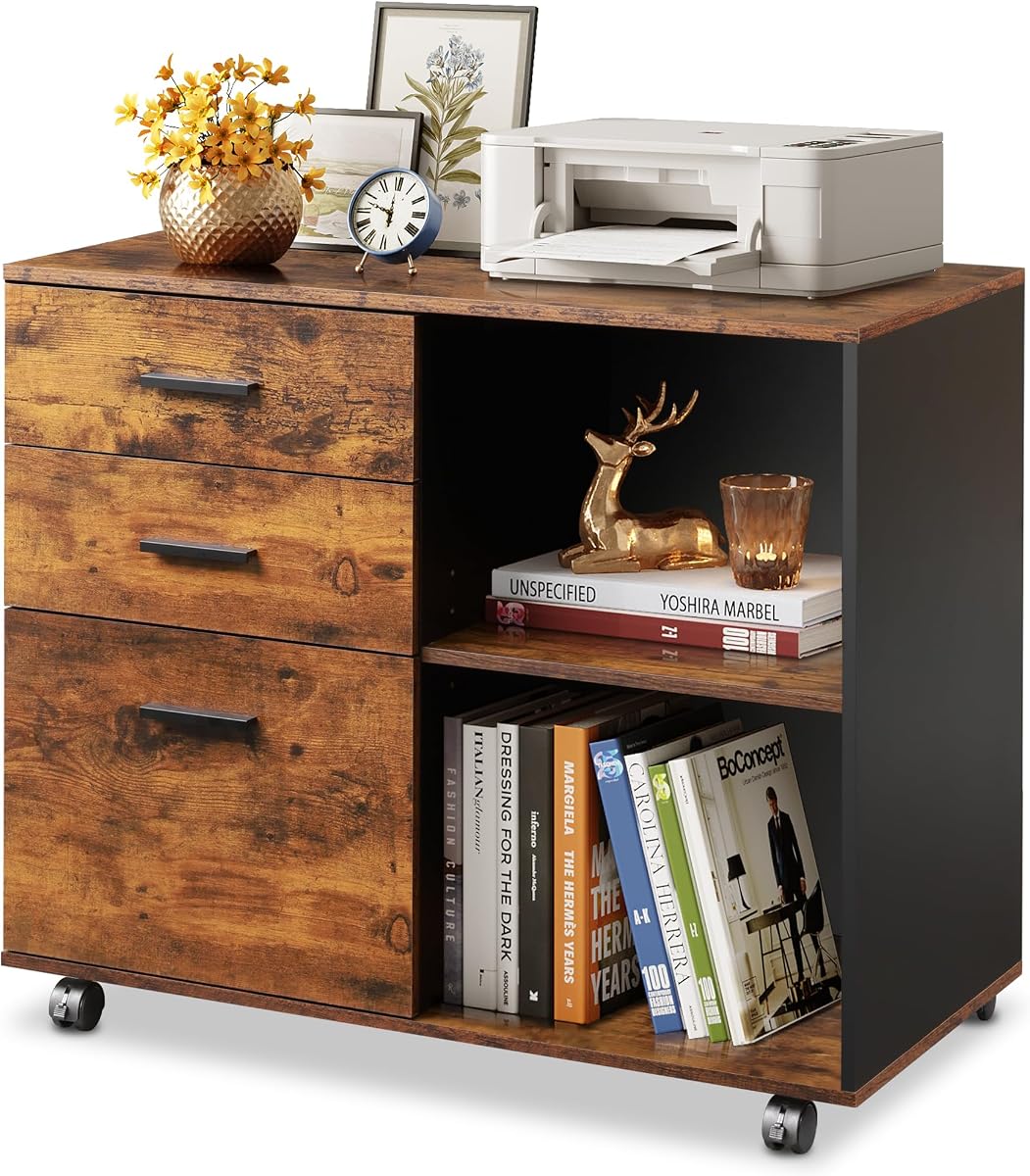
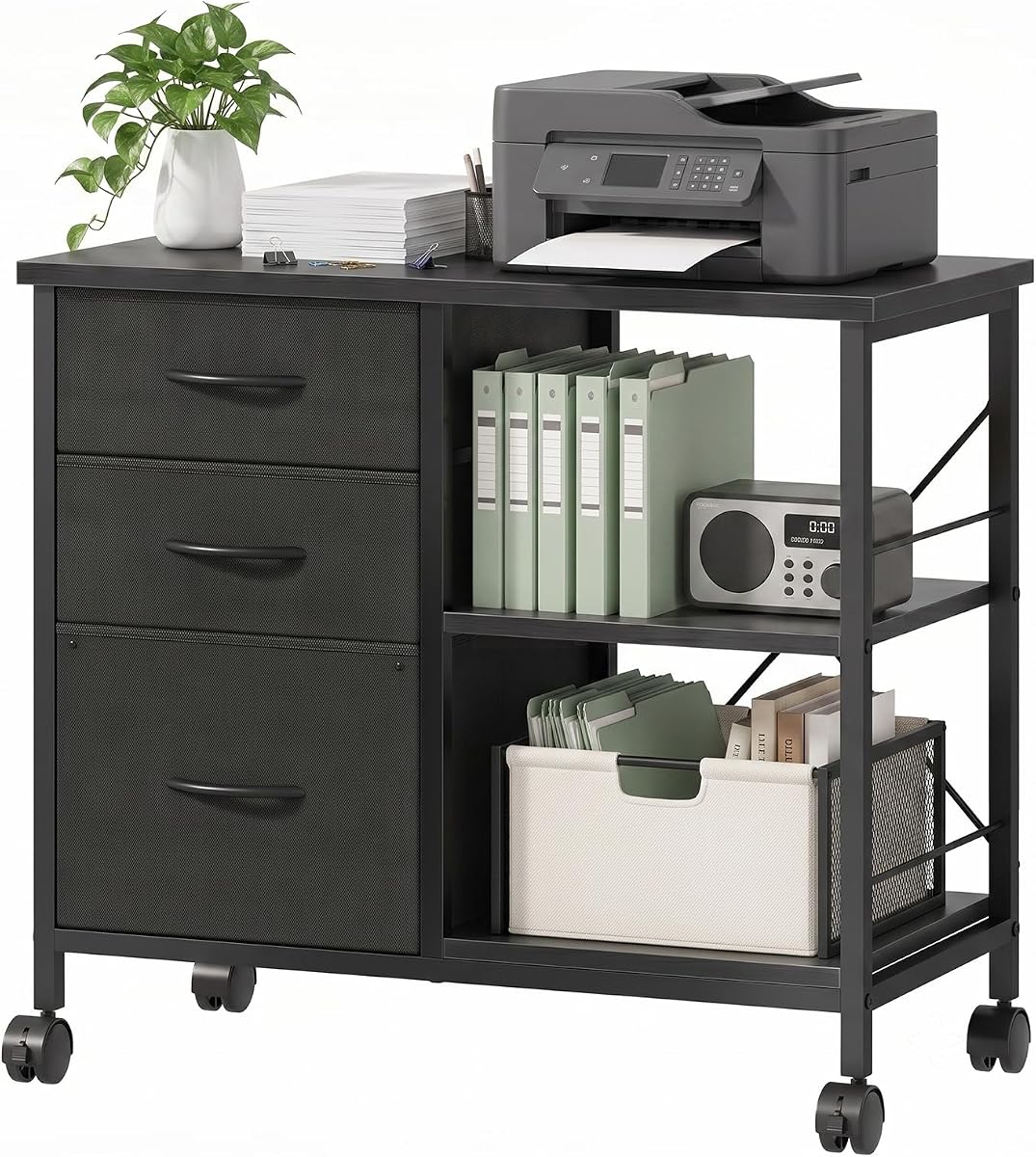
The OLIXIS Mobile File Cabinet stands out as a top choice for organizing printers and documents simultaneously. With a rating of 4.8 stars, it delivers reliable performance for home offices needing compact storage without sacrificing stability or style.
We may earn a commission when you buy through this link, at no additional cost to you.
Its design includes a spacious bottom drawer for A4 or letter hanging files while two smaller drawers handle pens and accessories. The durable wood top provides a secure platform for printers, ensuring they stay steady during operation without wobbling.
While the unit moves smoothly on casters, users should note that the drawers do not include locking mechanisms. This means sensitive documents are accessible to anyone nearby. However, the overall build quality and space efficiency make this a minor trade-off for most.
This cabinet is ideal for professionals who need quick access to files and a dedicated printer spot under their desk. If you value organization and mobility in a single unit, this model offers a balanced solution for modern workspaces.
The compact footprint allows placement under standard desks, freeing up valuable floor area while keeping essentials within arm's reach for daily tasks.
Reinforced metal panels ensure the unit remains stable even when fully loaded, providing long-term reliability for busy office environments.
We may earn a commission when you buy through this link, at no additional cost to you.
For those seeking a cost-effective solution, the HUANUO Printer Stand delivers exceptional value. Rated at 4.5 stars, it offers essential storage and mobility without breaking the bank, making it perfect for small home offices or tight corners.
We may earn a commission when you buy through this link, at no additional cost to you.
Its 2-tier design features a storage drawer with dividers for supplies and a bottom shelf for paper or books. The top platform accommodates most standard printers, while the adjustable height allows it to slide neatly under existing desks.
Users should be aware that the unit supports up to 38.5 lbs, which limits its use to lighter printer models. Additionally, the drawer is best suited for small accessories rather than large file folders due to its limited interior volume.
This stand is recommended for budget-conscious buyers who need basic printer elevation and storage. If you prioritize simplicity and low cost over heavy-duty capacity, this model provides a functional and tidy workstation upgrade.
The under-desk configuration maximizes vertical space, allowing you to keep the floor clear while maintaining easy access to your printer and supplies.
No tools are required to set up this stand, saving you time and effort so you can start organizing your workspace immediately after delivery.
We may earn a commission when you buy through this link, at no additional cost to you.
The GYIIYUO 2 Drawer File Cabinet represents a premium option for users needing robust support and ample workspace. With a 4.2-star rating, it combines durability with style, ideal for professional settings where large printers and heavy loads are common.
We may earn a commission when you buy through this link, at no additional cost to you.
Its standout feature is the 24-inch wide tabletop, providing significantly more room than standard 15-inch models. This extra space allows for dual monitor arms or larger printing equipment, while the steel frame supports up to 120 lbs securely.
While the dual-support system allows switching between rolling and stationary modes for stability, the unit itself is heavy. Moving it may require effort despite the casters. Additionally, the price reflects its premium build, which might exceed budget constraints for some.
Investors in a long-term workspace solution will appreciate its versatility and capacity. If you need a station that handles heavy equipment without compromising on aesthetics or stability, this cabinet is a top-tier choice for demanding offices.
The exclusive dual-support mode lets you lock the unit in place for heavy tasks, ensuring no wobbling occurs during high-volume printing operations.
Its industrial style blends well in living rooms or offices, offering flexible placement options that adapt to various room layouts and decor preferences.
We may earn a commission when you buy through this link, at no additional cost to you.
This MAHANCRIS model introduces convenience with a built-in charging station, featuring outlets and USB ports for powering devices directly from the cabinet. Rated at 4.4 stars, it solves common office issues of finding accessible power sources near printers and scanners.
We may earn a commission when you buy through this link, at no additional cost to you.
The three fabric drawers provide ample storage for files and office supplies, while open shelves accommodate multiple devices. Adjustable hanging rods further enhance organization, making it a versatile piece for maintaining a tidy and functional workspace.
The fabric construction limits heavy loads on drawers compared to solid wood, but it is suitable for documents. Users must ensure the power cord is managed properly to avoid tripping hazards. Overall, the functional design adds significant value to daily routines.
If you frequently charge phones or tablets while working, this unit is an excellent addition. It combines essential filing storage with modern connectivity needs, making it a smart pick for tech-integrated home offices.
Integrated USB ports and outlets eliminate the need for extension cords, keeping your desk area safer and more organized while powering multiple devices.
Adjustable rods and fabric drawers allow you to customize how you store different items, adapting the unit to your changing office requirements.
We may earn a commission when you buy through this link, at no additional cost to you.
The DEVAISE 5-Drawer Wood Drawer Cabinet offers extensive storage options with five individual compartments for diverse organizational needs. Rated 4.4 stars, it provides a sturdy white finish that complements various office themes while supporting significant weight loads.
We may earn a commission when you buy through this link, at no additional cost to you.
Its spacious desktop holds printers or scanners comfortably, while the drawers separate supplies effectively. The rolling wheels allow for easy repositioning, and the front brakes add stability when the unit is stationary. The ECO-friendly board resists scratches and water damage well.
Constructed from particle board, the unit may not be as durable as solid wood over time. The braking system on only two wheels means extra care is needed to prevent sliding on smooth floors. These factors are minor for general home office use.
This cabinet suits users who need multiple small storage spaces alongside a device stand. If you have varied supplies to organize and prefer a clean white look, this model delivers practicality and decent durability for the price.
Five drawers allow for detailed categorization of office materials, ensuring that everything from staples to papers has its designated spot.
Wheels enable easy movement for cleaning or layout changes, while front brakes secure the cabinet in place during active printing tasks.
We may earn a commission when you buy through this link, at no additional cost to you.
DUMOS delivers a heavy-duty solution with a reinforced back support bar and a 110 lb top capacity for printers. Rated 4.5 stars, it balances strength with compact design, ensuring stability even under heavier office loads while remaining easy to move.
We may earn a commission when you buy through this link, at no additional cost to you.
The storage configuration includes a large drawer for files and two smaller ones for supplies. Fabric drawers glide smoothly on rails, offering convenient access. The 2 lockable casters ensure the unit stays fixed when needed, preventing unwanted movement during operation.
While durable, the fabric drawers have lower weight limits compared to the main top. This limits bulk storage of heavy items inside. However, the top capacity remains sufficient for most large printers, making it a reliable choice for heavy use cases.
This stand is perfect for users needing robust support for large equipment. If you prioritize structural integrity and ease of movement in equal measure, this model provides a solid foundation for a productive workspace.
The back support bar prevents wobbling under heavy loads, offering a secure base that protects your printer during daily operation.
Multiple drawer sizes allow for tailored organization of different office supplies, keeping your workspace clutter-free and efficient.
We may earn a commission when you buy through this link, at no additional cost to you.
For multi-device offices, the JUSTOGO Printer Stand offers substantial capacity with three large shelves and four drawers. Rated 4.4 stars, it supports up to 130 lbs, making it ideal for storing printers scanners and bulk supplies without cluttering the desk.
We may earn a commission when you buy through this link, at no additional cost to you.
Its 26.3-inch wide shelves provide generous space for heavy printers, while the fabric and file drawers keep papers organized. The industrial design with vintage wood grain adds aesthetic appeal, blending functionality with a modern office look.
The unit is quite tall and occupies significant floor space, which might not suit small rooms. Assembly is straightforward but requires following instructions carefully. Despite its size, it maximizes vertical space efficiently for larger home or small business setups.
This cabinet is best for environments with extensive storage needs. If you run a studio or small business needing to house multiple devices securely, this model delivers the space and durability required for high-volume operations.
Three large shelves allow simultaneous placement of printers and scanners, reducing the need for multiple furniture units in one room.
Heavy-duty steel and waterproof particleboard ensure longevity, resisting wear and tear from daily office use and potential spills.
We may earn a commission when you buy through this link, at no additional cost to you.
The VASAGLE cabinet features a generous 60x40cm worktop that accommodates full-size printers and extra gear easily. Rated 4.1 stars, it offers a balanced mix of storage and workspace, ideal for those needing room for accessories alongside printing equipment.
We may earn a commission when you buy through this link, at no additional cost to you.
Three fabric drawers provide organized storage for documents and supplies, with a side pouch for quick access items. The unit rolls smoothly on casters with brakes for stability. Replaceable adjustable feet help it sit level on uneven floors.
Fabric drawers may wear faster than wood under heavy load, but they offer soft access. The assembly is designed to be straightforward with pre-numbered parts. Users should check floor stability to ensure proper leveling without the adjustable feet.
This model suits users needing extra desktop workspace. If you want a stylish and functional unit with a large top for daily tasks, it provides a practical solution for organizing home offices efficiently.
The large surface area allows for placing printers alongside laptops or tablets, creating an all-in-one workspace station.
Drawers and side pouches enable flexible organization of various office items, keeping frequently used supplies within easy reach.
We may earn a commission when you buy through this link, at no additional cost to you.
Rated 4.2 stars, this DEVAISE model offers robust support with 150 lb capacity and smooth full-extension drawer slides. The rustic brown finish adds warmth to offices, while lateral rails ensure easy access to hanging files for efficient document management.
We may earn a commission when you buy through this link, at no additional cost to you.
The bottom drawer fits A4 or letter files perfectly, and the open shelves accommodate devices. Central casters prevent tipping when drawers are fully extended, adding safety. Five rolling wheels ensure mobility on both wood and carpet floors without struggle.
Construction relies on eco-friendly wood boards which are durable but may require care against sharp objects. Assembly is required but supported by 24/7 service. This unit stands out for its file storage focus and sturdy frame.
Ideal for those prioritizing file access and stability, this cabinet is a strong choice for organized workflows. If you need a reliable lateral file drawer with printer top, it offers excellent functionality and aesthetic appeal.
Full-extension slides and adjustable rails make retrieving documents quick and quiet, enhancing efficiency in busy workdays.
Central casters and locking brakes prevent tipping and ensure stability, protecting your equipment when files are accessed.
We may earn a commission when you buy through this link, at no additional cost to you.
This black lateral cabinet earns a 5.0-star rating for its thickened steel frame and reinforced back bars. It offers reliable heavy-duty support at 110 lbs, ensuring stability for printers while maintaining a sleek industrial look for any office decor.
We may earn a commission when you buy through this link, at no additional cost to you.
Three fabric drawers slide smoothly to store stationery and supplies efficiently. The steel construction adds scratch resistance and durability for daily use. Labeled parts and clear guides make setup quick and stress-free for most users.
Drawers are fabric, which may be less robust for heavy storage compared to wood. Also, there are no built-in charging ports. However, for pure mechanical stability and strength, this model is a top performer in its category.
Buyers seeking a durable and simple storage solution will appreciate its construction. If you value a sturdy steel structure and easy setup, this cabinet is a highly recommended choice for secure printer placement.
Thickened steel frame provides lasting durability, protecting your investment against daily wear and tear in active offices.
Clear part labels guide quick assembly, allowing you to start using the storage unit without frustration or delays.
We may earn a commission when you buy through this link, at no additional cost to you.
Selecting the right printer drawer requires evaluating several critical factors to ensure compatibility with your equipment and workspace needs.
Always check the maximum load rating to ensure the cabinet can support your printer safely. Look for reinforced frames and locking casters to prevent wobbling during operation. Stability is crucial for preventing accidents and protecting expensive equipment.
Prioritize models with steel or thick wood construction if your printer is heavy to guarantee long-term reliability and safety.
Determine how many drawers or shelves you need based on your document and supply volume. Fabric drawers are lighter but may not hold as much weight as solid wood or metal options. Consider open shelving for devices and drawers for files.
Choose a layout that separates papers from supplies to keep your workspace organized and efficient daily.
Measure the space under your desk or the intended location before buying. Ensure the top surface is wide enough to hold your printer and any accessories. Height is also important if you need the unit to slide under a standard workstation.
Verify overall width and depth to avoid obstructing walkways or blocking other office furniture effectively.
If you plan to move the unit often, ensure it has smooth-rolling casters with locking mechanisms. This flexibility allows you to reconfigure your workspace easily without heavy lifting. Check if casters are suitable for your floor type, whether carpet or hardwood.
Lockable wheels are essential for maintaining stability while the printer is in active use to prevent accidental movement.
Materials like steel and engineered wood offer better scratch resistance than particleboard or fabric. Durable finishes protect against spills and wear, extending the cabinet's lifespan. Look for water-resistant or scratch-resistant properties if your office is prone to accidents.
Invest in robust materials to ensure your storage solution lasts through years of daily office use without degrading.
Some models require tools while others promise tool-free assembly. Check if all necessary hardware and instructions are included to avoid delays. Pre-numbered parts and clear diagrams can save significant time during setup.
Choose an option that matches your DIY skills and available tools to ensure a smooth and successful installation process.
Extra amenities like charging stations, side pouches, or open shelves add value to your purchase. These features can power devices or store specific accessories, enhancing functionality. Consider if such additions justify a higher price point for your needs.
Prioritize features that directly improve your workflow and reduce clutter for a more efficient workspace.
Select a color and finish that blends with your existing office decor. Industrial styles with wood grain finishes offer versatility in modern spaces. Matching the unit to your room enhances the overall professional appearance of your workspace.
Visual appeal should not be overlooked as it contributes to a pleasant and productive working environment.
Place the cabinet on a flat surface and secure all locking casters before setting your printer on top. This ensures stability during operation and prevents the unit from sliding unexpectedly during use.
Organize items by category using drawers and shelves to maintain a tidy workspace. Store heavier equipment on lower shelves or the main platform to prevent tipping and ensure balance.
Regularly dust the surfaces and wipe down wood or metal panels with a damp cloth to maintain appearance. Check wheels occasionally to ensure they roll smoothly and do not collect debris that could hinder movement.
Most models support heavy printers, with capacity ratings ranging from 38 to 150 lbs. Check specific specs to ensure your printer weight falls within the unit's rated limit for safe operation.
Some models offer drawers with locking mechanisms, but many rely on cabinet locking casters for overall security. Verify product details if you need secure storage for sensitive documents.
Yes, all listed cabinets feature casters compatible with hardwood, tile, and carpet. Ensure casters are locked during use to prevent unwanted movement on smooth surfaces.
Assembly varies by model, but most include all necessary tools and clear instructions. Some offer tool-free designs while others require basic screwdriver work for setup.
Most cabinets do not allow adding outlets post-assembly. If power access is vital, choose a model that already includes built-in charging ports and USB connections.
Shelf widths vary but generally range from 14 to 26 inches. Ensure the top surface is wide enough to accommodate your printer and any surrounding accessories comfortably.
This guide highlights ten top options ranging from budget-friendly stands to heavy-duty cabinets. Each model offers unique benefits to suit different office sizes and storage needs.
Focus on weight capacity and dimensions first to ensure your printer fits securely. Consider mobility features if you need to reorganize your workspace frequently.
Prices and availability vary often so check current listings before purchasing. Select the unit that balances durability, storage, and style for your professional environment.