
3DMakerpro Fox Entry-Level Medium-Format
3.2Editor score
0.07mm accuracy
Markerless AI tracking
Entry-level accessible design
3D scanners transform physical objects into digital models for printing, design, and analysis. Choosing the right device depends on your needs, budget, and the complexity of items you scan regularly.
We evaluated ten leading models based on accuracy, scanning speed, software capabilities, and portability. Our analysis covers handheld units suitable for hobbyists to industrial-grade tools for professional engineering and manufacturing applications.
Each selection highlights unique strengths like wireless connectivity, AI processing, or color capture. Prices and availability fluctuate, so verify current offers before purchasing to ensure you get the best value for your specific use case.
3.2Editor score

5.0Editor score

4.8Editor score
As an Amazon Associate we earn from qualifying purchases.
This side-by-side comparison highlights the core specifications and capabilities of each model to help you identify the best fit for your specific scanning requirements and workflow demands.


The Creality Pika stands out as a top-tier handheld scanner offering professional-grade accuracy in a pocket-sized form factor. With 0.03mm precision and dual scanning modes, it handles everything from tiny parts to full-body scans effectively. Its AI features streamline post-processing, making it accessible for both professionals and advanced hobbyists.
We may earn a commission when you buy through this link, at no additional cost to you.
It combines blue laser lines for detailed small objects with NIR structured light for larger surfaces. The inclusion of 110 FPS scanning speed ensures efficient workflows. Users can export directly to standard formats like STL and OBJ for immediate use in 3D printing or CAD software.
While the price reflects its premium capabilities, the convenience of wireless operation and the lack of need for scanning spray on dark surfaces justifies the investment. The battery system supports extended sessions, reducing interruptions during large scanning projects.
Anyone needing high precision for reverse engineering or detailed prototyping will appreciate the versatility. The intuitive app and touchscreen interface further reduce the learning curve. For those seeking a balance of speed, accuracy, and portability, this model leads the category.
Built-in AI completes body scans from photos and repairs holes automatically. This reduces manual editing time significantly for complex models.
Switch between laser and structured light to match object size and surface type. This ensures accurate data capture regardless of the target.
We may earn a commission when you buy through this link, at no additional cost to you.
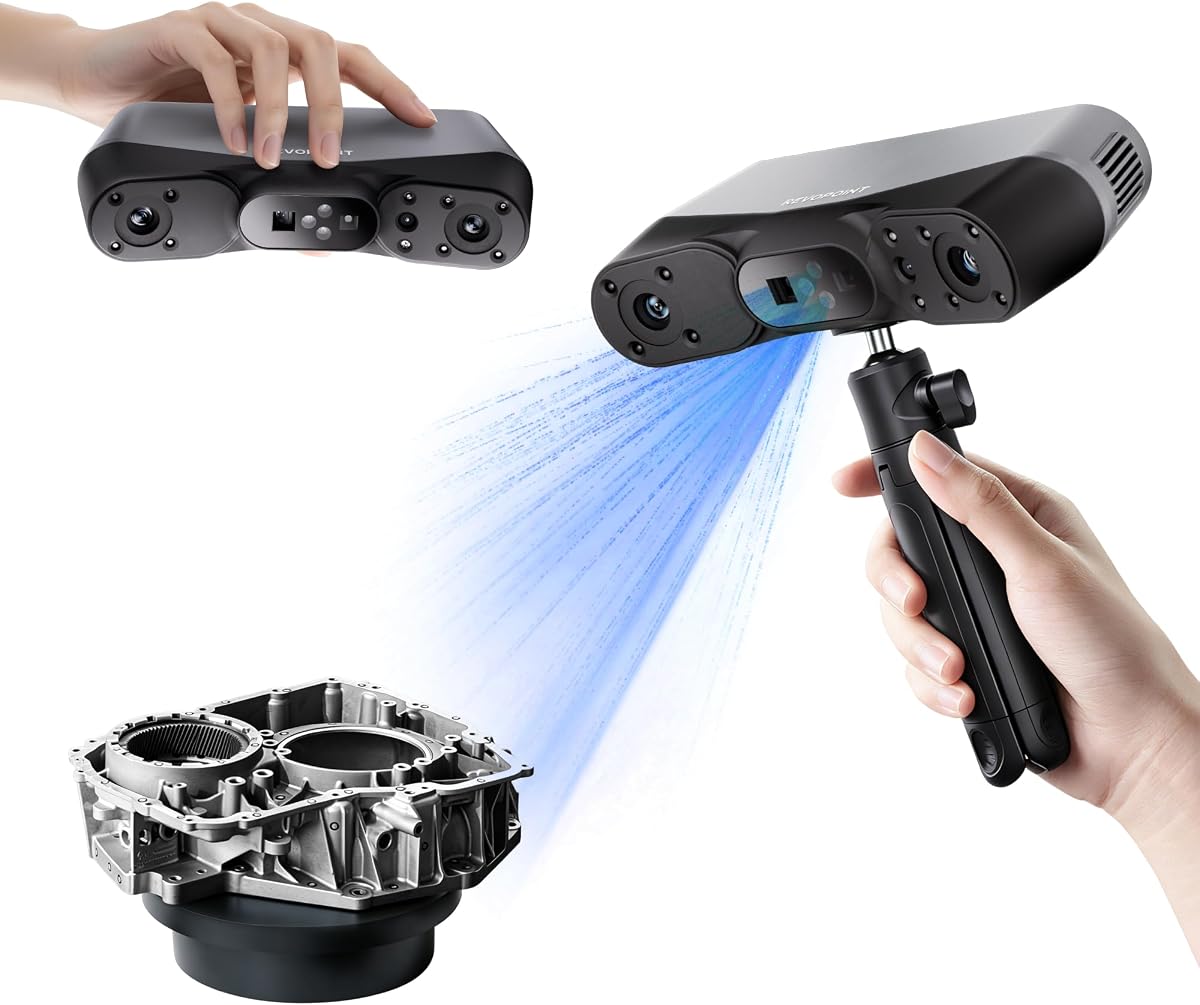
The Revopoint POP 4 is designed for users needing robust performance in varied environments. Its ability to operate in bright sunlight up to 100,000 lux makes it ideal for fieldwork. The high point acquisition rate ensures smooth capture of complex geometries quickly. AI segmentation filters noise, simplifying the clean-up process after scanning.
We may earn a commission when you buy through this link, at no additional cost to you.
It supports multiple scanning modes including NIR and blue laser to handle different surface types. The battery grip extends operational time significantly for outdoor sessions. Exporting in splat format allows for photorealistic rendering in VR or gaming applications without extra texture mapping steps.
Post-processing requires attention to detail but offers advanced tools for reverse engineering. The software ecosystem integrates well with measurement and design tools though some features are paid add-ons. Users should be comfortable with technical adjustments to fully leverage its capabilities.
For professionals in construction or industrial inspection, the reliability in harsh conditions is a major plus. The wireless streaming feature allows monitoring on tablets for better positioning control. It is a strong choice for those needing consistent accuracy across large projects.
Built-in filters allow stable operation in direct sunlight. This removes the need for shaded areas during outdoor data capture.
Gaussian Splatting converts scans to lifelike models instantly. Import phone photos to apply real textures for immersive visual results.
We may earn a commission when you buy through this link, at no additional cost to you.
Weighing only 190 grams, the INSPIRE 2 is one of the lightest professional scanners available. Its dual module design handles reflective surfaces without spray. The optical zoom allows focused scanning on mixed-geometry surfaces. Real-time PC-to-mobile streaming improves workflow flexibility for remote operations.
We may earn a commission when you buy through this link, at no additional cost to you.
Accuracy reaches 0.05mm which is sufficient for most detailed prototyping needs. The RGB camera ensures true-to-life color mapping for preservation projects. Outdoor performance is reliable in shaded or semi-bright conditions. It includes necessary accessories like calibration boards and markers.
Users may need to adjust settings for best results on highly reflective items. The software offers advanced tools but requires some training to master. Overall, the balance of weight and performance makes it highly portable for on-site surveys.
It fits well for architects or designers who need to capture rooms or products on the go. The wireless features mean you can review scans live on a tablet. For lightweight portability without sacrificing too much precision, this is an excellent pick.
Aerospace-grade aluminum front increases durability without adding weight. This ensures longevity during frequent field transport.
RGB data syncs automatically with geometry. This creates realistic textures for digital archiving and presentation models.
We may earn a commission when you buy through this link, at no additional cost to you.
The MetroY Ultra delivers exceptional precision suitable for tight tolerance measurements. Its blue laser technology captures intricate geometric details flawlessly. Scanning speeds up to 90 FPS accelerate large object capture without quality loss. The device handles dark or glossy surfaces directly without spray.
We may earn a commission when you buy through this link, at no additional cost to you.
Five scanning modes allow adaptation to various scenarios from deep holes to large industrial parts. Wireless control via Revo Mirror lets you monitor progress on mobile devices easily. The battery grip supports extended field work without constant recharging. Export options include industry-standard formats.
It requires a high-performance computer to process dense point clouds effectively. The software offers robust editing tools but is complex for beginners. This level of detail is ideal for manufacturing or reverse engineering tasks where accuracy is non-negotiable.
Professionals requiring metrology-grade results will find the capabilities justify the investment. The ability to scan outdoors in harsh sunlight adds versatility. For those needing the highest accuracy in a handheld unit, this model stands out.
Single-frame precision reaches 0.01mm. This ensures reliable measurements for quality control and industrial inspection tasks.
Directly scans high-gloss metals and black objects. This saves prep time and protects delicate parts from coating sprays.
We may earn a commission when you buy through this link, at no additional cost to you.
MetroX Pro brings industrial-grade scanning to a desktop workflow. It captures fine features with 0.01mm precision. The auto turntable feature automates scans for complex objects easily. Real-time streaming lets you view the model on your phone while scanning.
We may earn a commission when you buy through this link, at no additional cost to you.
Shiny or dark surfaces are handled without spray thanks to optimized laser lines. The software offers intuitive interfaces for editing and merging data. Compatibility with professional design tools ensures smooth integration into engineering workflows. It supports various tracking modes for different object types.
Users need to be comfortable with high-end technical specifications. The turntable is a significant advantage for repetitive or high-volume tasks. While costly, the efficiency gains are substantial for professional use. It bridges the gap between prototyping and production quality.
Ideal for industrial designers or quality inspectors needing rapid results. The RGB camera adds realism to color-accurate scans. For those seeking a powerful all-in-one solution, this scanner provides significant value and precision.
Dual-axis turntable automates one-click scans. This reduces manual rotation and speeds up the capture of complex geometries.
Stream scan data to phones or tablets instantly. This improves positioning and reduces blind spots during handheld operations.
We may earn a commission when you buy through this link, at no additional cost to you.
The Fox 3D Scanner is designed for beginners entering the world of digitization. It offers 0.07mm accuracy which is useful for hobbyist prints. The markerless AI visual tracking makes scanning much easier for first-timers. Software handles pre and post-processing to simplify the workflow.
We may earn a commission when you buy through this link, at no additional cost to you.
It delivers reliable detailed models for practical projects without needing advanced skills. The ecosystem is trusted by many users for its stability. It holds up under scrutiny for 3D printing and simple measurements. The handheld design is comfortable for extended use sessions.
Advanced industrial features are missing compared to pricier models. However, it strikes a solid balance between performance and price for casual users. Training is minimal due to the intuitive interface. It removes barriers for those who just want to start scanning objects.
Best for artists or hobbyists creating replicas for 3D printing. The ease of use means you can focus on results rather than technical setup. For a starter scanner that gets the job done, this is a practical choice.
Relocks onto scanned areas instantly if you move too fast. This prevents needing to restart scans due to tracking errors.
Scanning and optimizing happen in one seamless process. This reduces the need for external tools and simplifies the user experience.
We may earn a commission when you buy through this link, at no additional cost to you.
The Otter Lite uses a quad-camera system to capture details from coins to cars. It reaches up to 78 inches in scan range making it highly versatile. Accuracy of 0.05mm is suitable for reverse engineering and prototyping. It uses eye-safe infrared for full-body scans safely.
We may earn a commission when you buy through this link, at no additional cost to you.
Full color texture capture brings models to life with realistic 24-bit colors. It handles dark and metallic surfaces without spray thanks to advanced DOE technology. Wi-Fi 6 support ensures smooth data transfer to devices. The software includes AI mesh repair for better results.
The large capture area speeds up workflow for big projects significantly. While not designed for extreme sunlight, it works well indoors or shade. The included accessories help stabilize scanning for better quality. It is a strong tool for automotive or industrial hobbyists.
Ideal for those needing a wide scanning range in one device. The color capability enhances digital displays and product presentations. For a flexible scanner that handles varied sizes, this model offers excellent utility and value.
Dual long and short focal lenses cover diverse sizes. This allows detailed captures of small parts and large scenes.
Built-in RGB camera records vibrant accurate colors. This is ideal for product display and heritage preservation projects.
We may earn a commission when you buy through this link, at no additional cost to you.
The Ferret SE focuses on ease of use with anti-shake tracking technology. This enhances success rates for users with shaky hands. It captures colorful vivid textures for realistic models. The flexible range handles medium to large objects comfortably.
We may earn a commission when you buy through this link, at no additional cost to you.
Black and metal objects can be scanned without needing spray. This simplifies prep time significantly for quick scans. The 2MP color camera records details effectively for visual models. It is optimized for entry-level users learning scanning workflows.
While accuracy is lower than premium models, it suffices for basic prototyping. The software supports standard exports for 3D printing. It is a good stepping stone for those exploring digital scanning without high costs. Stability features reduce frustration during learning.
Best for hobbyists wanting to capture objects without advanced training. The anti-shake feature helps get cleaner data quickly. For a simple and effective starter scanner, this model offers reliable performance for casual projects.
Advanced technology increases success rate with rapid movement. This ensures smooth scans even with hand instability.
Built-in camera records original colors vividly. This brings intricate details to life for visual model accuracy.
We may earn a commission when you buy through this link, at no additional cost to you.
The Ferret Pro adds wireless scanning capabilities via a dedicated bridge. WiFi6 ensures stable data transfer speeds compared to older standards. It maintains the same accuracy and speed as the SE model. The anti-shake technology ensures smooth results during movement.
We may earn a commission when you buy through this link, at no additional cost to you.
It supports Windows Mac and Android devices for broad compatibility. Outdoor performance works up to 30000 lux for shaded conditions. Export formats include OBJ STL and PLY for integration into various software. It is a great mobile solution for on-the-go work.
The wireless feature offers convenience but depends on the bridge app. Users should ensure compatibility with their devices before purchase. For those needing mobility and connectivity, the upgrade is worthwhile. It simplifies setups without cables.
Ideal for professionals needing to move freely without cable constraints. The cross-platform support adds flexibility to different workflows. For wireless scanning reliability, this model provides a solid entry point into mobile workflows.
Three times faster speeds than previous WiFi standards. This ensures stable data transfer for smooth scanning workflows.
Works with Windows Mac and Android devices. This offers flexibility for various user environments and devices.
We may earn a commission when you buy through this link, at no additional cost to you.
MIRACO Plus integrates photogrammetry metrology for high-resolution capture on large objects. Its 6-inch flip screen provides clear previews at any angle. With 32GB RAM and an 8-core processor, it handles dense point clouds efficiently. Dual modes allow switching between single-shot and continuous scanning.
We may earn a commission when you buy through this link, at no additional cost to you.
Optical infrared zoom captures surface details with less noise. The 48MP RGB camera with flash LEDs ensures lifelike color capture. It supports fast charging for extended usage periods. Export options include major formats like OBJ PLY and STL for CAD.
The software enables conversion to CAD models for engineering tasks. While heavy for portable use, the internal processing power reduces PC dependency. It includes a carry case for easy transport. For all-in-one capabilities, this unit stands out.
Ideal for users needing high performance without external computing. The flip screen and powerful hardware ensure professional results on-site. For advanced scanning needs requiring internal processing, this model is a top choice.
Includes scale bars and targets for high precision. This enables accurate measurements on large objects.
8-core processor and 32GB RAM handle dense data. This reduces dependency on external PC for heavy tasks.
We may earn a commission when you buy through this link, at no additional cost to you.
Selecting the right 3D scanner requires understanding your specific needs and constraints. Below are key factors to consider.
Accuracy determines how closely the digital model matches the physical object. Industrial applications typically require tolerances within 0.01mm to 0.03mm while hobbyist needs may be satisfied with 0.1mm.
Look for single-frame accuracy ratings in product specifications. Higher precision ensures reliable measurements for reverse engineering and quality control.
Speed affects how quickly you can capture objects. Models offering high frames per second reduce capture time and help in scanning dynamic subjects. Faster rates also minimize motion errors during handheld use.
Choose a scanner with sufficient FPS to match your workflow. High-speed options are crucial for large objects or time-sensitive projects.
Different surfaces like shiny metals or black plastics can pose challenges. Some scanners handle these directly while others need spray. Check for dual-mode technology or specialized sensors for difficult textures.
Models with multiple modes offer better versatility. This avoids extra prep steps and speeds up your scanning workflow.
Post-processing software is as important as hardware. Ensure the scanner supports export formats you need like STL or OBJ. Look for features like noise filtering or auto alignment to save editing time.
Verify compatibility with your operating system. Some advanced tools require Windows only so confirm before buying.
Wireless scanning via Wi-Fi allows more freedom during use. A compact and lightweight design makes it easier to transport for fieldwork. Long battery life supports uninterrupted sessions.
Consider where you will scan most. Indoor stationary work differs from outdoor mobile use. Choose accordingly to maximize efficiency.
Prices range from entry-level to industrial. Higher cost models offer better accuracy but entry-level units suffice for prototyping. Weigh the cost against the features you will actually use.
Don't pay for capabilities you don't need. A balanced choice ensures you stay within budget while meeting project goals.
RGB cameras add realism by capturing surface color. This is vital for heritage preservation or product displays. Ensure the scanner maps color to geometry accurately.
Look for high-resolution cameras and good lighting features. Realistic textures improve visualization and presentation quality.
Outdoor use requires resistance to sunlight and varying light levels. Models with outdoor filters or NIR lasers work better in bright environments. Check lux ratings for outdoor performance.
If scanning in bright light is common, invest in outdoor-ready specs. This ensures data quality regardless of lighting.
Start by calibrating your scanner using the provided board to ensure accurate measurements. Clean the lens regularly to prevent smudges from affecting data quality.
Keep your working area well-lit but avoid direct sunlight unless your device is rated for it. Use stable surfaces or tripods for better consistency during longer scans.
Update software frequently to access new features and fixes. Store scans in multiple formats to prevent data loss and ensure compatibility with your future projects.
Handheld scanners offer mobility for large or irregular objects while desktop units are ideal for small high-detail parts. The choice depends on your typical object size and workspace constraints.
Many modern scanners use NIR or blue laser to handle dark or shiny surfaces without spray. Check your model's specs for spray-free capabilities before purchasing.
STL and OBJ are standard formats widely supported by slicing software. PLY is also good for preserving color data. Most scanners export these directly.
Yes if the scanner uses eye-safe infrared or structured light. Ensure the device is rated for full-body scanning and follows safety guidelines.
High-resolution scans can take significant space depending on point cloud density. Use external drives or cloud storage for large libraries of models.
High-end industrial scanners benefit from powerful PCs while basic models run on standard hardware. Check system requirements to match your setup.
Recalibrate at least monthly or if you drop the device. Regular checks maintain accuracy over time.
Modern WiFi6 enabled models offer stable connections comparable to wired ones. Ensure interference is minimal for consistent data transfer.
We explored ten top scanners ranging from budget-friendly options to industrial-grade models. Each offers unique strengths tailored to different needs from hobbyists to professionals.
Prioritize accuracy and software features that align with your workflow. Consider portability and ease of use if you scan frequently outside a studio.
Prices and availability change often so check current listings before purchasing. Finding the right fit ensures you achieve precise digital results consistently.