
LG 24U411A-B
4.5Editor score
Full HD IPS panel
120Hz refresh rate
Slim bezel design
Finding a display that remains visible under direct sunlight is crucial for outdoor professionals. High brightness and anti-glare coatings define the best options in this category for reliable performance.
We analyzed ten top-rated monitors focusing on nits, color gamut, and connectivity. Our comparison ensures you find a screen that handles bright environments without sacrificing visual fidelity or speed.
Each pick highlights unique strengths for field work or desk setups. Note that prices and availability change frequently, so verify current deals before purchasing your next bright sunlight PC monitor.
4.5Editor score
4.8Editor score

4.4Editor score
As an Amazon Associate we earn from qualifying purchases.
This table offers a side-by-side view of key specifications for all ten selected monitors. Use it to quickly identify the right balance of brightness, resolution, and size for your needs.


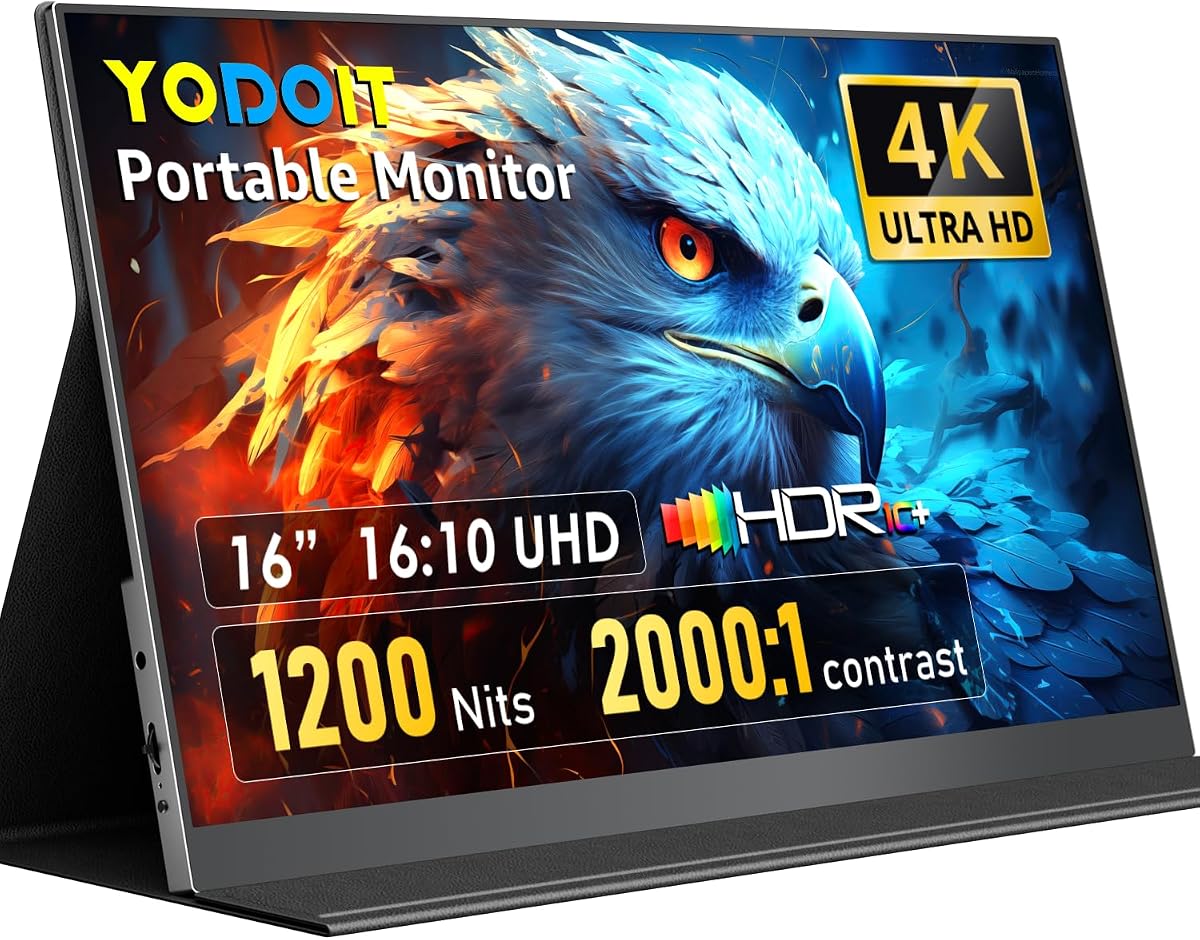
The Yodoit 4K Portable Monitor stands out as the premier choice for outdoor professionals needing high visibility. With a peak brightness of 1200 nits, it overcomes the limitations of standard portable screens that fail under direct sun. Its 16-inch canvas offers a professional 4K resolution tailored for precision work.
We may earn a commission when you buy through this link, at no additional cost to you.
This monitor delivers exceptional color accuracy with 145% sRGB coverage and a 2000:1 contrast ratio. The matte finish eliminates reflections, making it ideal for photographers and field inspectors. Connectivity options include USB-C and Mini HDMI, ensuring compatibility with laptops, consoles, and cameras.
While it requires a power adapter for peak performance at full resolution, the trade-off ensures stable output in demanding environments. The included magnetic cover acts as a versatile stand, enhancing portability without compromising protection. This design supports a wide range of workflows from editing to presentations.
Anyone needing a reliable second screen for outdoor or high-light conditions should consider this model. It excels in scenarios where visibility and color fidelity are paramount. The build quality and feature set justify its position as the top pick in our comparison for bright sunlight PC monitors.
The 1200 nit brightness ensures content remains clear even in direct sunlight without squinting.
With 145% sRGB and high contrast, this screen supports critical color grading and photo editing tasks.
We may earn a commission when you buy through this link, at no additional cost to you.
The LG 24U411A-B offers an accessible entry point into high-quality IPS monitoring. Its 120Hz refresh rate ensures smooth motion for gaming and general tasks. The slim bezels create a modern look suitable for multi-monitor setups in home offices.
We may earn a commission when you buy through this link, at no additional cost to you.
This monitor features HDR10 support and 99% sRGB color coverage for vibrant visuals. The Reader Mode reduces blue light for comfortable extended viewing sessions. Adjustable tilt allows users to find an ergonomic angle for daily use.
While it lacks higher resolutions or USB-C, its performance per dollar is excellent. The fast response time minimizes blur during dynamic content. It serves well as a secondary screen for general productivity and media consumption.
Budget-conscious buyers seeking a reliable IPS panel will appreciate its value. It balances performance and cost effectively for standard indoor environments. This model is a strong contender for those prioritizing fluid motion over ultra-high resolution.
The 120Hz refresh rate provides fluid visuals that reduce motion blur during gaming or scrolling.
Reader Mode and flicker safe technology help reduce strain during long working hours.
We may earn a commission when you buy through this link, at no additional cost to you.
The Dell 27 Monitor S2725QS brings premium features to a large 27-inch canvas. Its 4K resolution provides sharp detail ideal for creative professionals. ComfortView Plus reduces blue light significantly while maintaining color accuracy.
We may earn a commission when you buy through this link, at no additional cost to you.
AMD FreeSync Premium ensures a tear-free experience up to 120Hz for work and play. The 1500:1 contrast ratio enhances depth in HDR-ready content. Re-engineered sound quality adds value with spacious audio built into the unit.
The ultra-thin bezels contribute to a sleek aesthetic suitable for modern workspaces. While the response time is moderate, it remains effective for most non-competitive gaming. It balances performance with visual fidelity for high-demand users.
Professionals seeking a large, accurate display for multimedia and design work should consider this. The combination of 4K clarity and eye comfort makes it a top-tier option. It represents a solid investment for long-term workstation upgrades.
ComfortView Plus reduces harmful blue light emissions to under 35% without sacrificing color quality.
Vivid colors with 99% sRGB and HDR readiness deliver breathtaking depth and detail.
We may earn a commission when you buy through this link, at no additional cost to you.
The Dell 24 Plus Monitor S2425HSM emphasizes ergonomics and user comfort. Its full stand adjustability supports various viewing preferences throughout the day. The TUV certified eye comfort reduces strain during long work hours significantly.
We may earn a commission when you buy through this link, at no additional cost to you.
With a 144Hz refresh rate, motion appears fluid for gaming or video playback. The integrated speakers provide clear audio without external devices. The ash white finish offers a modern look that fits contemporary office decor styles.
While it uses Full HD resolution, the high refresh rate keeps tasks responsive. The pivot and swivel features allow for versatile orientations. This model serves well for general productivity and casual entertainment needs.
Users prioritizing ergonomics and adjustability will find this monitor highly practical. The balance of features and build quality is strong for office environments. It is an excellent choice for those needing comfort during extended work sessions.
Height, tilt, pivot, and swivel adjustments support optimal posture for any task or seating arrangement.
The 4-star TUV certification ensures high-quality eye protection while maintaining stunning image clarity.
We may earn a commission when you buy through this link, at no additional cost to you.
The Acer SB273 G0bi provides a large 27-inch viewing area at an accessible price. Its zero-frame design maximizes screen visibility for immersive multitasking. The 120Hz refresh rate ensures smooth motion for dynamic content and gaming.
We may earn a commission when you buy through this link, at no additional cost to you.
Adaptive-Sync support matches the graphics card to eliminate screen tearing. The 1ms VRB response time minimizes ghosting during fast-moving scenes. It delivers high-quality images with excellent detail across the full screen area.
While the brightness is standard at 250 nits, it remains suitable for indoor use. The design focuses on simplicity and performance for general office tasks. This monitor is a solid pick for budget-conscious buyers needing size.
Those looking for a large workspace without premium costs will appreciate this option. It balances resolution and refresh rate effectively for daily productivity. It is a practical solution for home offices or student setups requiring screen real estate.
The borderless frame provides maximum screen visibility from edge to edge for focused work.
With 120Hz and Adaptive-Sync, visuals remain fluid and tear-free during gaming or video playback.
We may earn a commission when you buy through this link, at no additional cost to you.
The LG 32 inch QHD Monitor features USB-C connectivity that simplifies desktop setup. This single cable handles video transmission and device charging efficiently. The 32-inch canvas provides ample space for multitasking and media consumption.
We may earn a commission when you buy through this link, at no additional cost to you.
It delivers vibrant color reproduction with 99% sRGB coverage and HDR10 support. The 100Hz refresh rate ensures fluid motion for general gaming and work. Reader Mode reduces eye strain during extended reading or document editing sessions.
While the stand is tilt-only, the screen size supports various mounting solutions via VESA. The slim bezel design enhances immersion and visual continuity. This monitor is ideal for users seeking simplified connectivity and large displays.
Anyone needing a streamlined connection for modern laptops or tablets will value this feature. The color accuracy and size make it suitable for light creative tasks. It represents a strong balance of performance and convenience for modern users.
USB Type-C provides video and charging in one cable to enhance desktop organization and efficiency.
HDR10 and 99% sRGB ensure that images and games come to life with accurate colors.
We may earn a commission when you buy through this link, at no additional cost to you.
The Dell 27 Plus QHD Monitor S2725DSM delivers a strong blend of speed and comfort. The 144Hz refresh rate ensures smooth motion for gaming and dynamic applications. Its QHD resolution offers sharp visuals suitable for detailed productivity work.
We may earn a commission when you buy through this link, at no additional cost to you.
The integrated speakers and high contrast ratio enhance the multimedia experience significantly. Full ergonomic adjustability supports personalized viewing angles throughout the day. The 4-star TUV certification ensures eye comfort during prolonged usage periods.
While not reaching 4K, the QHD balance is efficient for most graphics cards. The ash white finish adds a distinct aesthetic to the workspace. Connectivity includes HDMI and DisplayPort for versatile device attachment options.
Users seeking a balanced monitor for work and play will appreciate this package. The combination of refresh rate, comfort, and audio creates a versatile tool. It is a reliable choice for modern home office setups.
Integrated dual speakers deliver a wider frequency range for sound without external hardware.
With 144Hz and TUV eye comfort, this monitor balances performance with visual health.
We may earn a commission when you buy through this link, at no additional cost to you.
The Acer KB242Y G0bi is a compact choice for focused desktop setups. Its 23.8-inch size fits well on smaller desks or tight workspaces. The zero-frame design ensures maximum screen visibility for uninterrupted viewing.
We may earn a commission when you buy through this link, at no additional cost to you.
With a 120Hz refresh rate and 1ms response time, motion remains fluid and sharp. Adaptive-Sync support prevents tearing during video playback or light gaming. This monitor delivers solid performance for everyday productivity and general computing tasks.
While it lacks advanced features, its simplicity is a strength for general users. The design prioritizes clarity and speed within a small footprint. It is ideal for secondary screens or budget builds needing speed.
Users needing a reliable compact monitor will find this option practical and effective. It balances cost and performance well for standard office environments. This model serves as a solid foundation for multi-monitor arrangements.
The zero-frame design maximizes screen visibility while saving valuable desk space.
With 120Hz and 1ms response, fast-paced content remains clear and responsive.
We may earn a commission when you buy through this link, at no additional cost to you.
The Dell 24 Monitor SE2426H brings smooth motion to an affordable FHD package. Its 144Hz refresh rate ensures fluid visuals for work and gaming alike. The IPS panel provides consistent colors across wide viewing angles effectively.
We may earn a commission when you buy through this link, at no additional cost to you.
TUV 3-Star eye comfort certification helps protect vision during long sessions. The ultra-thin bezels create a clean aesthetic that maximizes screen space. AMD FreeSync technology delivers a tear-free experience for compatible graphics hardware.
While the stand is basic, the performance features offer strong value for the price. The 1ms MPRT response time keeps motion clear and sharp. It serves as an excellent primary monitor for standard office tasks.
Budget users seeking fast refresh rates will find this model highly practical. It balances essential features with an accessible price point effectively. This monitor is a reliable option for casual gaming and daily productivity.
With 144Hz and TUV eye comfort, you get smooth motion with reduced eye strain.
In-Plane Switching technology ensures excellent color accuracy across wide viewing angles.
We may earn a commission when you buy through this link, at no additional cost to you.
The Newsoul 4K Portable Monitor offers a strong alternative for outdoor users. Its 1200 nits peak brightness ensures visibility in direct sunlight conditions. The 16-inch canvas delivers sharp 4K visuals with accurate color reproduction.
We may earn a commission when you buy through this link, at no additional cost to you.
The matte screen reduces reflections while FreeSync technology smooths motion for gaming. The slim aluminum shell provides durability and heat dissipation. It is lightweight and easy to pack for travel or field deployment.
A protective case doubles as a stand for convenient viewing angles. Connectivity options include USB-C and HDMI for broad compatibility with laptops and consoles. Peak brightness requires a power connection for optimal performance levels.
Those needing a portable display with high luminance will find this model useful. It offers solid value for users requiring visibility outside traditional office settings. This is a practical tool for digital nomads or outdoor professionals.
With 1200 nits and a matte finish, this screen remains readable in strong outdoor light.
The slim aluminum shell and protective case make it easy to carry and robust for travel.
We may earn a commission when you buy through this link, at no additional cost to you.
Selecting the right monitor requires balancing brightness, resolution, and ergonomics. This guide explains the key factors to consider before purchasing a display for bright environments.
Brightness is measured in nits and determines how well a screen fights sunlight. For outdoor or bright indoor use, look for monitors exceeding 300 nits ideally 500 or higher to ensure readability.
Higher nits guarantee content remains visible even in direct light without squinting or glare.
Matte screens scatter light reflections instead of focusing them. This is critical for bright settings as it prevents distracting glare from overhead lights or windows.
Choose a monitor with a high-quality anti-glare finish for clearer viewing in well-lit rooms.
Resolution defines pixel density and sharpness. For professional work like photo editing 4K offers the necessary clarity. For general tasks Full HD may suffice depending on screen size.
Match the resolution to your workflow needs to ensure text and images remain sharp at your distance.
Refresh rate indicates how many times the image updates per second. Higher rates like 120Hz reduce motion blur which is useful for gaming or fast content consumption.
A high refresh rate ensures smooth movement and a more immersive visual experience.
IPS panels offer better color accuracy and wider viewing angles than TN or VA. This is essential if you need consistent colors from different angles during collaborative work.
Prioritize IPS technology if color fidelity and viewing angles are important for your tasks.
Ensure the monitor has the ports needed for your devices. USB-C supports video and charging while HDMI is standard for consoles and older laptops.
Verify available ports match your current setup to avoid buying extra adapters or cables later.
Adjustability features like tilt and height adjustment reduce neck strain. A flexible stand allows you to position the screen for comfort over long periods.
Look for monitors with full ergonomic stands to support healthy posture during long work days.
Certified eye comfort tech reduces blue light to minimize strain. This helps during extended sessions by protecting vision without changing image quality significantly.
Choose monitors with TUV eye comfort certification for better protection during extended daily use.
Position your monitor to avoid direct sunlight on the screen. Even with high nits angled placement reduces glare and improves contrast ratios for better clarity.
Use the built-in eye care modes when working in dim environments. Blue light filters help reduce strain during evening work sessions and improve focus without sacrificing color accuracy.
Clean the display gently with a microfiber cloth to maintain screen quality. Avoid harsh chemicals on anti-glare coatings as they can damage the matte finish over time.
For reliable visibility in direct sunlight, look for monitors with at least 500 nits. High-end portable models reach 1200 nits which ensures clear images even under the strongest midday sun.
Most modern IPS monitors include some anti-glare treatment but quality varies. Always check specifications for matte screen details if glare is a primary concern for your environment.
Refresh rate does not impact brightness directly but it helps reduce motion blur. This is helpful when reviewing fast content under changing light conditions without distracting stutter.
No but USB-C simplifies power and video transfer. Many bright portable monitors need external power to reach peak brightness regardless of the connection type used.
Standard monitors may be too dim for direct sunlight. High brightness options are specifically designed to overcome glare and maintain visibility in outdoor or bright indoor spaces.
Seek at least a one-year warranty to protect against defects. Premium brands often include three-year warranties which cover panel issues and provide peace of mind.
Our top pick for outdoor work is the Yodoit 4K Portable Monitor thanks to its exceptional brightness and resolution. It delivers the visibility needed for professional tasks in any lighting environment.
Prioritize high nits and matte finishes if you work under bright conditions. These features are essential for maintaining comfort and clarity throughout the work day.
Always check current prices before buying as deals change frequently. Verify the right size and ports match your specific setup before making your final choice.