
Nettbe 60 PCS Reusable Cable Ties
4.8Editor score
Reusable nylon material
Sixty piece count
Adjustable cord straps
Managing cables in a gaming PC setup can be a frustrating task that often leads to cluttered desks and potential safety hazards. Proper cable management ensures your workspace looks professional and reduces the risk of tripping or accidental disconnections during intense gaming sessions.
We evaluated ten highly rated products based on durability, ease of installation, and overall effectiveness in organizing various cable types. Each option was chosen for its ability to handle the specific demands of modern gaming rigs with multiple peripherals and power supplies.
Every selection in this list provides unique benefits for different setup sizes and budget levels. Please note that product availability and pricing may change over time, so always verify current details before making your final purchase decision.
4.8Editor score

4.6Editor score
4.6Editor score
As an Amazon Associate we earn from qualifying purchases.
This comparison table highlights key specifications and features across all ten selected products to help you quickly identify the best solution for your specific gaming desk requirements.




This comprehensive kit stands out as the best overall solution for gaming PC cable management due to its extensive inclusion of various organizational tools. With a 4.6 star rating from users, it offers everything from sleeves to ties in one package.
We may earn a commission when you buy through this link, at no additional cost to you.
The split wire sleeves allow for easy loading without disconnecting cables, which is crucial for existing setups. The included adhesive clips stick firmly to clean surfaces like desks and baseboards without requiring drilling.
While the kit is thorough, users should be careful when removing adhesive pads to avoid potential residue on painted surfaces. This minor trade-off is acceptable given the overall value and versatility provided.
Anyone looking to overhaul their entire cable setup at once should choose this kit for its completeness. It balances cost and functionality better than buying individual components separately.
The kit includes six kinds of cable clips and multiple types of ties to fit different cable thicknesses and mounting needs.
The cord protector sleeves are designed to keep cats from chewing on exposed wires, adding an extra layer of safety.
We may earn a commission when you buy through this link, at no additional cost to you.
This kit offers a similar value proposition to the top pick but at a slightly more affordable price point. It includes 192 pieces designed to organize cords effectively in any gaming room.
We may earn a commission when you buy through this link, at no additional cost to you.
The split cable sleeves close on themselves once loaded, ensuring a perfect wrap without needing extra tools. The black cable clips blend well with dark gaming setups.
While it offers great value, the count of reusable ties is slightly lower than the top option. This is a minor detail that does not significantly impact overall organization.
Budget conscious gamers will appreciate this set for its ability to handle large-scale cable routing without breaking the bank.
Made from sturdy quality materials, these components are built to last and ensure clutter-free organization for years to come.
No drilling or nailing is required as the adhesive backing allows for quick attachment to any smooth surface.
We may earn a commission when you buy through this link, at no additional cost to you.
This cord protector is highly rated for its ability to safely bundle wires while protecting them from pets. The 10 feet length is sufficient for most short desk runs or audio setups.
We may earn a commission when you buy through this link, at no additional cost to you.
The split design makes it incredibly easy to load existing cables without disconnecting them. It operates well within a wide temperature range suitable for various environments.
While effective for bundling, it does not include clips or ties so separate mounting solutions might be needed. This limits its utility for large setups but keeps it simple.
Users needing a quick fix to protect specific cables from cats should find this product to be an excellent choice for immediate results.
The cable organizer sleeve is UL Recognized and insulated to provide safe handling for high voltage power cords.
Using this sleeve keeps the cords organized with no more messy cables visible in your home and office.
We may earn a commission when you buy through this link, at no additional cost to you.
This set of six J channels provides a dedicated route for cables under your desk keeping them off the floor entirely. It is designed for office desks and home setups alike.
We may earn a commission when you buy through this link, at no additional cost to you.
The outward-facing opening design allows for effortless placement of cables without needing to unplug devices. The flame retardant PVC adds a layer of safety against electrical fires.
Adhesion can be tricky on uneven or powder coated surfaces so preparation of the surface is critical. However, it can be removed with heat without leaving residue if done correctly.
For those who need to hide thick bundles of cables permanently under a desk this raceway system is a robust and reliable solution.
Each wire organizer comes with pre-applied adhesive tape allowing you to skip the complex installation process entirely.
This cable management solution reduces exposed cables and enhances safety helping protect children and pets from potential hazards.
We may earn a commission when you buy through this link, at no additional cost to you.
These reusable ties are the most affordable option on this list while maintaining the highest customer rating. They are ideal for bundling loose cords temporarily or permanently.
We may earn a commission when you buy through this link, at no additional cost to you.
The hook and loop design allows you to easily adjust the tightness or remove cables without cutting the ties. This makes them very versatile for changing setups.
Since they do not include adhesive mounts you must use them with existing hooks or tie them around stationary objects. They work best as a supplementary tool rather than a standalone solution.
Gaming setups that require frequent cable changes will benefit most from the reusability and low cost of these cord straps.
These reusable cable ties are made from premium nylon adhesive materials that can be environmentally used multiple times.
They are versatile enough for use in home office garage and outdoor setups to wrap all loose cords.
We may earn a commission when you buy through this link, at no additional cost to you.
This tray is designed to fit under smaller desks without requiring any screws or drilling. It effectively hides power strips and transformers to clear the floor area.
We may earn a commission when you buy through this link, at no additional cost to you.
The adhesive backing is strong enough to hold various cables and equipment without bending over time. Users report that it makes the desk setup look clean and organized.
The size may be too small for very large setups but it is perfect for compact gaming stations. It provides a neater appearance by reducing visible clutter significantly.
If you want a quick and sturdy tray solution for hiding a power strip under your desk this is an excellent option.
Users reported that the cable management trays helped make their desk setup look clean and organized reducing the visible cable clutter.
The cable management trays were described as robust and solid capable of securely holding various cables without losing adhesion.
We may earn a commission when you buy through this link, at no additional cost to you.
This large capacity tray uses durable fabric to hold all your adapters and power sockets neatly. It fits most table materials and offers two installation methods for flexibility.
We may earn a commission when you buy through this link, at no additional cost to you.
The 36 inch length allows you to hide everything under your table without sagging. The build-in ties help fix items in the tray securely so they do not slide around.
You need to ensure there is space along the table edges for the clips to attach. If your table has drawers you might face installation limitations.
Gamers with many power adapters and long cables will appreciate the spacious and heavy-duty nature of this fabric tray.
This under desk organizer supports both no drill clamp on and screw fixing installation to fit all table top materials.
You can unfold the tray for much easier adding or removing items to keep your setup tidy and accessible.
We may earn a commission when you buy through this link, at no additional cost to you.
This metal tray offers sturdy construction that can withstand a weight of approximately 15 lbs. The mesh structure ensures good ventilation for power supplies to prevent overheating.
We may earn a commission when you buy through this link, at no additional cost to you.
It comes with adjustable desk clamps that attach firmly to the edge of your desk. The design allows cables to pass through freely from the side.
Although it requires some assembly with screws it is designed to be quick and easy. The open design makes it very convenient to route cables without removing the tray.
For those who prefer a hard durable metal tray that allows heat to escape this is a reliable choice for your PC setup.
The under desk cable management is made of sturdy metal with a mesh structure to maintain good ventilation for electronics.
Cable tray under desk are easy to install using adjustable clamps without the need for drilling into the furniture.
We may earn a commission when you buy through this link, at no additional cost to you.
These clips use an elastic loop to hold anything from a single charger to a bunch of cords. The ABS plastic hook allows for one-handed operation to add cables quickly.
We may earn a commission when you buy through this link, at no additional cost to you.
The upgraded white silicone elastic loop offers long lasting strength and UV resistance for a reliable grip. You can swap cables without waste which is eco friendly.
The clips are small so they may not hold very thick bundles securely. However, for individual cables and chargers they are very effective and versatile.
Anyone needing flexible and reusable clips for various spots around the gaming desk will find this kit to be highly useful.
The elastic loop securely holds anything from a single charger to a big bunch of cords under your gaming desk.
You can use adhesive pads screws or zip ties to attach the clip to flat or irregular objects easily.
We may earn a commission when you buy through this link, at no additional cost to you.
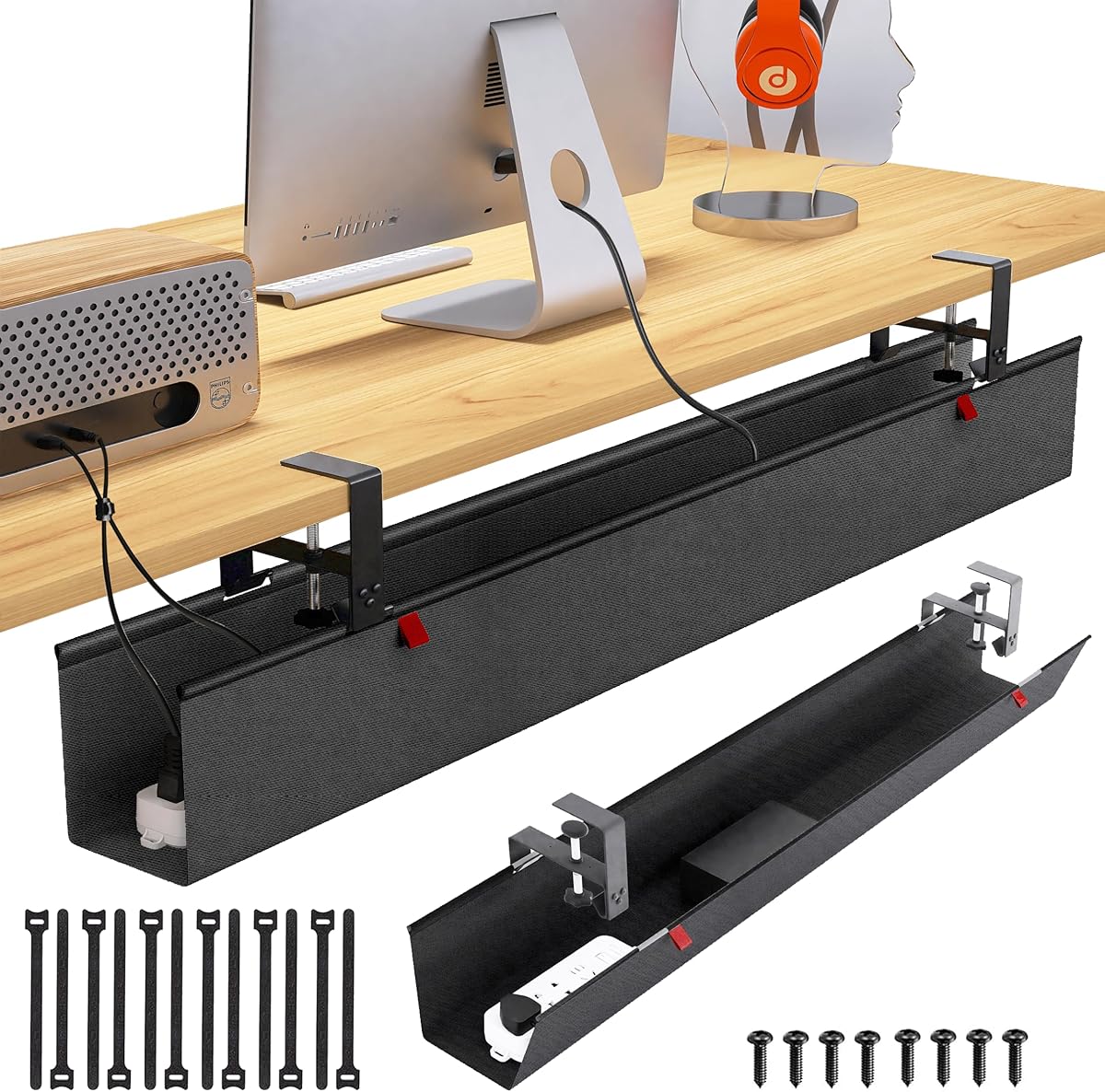
This premium tray is designed specifically to vanish into the shadows of your gaming desk letting your RGB lights pop. The high density black fabric completely blocks the view of wires.
We may earn a commission when you buy through this link, at no additional cost to you.
It is built to handle the weight of high performance gear without bowing or deforming. The breathable material prevents overheating while keeping dust away from your power strips.
The price is higher than other options but the aesthetics and durability justify the cost for serious PC gaming rigs. It creates a professional look that is perfect for streaming.
If you want the best visual finish for your battlestation and do not mind paying a premium this stealth tray is unmatched.
Unlike mesh nets that show the colorful mess inside our high-density black Oxford fabric completely blocks the view of wires.
The reinforced anti-sag base easily supports heavy gaming PC power bricks and long surge protectors without deforming.
We may earn a commission when you buy through this link, at no additional cost to you.
Choosing the right cable management solution depends on your specific needs such as desk size cable quantity and aesthetic preferences.
Consider how many cables you need to organize and the length required. Large trays are better for power strips and transformers while sleeves are for bundling individual groups.
Always measure your desk space before buying to ensure the solution fits without obstructing legroom.
Determine if you are willing to drill holes or prefer adhesive options. Clamps are great for desks with edges while adhesives work on flat surfaces.
Choose a method that matches your furniture material to ensure strong adhesion and easy removal.
Look for materials like reinforced Oxford fabric or metal mesh that resist wear and tear. Durable materials ensure your cables stay organized for years.
Avoid cheap plastics that might crack under the weight of heavy power bricks.
Ensure the solution allows for airflow around power supplies to prevent overheating. Mesh trays and breathable fabrics are best for this purpose.
Poor ventilation can lead to system instability and shorten the life of your power supply.
Select a color and finish that matches your gaming setup. Black is standard but some offer transparent or metallic options.
Visual consistency is key to achieving a professional looking battlestation.
Compare kits that offer multiple items against single solutions. A comprehensive kit often saves money and provides more flexibility.
Budget constraints should not compromise safety or essential functionality.
Look for flame retardant materials and pet protection options. Safety is crucial to prevent electrical hazards in the home.
Always ensure components are UL recognized or certified for electrical safety.
Choose products that allow you to add or remove cables without tools. Flexibility helps when you upgrade your PC components.
Reusable ties are better than zip ties for long-term maintenance.
Plan your cable routing before attaching anything to visualize the best paths. Route cables away from hot components and ensure they do not interfere with moving parts.
Clean the surface thoroughly before applying adhesive clips or trays to ensure a strong bond. Use a mild cleaner and allow it to dry completely before mounting.
Regularly inspect your cable management for signs of wear or loose adhesive. Tighten ties and adjust clips as needed to maintain a clean and safe setup.
The best way is to use an under desk tray that holds power strips and bundles cables neatly. This keeps the floor clear and protects cables from damage. Ensure the tray is securely mounted to prevent sagging.
Most sleeves are designed to fit standard power cords but check the diameter specifications. Split sleeves make it easier to add thick cords without disconnecting them.
Use reusable ties to bundle cables at regular intervals. This reduces slack and prevents them from sliding around on the desk or floor.
Yes but you need strong adhesive or clamps designed for smooth surfaces. Ensure the adhesive is compatible with glass to avoid damage.
Kits offer better value than buying individual components separately. They provide a variety of tools to handle all aspects of cable organization.
Remove any dirt with a soft cloth and mild soap. Ensure the clip is completely dry before reattaching to maintain strong adhesion.
Some adhesive pads are reusable but others may lose stickiness. Heating the adhesive with a hairdryer can help remove and reposition them.
Check if the tray is supported properly and not overloaded. Use additional ties to secure cables at intervals to prevent sagging.
Our top picks include the comprehensive N NOROCME Kit the budget-friendly Nettbe Ties and the premium 48 Inch Gaming Tray. These options cover a wide range of needs from basic bundling to full desk overhauls.
Prioritize safety and heat dissipation when choosing a solution to protect your valuable gaming equipment. A clean setup not only looks better but also improves airflow and reduces hazards.
Remember to check current availability and verify measurements before ordering. A well planned cable management system will enhance your gaming experience for years to come.