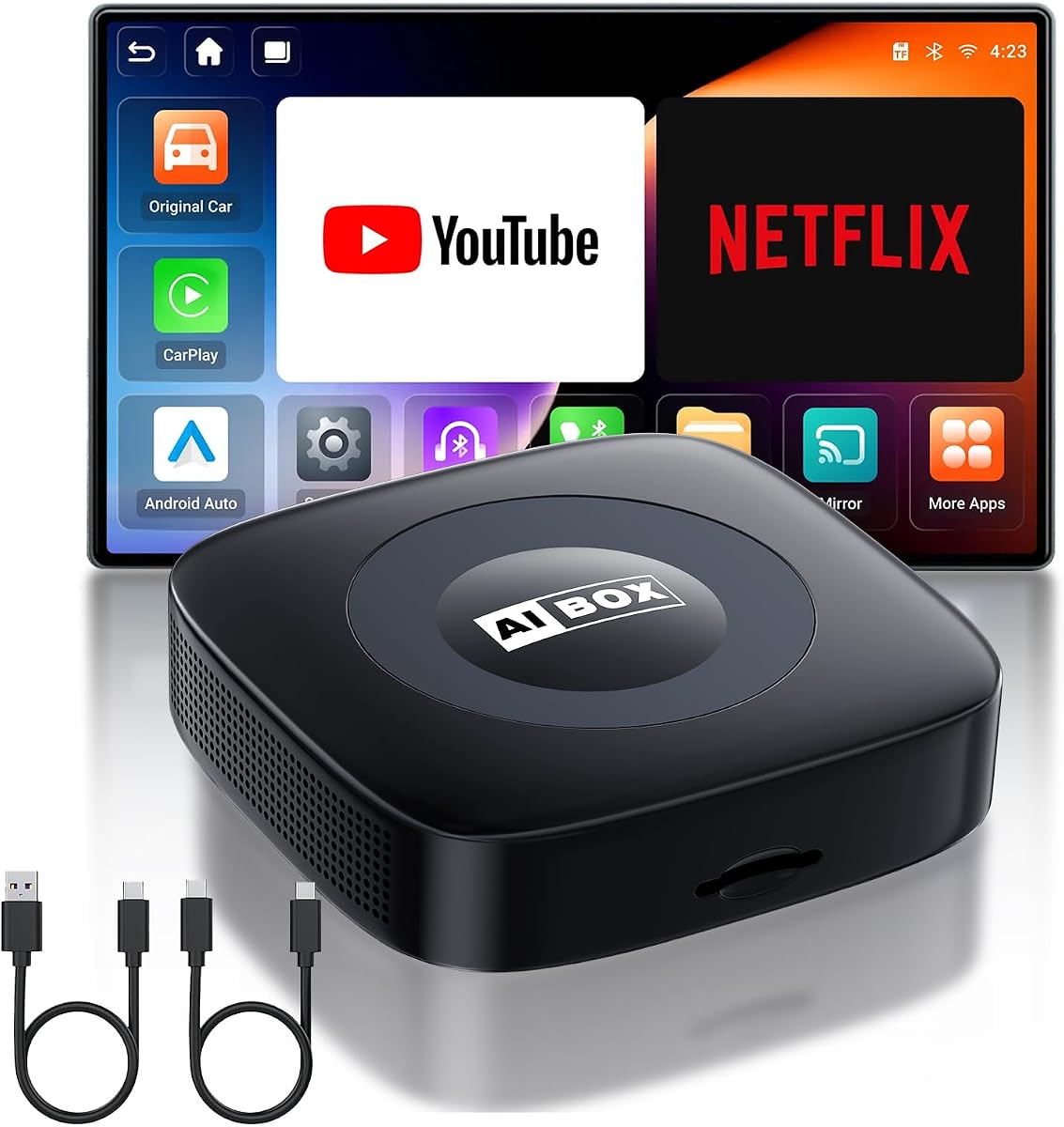
AI Box Carplay 2026 Upgraded
5.0Editor score
Affordable Price Point
WiFi 6 Connectivity
Android 13 OS
Explore our expert guide comparing the top 10 Carplay Box with Google Play adapters. We review features, performance, and compatibility to help you choose the
Modern drivers seek seamless connectivity and entertainment while on the road. A Carplay Box with Google Play transforms your factory wired system into a smart hub. It allows access to streaming apps and navigation tools without phone tethering.
We evaluated ten leading adapters based on performance, compatibility, and user feedback. Our analysis covers hardware specs, software features, and real-world reliability. This ensures you find a device that meets your specific driving needs.
Each pick highlights unique strengths like AI integration or offline playback options. Remember that compatibility varies by vehicle model and year. Always check your car's system before purchasing to ensure a smooth upgrade experience.
5.0Editor score

4.7Editor score

5.0Editor score
This side-by-side comparison highlights the key specifications and features of all ten selected adapters. It helps you quickly identify which device offers the best balance of performance, storage, and connectivity for your specific vehicle setup.


This AI Box Wireless CarPlay Adapter stands out as the top choice for drivers seeking full Android capabilities. It transforms your wired CarPlay system into a smart hub with direct access to the Google Play Store. The ability to download apps like YouTube and TikTok directly on the car screen makes it a versatile entertainment tool.
We may earn a commission when you buy through this link, at no additional cost to you.
The device features a robust connection system that ensures minimal latency during use. Users appreciate the one-tap screen mirroring which allows sharing content from phones without extra apps. Its compatibility with most major car brands from 2016 onwards simplifies the upgrade process significantly.
One trade-off is the restriction on video playback while the vehicle is in motion. This is a safety compliance feature found in many such devices to prevent driver distraction. It ensures you can enjoy movies during charging stops or breaks without violating local regulations.
We recommend this adapter for owners who want a seamless transition to wireless connectivity and app freedom. It balances performance and ease of use effectively. If you own a compatible OEM vehicle and crave more than standard navigation, this is a solid investment.
The built-in Play Store allows you to install navigation, music, and productivity apps tailored to your needs.
Dual-band WiFi support ensures that streaming apps run smoothly without dropping the connection to your phone hotspot.
We may earn a commission when you buy through this link, at no additional cost to you.
This adapter offers a premium experience driven by an 8-core Qualcomm platform and Android 13 OS. It goes beyond simple connectivity to offer a full Android AI Box experience. The inclusion of a 4G Nano SIM trial means you are not solely reliant on your phone's hotspot for internet access.
We may earn a commission when you buy through this link, at no additional cost to you.
The ScenePilot AI ecosystem adds unique features like trip logging and voice assistance that standard adapters lack. Users can access thousands of online radio stations via SSRadio and manage privacy with the Bluetooth Lock. This makes it ideal for shared vehicles or those who want robust vehicle insights.
While the cost is higher, the hardware performance justifies the investment for power users. The ability to run complex apps without lag is a significant advantage. However, you must verify your car compatibility as it excludes BMW and Tesla models.
Choose this if you need high performance and advanced features like independent LTE connectivity. It is a comprehensive solution for those wanting a smart car hub rather than just a wireless adapter. The 18-month warranty provides added peace of mind for this premium device.
The built-in 4G SIM allows you to use navigation and streaming apps even when your phone is off or out of range.
ScenePilot provides privacy tools and trip management to keep your data secure and your journeys organized.
We may earn a commission when you buy through this link, at no additional cost to you.
This adapter delivers strong performance at an accessible price point. It features the latest WiFi 6 technology which offers faster transmission and stronger signal strength than older models. The H618 quad-core processor ensures smooth operation for basic apps and streaming services.
We may earn a commission when you buy through this link, at no additional cost to you.
Users appreciate the 3-year warranty which offers long-term support confidence. The device supports both CarPlay and Android Auto allowing you to switch seamlessly between iOS and Android phones. Its small size keeps your interior clean and organized.
While it has less RAM than premium models, it handles daily tasks well. The trade-off is minimal for most standard use cases like music and maps. The high user rating indicates consistent reliability across many vehicles.
This is an excellent choice for budget-conscious drivers who still want modern connectivity features. It provides the essential experience of a smart box without a high cost. If you need a reliable upgrade for a 2016 vehicle this is a top contender.
WiFi 6 ensures that your streaming and data transfer happen faster with less interference in busy areas.
Supporting over 1200 car models means it fits a wide range of vehicles with factory wired CarPlay systems.
We may earn a commission when you buy through this link, at no additional cost to you.
This 3-in-1 adapter offers a reliable solution for converting wired systems to wireless. It features dual-band WiFi which helps maintain stability for audio and video. The aluminum alloy build ensures it can withstand extreme temperatures inside a parked car.
We may earn a commission when you buy through this link, at no additional cost to you.
Pre-loaded apps like Netflix and YouTube make entertainment setup quick and easy. Users can also use USB drives for offline playback which is helpful in areas with poor signal. The auto-connect function saves time when starting your daily commute.
The main limitation is the exclusion of BMW and Tesla vehicles. If you have a standard OEM vehicle this box works seamlessly with your existing controls. The build quality suggests it is designed to last over time.
Recommend this for drivers who want durability and ease of use. It balances hardware quality with practical features. If you need a robust box for long trips where reliability is key this model is a strong option.
The aluminum chassis dissipates heat better than plastic alternatives ensuring consistent performance during long use.
Use a USB drive to play stored media without relying on a mobile hotspot connection.
We may earn a commission when you buy through this link, at no additional cost to you.
This device represents the high end of the market with an 8-core Qualcomm platform. It runs Android 13 providing a very smooth and responsive interface. The ScenePilot ecosystem adds value through privacy locks and detailed trip management.
We may earn a commission when you buy through this link, at no additional cost to you.
The inclusion of a SIM card trial allows true independent internet access. This is useful for passengers on devices or when you want to save phone battery. The SSRadio feature offers thousands of online stations for endless audio options.
It might be overkill for someone who just wants simple navigation. However for power users who want a smart car hub this is the best fit. The advanced features justify the cost for those who spend significant time driving.
Choose this if you want the most advanced technology available. It turns your car screen into a full tablet experience. The privacy features make it safe for shared family use too.
Bluetooth Lock prevents unauthorized access to your apps when you leave the vehicle.
Access thousands of online radio stations with SSRadio for diverse music and news content.
We may earn a commission when you buy through this link, at no additional cost to you.
This adapter stands out due to its integration of Gemini AI. It acts as a co-pilot to plan routes and find gas stations via voice commands. The 4GB RAM helps when switching between navigation and music apps smoothly.
We may earn a commission when you buy through this link, at no additional cost to you.
The Mini HDMI output is a unique feature that lets you connect to external displays. This is great for sharing content with passengers on headrest screens. You can also mirror your phone screen for presentations or photos.
Users note that clearing cached data helps maintain performance over time. While the rating is lower than others it has powerful features for the right user. The AI co-pilot aspect is a strong benefit for tech savvy drivers.
Recommend this if you want an AI assistant in your car. It adds utility beyond simple media playback. Check compatibility carefully as it is for wired CarPlay vehicles.
Ask Gemini to plan multi-stop trips or find stops while you drive using voice commands.
Use the HDMI output to connect to an external monitor for back seat entertainment.
We may earn a commission when you buy through this link, at no additional cost to you.
This adapter supports both CarPlay and Android Auto wirelessly in one device. It is ideal for households with different phone systems. The TF card slot allows you to play offline videos and music without using data.
We may earn a commission when you buy through this link, at no additional cost to you.
It retains original car controls like steering wheel buttons for seamless integration. The 4.2GHz WiFi ensures quick connection times during startup. Setup is straightforward with no extra apps required.
Note that you cannot use streaming and navigation at the exact same time. You must switch modes which is a common limitation in this price range. The warranty support is a good add for this budget friendly unit.
Choose this if you need a versatile adapter for multiple devices. It offers solid value for basic wireless conversion. The offline playback feature makes it good for travel in poor signal areas.
Switch between CarPlay and Android Auto to support multiple phone types in your family.
Insert a microSD card to watch local videos without needing an internet connection.
We may earn a commission when you buy through this link, at no additional cost to you.
This 3.0 upgraded model combines wireless connectivity with built-in streaming options. It uses 5G WiFi for fast transmission reducing lag significantly. The HDMI connection allows you to output video to external projectors or screens.
We may earn a commission when you buy through this link, at no additional cost to you.
Users find it very compact which keeps the center console tidy. The built-in USB port supports offline storage making it useful for camping or road trips. It supports major streaming apps for passenger entertainment.
The high rating indicates reliable performance for daily driving. It is a good modern choice for those who need extra video features. Make sure to check your car settings before ordering to ensure wired CarPlay is enabled.
Recommend this for those who want a compact solution with video output. It is versatile for both driving and parking entertainment needs.
The 5G WiFi module ensures fast data transfer for smooth streaming of movies and maps.
Use the HDMI port to connect to projectors or other screens for large group entertainment.
We may earn a commission when you buy through this link, at no additional cost to you.
This adapter focuses on hands free utility with Gemini AI stories and reminders. It keeps passengers entertained while allowing the driver to focus on the road. The dual-band WiFi ensures you can run maps and music without dropping connection.
We may earn a commission when you buy through this link, at no additional cost to you.
The HD Media output lets you send video to rear headrest displays. This separates entertainment from navigation so the driver sees maps while kids watch videos. It supports OTA updates to keep features current.
You need to adjust Bluetooth settings during setup to avoid connection conflicts. Once set up it is very reliable for daily use. The AI stories are a nice touch for long commutes.
Choose this if you want a balance of entertainment and safety. It is great for families who need to keep children occupied on trips.
Use voice commands to set reminders and play stories without taking your hands off the wheel.
Output video to rear screens so the driver keeps navigation in view while passengers watch movies.
We may earn a commission when you buy through this link, at no additional cost to you.
This basic adapter focuses on simple streaming capabilities. It comes with Netflix and YouTube pre-installed for instant access. The TF card slot is useful for playing your own files when internet is unavailable.
We may earn a commission when you buy through this link, at no additional cost to you.
It supports both CarPlay and Android Auto making it a good choice for shared vehicles. The setup is straightforward with no complicated steps. It auto-connects to your phone automatically for convenience.
Keep in mind you must turn off Bluetooth on your phone for hotspot setup. This can be confusing at first. Performance is adequate for light use but may lag with heavy apps.
Recommend this for those who want a simple cheap upgrade. It covers the basics well for those on a strict budget.
Load a TF card with music and movies to play during drives with no signal.
Turn off Bluetooth on your phone during initial setup to ensure a clean connection.
We may earn a commission when you buy through this link, at no additional cost to you.
Selecting the right Carplay Box requires checking compatibility and features. Use this guide to understand the key factors that impact performance.
Ensure your vehicle has a factory wired CarPlay system. Most adapters work with cars from 2016 onwards. Check specifically if your model is excluded as some boxes do not support BMW or Tesla systems.
Look for devices running Android 13 for the best app support. Newer OS versions ensure compatibility with the latest apps and security updates. This makes your device future proof for longer use.
Dual-band WiFi 5G is recommended for stable streaming. Bluetooth 5.0 or higher ensures quick pairing with your phone. Some premium units include built-in SIM slots for independent internet access.
At least 2GB RAM is needed for smooth multitasking. 16GB ROM allows for essential app installation. Higher specs like 4GB RAM help prevent lag when running navigation and video apps.
Check for pre-loaded apps like Netflix and YouTube. Some units allow offline playback via USB or TF cards. This is crucial for road trips through areas with weak mobile signals.
Wireless mirroring lets you cast phone content to the car screen. This is useful for sharing photos or presentations. Look for low latency options to avoid sync issues.
Advanced boxes include AI assistants for voice commands. They can plan trips or control home devices. This adds smart utility to your driving experience beyond standard media playback.
Choose brands offering at least a one-year warranty. Good customer service helps resolve connection issues quickly. Check for 24-hour technical support options before purchase.
Keep the device cool to prevent overheating during long trips. Update firmware regularly to maintain smooth performance. Always store the box in a safe place when not in use.
Most devices work with factory wired CarPlay vehicles from 2016 onwards. Check if your car is excluded as BMW and Tesla models are often not supported. Always verify your system settings before purchasing.
Video playback is restricted to parked status to ensure safety compliance. This prevents driver distraction while the vehicle is in motion. Use the screen for navigation or audio while on the road.
Most adapters connect to your phone hotspot for internet access. Some premium units have built-in SIM slots for independent connectivity. This ensures you stay online even if your phone is off.
Simply plug it into the car USB port for a plug and play setup. Pair it via Bluetooth once for automatic connection. No complex tools or apps are required for basic setup.
You can download apps from the Google Play Store like YouTube and Netflix. Built-in apps vary by model but usually include streaming services. Offline media is supported via USB cards.
2GB RAM is sufficient for basic use and navigation. 4GB RAM helps with heavy multitasking and complex apps. More memory prevents lag when running multiple services at once.
It plugs into a USB port so it typically does not void warranty. It is a removable device that does not alter hardware. Always check with your dealer if unsure.
Clear cached data periodically to keep the system running smoothly. Ensure you have a strong WiFi signal for streaming. Use models with dual band WiFi for better performance.
Always check current product details before buying. Prices and specs may change so verify with the seller.