
VEIKK VK1200 V2
4.3Editor score
Full-laminated anti-glare screen
Single-cable USB-C setup
11.6 inch active area
Finding the right tool for digital art starts with understanding your needs and budget. A cheap drawing tablet with screen offers a natural drawing experience without breaking the bank. These devices allow you to draw directly on the display, making creativity intuitive and accessible for everyone.
We evaluated ten top-rated pen displays based on screen quality, pressure sensitivity, and build durability. Each product was selected for its ability to deliver professional results at an affordable price point. Our analysis ensures you can compare features side by side to find the perfect match.
Each pick highlights key strengths, trade-offs, and ideal use cases for artists and students. While prices fluctuate due to market demand, these models consistently offer value. Check current listings before purchasing to ensure you get the best deal available today.
4.3Editor score

4.4Editor score

4.5Editor score
As an Amazon Associate we earn from qualifying purchases.
This table provides a side-by-side comparison of the ten best affordable pen displays available in the market. Review the key specifications to see how each model stacks up regarding screen size, pressure sensitivity, and unique features.




The XP-PEN Artist12 is a standout choice for artists seeking a budget-friendly screen that delivers professional results. With a 11.6-inch FHD display and 8192 pressure levels, it ensures precision without costing a fortune. This model is widely recognized for its reliability and excellent value in the digital art market.
We may earn a commission when you buy through this link, at no additional cost to you.
Its 72% NTSC color gamut provides vibrant visuals essential for creative work. The battery-free pen feels natural, mimicking traditional pencil strokes. Compatibility spans major platforms like Windows and Mac, making it versatile for various users. The pre-installed anti-reflective protector further enhances the drawing experience.
While it lacks a built-in stand, the device is lightweight and easy to position. Some users note that connection ports might require adapters for modern laptops. However, these are minor inconveniences compared to the overall quality and performance offered at this price point.
Ideal for beginners and intermediate artists, the Artist12 bridges the gap between affordability and functionality. If you need a dependable tool for sketching or animation, this tablet is a top recommendation. It remains a leader in the category for its consistent performance.
The screen offers vivid colors and extreme detail, perfect for animation and sketching. Its anti-reflective layer reduces glare during long sessions.
The battery-free stylus provides a traditional pencil-like feel with an integrated eraser. This design supports efficient workflows without charging interruptions.
We may earn a commission when you buy through this link, at no additional cost to you.
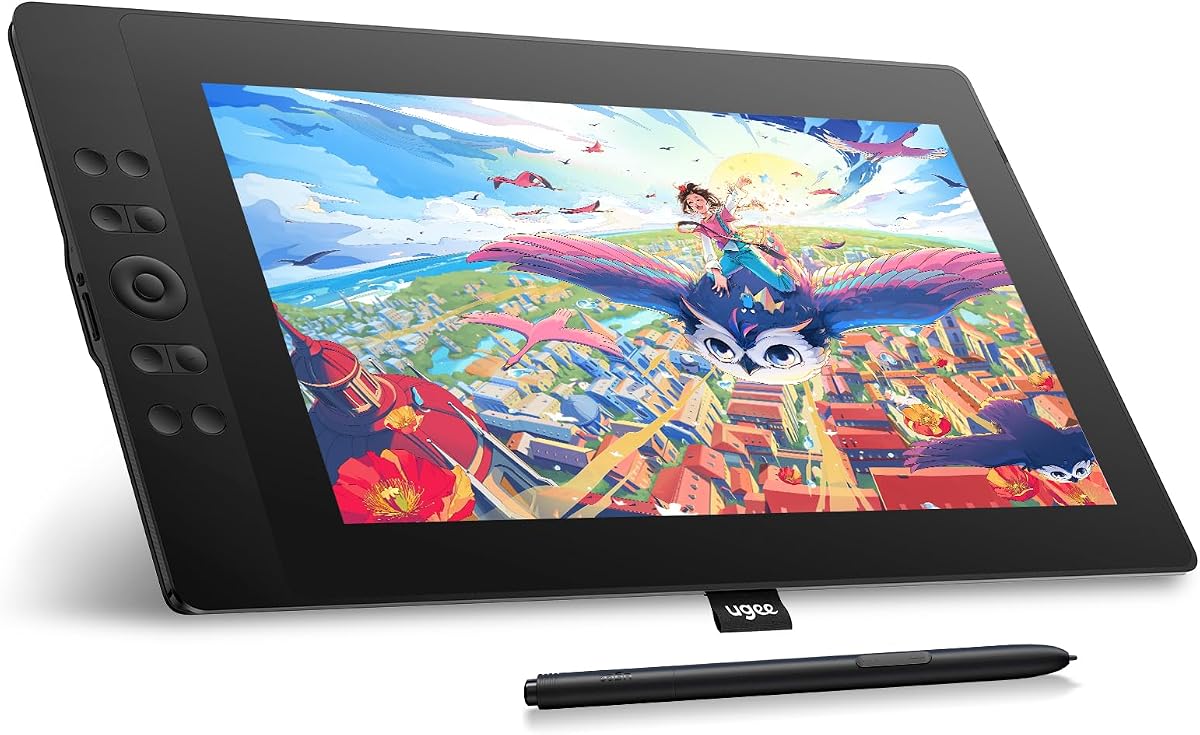
The VEIKK VK1200 V2 offers exceptional value for those on a strict budget. It features full-laminated technology to minimize parallax, ensuring cursor accuracy. The anti-glare glass provides a paper-like feel, making it comfortable for extended drawing sessions.
We may earn a commission when you buy through this link, at no additional cost to you.
With 8192 pressure levels and tilt recognition, this tablet captures subtle strokes effectively. The single-cable connectivity simplifies setup, reducing clutter on your desk. Two pens and plenty of nibs are included, which is rare in this price range.
Its stylish frameless design makes it easy to carry. However, it requires connection to a computer for use. While the active area is standard, the device is stable and ergonomic enough for most creative tasks.
This model is perfect for students or hobbyists starting out. It balances cost and performance well, offering premium features like tilt support. If you want reliability without overspending, the VK1200 V2 is a strong contender.
Full-laminated technology ensures the glass and screen integrate seamlessly. This reduces parallax and improves cursor accuracy during detailed work.
Single-cable USB-C connectivity transmits data and power simultaneously. This streamlines the workspace for better focus on creativity.
We may earn a commission when you buy through this link, at no additional cost to you.
The HUION Kamvas 13 Gen 3 stands out for its premium build and advanced features. It boasts a fully laminated screen with Canvas Glass 2.0, reducing glare significantly. With 16384 pressure levels, it offers fluid and natural drawing experiences for professionals.
We may earn a commission when you buy through this link, at no additional cost to you.
Enhanced color accuracy with factory calibration ensures your work looks consistent across devices. The dual dial buttons optimize workflow, allowing quick access to brush size and zoom. USB-C single cable connection simplifies setup for most modern computers.
Though pricier, its build quality and performance justify the investment. Some users may find it requires a dedicated stand for comfort. However, the included adjustable stand helps mitigate this issue effectively.
This tablet is ideal for serious artists needing precision and reliability. It supports diverse software and operating systems, making it versatile. If you seek high-end features at a competitive price, this model is worth considering.
Dual dial buttons streamline creative tasks by providing quick access to tools. This reduces interruptions and keeps your focus on the artwork.
Factory calibration reports ensure accuracy and consistency across projects. With Avg. ΔE<1.5, your colors remain true to life.
We may earn a commission when you buy through this link, at no additional cost to you.
The GAOMON PD1161 is a robust option for those needing efficiency. It features eight programmable shortcut keys that significantly enhance workflow. The matte film on the display reduces glare, mimicking the feel of paper for natural sketching.
We may earn a commission when you buy through this link, at no additional cost to you.
With 8192 pressure levels and tilt support, it captures subtle details accurately. Compatibility with major software like Photoshop ensures flexibility for any artist. It is particularly useful for online education and remote collaboration.
The design is simple and functional. However, it requires a computer connection and does not come with a stand. Despite these limitations, it delivers strong performance for its price range.
Ideal for students and teachers, this tablet offers essential features without fluff. It supports a wide range of applications, making it a versatile tool. If you prioritize functionality and affordability, the PD1161 is a solid choice.
Eight side keys and two pen buttons allow quick access to shortcuts. This customization improves efficiency and reduces repetitive actions.
Vivid color performance with 72% NTSC ensures lifelike drawing results. Smoother gradations bring your digital art to life effectively.
We may earn a commission when you buy through this link, at no additional cost to you.
The Artisul D16 provides a spacious 15.6-inch active area for creators. Full-laminated technology ensures accurate cursor positioning. This refurbished model offers significant value while maintaining high standards for professional work.
We may earn a commission when you buy through this link, at no additional cost to you.
With 7 customizable hotkeys and a quick dial, workflow adjustments are seamless. The adjustable stand allows for comfortable angles during long sessions. Anti-glare film reduces scratches and enhances clarity on the screen.
While refurbished, the device is tested for reliability. Some users may prefer new units for warranty peace of mind. However, the large workspace makes it ideal for detailed design projects.
Ideal for designers needing room to move, this tablet offers professional features at a lower cost. Its strong compatibility and ergonomic design support efficient creation. If space is a priority, the D16 is an excellent option.
The 15.6-inch area provides more room for complex animations and designs. This space allows for greater precision and freedom in strokes.
A quick dial helps adjust brush sizes and scroll pages instantly. This feature enhances efficiency during intensive creative sessions.
We may earn a commission when you buy through this link, at no additional cost to you.
The UGEE UE16 stands out with its impressive 143% sRGB color gamut. This ensures vibrant and accurate colors for design work. The 15.4-inch screen offers ample space for intricate projects.
We may earn a commission when you buy through this link, at no additional cost to you.
With 16K pressure levels, strokes are smooth and precise. The four color space options allow for versatile visual transitions. Physical shortcut keys provide tactile feedback, enhancing the drawing experience.
Support for multiple operating systems, including Android, makes it versatile. However, the larger footprint may require more desk space. Despite this, the color quality and performance are unmatched in this category.
Ideal for designers needing precise color representation, this tablet delivers exceptional results. Its support for various apps ensures compatibility across tasks. If you prioritize color accuracy and workspace, the UE16 is a top pick.
The 143% sRGB gamut reproduces 16.7 million colors accurately. This ensures your art looks vivid and true across different screens.
Eight physical shortcut keys offer reliable control without software input. This tactile feedback enhances the drawing workflow significantly.
We may earn a commission when you buy through this link, at no additional cost to you.
The VEIKK VK1200 is a straightforward tool for beginners. It features an 11.6-inch LED screen with essential functions. Six shortcut keys and tilt support cover basic needs efficiently.
We may earn a commission when you buy through this link, at no additional cost to you.
An included artist glove helps keep hands clean and smudge-free. The pen is battery-free and responsive, ensuring uninterrupted creativity. Its compact design makes it easy to transport for on-the-go work.
Though it lacks advanced features like dual pens, it remains a functional device. Some users may find the screen brightness average. However, for basic tasks, it performs reliably.
Ideal for students or hobbyists, this tablet offers entry-level quality. It balances simplicity with necessary features for digital art. If you seek an easy start without complexity, the VK1200 fits well.
A soft artist glove keeps hands clean and smudge-free during use. This ensures your artwork remains pristine throughout long sessions.
Tilt function allows for adjusting pen angles naturally. This enhances shading and line variation in your drawings.
We may earn a commission when you buy through this link, at no additional cost to you.
The RubensTab T11 Pro offers true freedom with its standalone design. You can create anywhere without connecting to a computer. Its 5800mAh battery provides hours of use, ideal for travel.
We may earn a commission when you buy through this link, at no additional cost to you.
With a 10.1-inch Full HD IPS screen, colors remain vibrant. Multi-touch allows intuitive zooming and panning. Pre-installed apps make it ready for use immediately upon purchase.
While battery life is decent, it may not suffice for long projects. However, USB-C charging allows power bank use for extension. The portability is a unique advantage over screen monitors.
Ideal for travelers or those needing independence, this tablet is versatile. It supports note-taking and creative work equally well. If you want a device for anywhere creation, the T11 Pro stands out.
No computer needed for operation, allowing creation anywhere and anytime. This independence suits students and travelers perfectly.
Built-in battery provides hours of continuous use without power loss. USB-C charging ensures quick and convenient replenishment.
We may earn a commission when you buy through this link, at no additional cost to you.
The VEIKK VK1200V2 offers an upgraded experience with higher pressure sensitivity. With 16384 levels, strokes are precise and smooth. The full-laminated screen reduces parallax for accurate drawing.
We may earn a commission when you buy through this link, at no additional cost to you.
Its color gamut of 120% sRGB ensures vivid visuals. Two pens are provided, ensuring backups for longer use. The lightweight design makes it easy to transport for work on the go.
While it requires PC connection, the performance is robust. The metal back cover adds durability without bulk. It supports Linux and Windows, making it accessible for diverse users.
Ideal for artists needing precision, this tablet balances cost and quality. The included pens add extra value. If you seek refined sensitivity without spending much, the VK1200V2 is suitable.
16384 pressure levels deliver delicate lines and natural strokes. This ensures your art captures every subtle detail precisely.
Lightweight and portable with a full-metal back cover. This ensures stability and durability during transport and use.
We may earn a commission when you buy through this link, at no additional cost to you.
The XPPen Artist 12 Pro Lite offers a balanced setup with a red dial. Full-laminated technology minimizes parallax for a distraction-free experience. With 8192 pressure levels, it supports precise strokes for any project.
We may earn a commission when you buy through this link, at no additional cost to you.
The 3-in-1 cable simplifies connection without needing adapters. Tilt support allows for natural shading and transitions. Eight shortcut keys provide customizable options for efficient workflows.
Compatibility spans various systems like Windows, Mac, and Chrome. While it requires a PC, the simplicity of connection is a plus. Some users may find the design simple, but functionality remains strong.
Ideal for users needing easy setup, this tablet is versatile. The red dial adds unique control for specific tasks. If you prefer straightforward connectivity and essential features, this Lite version is a good fit.
Full-laminated display virtually eliminates parallax for a paper-like feel. This helps maintain focus without visual interruptions.
The customizable Red Dial offers comfortable control and convenience. This enhances your workflow by allowing quick adjustments.
We may earn a commission when you buy through this link, at no additional cost to you.
Selecting the right pen display requires evaluating several technical aspects to match your artistic needs.
Screen size impacts how much space you have to draw. Larger screens offer more room for details but may be harder to carry. Smaller screens are portable but can feel cramped for detailed illustrations.
Higher resolution ensures sharper images and finer lines. Look for at least 1920×1080 for clarity. Low resolution can make textures appear blurry or pixelated.
A wider color gamut provides more vibrant and accurate visuals. This is essential for professional work. Check for 72% NTSC or higher for true-to-life colors.
Pressure levels determine how well the pen captures stroke intensity. Higher levels allow for nuanced brushwork. 8192 levels are standard for most casual and professional tasks.
Ensure the tablet works with your OS and software. Some devices support Android while others need a PC. Check drivers before buying to avoid connectivity issues.
USB-C single cable setups simplify your workspace. HDMI is common but may require extra power cables. Fewer cables reduce clutter and setup time.
Battery-free pens are convenient for uninterrupted work. Tilt recognition enhances shading capabilities. Look for ergonomic designs to prevent hand fatigue.
Durable materials ensure the device lasts long. Metal bodies often provide better stability. Anti-glare coatings protect the screen during extended use.
Always install the latest drivers from the manufacturer to ensure full functionality. This ensures all buttons and pen features work as expected. Check for updates regularly for improved performance.
Most of these devices require a computer connection to function fully. Some models support Android, but you typically need USB OTG. Always check the compatibility list before purchasing.
Many modern budget tablets now feature full lamination to reduce parallax. This brings the pen tip closer to the image for accuracy. It improves the overall drawing feel significantly.
Yes, most of these tablets use passive battery-free pens. This means no charging or battery replacements are needed. It ensures a seamless drawing experience without interruptions.
Many models in this range support tilt recognition. This allows you to change brush angles by tilting the pen. It adds a natural touch to shading and strokes.
Most devices offer between 8192 to 16384 levels. This range is sufficient for detailed artistic work. It allows for varying line widths with natural pressure.
Yes, most tablets are compatible with Photoshop and other major design apps. Drivers allow full key mapping for shortcuts. Always verify software support for your specific OS.
Some models come with a basic stand, while others do not. Always check the package contents before buying. Third-party stands can be purchased separately for flexibility.
Most manufacturers offer at least a one-year warranty. Some provide lifetime technical support for drivers. It is advisable to register your device for full coverage.
Selecting the right pen display depends on balancing your artistic needs with budget constraints. The XP-PEN Artist12 and VEIKK VK1200 V2 remain top contenders for value and quality. For those needing more screen real estate, models like the Artisul D16 offer distinct advantages.
Focus on features like color accuracy and pressure sensitivity to ensure you get a tool that grows with your skills. A good tablet should support your workflow without needing constant upgrades. Prioritize models with reliable driver support and compatibility with your current software.
Remember that prices fluctuate based on promotions and stock levels. Always check current listings before finalizing your purchase to get the best deal available today. With the right tool, you can turn your creativity into professional work effortlessly.