
Verifone VX520
3.5Editor score
EMV and NFC support
Ethernet and dial options
Smart card compatible
This guide compares top card readers for vending machines covering payment types, connectivity, and security to help operators choose the right cashless
Modern vending operators need reliable card readers to accept cashless payments efficiently. A good reader handles chip cards, mobile wallets, and magnetic stripes with speed and security.
We compared ten models based on connectivity, protocol support, durability, and ease of integration. Our analysis covers options for standard machines and specialized unattended kiosks.
Each pick highlights key specs and ideal use cases. Remember that device prices and availability can change quickly, so verify current details before purchasing your next reader.
3.5Editor score
3.8Editor score

4.0Editor score
This side-by-side comparison outlines the core capabilities of each selected reader. Review these specifications to find the model that best matches your machine protocol and operational needs.


The VPOS Touch is a leading cashless reader designed for modern vending machines. It rates 3.8 stars and stands out for its all-in-one payment acceptance.
We may earn a commission when you buy through this link, at no additional cost to you.
It accepts chip cards, NFC, and magnetic stripes while providing real-time telemetry via cellular. Operators can monitor inventory and cash levels remotely without extra hardware.
The activation process may take up to ten business days which is slower than instant tools. However the reliability of remote data and security offsets this initial wait.
Choose this for any machine needing independent connectivity and detailed sales analytics. Its seamless integration makes it a top pick for serious vending operators.
Built-in 4G LTE antenna ensures consistent connection without relying on venue Wi-Fi.
Full PCI DSS compliance protects both operator and customer during every transaction.
We may earn a commission when you buy through this link, at no additional cost to you.
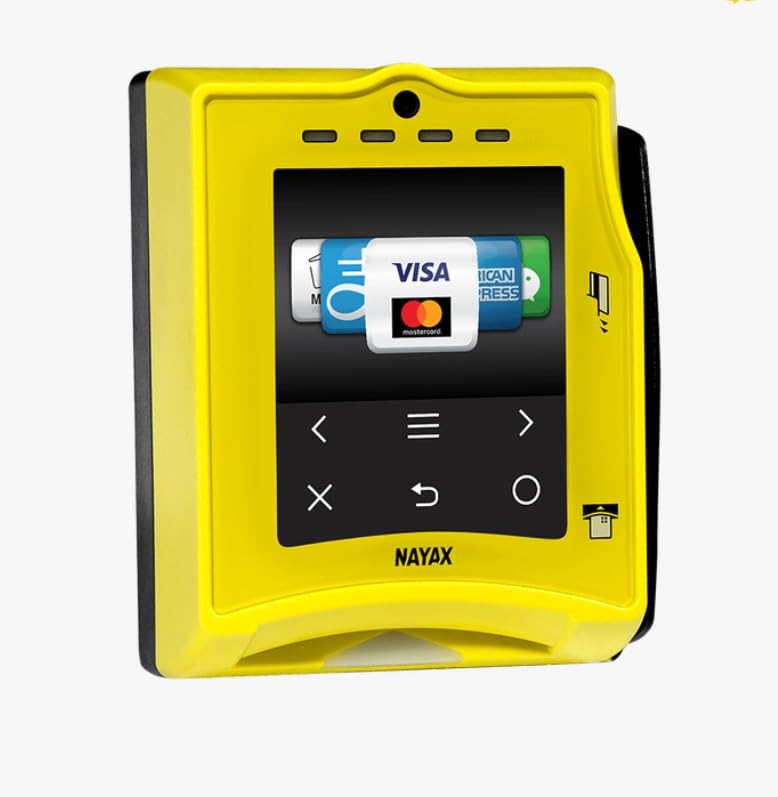
This Nayax variant adds a vivid touchscreen interface to the standard VPOS experience. It lacks a public star rating but offers advanced marketing tools for operators.
We may earn a commission when you buy through this link, at no additional cost to you.
The color LCD supports multi-language prompts and voice cues to guide users. Built-in marketing features let you deploy loyalty programs and discounts directly on the unit.
Its Dragontrail glass and IP55 rating make it resistant to physical damage and dust. The main limitation is reliance on the Nayax ecosystem which may require account setup.
Ideal for high-traffic arcade or vending spots needing user guidance. Its interactive features help drive engagement beyond simple transaction processing.
Touchscreen prompts reduce user confusion and improve conversion rates during peak hours.
Built-in tools allow operators to offer punch cards and discounts easily.
We may earn a commission when you buy through this link, at no additional cost to you.
This generic card reader serves as a basic cashless solution for standard vending machines. It requires activation before use which adds a waiting period to setup.
We may earn a commission when you buy through this link, at no additional cost to you.
Inside the box you will find a yellow instruction sheet to begin the process. Activation takes up to ten business days after submission of required details.
Due to minimal public specs it is best suited for operators familiar with generic hardware. The delay may be frustrating if immediate deployment is needed.
Consider this if budget is the primary constraint and waiting is feasible. Verify activation steps carefully to avoid delays in getting your machine online.
Users must follow specific instruction steps to enable device functionality before use.
Provides standard cashless acceptance without advanced telemetry or marketing features.
We may earn a commission when you buy through this link, at no additional cost to you.
The Symcode reader is a versatile device often used for membership and check-in systems rather than dedicated vending. It rates 2.8 stars and is primarily a read-only tool.
We may earn a commission when you buy through this link, at no additional cost to you.
It supports magnetic cards chip cards and NFC inputs through separate physical interfaces. Developers can use keyboard emulator mode for simple integration or passive mode for software control.
Its read-only limitation means it cannot encode new data onto cards which restricts some use cases. This also contributes to its lower customer satisfaction compared to full payment solutions.
Choose this for internal systems or low-cost kiosks needing basic card input. Avoid for commercial vending requiring secure payment processing or complex data encoding.
Dual mode operation allows easy integration with custom software or POS systems.
Affordable pricing makes it suitable for non-critical applications with simple needs.
We may earn a commission when you buy through this link, at no additional cost to you.
The Verifone VX520 is a well-established terminal that supports multiple connectivity options including dial and Ethernet. It rates 3.5 stars and is a strong budget choice for secure payments.
We may earn a commission when you buy through this link, at no additional cost to you.
It complies with EMV standards to protect transactions from fraud. Built-in NFC enables contactless payments like Apple Pay which modern customers expect regularly.
As an older model it may lack the latest touchscreen features or remote telemetry. You will also need a merchant account to activate the device for processing.
Ideal for operators needing a trusted name in secure transactions without new device costs. Verify merchant account compatibility before purchase to ensure smooth activation.
Supports both dial and Ethernet to suit different venue infrastructure requirements.
EMV compliance ensures card data is encrypted and protected during every sale.
We may earn a commission when you buy through this link, at no additional cost to you.
This reader combines reading and writing capabilities for memory chip and Mifare cards. It has a 3.5 star rating and is optimized for membership or check-in systems.
We may earn a commission when you buy through this link, at no additional cost to you.
It comes with an SDK and user manual to assist with development. The device can read magnetic tracks and write to specific chip types like SLE4442.
It is not designed for processing credit or debit transactions so payment systems need separate units. Setup requires technical knowledge to operate the writing functions correctly.
Use this for loyalty programs or access control where data storage on cards is key. Developers will appreciate the included testing card and comprehensive support files.
Built-in writer allows storing loyalty points or access codes directly on cards.
SDK and manual provide necessary resources for custom integration and testing.
We may earn a commission when you buy through this link, at no additional cost to you.
The E-seek M-260 rates 4 stars and is designed for scanning government IDs with magnetic stripes and barcodes. It includes a 6 foot USB smart cable for flexible mounting.
We may earn a commission when you buy through this link, at no additional cost to you.
Its dual interface design with bottom and side connectors makes it ideal for kiosks. It transfers data via standard USB or RS-232 for compatibility with various hosts.
This device is not intended for credit card processing but for identity verification. The build quality and specific capabilities make it a premium choice for strict access control.
Select this for vending machines that require age verification or secure access. Its durability ensures consistent performance in demanding environments.
Scans both magnetic stripes and 2D barcodes for accurate government ID validation.
Multiple interface connectors allow installation in tight kiosk or desktop spaces.
We may earn a commission when you buy through this link, at no additional cost to you.
This VP3350 model is a compact reader built for mobility with a stand included. It supports contactless and chip payments and requires a new merchant account before shipping.
We may earn a commission when you buy through this link, at no additional cost to you.
It is PCI P2PE compliant to secure transaction data end-to-end. Integration with CardPointe gateway allows flexible terminal and API options for different systems.
The requirement for a new merchant account adds a setup step before use. It is also not explicitly designed for MDB protocols which may limit vending compatibility.
Best for mobile vending carts or temporary events needing quick card acceptance. Confirm gateway compatibility with your provider before ordering to avoid delays.
Compact design with stand makes it easy to move between different service locations.
Built-in features allow operators to apply surcharges where legally permitted.
We may earn a commission when you buy through this link, at no additional cost to you.
The MTMS15 offers card and PIN support for multi-factor authentication. It has no public star rating but is noted for open architecture and real-time networking.
We may earn a commission when you buy through this link, at no additional cost to you.
It combines magnetic stripe reading with mobile NFC capabilities for flexible inputs. The open system allows custom integration into secure access or payment environments.
Information about specific vending compatibility is limited compared to dedicated cashless units. Verify protocol support carefully before use to ensure it fits your workflow.
Choose this for secure access control or hybrid systems requiring PIN verification. The real-time network feature ensures immediate updates on transactions.
Multi-factor requirements help prevent unauthorized use of vending or access machines.
Supports modern mobile wallets alongside traditional magnetic stripe cards.
We may earn a commission when you buy through this link, at no additional cost to you.
The Bluetooth X6BT connects wirelessly to mobile devices for card reading and writing. It has a 3.8 star rating and is ideal for apps needing portable card access.
We may earn a commission when you buy through this link, at no additional cost to you.
It supports all major operating systems including Windows MacOS iOS and Android. The device reads and writes all three tracks of magnetic cards per ISO standards.
Its wireless nature can be less reliable for continuous high-volume processing. A stable Bluetooth connection and power source are required for consistent operation.
Best for field sales or mobile kiosks needing quick card scanning. Ensure your app supports the necessary protocols before using this device.
Bluetooth connectivity removes cables and allows flexible device placement.
Works across multiple operating systems to support diverse software requirements.
We may earn a commission when you buy through this link, at no additional cost to you.
Selecting the right card reader depends on your machine protocol connectivity options and security needs.
Ensure the reader supports your machine communication protocol such as MDB or Pulse. Without this connection the device cannot authorize purchases effectively.
Always verify protocol support before purchasing to avoid incompatibility issues.
Choose a reader with connectivity that matches your site environment. Cellular LTE works anywhere while Wi-Fi or Ethernet depend on venue infrastructure.
Independent cellular connectivity is often more reliable for remote vending machines.
Look for PCI DSS and EMV compliance to protect card data. Security certifications reduce liability risk for both operators and customers.
Never compromise on recognized security standards for payment devices.
Modern readers often include remote telemetry for sales and inventory data. This feature helps operators monitor performance without physically visiting each machine.
Telemetry adds significant value by saving time and improving operational insights.
Outdoor or high-traffic machines need robust hardware. Check for IP ratings and shock detection features to withstand vandalism or weather.
A rugged unit reduces maintenance costs and downtime over the long term.
Some readers require activation steps that take days. Consider your deployment timeline to avoid delays in getting machines running.
Read activation terms carefully to align with your rollout schedule.
Evaluate both the device cost and any transaction fees from the payment provider. Hidden costs can add up over time.
Budget for the total cost of ownership including monthly fees.
Customers expect NFC options like Apple Pay and Google Pay. A reader without contactless support may see lower acceptance rates.
Prioritize models that support major mobile wallets for better sales.
Install the reader according to the manufacturer instructions and ensure all cables are secure. Connect to your machine using the provided harness or adapter.
Activate the device and merchant account as required. Wait for confirmation before allowing customer transactions to avoid errors.
Keep the screen and card slots clean from dust. Check connectivity and firmware updates regularly to maintain performance.
Most modern vending machines support card readers via MDB or Pulse protocols. You should verify your machine model compatibility before purchasing a new reader to ensure proper function.
Activation usually involves submitting a form online with business details. Some devices need a merchant account or specific steps before they process payments.
Yes if the reader supports NFC contactless payments. Most modern models include this feature to allow mobile wallet transactions.
Not necessarily. Many units have built-in cellular modems that connect directly without Wi-Fi. Others may need Ethernet or Wi-Fi depending on model.
MDB stands for Multi Drop Bus. It is a standard protocol allowing communication between the card reader and vending machine controller.
Activation typically takes from a few hours up to ten business days. It depends on the payment processor and required verification steps.
The VPOS Touch leads with full payment support and cellular connectivity making it ideal for most operators.
Prioritize security compliance and protocol support when evaluating options for your machine.
Verify current prices and availability on Amazon since device costs and stock can change.