
CyberPower CP1500PFCLCD
4.5Editor score
PFC Sinewave Output
12 Outlets Total
LCD Power Display
Discover the top battery backup for workstation PC solutions. This guide compares reliability, output type, and features to help you choose the best UPS for
Finding a reliable battery backup for workstation PC is essential for protecting your hardware from power outages and surges. A quality uninterruptible power supply ensures your critical applications stay running during short interruptions. It gives you time to save work or shut down safely.
We evaluated ten top-rated models based on output capacity, wave type, outlet count, and software features. Each unit was selected for its ability to handle workstation-grade power demands. Our analysis focuses on real-world performance and durability metrics.
Each pick highlights key strengths like sine wave output, voltage regulation, and connected equipment guarantees. You will see how each model fits different workstation setups. Keep in mind that prices and availability can change frequently online.
4.5Editor score

4.5Editor score

4.4Editor score
This table provides a quick side-by-side comparison of all ten selected units. It highlights essential specifications like power capacity, outlet count, and warranty terms to help you compare options quickly.




This unit stands out as a top contender for the title of best battery backup for workstation PC. It offers 1500VA capacity and uses PFC Sinewave technology, making it safe for active PFC power supplies found in modern workstations.
We may earn a commission when you buy through this link, at no additional cost to you.
The multifunction color LCD panel provides detailed info on power conditions. It alerts users to issues before they cause downtime. You also get 12 outlets including USB ports for charging peripherals directly.
The main trade-off is its size and weight. It is larger than some competing models which could be challenging in tight spaces. However the extra capacity justifies the size for most dedicated workstation setups.
If you need a reliable battery backup for workstation PC with high power quality and extensive outlet options this model is an excellent choice. It balances cost and performance well for professional environments.
PFC Sinewave output ensures compatibility with active PFC power supplies common in high-end workstations.
The tilting color LCD screen gives real-time updates on battery health and load capacity.
We may earn a commission when you buy through this link, at no additional cost to you.
This model is a strong alternative for those seeking a best battery backup for workstation PC without sine wave requirements. It provides 1500VA capacity and uses intelligent LCD technology to display detailed power information clearly.
We may earn a commission when you buy through this link, at no additional cost to you.
The AVR corrects minor voltage fluctuations without draining the battery. This feature extends battery life by reducing unnecessary cycling during minor grid dips. It is a practical feature for unstable power environments.
While it uses simulated sine wave it is sufficient for many workstations not requiring pure sine output. Some users may prefer true sine wave for sensitive electronics but this unit covers most standard needs well.
For users prioritizing voltage regulation and monitoring features this unit is a very capable choice. It delivers consistent power backup for workstation PC performance with reliable surge protection capabilities.
Automatic Voltage Regulation helps preserve battery health by avoiding unnecessary discharge cycles.
The color LCD provides detailed stats on runtime and battery capacity at a glance.
We may earn a commission when you buy through this link, at no additional cost to you.
This premium unit redefines what a battery backup for workstation PC can offer with its lithium iron phosphate battery. It delivers 2000VA capacity and pure sine wave output ensuring top-tier protection for sensitive workstation gear.
We may earn a commission when you buy through this link, at no additional cost to you.
The LiFePO4 battery promises over 10 years of life and 3000 cycles. This significantly reduces total cost of ownership compared to lead-acid alternatives. You avoid the hassle of frequent replacements over time.
Its main trade-off is the heavier weight due to the transformer and battery chemistry. While it offers higher capacity it takes up more space physically. However this is a fair exchange for long-term reliability.
If you seek a long-term solution this unit is unmatched for endurance and performance. It stands out as a best battery backup for workstation PC for users needing high capacity and minimal maintenance.
Lithium chemistry ensures a battery lifespan exceeding ten years with minimal degradation.
Pure sine wave output ensures perfect compatibility with any power supply type.
We may earn a commission when you buy through this link, at no additional cost to you.
This unit is designed for smaller workstation setups needing reliable battery backup for workstation PC protection. It delivers 1000VA capacity with PFC Sinewave output ensuring safe operation with active PFC power supplies.
We may earn a commission when you buy through this link, at no additional cost to you.
The color LCD panel tilts for better viewing and displays detailed power stats. It also includes USB ports for charging devices. This makes it convenient for keeping peripherals powered during an outage.
The lower wattage limit means it cannot support high-draw components during outages. It is best suited for systems with lower power consumption. Users with high-end GPUs should consider higher capacity models.
For compact setups requiring sine wave protection this model is a solid mid-range option. It offers a best battery backup for workstation PC balance for smaller systems needing reliable power.
PFC Sinewave output guarantees compatibility with modern active PFC power supplies.
Its smaller form factor makes it ideal for limited desk or rack spaces.
We may earn a commission when you buy through this link, at no additional cost to you.
This model offers a lightweight solution for battery backup for workstation PC needs with strong data line protection. It provides 900VA capacity and uses simulated sine wave technology to support standard workstations.
We may earn a commission when you buy through this link, at no additional cost to you.
The data line protection shields against surges traveling through telephone or network lines. This feature is unique and valuable for workstations connected via modem or legacy phone lines. It adds a layer of security beyond power.
Its capacity is limited to 900VA which restricts runtime for high power systems. Simulated sine wave is also less robust than pure sine wave for sensitive hardware. It is best for light duty use.
For users needing basic protection and data line safety this unit is a top pick. It is a cost effective battery backup for workstation PC option for standard office setups.
Data line protection prevents damage to modems and network cards from surges.
Compact design and lower cost make it accessible for basic protection needs.
We may earn a commission when you buy through this link, at no additional cost to you.
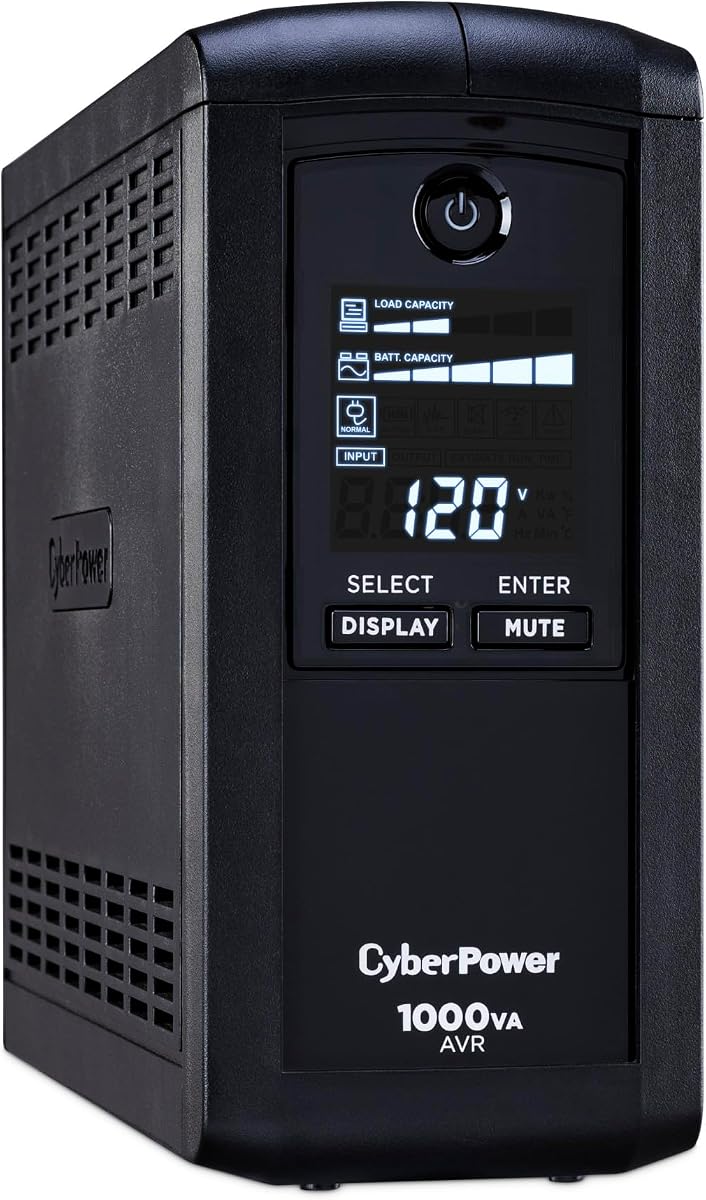
This model is a reliable choice for battery backup for workstation PC tasks with its intelligent LCD interface. It provides 1000VA capacity and simulated sine wave output suitable for standard workstation power supplies.
We may earn a commission when you buy through this link, at no additional cost to you.
The multifunction LCD panel displays estimated runtime and battery capacity. This helps you manage your workflow during power loss. AVR extends battery life by regulating voltage fluctuations automatically.
The simulated sine wave is acceptable for most workstations but not for medical or audio equipment. It is a standard feature in this price range. Users needing pure sine wave should look elsewhere.
For a dependable mid-range unit this model fits standard workstation needs well. It serves as a solid battery backup for workstation PC option with good monitoring features.
The LCD panel displays estimated runtime so you can plan shutdowns.
Automatic Voltage Regulation extends battery life by managing minor fluctuations.
We may earn a commission when you buy through this link, at no additional cost to you.
This unit is designed for space-saving battery backup for workstation PC setups with slim profile design. It provides 900VA capacity and uses GreenPower technology to reduce power consumption when running normally.
We may earn a commission when you buy through this link, at no additional cost to you.
The high efficiency design reduces heat generation and electricity usage. This makes it a green choice for energy-conscious users. The slim form factor fits easily under desks or in tight corners.
Its capacity is limited to 900VA which may not suit high-performance systems. It relies on standby mode which has a slight delay compared to line-interactive models. This is acceptable for most short interruptions.
For users prioritizing desk space and efficiency this unit is a smart pick. It offers a compact battery backup for workstation PC solution for basic office tasks.
GreenPower technology reduces power consumption during normal operation.
Slim profile design saves valuable desk or floor space.
We may earn a commission when you buy through this link, at no additional cost to you.
This model focuses on energy efficiency for battery backup for workstation PC needs with its unique ECO Mode. It provides 850VA capacity and features outlets that shut off when the computer is in sleep or off mode.
We may earn a commission when you buy through this link, at no additional cost to you.
ECO Mode helps reduce power consumption by cutting power to peripherals like monitors when not in use. This lowers the total energy footprint of your workstation setup. It is a great feature for eco-conscious users.
The capacity is limited to 850VA which limits runtime for high power systems. It is suitable for low power workstations. Users requiring longer runtimes should look at higher VA options.
If you want to reduce idle power this unit is a unique choice. It offers a specialized battery backup for workstation PC option focused on energy conservation.
ECO Mode outlets turn off when the computer is off or sleeping.
Standard form factor fits easily on standard workstation desks.
We may earn a commission when you buy through this link, at no additional cost to you.
This unit is a basic but reliable choice for battery backup for workstation PC protection. It provides 850VA capacity and simulated sine wave output for general use. The LCD displays key stats like runtime and battery health.
We may earn a commission when you buy through this link, at no additional cost to you.
The LCD panel gives real-time feedback on load and battery condition. This helps you manage power usage and avoid overload. It also includes AVR to stabilize incoming voltage without draining the battery.
Its capacity is best for light systems with low power draw. The simulated sine wave limits compatibility with sensitive devices. It is a basic option for non-critical backups.
For light workstation use this model provides adequate backup capabilities. It is a simple battery backup for workstation PC unit for standard home office needs.
LCD panel shows load capacity to prevent overloading outlets.
Provides standard surge protection and battery backup for simple setups.
We may earn a commission when you buy through this link, at no additional cost to you.
This model is a feature-rich option for battery backup for workstation PC users needing extended warranty coverage. It provides 1500VA capacity and simulated sine wave output with a rare 5-year warranty on the battery.
We may earn a commission when you buy through this link, at no additional cost to you.
The color LCD panel provides detailed monitoring and alerts. It includes 12 outlets and USB ports for charging. The extended warranty signals manufacturer confidence in build quality and battery life.
The simulated sine wave output is not ideal for active PFC supplies or sensitive electronics. It is best for standard workstations that do not require pure sine wave. This limitation reduces its premium appeal.
If you value warranty length this unit is a top choice. It offers a reliable battery backup for workstation PC solution with long-term coverage.
A rare 5-year warranty covers both unit and battery components.
Color LCD provides intuitive visual alerts for power status.
We may earn a commission when you buy through this link, at no additional cost to you.
Choosing the right battery backup for workstation PC requires understanding power needs and key features. This guide covers the factors that impact performance and reliability.
The output waveform determines how closely the backup power matches grid power. Pure sine wave units produce a smooth signal compatible with active PFC power supplies and sensitive electronics. Simulated sine wave units produce a stepped approximation that may cause issues with some devices. Always check if your workstation power supply requires pure sine wave.
Select pure sine wave for professional workstations to ensure compatibility and safety.
Capacity is measured in VA (Volt-Amps) and watts. Higher capacity means longer runtime during outages. Workstations with high-draw components need higher VA ratings to support a full shutdown. Estimate your total wattage to choose the right size.
Choose a capacity that exceeds your total load by at least 20 percent.
Your workstation may need multiple outlets for the tower, monitor, and peripherals. Look for units with enough outlets and spaced to accommodate large power bricks. Some models include USB ports for charging small devices directly. Proper spacing prevents cord conflicts.
Ensure the unit has enough outlets for all devices you need to back up.
Automatic Voltage Regulation (AVR) corrects minor voltage fluctuations without using the battery. This extends battery life by preventing unnecessary discharge cycles. It is a key feature for areas with unstable power. AVR provides protection during brownouts.
Look for AVR to protect your equipment and extend battery lifespan.
Software allows remote shutdown and monitoring of battery health. Some units include LCD panels for real-time data. Look for features like estimated runtime and load capacity display. Proper software integration helps manage power safely.
Prioritize units with clear monitoring displays and compatible software.
A strong warranty indicates confidence in product quality. Most units offer three to five years. Check if the warranty includes the battery component. A longer warranty reduces long-term ownership costs. Support availability is also critical.
Choose units with longer warranties for better long-term value.
Larger capacity units tend to be heavier and take up more space. Consider your desk or rack layout before buying. Ensure the unit fits your planned location. Proper ventilation around the unit helps with heat dissipation.
Verify physical dimensions match your workspace constraints.
Lead-acid batteries are standard but have shorter lifespans. Lithium options offer longer life and faster recharge. Lithium batteries are more expensive but reduce replacement frequency. Choose based on your maintenance preferences and budget.
Lithium batteries are better for longevity while lead-acid suits budget builds.
Plug your workstation directly into a battery backup outlet to ensure full protection. Avoid connecting devices to surge-only outlets for critical components. Check the LED indicators for normal power status. Proper placement ensures optimal cooling.
Test the unit periodically by simulating a power outage. Most systems offer a test button for verification. Regular testing confirms battery health. Replace the battery as recommended. Routine maintenance prevents unexpected failure.
Keep the unit in a well-ventilated area away from heat. Dust accumulation can cause overheating over time. Clean the exterior regularly. Follow manufacturer instructions for environmental conditions. Care preserves longevity.
Pure sine wave output closely mimics the smooth grid power and is safe for active PFC supplies. Simulated sine wave produces a stepped approximation that may not work with sensitive electronics. Choose pure sine wave for professional workstations.
Add up the wattage of all components you want to protect including the monitor and peripherals. Add 20 percent to that total to ensure headroom. Choose a UPS with a watt rating above that total to guarantee safety.
Automatic Voltage Regulation corrects minor voltage dips without draining the battery. This preserves battery life by avoiding unnecessary discharge cycles. AVR is essential in locations with unstable electrical grids.
Only use a UPS with pure sine wave output for active PFC power supplies. Simulated sine wave may cause instability or failure. Check the UPS specs to ensure PFC compatibility before connecting.
Lead-acid batteries typically need replacement every three to five years. Lithium batteries can last up to ten years. Monitor battery health via software or LCD indicators to know when it is time for a swap.
Continuous beeping often indicates a low battery or overload condition. Check connected devices to ensure you have not exceeded the watt limit. If power is normal the battery may be nearing end of life.
We selected these ten models to cover various needs for battery backup for workstation PC setups. The CyberPower CP1500PFCLCD offers the best balance of sine wave protection and value for most users.
If you need premium longevity the GOLDENMATE Lithium unit delivers unmatched lifespan and pure wave protection. Consider pure sine wave output as a priority to prevent compatibility issues with modern power supplies.
Always check current availability and warranty details before purchase. Prices and specs may shift based on market conditions. Select the model that best fits your specific workstation power requirements.